

AI Drip Campaigns: The Practitioner's Guide to Sequences That Actually Land
Most "AI drip campaign" guides are regular drip guides with the word AI sprinkled in. You can tell because they spend 800 words defining what a drip campaign is, then bolt on "and now AI can write your subject lines!" at the end.
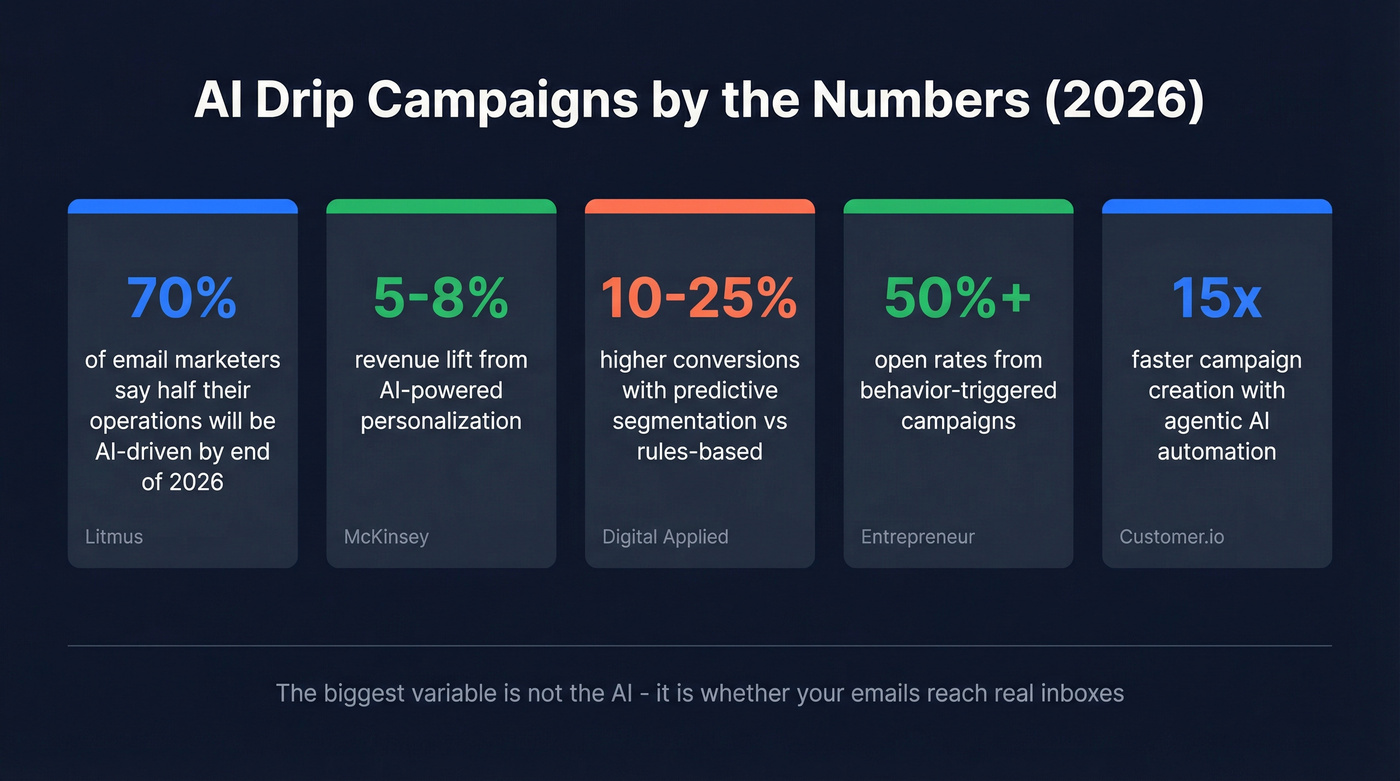
Here's what's actually changed: 70% of email marketers say up to half their operations will be AI-driven by end of 2026. McKinsey pegs AI-powered personalization at a 5-8% revenue lift. The shift is real, but the execution gap is enormous.
The Short Version
AI changes three things about drip campaigns: how you write the copy, when you send it, and how you measure what's working. Everything else is the same automation you've been doing for years. Pick a tool from your category - outbound vs. lifecycle vs. creator - verify your contact list, and launch a 3-email welcome sequence this week. The single biggest variable isn't the AI. It's whether your emails reach real inboxes.
What AI Actually Does in a Drip Sequence
Let's break this into four capabilities. Most tools only do one or two well.
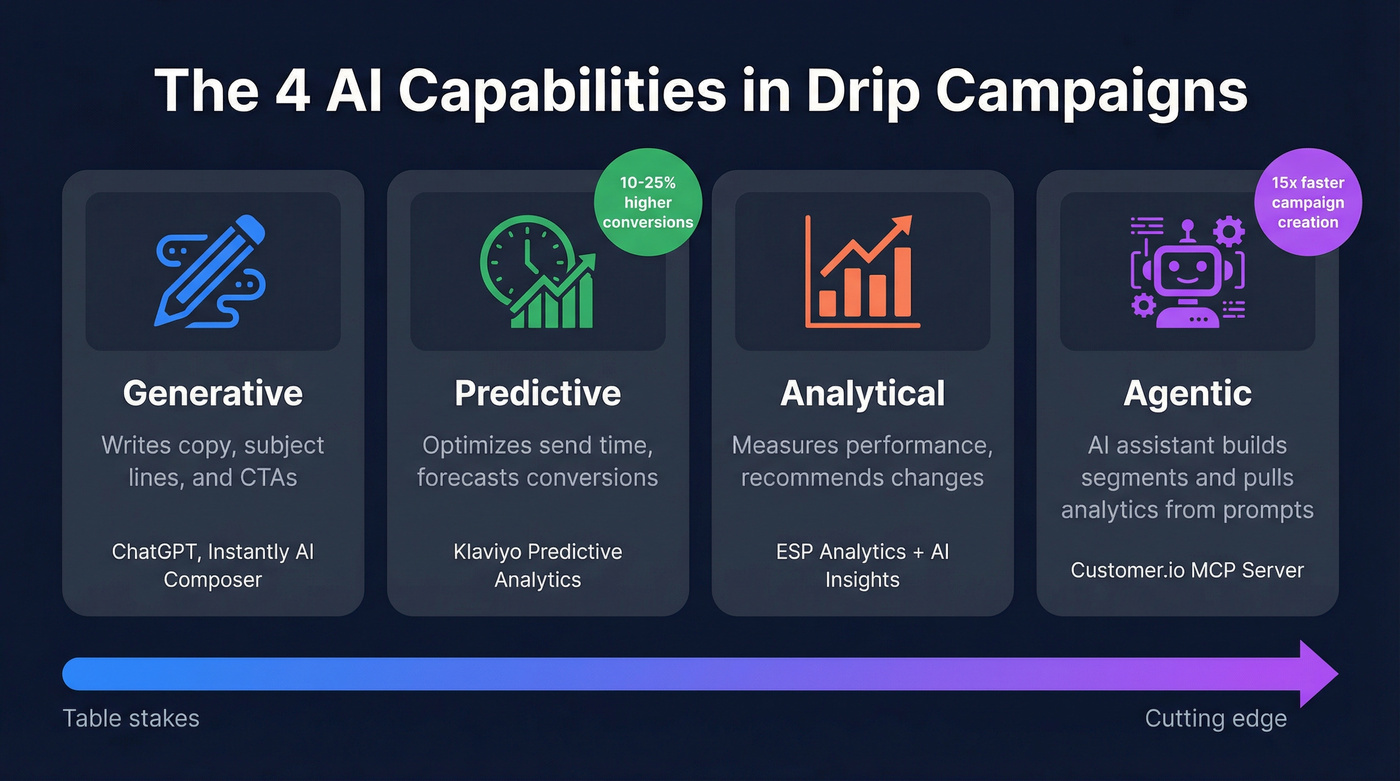
| Capability | What It Does | Example |
|---|---|---|
| Generative | Writes copy, subject lines, CTAs | ChatGPT, Instantly's AI composer |
| Predictive | Optimizes send time, forecasts conversions | Klaviyo's predictive analytics |
| Analytical | Measures performance, recommends changes | ESP analytics + AI insights |
| Agentic | Lets an assistant build segments, pull analytics from prompts | Customer.io's MCP server |
Generative is what everyone talks about - AI writing your emails. It's the least interesting capability. Subject line generators are table stakes; every ESP has one. Predictive is what actually moves the needle: predictive segmentation delivers 10-25% higher conversions than rules-based segmentation, because the model finds patterns you'd never spot manually.
The agentic layer is newest and most exciting. Customer.io's MCP server lets you connect Claude or Cursor directly to your email platform - an AI assistant that creates segments, builds campaigns, and pulls analytics without you switching tabs. Fortune 250 companies estimate this kind of agentic automation speeds up campaign creation by 15x. We're early, but the direction is clear.
The workflow speed gains are already measurable. Litmus found that teams needing 2+ weeks to produce a single email dropped from 62% to just 6% between 2024 and 2025. That's not incremental - that's a structural shift in how fast teams can ship.
One more thing worth watching: AI-generated personalized video and voice elements in outreach emails. Not mainstream yet, but if you're building sequences for high-value enterprise deals, keep an eye on it.
Tools by Category
The tool you need depends on what you're building. An outbound SDR running cold sequences needs a completely different platform than an ecommerce marketer building post-purchase flows.
| Category | Tool | Starting Price | AI Highlight |
|---|---|---|---|
| Outbound | Instantly | ~$30-$50/mo | AI sequences, warmup |
| Outbound | Smartlead | ~$39-$60/mo | Lead categorization, rotation |
| Lifecycle | Mailchimp | Free / $20/mo (AI) | Segmentation + automation |
| Lifecycle | ActiveCampaign | $15/mo ($79/mo full AI) | Branching + automation |
| Lifecycle | Klaviyo | $20/mo+ | Predictive analytics, flows |
| Lifecycle | Customer.io | Custom pricing | MCP server, event-driven automation |
| Lifecycle | Omnisend | $16/mo | AI subject lines, product recs |
| Creator | Kit | Free / $39/mo | AI email writing |
| Creator | MailerLite | $10/mo ($18 AI) | AI writing assistant |
| Creator | Brevo | $9/mo | AI content generation |
| Infra | Loops | Free / $49/mo | Developer-first automation |
Mailchimp is the default for SMB lifecycle campaigns - the free tier gets you started, and AI segmentation features kick in at $20/mo. ActiveCampaign is the power-user pick for deep branching logic. Klaviyo owns ecommerce. For outbound, Instantly and similar platforms like Smartlead win because they're built for cold email realities: warmup, inbox rotation, and sending infrastructure.
Here's the thing: if your deal sizes sit below $10k, you probably don't need the most expensive tool on this list. A $30/mo outbound platform with clean data will outperform a $300/mo lifecycle suite fed garbage contacts every single time.
None of these tools matter if 20% of your emails bounce.

Every AI drip tool on this list sends to the addresses you give it. Feed it unverified contacts and watch your domain reputation tank - no amount of AI optimization saves a 20% bounce rate. Prospeo's 5-step verification catches spam traps, honeypots, and catch-all domains before your first email fires. One agency cut bounce rates from 35% to under 4% overnight.
Clean your list in minutes. Native integrations push verified contacts straight into Instantly, Smartlead, or your CRM.
How to Build an AI Drip Campaign
Step 1 - Verify Your List First
Your SDR team uploaded 2,000 trade show contacts. Two weeks later, your domain reputation is trashed. This happens constantly, and it's the reason McKinsey found that nearly 8 in 10 organizations see no significant bottom-line gains from AI - most teams get stuck in pilots, and weak data blocks real impact.
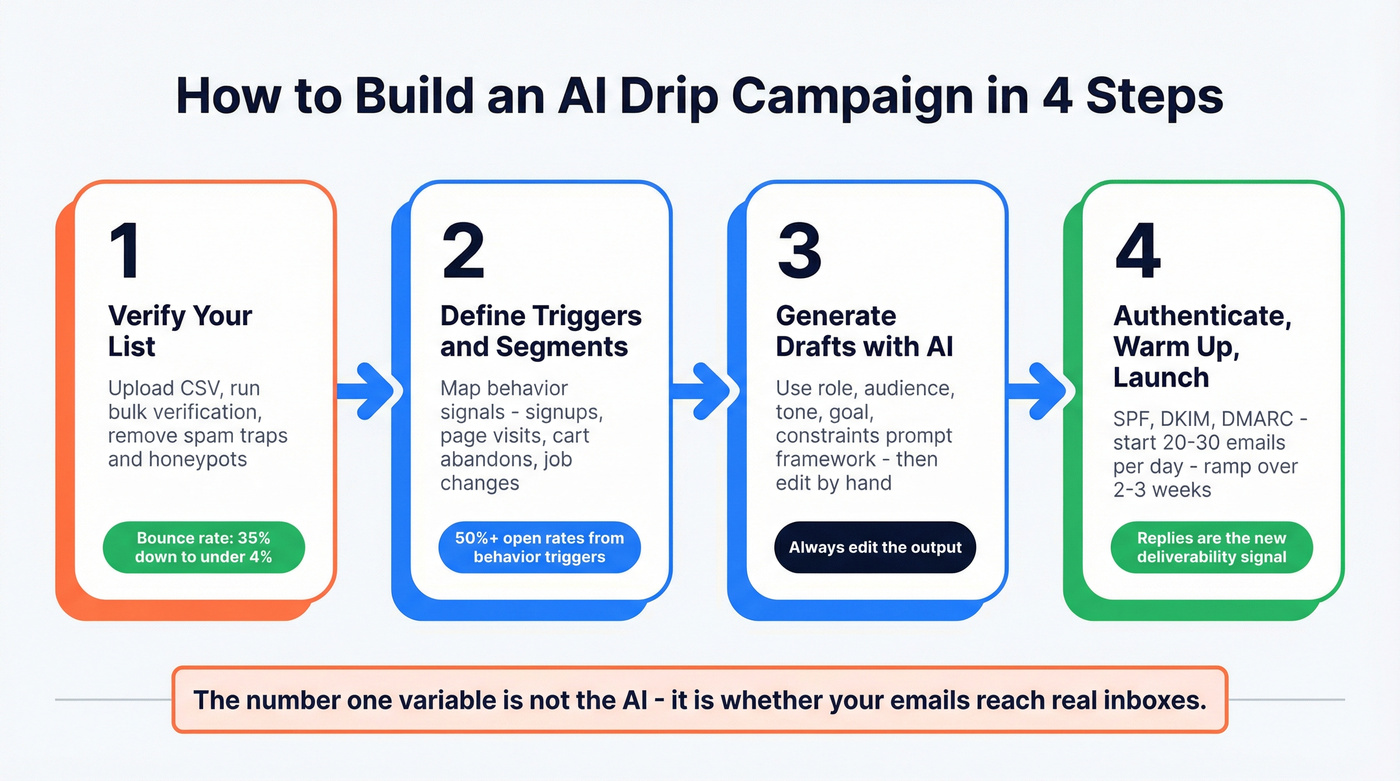
We use Prospeo for this step. Upload your CSV, run it through bulk verification - 98% email accuracy, 5-step verification with spam-trap and honeypot removal - and export the clean list. It integrates natively with Instantly, Smartlead, Lemlist, Salesforce, and HubSpot, so verified contacts flow straight into your drip tool. One outbound agency using this workflow saw client bounce rates drop from 35% to under 4%, with zero domain flags across all accounts.
Step 2 - Define Triggers and Segments
Behavior-triggered campaigns exceed 50% open rates - roughly double what batch-and-blast gets you. Your triggers should map to real buying signals, not arbitrary timelines:
- New signup or form fill
- Page visit (pricing page, case study, product demo)
- Cart abandonment
- Trial expiry approaching
- No reply after X days in an outbound sequence
- Job change or company funding event
Predictive segmentation takes this further. Instead of manually building rules like "visited pricing page + company size > 50," the AI clusters contacts by conversion likelihood based on behavioral patterns across your entire database. The model continuously re-scores contacts as new engagement data flows in, which is where AI email nurture campaigns gain their real advantage over static rule sets.
Step 3 - Generate Drafts with AI
Here's a prompt framework that consistently produces usable first drafts:
Role: You're a [title] at a [company type] selling [product]. Audience: [ICP description with pain points]. Tone: [Conversational / formal / direct] - match [brand voice example]. Goal: [Book a demo / start trial / reply with interest]. Constraints: Under 120 words per email. No jargon. One CTA per email.
A filled-in example for a SaaS trial conversion sequence:
Role: You're a growth marketer at a project management SaaS selling to mid-market ops teams. Audience: Operations managers at 50-500 person companies frustrated by spreadsheet chaos. Tone: Direct and helpful - match Basecamp's blog voice. Goal: Convert free trial to paid plan. Constraints: Under 120 words per email. No jargon. One CTA per email.
AI should be the co-pilot, not the pilot. Early-stage brands that shipped pure AI-generated sequences saw higher unsubscribe rates and stagnant revenue despite "perfectly timed schedules." Always edit the output. Add a specific detail, cut the filler, make it sound like a human wrote it. Your recipient's inbox is full of AI slop and they can tell.
Step 4 - Authenticate, Warm Up, Launch
Before you send a single email:
- SPF, DKIM, DMARC configured and passing. If you don't know what these are, your IT team does. Don't skip this. (If you need a walkthrough, use this SPF, DKIM, DMARC guide.)
- Domain warmup for new sending domains - start at 20-30 emails/day and ramp over 2-3 weeks. Instantly automates this. (More detail: email warmup.)
- Engagement signals are the new deliverability currency. Replies and clicks tell inbox providers your emails are wanted. Design early sequences to maximize replies, not just opens.
- Don't scale volume before warmup is complete. A sudden spike from 50 to 500 emails/day triggers filtering fast.
Templates and Real-World Examples
Welcome Sequence (3 Emails)
| Timing | Subject Line Concept | CTA | AI Enhancement | |
|---|---|---|---|---|
| 1 | Immediately | "Here's your [resource]" | Download / access | Personalize based on signup source |
| 2 | Day 2 | "Quick question about [goal]" | Reply with answer | A/B test subject lines via ESP's AI |
| 3 | Day 4 | "[Benefit] starts here" | Start trial / book call | Predictive send-time optimization |
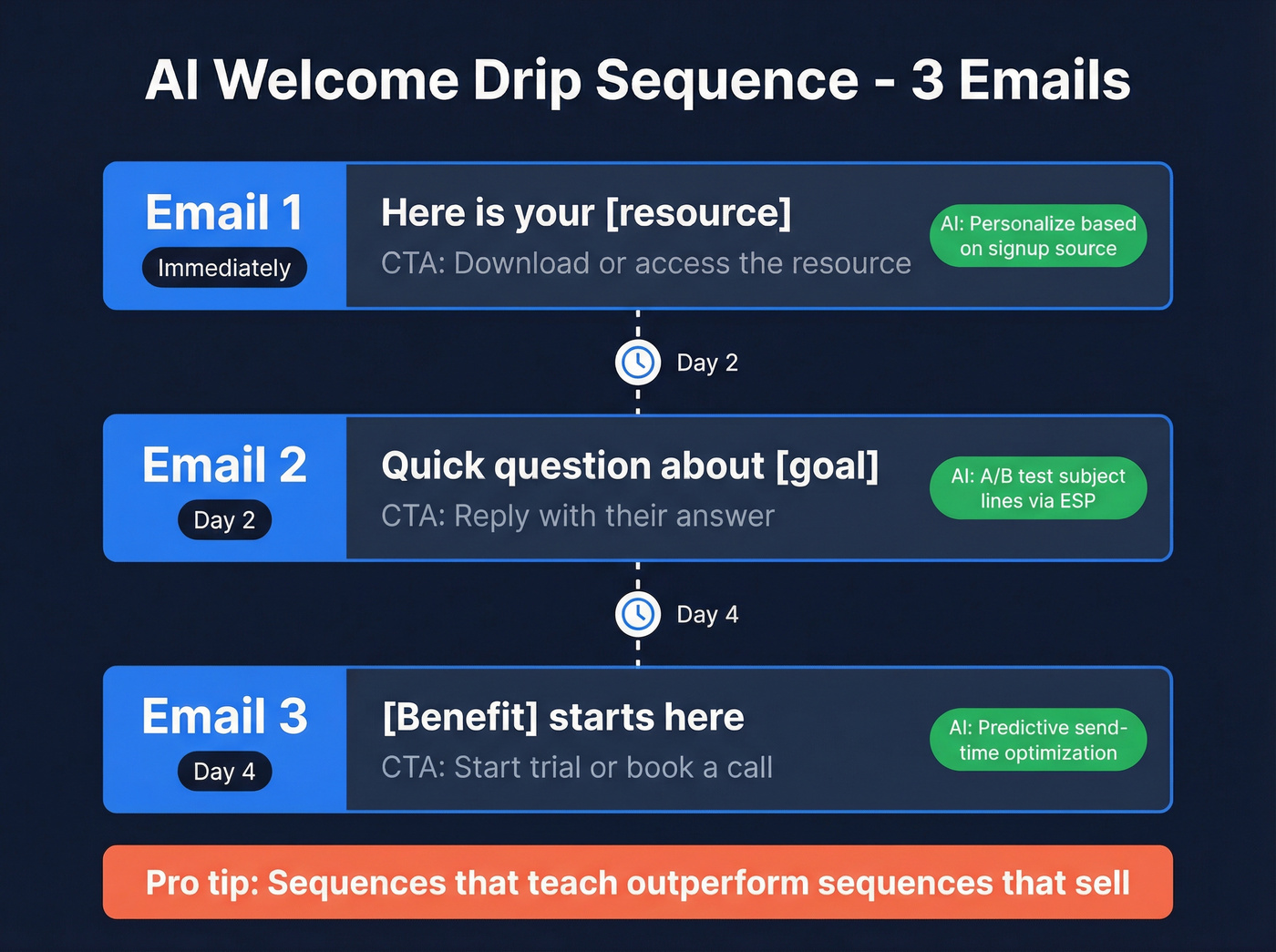
The timing - immediately, Day 2, Day 4 - is tight enough to stay top-of-mind, spaced enough to avoid fatigue. Use AI to personalize Email 1 based on how the contact found you. A webinar attendee gets different framing than someone who downloaded a whitepaper.
Brand worth studying: Semrush runs an educational drip that teaches one platform concept per email with scannable, action-oriented copy. The lesson: drip sequences that teach outperform sequences that sell. (If you want more copy patterns, start with an outreach email template library.)
Outbound Cold Sequence (5 Emails)
| Timing | Angle | Opened, No Reply | No Open | |
|---|---|---|---|---|
| 1 | Day 1 | Pain point + relevance | - | - |
| 2 | Day 3 | Social proof / case study | Value-add content | Change subject angle |
| 3 | Day 7 | Different angle / insight | Offer specific resource | Try plain-text format |
| 4 | Day 14 | Breakup framing | Direct ask | Final subject line test |
| 5 | Day 21 | Permission-based close | - | Remove from sequence |
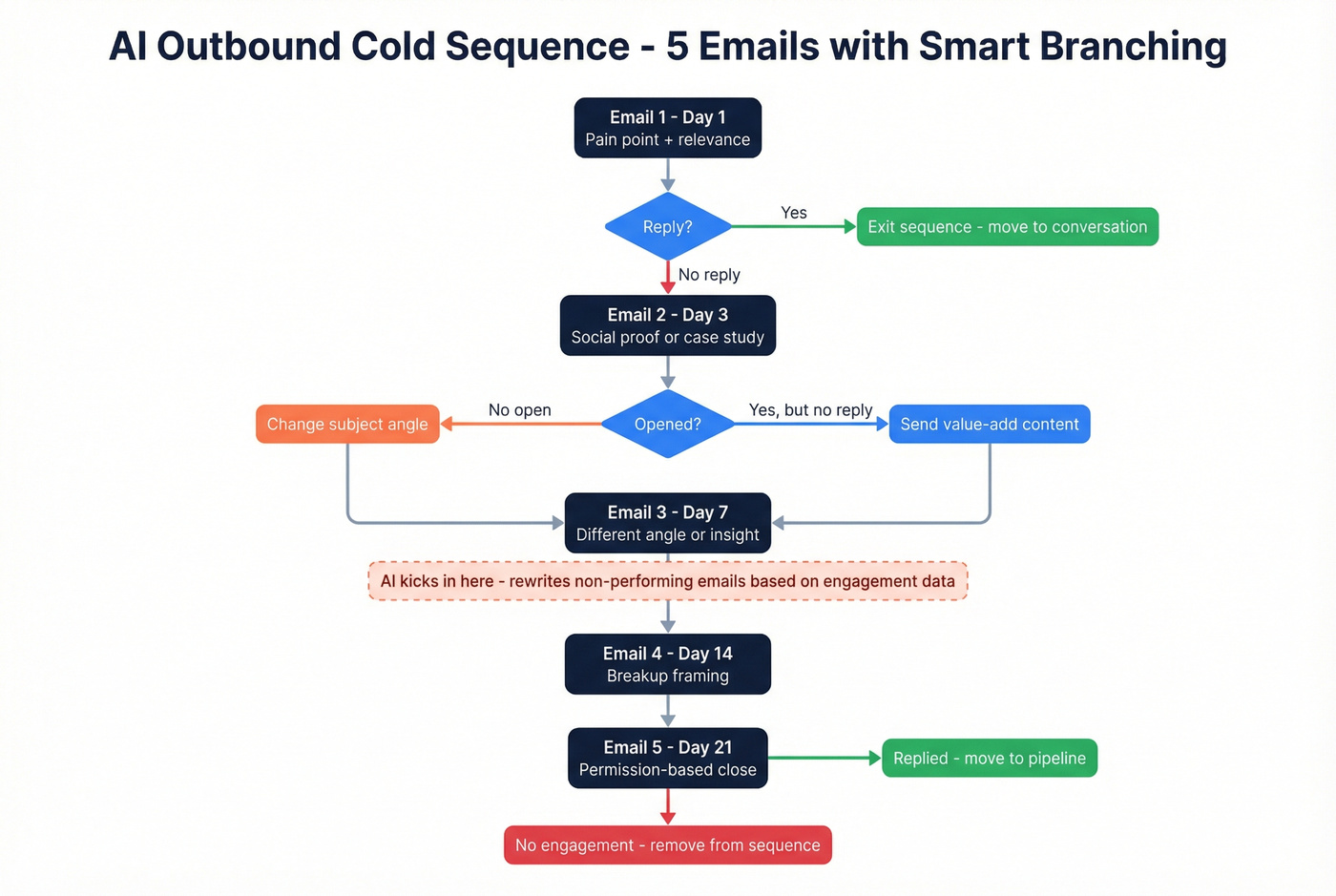
If someone replies at any point, they exit the sequence immediately. The AI enhancement layer kicks in after Email 3: use your platform's AI to rewrite non-performing emails based on engagement data. Which subject lines got opens? Which angles generated replies? Let the model iterate on what's not working rather than guessing. (For more iteration ideas, use these cold email tactics.)
Brand worth studying: Huckberry's cart abandonment sequence nails casual tone, subtle scarcity, and a flow that feels like a nudge instead of a coupon blast. The takeaway: AI can optimize the timing of each step, but the strategic arc still needs a human to design.
Dynamic Content at Scale
Beyond subject lines and send times, the real personalization win is dynamic content - swapping body copy, images, CTAs, and product recommendations in real time based on each recipient's profile and behavior. Klaviyo and ActiveCampaign both support content blocks that render differently per segment, so a single email template can serve dozens of variations without manual duplication. This is especially powerful in nurture sequences where contacts move through stages at different speeds and respond to different value propositions. (Related: behavioral segmentation.)
What to Measure
Most teams track opens. Wrong metric in 2026.
Apple Mail Privacy Protection pre-loads tracking pixels, making open-rate data unreliable for a huge chunk of your list. Here's the KPI hierarchy that actually matters:
- Replies - strongest signal of engagement, directly boosts deliverability
- Clicks - real intent signal, unaffected by privacy pre-loading
- Conversions - demos booked, trials started, purchases completed
- Revenue per email - the only metric your CFO cares about
Drip campaigns also serve as a first-party data collection mechanism. Every click, reply, and conversion builds a behavioral profile that makes your next campaign smarter - increasingly valuable as third-party cookies disappear. (If you're aligning this with pipeline, see lead scoring systems.)
Why AI Drip Campaigns Fail
Letting AI write without editing. Pure AI copy produces higher unsubscribe rates. The patterns are recognizable - same sentence structures, same filler phrases, same "I hope this email finds you well" energy. The most upvoted advice in email marketing communities is always the same: edit every email before it ships. (If you want better openers, use these "I hope this email finds you well" alternatives.)
Optimizing on open data. Apple MPP makes open-rate data unreliable. Optimize on clicks and conversions instead - those signals are real. (More context: open rate vs click rate.)
Skipping data verification. If 20-35% of your emails bounce, your domain reputation tanks and even your best sequences land in spam. Verify before you send. One team went from a 38% bounce rate to under 4% just by running their list through verification before launching - pipeline jumped 140%. (If you're comparing vendors, start with email checker tools.)
Running identical content patterns. Modern spam filters detect when multiple emails in a sequence share similar structure and phrasing. Vary your copy, format, and length across sequence steps. Mix plain-text with light HTML.
Scaling volume before warming up. Going from 50 to 500 emails overnight is a deliverability red flag. Ramp gradually. Two weeks of warmup saves months of reputation repair.
The Deliverability Reality
Your AI-generated drip emails are landing in a smarter inbox than ever. Gmail alone blocks 99.9% of spam and processes 15 billion unwanted messages daily. Their RETVec upgrade improved spam detection by 38% while cutting false positives by 19.4%.
Modern filters don't just scan for keywords. They evaluate sending patterns, domain health, and recipient engagement. Did the last 50 people who received your emails open them? Reply? Or delete without reading? That behavioral signal matters more than anything your AI writes. The platforms adapting to this reality - Klaviyo and other lifecycle tools leaning into predictive analytics - are pulling ahead of those still fixated on open rates. (If you need a full system, use this email deliverability checklist.)
Predictive segmentation and AI-written copy mean nothing if half your contacts have stale data. Prospeo refreshes 300M+ profiles every 7 days - not the 6-week industry average - so your drip sequences reach real people at current companies with valid emails. 98% accuracy, 92% API match rate, and it plugs directly into your outbound stack.
Stop feeding your AI drip campaigns dead data. Start with contacts that actually exist.
FAQ
What's the difference between a drip campaign and an AI drip campaign?
A traditional drip sends pre-written emails on a fixed schedule. An AI-powered version uses machine learning to optimize timing, personalize content, predict which contacts will convert, and automatically adjust sequences based on engagement data. The automation backbone is identical - the intelligence layer on top is what changes.
Which tool is best for outbound AI drip campaigns?
Instantly and Smartlead lead the outbound category with AI sequence generation, warmup, and inbox rotation. Pair either with a verification tool like Prospeo for list cleaning - bad data will undermine even the best sequences.
Do AI-written emails trigger spam filters?
They can. Gmail's RETVec upgrade improved spam detection 38%. The risk isn't AI itself - it's repetitive patterns and lack of human editing. Always review drafts and vary copy across sequence steps to avoid pattern-based filtering.
How many emails should a drip sequence have?
Welcome sequences typically run 3-5 emails over 7 days. Outbound prospecting sequences run 4-7 emails over 2-4 weeks. Let engagement data - not a fixed number - determine when to stop sending.
What's the biggest mistake teams make?
Bad data. If 20-35% of your emails bounce, your domain reputation tanks and even perfectly optimized sequences land in spam. Verify your list before launching - it's the single highest-return step you can take.