How to Track Attachments in Email Campaigns: The Complete 2026 Guide
You sent a proposal three days ago. Radio silence. Did they open it? Did they read past the pricing page? Did they forward it to their CFO - or did it land in spam?
If you attached that PDF the normal way, you'll never know. Native email attachments are a black hole. Once they leave your outbox, you have zero visibility into what happens next.
The fix is straightforward: every tool that lets you track attachments in email campaigns works the same way. It converts your file into a hosted link, the recipient clicks, and you get analytics. No enterprise software required, no IT department involved.
What You Need (Quick Version)
For most teams, three tools cover 90% of use cases:

- PandaDoc - Best free starting point. 60 tracked docs/year, unlimited seats, real-time notifications. $0.
- Yesware - Best for reps who live in Gmail/Outlook. Attachment tracking with page-by-page analytics from $15/seat/month.
- DocSend - Best for high-stakes documents (investor decks, enterprise proposals). Starts at $10/user/month.
One prerequisite before you track anything: verify your email list. Monitoring engagement on bounced emails is pointless. Prospeo handles this with 98% email accuracy and a free tier - verify first, track second. (If you need options, start with these email verifier websites.)
Why You Can't Track Native Email Attachments
When you attach a PDF to an email, the file gets encoded and embedded directly in the message. The recipient's email client downloads it to their device. After that, the file lives on their laptop, phone, or tablet with no connection back to you. There's no callback mechanism, no pixel, no analytics hook. It's like handing someone a printed brochure and walking away.
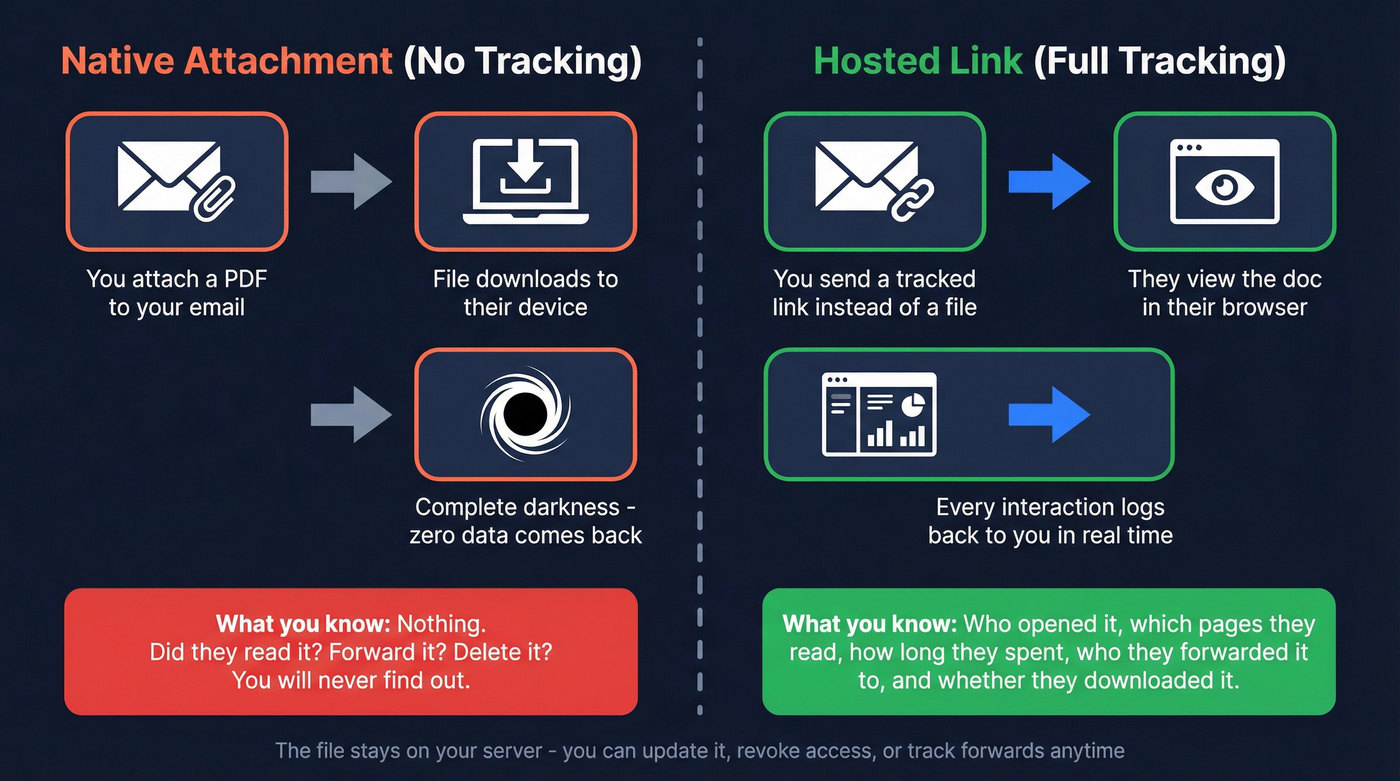
This isn't a feature gap in Gmail or Outlook. It's a fundamental limitation of how email works. The SMTP protocol wasn't designed for post-delivery tracking. Your email client can tell you the message was sent. Some clients support read receipts (which most people decline). But what happens to the attachment after delivery? Complete darkness.
Hosted links solve this by keeping the file on a cloud server. The recipient views the document through a browser, and every interaction - opens, page views, time spent, forwards - gets logged server-side. You retain control of the file, can update it without resending, and can revoke access instantly.

Here's how the two approaches compare across the dimensions that actually matter:
| Dimension | Native Attachment | Hosted Link |
|---|---|---|
| Tracking | None | Full analytics |
| Version control | Version sprawl | Always current |
| Access revocation | Impossible | Instant |
| File size limit | 25MB (Gmail) | Unlimited |
| Mobile experience | Inconsistent rendering | Browser viewing |
| eSignature | Print-sign-scan | Embedded |
The mobile piece matters more than most teams realize - 53% of emails are opened on mobile devices. A 15MB PDF attachment that requires downloading and opening in a separate app is a terrible experience. A hosted link that renders in the browser loads instantly and keeps the reader in context.

Attachment tracking only works when emails actually land. If 35% of your sends bounce, your page-by-page analytics are meaningless. Prospeo's 98% email accuracy and 5-step verification ensure every tracked proposal reaches a real inbox.
Verify first, track second. Start free with 100 credits.
What Attachment Tracking Actually Measures
Once you switch to hosted links, you get engagement data that email open tracking can't touch:

- Document opens - who opened it, when, and how many times
- Page-by-page time spent - which slides or sections held attention
- Forwards and shares - who else is looking at your proposal
- Unique viewers - distinguish the original recipient from forwards
- Completion rate - did they read the whole thing or bail on page 3?
- Download attempts - did they try to save a local copy?
- Location and device data - opened from HQ or a home office?
Average email open rates run 21.5% to 35.63%, with click-through rates hovering around 2.3-2.6%. Those numbers tell you someone clicked. They tell you nothing about what happened after.
Tracked sales documents typically see 40-65% view rates - significantly higher than general email CTR because the recipient has already self-selected by opening the email and clicking through. The real gold is in the page-level data. Knowing that your prospect spent 4 minutes on the pricing page and 12 seconds on the "About Us" slide tells you exactly where to steer the follow-up conversation.
Teams using document tracking report 20-30% faster follow-up response times. When you know a prospect just spent 4 minutes on your pricing page, you call now, not next Tuesday. (If you're rebuilding your follow-up system, use a proven follow up email sequence strategy.)
Best Tools for Monitoring Attachment Engagement in 2026
Most attachment tracking guides stop at the tool comparison. We'll get to the tools - but stick around for the sections after, because the problems nobody warns you about (security blocking, bot inflation, GDPR liability) will determine whether your tracking data is actually useful.

PandaDoc - Best Value for Proposals and Contracts
Use this if: You send proposals, contracts, or quotes and want tracking without paying anything upfront. PandaDoc's free plan gives you 60 tracked documents per year with unlimited seats and real-time notifications. That's enough for most small sales teams to test the workflow before committing.
The Starter plan at $19/seat/month (annual) unlocks unlimited documents and eSignatures. The Business plan ($49/seat/month) adds CRM integrations with Salesforce and HubSpot, deal rooms, and approval workflows. G2 rating: 4.7/5 across 3,174 reviews. GDPR and HIPAA compliant.
I've seen teams run their entire proposal workflow on the free tier for months before upgrading. If you're sending fewer than five proposals a month, you won't hit the cap.
Skip this if: You need page-by-page analytics on slide decks or want tracking embedded directly in your Gmail/Outlook compose window. Yesware handles that better.
Yesware - Best for Email-First Sales Workflows
Use this if: You live in Gmail or Outlook and don't want to leave your inbox to track documents. Yesware's attachment tracking turns your files into tracked links right inside the compose window. It handles PDFs, PPTs, DOCX, CSV, and MP4 files.
The free plan gives you basic tracking limited to the last 24 hours. Pro at $15/seat/month (annual) unlocks unlimited attachment tracking. The Presentation Report is the standout feature - engagement per page, per user, with completion rates and time-since-last-view data. You can require recipients to enter their name before accessing, which gives you individual-level tracking even on forwarded emails. Enterprise ($65/seat/month) syncs everything to Salesforce.
Skip this if: You primarily send contracts needing eSignatures. Pair Yesware with PandaDoc or DocuSign for that.
DocSend - Best for High-Stakes Documents
Real talk: DocSend is overkill for most sales teams. If you're tracking standard proposals and one-pagers, Yesware or PandaDoc covers 90% of what you need at a fraction of the cost. Save DocSend for when the document is the deal.
The Personal plan starts at $10/user/month (annual) with document-level analytics and 4 eSignatures/month. Standard ($45/user/month) adds video analytics and custom branding. Advanced ($150/month for 3 users) includes data rooms, dynamic watermarking, and email authentication.
Now a Dropbox company, DocSend is the industry standard for fundraising. VCs expect DocSend links at this point.
Skip this if: You want a free tier (there isn't one) or you're tracking routine sales collateral.
Cirrus Insight - The Salesforce-Only Play (Read the Fine Print)
One warning that catches teams off guard: Cirrus Insight's auto-renewal requires 30 days' notice to cancel, but they only send a reminder at 15 days. Set a calendar reminder on day one of your contract. Seriously.
If your entire sales workflow runs through Salesforce, Cirrus Insight syncs everything - emails, calendar, attachments - straight to opportunity records without middleware. The attachment tracking you need requires the Expert plan at $49/user/month. G2 rating: 4.2/5 across 1,512 reviews.
Don't use Salesforce? Skip this entirely. The only reason to pay that premium is the native sync.
GetAccept - When $79/Month Actually Makes Sense
$79/user/month sounds steep for document tracking. It is - if that's all you use it for. That's like buying a pickup truck to carry groceries.
GetAccept makes sense when you're replacing 3-4 tools with one platform: document tracking, eSignatures, deal rooms, and ML-based deal scoring. Trumpet reports customers see 44% higher win rates with digital sales rooms - that's the bet GetAccept is making. GDPR and SOC2 compliant. HubSpot integration is native; Salesforce requires Enterprise (custom pricing, typically $100+/user/month).
Budget and Lightweight Options
Mixmax - Free starter tier, paid from ~$12/user/month. Gmail only. Email productivity tool first, document tracking second.
Mailbutler - From $4.95/user/month. Works in Gmail, Outlook, and Apple Mail. Basic tracking at a budget price.
Streak - Free plan available, Pro from $15/user/month. Gmail-only CRM with some document features.
SalesHandy - Free unlimited email tracking for Gmail. Outreach plans from $36/month. Email tracking is solid; document-specific analytics are thin.
HubSpot Documents - If you're already on HubSpot, their native Documents feature converts attachments to tracked links without a third-party tool. Included in Sales Hub Starter ($20/seat/month).
Google Drive + UTM parameters - For zero budget, a Google Drive link with UTM parameters gives you basic click data through GA4. No tool required.
These lightweight options tell you if someone opened your attachment link. They won't give you page-by-page analytics or completion rates.
Pricing Comparison Table
| Tool | Free Tier | Paid From | Min. Tracking Plan | Best For |
|---|---|---|---|---|
| PandaDoc | Yes (60 docs/yr) | $19/seat/mo | Free | Proposals & contracts |
| Yesware | Yes (24hr window) | $15/seat/mo | Pro | Inbox-first tracking |
| DocSend | No (14-day trial) | $10/user/mo | All plans | High-stakes docs |
| Cirrus Insight | No (14-day trial) | $49/user/mo | Expert | Salesforce teams |
| GetAccept | No (14-day trial) | $79/user/mo | Professional | Full deal rooms |
| Mixmax | Yes (limited) | ~$12/user/mo | Paid plans | Gmail productivity |
| Mailbutler | No (14-day trial) | $4.95/user/mo | All plans | Budget multi-client |
| Streak | Yes (basic) | $15/user/mo | Pro | Gmail CRM |
| SalesHandy | Yes (email only) | $36/mo | Outreach | Email sequences |

Plan names indicate the minimum tier required for attachment tracking features.
What Goes Wrong When You Track Attachments in Campaigns
Corporate Security Blocking Your Tracked Links
Here's a problem that most tracking tool vendors conveniently don't mention: corporate security systems increasingly block hosted document links. A HubSpot Community user put it bluntly - the majority of their test accounts threw phishing warnings and blocked the doc links entirely. No view, no analytics, no data.
A Microsoft Security Blog post from October 2024 documented how attackers exploit the exact same file-sharing workflows that legitimate tracking tools use - SharePoint, OneDrive, and Dropbox links configured with restricted access to evade detection. Corporate firewalls are responding by flagging hosted document links more aggressively.
Roughly 10-20% of hosted links trigger security warnings in enterprise environments. Workarounds that help:
- Use established platforms (DocSend, PandaDoc, Yesware) - their domains are whitelisted by most security vendors
- If you use a custom domain, age it for 60+ days and submit categorization requests to Cisco, Palo Alto, and Microsoft Defender
- For enterprise prospects, send a native attachment on first touch, then switch to tracked links once trust is established
Bot and Scanner Inflation of Tracking Data
A Reddit practitioner in late 2024 reported 70% open rates with zero replies. That's not a great campaign - that's bots.
Corporate email security scanners automatically open links to check for malware. Every "open" from a scanner gets logged as a legitimate view. Apple Mail Privacy Protection has been inflating open rates since 2021 by pre-loading tracking pixels regardless of whether the recipient reads the email.
The fix: stop relying on open data alone. Page-by-page time spent and completion rates are much harder for bots to fake. A security scanner might trigger an "open," but it won't spend 3 minutes on your pricing slide. Cross-reference tracking data with actual replies and meeting bookings.
Attachments Killing Your Deliverability
If you're sending cold emails with attachments, stop.
Don't:
- Attach files to cold emails - spam filters flag this immediately
- Send files over 10MB, even though Gmail allows 25MB
- Send attachment-only emails with no text body - guaranteed spam folder
Do:
- Use hosted links instead of attachments for cold prospects
- Wait until a prospect has engaged (replied, booked a meeting) before sending attachments
- Keep your email body text-forward with the link as a natural part of the conversation
Attachments in cold outreach are a deliverability tax. Every file you attach increases the chance your email never reaches the inbox. If you're running sequences, it's worth tightening your email deliverability basics first.
The GDPR Angle Most Guides Skip
The EU's Working Party 29 expressed "strongest opposition" to email tracking without unambiguous consent in Opinion 2/2006. Germany's Federal Commissioner confirmed in 2017 that email tracking requires consent under GDPR Articles 6, 7, and potentially 8. Fines reach EUR 20 million or 4% of global annual turnover.
Here's the distinction that matters: the sender (you or your sales rep) is the Data Controller. The tracking tool (Yesware, PandaDoc, DocSend) is the Data Processor. You're responsible for establishing a lawful basis for tracking, not the tool vendor.
For B2B sales teams:
- Document your lawful basis. A legitimate interest argument is possible but requires a documented balancing test showing your interest doesn't override the recipient's privacy rights.
- Offer an opt-out. Include a way for recipients to decline tracking.
- Consent is safest. For EU recipients, getting explicit consent ("I'm sending you a tracked document link") eliminates the legal gray area entirely.
In practice, most B2B sales teams track without explicit consent and rely on legitimate interest. This is common but not risk-free. At minimum, get your DPA with your tracking tool vendor in order. (For a practical outbound view, see GDPR for Sales and Marketing.)
Fix Your Data Before You Track Anything
Here's my hot take: if your deals are typically under $10k, you probably don't need DocSend-level analytics. But you absolutely need a clean email list.
Email data churns at 9% monthly. Nearly half your list goes stale in six months. A 98% deliverability rate with basic link tracking beats a 70% deliverability rate with page-by-page analytics every single time. The fanciest tracking dashboard in the world is useless if 30% of your emails never arrive. (If this surprised you, read the benchmarks on B2B contact data decay.)
We've seen this pattern repeatedly: a team invests in DocSend or GetAccept, builds beautiful tracked proposals, then wonders why their "view rate" is abysmal. The problem isn't the tracking tool. It's the list. Prospeo's real-time email verification catches invalid addresses, spam traps, and catch-all domains before you send - the 5-step verification process and 7-day data refresh cycle keep your contact data current, not six weeks stale. If you want the full workflow, follow this guide on how to verify an email address.

The free tier covers 75 verifications per month - enough to test on your next campaign. Paid plans run about $0.01 per email, trivial compared to the cost of tanking your domain reputation with bounced sends. If you're comparing providers, start with this breakdown of email lookup tools.
You're spending $15-49/seat/month on document tracking tools. But none of that matters if your prospect's email is outdated. Prospeo refreshes 300M+ contacts every 7 days - so your proposals reach the right person at the right address for ~$0.01 per verified email.
Stop tracking documents that never arrive. Fix the data first.
FAQ
Can you track when someone opens an email attachment?
Not with a native attachment. Standard email attachments download to the recipient's device with no callback mechanism - once the file leaves your outbox, you have zero visibility. You need a tool that converts your file into a hosted link served from a cloud server, which logs opens, page views, and time spent automatically.
What's the best free tool for tracking email attachments?
PandaDoc's free plan offers real-time document tracking on up to 60 documents per year with unlimited seats - the strongest free option for 2026. Yesware's free tier also tracks attachments but limits visibility to the last 24 hours. For zero-cost basics, a Google Drive link with UTM parameters gives you click data through GA4.
Does attachment tracking work in Outlook and Gmail?
Yes - most tools support both clients. Yesware, Cirrus Insight, and Mailbutler work in Gmail and Outlook. Streak and Mixmax are Gmail-only. Confirm compatibility before committing - switching tools mid-quarter because half the team can't use it is a painful mistake we've watched happen more than once.
Is email attachment tracking legal under GDPR?
It's legally risky without consent. The EU's Working Party 29 expressed "strongest opposition" to email tracking without unambiguous consent, and fines reach EUR 20 million or 4% of global annual turnover. For B2B outreach, a legitimate interest argument is possible but requires a documented balancing test and an opt-out mechanism.
How do you prevent tracked document links from getting blocked?
Use established tracking platforms with recognized domain reputations - DocSend, PandaDoc, and Yesware are whitelisted by most corporate security tools. Avoid newly registered custom domains. If you use a custom domain, age it 60+ days and submit categorization requests to Cisco, Palo Alto, and Microsoft Defender before sending at scale.