

AI Email Generator: What the Data Says, Which Tools Work, and How to Write Prompts That Don't Sound Like a Robot
Writing emails eats 28% of the average workday - over 11 hours a week. The average professional gets interrupted roughly 275 times a day by email alerts alone. And with 376 billion emails sent daily in 2026, your message is fighting for attention in an inbox that's more crowded than it's ever been.
Here's a stat that should change how you think about this: 67% of decision-makers don't care if AI wrote the cold email they received. But 47% of senders think recipients will hold it against them. That perception gap is costing you hours of manual writing that nobody asked for.
An AI email generator can cut your writing time dramatically - an MIT study found these tools save roughly 11 minutes per task and improve output quality by 18%. Across a 50-email week, that's nearly 10 hours back. But the tool matters less than you think. The prompt matters more than you'd expect. And the step almost everyone skips - verifying that your emails actually reach real inboxes - matters most of all. I've watched teams spend weeks perfecting AI-generated copy, then torch their sender reputation because 20% of their list was dead addresses.
AI-driven email personalization delivers a 41% revenue increase. AI-generated subject lines boost open rates by up to 22%. The data is clear. The question is which tools, which prompts, and which workflow.
What You Need (Quick Version)
If you just need to write better emails faster: ChatGPT (free) with the prompt templates below. 71% of marketers already use it, and it's more flexible than any dedicated tool on the market.
If you want a dedicated tool with inbox integration: Mailmeteor (free) for Gmail or Lavender ($29/mo) for sales email coaching.
If you're choosing one tool today: ChatGPT for flexibility, Mailmeteor for Gmail integration, Lavender if you're in sales. Everything else is situational.
Do Recipients Actually Care If You Used AI?
There's a massive perception gap between senders and receivers - and it works in your favor.
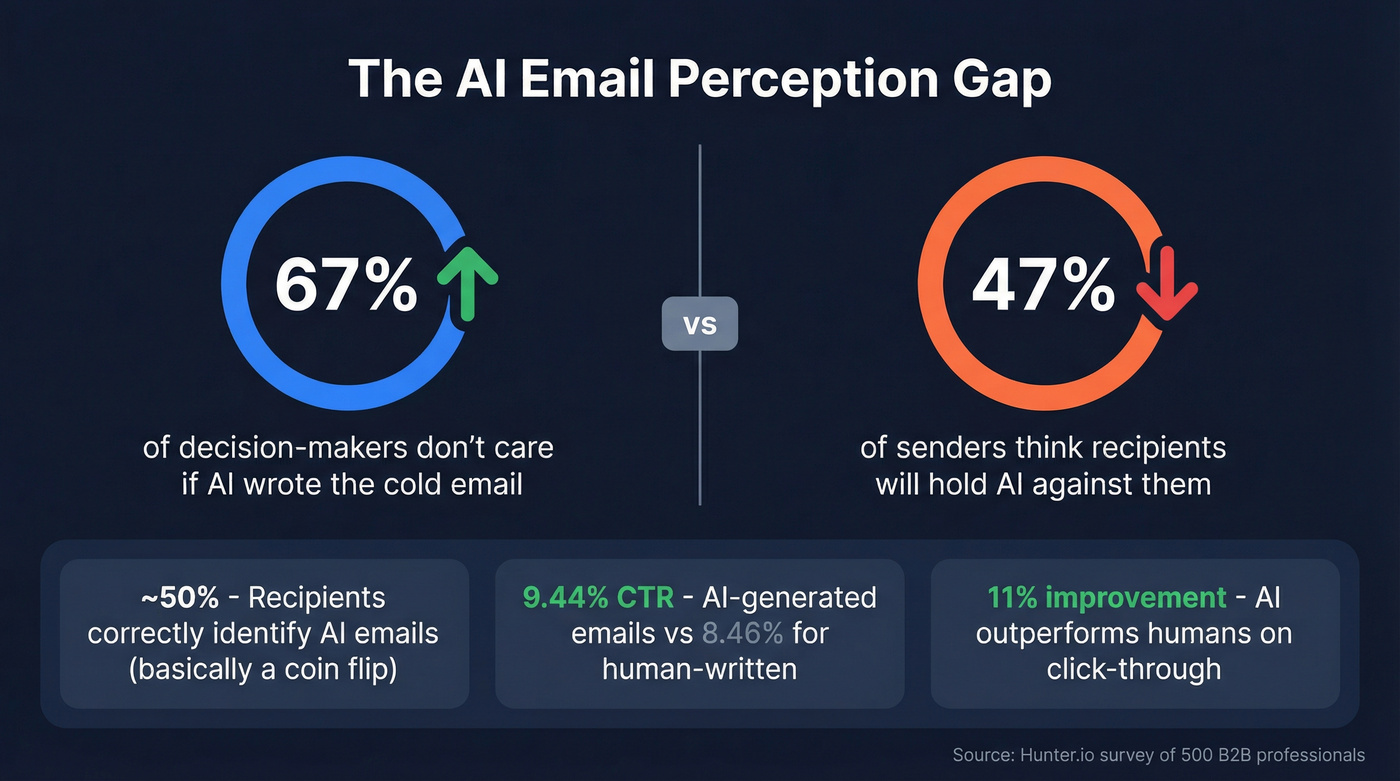
Hunter.io surveyed 200 decision-makers and 300 B2B professionals. The results are counterintuitive: 67% of decision-makers don't mind if AI wrote the cold email they received. They care about relevance, not authorship. Meanwhile, 47% of senders said they'd be less likely to reply to an AI-written email. You're projecting your own anxiety onto your prospects.
Recipients correctly identify AI-written emails only about half the time - a coin flip, even in marketing and tech where people are supposedly more AI-savvy. When they do catch it, the reasons are consistent: the email sounded repetitive, overly formal, and formulaic.
Here's what makes this actionable: AI-generated emails achieve a 9.44% click-through rate versus 8.46% for human-written emails - an 11% improvement. The machines aren't just keeping pace. They're slightly outperforming us on measurable engagement metrics.
The takeaway isn't "use AI and don't worry about it." It's that the problem isn't AI itself - it's lazy AI. Generic, template-sounding output gets flagged. Specific, contextual, human-edited output blends right in.
Lack of personalization is the real problem. That's the line to remember.

You just read that teams torch their sender reputation because 20% of their list is dead addresses. Prospeo's 5-step email verification catches bad data before you hit send - 98% accuracy, 7-day refresh cycle, and bounce rates under 4% for teams like Snyk and Meritt.
Perfect AI copy means nothing if it bounces. Fix your list first.
How AI Email Generators Actually Work
Every AI email tool on the market runs on the same foundation: large language models, GPT-4 or comparable. The differences are in the wrapper, not the engine.

The market breaks into three categories:
Wrappers layer AI on top of Gmail or Outlook. Gmelius, Mailmeteor, and MailMaestro fall here. They live inside your existing inbox and generate drafts without making you switch apps. Think of these as an AI writing assistant that stays out of your way.
Clients replace your default email app entirely. Superhuman and Shortwave are the notable ones - they rebuild the inbox experience around AI-powered triage, drafting, and prioritization.
Drafters are standalone writing tools you use separately. ChatGPT, Copy.ai, Jasper, and Rytr fit here. You write in their interface, then paste into your email client.
The tool is a wrapper. The prompt is the product. A $5/month Flowrite subscription and a $69/month Jasper plan are both calling the same underlying models. The difference is convenience, integration, and how much prompt engineering the tool does for you. If you're willing to write good prompts yourself, ChatGPT at $0-20/month beats most dedicated tools.
Here's the thing: if your deals average under $15K, you don't need a $300/month AI outreach platform. ChatGPT plus a verification tool will get you 80% of the results at 5% of the cost.
Best AI Email Generators Compared in 2026
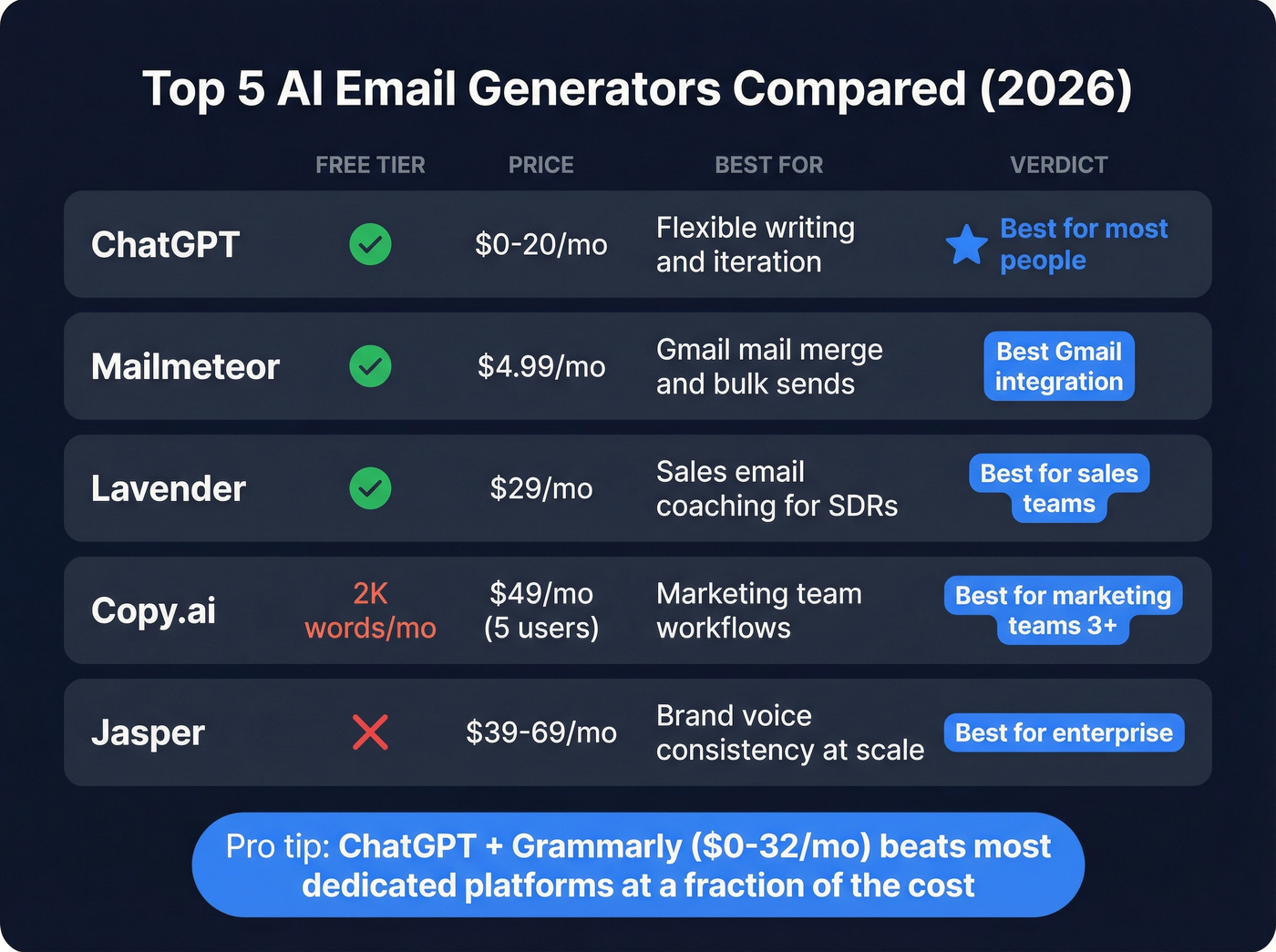
Comparison Table
| Tool | Free Tier | Paid Price | Best For | Key Limitation |
|---|---|---|---|---|
| ChatGPT | Yes | $20/mo | Flexible writing, iteration | No inbox integration |
| Mailmeteor | Yes | $4.99/mo | Gmail mail merge | Gmail only |
| Lavender | Yes | $29/mo | Sales email coaching | Sales-focused only |
| Copy.ai | 2K words/mo | $49/mo (5 users) | Marketing team workflows | Overkill for simple emails |
| Jasper | No | $39-69/mo | Brand consistency at scale | Expensive for email only |
| Rytr | 10K chars/mo | $9/mo | Budget option | Quality ceiling |
| QuillBot | Yes | $9.95/mo | Paraphrasing and polishing | Not a full generator |
| Grammarly | Yes | $12/mo | Polishing drafts | Not a generator |
| Flowrite | No | $5/mo | Quick inbox replies | Limited templates |
| MailMaestro | No | $15/mo | Outlook/Gmail drafts | Doesn't learn tone |
| Writesonic | 10K words free | $12.67/mo | Fast content | Generic output |
| Anyword | No | $39/mo | Performance scoring | Marketing-heavy |
| Apollo.io | Yes | From $49/mo | Sales outreach + data | Learning curve |
ChatGPT - The Best AI Email Writer for Most People
71% of marketers already use ChatGPT for email writing. There's a reason it's the default: it's free, it's flexible, and it handles iterative editing better than any single-purpose tool on this list.
Where ChatGPT beats dedicated tools: you can iterate in conversation. Ask it to rewrite for a different tone, shorten by half, add a specific CTA, or adjust for a VP audience versus a director audience - all in the same thread. Dedicated tools give you one output and maybe a "regenerate" button. That difference compounds fast when you're writing 20+ emails a day and each one needs a slightly different angle.
The tradeoff is obvious: no inbox integration, no mail merge, no send tracking. You're copying and pasting. For most people writing 5-15 emails a day, that's fine. For teams running outbound sequences at scale, you'll want something that plugs into your workflow (and a solid B2B sales stack).
$20/month for ChatGPT Plus gets you GPT-4 and faster responses. The free tier handles email writing perfectly well. In our testing, the free tier produced emails that needed less than 30 seconds of editing when given a detailed prompt.
Mailmeteor
Who this is really for: Anyone who lives in Gmail, sends bulk emails, and doesn't want to learn a new platform. Six million users and a 4.9/5 rating from over 10,000 reviews back that up.
The privacy angle is genuinely differentiated: Mailmeteor sends emails without reading your inbox. Most AI email tools need full inbox access to function. Mailmeteor doesn't. If you're in a regulated industry or just privacy-conscious, that matters.
The Chrome extension handles mail merge for up to 2,000 emails/day, AI-generated drafts, and subject line suggestions. Paid plans start at $4.99/month - essentially rounding error. Skip this if you're on Outlook or need sales-specific coaching.
Lavender
Lavender isn't a typical automated email generator - it's an email coach.
Instead of writing your email for you, it scores your draft and tells you what to fix: too long, wrong reading level, missing personalization, weak subject line. At $29/month, it's built for SDRs and AEs who write dozens of cold emails daily. The free plan lets you test it. As an AI email writing assistant, it sits in your workflow and improves your output in real time.
Where Lavender shines is the feedback loop - your writing actually improves over time, which no pure generation tool can claim. Other tools give you a fish. Lavender teaches you to fish.
Use this if you're an SDR writing 30+ cold emails a day. Skip this if you just need help with internal emails or marketing copy.
Copy.ai
The case for Copy.ai: 10 million users, 30+ email templates, and workflow automation that goes beyond "write me an email." The platform handles entire content sequences - from cold outreach to cart abandonment to nurture campaigns - with templates that marketing teams can standardize across.
The case against: At $49/month for 5 users, you're paying for a content platform when you might just need ChatGPT and 5 minutes. The free tier gives you 2,000 words/month - enough to test, not enough to rely on.
Copy.ai earns its price for marketing teams of 3+ who need consistent output across campaigns. For individual email writing, it's overkill.
Jasper
Enterprise marketing teams with strict brand guidelines - that's Jasper's sweet spot. At $39-69/month per user, the brand voice feature keeps output consistent across a 20-person content team. Amazon's marketing team used AI tools like Jasper to reduce email build time by 95%.
Skip this if you're a solo operator or a team under five. The brand voice feature only pays off with multiple writers producing content.
Rytr
The budget pick at $9/month with a free plan (10,000 characters). Covers 30+ languages, which makes it useful for international teams. The quality ceiling is lower than ChatGPT or Copy.ai - Rytr handles routine emails well but struggles with nuance. Use this for internal emails and standard correspondence. For anything client-facing or high-stakes, upgrade to ChatGPT.
QuillBot and Grammarly - The Editing Layer
QuillBot (5 million Chrome extension users, $9.95/month premium) and Grammarly ($12/month) aren't generators. They're polishers. QuillBot rewrites and paraphrases; Grammarly fixes grammar and adjusts tone.
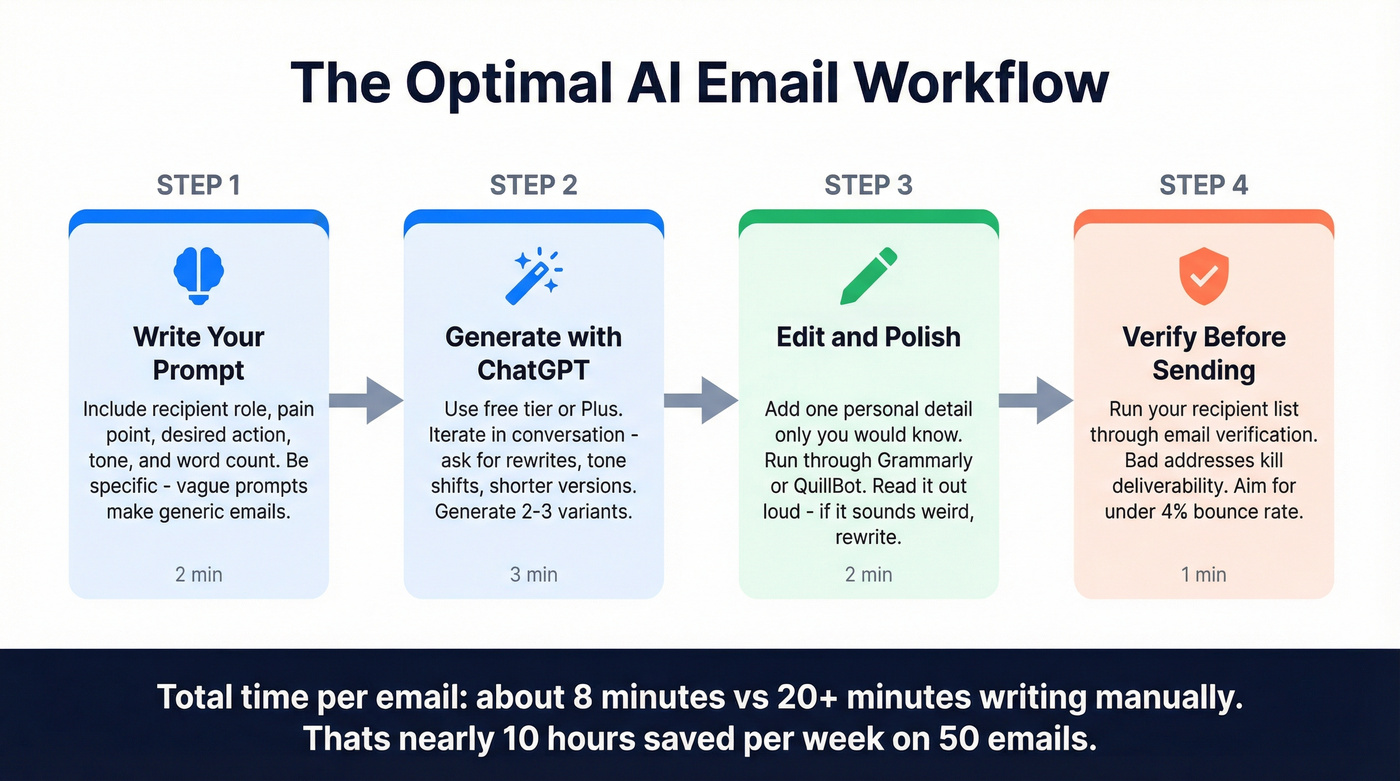
The power combo: generate with ChatGPT, polish with Grammarly. That two-tool workflow beats most dedicated email platforms at a fraction of the cost. Or pair ChatGPT with QuillBot for a free-to-cheap workflow where you generate drafts and refine them before pasting into your inbox.
Other Notable Tools
Flowrite ($5/month) integrates directly into your inbox for quick reply generation. Best for people who answer 50+ emails daily and want one-click drafts.
MailMaestro ($15/month) offers a Chrome extension for Gmail and Outlook that generates full drafts with subject lines. It recognizes your name and Calendly links, which is a nice touch - but it doesn't truly learn your tone over time.
Writesonic ($12.67/month) can produce 1,500 words within seconds. The free version gives you 10,000 words to test. It's a general content tool that happens to do email, not email-first.
Anyword ($39/month) has a predictive performance scoring feature that estimates how your email will perform before you send it. Interesting for data-driven marketers, but the scoring accuracy is hard to validate independently.
Gmelius ($21/user/month) combines shared inbox management with AI drafting. If your team collaborates on email responses - support teams, account management - Gmelius adds workflow features that solo tools lack.
Sales Outreach Tools (Enterprise Tier)
If you're doing cold outreach at scale, you need more than a writing tool. You need a data + sending platform. If that's you, start with our breakdown of AI email outreach tools.
Apollo.io covers 275M+ contacts and 60M+ companies with built-in AI email writing. The free plan is generous; paid plans start at $49/month. It's the obvious starting point for SMB sales teams who want prospecting and email generation in one tool.
Instantly.ai runs $37/month with unlimited email accounts and a 200,000+ account warmup system. Their built-in database covers 160M+ verified contacts. Best for agencies running multi-client outbound.
Luna starts at $300/month - steep, but it handles end-to-end cold email from lead finding to personalized generation. Enterprise-grade pricing for enterprise-grade needs.
ChatGPT Email Prompts You Can Copy Right Now
The Prompt Framework
The difference between a useless AI email and a sendable one comes down to three things: what's happening, who you're talking to, and what you want to accomplish.
"Write a good email" gives you garbage. "Write a cold outreach email to a VP of Marketing at a Series B SaaS company, offering a free audit of their paid search spend, keeping it under 100 words with a specific calendar link CTA" gives you something you can actually send. Specificity is the single biggest lever you have when prompting AI to create email drafts.
One stat worth knowing: personalized subject lines increase open rates by 26-50%. So when you're prompting, always specify the personalization angle for the subject line - not just the body. If you want plug-and-play ideas, pull from these email opener examples.
Cold Outreach Prompts
Write a cold outreach email to [JOB TITLE] at [COMPANY TYPE].
We offer [PRODUCT/SERVICE] that helps [SPECIFIC BENEFIT].
Reference their [RECENT NEWS/CHALLENGE/TECH STACK].
Keep it under 100 words. End with a specific ask
(15-minute call this week, not "let me know if you're interested").

Tone: direct, peer-to-peer, zero buzzwords.
Write a personalized cold email to [NAME], [TITLE] at [COMPANY].
They recently [TRIGGER EVENT   -   funding round, job change, product launch].
Connect that event to how [YOUR PRODUCT] solves [SPECIFIC PROBLEM].
One paragraph max. Include one concrete proof point (customer result or stat).

CTA: suggest two specific times for a 10-minute call.
The key with cold outreach prompts: always include a trigger event and a concrete CTA. AI defaults to vague closings like "I'd love to connect" - that's a delete-trigger, not a reply-trigger. For more structure, use a proven B2B cold email sequence.
Follow-Up Prompts
Write a follow-up email to [NAME] who I emailed [X DAYS] ago about
[TOPIC]. They haven't replied. Add one new piece of value
(a relevant case study, stat, or insight) that wasn't in the first email.
Keep it under 75 words. Tone: helpful, not desperate.
Don't start with "Just following up" or "Circling back."
Write a post-meeting follow-up to [NAME] after our call about [TOPIC].
Summarize the three key decisions we made: [DECISION 1], [DECISION 2],
[DECISION 3]. Include the next step with a specific deadline.

Tone: professional but warm. Under 150 words.
80% of sales require at least five follow-ups. Most reps stop at two. AI makes follow-ups painless - but you need to feed it what actually happened in the conversation. AI can't know what was discussed; you have to tell it. If you want timing rules, see when to follow up with prospects.
Customer Support Prompts
Write a customer support email responding to [CUSTOMER SITUATION].
Acknowledge their [EMOTION/CONCERN]. Apologize for [WHAT WENT WRONG].
Explain that we're [IMMEDIATE SOLUTION].
Provide [CONTACT INFO OR NEXT STEPS].
Keep the tone professional but warm. Don't use corporate buzzwords.
Under 120 words.
Write a response to a customer who's frustrated about [ISSUE].
They've contacted us [X TIMES] about this. Validate their frustration
without being defensive. Offer [SPECIFIC RESOLUTION] with a timeline.
Include a direct phone number or calendar link for escalation.

Tone: empathetic, action-oriented.
Support emails are where AI email writing shines brightest. The emotional labor of responding to frustrated customers all day is real - and it's exhausting. Let AI draft the structure, then add the human touches: the specific details about their account, the genuine empathy that comes from understanding their situation, not just processing their ticket.
Quick Refinement Prompts
Once you have a draft - from AI or from your own writing - these one-liners sharpen it fast:
- "Make this more conversational - I sound like a corporate press release"
- "Rewrite this for busy marketers who skim everything"
- "Shorten this without losing meaning - target 50% fewer words"
- "Remove every sentence that doesn't directly serve the reader"
- "Rewrite the CTA to be more specific - what exactly should they do next?"
- "Adjust the tone from formal to peer-to-peer"
- "Add a concrete example or proof point to the second paragraph"
These refinement prompts are where AI saves the most time. Writing a first draft from scratch is fast enough. Editing it through four iterations manually? That's where hours disappear.
What AI Gets Wrong (and How to Fix It)
The "Oddly Neutral" Problem
AI-generated emails aren't bad in the way you'd expect. They're not riddled with errors or obviously robotic. They're worse than that - they're forgettable.
AI drafts avoid mistakes, but they also avoid clarity. The language stays cautious. Decisions are implied instead of stated. Requests feel soft. Next steps remain open-ended. Every email reads like it was written by someone who's afraid of being too direct, and in sales, that's death. In support, it feels hollow. Even in internal emails, it creates ambiguity where you need precision.
The fix isn't avoiding AI. It's editing with a specific lens: does this email make a clear ask? Does it state a decision? Does it give the reader exactly one thing to do next? A good reference point here is a tight sales CTA.
Before and After - Cold Outreach
AI Draft:
Hi Sarah, I came across Relay and was impressed by your recent growth. Our platform helps companies like yours streamline their outbound process. I'd love to connect and explore how we might be able to help your team achieve even better results. Would you be open to a quick chat?
Edited Version:
Sarah - Relay's Series B last month caught my eye. Most teams at your stage are hiring 3-5 SDRs and realizing their data provider can't keep up. We helped [Similar Company] cut list-building time by 60% and drop bounce rates from 25% to under 4%. Worth 15 minutes Thursday or Friday?
The AI draft names the company but gives zero reason to engage. The alignment is vague ("streamline outbound process" means nothing). The CTA is soft ("would you be open" is easy to ignore).
The edited version adds a trigger event, a specific proof point, and a concrete time ask. That's 30 seconds of editing that triples your reply rate.
Five Mistakes That Make AI Emails Sound Like AI
Lazy prompts. "Write a good email" produces a generic email. Garbage in, garbage out.
Same tone for everything. Sales, support, and internal ops need completely different voices. AI defaults to one neutral tone unless you specify.
Skipping the final check. AI hallucinates facts, mangles names, and invents details. As one Reddit user put it: the output feels "like a PR email, not a real person trying to start a conversation."
Assuming AI gets details right. It doesn't. Always verify names, dates, company details, and any specific claims before sending.
Forgetting empathy. AI can mimic empathy structurally, but it can't feel it. For support emails and sensitive conversations, add the human layer that makes someone feel heard - not just processed.
The Step Everyone Skips: Verifying Your List Before You Send
AI writes the email. But if that email bounces, none of the copy matters.
Email deliverability has dropped to an 83% average. Google enforces a 0.3% spam rate threshold - exceed it, and your domain gets throttled. B2B email lists decay 15-20% annually as people change jobs, companies rebrand, and domains go dark. Every bounced email chips away at your sender reputation, making every future email less likely to land. (If you want the full playbook, read our guide to email deliverability.)
No AI writing tool can fix a broken list.

Prospeo's email verification handles this before you hit send. The free tier covers 75 verifications per month - enough to test before committing. The 5-step verification process runs catch-all handling, spam-trap removal, and honeypot filtering, delivering 98% email accuracy. Upload a CSV, paste individual addresses, or run verification through the API. If you're comparing options, start with the shortlist of email verifier websites or this step-by-step on how to verify an email address.
Real talk: the math is brutal. A 20% bounce rate on a 1,000-email campaign means 200 bounces. That's enough to land you in spam folders for months. I've seen teams spend weeks crafting AI-optimized sequences, only to watch their domain reputation crater because they skipped a 10-minute verification step.
Verify first. Write second. Send third.
AI email generators save you 10 hours a week writing. But the step everyone skips - finding verified contact data - is where deals die. Prospeo gives you 143M+ verified emails at $0.01 each, so every AI-crafted message lands in a real inbox.
Stop sending brilliant emails to dead addresses. Get verified contacts.
Privacy: What Happens to Your Data
There are two paths for AI email tools, and the privacy implications are very different.
Built-in AI (like Gmail's Smart Compose) processes your data within the provider's ecosystem. Your data goes to one company - the one you already trust with your email.
Third-party tools mean your data goes to two companies: your email provider and the AI tool developer. Most third-party services decrypt your email on their servers so AI can read and process it. That's a meaningful expansion of your attack surface.
Mailmeteor is transparent about this: instructions are transmitted to OpenAI, which stores inputs for up to 30 days to detect abuse before deleting them. That's better than most tools, which don't disclose their data handling at all. But it means your email content - including names, deals, and internal context - temporarily lives on OpenAI's servers.
The practical advice: don't use AI email tools for confidential information. Legal negotiations, M&A discussions, HR matters, medical data - keep those manual. If you're sending to EU residents, use a practical compliance checklist for GDPR for sales and marketing.
Regulatory Landscape
GDPR Article 5 mandates explainability for AI-driven decisions, with fines up to 4% of annual global revenue for violations. If you're using AI to auto-respond to EU customers, you need to understand what that means for your compliance posture.
The EU AI Act classifies some email systems as "high-risk AI" when they handle sensitive personal data. The classification triggers documentation, transparency, and human oversight requirements that most small teams aren't prepared for. When in doubt, keep sensitive communications out of AI tools.
FAQ
Is AI email writing legal?
Yes - no laws prohibit using AI to write emails. GDPR and the EU AI Act govern how AI tools handle your data, especially when processing personal information of EU residents. Check your company's internal AI use policy, and disclose AI use if required by your organization or industry regulations.
Can AI write cold emails that actually get replies?
AI-optimized cold emails achieve 8-15% reply rates versus 1-3% for generic blasts. The key word is "optimized" - 90% of raw AI output needs human editing before it's sendable. AI gives you speed and structure; you add the personalization and specific context that drives replies.
Is ChatGPT better than a dedicated AI email generator?
For most individuals, yes. ChatGPT is more flexible, free to start, and handles iterative editing better than any single-purpose tool. Dedicated tools add value for inbox integration (Mailmeteor), sales coaching (Lavender), or team-wide brand consistency (Jasper). If you're choosing one tool, start with ChatGPT.
How do I make AI emails sound less robotic?
Use specific prompts with full context - who you're writing to, why, and what you want them to do. Edit every draft for concrete details AI can't know. Replace vague CTAs with specific asks. Read it out loud before sending - if it sounds like a press release, rewrite the opening line.
Should I verify my email list before sending AI-generated outreach?
Absolutely. Average deliverability sits at 83%, and bounces destroy sender reputation for every future campaign. Prospeo's 5-step verification (including catch-all handling and spam-trap removal) catches dead addresses at 98% accuracy, with a free tier of 75 verifications per month to test before scaling.