

Webinar Lead Follow-Up in 2026: The 72-Hour System That Books Meetings
Most webinar lead follow-up is lazy: "Thanks for attending - here's the recording." It feels polite, but it's not a revenue motion.
Here's the contrarian take: the recording email isn't the follow-up. It's the receipt.
The follow-up is a 72-hour SLA with segmentation, routing, and deliverability guardrails so sales can book meetings while intent's still warm. This playbook's built to work even when open tracking's off-limits and deliverability's fragile.
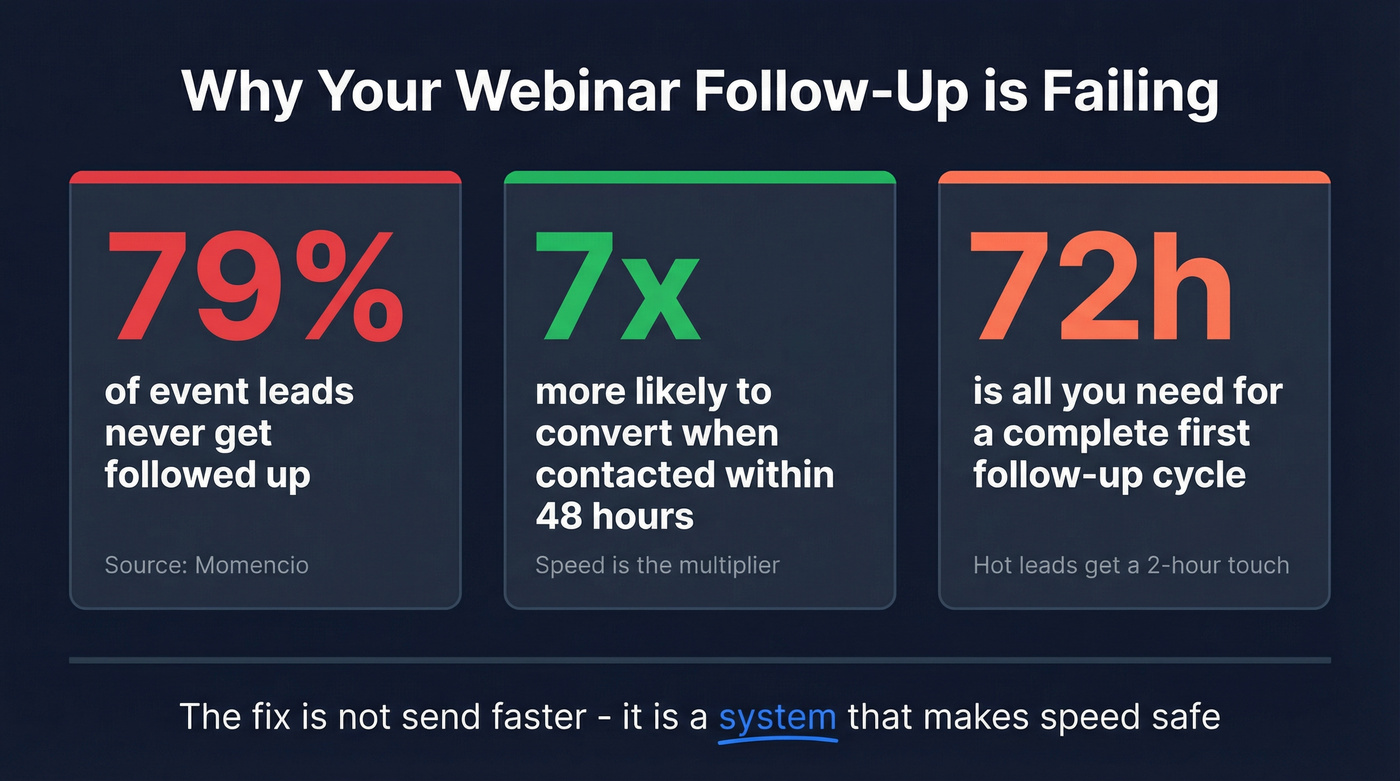
Momencio reports brutal numbers: 79% of event leads never get followed up, and leads contacted within 48 hours are 7x more likely to convert. That's not a "nice-to-have" gap. That's pipeline leaking because nobody owned the clock.
The fix isn't "send faster." It's a system that makes speed safe: clean data, clear segments, and a tight first cycle that finishes by hour 72 - a repeatable webinar follow-up strategy, not a one-off email.
The problem with "here's the recording" follow-up
The "recording" email fails for three reasons.
1) It treats every registrant the same. Someone who stayed 51 minutes, answered a poll, and asked a pricing question gets the exact same message as someone who bounced after 6 minutes. That's how you train high-intent buyers to ignore you.
2) It punts the hard part to sales without context. I've watched teams dump a CSV into the CRM, assign it to SDRs, and call it "alignment." Then SDRs open a lead record that tells them nothing except "Registered." The first call becomes generic because the data's generic.
3) It quietly wrecks deliverability.
Webinar lists are messy: typos, role accounts, old domains, and catch-alls. If you blast that export from your main marketing domain, bounces and complaints spike - and your next "important" email lands in spam. Great copy can't save an email that never hits inbox.
The frustrating part is that webinars should be the easiest post-event motion to operationalize. You already have timestamps, engagement minutes, poll answers, downloads, and questions, plus a clear topic and a natural reason to reach out.
You just need to stop treating follow-up like a single email and start treating it like a 72-hour conversion sprint.
What you need (quick version)
Here's the "implement this week" checklist. It works even if you can't rely on open tracking.
The 3 priorities to implement this week
Set a 72-hour SLA with ownership
- Hot leads: 2-hour touch (human outreach, not just an automated email)
- Everyone else: first touch within 24 hours, full first cycle done by hour 72
Segment by engagement signals, not attendance alone
- Minutes watched (45+ / 20+ / <20)
- Interactions (polls, downloads, Q&A)
- "Next step" intent (demo CTA clicks, pricing questions, integration questions)
Fix list quality before you hit send
- Verify emails, remove risky addresses, enrich missing firmographics so routing doesn't stall
- Tools like Prospeo ("The B2B data platform built for accuracy") are a clean way to verify/enrich the export before sequences so your 2-hour SLA doesn't turn into a bounce-fest. If you need a broader comparison, start with email verifier websites.
The minimum stack (no fancy tools required)
- Webinar platform export (attendee minutes + interactions)
- CRM fields for: webinar name/date, minutes watched, questions asked, assets downloaded
- Sequencer for 3-5 emails over 72 hours
- A routing rule: "High intent -> SDR/AE now; everyone else -> sequence + task"
The promise: works without open tracking
Measure success with replies, meetings booked, and webinar engagement signals (minutes, questions, downloads). Opens are optional - and in parts of the EU they're turning into a compliance trap anyway. For a deeper KPI/SLA view, use speed to lead metrics.
Webinar lead follow-up SLA: the 72-hour timeline (with table)
Speed matters, but speed without structure creates chaos. A solid baseline's simple: first touch within 24 hours, and hot leads within 2 hours. Not "same day." Not "tomorrow morning." Two hours.
That sounds aggressive until you design for it: pre-map segments, pre-write templates, and make sure the list's reachable immediately after export. If you want a simple set of webinar follow-up tips, start here: segments, templates, and a reachable list beat "send faster" every time.
72-hour SLA timeline (copy/paste into your ops doc)
| Window | Do this | Goal |
|---|---|---|
| 0-2h | Segment + route hot | Human touch starts |
| 2-6h | Email #1 + tasks | Fast, relevant reply |
| 6-24h | SDR/AE touches | Book meetings |
| 24-48h | Value pack | Answer + proof |
| 48-72h | Close loop | Handoff to nurture |

Skip rules (use these under the table, not inside it):
- Skip human outreach if you don't have a working email/phone yet.
- Skip generic replay blasts to the whole list.
- Skip "just circling back" language. It trains people to ignore you.
Follow-up starts during the webinar (this is what makes 0-2h realistic)
If you wait until the webinar ends to figure out intent, you've already lost time. The cleanest teams capture intent in the last 5-10 minutes while attention's highest.
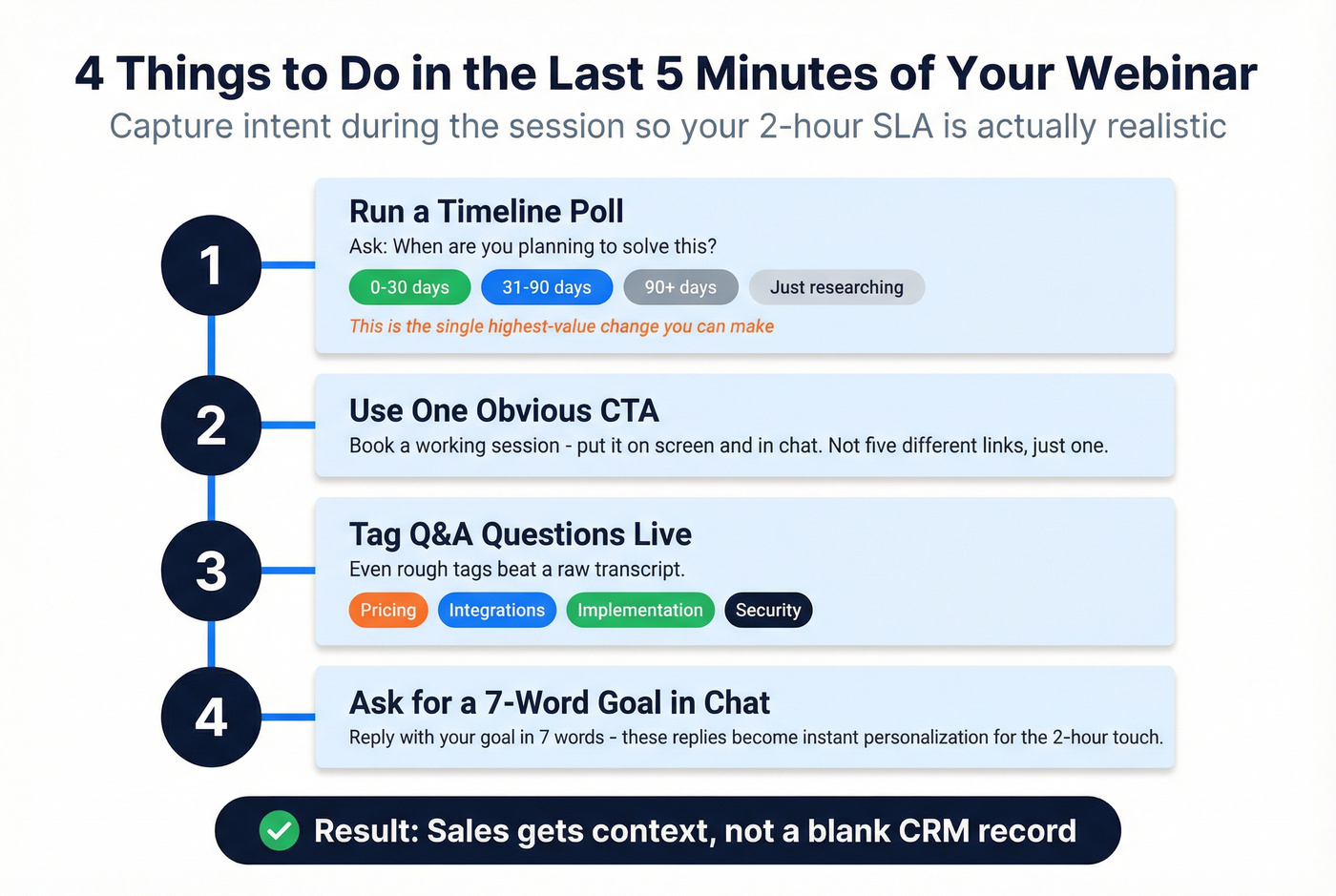
During the webinar (especially the last 5 minutes), do these four things:
- Run a timeline poll: "When are you planning to solve this?" Options: 0-30 days / 31-90 / 90+ / just researching.
- Use a single, obvious CTA: "Book a working session" (not five different links). Put it on-screen and in chat.
- Tag Q&A live (or immediately after): pricing / integrations / implementation / security / "other." Even rough tags beat a raw transcript.
- Ask for a one-line reply prompt in chat: "Reply with your goal in 7 words." Those replies become instant personalization for the 2-hour touch.
Field checklist to capture (so sales has context, not a blank record):
- webinar_name, webinar_date
- minutes_watched
- poll_timeline_answer
- CTA_clicked (yes/no + which CTA)
- question_text (verbatim if possible)
- question_topic_tag (pricing/integration/etc.)
- assets_downloaded
Operator opinion: if you only implement one during-webinar change, make it the timeline poll. It turns follow-up from guessing into prioritization.
What each window actually means
0-2 hours: decide who gets human outreach. Turn webinar behavior into a queue: stayed long, asked questions, clicked the CTA, chose an urgent timeline.
2-6 hours: send the first follow-up fast, but not generic. Use timestamp links. If someone asked about integrations at minute 38, link to 38:00. It's personalization that feels helpful, not creepy.
6-24 hours: sales outreach happens here (for the right people).
Call with context: "You asked about X" or "You picked 0-30 days." It feels like a continuation, not an interruption. If you’re pairing email + calls, keep your talk track tight with a B2B cold calling guide.
24-48 hours: ship the value pack. Slides, transcript, checklist, relevant case study, and answers to unanswered questions. This is where you earn trust.
48-72 hours: close the loop. Short, direct, respectful. If there's no signal, stop spamming and move them into a segment-matched nurture track.

Your 72-hour clock is ticking, but 35% of your webinar export has bad emails. Prospeo verifies and enriches your attendee list in minutes - 98% email accuracy, firmographic data for routing, and direct dials so your SDRs actually connect during that 2-hour window.
Stop losing hot webinar leads to bounced emails at $0.01 per verified address.
Segmentation that actually predicts meetings (not just attendees vs no-shows)
Attendance's a weak predictor. Engagement's the predictor.
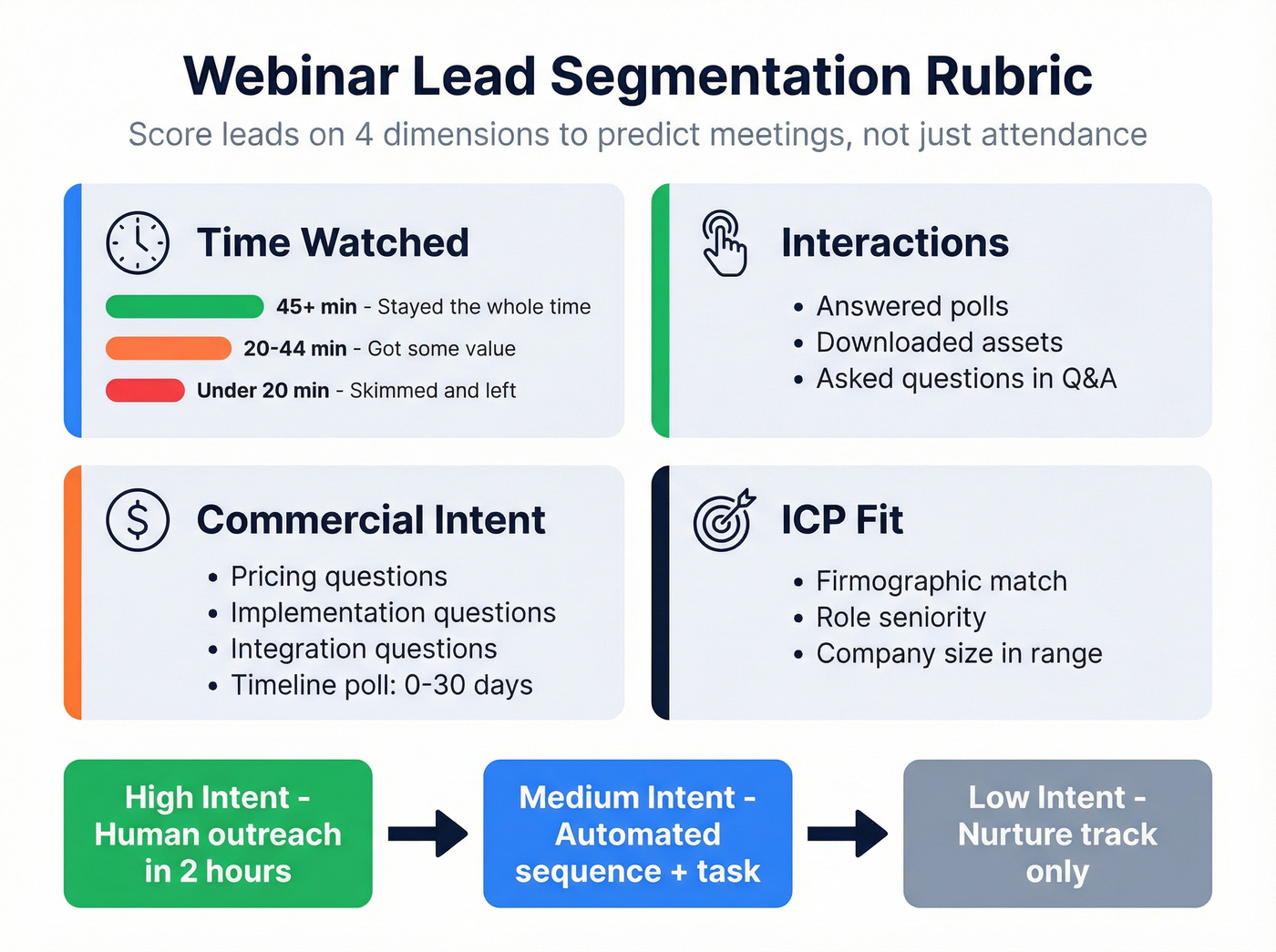
ON24's webinar benchmarks put average engagement time around 51 minutes. For follow-up operations, time-based tiers work in real life: 45+ minutes is "stayed," 20+ minutes is "got value," and under 20 minutes is "skimmed."
Use this mini-rubric:
- Time watched (45+ / 20+ / <20)
- Interactions (polls, downloads, Q&A)
- Commercial intent (pricing, implementation, integrations, timeline)
- Fit (ICP firmographics + role seniority)
If you want a repeatable way to operationalize "Fit," start from your ideal customer definition and keep it consistent across webinars.
Attended (high / medium / low intent)
High intent
- 45+ minutes and at least one interaction (poll, download, Q&A)
- Any pricing/implementation/integration question jumps them to high intent immediately
- Any "0-30 days" poll answer jumps them to high intent
Medium intent
- 20+ minutes, no interaction
- Or 45+ minutes but clearly educational (no buying signals)
Low intent
- <20 minutes
- Or attended but bounced before the "how to" section / demo
Low intent doesn't mean "bad lead." It means don't spend a human call yet.
No-shows (still valuable)
No-shows are often "interested but busy," not "uninterested." Treat them like a separate motion:
- Give them a choice (two tracks) instead of a replay dump
- Ask one easy reply question to create a conversation thread
- Route only the ones who respond or click a high-intent asset
On-demand viewers (first-class segment)
On-demand isn't a consolation prize. It's a primary channel.
Look, if your team treats on-demand viewers as "less real," you're not doing demand gen - you're doing calendar worship. Buyers consume when they want, not when you scheduled it.
Treat on-demand as first-class (because nearly half of views happen there)
The split's basically even: roughly 56% live / 45% on-demand is a common benchmark, and another widely cited number lands around 47% on-demand views. So if your follow-up only respects live attendees, you're designing for half the market.

Also: making webinars on-demand by default can lift total views dramatically (up to ~80% in some benchmarks). That means your follow-up motion can't be a one-time blast tied to a calendar event. It has to be a rolling system that triggers off behavior, not a calendar invite.
Do this:
- Create an on-demand track with its own CTA (no "sorry we missed you" language)
- Use content-based context: "If you're focused on X, start at minute Y"
- Trigger sales tasks off high-intent actions (demo CTA, pricing page click, implementation guide download)
Avoid this:
- "I saw you watched" messages that feel creepy
- Designing your entire motion around opens
- Sending the same replay email three times in a row
Templates & scripts by segment (copy blocks you can paste)
These are built for replies and meetings, not vanity "engagement."
Two deliverability rules that matter more than people admit:
- Keep subject lines ≤50 characters (if you need ideas, use these reminder email subject lines)
- Don't send from noreply@ (replies are both a signal and a conversion path)
Also: use timestamp links. It's the easiest "they actually listened" personalization.
High-intent attendee (45+ min / asked a question) -> book time this week
Subject: Quick follow-up on your question
Hi {{first_name}} - thanks for joining {{webinar_name}}.
You asked about {{their_question_topic}}. The exact moment is here: {{timestamp_link}}.
If you're evaluating this in the next {{timeframe}}, want me to map what this looks like for {{company}}? I can do {{two_time_options}} or send a link.
-- {{sender_name}}
Medium-intent attendee (20+ min, no interaction) -> resource + soft meeting CTA
Subject: Slides + 2 resources from {{webinar_name}}
Hi {{first_name}} - appreciate you joining {{webinar_name}}.
Here are the slides + the two resources people asked for most:
- Slides: {{slides_link}}
- Checklist: {{checklist_link}}
- Example: {{case_study_link}}
If you tell me which track you're on--A) fixing {{problem_1}} or B) scaling {{problem_2}}--I'll send the most relevant 10-minute walkthrough.
-- {{sender_name}}
Optional incentive (small, high-touch webinars): a modest gift card for a 15-minute feedback call can work. Use it only if it fits your compliance policy and you're emailing a clean, opted-in list.
Low-intent attendee (<20 min) -> "best 3 minutes" clip + on-demand CTA
Subject: The best 3 minutes (with timestamps)
Hi {{first_name}} - you might've had to drop early, so here's the fastest way to get the value.
Start here:
- {{timestamp_1}} - {{takeaway_1}}
- {{timestamp_2}} - {{takeaway_2}}
- {{timestamp_3}} - {{takeaway_3}}
Full on-demand version: {{on_demand_link}}.
If you reply with your role (sales / marketing / ops), I'll send the one section that matters most.
-- {{sender_name}}
No-show -> "choose your track" replay + 1-question reply CTA
Subject: Want the 12-min version or full replay?
Hi {{first_name}} - sorry we missed you at {{webinar_name}}.
What's more useful?
- Track 1: the 12-minute highlights (with timestamps)
- Track 2: the full replay + slides
Reply "1" or "2" and I'll send the right link.
-- {{sender_name}}
On-demand viewer -> content-based CTA (no creepy tracking)
Subject: A quick follow-up on {{topic}}
Hi {{first_name}} - if you're digging into {{topic}}, this might help.
We put together:
- A short implementation guide: {{guide_link}}
- A template you can steal: {{template_link}}
If you're trying to do this in the next 30-60 days, I can share the 3 most common failure points (and how teams avoid them). Want that?
-- {{sender_name}}
"Answered your question" follow-up (Q&A-based) -> direct reply request
Subject: Re: your question on {{topic}}
Hi {{first_name}} - I answered your question on {{topic}} during Q&A.
Here's the exact answer: {{timestamp_link}}.
Quick question: are you solving this for just your team or across multiple teams/regions? One sentence's enough - I'll point you to the right approach.
-- {{sender_name}}
Lead scoring + routing rules (so sales calls the right people first)
If you don't score and route, you'll waste the 2-hour window on the wrong people.
A clean mental model is: Fit, Engagement, and Conversion--with caps so one behavior doesn't overwhelm the score. That cap matters for webinars because engagement can be noisy, and I've seen "busy clickers" outrank perfect-fit buyers if you let raw activity run the show.
Benchmarks put average interactions around ~1.7 per attendee. So one poll click isn't hot. Multiple interactions + time watched + fit is. If you’re debating scoring approaches, compare AI lead scoring vs traditional lead scoring.
Scoring model (Fit + Engagement + Conversion) with caps
| Group | Signal | Points | Cap |
|---|---|---|---|
| Fit | ICP industry | +10 | 30 |
| Fit | Role seniority | +10 | 30 |
| Fit | Company size | +10 | 30 |
| Engage | 45+ min | +25 | 50 |
| Engage | 20-44 min | +15 | 50 |
| Engage | Poll + download | +15 | 50 |
| Engage | Asked question | +25 | 50 |
| Convert | Demo/meeting CTA | +40 | 60 |
| Convert | Pricing question | +40 | 60 |
Rules that keep this sane:
- Cap Engagement so "busy clickers" don't outrank perfect-fit buyers.
- Weight Conversion highest. If they asked about pricing or clicked "book a demo," don't overthink it.
Routing matrix (SDR now vs AE now vs nurture) + SLA ownership
AE now (2-hour SLA): Fit ≥20 and Convert ≥40 Owner: AE (SDR supports with research)
SDR now (2-hour SLA): Fit ≥20 and Engage ≥30 Owner: SDR, with a "what to say" note pulled from webinar context
Nurture (72-hour cycle): everyone else Owner: Marketing automation + SDR tasks only on reply/high-intent click
Routing fails when nobody owns the SLA. Put it in writing: who calls, who emails, and who gets blamed when it slips.
Deliverability-first follow-up (why great copy still doesn't land)
If your follow-up doesn't hit inbox, your speed-to-lead doesn't matter.
Here's what we see in the wild: webinar exports spike bounce rates unless you verify first, especially if you run co-marketed webinars, allow personal emails on the form, or import lists from partners that "swear it's clean." One dirty send can drag your domain reputation for weeks, and then your real customers start missing product emails. That's the kind of self-inflicted wound that makes me mad because it's so avoidable. If you want the updated mechanics, read our email deliverability playbook.
Non-negotiables:
- Authenticate your sending domain (SPF/DKIM/DMARC)
- Don't blast unverified exports
- Throttle by segment so you don't look like a sudden spammer
The sending setup that keeps you out of trouble
Use domain separation on purpose.
- Send the human 2-hour touches from a real person on your primary domain (highest trust, lowest volume).
- Send the 72-hour sequence from a dedicated subdomain (e.g.,
go.orevents.) with its own authentication and reputation. - Keep marketing newsletters and webinar follow-up on different lanes if you send at scale.
Throttle based on list size (simple rule of thumb):
- <500 leads: send hot segment immediately; stagger the rest over 1-2 hours.
- 500-5,000: stagger over 4-8 hours; prioritize high intent first.
- 5,000+: stagger over 24 hours; consider splitting by region/provider; watch bounces in the first 200 sends before you ramp.
Deliverability checklist for webinar follow-up
Authenticate the sending domain
- SPF aligned
- DKIM signing enabled
- DMARC set (monitoring's minimum; enforcement's better) - see SPF DKIM & DMARC
Protect sender reputation
- Suppress role accounts (info@, sales@) unless explicitly opted in
- Keep complaint rate low with clear opt-out and relevance
- Don't "replay blast" three times
Make replies easy
- Don't use noreply@
- Use a monitored reply-to
How to run verification safely (without breaking your SLA)
Verification's only useful if it's fast and operationally clean.
Workflow that works:
- Export webinar list with engagement fields (minutes, Q&A, poll answers).
- Verify emails before they touch your sequencer.
- Split into: Verified / Invalid / Catch-all / Unknown.
- Send immediately to Verified.
- For Catch-all, either:
- route to phone-first (if you have mobiles), or
- send a single low-volume "confirm details" email from a human, not a blast.
- Suppress Invalid and Unknown until you enrich/repair. (If you need the SOP, use this email verification list workflow.)
What the verification screen should show (and how it prevents bounces)
Right after upload, you want a results view that makes decisions obvious: a breakdown of Verified / Invalid / catch-alls / Unknown, plus counts for risky addresses removed (spam-traps/honeypots). Then you need simple toggles: exclude catch-all, exclude free providers (if that's your policy), and a clean export action.
That UI matters because it turns deliverability into a checklist, not a debate:
- Invalid suppressed -> bounce rate drops immediately.
- Catch-all separated -> you avoid "maybe deliverable" blasts that tank reputation.
- Spam-trap/honeypot removed -> you reduce the chance of getting flagged.
- Field mapping on export (email, company, role, segment, score) -> your sequencer sends the right copy to the right segment without manual cleanup.

Privacy & compliance in 2026 (GDPR + France pixel reality)
If you market to EU/UK registrants, build a follow-up motion that doesn't depend on invasive tracking. For the practical outbound angle, see GDPR for Sales and Marketing.
GDPR basics for webinar follow-up:
- Unticked opt-in boxes for marketing communications
- Clear transparency (privacy policy on forms)
- Data minimization (collect what you'll actually use)
- Retention rules (delete/anonymize on a schedule)
- Supplier DPAs + secure storage
France/EU-safe measurement stack (works without pixels)
France is the sharp edge right now. CNIL's draft recommendation (consultation) signals a stricter posture on email tracking pixels and customized hyperlinks. Don't wait for final wording to protect your pipeline - design for the safe default.
Safe default: assume you need consent for pixels in France unless you're doing strictly necessary, non-identifying measurement. Build your process to succeed without opens.
Here's the practical stack:
What you can track without pixels (and still win):
- Webinar platform engagement: minutes watched, poll answers, Q&A, downloads
- First-party outcomes: replies, meetings booked, calls completed
- Page-level intent that doesn't rely on email pixels:
- "Booked meeting" thank-you page hits
- Form submissions (implementation guide, demo request)
- In-app signups (if relevant)
How to store consent cleanly (so you stop guessing):
- Store two fields per contact:
marketing_email_consent(yes/no + timestamp + source form)email_tracking_consent(yes/no + timestamp + region)
- If
email_tracking_consent = no, your sequencer still sends - your reporting just ignores opens and pixel-based click attribution.
What counts as "customized hyperlinks" in practice:
- Links that embed unique identifiers tied to a person (common in email click tracking).
- If you can't explain it to a privacy reviewer in one sentence, treat it as tracking and require consent.
Operator opinion: teams that cling to open rate in 2026 are choosing a fragile metric over durable revenue. Replies and meetings don't get blocked by privacy settings.
Measurement dashboard (KPIs that prove revenue impact by hour 72)
You don't need 40 metrics. You need a dashboard that tells you whether the 72-hour system's working - and where it's breaking.
Use a planning baseline of ~57% registration -> attendance so you don't overreact to normal drop-off. Then measure what you control: speed, reachability, routing quality, and meetings.
| KPI | Target | If it's off, do this |
|---|---|---|
| Hot lead 1st touch | ≤2 hours | Fix routing + tasks |
| Everyone 1st touch | ≤24 hours | Automate email #1 |
| Cycle complete | ≤72 hours | Cut steps, simplify |
| Bounce rate | <2% | Verify + suppress |
| Complaints | <0.1% | Tighten targeting |
| Reply rate | 3-8% | Improve relevance |
| Meetings booked | Up weekly | Fix CTA + scoring |
Add these three quality KPIs and you'll spot the real bottlenecks:
- % hot leads with a context note (Q&A/poll/timestamp) Target: ≥90%. If it's 40%, sales is calling blind.
- Meeting rate by score band (e.g., 0-39 / 40-69 / 70+) Target: the top band should win by a mile. If bands perform similarly, your scoring's noise.
- % routed correctly on first pass (no reassignment) Target: ≥95%. Reassignments kill the 2-hour SLA.
One pattern we've seen repeatedly: teams obsess over open rate, then ignore that meeting-booked rate by segment is flat. If meetings aren't rising, your segmentation and CTA are wrong - subject line testing won't save you.
FAQ
How fast should you follow up after a webinar?
Hot leads should get a human touch within 2 hours, everyone else should get the first message within 24 hours, and the first cycle should be complete by 72 hours. If you miss that window, intent cools fast and your outreach starts feeling random instead of timely.
What should you send to webinar no-shows?
Send a replay as a two-option choice: a 12-minute highlights track or the full replay + slides, and ask them to reply "1" or "2." This beats a replay dump because it creates a thread, segments intent instantly, and gives sales a clean reason to follow up.
How do you follow up if open tracking is limited in the EU?
Assume opens are unreliable and treat pixels as consent-gated in stricter regions like France; run your reporting off replies, meetings, and webinar engagement (minutes watched, Q&A, downloads). For reachability, verify and enrich the export first - Prospeo's 98% verified email accuracy helps you avoid bounce-driven deliverability issues.
Summary: the system that makes webinar leads convert
A webinar lead follow-up that books meetings isn't a perfect email. It's a 72-hour system: segment by engagement, route hot leads fast, personalize with timestamps/Q&A context, and protect deliverability with verification and throttling. For the broader cadence mechanics, see our follow up email sequence strategy.
Do that consistently and "here's the recording" turns into a predictable pipeline motion.
Webinar exports are full of gaps: missing titles, no phone numbers, stale emails. Prospeo's enrichment fills in 50+ data points per contact with a 92% match rate - so your SDRs call with context, not a blank record, and your sequences actually land in inbox.
Enrich your attendee list before the intent window closes.