Email Deliverability Best Practices: The 2026 Playbook
Your DNS records are in order. Your content is solid. And 17% of your emails still land in spam.
Average deliverability sits at 83.1% globally - roughly one in six messages never reaches a visible inbox. The gap between "delivered" and "actually seen" is where pipeline dies, and closing it takes more than a checklist. It takes infrastructure work most teams underestimate.
Why Deliverability Got Harder in 2026
The rules changed fast. In February 2024, Gmail and Yahoo started requiring DMARC policies for anyone sending more than 5,000 emails per day. Microsoft followed with its own enforcement in early 2025. Then Gmail escalated - by late 2025, non-compliant messages weren't just getting spam-foldered. They were being rejected at the SMTP level. Flat-out bounced before they ever reached a mailbox.
This matters because 44% of data breaches involve phishing or stolen credentials. Mailbox providers decided the cost of lax authentication was too high. If you're sending B2B email in 2026 - cold, warm, or transactional - you're operating under stricter rules than existed 18 months ago.
What You Need (Quick Version)
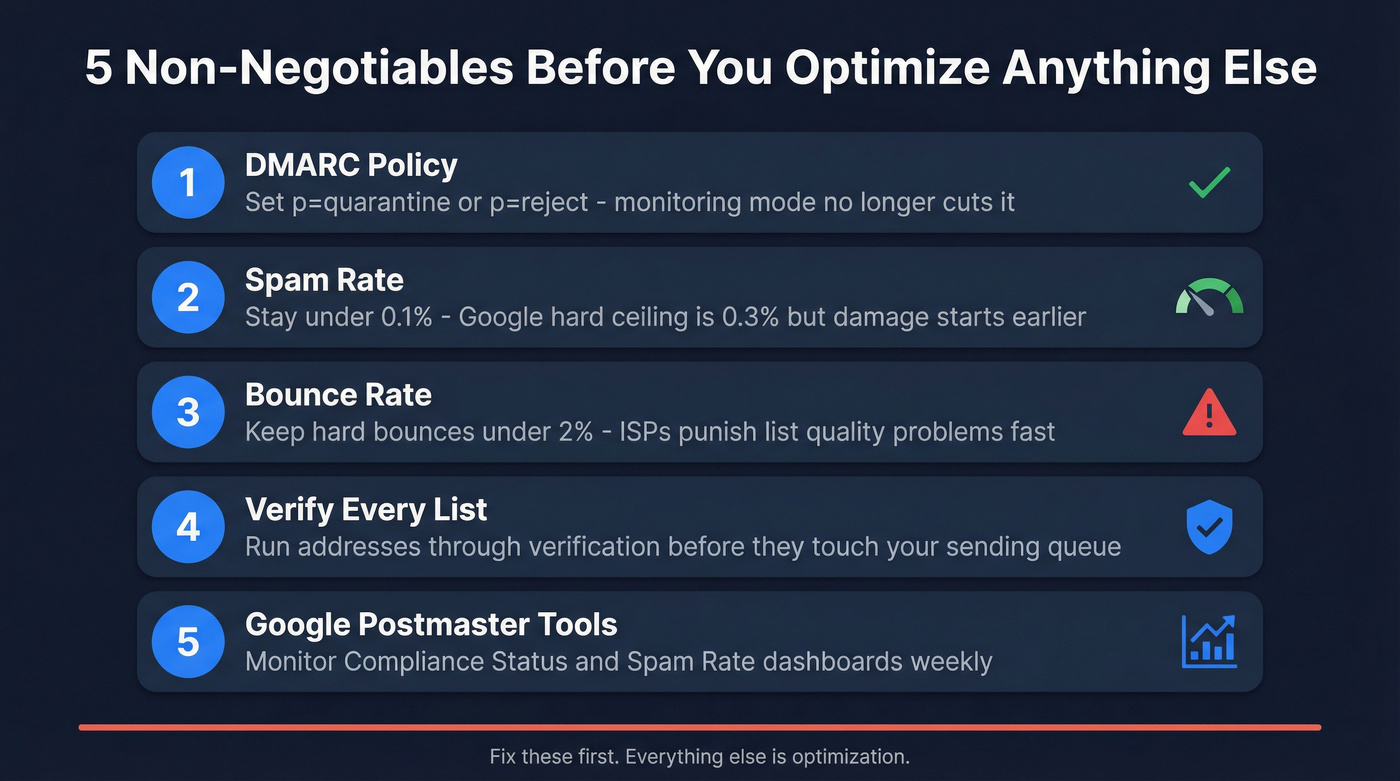
Five non-negotiable actions. Fix these before you optimize anything else. If you want the longer version, use this deliverability checklist alongside your implementation plan.
| Provider | DMARC / Auth Requirements for Bulk Senders | Spam Threshold | Enforcement | 2026 Status |
|---|---|---|---|---|
| Gmail | Yes (5,000+/day) | < 0.3% | Feb 2024 | SMTP rejections for non-compliance |
| Yahoo | Yes (5,000+/day) | - | Feb 2024 | Active enforcement |
| Microsoft | Yes (bulk sender requirements) | - | Early 2025 | Active enforcement |
- DMARC at
p=quarantineorp=reject. Monitoring mode (p=none) no longer cuts it for serious sending. Gmail wants enforcement. - Spam rate under 0.1%. Google's hard ceiling is 0.3%, but reputation damage starts well before that.
- Bounce rate under 2%. Hard bounces above 2% signal list quality problems that ISPs punish quickly.
- Verify your data before every send. Bad emails cause bounces, spam traps, and reputation damage. Run every list through verification before it touches your sending queue (see email verification for outreach).
- Monitor via Google Postmaster Tools. The UI changed in October 2025 - set it up fresh and watch Compliance Status and Spam Rate dashboards weekly.
How to Authenticate Your Domain
SPF, DKIM, and DMARC Setup
Authentication is the foundation. Without it, nothing else matters - not your subject lines, not your sending schedule, not your list hygiene. Properly configured SPF/DKIM/DMARC makes your domain far less likely to be spoofed, and it's the first thing every mailbox provider checks. If you need a deeper walkthrough, use this SPF, DKIM, DMARC explainer.
SPF tells receiving servers which IPs can send on your domain's behalf. A typical record for a team using Google Workspace and Mailchimp:
v=spf1 include:_spf.google.com include:mailchimp.com ~all
Critical pitfall: SPF has a 10 DNS lookup limit. Every include: counts, and nested includes count too. Exceed it and SPF fails - emails start failing authentication with no obvious error. We've seen teams debug this for days before realizing a single nested include pushed them over the limit.
DKIM adds a cryptographic signature to your messages. Most ESPs generate the keys; you publish the public key as a DNS TXT record. Make sure every service sending on your behalf has its own DKIM key.
DMARC ties SPF and DKIM together. Here's a starter record:
v=DMARC1; p=none; sp=none; pct=100; aspf=r; adkim=r; rua=mailto:dmarc-reports@yourdomain.com
The key tags: p=none starts in monitor-only mode, aspf=r and adkim=r set relaxed alignment, and rua= is where aggregate reports land. Publish this at _dmarc.yourdomain.com with a TTL of 3600 for fast iteration during setup. Major providers send reports daily - expect data within 48-72 hours.
For forwarded messages, consider implementing ARC (Authenticated Received Chain) to preserve authentication through forwarding chains. It helps legitimate forwards avoid DMARC failures.
DMARC Rollout in 6 Steps
- Publish
p=noneand collect reports for 2-3 weeks - Identify all legitimate sending services in the reports
- Fix SPF/DKIM for any services failing alignment
- Move to
p=quarantine; pct=25- quarantine 25% of failing messages - Ramp
pctto 50, then 100 over 2-4 weeks while monitoring - Move to
p=rejectonce all legitimate mail passes
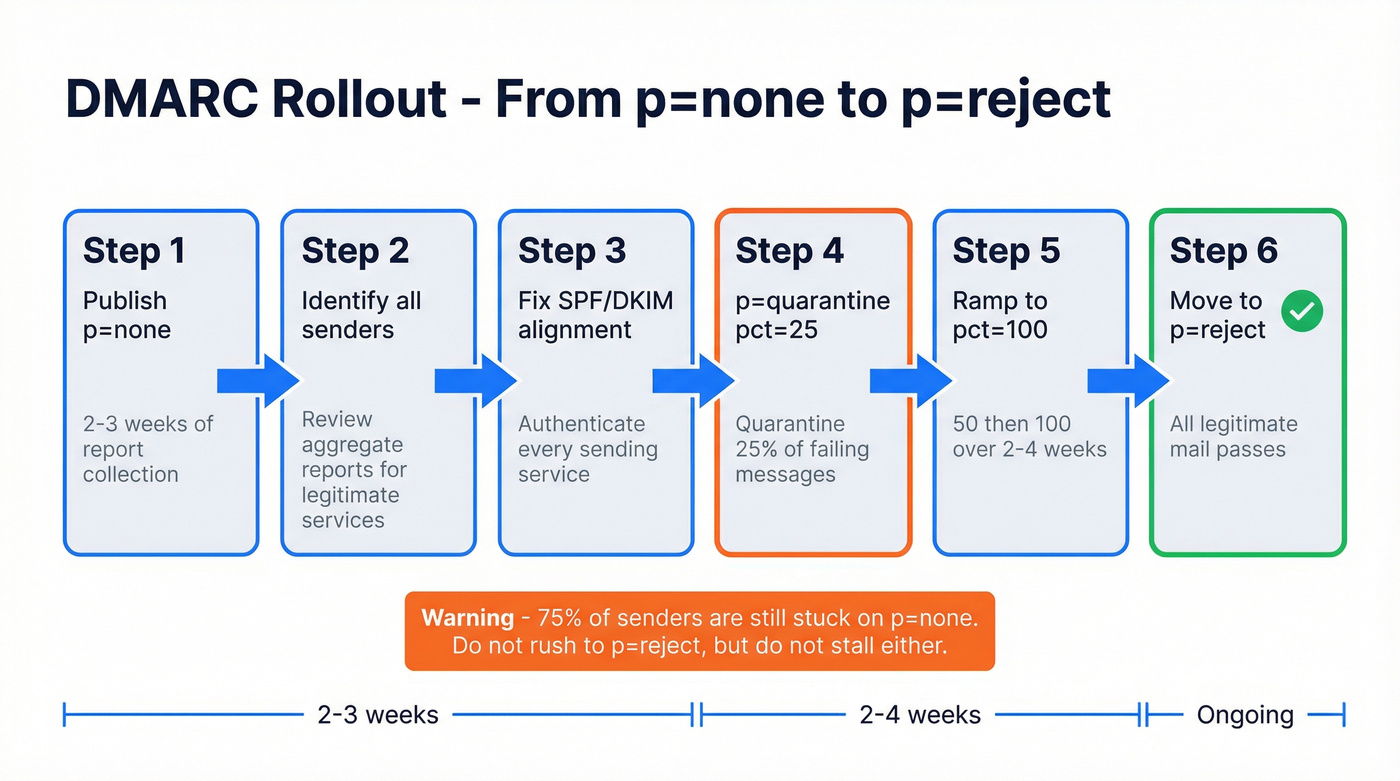
The biggest mistake we see is jumping to p=reject too early. That blocks legitimate mail from services you forgot to authenticate. Nearly 75% of senders are still stuck on p=none, and only 50.2% of public companies have reached full enforcement. Don't rush, but don't stall either.
Set Up BIMI for Brand Trust
BIMI displays your brand logo next to emails in supporting inboxes. It improves open rates, but has a hard prerequisite: DMARC at p=quarantine or p=reject.
A common implementation plan runs about 15 weeks. Weeks 1-8 get DMARC to enforcement. Weeks 9-10 are logo preparation in the required SVG format. Weeks 11-14 cover obtaining a mark certificate - VMC requires a registered trademark, while CMC (adopted by Google in 2025) works without one if you've used the logo 12+ months. Week 15, publish the BIMI DNS record. Before flipping to enforcement, confirm a 95%+ authentication pass rate.
Skip BIMI if you're a small team or early-stage startup. It's a nice-to-have that only pays off once your authentication and sending reputation are already solid.
Clean Your Data Before You Send
Here's the thing: most deliverability guides focus on DNS records and sending patterns. Those matter. But the root cause of most reputation damage is upstream - bad data. Every invalid address generates a hard bounce. Every spam trap flags your domain. Every honeypot gets you blacklisted. None of it shows up until the damage is done.
Data quality is the single highest-leverage fix for inbox placement (more on data quality scorecards and KPIs).
Hard bounces vs. soft bounces: A hard bounce means the address doesn't exist - permanent failure, immediate reputation hit. A soft bounce is temporary (full mailbox, server down) and less damaging. Hard bounces are the reputation killer, and they're entirely preventable with verification. If you need a quick refresher, see hard bounce.
The 2% bounce threshold isn't generous. If you're sending 1,000 emails and 25 hard bounce, you're already over the line. For cold outbound teams, the math is even less forgiving because you're sending to addresses you've never contacted before.

Snyk's 50-person AE team saw this firsthand - bounce rates running 35-40% before they switched to verified data, then dropped to under 5%. AE-sourced pipeline jumped 180%. That's the difference clean data makes at scale, and it's the fastest path to sender reputation recovery for any outbound team.
Warm Up New IPs and Domains
Not every situation requires a warm-up. Here's the decision matrix:
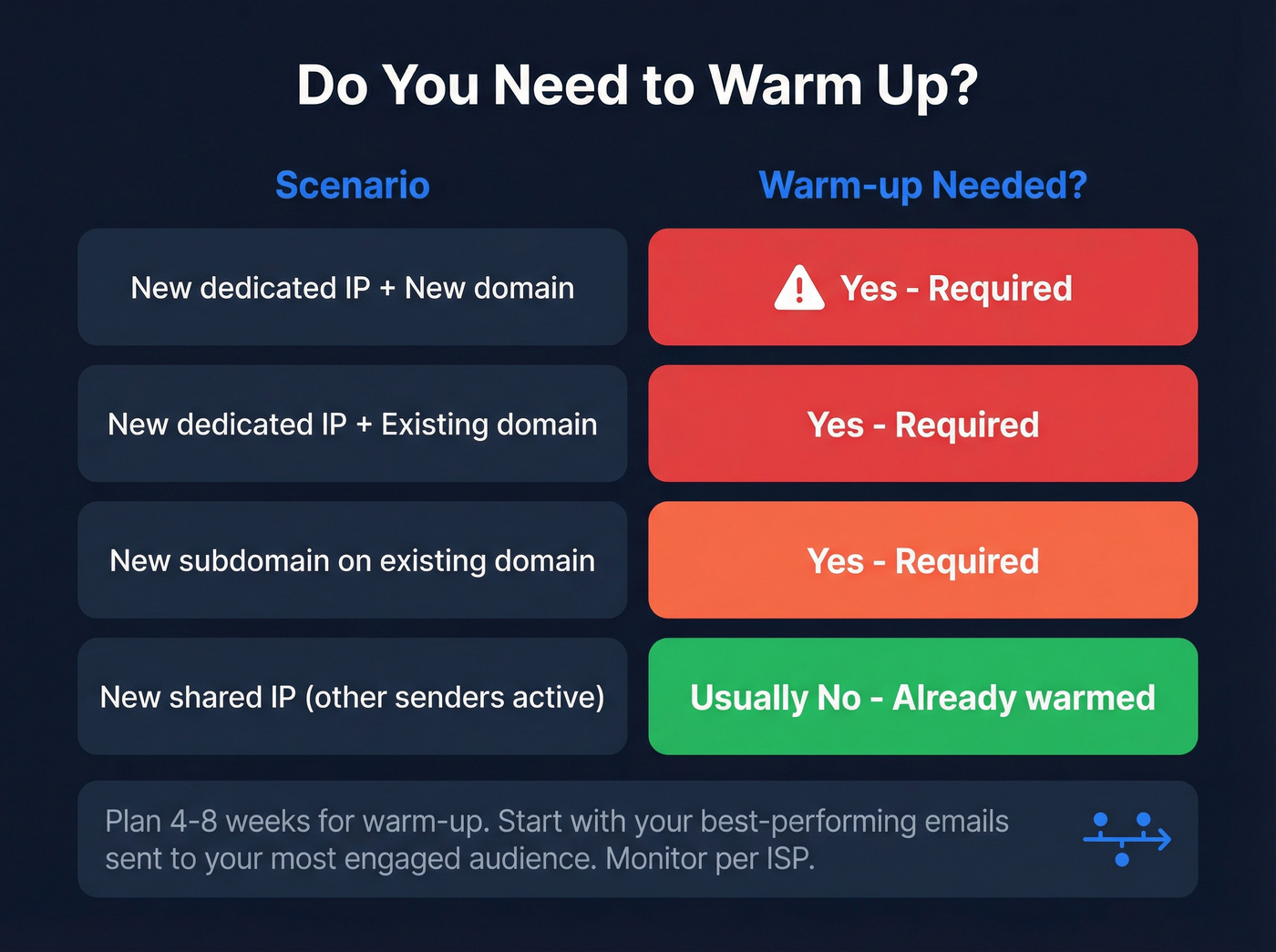
- New dedicated IP + new domain: warm-up required
- New dedicated IP + existing domain: warm-up required
- New subdomain: warm-up required
- New shared IP: usually not needed (already warmed by other senders)
When you do need to warm up, plan for 4-8 weeks. Start by sending your highest-performing emails from the last 6-9 months to your most engaged audience. This gives ISPs positive signals from day one. Monitor performance per ISP - if Gmail is giving you trouble while Yahoo is fine, isolate Gmail recipients and warm them separately. For a deeper process, follow an automated email warmup plan.

Every hard bounce chips away at your sender reputation. Prospeo's 5-step verification catches spam traps, honeypots, and invalid addresses before they touch your sending queue - delivering 98% email accuracy with data refreshed every 7 days, not every 6 weeks.
Stop debugging deliverability problems that start with bad data.
Manage Engagement and List Hygiene
Double opt-in is the gold standard for marketing lists. It adds friction, but it eliminates typos, bots, and people who didn't actually want to hear from you. The deliverability payoff is worth the conversion hit.
Build a sunset policy for unengaged contacts. If someone hasn't opened or clicked in 90 days, trigger a re-engagement sequence. Give them 30 more days. If they still don't engage, remove them. Keeping dead weight on your list drags down the engagement metrics ISPs use to judge your reputation. If you need ideas, use these re-engagement sequence patterns.
One-click unsubscribe via the List-Unsubscribe header is required for bulk senders, and Gmail enforces it. Make it easy for people to leave - every clean unsubscribe is one fewer "Report spam" click. Preference centers help too: let subscribers choose frequency and topic rather than forcing an all-or-nothing decision.
Optimize Content and Sending Patterns
Let's be honest: stop obsessing over subject lines and start obsessing over DNS records. Content is the last 10% of deliverability, not the first. We've seen teams spend weeks A/B testing emoji in subject lines while their DMARC was still on p=none and their bounce rate was 4%. If you want to sanity-check your stack end-to-end, start with your email sending infrastructure.
If your average deal size is under five figures and your bounce rate is above 2%, you'll get more pipeline from fixing data quality than from any content optimization, sending tool upgrade, or subject line hack combined. Full stop.
That said, the basics still apply. Maintain a consistent sending schedule - ISPs notice sudden volume spikes and treat them as suspicious. Segment by engagement so your most active subscribers get priority. And resist the temptation to blast your entire list for a big announcement. Ramp volume gradually, even for legitimate campaigns. These sending pattern adjustments are often overlooked but compound significantly over time.
Monitor Your Deliverability
Google Postmaster Tools got a major overhaul in October 2025. The v1 interface was retired, and with it went the "IP Reputation" and "Domain Reputation" dashboards everyone relied on. For a full metrics breakdown, use this deliverability tracking guide.
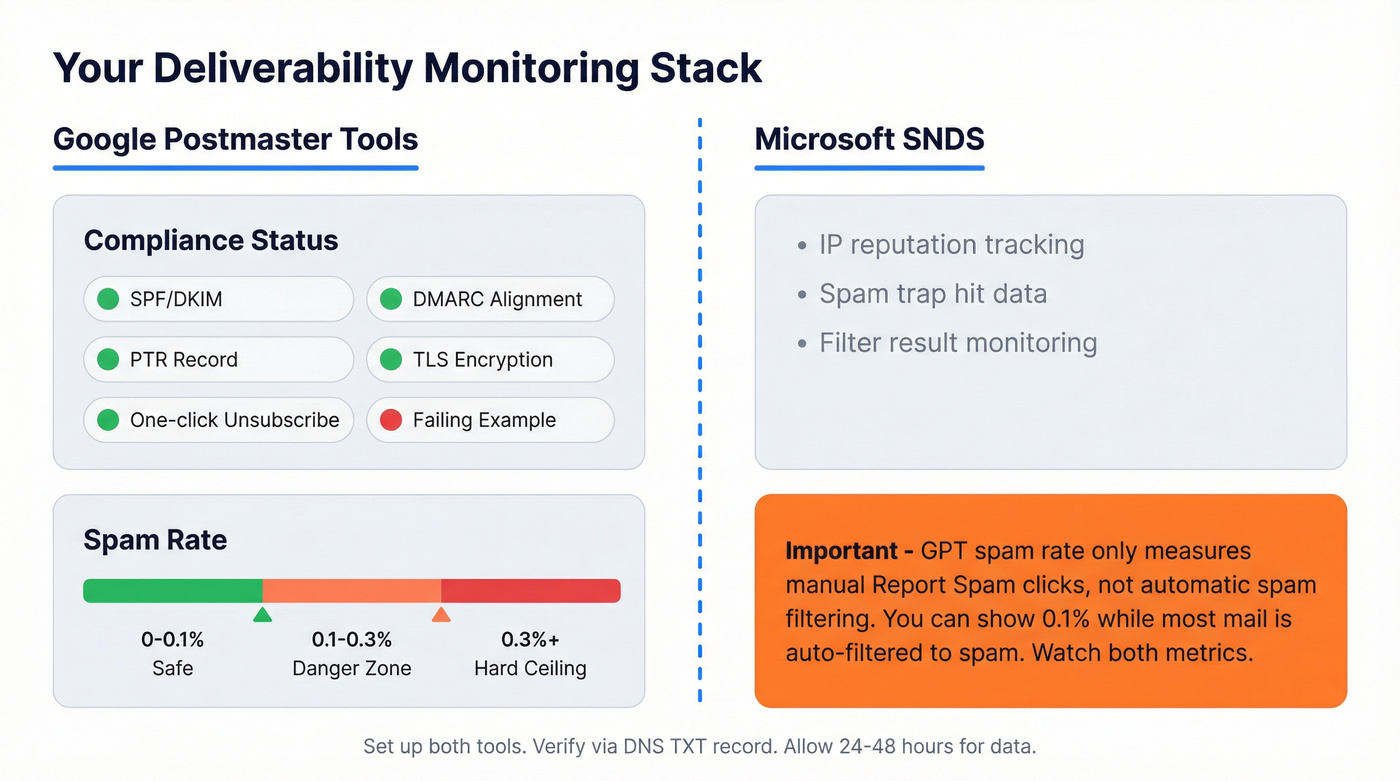
Compliance Status now shows pass/fail on technical requirements: SPF/DKIM, DMARC alignment, PTR, TLS, and one-click unsubscribe. Spam Rate tracks manual "Report spam" actions from recipients.
One nuance B2B senders consistently run into: GPT's spam rate only measures manual reports, not automatic spam filtering. You can show 0.1% spam rate while most of your mail is being auto-filtered to spam. Watch both metrics.
To set it up: go to postmaster.google.com, add your sending domain, verify ownership via DNS TXT record, and wait 24-48 hours. Data can be sparse on low-volume days under ~200 emails. You can't fix what you can't see - consistent monitoring is the backbone of any deliverability effort.
Microsoft SNDS is your second free monitoring tool. Between the two, you've got visibility into a large share of B2B inbox traffic.
Cold Email: Different Rules
Cold email isn't email marketing. The tolerances are tighter and the consequences of bad data are immediate. If you're building a program from scratch, follow a cold email drip campaign structure that prioritizes reputation first.
| Week | Daily Volume (per inbox) |
|---|---|
| 1-2 | 5-10 |
| 3-4 | 15-20 |
| 5-6 | 30-40 |
| 7+ | Max 50 |
Never exceed 50 emails per day from a single inbox. Keep bounce rate under 2%, spam complaints under 0.1%, and target a 5%+ reply rate. Avoid open-tracking pixels - they're a deliverability liability in cold outreach that isn't worth the data.
Cold email lives and dies on data quality. Catch-all domains are a silent reputation killer - they accept everything at the SMTP level, then discard messages later, giving you no bounce signal while your sender reputation erodes. Spam traps and stale addresses that hard bounce round out the top threats. Prospeo's 5-step verification with catch-all handling, spam-trap removal, and honeypot filtering catches the exact problems that burn cold outbound domains. Verify every list before it touches your sequencer - the cost of verification is trivial compared to rebuilding a burned domain.
Deliverability Tools Worth Using
You don't need ten tools. You need the right ones for monitoring, testing, verification, and warm-up. If you're comparing options, start with these email checker tools.
| Tool | Use Case | Price | Free Tier? |
|---|---|---|---|
| Google Postmaster | Monitoring | Free | Yes |
| Microsoft SNDS | Monitoring | Free | Yes |
| Mail-Tester | Testing | Free (basic) | Yes |
| MXToolbox | Monitoring/testing | $0-$399/mo | Yes (limited) |
| GlockApps | Inbox placement | From $85/mo | Limited |
| Mailtrap | Testing/sending | From $15/mo | Yes |
| Prospeo | Verification | ~$0.01/email | 75 emails/mo |
| ZeroBounce | Verification | From $49/mo | Limited |
| InboxAlly | Warm-up | From $149/mo | No |
| Emailwarmup.com | Warm-up | From $19/mo | No |
Start with the free tools - Google Postmaster Tools and Microsoft SNDS cover monitoring. For inbox placement testing, GlockApps is the standard, though it isn't cheap. For warm-up, Emailwarmup.com is the budget option; InboxAlly is pricier but more feature-rich.
The monitoring tools tell you what's wrong. Verification tools prevent the problem in the first place. If your budget is limited, spend on verification first - it's the highest-ROI line item in your deliverability stack.
Snyk's 50 AEs cut bounce rates from 35-40% to under 5% and grew AE-sourced pipeline 180% - by switching to verified contact data. Prospeo gives you 143M+ verified emails at $0.01 each, with catch-all handling and spam-trap removal built in.
Fix your deliverability at the source: the data itself.
FAQ
What's the difference between delivery and deliverability?
Delivery means the receiving server accepted your message without bouncing it. Deliverability means it landed in the primary inbox, not spam or promotions. You can have 99% delivery and 60% deliverability - the gap is where most pipeline leaks happen.
What spam rate should I target?
Under 0.1%. Google's hard ceiling is 0.3%, but reputation damage starts well before that threshold. Monitor weekly in Google Postmaster Tools - if you're consistently above 0.15%, investigate list sources and content immediately.
How long does DMARC take to fully enforce?
8-15 weeks with a staged rollout. Start at p=none for 2-3 weeks of report collection, fix alignment issues, then ramp through p=quarantine (increasing pct from 25 to 100) before moving to p=reject. Rushing skips the step where you catch forgotten sending services.
Do I need a dedicated IP?
Only if you're consistently sending 25,000+ emails per day. Below that volume, shared IPs are fine and often better - they benefit from the combined sender reputation of multiple legitimate senders on the same pool.
What's a good free tool for email verification?
Prospeo offers 75 free email verifications per month with full catch-all handling and spam-trap removal - enough for small teams running real campaigns. ZeroBounce and NeverBounce also offer limited free tiers, but typically cap at fewer credits without catch-all verification included.