


7 Best Maximizer CRM Alternatives (Tested & Compared)
Maximizer's own pricing page lists "Automated Workflows" as "coming 2026." A CRM selling workflow automation as a future feature while competitors have had it for years tells you exactly where the product sits right now. If you're shopping for Maximizer CRM alternatives, you're not alone - it's not a bad product, it's a stuck one, with a composite score of 6.3/10 on SoftwareReviews. User feedback flags the same pain points over and over: weak analytics, missing automation, and extra charges for enhancements that should be standard.
You don't need 15 options. You need three good ones and a clear recommendation. Here are seven alternatives with honest pricing and real tradeoffs.
Our Picks (TL;DR)
| Use Case | Tool | Starting Price | Why |
|---|---|---|---|
| Sales teams on a budget | Pipedrive | $14/user/mo (annual) | Best pure sales CRM, clean UI |
| Free CRM + marketing | HubSpot CRM | Free (up to 2 users) | Largest ecosystem, scales up |
| Best features per dollar | Zoho CRM | Free (3 users) | Deep functionality, low cost |
| Teams over 10 (flat fee) | Bitrix24 | $99/org/mo (50 users) | Under $2/user at scale |
Pricing at a Glance
| Tool | Free Tier | Paid Start | Model | Watch Out |
|---|---|---|---|---|
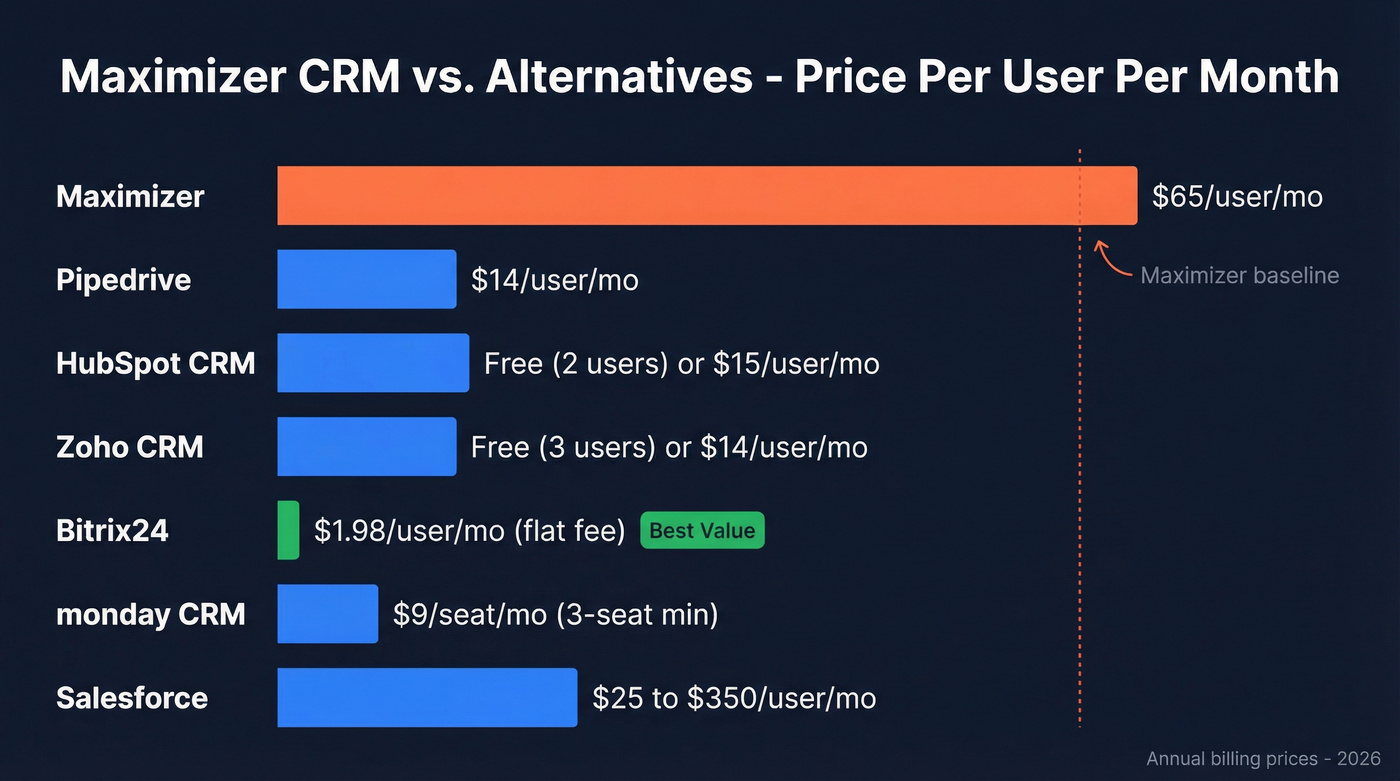
| Maximizer | No free tier | $65/user/mo | Per user | Extra charges for add-ons |
| Pipedrive | 14-day trial | $14/user/mo (annual) | Per user | Add-ons per company extra |
| HubSpot CRM | Free (up to 2 users) | $15-$20/user/mo | Per user + hub | Onboarding fees $1.5K-$7K |
| Zoho CRM | Free (3 users) | $14/user/mo | Per user | Feature gating by tier |
| Bitrix24 | Free (1-2 users) | $99/org/mo | Flat per org | UI learning curve |
| monday CRM | Free (2 seats) | $9/seat/mo (annual) | Bucket pricing | 3-seat min, 5-seat jumps |
| Salesforce | Free (2 users) | $25/user/mo | Per user | 6% price hike in 2025 |

Switching from Maximizer means migrating thousands of contacts - and stale data will poison your new CRM on day one. Prospeo enriches every record with 50+ data points, verifies emails at 98% accuracy, and refreshes weekly. Native HubSpot and Salesforce integrations push clean data straight into your new system.
Start your CRM migration with data you can actually trust.
Best Alternatives to Maximizer CRM
Pipedrive
Pipedrive is the CRM that gets out of your way. Where Maximizer buries you in configuration screens, Pipedrive gives you a visual pipeline that reps actually enjoy using. We've seen teams migrate in under a week - the learning curve is almost nonexistent.
Pricing runs $14/user/mo (Lite) through $79/user/mo (Ultimate) on annual billing. Here's the smart move: add-ons like LeadBooster ($32.50/mo) and Campaigns ($13.33/mo) are priced per company, not per user. That's a meaningful difference when you've got 15 reps.

The tradeoff? Pipedrive doesn't try to be a marketing platform. It's a sales CRM, full stop. If that's what you need, it's the obvious first choice.
HubSpot CRM
HubSpot is the best free CRM on the market and a genuinely strong Maximizer replacement for small teams. The free CRM tier covers up to 2 users with usable CRM features, and the marketing integration means one platform for email, forms, and pipeline. A 4.5/5 on SoftwareAdvice from 4,440 reviews and an 88% recommend rate on SelectHub back that up. HubSpot also has 94% unique integrations versus Maximizer - it's not even close.
Here's the thing: the danger is the upgrade path. Paid plans start around $15-$20/user/mo, but mid-market stacks with Marketing Hub and Service Hub easily hit $50K+/year. Onboarding fees commonly run $1,500 to $7,000. Budget for that from day one or you'll get sticker shock six months in.
Zoho CRM
This is where you go if you want maximum features for minimum spend. Zoho's free tier covers 3 users (more than HubSpot's 2), and paid plans range from $14-$52/user/mo with up to 34% savings on annual billing. The 85% recommend rate on SelectHub backs up the value story, and the feature depth at the Standard tier already exceeds what Maximizer offers at $65/user/mo.
Skip this if you need a dead-simple UI. Zoho's flexibility comes with complexity - there are a lot of settings screens, and teams that loved Maximizer's simplicity will find Zoho overwhelming at first. The consensus on r/CRM threads is that Zoho takes about two weeks to feel comfortable, but once you're past that hump, the value is hard to beat.
Bitrix24
Bitrix24 is wildly underrated for teams over 10. The math is simple: the Standard plan runs $99/org/mo on annual billing and includes up to 50 users. That's $1.98/user/mo.
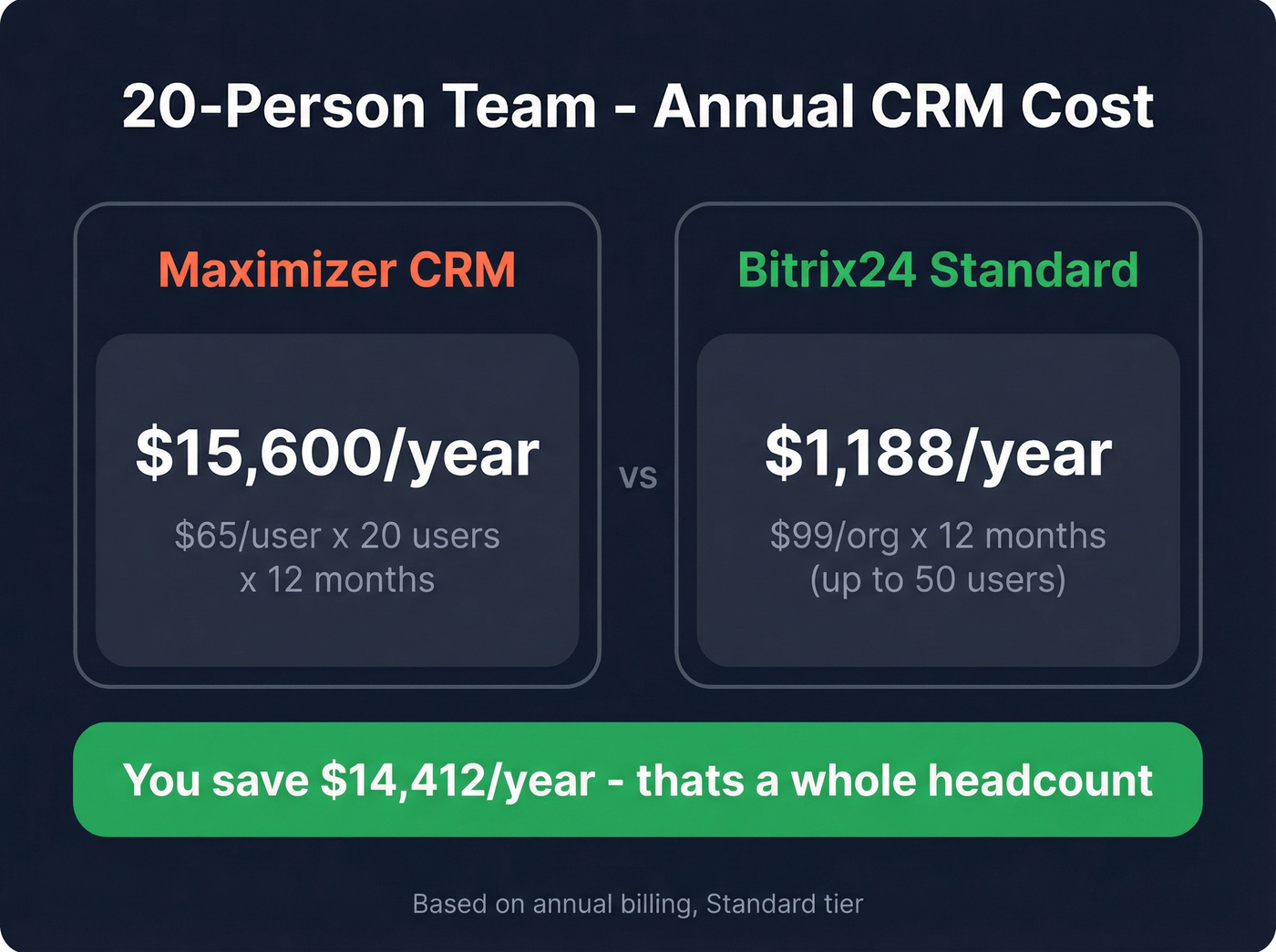
Let's put that in context. A 20-person team pays $15,600/year for Maximizer versus $1,188/year for Bitrix24 Standard - a savings of $14,412/year. That's not a rounding error. That's a headcount.
The Professional tier ($199/org/mo) handles 100 users with AI-powered sales tools and automation. The tradeoff is a steeper learning curve and a UI that tries to do everything - CRM, project management, HR, communications. But if flat-fee pricing matters to your budget, nothing else comes close.
Hot take: If your average deal size is under $10K and you have more than 10 reps, Bitrix24's flat-fee model will save you more money than any feature comparison ever will. Stop optimizing for features and start optimizing for cost-per-seat.
monday CRM
monday CRM's $9/seat/mo headline looks great until you hit the bucket pricing. Plans start at a 3-seat minimum and scale in 5-seat increments, so a 6-person team pays for 10 seats. The 4.7/5 rating from 453 reviews on G2 is strong, and the visual interface is genuinely intuitive. Just budget for the seats you'll actually pay for, not the ones you'll use.
For teams under 5, it's a solid pick. Beyond that, the bucket math starts working against you.
Salesforce Sales Cloud
If you're leaving Maximizer because of cost, Salesforce is the wrong answer. Plans range from $25/user/mo (Starter) to $350/user/mo (Unlimited), and Enterprise and Unlimited editions took an average 6% price increase in 2025. It's the right tool for enterprise teams that need deep customization and a massive app ecosystem. Everyone else should look elsewhere on this list.
Clean Your Data Before You Switch
This is the step most teams skip when moving away from Maximizer, and it's the one that bites hardest. Your existing contacts are stale. Email addresses have changed, people have moved companies, phone numbers are dead. Import garbage into your new CRM and you've just migrated a mess.
If you want a repeatable process, follow a CRM hygiene checklist and run a CRM verify pass before you import anything.
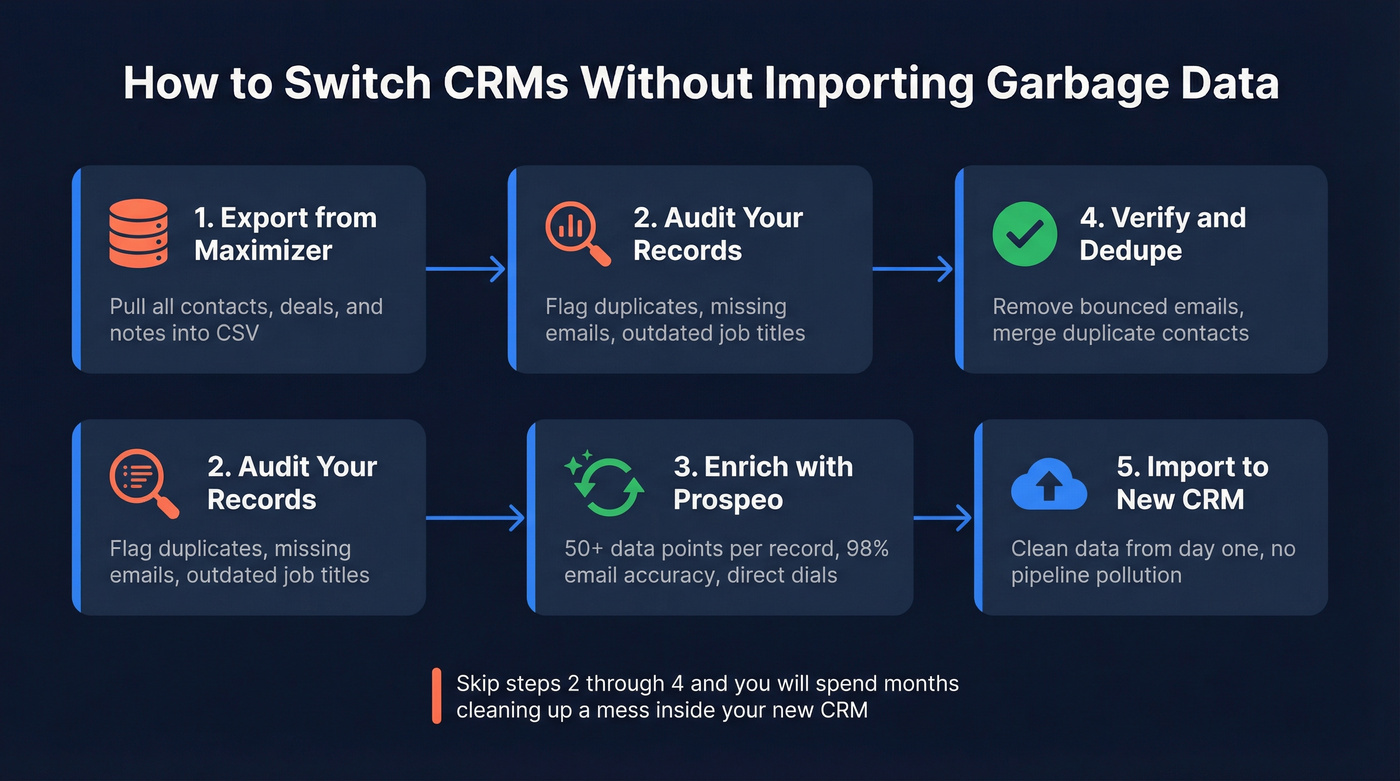
We've watched teams spend weeks setting up a new CRM only to realize their pipeline is full of bounced emails and disconnected numbers. Run your entire contact database through an enrichment tool before importing. Prospeo enriches every record with 50+ data points - verified emails at 98% accuracy, direct dials, job titles, company data - and refreshes on a 7-day cycle compared to the 6-week industry average. Native integrations with Salesforce and HubSpot mean enriched contacts flow straight into your new system. The free tier gives you 75 emails per month to test with a segment of your database before committing.
If you're specifically worried about bounces, pair enrichment with an email checker or dedicated email ID validator before you start outreach.

Switching as a Financial Advisor?
Pause before you switch. Maximizer has genuine strengths in financial services that generic CRMs don't replicate: on-premise deployment for strict data sovereignty and detailed permission settings that support compliance-heavy teams. User sentiment runs 80% positive overall, and the "pros" tags on SoftwareReviews lean heavily toward data integrity themes.
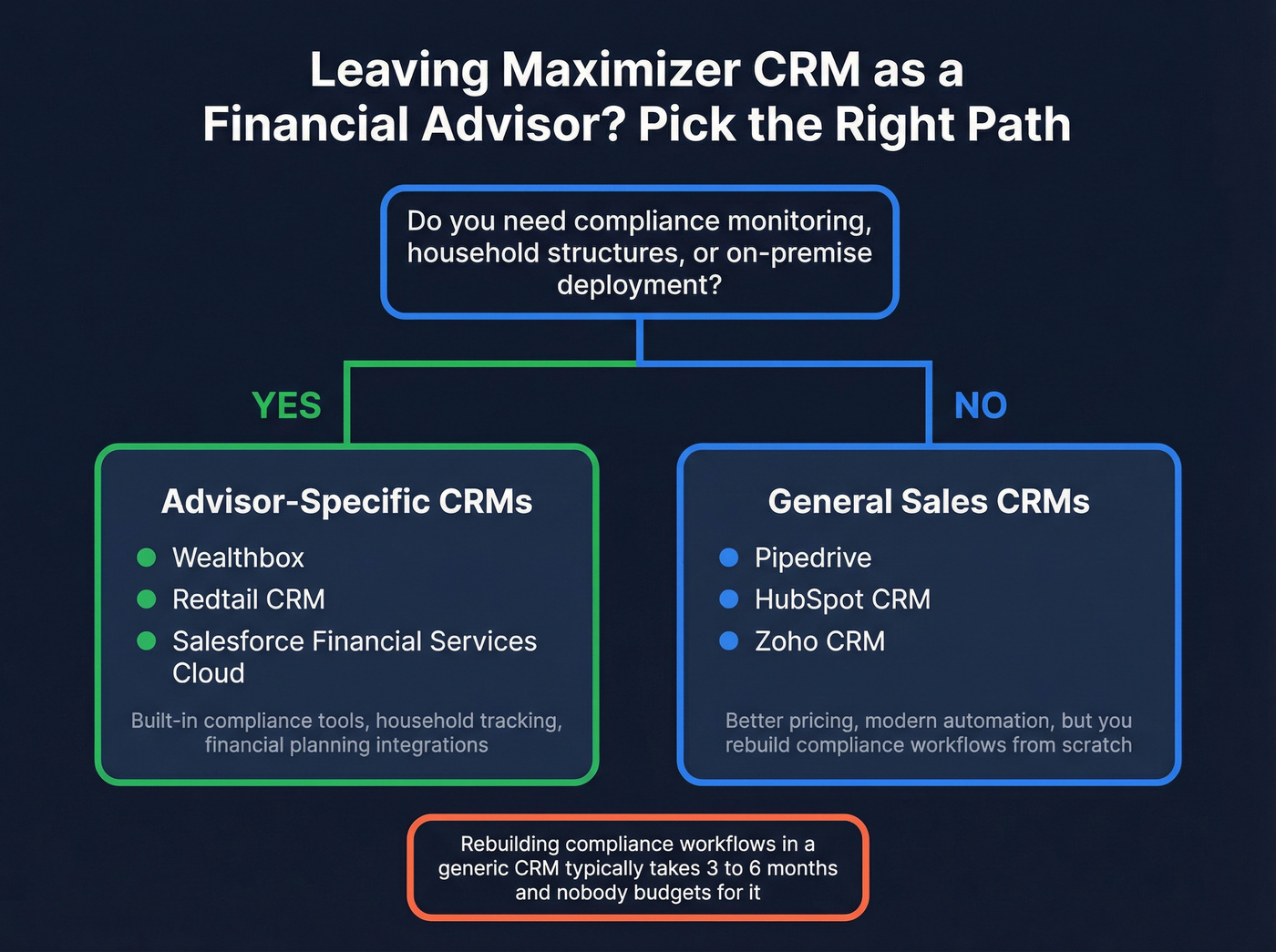
If you do need to move, look at advisor-specific platforms first: Wealthbox, Redtail CRM, or Salesforce Financial Services Cloud. These tools understand household structures, compliance monitoring, and integrations with financial planning software. Switching to a generic CRM like Pipedrive or HubSpot means rebuilding compliance workflows from scratch - and in our experience, that's a 3-6 month project nobody budgets for.
If your growth plan includes outbound, make sure your B2B sales process and outbound sales engine are defined before you migrate tools.
You're about to save thousands switching off Maximizer. Don't waste those savings on bounced emails and dead phone numbers. Prospeo's enrichment API returns verified emails, direct dials, and company data at $0.01/lead - 90% cheaper than ZoomInfo - with a 92% match rate.
75 free enrichments to test before you import a single record.
FAQ
Is Maximizer CRM worth it in 2026?
For regulated financial firms that need on-premise deployment and compliance-oriented controls, yes - it still earns 80% positive sentiment in that niche. For everyone else, the value proposition is thin. Key automation features are still listed as "coming 2026," and modern alternatives offer more functionality at lower price points.
What's the cheapest alternative to Maximizer?
Bitrix24's flat-fee model wins at scale: $99/org/mo covers 50 users, working out to $1.98/user/mo - roughly 97% cheaper per seat than Maximizer's $65/user/mo starting price. For solo users or tiny teams, Zoho CRM's free tier (3 users) is the best no-cost option.
How do I clean my data when switching CRMs?
Run your contact database through an enrichment platform before importing into the new system. This catches stale records, dead email addresses, and outdated job titles before they pollute your pipeline. Prospeo's free tier (75 emails/month) is enough to validate a sample segment and confirm accuracy before a full migration.
Can I replace Maximizer with a free CRM?
HubSpot CRM (free for 2 users) and Zoho CRM (free for 3 users) both offer usable free tiers that cover basic pipeline management, contact storage, and reporting. For teams under 3 people with simple sales workflows, either one replaces Maximizer without spending a dollar.