

10 Best Quo Alternatives for Teams That Need More Than a Second Line
You're halfway through a cold calling block when the notification hits: "Your account has been flagged for violating Quo's Fair Use Policy." Twenty prospects left on your list, and your phone system just benched you. This isn't hypothetical - it's happening to sales teams, recruiters, and small business owners every week.
If you're searching for quo alternatives, the cold calling ban is probably why.
Quo's Fair Use Policy, revised December 2025, doesn't leave room for interpretation: "Cold calling and/or messaging, including but not limited to any messages without proper consent and opt-out language" is explicitly prohibited. Auto-dialers are banned "under any circumstances." Violations can result in account termination.
But the cold calling ban isn't the only reason people are leaving. Dropped calls, text failures, price creep after the $105M funding round, and zero security basics like SSO or MFA are pushing teams to look elsewhere. Here's the honest breakdown of what's actually worth switching to.
Our Picks (TL;DR)
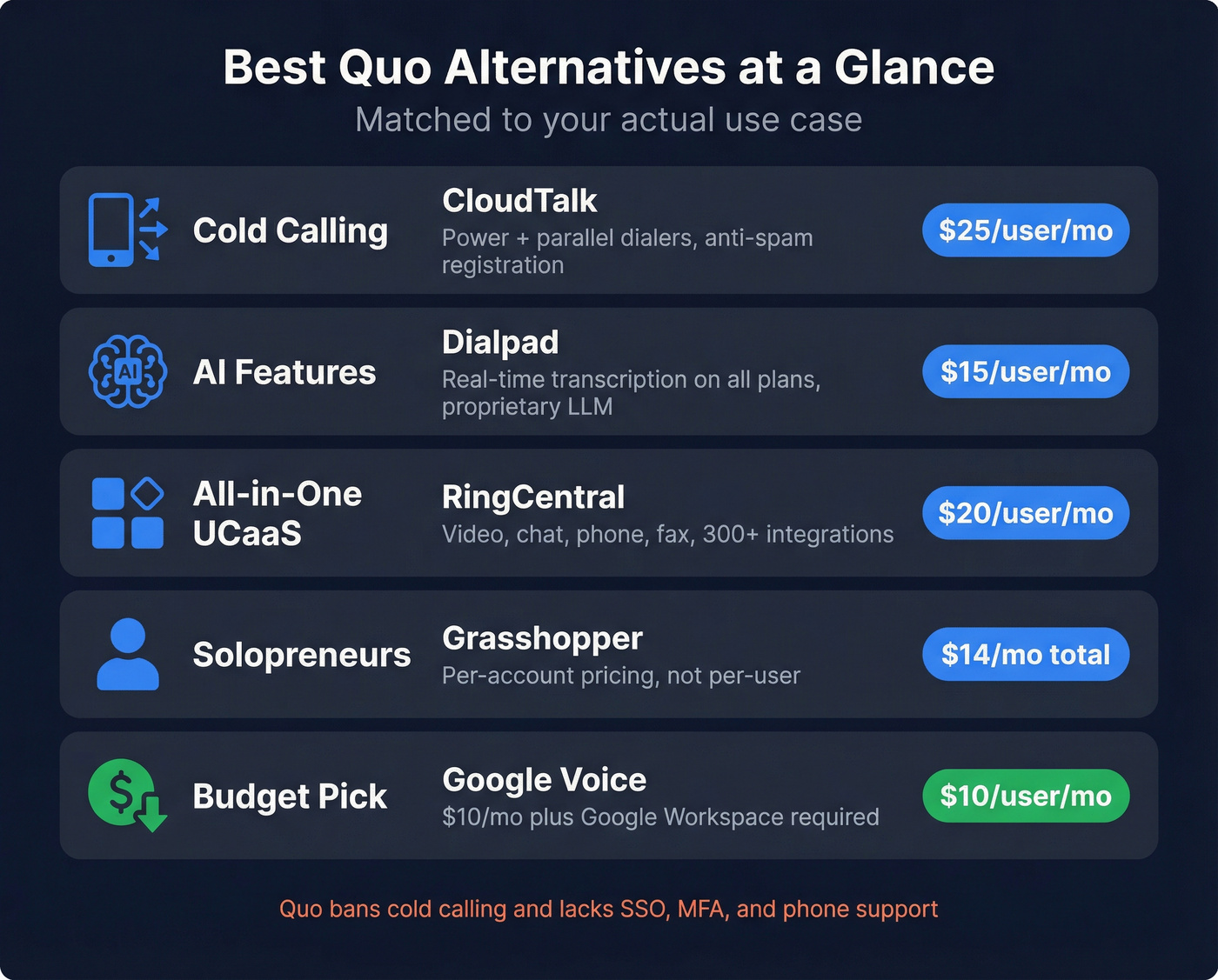
| Use Case | Pick | Why | Starting Price |
|---|---|---|---|
| Cold calling | CloudTalk | Power + parallel dialers, anti-spam | $25/user/mo |
| AI features | Dialpad | Real-time transcription, all plans | $15/user/mo |
| All-in-one UCaaS | RingCentral | Video, chat, phone, 300+ integrations | $20/user/mo |
| Solopreneurs | Grasshopper | Per-account pricing (not per-user) | $14/mo total |
| Budget minimum | Google Voice | $10/mo + Google Workspace | $10/user/mo |
Most "alternatives" guides are written by the alternative itself. This one isn't. We've tested these tools, talked to teams who've switched, and tracked the complaints that actually matter.
Here's the thing: Quo is still a great product for inbound-only teams with fewer than ten people. But the moment you need to make a single unsolicited call - to a prospect, a lead from a trade show, a referral who didn't explicitly opt in - you're operating on borrowed time. Most growing businesses hit that wall within six months.
Why People Are Switching from Quo in 2026
Quo (formerly OpenPhone) has a 4.7/5 on G2 with 3,294 reviews. 831 mentions of "ease of use." 298 mentions of "easy setup." It's genuinely good for what it was built for: a shared phone system for small teams handling inbound calls and texts.
The problems start when you try to use it for anything beyond that.
The Cold Calling Ban
Here's the exact language from Quo's Fair Use Policy:
"Cold calling and/or messaging, including but not limited to any messages without proper consent and opt-out language" is prohibited. Calls placed "without proper consent, including cold calls or prerecorded campaigns lacking a clear opt-out mechanism" violate the policy.
This isn't buried in fine print. Teams are getting flagged for standard B2B outreach. One trucking business owner on Reddit put it bluntly: "I just discovered that OpenPhone has a policy against cold calling... I'm planning to make 20-40 cold calls to prospects daily... It's not telemarketing people, it's a standard business practice of B2B sales."
Another user who'd already been warned: "We were using Quo for a bit, and while it's really good for calling existing customers, it's just not built for outbound. They don't allow cold calling, and we've already had warnings for outreach that wasn't even aggressive."
Quo's own blog acknowledges that cold calls "fall outside Quo's Fair Use policy." They're not hiding it. They just don't want outbound users.
Reliability Problems
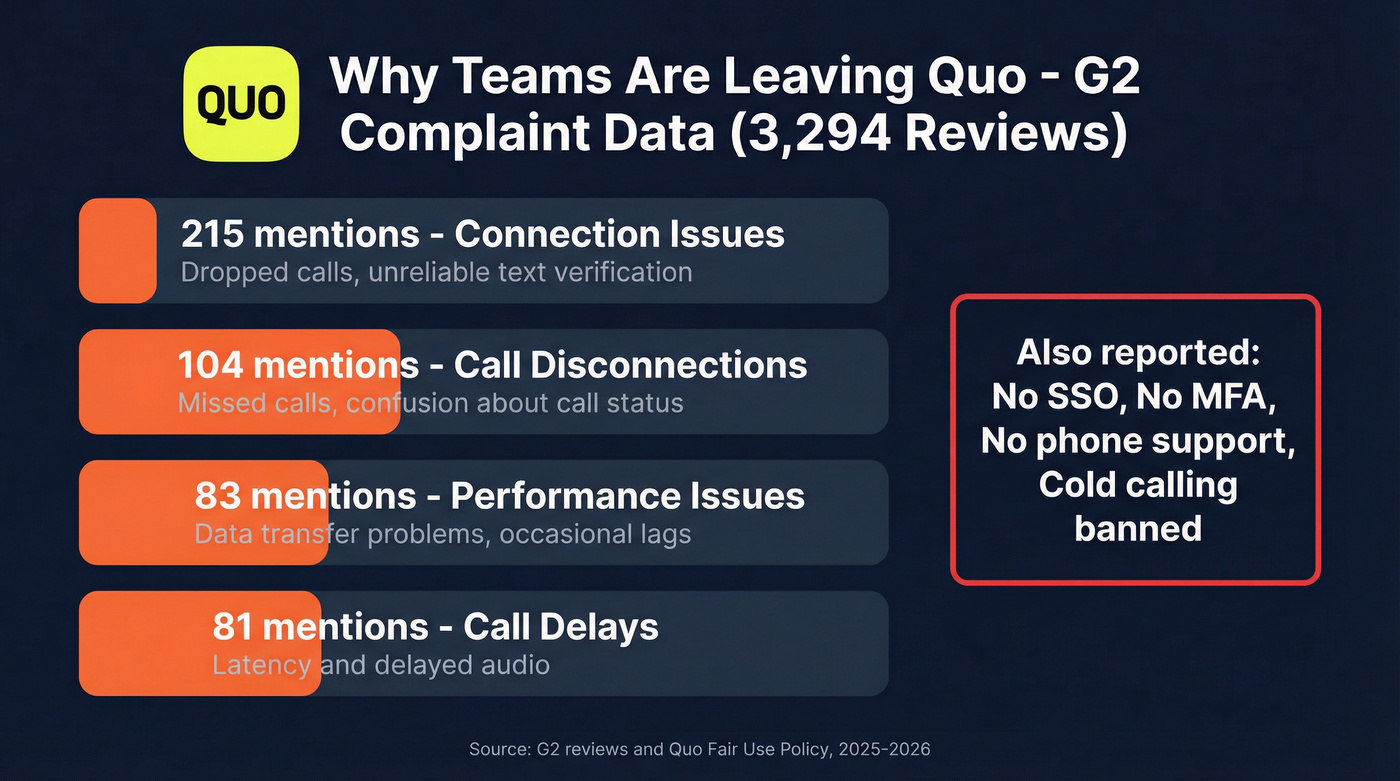
G2's complaint data tells a clear story:
- 215 mentions of connection issues - "dropped calls and unreliable text verification"
- 104 mentions of call disconnections - "missed calls and confusion about call status"
- 83 mentions of performance issues - "data transfer problems and occasional lags"
- 81 mentions of call delays
A commercial photographer on Reddit: "Lots of texts fail to send, lots of weird connection issues and dropped calls, and they've been continually jacking up the subscription price."
And perhaps the most visceral review: "Seriously. I'm done with this shit. Literally just sitting here waiting to be able to run my fucking business."
For a phone system, reliability isn't a feature. It's the product.
Price Creep and Feature Paywalling
Quo raised $105M alongside the rebrand from OpenPhone. That kind of funding comes with growth expectations, and users are already feeling it. One Reddit commenter warned: "Remember that your customers opted to choose you based on your simplicity, great product, and most important - price!"
Features that were previously included are migrating behind paywalls. G2 reviewers have noted that call recording - once included in the app - now requires a higher-tier plan. The carrier registration fee ($19.50 one-time plus $1.50-$3/mo for messaging) catches people off guard too.
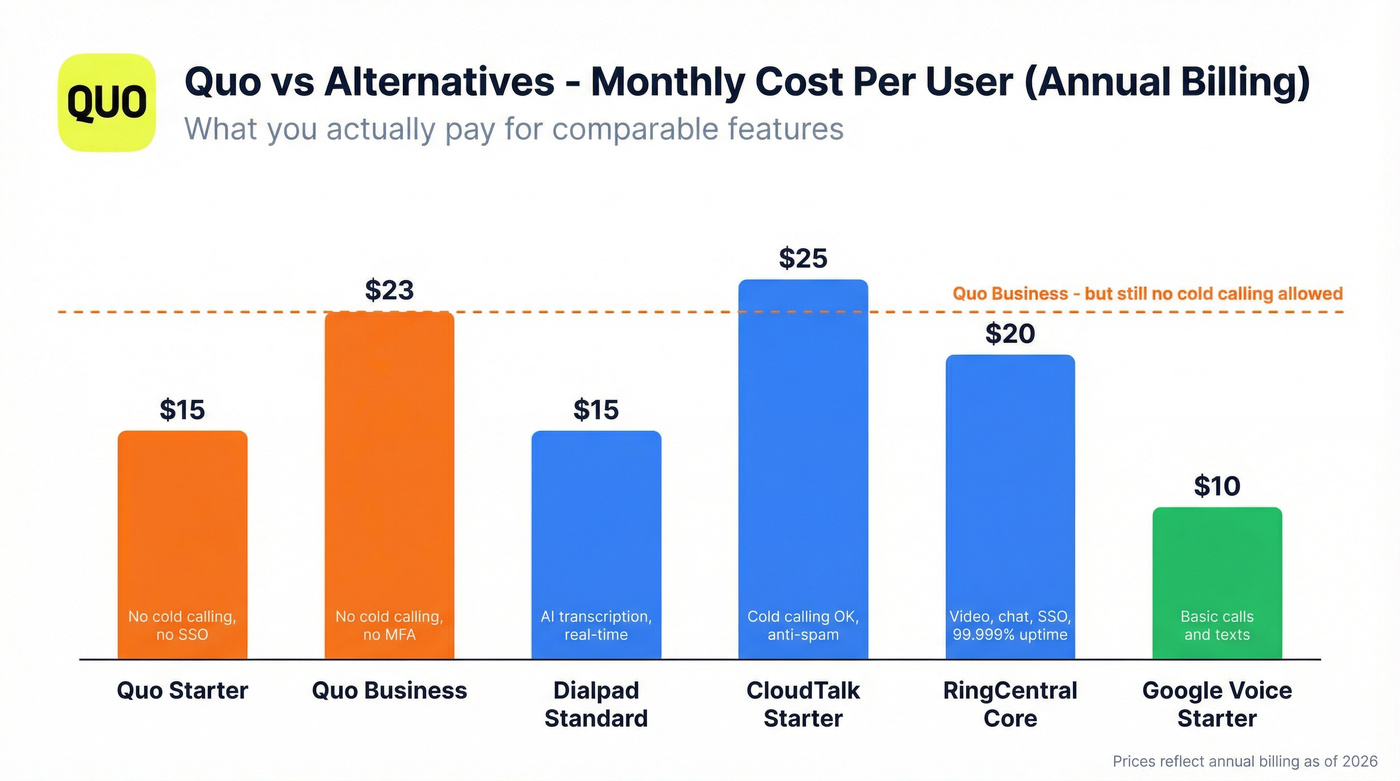
Starter runs $19/user/mo (monthly billing), Business jumps to $33, and Scale hits $47. Annual billing drops those to $15, $23, and $35 respectively. For a tool that bans cold calling and lacks enterprise security features, that's a tough sell against alternatives offering more for less.
Security and Support Gaps
Quo lacks SSO, MFA, and end-to-end encryption. In 2026, that's not a minor gap - it's a dealbreaker for any team handling sensitive customer data or operating in regulated industries.
Support is email-only. No phone support for a phone company. One Reddit user described their porting experience: "Their customer service is TERRIBLE... they literally had put '123456' as our account with ATT." When your phone provider can't handle a number port correctly, trust erodes fast.

Switching from Quo fixes your cold calling ban - but a dialer without accurate contact data is just an expensive way to hear voicemail. Prospeo gives you 125M+ verified mobile numbers with a 30% pickup rate and 98% email accuracy, so every dial connects to a real decision-maker.
Stop dialing dead numbers. Start conversations at $0.01 per verified email.
Which Quo Replacements Actually Support Cold Calling?
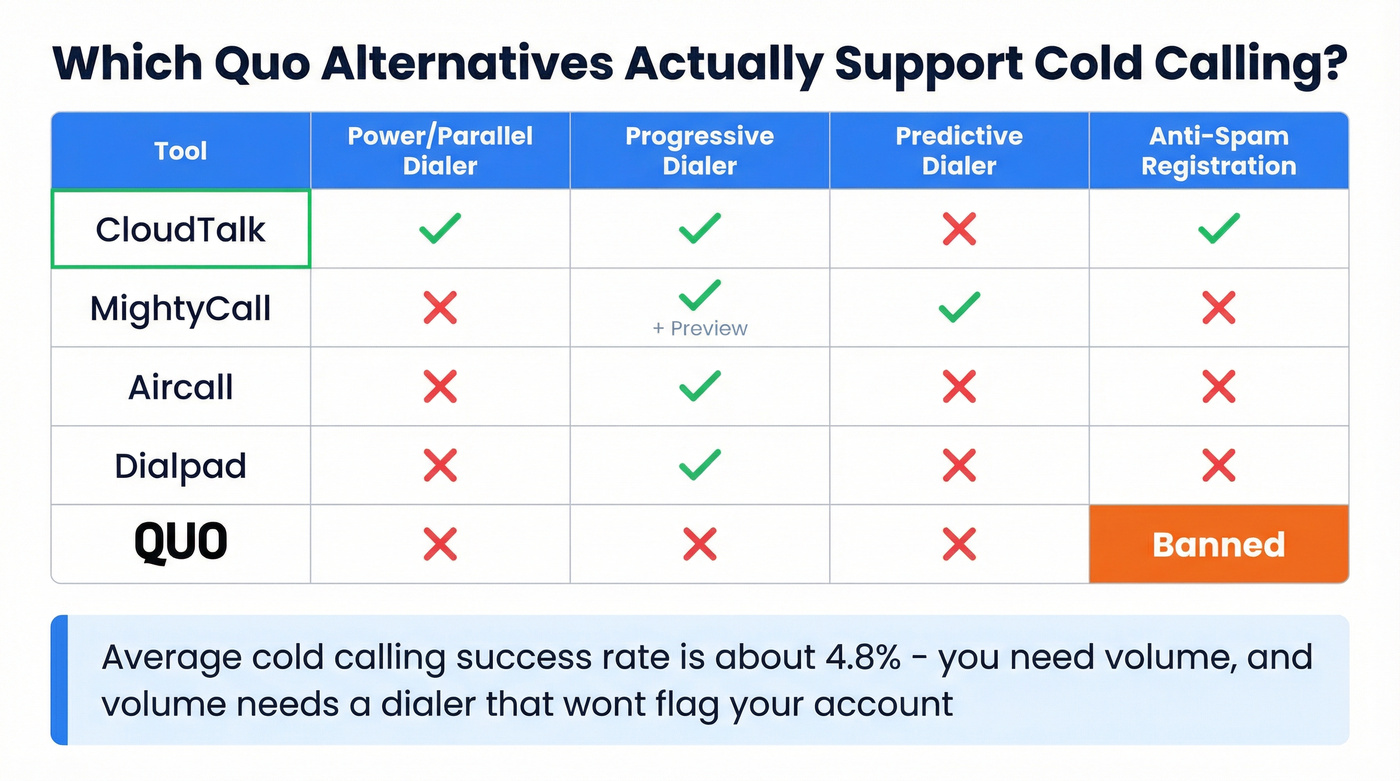
Not every "alternative" actually solves the cold calling problem. Some just give you a different second line with the same restrictions.
| Tool | Power/Parallel Dialer | Progressive Dialer | Predictive Dialer | Anti-Spam Registration |
|---|---|---|---|---|
| CloudTalk | ✅ Both | ✅ | ❌ | ✅ |
| MightyCall | ❌ | ✅ (+ Preview) | ✅ | ❌ |
| Aircall | ❌ | ✅ | ❌ | ❌ |
| Dialpad | ❌ | ✅ | ❌ | ❌ |
| Quo | ❌ | ❌ | ❌ | N/A - banned |
The average cold calling success rate is about 4.8%. That means you need volume, and volume means a dialer that doesn't flag your account. CloudTalk is the only option here with both a parallel dialer and anti-spam number registration - two features that directly impact connect rates and caller ID reputation.
The 10 Best Quo Alternatives for 2026
CloudTalk
CloudTalk is the obvious pick for sales teams switching from Quo because of the cold calling ban. It's the only alternative on this list with power dialing, parallel dialing, and progressive dialing - plus anti-spam number registration to protect your caller ID reputation across campaigns.
Best for: Sales teams running high-volume outbound with dedicated call blocks.
The platform covers local numbers in 160+ countries, which matters if you're prospecting internationally and need local presence. SOC 2, GDPR, and HIPAA compliant - a massive step up from Quo's security gaps. I've seen teams switch from Quo to CloudTalk in under a week and immediately run call blocks without worrying about getting flagged.
Pricing: $25/user/mo (Starter), $29/user/mo (Essential), $49/user/mo (Expert) - all annual. Monthly runs $34/$39/$69. The Expert plan requires a 3-license minimum, which is where the power and parallel dialers live.
Key advantage over Quo: You can actually cold call. That alone justifies the switch. Add the parallel dialer and anti-spam registration, and it's not even close for outbound teams.
Watch out for: AI Conversation Intelligence is an add-on, not included in any plan. If you want call analytics beyond basics, budget for it separately.
Rating: 4.4/5 on G2, 4,000+ customers.
If you also want to improve your outbound numbers list quality, pair a new dialer with a verified direct dials workflow so reps aren’t burning call blocks on bad data.
Dialpad
If your main frustration with Quo is paying more for features that should be standard, Dialpad is the answer. Real-time transcription ships on every plan - including the $15/mo Standard tier.
Best for: Teams wanting AI-powered call intelligence without paying a premium for it.
DialpadGPT, their proprietary LLM trained on 7B+ minutes of business conversations, powers everything from live transcription to post-call summaries to a company dictionary that learns your industry jargon and improves accuracy over time. It's the most sophisticated AI in this price range.
Pricing: $15/user/mo (Standard), $25/user/mo (Pro) - annual. 14-day free trial. Pro and Enterprise plans have seat minimums, so confirm before committing.
Key advantage over Quo: Better AI at a lower price. Standard plan at $15/mo includes real-time transcription and AI-powered call summaries at a fraction of Quo's cost.
Watch out for: The Standard plan is genuinely great for small teams, but scaling into Pro requires minimum seats. Enterprise pricing isn't published - expect $40-$60/user/mo based on market positioning.
Rating: 4.3/5 on G2, 4.4/5 on Capterra.
If you’re building an outbound motion around AI, it helps to pressure-test the workflow against an outbound calling strategy that covers volume, compliance, and list hygiene.

RingCentral
I've seen teams agonize over picking between five different tools for phone, video, chat, and fax - then realize RingCentral does all four. It's the most complete UCaaS platform on this list, and PCMag gave it a 4.5/5 Editors' Choice for a reason.
Best for: Growing teams that need a full communications platform, not just a phone line.
300+ integrations. 99.999% uptime SLA. Video meetings, team messaging, phone, and fax in one platform. If Quo felt like it was missing features (88 G2 mentions say it was), RingCentral is the opposite problem - it might have too many.
Pricing: $20/user/mo (Core), $25/user/mo (Advanced), $35/user/mo (Ultra) - annual. But watch the add-ons: AI Receptionist starts at $39/mo, SMS Booster is $25/mo, Call Queues Booster is $35/mo. These stack up fast.
Key advantage over Quo: Everything Quo doesn't have - SSO, video meetings, call monitoring, call queues, auto-attendant - plus enterprise-grade uptime.
Watch out for: Add-on pricing is where RingCentral gets expensive. The base plans are competitive, but a fully loaded deployment can rival enterprise-level phone bills. Price out exactly what you need before signing.
Rating: PCMag 4.5/5 Editors' Choice, 4.0/5 on G2.
If your phone system is part of a larger stack rebuild, use a B2B sales stack checklist to avoid buying overlapping tools.
MightyCall
Use this if: You want a dedicated cold calling setup with preview, progressive, and predictive dialers - and you're willing to pay for the Power plan to get there.
Skip this if: You're a small team on a budget. The 3-user minimum and $65/mo Power plan pricing make this expensive for teams under five reps.
MightyCall's Power plan includes AI answering machine detection, which skips voicemails automatically during call blocks. The supervisor workspace on the Pro plan ($38/mo) lets managers listen in and coach in real time. It's the only tool on this list with a predictive dialer, which matters if your team is large enough to keep multiple lines ringing simultaneously.
Pricing: $20/user/mo (Core), $38/user/mo (Pro), $65/user/mo (Power) - annual. Enterprise is custom with a 5-user minimum. The 7-day trial is limited to 100 minutes, which barely covers a real evaluation.
Rating: 4.4/5 on G2.
If you’re comparing dialer types, the differences between power dialing and predictive modes matter more than most pricing pages admit.
Nextiva
Nextiva makes sense when your team needs more than phone - live chat, social media management, review platforms, and video meetings up to 200 participants. It's 73 platform capabilities rolled into one subscription.
Best for: Multi-channel teams that want phone + chat + social without stitching together three vendors.
Pricing: $20/user/mo (Digital - no phone), $30/user/mo (Core), $40/user/mo (Engage), $60/user/mo (Power Suite) - annual. The $20 plan is digital-only, so Core at $30 is the real starting point if you need a phone system.
Key advantage over Quo: Channels. Quo gives you phone and text. Nextiva gives you phone, text, live chat, chatbot, social, and review management.
Watch out for: AI features are usage-based, which makes costs unpredictable at scale.
Rating: 4.5/5 on G2.
If you’re tying voice + chat into one motion, align it with your outbound campaigns rules so compliance and opt-outs stay consistent across channels.
Aircall
Pros:
- 100+ integrations with deep Salesforce and HubSpot connections
- Progressive dialer for outbound campaigns
- Analytics that actually help managers coach reps
- Call monitoring and whispering on Professional plan
Cons:
- 3-user minimum on every plan
- Salesforce integration costs $30/license extra
- AI tools run $9-$49/license/mo on top of your plan
- That "~$30/mo" Essentials plan can quietly become $70+ per user
Best for: Teams whose workflow lives in Salesforce or HubSpot and needs the phone system to sync without manual work.
Pricing: ~$30/user/mo (Essentials), ~$50/user/mo (Professional) - 3-user minimum on both. Custom plans start at 25 users.
Rating: 4.3/5 on G2, 4.3/5 on Capterra.
If Aircall is on your shortlist, it’s worth sanity-checking total cost and dialer limits against 3CX vs Aircall.
Grasshopper
Grasshopper does one thing that no other tool on this list does: per-account pricing. $14/mo gets you a business number, and adding team members doesn't multiply the cost. For solopreneurs and freelancers who just need to separate personal and business calls, it's the simplest, cheapest option.
Best for: Solo operators and tiny teams who need a business number without business-phone complexity.
Pricing: $14-$55/mo per account (not per user) - annual. 7-day free trial, no credit card required. 400,000+ customers.
Key advantage over Quo: Cost structure. A 3-person team on Quo Starter pays $57/mo. On Grasshopper, you might pay $14-$25/mo total.
Watch out for: No international calling. No AI features. Limited integrations. This is a business number, not a sales platform.
If you’re a solo operator doing outreach yourself, pairing calls with a lightweight B2B cold email sequence often beats trying to “dial your way” to pipeline.
GoTo Connect
Best for: International teams needing calling to 50+ countries on every plan.
GoTo Connect includes international calling by default - most competitors charge extra or limit it to higher tiers. The Connect CX tier adds multichannel inbox and AI-powered call summaries.
Key advantage over Quo: Built-in international calling across all plans. Quo charges per-minute for international calls.
Pricing: $26/user/mo (Phone System), $34/user/mo (Connect CX), $80/user/mo (Contact Center) - annual. That jump from $34 to $80 is brutal, and many features between tiers are locked behind undisclosed add-on pricing.
Rating: 4.2/5 on G2.
Google Voice
The absolute budget floor.
$10/user/mo if you're already on Google Workspace. No AI, limited integrations, but it works for teams that just need a business number and basic call handling.
Best for: Teams already deep in the Google ecosystem who need a no-frills business line.
Key advantage over Quo: Price. At $10/user/mo, it's the cheapest option - though you need Google Workspace ($7-$25/user/mo) underneath it.
Pricing: $10/$20/$30/user/mo - requires an existing Google Workspace subscription, so factor that in. No free trial.
Rating: 4.1/5 on G2.
Ooma
Simple, affordable, traditional phone system for small offices that don't need modern bells and whistles. $19.95/user/mo gets you started. No AI on the base plan, limited integrations, but reliable for basic calling.
Best for: Small offices that want a straightforward desk-phone replacement.
Key advantage over Quo: Hardware support. Ooma sells and supports physical desk phones - Quo is software-only.
Pricing: $19.95/$24.95/$29.95/user/mo.
Rating: 4.0/5 on G2.
Vonage
API-first communications for developer teams. If you want to build custom voice workflows, Vonage's APIs are best-in-class. If you want a turnkey phone system, look elsewhere - the best features require development work.
Best for: Teams with developers who want to build custom communication workflows.
Key advantage over Quo: Programmability. Vonage's APIs let you build exactly the phone system you need. Quo gives you what Quo gives you.
Pricing: $13.99/line/mo (Mobile), $20.99/line/mo (Premium), ~$28/line/mo (Advanced) for the turnkey Unified Communications plans. API pricing is usage-based and varies widely.
Rating: 4.3/5 on G2.
You're switching phone systems to run real outbound. Don't feed your new dialer with stale data from providers that refresh every 6 weeks. Prospeo refreshes 300M+ profiles every 7 days - so the direct dials and emails you pull today are still accurate next week.
Your cold calling stack is only as good as the numbers you're dialing.
Full Pricing Comparison: Every Quo Alternative Side by Side
All prices are annual billing, with Quo as the baseline.
| Tool | Annual Price | Free Trial | Cold Calling | G2 Rating |
|---|---|---|---|---|
| Quo | $15/user/mo | 7 days | ❌ Banned | 4.7/5 |
| CloudTalk | $25/user/mo | ✅ | ✅ | 4.4/5 |
| Dialpad | $15/user/mo | 14 days | ✅ | 4.3/5 |
| RingCentral | $20/user/mo | ✅ | ✅ | 4.0/5 |
| MightyCall | $20/user/mo | 7 days | ✅ | 4.4/5 |
| Nextiva | $30/user/mo* | ✅ | ✅ | 4.5/5 |
| Aircall | ~$30/user/mo | ✅ | ✅ | 4.3/5 |
| Grasshopper | $14/mo total | 7 days | ❌ | 4.0/5 |
| GoTo Connect | $26/user/mo | ✅ | ✅ | 4.2/5 |
| Google Voice | $10/user/mo | ❌ | ❌ | 4.1/5 |
| Ooma | $19.95/user/mo | ❌ | ❌ | 4.0/5 |
| Vonage | $13.99/line/mo | ✅ | ✅ | 4.3/5 |
*Nextiva's $20/mo plan is digital-only (no phone). Core with phone starts at $30/mo.
Monthly pricing and minimums: CloudTalk runs $34/mo monthly (3-user min on Expert). Dialpad is ~$23/mo monthly. MightyCall and Aircall both require 3 users minimum. Grasshopper is per-account, not per-user.
Hidden costs to watch:
- Quo: $19.50 one-time carrier registration + $1.50-$3/mo messaging fee
- Aircall: Salesforce integration is $30/license extra; AI tools $9-$49/license/mo
- RingCentral: AI Receptionist ($39/mo), SMS Booster ($25/mo), Call Queues ($35/mo) are all add-ons
- Google Voice: Requires Google Workspace subscription ($7-$25/user/mo) on top of Voice pricing
How to Switch from Quo
Switching phone systems sounds painful. It doesn't have to be - but you need to do it in the right order.
1. Download everything first. Before you cancel or start porting, export your call history, recordings, and contact lists from Quo. Once your account is closed, this data is likely gone. Don't assume you can get it back.
2. Request your CSR (Customer Service Record). This is the document your new provider needs to port your number. Ask Quo for it directly, and - this is critical - verify every detail is correct. One user reported that Quo had entered "123456" as their account number with AT&T during a port. Double-check the account number, PIN, and authorized name before you hand it to your new provider.
3. Initiate the port with your new provider. Number porting typically takes 1-3 business days for mobile numbers and up to 2-4 weeks for landlines. Your new provider handles the process, but accuracy of the CSR determines whether it goes smoothly.
4. Overlap your service. Don't cancel Quo until the port is confirmed and your new system is live. Run both simultaneously for at least a few days. Missed calls during a transition cost more than a few extra dollars in overlapping subscriptions.
5. Update your integrations. If Quo was connected to your CRM, helpdesk, or any automation tools, reconnect those to your new system before going live. Test inbound and outbound calls, text messaging, and any call routing rules.
6. Notify your team and key contacts. If you're changing numbers (rather than porting), update your email signatures, website, Google Business Profile, and any directories where your number appears.
If you’re rebuilding your prospecting workflow at the same time, a simple data quality checklist prevents “new dialer, same bad list” syndrome.
Quo Alternatives FAQ
Is Quo the Same as OpenPhone?
Yes. OpenPhone rebranded to Quo in 2025 alongside $105M in new funding and the launch of Sona, their AI agent product. Same product, same team, new name.
Does Quo Allow Cold Calling?
No. Quo's Fair Use Policy explicitly prohibits cold calling, cold messaging, and auto-dialers. Violations can result in account termination. Multiple users have reported receiving warnings for standard B2B outreach that wasn't aggressive or high-volume.
What's the Cheapest Quo Alternative?
Google Voice at $10/user/month, though it requires a Google Workspace subscription ($7-$25/user/mo extra). For per-account pricing, Grasshopper starts at $14/month total regardless of team size. Dialpad's Standard plan at $15/user/mo is the best value if you want AI features included.
Which Quo Alternative Is Best for Sales Teams?
CloudTalk for dedicated cold calling with power and parallel dialers. Dialpad for AI-powered call intelligence at $15/month. Pair either with verified mobile data from Prospeo to make sure you're dialing real numbers - a 30% mobile pickup rate beats burning through unverified lists at 4.8% connect rates.
Can I Port My Phone Number from Quo?
Yes, but request your CSR (Customer Service Record) from Quo first and verify every detail is correct. Porting typically takes 1-3 business days for mobile numbers and up to 4 weeks for landlines. Keep your Quo account active until the port is fully confirmed - users have reported errors including incorrect account numbers submitted to carriers.