Outbound Campaigns: The Unified Guide for Dialers and Sales Sequences (2026)
Most outbound campaigns don't fail because the copy's bland. They fail because the plumbing's broken: dirty data, shaky deliverability, and compliance gaps that force you to slow down (or shut down) right when you need volume.
This is the playbook we wish more teams used: a dialer-vs-SDR decision tree, an operator-grade metrics scoreboard, and US/UK compliance checklists you can actually run without turning your RevOps channel into a weekly argument.
Here's the thing: outbound gets easy once you stop treating it like "messaging" and start treating it like a system.
What you need (quick version)
Outbound campaigns checklist (the stuff that actually moves numbers)
- Pick your meaning first (SERP is split):
- Contact-center outbound campaign = dialer-driven calling/SMS/notifications at scale.
- SDR/BDR outbound campaign = multi-channel sequences (email + calls + social touches) to book meetings.
- A clean list: verified emails + callable numbers, deduped, segmented by ICP.
- Deliverability basics: SPF, DKIM, DMARC; warm inboxes; daily caps; one-click unsubscribe.
- Compliance basics: DNC scrubbing, time-zone calling windows, consent handling, opt-out SLAs.
- A cadence you can run weekly: not a "perfect" one you never ship.
- A scoreboard: connect rate, conversation rate, meeting rate, delivery rate, bounce, complaints.
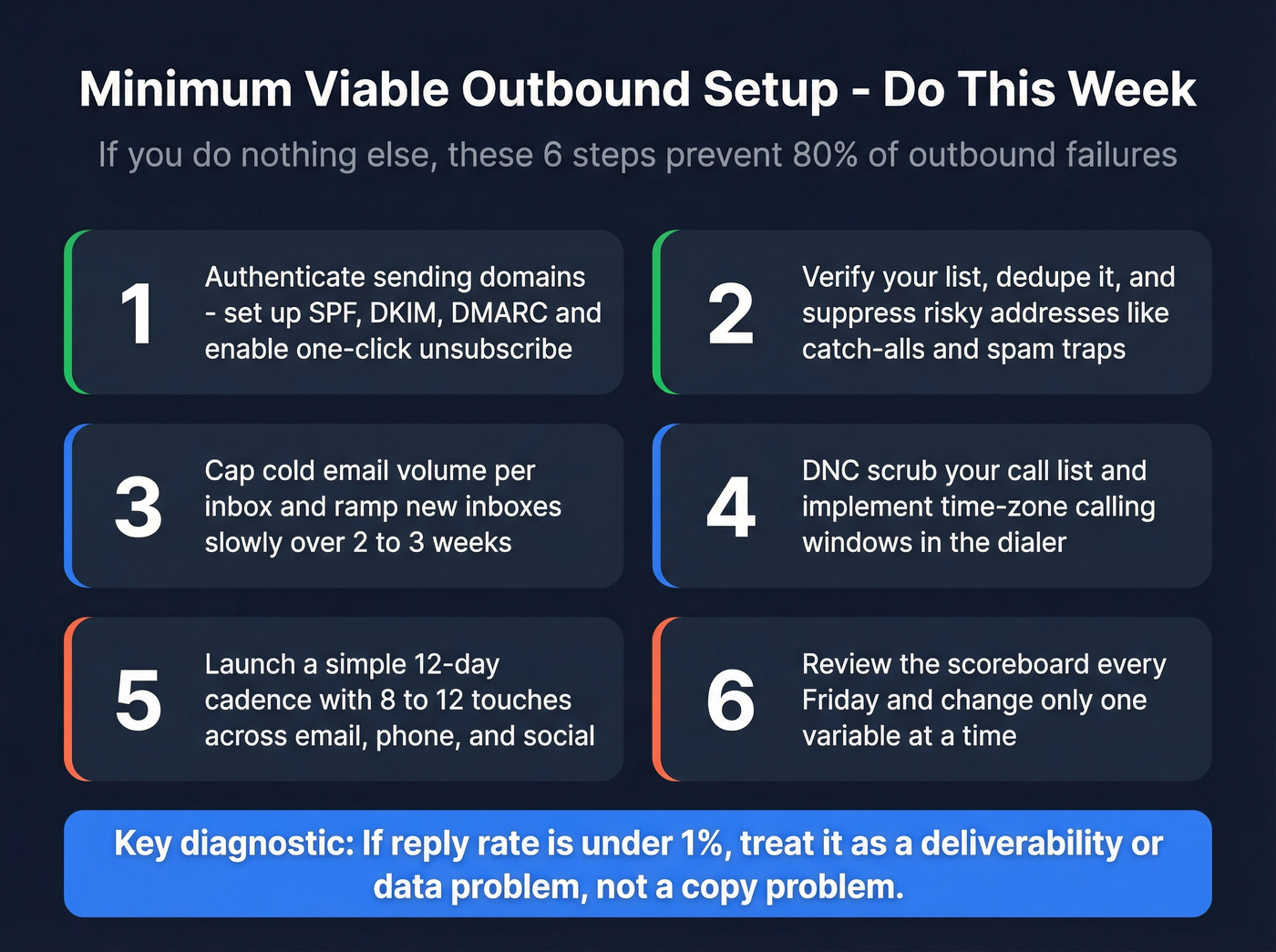
One diagnostic that saves weeks: If reply rate's under 1%, treat it as deliverability/data - not copy.
Decision tree (use this to stop arguing in Slack):
- If you mean "dialer campaign" -> prioritize dialing mode, agent staffing, AMD, abandon/silent-call controls, DNC/time-zone rules.
- If you mean "SDR sequence" -> prioritize list quality, deliverability, touch spacing, and meeting conversion.
If you do nothing else this week (minimum viable setup):
- Authenticate sending domains (SPF/DKIM/DMARC) + enable one-click unsubscribe.
- Verify your list, dedupe it, and suppress risky addresses (catch-all/spam traps).
- Cap cold email volume per inbox and ramp new inboxes.
- DNC scrub + implement time-zone windows in the dialer.
- Launch a simple 12-day cadence.
- Review the scoreboard every Friday and change one variable at a time.

What is an outbound campaign? (and why the SERP is confusing)
"Outbound campaign" is overloaded.
In contact-center land, an outbound dialing campaign is basically a dialer calling through lists at scale and filtering out non-live outcomes (busy signals, answering machines, failed calls) so agents spend time on real conversations. That's why so many top results are Amazon Connect and Genesys docs: they're talking about pacing, routing, and compliance metrics.
In sales/SDR land, "outbound campaign" usually means a coordinated push to a defined audience: a list, a message angle, and a multi-touch cadence across email + phone + social. Same words, totally different operational reality.
Teams get burned because they borrow advice across the boundary.
A contact-center playbook obsessed with abandon rate won't fix a 6% bounce rate, and an SDR "write better copy" thread won't stop silent calls caused by predictive dialing and agent latency.
I've watched RevOps teams waste a full quarter because they didn't disambiguate this upfront: they bought "outbound campaign software," then realized half the stakeholders meant "power dialer" and the other half meant "sequencer."
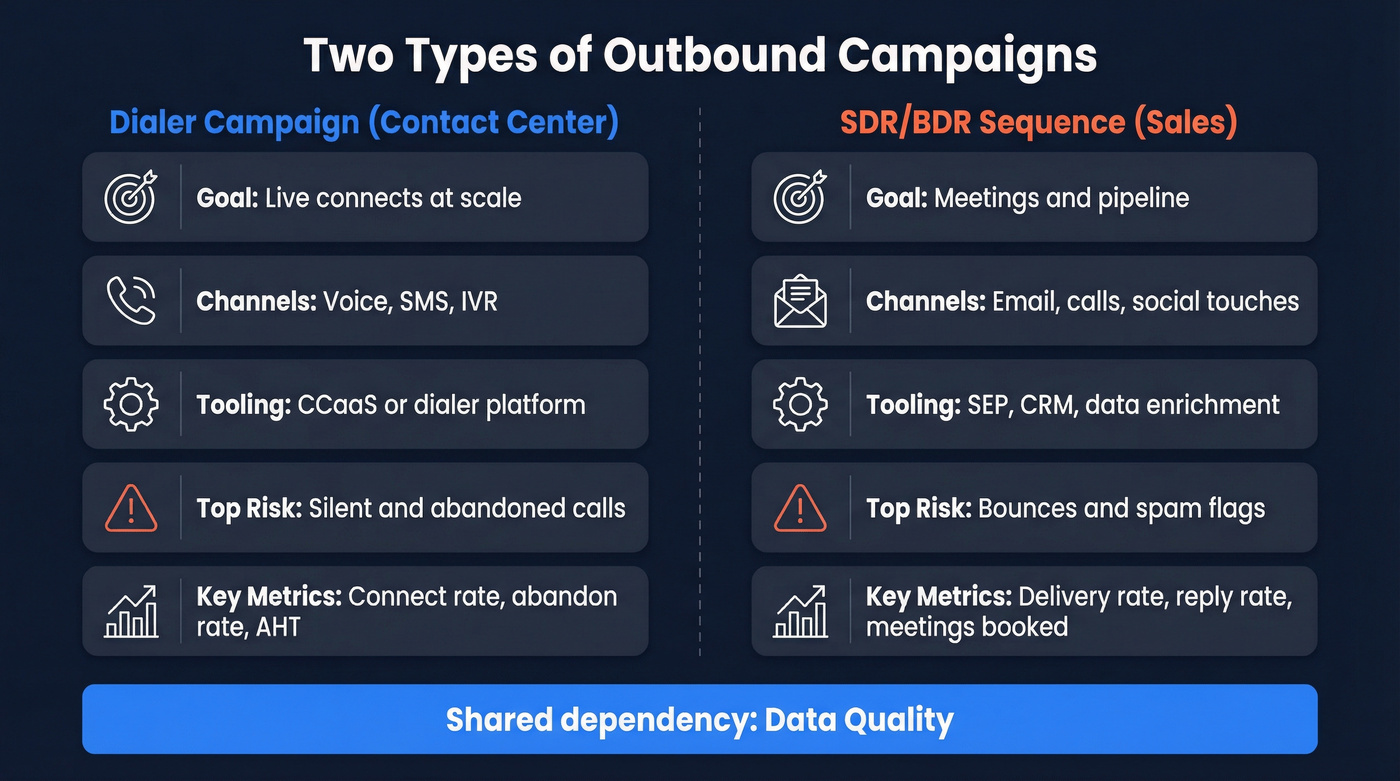
So we'll treat this as two systems with one shared dependency: data quality.
Two types of outbound campaigns (dialer vs sales sequence)
| Dimension | Dialer campaign | SDR/BDR sequence |
|---|---|---|
| Goal | Live connects at scale | Meetings + pipeline |
| Channels | Voice/SMS/IVR | Email + calls + social |
| Tooling | CCaaS/dialer | SEP + CRM + data |
| Primary risks | Silent/abandoned calls | Bounces + spam flags |
| Core metrics | Connect, abandon, AHT | Delivery, reply, meetings |
Dialing modes you'll hear (and you should be precise about):
- Predictive: dials ahead based on agent availability predictions.
- Progressive: dials the next number when an agent is ready.
- Preview: agent reviews the record before dialing.
- Agentless: high-volume notifications/IVR without agents.
Why the same KPI names mislead across contexts (and wreck programs): dialer teams live and die by abandon/silent-call controls because a bad day creates immediate customer harm and regulator risk. SDR teams should obsess over bounces/complaints because one dirty list can tank domain reputation for weeks.
Hot take: most B2B orgs that say they need predictive dialing actually need progressive dialing + better data + tighter list governance. Predictive is how you accidentally buy yourself compliance risk.

You just read it: if reply rate's under 1%, it's a data problem, not a copy problem. Prospeo's 5-step verification and 7-day refresh cycle keep bounce rates under 4% - the same fix that took Snyk's 50-AE team from 35% bounces to under 5% and added 200+ opportunities per month.
Stop rewriting subject lines. Start fixing the list underneath them.
Contact-center outbound campaigns (dialer operations that avoid silent calls)
If you're running contact-center outbound, your job is less "sales" and more systems engineering: pacing, staffing, latency, and compliance controls.
Amazon Connect's Outbound Campaigns is a useful mental model because it's built for proactive outreach (reminders, updates, triggered calls) with controls around time zones, attempt limits, and monitoring compliance metrics.
Pick the right dialer mode (AWS guidance, translated)
- Predictive dialing: use it when you have stable staffing, predictable handle times, and you're optimizing for maximum agent talk time. The tradeoff is silent call risk when a call connects and no agent's ready.
- Progressive dialing: use it when you need a 1:1 "agent ready -> dial" guarantee. It's the safer default for compliance and customer experience.
- Preview dialing: use it when context matters (collections, renewals, high-value accounts). A common best practice: disable call classification for preview mode.
- Agentless: use it for notifications and IVR flows where no agent's required.
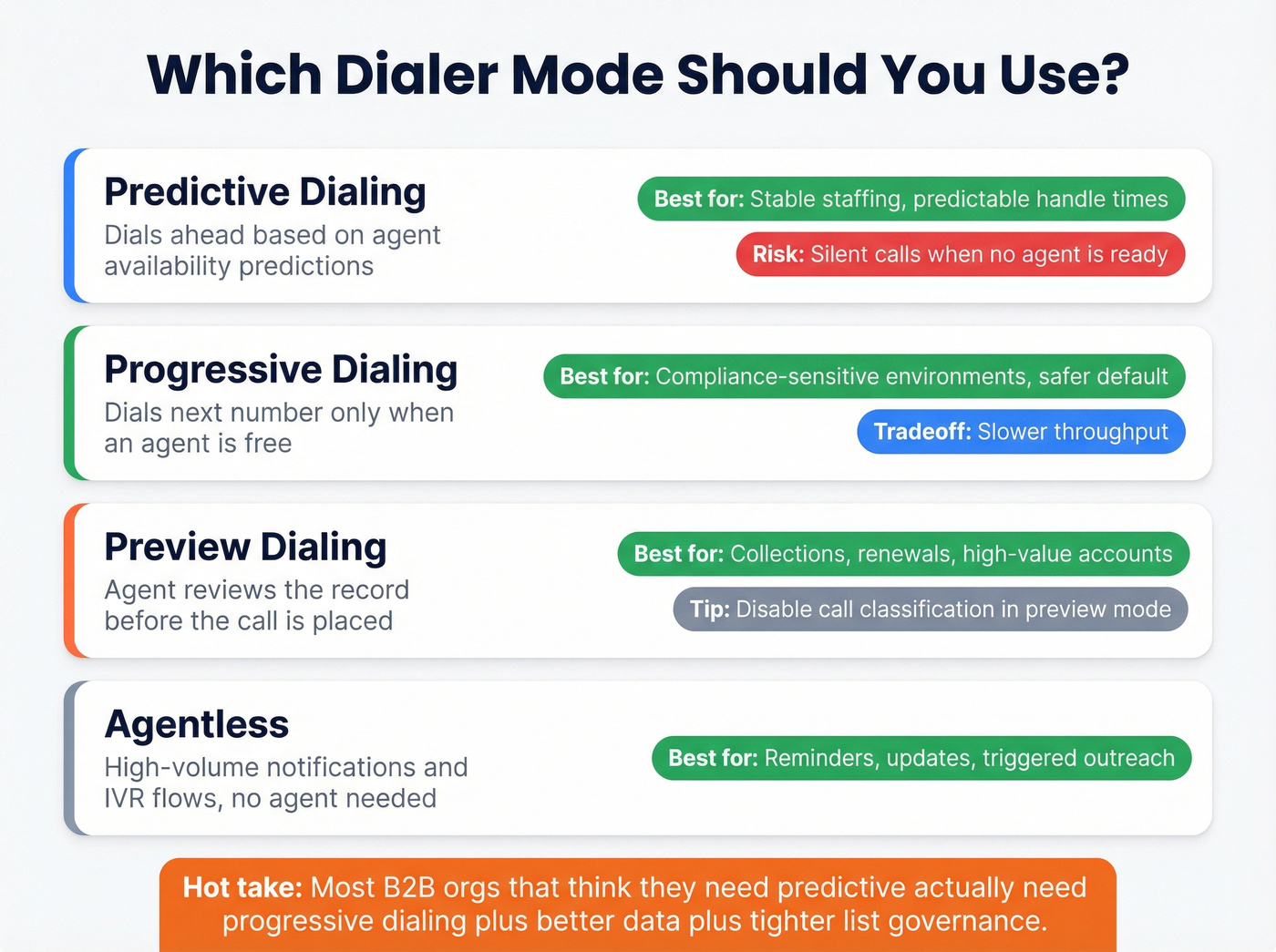
Skip predictive dialing if you can't staff consistently, you can't keep routing latency low, or you operate in UK/high-risk compliance environments. Progressive is slower, but it's clean.
Silent call mitigation (the unsexy fix that works)
Silent calls usually come from a timing gap: the call connects, but the system can't hand it to an agent fast enough.
Two fixes consistently matter:
- Staffing: make sure enough agents are logged into the queue for the campaign's dial rate.
- Flow latency: remove extra flow blocks between "Check call progress" and "Transfer to queue." A couple seconds is often the difference between a clean connect and a silent call.
We test this the same way every time: run the same list for 30 minutes, then change only one thing (staffing or flow steps). Silent calls respond fast when you fix the real bottleneck.
Dialer stability extras (worth copying)
These are the settings and habits that separate stable programs from chaotic ones:
- Reduce anything that increases connect-to-agent delay.
- Keep routing simple and fast.
- Govern attempt limits and time-zone windows tightly.
- Number-integrity throttles: a practical ops rule is no more than ~50 calls per area code/carrier/day from a given number pool to avoid looking like spam traffic.
That last point is boring.
It's also why it works.
AMD (answering machine detection) is a lever and a liability
In B2B, a huge share of outbound calls hit voicemail. AMD helps you avoid wasting agents on machines, but it's never perfect; accuracy commonly lands in the ~80-97%+ range depending on configuration and audio conditions.
Operationally, tune AMD conservatively if you're seeing false positives (machines marked as humans) because that's a fast path to awkward agent experiences. Tune it aggressively only if you can tolerate mistakes and you're optimizing for throughput, and don't pretend it isn't a compliance-sensitive setting.
Planning constraint you can't ignore: Amazon Pinpoint end of support (Oct 30, 2026)
AWS flags a real constraint: Amazon Pinpoint end of support is Oct 30, 2026, and outbound calling campaigns that rely on Pinpoint are impacted.
If your architecture uses Pinpoint as the record/campaign manager, you need a migration plan now, because the hard part isn't the dialer. It's ownership of the data model, suppression logic, and campaign state when multiple systems touch the same contact, and that gets messy fast once you're running more than one outbound motion.
If you want the operational dashboard side, AWS's Outbound campaigns performance dashboard doc is the right rabbit hole.
Outbound campaigns for SDR/BDR teams (multi-channel sequences)
SDR outbound is simpler than contact-center dialing, but it fails more often because teams underestimate deliverability and overestimate copy.
My bias: shorter is cleaner. Tight ICP, one strong reason to reach out, and a cadence that doesn't feel like harassment beats 12-step mega-sequences almost every time.
If you're planning outreach across multiple segments, treat each angle as its own small experiment with its own list, caps, and scoreboard.
Step-by-step execution (what actually works)
Step 1: Define the ICP like you mean it. Not "SaaS companies." More like: "Series B-D, 200-1,000 headcount, hiring in RevOps, using Salesforce, selling to mid-market."
Step 2: Build a list that's small enough to be relevant. Cohorts of 50 accounts/contacts per angle routinely outperform giant blasts because you can keep the message specific and the follow-up disciplined, especially in B2B where relevance beats volume.
Step 3: Pick one primary hook per campaign. Timeline hook, numbers hook, or problem hook. Don't mix three in one email. Your rep can't defend three angles on a live call anyway.
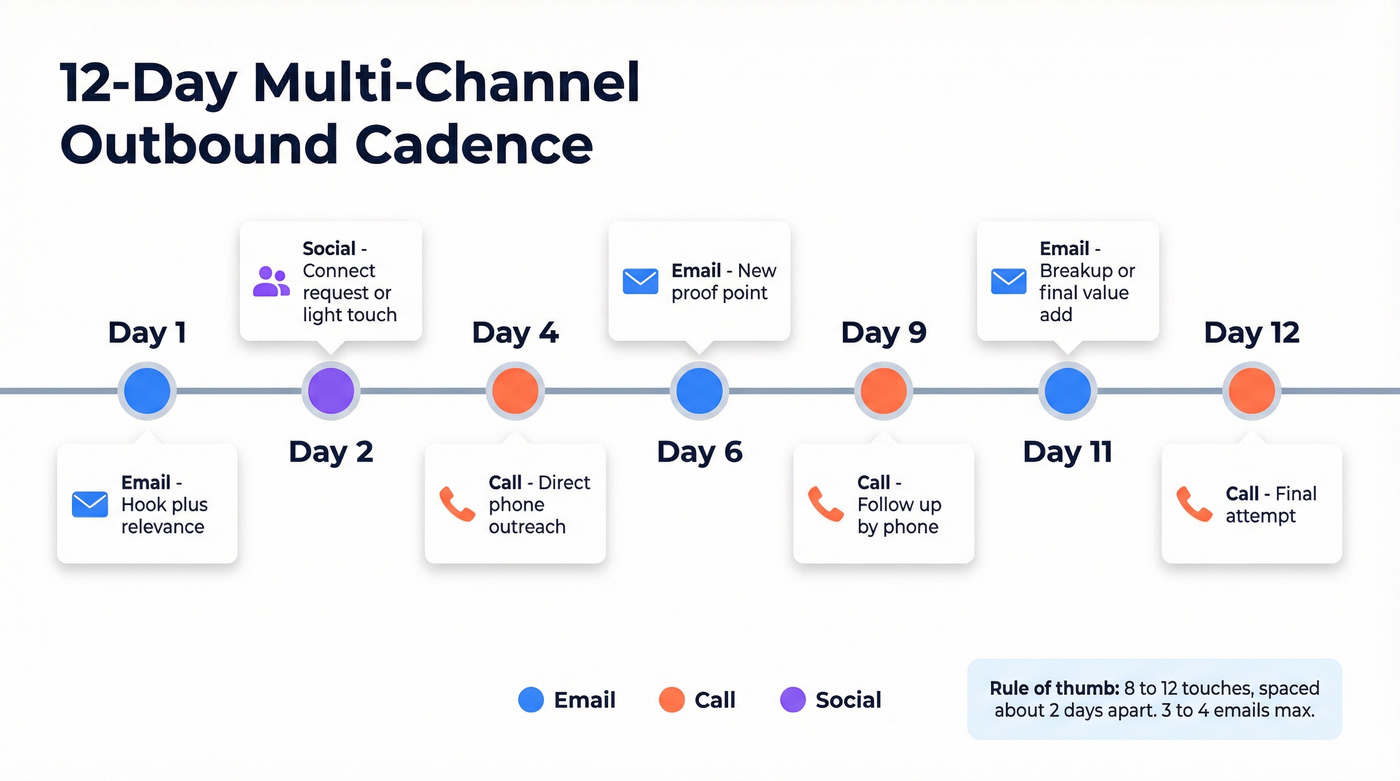
Step 4: Run a 12-day cadence with ~2-day spacing.
Rules of thumb that hold up: 8-12 touches total, spaced about 2 days apart (3 at most). (If you want more templates, see sales cadences.)
Step 5: Keep emails to 3-4 in most sequences.
Operators are blunt about this: 3-4 emails often beats 7-9 because deliverability and attention are finite. Calls and light social touches can carry the rest.
Step 6: Decide your "one metric that decides the next action."
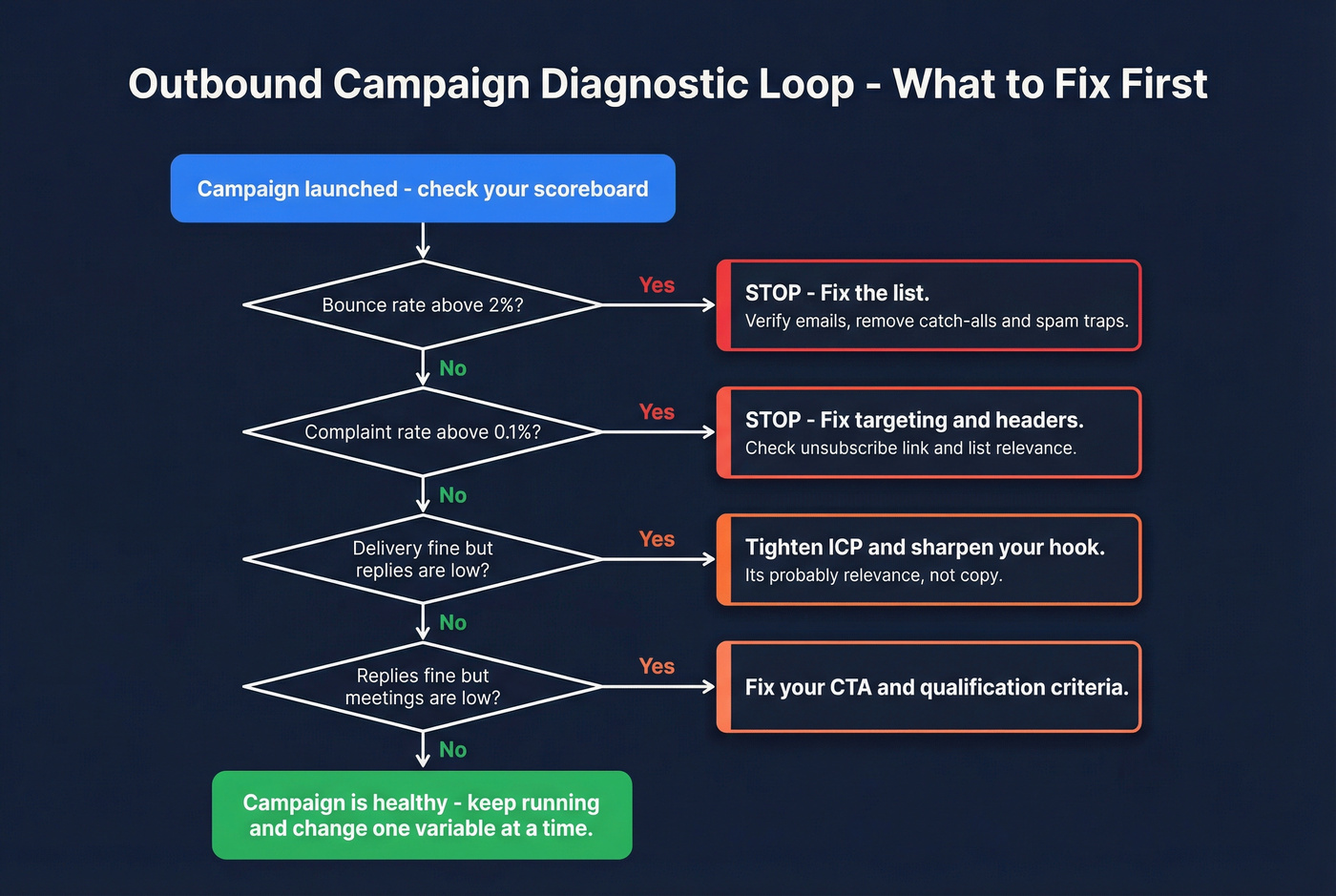
Use a simple control loop:
- If bounce >2% -> stop and fix the list.
- If complaints >0.1% -> stop and fix targeting + unsubscribe/headers.
- If delivery is fine but replies are low -> tighten ICP and hook.
- If replies are fine but meetings are low -> fix CTA and qualification.
Example cadence (12 days, multi-channel)
- Day 1: Email (hook + relevance)
- Day 2: Connect request / light touch
- Day 4: Call
- Day 6: Email follow-up (new proof point)
- Day 9: Call again (same angle, shorter)
- Day 12: Breakup email (permission + close loop)
Operator note: if you're running Outreach/Salesloft sequences fed by Sales Navigator lists, your bottleneck isn't "steps." It's whether the list's verified and your inboxes are warmed (see email warmup), and it hurts to pay SEP seat pricing while your data quietly sabotages performance.
Social touch reality check (so you don't overcount "multi-channel")
A practical heuristic from operators: 100 connection requests -> ~16 accepts -> ~3 replies. Social touches are great as a credibility layer, but they're not a volume engine. (More context: social selling statistics.)
Outbound metrics that actually matter (definitions + formulas)
Most teams track too many vanity metrics and not enough "can we even reach people" metrics.
Calling (contact-center grade)
- Connect Rate (Genesys): Connect Rate = live voice detected / total calls dialed
- Compliance Abandon Rate (Genesys): Calls that didn't reach an agent within your configured compliance threshold / calls subject to compliance abandon rate.
- True Abandon Rate (Genesys): Calls transferred to queue that never reached an agent (often the customer hung up).
- AHT (Average Handle Time): Talk + hold + after-call work.
Micro-diagnostics (what to do when a metric drops):
- Connect rate drops suddenly -> check carrier blocks/local presence changes, number reputation, and whether your list source changed this week.
- Abandon rate rises -> you're over-dialing for staffing/AHT, or routing latency increased (new flow step, new integration, new whisper).
- AHT rises -> your script's too long, your dispositioning's slow, or you're pushing complex offers to the wrong segment.
If you want the exact campaign view definitions, Genesys's Outbound campaign details view is a clean reference.
Why your progress bar lies (Genesys nuance that matters): campaign "progress" and "attempts remaining" can exclude records you thought were in play, like contacts with no callable number, contacts filtered out by DNC, and records that hit attempt limits or rules. Operationally, that means a campaign can look stuck at 70-80% even though the dialer's behaving correctly, and the fix isn't "dial faster." It's cleaning the list, adjusting callable fields, or revisiting attempt/time-zone settings.
Email deliverability (the math you should tattoo on your dashboard)
- Delivery rate: (Sent - Bounced) / Sent
- Bounce rate: Bounced / Sent
- Complaint rate: Complaints / Delivered
Operational thresholds that keep you out of trouble:
- Delivery: 95-98%+
- Bounce: <2%
- Complaints: <0.1% (1 per 1,000 delivered)
If you're above 2% bounces, stop sending and fix the list. Don't A/B test your way out of bad data.
Deliverability failure modes to watch:
- Catch-all domains that accept mail but never deliver it to a human inbox.
- Spam traps / honeypots that exist to catch sloppy list building.
- Suppression list gaps (opt-outs stored in one tool but not synced everywhere).
- Domain reputation drift from ramping volume too fast or sending to stale segments.
Benchmarks: what "good" looks like in 2026 (plan capacity)
Benchmarks aren't goals. They're capacity planning inputs.
Directional benchmarks compiled from outbound operators and published datasets (methodologies vary). Use them to sanity-check your model, not to promise your CEO a number you can't control.
Benchmarks table (directional, but useful)
| Channel | Metric | "Good" range |
|---|---|---|
| Cold calling | Connect rate | 5-12% |
| Power dialing | Dials/day | 400-750 |
| Power dialing | Connects/day | 30-60 |
| Cold email | Reply rate avg | 3-5.1% |
| Cold email | Reply rate top | 15-25% |
| Email hooks | Timeline | 10.01% / 2.34% |
| Email hooks | Numbers | 8.57% / 1.86% |
| Email hooks | Problem | 4.39% / 0.69% |
Hook rows are shown as reply % / meeting %.
The operator funnel (so you can forecast meetings/day)
A practical way to translate activity into outcomes:
- 400-750 dials/day -> 30-60 connects/day -> ~24% become quality conversations (real back-and-forth, not "call me later") -> ~20% of quality conversations convert to meetings -> ~2 meetings/day as a realistic planning number for one dial-heavy rep
If your plan assumes 8 meetings/day from one rep with average lists, your plan isn't aggressive. It's wrong.
What to do if you're below benchmark (fast diagnosis)
- Connect rate <5%: your data's stale, you're calling the wrong time zones, or you're missing mobiles/direct lines.
- Email reply <1%: deliverability's broken or your list's irrelevant.
- Reply is fine, meetings are low: your CTA is weak, you're targeting the wrong persona, or your "why now" doesn't hold up live.
Hard rule: don't buy AI personalization until bounce is under 2% and complaints are under 0.1%. AI can't repair domain reputation damage. It just helps you send bad mail faster.
One sequencing timing stat that's surprisingly practical: the "3-7-7" follow-up pattern captures 93% of replies by Day 10. Translation: if your campaign hasn't produced replies by then, it usually won't wake up on Day 21.
Deliverability + list hygiene (the part that makes results predictable)
Outbound gets predictable when you treat deliverability like production infrastructure.
A widely cited benchmark is ~22.5% annual email list decay. If you're running outreach off a list you built last quarter and never re-verified, you're paying for bounces and reputation damage, and you're training your team to blame "copy" for what is really a data problem. (Deeper dive: B2B contact data decay.)
Deliverability checklist (use/skip rules)
Use this if:
- You're sending cold email from new domains/inboxes.
- You're scaling volume week over week.
- You're mixing sources (forms, events, scraped lists, enrichment).
Skip this (or pause sending) if:
- Bounce rate's >2%.
- Complaint rate's >0.1%.
- Reply rate's <1% and you haven't audited deliverability.
Mini SOP: list hygiene + sending guardrails
Authenticate domains (non-negotiable). Bulk requirements made this table stakes: SPF, DKIM, DMARC. Add one-click unsubscribe and make sure it works across clients.
Set safe daily caps per inbox.
A safe limit: 40-50 emails per inbox per day for cold outbound. (More: email pacing and sending limits.)
- Ramp new inboxes.
A ramp schedule that works:
- Week 1: 10-20/day
- Week 2: 20-40/day
- Week 3: 40-60/day
- Week 4: 60-80/day
Verify before you send (and re-verify on a cadence). Weekly verification for high-velocity outbound; monthly at minimum. Suppress invalids, known traps, and anything you can't confidently deliver. (SOP: email verification list.)
Segment and throttle by performance. If one segment spikes complaints, isolate it. Don't burn the whole domain because one list source was dirty.
The cleanest workflow (data -> verify -> export -> sequence)
A workflow we've seen work across agencies and in-house SDR teams looks like this: build a tight list, verify in real time (including catch-all handling), export only valid contacts, then run your sequence with caps and suppression syncing turned on; it's not glamorous, but it stops the slow bleed where one bad CSV quietly wrecks deliverability for the whole quarter.
Practical workflow I recommend:
- Build your target list using filters (role, industry, headcount, intent topics, technographics).
- Run real-time verification so you only keep valid addresses.
- Export directly to your outbound tool or CRM, then launch the sequence with daily caps.
If you want the relevant pages:
- Data enrichment (CRM/CSV): https://prospeo.io/b2b-data-enrichment
- Native integrations: https://prospeo.io/integrations
Every cadence in this playbook - dialer or sequence - depends on one thing: verified contacts. Prospeo gives you 98% accurate emails and 125M+ verified mobiles with a 30% pickup rate, so your progressive dialer connects and your sequences land in primary inboxes.
Build outbound campaigns on data that actually connects. Starting at $0.01 per email.
Compliance-by-design (US checklist + UK sidebar)
Compliance isn't a legal memo. It's an operating system: settings, logs, suppression lists, and SLAs.
US checklist (TSR/TCPA reality, operationalized)
Checklist A: calling operations (FTC TSR backbone)
- Calling time restrictions: only call within allowed hours (commonly 8 a.m. to 9 p.m. recipient local time). Build time-zone logic into the dialer, not a rep's brain.
- Caller ID transmission: make sure caller ID's sent and consistent.
- Disclosures + no misrepresentation: train scripts and QA them.
- Recordkeeping: keep required records for 2 years (campaigns, scripts, authorizations, etc.).
- Abandoned calls safe harbor concept: design pacing to avoid abandoned calls; predictive dialing needs extra care.
Primary reference: the FTC's Telemarketing Sales Rule compliance guide.
Checklist B: suppression + consent (where teams actually get hurt)
- National DNC scrubbing: scrub lists every 31 days at minimum. Automate it.
- Internal DNC: honor opt-outs immediately and permanently unless re-consented.
- Consent taxonomy:
- PEWC (Prior Express Written Consent) for automated/prerecorded marketing calls/texts to cell phones.
- PEC (Prior Express Consent) for automated/prerecorded informational messages.
Checklist C: opt-out SLA mechanics (make it real, not theoretical) If you want compliance to survive tool sprawl, implement it like an incident workflow:
One suppression list, many destinations: maintain a canonical suppression table (email + phone + domain + company) and sync it to your dialer, SEP, CRM, and any enrichment/list tools.
Event-based updates: treat "STOP," unsubscribe clicks, and verbal opt-outs as events that write to the suppression table immediately.
Fast propagation: push suppression updates on a schedule that matches your risk (hourly is a solid default for high-volume teams).
Proof you did it: log timestamp, source system, identifier (email/phone), and the systems updated. If you can't prove suppression, you didn't suppress.
Consent revocation (FCC rule effective April 11, 2026): treat opt-out as a system event with an SLA. If someone revokes consent, your workflow must stop calls/texts fast across every tool, not just one dialer.
If you need the canonical anchor for revocation timing, the FCC's revocation of consent notice is the one to bookmark.
UK sidebar (Ofcom: silent/abandoned calls are "misuse")
UK teams get nervous here for a reason: Ofcom treats silent and abandoned calls as misuse, and repeated incidents can become persistent misuse.
Operational implications:
- Don't over-dial beyond agent capacity.
- Monitor for silent-call patterns and fix routing latency.
- Treat AMD and predictive pacing as compliance-sensitive settings, not "performance tweaks."
Enforcement risk's real: Ofcom penalties can go up to GBP2M (current as of the Jan 2026 refresher). The refresher is worth reading end-to-end: silent and abandoned calls guidance.
I hate giving this advice because everyone wants more throughput, but I've watched UK ops teams slow down dialing (and accept lower volume) because the downside of getting this wrong is existential.
Tooling taxonomy + cost drivers (so you don't build on the wrong stack)
Outbound fails when you build on the wrong layer.
The three layers (and what each is for)
- CRM: system of record. Not where you should run high-volume cold outreach.
- SEP (Sales Engagement Platform): sequences, tasks, multi-channel touches, rep workflow. This is where SDR outbound lives.
- Contact-center platform (CCaaS): dialer modes, queues, compliance pacing, agent states. This is where true outbound dialing campaigns live. (If you're evaluating vendors, start with outbound calling software.)
AUP/suspension risk is the hidden landmine: many CRMs and marketing automation tools restrict cold outreach and purchased lists. If you blast cold outbound from the wrong system, you can get suspended at the worst possible time.
Cost drivers (what you'll actually pay)
- Amazon Connect pricing (voice): base voice usage is $0.038/min, but outbound campaigns voice usage is $0.045/min (plus telco communication charges). AWS lists this on their Amazon Connect pricing page.
- SEP seat pricing (typical market ranges; varies by contract and modules):
- SMB: $100-250/user/mo
- Enterprise: $250-500+/user/mo
- Dialer add-ons: power dialing, local presence, recording, AMD, compliance modules often add meaningful cost.
If you're cost modeling, do it like RevOps: price per seat + price per minute + price per verified contact. That's the real outbound unit economics.
FAQ
What's the difference between an outbound dialing campaign and a sales outbound sequence?
An outbound dialing campaign is a contact-center workflow where a dialer automatically calls through lists (predictive/progressive/preview/agentless) and tracks metrics like connect and abandon rates. A sales outbound sequence is an SDR/BDR cadence across email + calls + social touches designed to book meetings, where deliverability, reply rate, and meeting conversion matter most.
What metrics should I track for outbound calling campaigns?
Track connect rate (live voice detected/total calls), compliance abandon rate, true abandon rate, AHT, and meeting conversion from quality conversations. These tell you whether your dialer pacing, staffing, and list quality are working. If connect rate's weak, fix data and timing before you change scripts or add more call steps.
What bounce rate and complaint rate are safe for cold email?
A safe cold email bounce rate is under 2% and a safe complaint rate is under 0.1% (1 complaint per 1,000 delivered). Delivery rate should land at 95-98%+ as a baseline. If you're above those thresholds, pause sending and fix list hygiene and authentication before you scale volume.
How do I reduce bounces before launching an outbound campaign?
Reduce bounces by verifying emails before sending, re-verifying weekly or monthly as lists decay, and only exporting valid addresses into your sequencer. Tools like Prospeo make this straightforward: real-time verification with 98% email accuracy plus a 7-day refresh cycle keeps your outbound list clean as you scale.
Summary: make outbound campaigns boring (and you'll win)
The teams that win don't hack outreach. They make it boring: verified data, stable deliverability, compliance baked into settings, a cadence reps can actually run, and a scoreboard that tells the truth.
Do that, and outbound campaigns stop feeling random and start behaving like a system you can scale.