

AI Lead Categorization: From Raw Replies to Actionable Labels
You sent 4,200 cold emails last month. 312 people replied. Now you're staring at an inbox where "Sure, let's chat Tuesday" sits next to "Remove me from your list" and "I'm OOO until February." A 5-10% reply rate is solid, but 312 unsorted replies is just noise until each one gets a label and a next step.
That's what AI lead categorization solves. Not a score. Not a probability. A discrete label that tells your team exactly what to do with each reply, right now.
The Short Version
Labels, not scores. Interested, Out of Office, Not Interested - each maps to a specific action. Keep it to 7 categories max, use a tool that classifies replies automatically, and feed it clean upstream data so you actually generate replies worth categorizing. Expect 90-97% accuracy on clean replies. Plan for 5-15% manual review on ambiguous ones.
What Is AI Lead Categorization?
AI lead categorization uses machine learning - typically an LLM - to assign a discrete action label to each inbound lead signal. In outbound, that signal is usually a reply. In inbound, it's a behavioral pattern bucketed into a tier.
Here's the thing about lead scoring: a score of 73 means nothing until it maps to a category that triggers an action. "73" doesn't tell a rep whether to call, nurture, or remove. "Interested" does. Classification is the most popular data mining model across 44 academic studies on lead scoring, and for good reason. Labels drive workflows. Numbers sit in dashboards.
Two Types of Categorization
Reply Classification for Outbound
This is where most outbound teams encounter AI categorization first. Cold email platforms like Smartlead and Instantly parse replies and assign a label - Interested, Not Interested, OOO, and so on. It solves an immediate, high-volume problem: sorting hundreds of responses into actionable buckets without manual triage.
Setup in Smartlead is straightforward. Enable AI categorization in campaign settings, pick your categories, and replies get classified automatically. The Pro plan caps you at 5 categories; the Custom plan allows up to 10 but requires a GPT-4 API key to go beyond 5. Instantly takes a different approach - it recommends tracking positive, neutral, and negative replies and offers an AI Reply Agent that can respond in under five minutes. In our experience, Smartlead gives you more granular control over category definitions, while Instantly gets you running faster with less configuration.
Score-to-Tier for CRM and Inbound
CRM platforms convert numeric scores into discrete priority tiers - categorization by another name. HubSpot predictive scoring outputs a likelihood to close (0-100%) and a priority tier (Very High, High, Medium, Low). Its lead pipeline automation can move leads through stages automatically. Salesforce Einstein assigns a 0-100 behavior score refreshing every four hours, and teams set threshold rules to bucket leads into action tiers.
Both come with real constraints. HubSpot predictive scoring is Enterprise-only at roughly $150/seat/mo. Einstein needs about a year of engagement data and at least 20 prospects linked to opportunities before scores become meaningful. Skip these if you're an early-stage team without that data history.

Your AI categorization engine is only as good as the replies it receives. At a 35% bounce rate, most of your leads never get categorized at all. Prospeo's 98% email accuracy and 7-day data refresh mean more emails land, more replies come back, and your categorization AI has real signals to work with.
Stop categorizing silence. Start with verified contacts.
The 7-Category Reply Taxonomy
You don't need 15 categories. You need enough to trigger distinct workflows without creating so many buckets that the AI starts misclassifying. Seven covers virtually every cold email reply type.
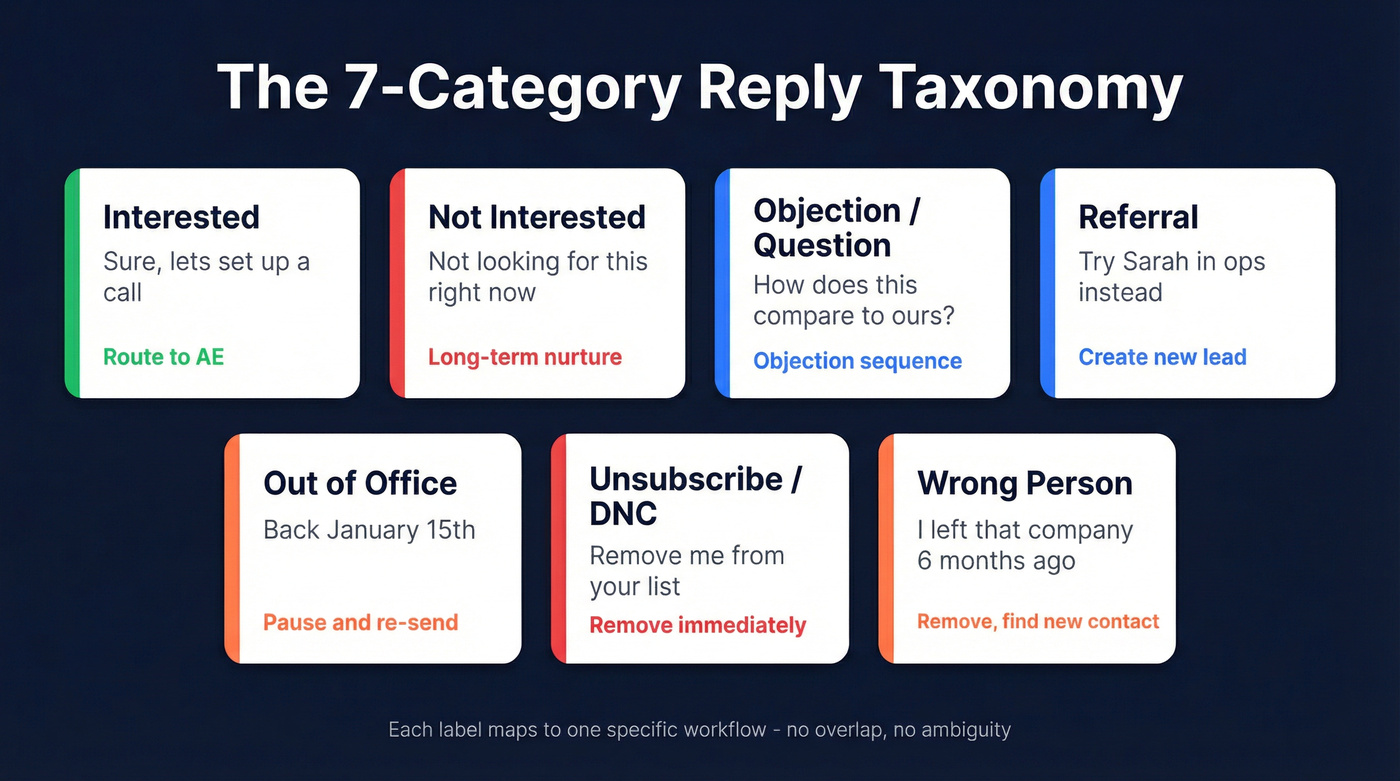
| Category | Example Reply | Recommended Action |
|---|---|---|
| Interested | "Sure, let's set up a call next week." | Route to AE immediately |
| Not Interested | "We're not looking for this right now." | Move to long-term nurture |
| Objection/Question | "How does this compare to what we use?" | Objection-handling sequence |
| Referral | "I'm not the right person - try Sarah in ops." | Create new lead, credit referrer |
| Out of Office | "I'll be back January 15th." | Pause, re-send after return date |
| Unsubscribe/DNC | "Please remove me from your list." | Remove immediately, flag DNC |
| Wrong Person | "I left that company 6 months ago." | Remove, find new contact |
Smartlead's Pro plan limits you to 5 of these, so you'll likely merge Referral and Wrong Person into a single "Re-route" bucket. Instantly's positive/neutral/negative framework is simpler - useful for dashboards, but you'll want sub-labels if you're running sequences off the back of it.
The taxonomy only works if each category has a non-overlapping definition and a clear automation trigger. "Not Interested" and "Objection" look similar on the surface, but one goes to nurture and the other gets a human reply. Define the boundary before you turn on the AI.
Accuracy and Manual Review
Smartlead advertises 99.9% accuracy for its categorization. That number is aspirational.
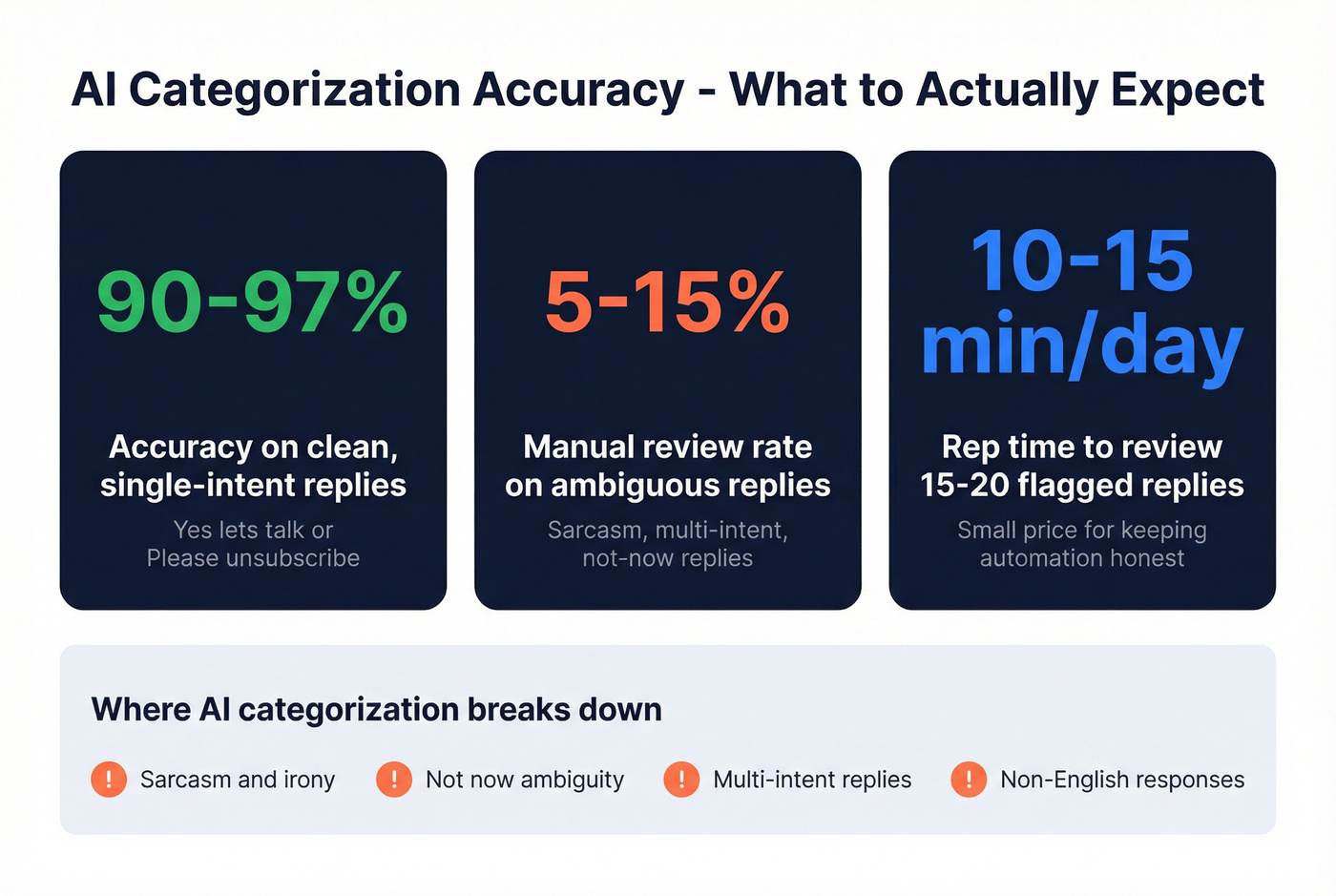
On clean, single-intent replies - "Yes, let's talk" or "Please unsubscribe" - accuracy runs 90-97%. That's genuinely good. Where it breaks down: sarcasm ("Oh sure, I'd love another cold email"), "not now" ambiguity, multi-intent replies ("I'm not the right person but we might need this - forward to my colleague"), and non-English responses. These edge cases produce the 5-15% manual review rate we've seen across teams.
Build a manual review queue. Route anything the AI flags with low confidence into a separate inbox or Slack channel. A rep spending 10 minutes a day reviewing 15-20 ambiguous replies is a small price for keeping your automation honest. The consensus on r/coldemail is that teams who skip this step end up routing hot leads into nurture sequences by accident - and they don't find out for weeks.
Data Quality Decides Everything
Here's a number that should frustrate you: global inbox placement averages about 83.1%. Roughly 1 in 6 emails never reach the inbox. If your list hygiene is poor, bounces wipe out even more of your delivered volume.
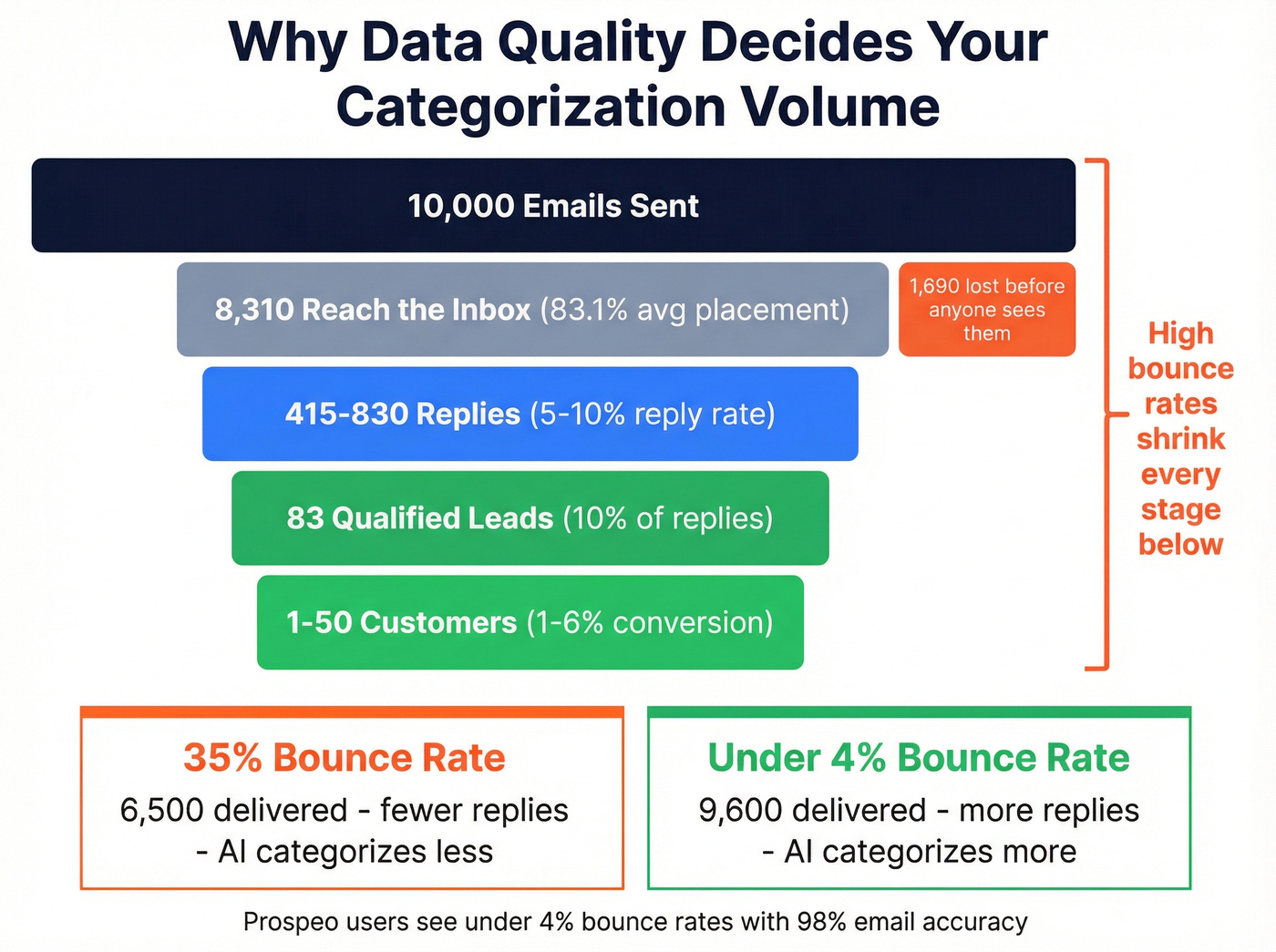
The funnel math is unforgiving. Only about 10% of prospects convert to qualified leads, and just 1-6% of leads become customers. Every bounced email is a reply that never happened - a lead your AI never got to categorize. You can have the most sophisticated categorization engine in the world, and it won't matter if half your emails are bouncing before they reach anyone.
We've seen this play out firsthand. One customer, Meritt, was running a 35% bounce rate before switching to Prospeo for verified contacts. After the switch, bounces dropped under 4%, which meant dramatically more replies actually hitting the categorization engine. That's the upstream fix most teams overlook - 98% email accuracy and a 7-day data refresh cycle, with native integrations into Smartlead and Instantly so verified contacts flow straight into campaigns.

Tools for AI Lead Categorization
Let's be honest: most teams under 5,000 sends per month don't need a sophisticated categorization setup. Instantly's sentiment buckets plus a 10-minute daily manual review will outperform an over-engineered Smartlead taxonomy that nobody maintains. Scale the tooling to match your volume.
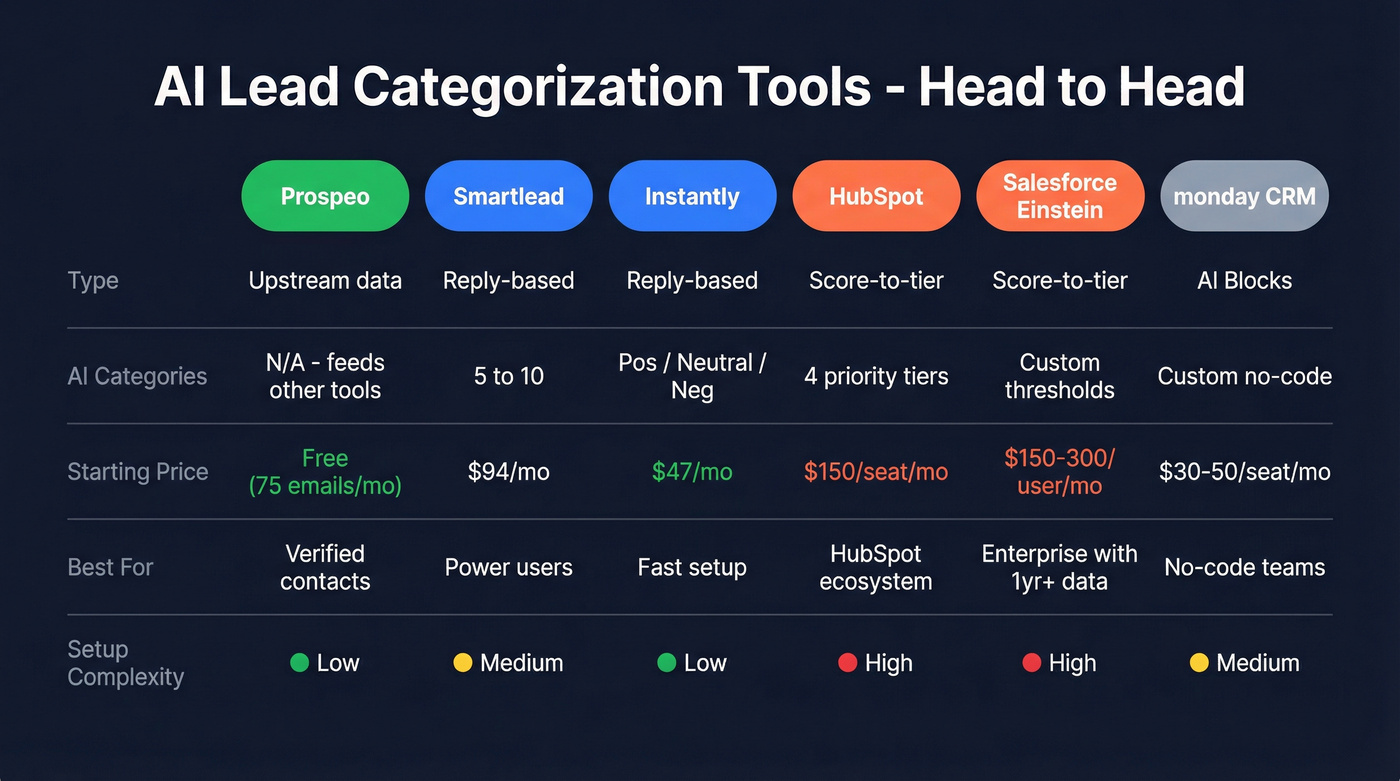
| Tool | Type | AI Categories | Starting Price | Best For |
|---|---|---|---|---|
| Prospeo | Upstream data quality | N/A (feeds categorization tools) | Free (75 emails/mo) | Ensuring replies to categorize |
| Smartlead | Reply-based | 5 (Pro) / 10 (Custom) | $94/mo (Pro) | Reply classification control |
| Instantly | Reply-based | Pos/Neutral/Neg + AI Reply | $47/mo (Growth) | Fast setup, lower cost |
| HubSpot | Score-to-tier | 4 priority tiers | ~$150/seat/mo (Enterprise) | HubSpot ecosystem teams |
| Salesforce Einstein | Score-to-tier | Custom thresholds on 0-100 | ~$150-300/user/mo | Enterprise with 1yr+ data |
| monday CRM | AI Blocks | Custom via no-code AI | ~$30-50/seat/mo | No-code pipeline teams |
Smartlead is the power-user pick. The Pro plan at $94/mo gives you 5 configurable categories and 30,000 active leads. The Custom plan unlocks 10 categories but requires your own GPT-4 API key, which adds variable cost depending on reply volume.
Instantly is where you start if you want speed over configurability. At $47/mo for the Growth plan (1,000 contacts, 5,000 emails), it's the cheapest entry point. The AI Reply Agent fires back responses within minutes of a positive reply. You get less control over category definitions, but for most teams that's a feature, not a bug.
HubSpot and Salesforce Einstein handle CRM-side categorization. Neither is a cold email reply classifier - they're inbound/lifecycle tools with enterprise pricing to match. For teams already deep in those ecosystems, they work. For everyone else, they're overkill.
monday CRM offers no-code AI Blocks for custom categorization logic. Worth watching for teams already running their pipeline in monday.
Meritt cut their bounce rate from 35% to under 4% with Prospeo - tripling their pipeline from $100K to $300K/week. More delivered emails means more replies to categorize, and more replies means your 7-category taxonomy actually drives revenue instead of sorting noise.
Every bounce is a lead your AI never gets to classify.
FAQ
What's the difference between lead scoring and lead categorization?
Lead scoring assigns a numeric value based on engagement signals. Lead categorization assigns a discrete label like "Interested" that directly triggers a workflow. Scoring tells you how warm a lead is; categorization tells you what to do next. The best systems use both - scores feed into category thresholds.
How many reply categories should I use?
Start with 7 or fewer. More categories increase misclassification risk because boundaries between labels get blurry. The taxonomy above - Interested, Not Interested, Objection, Referral, OOO, Unsubscribe, Wrong Person - covers virtually all cold email reply types.
How do I improve classification accuracy?
Start with clean contact data. Verified emails reduce bounces and increase the reply volume your AI actually classifies. Keep categories clearly defined with non-overlapping criteria, and build a manual review queue for the 5-15% of ambiguous replies that'll trip up any model.
Can I use AI lead categorization without a cold email platform?
Yes. Any LLM with API access (GPT-4, Claude) can classify reply text against a defined taxonomy. You'd build a lightweight webhook that intercepts inbound replies, sends the body to the model with your category definitions as a system prompt, and routes the labeled output to your CRM or Slack. It's more work than Smartlead's built-in toggle, but it gives you full control over prompt logic and category boundaries.