How to Start an Email Professionally - Greetings, Openers & What to Avoid
The average professional receives 121 emails a day. That's 121 chances to make an impression - or 121 chances to get skimmed, ignored, and deleted. Knowing how to start an email professionally goes beyond picking a greeting. Your first sentence is what earns the read. It's the preview snippet in Gmail and Outlook, often taking up more screen real estate than the subject line itself, and if that snippet is bland or generic, nothing else in your email matters because nobody's going to see it.
69% of recipients mark emails as spam based solely on the subject line. But the ones who do open? They're scanning your first sentence fast. That snippet is your audition.
Quick Decision Framework
Pick the greeting that matches your situation, then spend your real energy on the opening line.
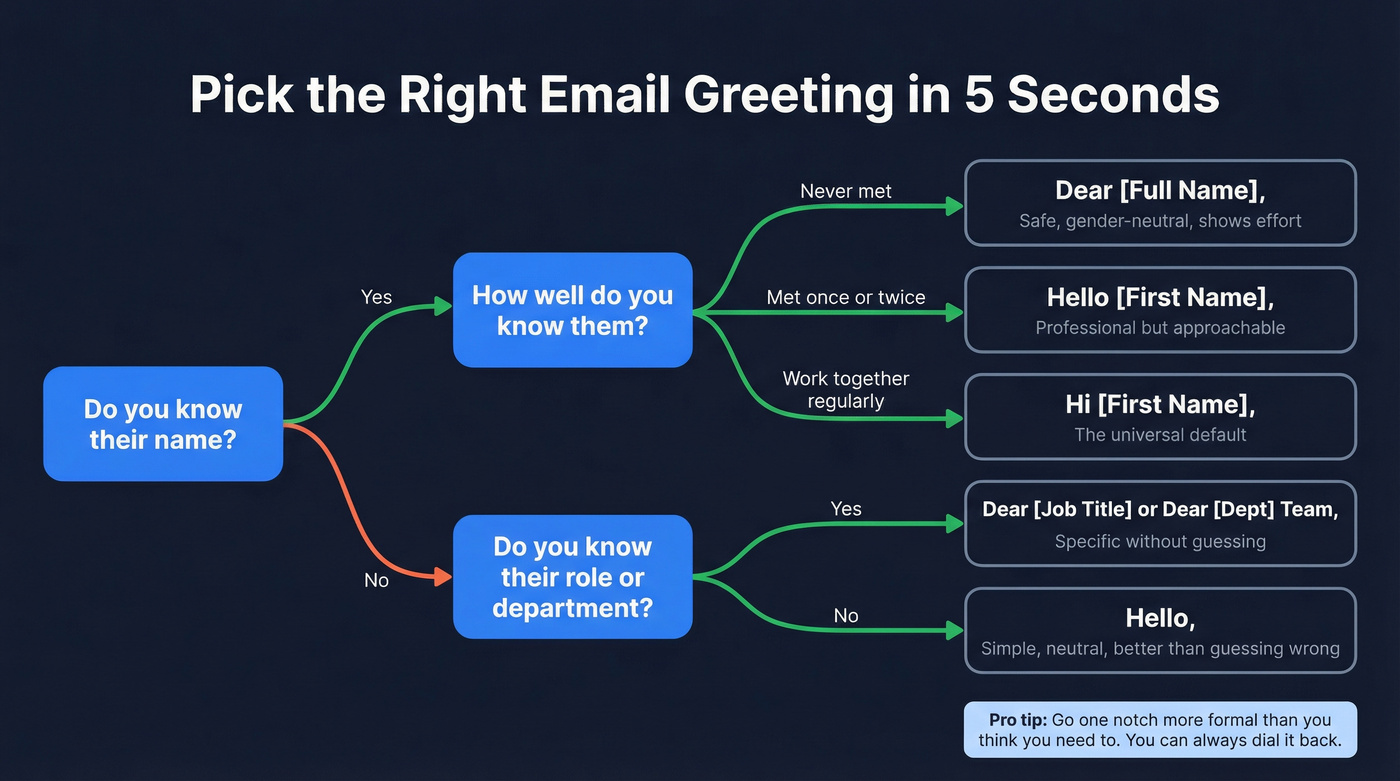
| Situation | Greeting | Why |
|---|---|---|
| Know them well | Hi [First Name], | Warm, efficient, expected |
| First contact, professional | Dear [Full Name], | Gender-neutral, shows effort |
| Senior / formal context | Dear [Title + Last Name], | Signals respect for hierarchy |
| Don't know their name | Dear [Department] Team, | Better than guessing wrong |
| Group / team email | Hi everyone, | Inclusive, clean |
| Cold outreach | Hi [First Name], | Pair with observation-based opener |
One rule that's never steered us wrong: go one notch more formal than you think you need to. You can always dial it back in the second email. You can't undo a "Hey dude" to a VP you've never met.
The greeting matters. The first sentence after it determines whether someone keeps reading.
Professional Email Greetings by Scenario
Formal Greetings
Use these for first contact with senior stakeholders, job applications, academic requests, or anyone you'd address as "Dr." or "Professor" in person.
- Dear Dr. [Last Name], - academia, medicine, any doctoral-title context
- Dear [Full Name], - the safest formal option when you're unsure about titles or gender
- Dear Professor [Last Name], - academic outreach specifically
- Dear Hiring Manager, - job applications when you can't find a name
- Dear [Title] [Last Name], - when you know their role
Miriam Posner's guidance applies here: when requesting help from an authority, default to the most formal form of address available. You can always loosen up once they reply with "Call me Sarah."
Semi-Formal Greetings
These work for colleagues you've met, warm introductions, and ongoing professional relationships where "Dear" would feel stiff.
- Hello [First Name], - professional but approachable
- Good morning [First Name], - adds warmth, but watch time zones
- Hi [First Name], - increasingly the default in most industries
Semi-formal is the sweet spot for most professional emails. It signals competence without pretension. One mismatch to avoid: don't pair "Hello" with a full name. "Hello John Smith" reads awkwardly - use "Dear John Smith" for formal or "Hi John" for semi-formal. Mixing registers in a single greeting is the email equivalent of wearing a tuxedo jacket with gym shorts.
Casual / Internal Greetings
Reserve these for teammates, established working relationships, and companies where Slack culture has bled into email.
- Hi [First Name], - the universal safe casual option
- Hey [First Name], - fine for close colleagues, risky for anyone external
- Hi team, - quick internal updates
"Hey" is a judgment call. In a startup where the CEO signs off with emoji, it's fine. In a law firm or bank, it reads as careless.
Unknown Recipients
Most people default to "To Whom It May Concern" here. Don't.
- Dear [Full Name], - you can usually find it with two minutes of research
- Dear [Job Title], - "Dear Head of Marketing," works when you know the role
- Dear [Department] Team, - specific enough without guessing
- Hello, - simple, neutral, better than guessing wrong
Never assume gendered honorifics. If you're unsure about gender, use their full name. "Dear Alex Morgan" is respectful and avoids the minefield entirely. Skip "Dear Sir or Madam" - it's a relic. Even BetterUp's guide lists it as a greeting to avoid.
Group & Team Emails
- Hi everyone, - inclusive, clean, works in any context
- Hello team, - slightly more formal, good for cross-functional groups
- Hi all, - quick and neutral
Skip "Hi guys." It's increasingly avoided in professional contexts - not because it's offensive in every setting, but because "Hi everyone" costs you nothing and doesn't risk alienating anyone.
Opening Lines That Earn the Read
Your first sentence doubles as the inbox snippet. In Gmail and Outlook, it sits right next to the subject line - sometimes with even more screen real estate. This is where most people fall short.
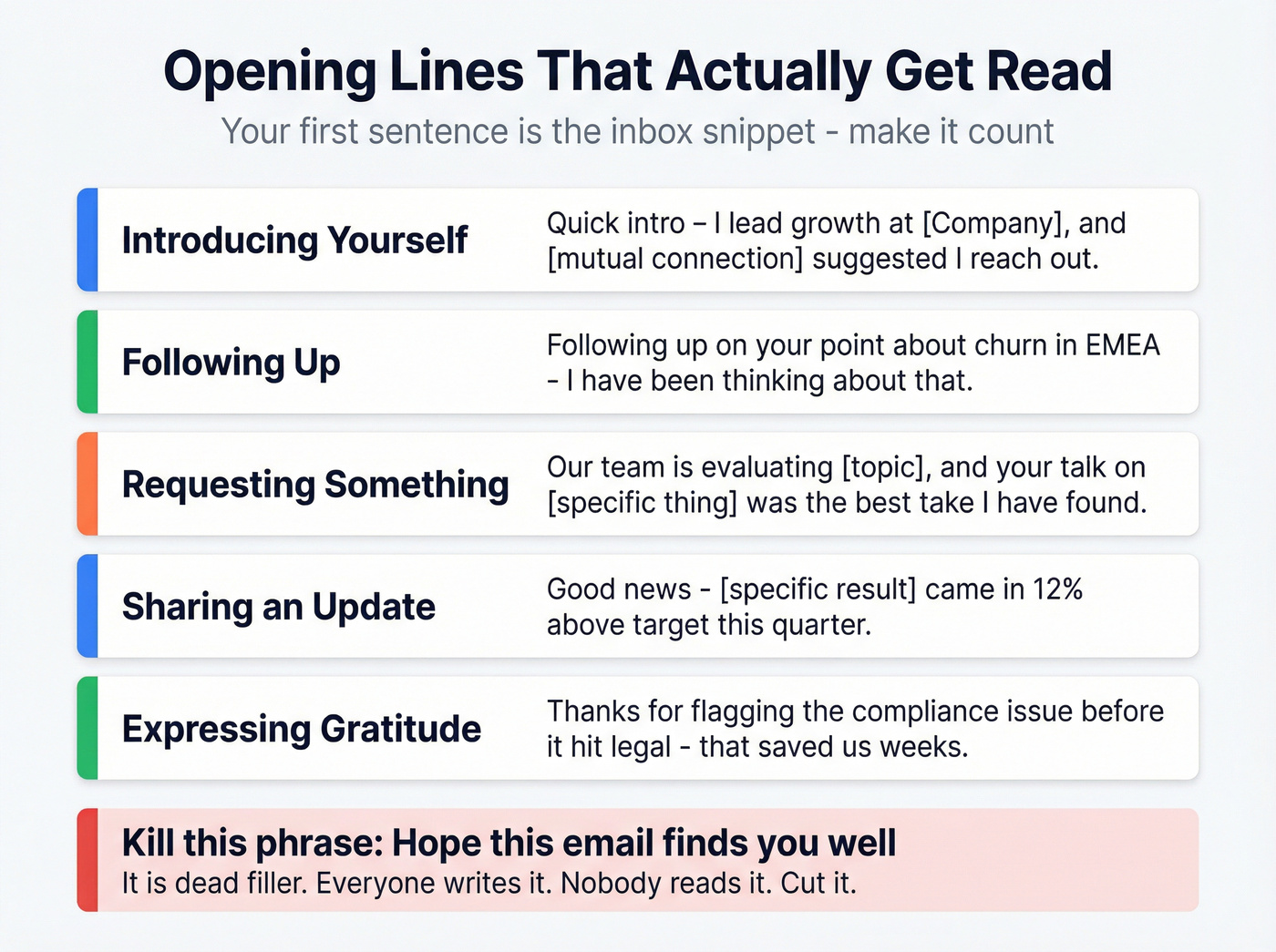
Introducing Yourself
- "I'm [Name], [Role] at [Company] - we help [specific outcome relevant to them]."
- "Quick intro: I lead [function] at [Company], and [mutual connection] suggested I reach out."
Skip the "My name is..." preamble. Lead with context the reader cares about.
Following Up
- "Following up on our conversation at [event] last week - specifically your point about [topic]."
- "You mentioned [specific detail] when we spoke on [date]. I've been thinking about that."
The more specific you are, the more likely they'll remember you. "Following up on our chat" is forgettable. "Following up on your point about churn in EMEA" is not.
Requesting Something
- "I'm working on [project] and could use your perspective on [specific question] - would a 15-minute call next week work?"
- "Our team is evaluating [topic], and your [article/talk/work] on [specific thing] was the best take I've found."
Lead with context, not the ask. People are more generous when they understand why you're asking.
Sharing an Update
- "Good news - [specific result] came in 12% above target this quarter."
- "Quick update: the [project] launch is confirmed for March 15."
Expressing Gratitude
- "Your feedback on the Q3 deck directly shaped how we restructured the pricing section - thank you."
- "Thanks for connecting me with [Name] - we've already scheduled a follow-up."
Specific gratitude beats generic gratitude every time. "Thanks for your help" is noise. "Thanks for flagging the compliance issue before it hit legal" is memorable.
Here's the thing about "Hope this email finds you well" - it's dead filler. Everyone writes it. Nobody means it. Nobody reads it. It's the email equivalent of elevator small talk: it takes up space without earning attention. Cut it and jump straight to something the reader actually cares about.
Cold Email Openers That Work
Cold email is a different animal. The recipient has zero context, zero relationship, and zero reason to keep reading. You've got roughly 6 seconds to earn their attention once they open.
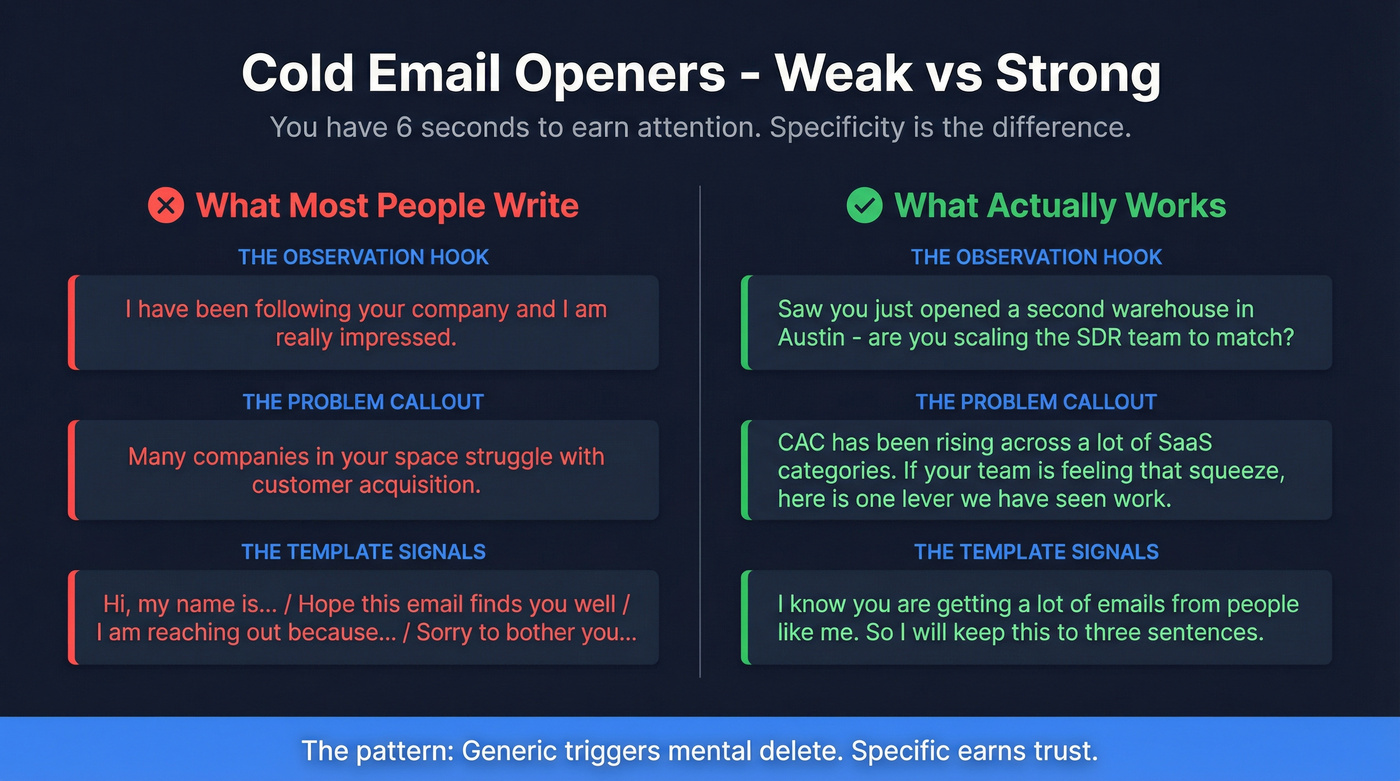
The Specific-Observation Hook
In our experience testing thousands of cold emails across client campaigns, this outperforms every other opener by a wide margin. Generic flattery like "Love what you're building!" is transparent. Specificity earns trust.
Weak: "I've been following your company and I'm really impressed."
Strong: "Saw you just opened a second warehouse in Austin - are you scaling the SDR team to match, or keeping it lean?"
The strong version shows you know something real. That's the whole difference.
The Problem Callout
Reference a specific metric or challenge their company likely faces.
Weak: "Many companies in your space struggle with customer acquisition."
Strong: "CAC has been rising across a lot of SaaS categories. If your team's feeling that squeeze, here's one lever we've seen work."
The Competitor Intelligence Angle
"Noticed [competitor] just launched their enterprise tier last month - are you seeing pressure to respond on pricing?"
This works because it's relevant, timely, and shows you understand their market. It creates urgency without being pushy.
The Vendor Fatigue Disruptor
"I know you're getting a lot of emails from people like me. So I'll keep this to three sentences."
Acknowledging the noise is disarming. Then you actually have to deliver on the brevity promise.

What NOT to say in a cold email opener: "Hi, my name is..." / "Hope this email finds you well" / "I'm reaching out because..." / "Sorry to bother you..." These are template signals. The recipient has seen them a thousand times, and they trigger an instant mental delete.
Let's be honest though - the best cold email opener is worthless if it bounces. Before you write a word, verify the address. Prospeo's email finder checks emails in real time with 98% accuracy, so your carefully crafted opener actually reaches someone. That's step zero. (If you're comparing options, see our roundup of cold email marketing tools.)

You just learned how to craft the perfect professional opener. But even the best first sentence is wasted on a bad email address. Prospeo gives you 98% verified emails from 300M+ profiles - so your carefully written opener actually lands in the right inbox.
Stop perfecting emails that bounce. Start sending to verified contacts.
Emailing International Recipients
Over 250 billion emails are sent daily. A huge chunk cross borders, time zones, and cultural norms. As Kristina Laliberte of Talaera told Business.com: "Missteps in etiquette can slow down decision-making and hinder progress." That's a diplomatic way of saying one wrong greeting can tank a deal.
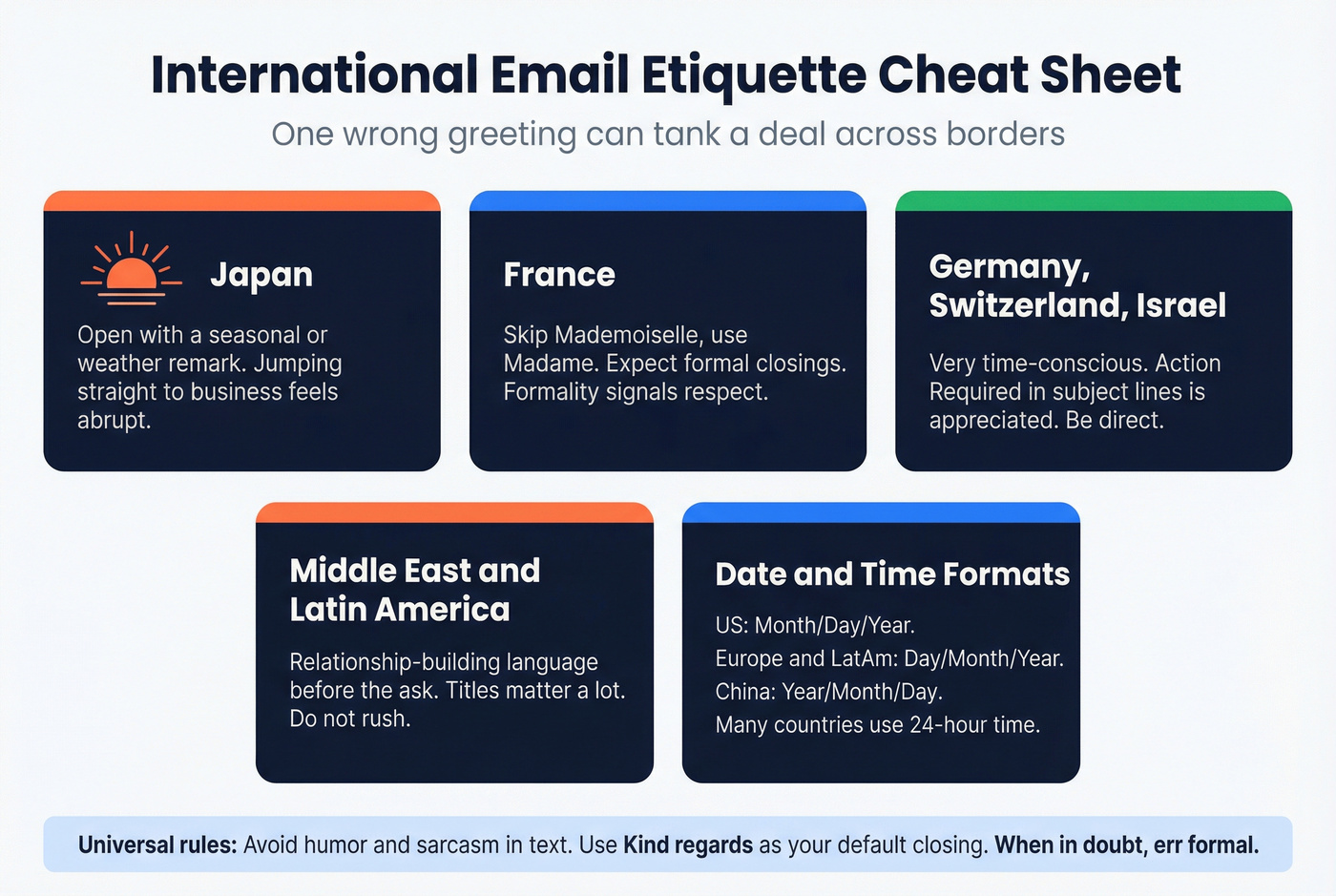
| Region | Key Norm |
|---|---|
| Japan | Open with a seasonal or weather remark; jumping straight to business feels abrupt |
| France | "Mademoiselle" is phased out - use "Madame"; expect formal closings |
| Germany / Switzerland / Israel | Time-conscious; "Action Required" in subject lines is appreciated |
| Middle East / LatAm | Relationship-building language before the ask; titles matter |
| Date/time formats | US: Month/Day/Year. Most of Europe/LatAm: Day/Month/Year. China: Year/Month/Day. Many countries use 24-hour time |
A few universal rules for cross-cultural emails: avoid humor and sarcasm (they don't translate well in text), use "Kind regards" or "Best regards" as your default closing, and be careful with "Good morning" if you're not sure what time zone the recipient is in. When in doubt, err formal. A slightly-too-formal email is charming. A too-casual one is disrespectful.
Subject Line Basics
Your subject line is the gatekeeper. 64% of recipients decide to open based on subject line quality alone.
- Personalized subject lines hit a 46% open rate vs. 35% without - a 31% lift.
- 2-4 word subject lines also hit 46% open rates. Brevity wins.
- Urgency language like "Action needed" or "Quick question" drives 22% higher open rates.
- Vague subject lines like "Hi" or "Hey" get ignored as spam.
If you're writing outreach, these subject lines for follow-up emails can save you time.
The Boise State writing guide puts it simply: keep it short and professional. "Q3 pipeline review - feedback needed by Friday" beats "Checking in" every time.
Mistakes That Kill Your Email
Here are the most common openers that sabotage otherwise good emails - and how to fix them.
"Hope this email finds you well" - Cut it entirely. Replace with a specific observation or jump straight to the point. "Saw your team just hit 500 employees - congrats" is infinitely better.
"To Whom It May Concern" - Use "Dear [Department] Team" or spend two minutes finding the actual person's name. It's not hard.
"Dear Sir or Madam" - Use "Dear [Full Name]." It's gender-neutral, shows you did your homework, and doesn't sound like a letter from 1987.
Grammar or spelling errors in the greeting - 97% of people say errors affect their perception of the sender. 86% of employers are less likely to hire candidates who submit materials with mistakes. Proofread the greeting twice. It's five words - there's no excuse.
If you're sending at scale, follow an email deliverability checklist and consider automated email warmup before ramping volume.
Keep the whole email tight. The 80-100 word guideline exists for a reason. With 121 emails hitting the average inbox daily, nobody's reading your four-paragraph essay.
Does AI-Written Email Matter?
A peer-reviewed study testing automation cues in email found that neither automation cues nor timing cues had a measurable impact on how recipients perceived the email exchange. People don't care if your email was drafted at 3 AM or if it sounds slightly templated.
But here's our take: AI can draft, but you must personalize. Generic AI output is just a faster way to write a bad email. The frameworks above work whether you type them yourself or use ChatGPT as a starting point - as long as the specificity is real and the observation is genuine. We've seen teams use AI to generate 50 cold email variants, then wonder why reply rates are flat. The tool isn't the problem. The lack of a real, human observation in the first line is. For more, see our guide to AI personalized email sequences.
FAQ
Can I use "Hey" in a professional email?
Only with close colleagues in casual workplace cultures. For anyone external, senior, or unfamiliar, "Hi" or "Hello" is safer. "Hey" reads as too informal in many industries and most cross-border contexts - stick with it only when you're certain of the relationship.
What's the best greeting for a job application?
"Dear [Hiring Manager's Name]," if you can find it. If not, "Dear Hiring Manager," or "Dear [Company Name] Recruiting Team." Never "To Whom It May Concern" - it signals zero effort and gets mentally filed alongside spam.
How do I address someone whose gender I don't know?
Use their full name: "Dear Alex Morgan." This avoids gendered honorifics entirely and sounds respectful. Never guess with Mr./Mrs./Ms. - getting it wrong damages credibility more than playing it safe ever could.
How do I find the right person's email address?
Use a B2B data tool like Prospeo to search by job title, company, and department. Verify the address before sending so your carefully written opener actually lands in the right inbox, not a bounce folder.
Is "Dear" too formal for modern email?
"Dear [Name]" is still standard in formal contexts like job applications, academic outreach, and first contact with executives. In day-to-day professional exchanges, "Hi [First Name]" has largely replaced it. Match the formality to the relationship - when unsure, "Dear" is never wrong.
The article says most people default to 'To Whom It May Concern' when they don't know the recipient. With Prospeo's Chrome extension, used by 40,000+ professionals, you'll always have a real name, title, and verified email - so every greeting is personal and every opener hits.
Never send another email to an unknown recipient again.