Referral Template Email (2026): 20 Copy-Paste Templates + Subject Lines
What you need (quick version)
Most referral emails fail for one boring reason: they show up too late, ask too much, and make sharing feel like work.
If you want a referral template email that actually gets forwarded, keep it plain: send the ask right after a happy moment, make the reward obvious, and don't email the friend unless you're 100% sure you can.
Here's the simple setup that wins more often than any "clever" campaign, and it doubles as an asking-for-referrals email template you can reuse across products:
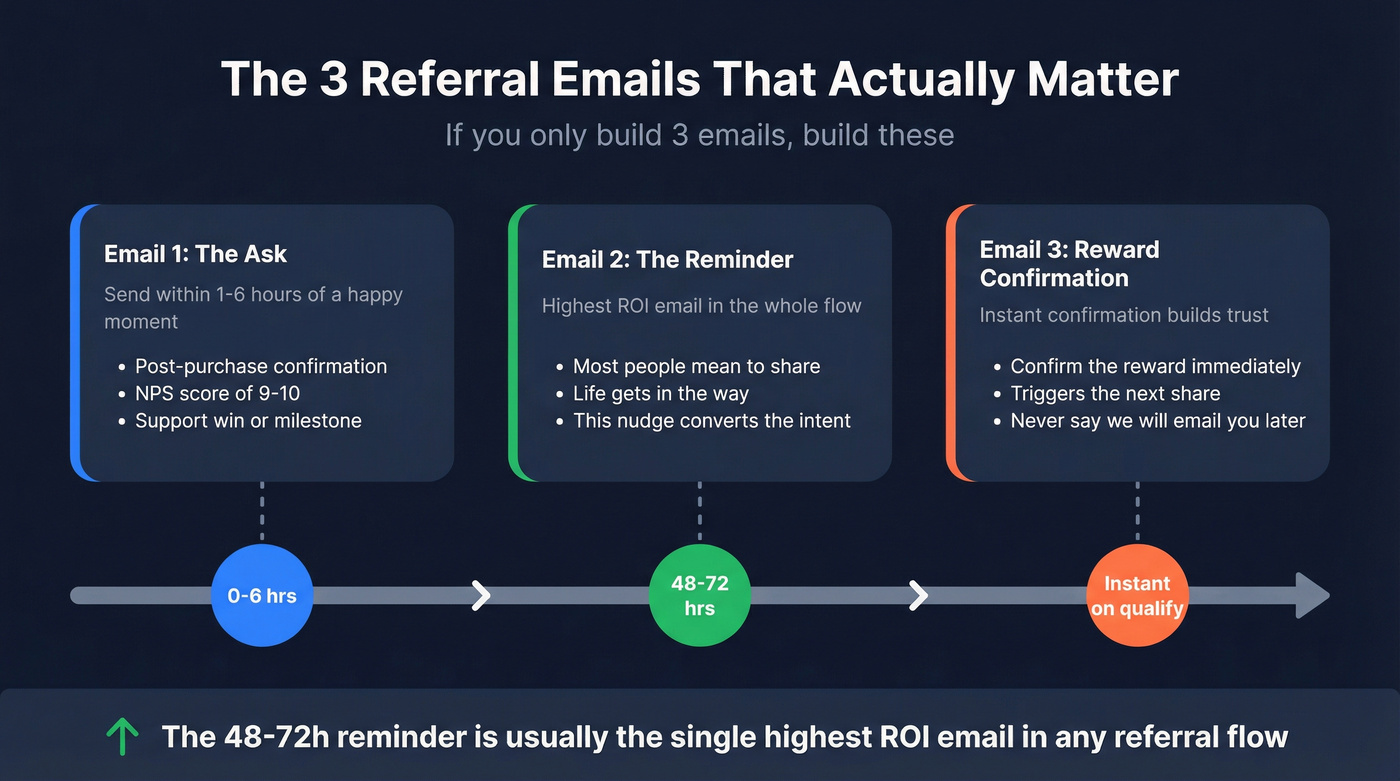
- Send one "ask" email fast - ideally within 1-6 hours of a happy moment (purchase confirmation, renewal, milestone, NPS 9-10, a support win). Wait a week and the emotional peak's gone.
- Send one reminder at 48-72 hours. Most people mean to share. Then life happens. This reminder's usually the highest ROI email in the whole flow.
- Confirm the reward immediately when the referral qualifies. Instant confirmation builds trust and triggers the next share. "We'll email you later" kills momentum.
- Default to "forward/share" if you have any UK/EU/Ireland/Canada exposure. It's the cleanest compliance posture and it avoids the awkward "why did this brand email me?" reaction.
- Make sharing frictionless: one link, one button, one sentence explaining the reward. If your email needs scrolling to find the link, you're bleeding referrals.
- Protect deliverability: authenticate (SPF/DKIM/DMARC), ramp volume, and keep bounces low. Referral programs often spike sends and introduce new recipients - exactly what mailbox providers dislike.
- Disclose incentives clearly: "You'll both get [Reward]" is enough. Hidden incentives create complaints and refunds.
If you only implement 3 emails, implement these first: (1) the ask, (2) the 48-72h reminder, (3) the reward confirmation.
Jump to what you need:
- Choose your referral email type
- Subject lines that get opened
- Copy-paste referral template emails
- Compliance reality check
- Deliverability checklist
- Incentives that move referrals
- Fraud prevention
- Benchmarks + tracking
Choose your referral email type (so you don't send the wrong ask)
Here's the decision tree I use when teams ask for a "referral template email" and actually mean five different things.
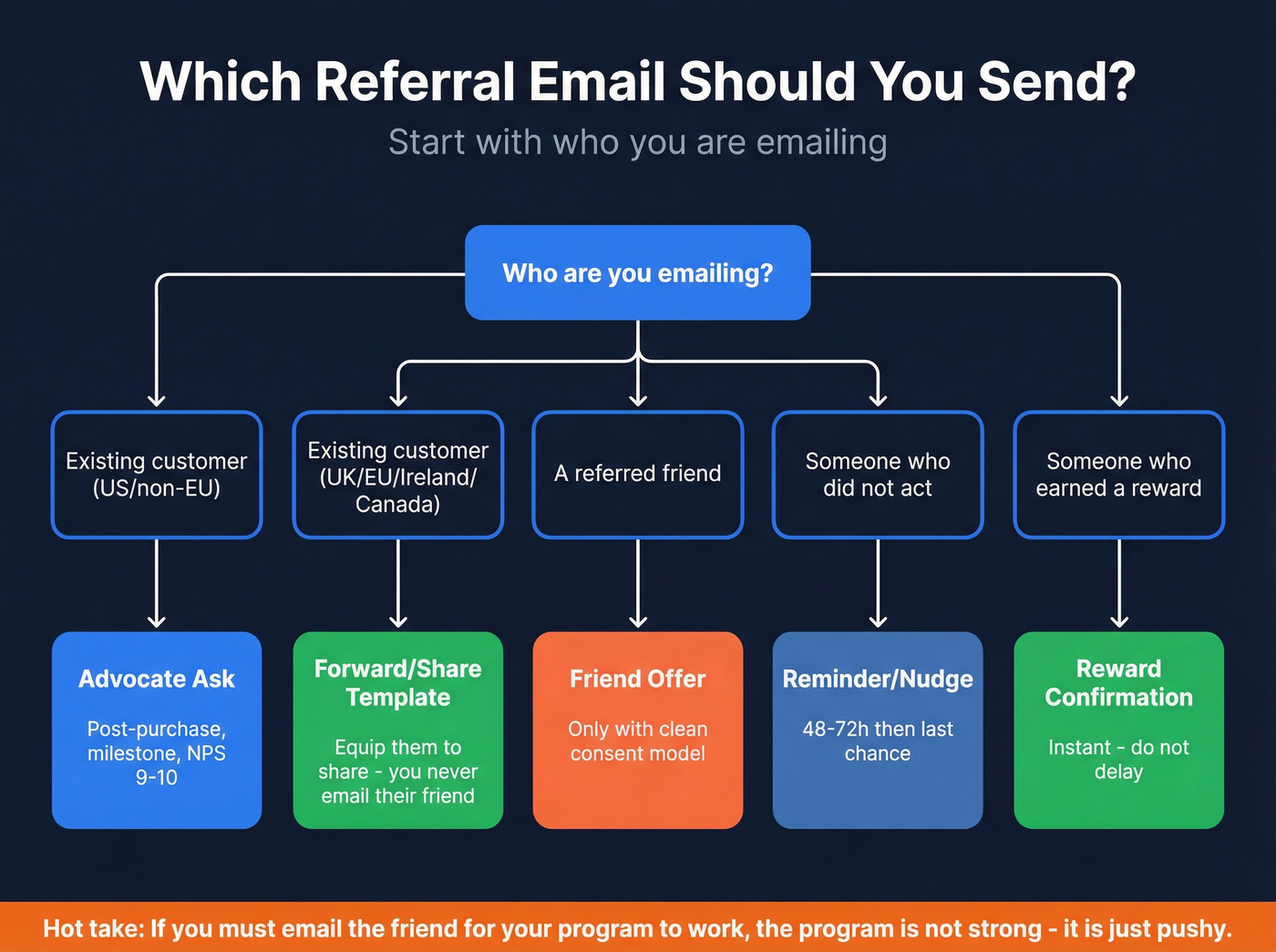
Start here: who are you emailing?
- Your existing customer/user (advocate) -> send an Advocate ask (your core referral request email template) Best for ecommerce, SaaS, newsletters, communities.
- Your existing customer/user (advocate) but you operate in UK/EU/Ireland/Canada -> send Advocate "forward/share this" This equips them to share without you emailing their friend.
- A referred friend -> only use Referred friend offer when you have a clean consent model and you're ready to support unsubscribes/complaints.
- Someone who didn't act -> send a Reminder/nudge (48-72h, then last-chance).
- Someone who earned a reward -> send Reward confirmation (and a milestone unlock if you do tiers).
- Your newsletter audience -> use Newsletter referral block (recurring) or a dedicated blast (when you launch tiers).
- Employees -> use Employee referral (program launch + role-specific ask + lifecycle updates).
- B2B (partner/customer referrals) -> use B2B "direction" or warm intro request (a light referral outreach email template). If you need more structure, borrow from a B2B cold email sequence.
Contrarian rule that saves you legal headaches and spam complaints: stop emailing the friend (especially UK/EU/Ireland/Canada). Instead, equip the advocate to forward/share a clean, pre-written message with a trackable link.
Hot take: If your referral program requires you to email the friend to "work," your program isn't strong - it's just pushy.
I've seen this play out in the real world: a brand launches "friend emails," complaints jump, deliverability dips, and suddenly the team blames the copy. It's not the copy. It's the structure.
Subject lines that get opened (2026 vault)
Referral subject lines aren't about being clever. They're about being obvious, short, and reward-forward.
A Friendbuy write-up citing Business Wire shared a fun data point: Valentine's Day emails with an emoji saw 89% inbox placement vs 83% for text-only subject lines. Friendbuy also notes the emoji subject lines improved read rate and reduced trashing. Useful, but don't turn that into a religion. The takeaway's simple: if the subject line matches the message and doesn't look spammy, test it.
What actually moves opens in referral emails:
- Keep it short enough to avoid truncation: aim for 30-45 characters (mobile clients cut aggressively).
- Pair subject + preview text: treat them as one sentence. If your subject's "Your referral link is ready," your preview should finish the thought ("Share it with one friend - you'll both get [Reward].").
- Be specific, not cute: "Give $20, get $20" beats "A little something for you."
- Test one variable at a time: reward-first vs personal ask, deadline vs no deadline, and "link ready" clarity vs "quick favor" tone. Referral flows are repetitive; small wins compound fast. If you want a clean testing workflow, use an A/B testing plan.
The mini-framework (use these patterns)
- Reward-first: "Give [Reward], get [Reward]"
- Time-boxed: "Ends [Deadline]"
- Personal: "[First name], quick favor?" (works best when the body is a personalized referral email, not a generic blast)
- Clarity > curiosity: "Your referral link is ready"
- B2B direction ask: "Quick question - who owns [area]?"

Swipe file: advocate vs friend vs reminder vs reward vs B2B
Advocate (your customer/user)
- "Give [Reward], get [Reward]"
- "[First name], want to share [Brand] with a friend?"
- "Your referral link (and a thank-you)"
- "Spread the love, earn [Reward]"
- "You + a friend = [Reward]"
Advocate (forward/share default)
- "Can you forward this to a friend?"
- "A gift for a friend (from you)"
- "Copy/paste this to someone you like"
Referred friend (only with the right consent model)
- "[First name] sent you [Reward]"
- "A friend thought you'd like this"
- "You've got a friend in me 🤠"
- "[First name], we've got just the thing for you 🎁"
Reminder
- "Still want your [Reward]?"
- "Quick reminder: your referral link"
- "Last chance: [Reward] ends [Deadline]"
Reward confirmation
- "You earned [Reward]"
- "Referral confirmed - here's your [Reward]"
- "Nice work. Your reward's ready."
B2B "direction" (asking for the right owner)
- "Not sure this is your area - who owns [topic]?"
- "Quick favor: point me to the right person?"
- "Help me avoid spamming the wrong teammate"
- "Looking for the right contact for [topic]"
- "Tried finding the owner. Failed. Can you help?"
If you want design inspiration (not copy), Really Good Emails keeps a solid gallery: referral email examples & designs.

Referral templates only work when they land in real inboxes. Prospeo gives you 143M+ verified emails with 98% accuracy and a 7-day refresh cycle - so your referral asks hit active contacts, not dead addresses that spike bounces and tank deliverability.
Stop bleeding referrals to bad data. Start with verified contacts.
Copy-paste referral template emails (by scenario)
Below are copy blocks you can paste into your ESP. Keep the tokens, and don't over-personalize - referral emails work because they're simple.

One more opinion before you copy/paste: if your referral email needs a hero image to "make sense," it's not a referral email. It's a campaign.
Advocate ask (post-purchase / post-win / milestone)
Template 1: Post-purchase ask (simple + direct) Subject: Give [Reward], get [Reward] Preview: Your link is ready - share it with one friend. Body: Hey [First name] - quick one. If you know someone who'd love [Product], share your referral link and you'll both get [Reward].
Here's your link: [Link] If you'd rather not share, no worries - just ignore this.
CTA: Share your link
Template 2: Post-win / "you're crushing it" (SaaS/customer success) Subject: [First name], want to help a friend and earn [Reward]? Preview: Same setup you used - now with a perk. Body: Hey [First name], congrats again on hitting [Milestone]. If you've got a peer who's dealing with [Pain point], I can set them up with the same playbook.
Your referral link: [Link] When they [Qualifying action], you'll get [Reward] (and they'll get [Reward] too).
CTA: Send your referral link
Template 3: Anniversary / milestone (ecommerce + subscription) Subject: A thank-you for year [#] 🎁 Preview: Share [Brand] - you both get [Reward]. Body: Hey [First name] - you've been with us for [#] months, and we appreciate it. If you want to share [Brand] with a friend, here's a gift: [Reward] for them and [Reward] for you.
Your link: [Link]
Ends: [Deadline] (so you don't forget).
CTA: Claim your referral link
Advocate "forward this" message (safe default)
Template 4: Forward-safe (short, UK/EU-friendly default) Subject: Can you forward this to a friend? Preview: You'll both get [Reward] if they join. Body: Hey [First name] - can you forward the message below to someone who'd genuinely like [Product]? It's the easiest way to share, and you'll both get [Reward].
-- copy/paste starts --
Subject: A gift for you from [First name]
Body: Hey! I've been using [Brand] and thought you'd like it. If you want to try it, here's my link: [Link]. We'll both get [Reward]. -- copy/paste ends --
CTA: Copy the message
Template 5: Forward-safe (story-based) Subject: One person who'd love this? Preview: Forward this - no awkward selling required. Body: Hey [First name] - think of one friend who's been complaining about [Pain point]. Forward them the note below. That's it.
-- forward this -- "I've been using [Brand] for [Outcome]. If you want to try it, here's my link: [Link]. We'll both get [Reward]. No pressure." -- end --
CTA: Copy + forward
Referred friend offer (only with the right consent model)
Template 6: Friend offer (clean + transparent) Subject: [First name] sent you [Reward] Preview: Use it by [Deadline]. Body: Hey [First name] - [Referrer name] thought you'd like [Brand]. If you want to try it, here's [Reward] to get started.
Use this link: [Link]
Heads up: [Referrer name] also earns a reward if you [Qualifying action].
If you don't want emails like this, unsubscribe below.
CTA: Redeem [Reward]
Template 7: Friend offer (low pressure) Subject: A friend thought you'd like this Preview: Try it once - keep it if it fits. Body: Hi [First name] - you're getting this because [Referrer name] shared a referral link for [Brand]. If you're curious, you can use [Reward] here: [Link].
No pressure. If it's not relevant, you can ignore this or unsubscribe.
CTA: See the offer
Reminder/nudge sequence
Template 8: 48-72h reminder (the money email) Subject: Quick reminder: your referral link Preview: Takes 10 seconds to share. Body: Hey [First name] - quick reminder about your referral link. If you share [Link] with one friend, you'll both get [Reward] when they [Qualifying action].
Want the easiest version? Just forward this line: "Here's my link for [Brand]: [Link] - we'll both get [Reward]."
CTA: Copy your link
Template 9: Last-chance nudge (deadline + clarity) Subject: Last chance: [Reward] ends [Deadline] Preview: After that, the offer resets. Body: Hey [First name] - last call. Your referral reward [Reward] expires on [Deadline]. If there's anyone you had in mind, send them your link now: [Link].
If you're not sharing, totally fine - this is the last reminder.
CTA: Share before [Deadline]
Reward confirmation + milestone unlock
Template 10: Reward confirmation (instant gratification) Subject: You earned [Reward] Preview: Thanks for the referral - here's your reward. Body: Hey [First name] - your referral's confirmed. Here's your [Reward]: [Reward details / code]
Want to keep it going? Your link still works: [Link] (And yes - your friend got their reward too.)
CTA: Use your reward
Template 11: Milestone unlock (tiered program) Subject: New referral tier unlocked: [Reward] Preview: You're at [#] referrals - next reward's bigger. Body: Hey [First name] - you just hit [Milestone] referrals. Nice. You've unlocked [Reward].
Next up: refer [Next milestone] friends and you'll get [Next reward].
Your link: [Link]
CTA: See your referral status
"Make it frictionless" one-click share
Template 12: One-click share (buttons + microcopy) Subject: Your referral link is ready Preview: Share by email or text - one tap. Body: Hey [First name] - here's your referral link: [Link] You'll both get [Reward] when they [Qualifying action].
Share options:
- Share via email: [Link]
- Share via text: "Try [Brand] with my link: [Link] - we'll both get [Reward]."
- Copy link: [Link]
CTA: Share now
Newsletter referrals
Template 13: Weekly newsletter block (drop-in module) Subject: (keep your normal subject) Preview: (normal preview) Body (block): Invite friends, get rewarded If you like this newsletter, share it. When a friend joins with your link, you'll get [Reward].
Your link: [Link]
Progress: [#] referrals • Next reward at [Milestone]
CTA: Share your link
Template 14: Dedicated newsletter blast (launch tiers) Subject: Help me grow this - rewards inside Preview: You share. I'll send perks. Body: Hey [First name] - I'm launching referrals for the newsletter. If you share your link and friends subscribe, you'll unlock rewards like [Reward] at [Milestone] referrals.
Your referral link: [Link] If you've ever forwarded an issue to a friend, this is the easiest way to do it (and get a thank-you).
CTA: Get your referral link
What "good" can look like (newsletter referrals) beehiiv has shared case study results that set expectations for what's possible when the offer's strong and the referral link's always visible:
- The Brink: 14,000 subscribers in a month from referrals (case study figure).
- Milk Road: 18,000 referred subscribers (case study figure).
- One example benchmark: ~2.7 referrals per subscriber (case study figure).
If you want more newsletter-specific examples, beehiiv has a roundup: referral email examples for newsletters.
Employee referrals (HR/recruiting)
Template 15: Program launch (company-wide) Subject: Employee referrals are open (bonus: [Reward]) Preview: Here's how to refer in 30 seconds. Body: Hey team - we're kicking off employee referrals for [Quarter/Month]. If you refer someone we hire, you'll receive [Reward] after [Milestone] (ex: 90 days employed).
To refer:
- Send their name + email to [Inbox] or submit here: [Link]
- Tell us how you know them (1-2 lines)
Open roles: [Link] Thanks for helping us build the team.
CTA: Refer a candidate
Template 16: Role-specific ask (targeted, less spammy) Subject: Know a great [Role]? (Referral bonus: [Reward]) Preview: One name's enough. Body: Hey [First name] - we're hiring a [Role] for [Team]. If you know someone who's strong at [Skill 1], [Skill 2], and wants [Benefit], reply with their name or intro us.
Referral bonus: [Reward] paid after [Milestone].
Job description: [Link]
CTA: Reply with a name
Template 17: Referral status update (keeps employees engaged) Subject: Update on your referral: [Candidate name] Preview: Next step: [Screen/Interview/Review]. Body: Hey [First name] - quick update on [Candidate name].
Status: [Received / Recruiter screen scheduled / Interview scheduled / Still in review].
If we need anything from you (availability for a quick chat, extra context, etc.), we'll reply here. Thanks again for the referral - this is exactly how we hire great people faster.
CTA: Reply with context (optional)
Template 18: Bonus processing confirmation (closes the loop) Subject: Referral hire confirmed - bonus scheduled Preview: Bonus: [Reward] paid on [Date]. Body: Hey [First name] - good news: [Candidate name] accepted and is officially hired.
Your referral bonus: [Reward].
Payment timing: [Date] (paid via [Payroll/Bonus system]).
Reminder: the bonus is paid after [Milestone] (example: 90 days employed) and requires [Eligibility item] (example: you were the first referrer on record).
Thanks for helping us build the team.
CTA: View referral policy (optional)
B2B referral request (wrong person -> point me to the right owner)
Template 19: Direction ask (cold-ish, respectful) Subject: Not sure this is your area - who owns [topic]? Preview: Quick question so I don't spam the wrong person. Body: Hi [First name] - quick question. Who's the right person for [topic] at [Company]?
I'm trying to avoid blasting the wrong teammate. If you can point me to the owner (name or role), I'll reach out once and keep it tight.
Thanks, [Your name] [Title] | [Company] [Website]
CTA: Reply with the right contact
Template 20: Warm intro request (customer/partner) Subject: Anyone come to mind? Preview: 1-2 intros would help a lot. Body: Hey [First name] - quick favor. Do you know 1-2 teams like yours who'd benefit from [Outcome]?
If yes, I can send a short blurb you can forward, or you can intro us directly. Either way, if they become a customer, you'll get [Reward].
Forwardable blurb: "Hey - we've been using [Brand] for [Outcome]. If you want to see it, happy to intro you to [Your name]."
CTA: Reply with 1 name
Two quick implementation notes (that save weeks)
Keep referral emails shorter than your marketing emails.
Don't bury the link. Put [Link] above the fold, then repeat it once.
For more design patterns (hero + CTA layouts, social buttons, etc.), ReferralCandy's gallery is useful: referral email design examples.
Compliance reality check (US vs UK/EU/Ireland vs Canada)
Look, referral programs are where "growth" collides with privacy law. The safest global default is email your advocate and let them forward/share. The riskiest move is you emailing the friend without a clean consent story.
Here's the operational Do/Don't table I use.
| Jurisdiction | Do | Don't | Safer default |
|---|---|---|---|
| US (CAN-SPAM) | Unsub + physical address | Deceptive subject lines | Email advocate |
| UK/EU (ePrivacy) | Get direct consent | Treat a friend's email as consent | Forward/share |
| Ireland (DPC) | Avoid friend emails | Market to non-customers without consent | Forward/share |
| Canada (CASL) | Consent + ID + unsub | Email to "ask for consent" | One-message exemption (narrow) |
US (CAN-SPAM)
CAN-SPAM applies to commercial email, including B2B. The penalty number gets everyone's attention: $53,088 per email in violation (FTC guidance).
Core basics:
- Accurate headers and "from" info
- Non-deceptive subject lines
- Clearly and conspicuously disclose the message is an ad
- Include a physical postal address (details: CAN-SPAM physical address)
- Include a working opt-out and honor it within 10 business days
Nuance teams miss: CAN-SPAM doesn't force you to label every email "ADVERTISEMENT," but if your message is promotional, don't disguise it as a personal 1:1. Referral emails should read friendly, but they still need to be honest about who's sending and why.
UK/EU (ePrivacy / PECR-style rules)
ICO guidance is explicit that "consent isn't transferrable." If your customer gives you their friend's email, that doesn't become consent.
Soft opt-in is narrow. It generally requires all of the following:
- You collected the email directly during a sale or negotiation
- You're marketing similar products/services
- You offered an opt-out at collection
- You include an opt-out in every message
A third-party-provided friend email doesn't fit that model. That's why forward/share is the clean default. If you operate in Europe, align your outbound with GDPR for sales and marketing.
Ireland (DPC)
Ireland's regulator is unusually blunt: emailing marketing to non-customers via "refer a friend" is an offence under their ePrivacy regs, and the onus is on the sender to prove consent. If you've got any Irish footprint, don't gamble - use forward/share.
Canada (CASL)
CASL is strict: you need consent, identification, and unsubscribe in each commercial electronic message. And the classic workaround ("we'll email to ask for consent") fails because a consent-request email is itself a CEM.
CASL includes a limited partial exemption for third-party referral messages (when conditions are met). If you use it, your email must include:
- Only one message (no "just checking in" follow-up unless you've got consent)
- The referrer's full name (so the recipient knows the connection)
- The sender's identification plus a working unsubscribe mechanism
Operationally: if you can't meet those conditions cleanly, don't use the exemption - stick to advocate-forwarding.
Deliverability checklist for referral campaigns (so you don't tank inboxing)
Referral emails can quietly wreck your sender reputation because they often introduce new recipients, new links, and spiky sends. I've watched teams launch referrals on a Friday, spike volume on Monday, and then spend the next quarter asking why everything lands in Promotions (or worse) even though "nothing changed."
Do this before you send:
- Authenticate properly: SPF, DKIM, DMARC aligned. Non-negotiable. (Deep dive: SPF/DKIM/DMARC explained)
- Ramp volume instead of spiking: a simple ramp looks like 500/day -> 1,000/day -> 2,000/day over a week, then scale. Mailbox providers hate sudden jumps.
- Keep your referral link domain stable: don't rotate domains every campaign. Consistency builds reputation.
- Avoid link shorteners: they're heavily associated with spam and phishing. Use a branded tracking domain.
- Use branded tracking URLs: shared tracking domains can inherit bad reputation. Branded links also look less scammy. Outreach's deliverability guidance is clear on this: Outreach email best practices.
- Write for complaint prevention, not just clicks:
- Add one plain line: "You're getting this because you're a [Brand] customer and your referral link is active."
- Use a monitored reply-to (people reply when confused; unanswered replies turn into spam complaints).
- Cap frequency (ask + one reminder is enough for most programs).
- Treat unsubscribe as a trust signal: include it (and the right headers) even when you think "it's just a referral." It cuts spam complaints.
- Keep the copy plain: fewer images, fewer weird fonts, fewer "PROMO!!!" vibes.
- List hygiene matters more than copy: bounces are reputation poison. If you need triage help, start with 550 Recipient Rejected and an email verification list SOP.
If you're sending referral or partner emails to business addresses, clean the list first. Tools like Prospeo (the B2B data platform built for accuracy) help keep bounce rates down with 98% email accuracy and a 7-day data refresh cycle, which is exactly what you want before a spiky referral or partner send. (More options: email verifier websites.)
Incentives that actually move referrals (with disclosure language)
Most referral programs underpay. impact.com's consumer norms are a good gut-check: shoppers expect roughly $21 or about 11% off, and 78%+ of programs are double-sided (both advocate and friend get something). If you're offering $5 credit on a $200 product, you're basically asking for charity.
A huge reason programs underperform has nothing to do with the reward: people never get the link. impact.com also found 60% of non-participants never received a referral link/code. Fix the promotion gap before you redesign anything:
- Put the referral link in receipt/order confirmation emails
- Add it to the post-purchase thank-you page
- Surface it in the account page (logged-in)
- Add a small referral block in your newsletter footer
- Include it in the reward confirmation (people share again right after they win)
Use this / skip this
Use:
- Double-sided rewards (almost always)
- Store credit when repeat purchase is likely
- Percent-off when AOV varies a lot
- Tiering when you want ongoing behavior (newsletter/community)
Skip:
- Tiny rewards that feel insulting
- Complicated math ("points" nobody understands)
- Instant rewards with no fraud controls (you'll regret it)
Concrete examples that work in the wild:
- Ollie: friend gets 70% off first box; advocate gets $40.
- Shiseido: Give 20 / Get 20.
- Gift card model: $100 to both sides after a successful referral.
Disclosure language (FTC Endorsement Guides): if there's a reward, say it plainly. Add one line like:
- "If your friend signs up, you'll both get [Reward]."
- "I may receive a reward if you use my link."
Fraud prevention (protect your referral ROI)
Referral fraud's boring until it eats your budget. Prefinery's breakdown matches what we see across ecommerce, SaaS, and newsletters: self-referrals, bots, fake accounts, and referral rings.
Default controls (use these as policy):
- Delay rewards until a real milestone (paid invoice, 30 days active, first order shipped).
- CAPTCHA on signup/referral forms.
- IP/device checks to catch obvious self-referrals and farms.
- Caps: max rewards per advocate per month; max redemptions per payment method.
- Anomaly monitoring: spikes from one advocate, data-center IPs, weird conversion patterns.
- Manual review lane for high-value rewards (gift cards, cash).
One practitioner takeaway I agree with (learned the hard way): the moment you offer instant cash-equivalent rewards, you're not running a referral program - you're running a fraud magnet. Keep rewards valuable, but gate them behind a real conversion event.
What we've seen work (and fail)
These are the field notes that don't show up in most "referral template email" listicles:
- Timing beats copy. The same email sent right after a win can outperform a better-written email sent three days later.
- One link wins. Every extra option ("share on X, share on Y, copy this, or that...") drops shares. Give one primary link and one fallback line to forward.
- Forward-safe is the grown-up default. It cuts legal risk, cuts "who are you?" complaints, and still scales if your product's worth sharing.
- Reward confirmation is a second ask. The confirmation email is where advocates are happiest. Put the link in the first line and you'll see repeat shares.
- Fraud controls protect your best advocates. When fraud spikes, teams slash rewards. That punishes the honest customers who were actually sharing.
Benchmarks + tracking (what "good" looks like in 2026)
Referral emails vary a lot by audience, but you still need targets. ActiveCampaign's 2025 cross-industry baseline is 39.26% opens and 6.21% CTR, with ecommerce around 35.66% / 5.07% and media around 43.16% / 7.32% (from their benchmarks post: ActiveCampaign email benchmarks).
ActiveCampaign is the baseline; the referral ranges below are practical estimates for referral flows.
| Email type | Open est. | CTR est. |
|---|---|---|
| Advocate ask | 40-55% | 6-12% |
| Reminder | 35-50% | 5-10% |
| Reward confirm | 55-70% | 4-9% |
| Newsletter block | 35-45% | 1-4% |
Tracking plan (simple, works everywhere):
- UTMs on referral links (source=referral, medium=email, campaign=[program]).
- Track referral link clicks (by advocate).
- Track referred conversions (first purchase / paid activation).
- Track time-to-convert and fraud flags (IP/device repeats).
- Report weekly: invites sent, shares, clicks, referred signups, qualified conversions, rewards issued.
You just built the perfect referral flow - now protect it. Bad contact data kills deliverability, and referral programs already spike sends to new recipients. Prospeo's 5-step verification with spam-trap removal keeps your bounce rate under control at $0.01 per email.
Protect your referral program's sender reputation from day one.
FAQ
Can I email the referred friend directly?
You can, but it's the highest-risk structure - especially in UK/EU/Ireland where consent isn't transferable and regulators treat unsolicited friend emails as marketing. The safer default is emailing your customer (advocate) and giving them a forward/share message with a trackable link.
What should I put in a referral email subject line?
Use short, obvious subject lines that lead with the reward or the action: "Give [Reward], get [Reward]" or "Your referral link is ready." For B2B, frame it as directions: "Not sure this is your area - who owns [topic]?" Clarity beats curiosity.
What's a good referral incentive?
A good incentive's usually double-sided and feels worth sharing: consumer norms cluster around ~$21 or ~11% off, and 78%+ of programs reward both people. If your margins are tight, use tiered rewards (bigger perks at 3 and 5 referrals) instead of a tiny one-off credit.
How do I reduce bounces on referral or partner emails?
Reduce bounces by authenticating SPF/DKIM/DMARC, ramping volume gradually, and cleaning lists before you send. In our experience, the fastest win is verification: Prospeo verifies emails in real time with 98% email accuracy and refreshes data every 7 days, which keeps bounce rates low and protects sender reputation.
Summary
If you want one referral template email flow that works in 2026, keep it simple: send the advocate ask within hours of a happy moment, follow with one 48-72 hour reminder, and close the loop with an instant reward confirmation. Default to forward/share for global compliance, keep one primary link above the fold, and protect deliverability with authentication and clean lists. If you're building a bigger sending system, use an email deliverability playbook and set up a sender score checker routine.