How to Write a New Relationship Manager Introduction Email (With 12 Templates)
A banking client on Reddit shared that they'd been upgraded to preferred status - over 1M PHP in their account - and hadn't heard a single word from their new relationship manager in seven months. Not an email. Not a call. Nothing. They had to ask strangers on the internet whether they were supposed to go find their RM.
That's not an edge case. It's what happens when RMs skip the introduction or treat it like an afterthought. A new relationship manager introduction email is where retention either starts or silently dies. A 5% improvement in customer retention can boost profits by 25-95%, and it costs 5x more to acquire a new client than retain one.
What You Need (Quick Version)
If you have a warm handoff: Push for the three-way introduction template. The outgoing RM sends the first email introducing you. You follow up within 24 hours. This is always the best outcome - fight for it.
If you're introducing yourself cold: Use the self-introduction template with a personalized PS line. Keep it under 150 words. Nobody needs your career history.
If the client is at-risk or upset: Don't use a generic template. Use the 4-step framework: Acknowledge, Address, Agree, Move forward. These accounts need a different tone entirely.
One thing before you hit send: verify your contact list is still valid, especially if you inherited accounts from a departing RM. A bounced introduction email to your biggest client is the worst possible first impression. If you need a workflow, start with an email verification tool.
Why Your RM Introduction Email Matters More Than You Think
Changing RMs is like replacing the lead actor on a theater stage. The audience expects the show to go on with flawless performance. They don't care about your backstage logistics - they care that their experience doesn't skip a beat.
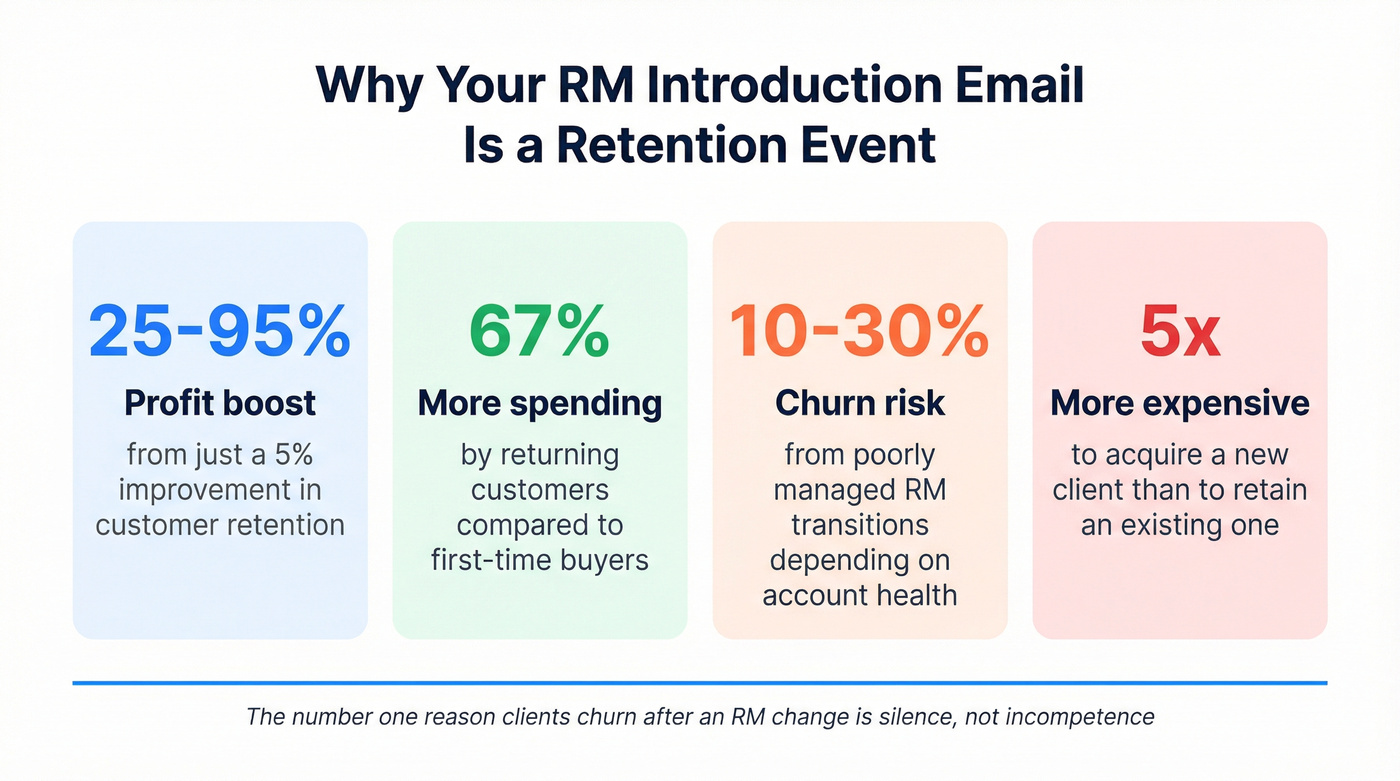
Nearly 90% of clients consider their advisor's communication frequency and style when deciding whether to stay. Returning customers spend 67% more than first-time buyers. And poorly managed transitions carry a 10-30% churn risk, depending on the account's health and how long the silence lasts.
Here's the thing most RMs miss: a Deloitte study found that continuity assurances during transitions directly increased client satisfaction and loyalty. That means the simple act of saying "I've reviewed your account and nothing's changing" has measurable impact. It's not fluff. It's retention strategy.
In our experience, the clients who churn after an RM change almost always cite the same thing: silence. Not incompetence, not a bad product - just silence. Your introduction email is the first data point your client has about you. Before they hear your voice, see your face, or experience your work, they'll read 150 words you wrote. Those words set the ceiling for the entire relationship.
Before You Write - The Relationship Manager Handoff Checklist
Most RMs jump straight to drafting the email. That's backwards. The email is maybe 20% of the job. The other 80% is preparation that makes the email - and everything after it - actually land.
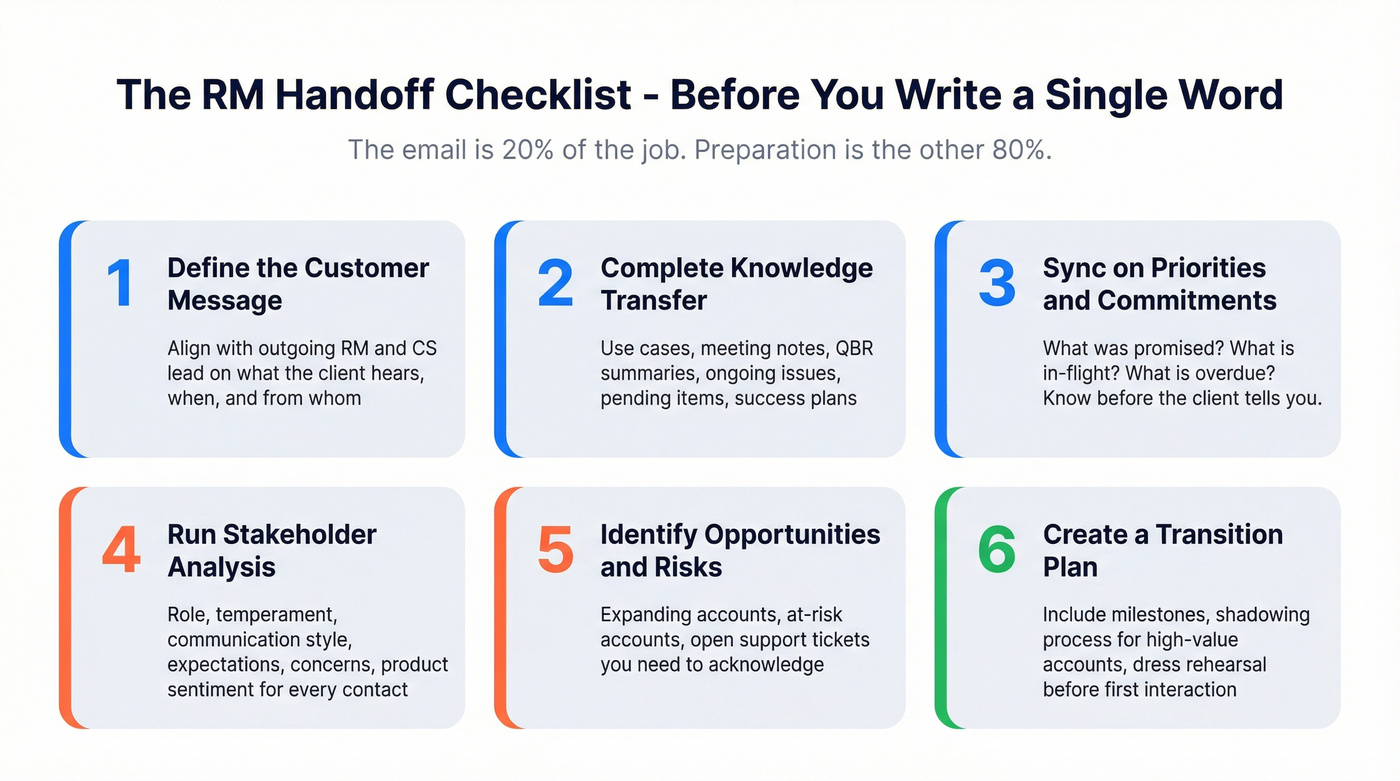
Here's the internal checklist, adapted from frameworks used by CS leaders and companies like GitLab (which publishes its entire handoff process in a public handbook):
1. Define the customer message. Align with the outgoing RM and your CS lead on what the client hears, when, and from whom. Mixed signals kill trust.
2. Complete knowledge transfer. This means use cases, meeting notes, QBR summaries, ongoing issues, pending action items, success plans, and engagement trends. Not a five-minute Slack summary.
3. Sync on priorities and commitments. What did the previous RM promise? What's in-flight? What's overdue? You need to know before the client tells you.
4. Run stakeholder analysis. For every key contact, capture their role, temperament, communication style, expectations, concerns, and product sentiment. Go as granular as "never available before 10 am." That level of detail separates a smooth transition from a rocky one.
5. Identify opportunities and risks. Which accounts are expanding? Which are at risk? Which have open support tickets you need to acknowledge?
6. Create a transition plan with milestones. For high-value accounts, this should include a shadowing process where you sit in on calls before taking over.
Run a "dress rehearsal" in your head before your first client interaction. If you can't confidently answer basic questions about the account, you're not ready to send the email.

A bounced introduction email to your biggest inherited account is an unrecoverable first impression. Before you send a single RM transition email, run your contact list through Prospeo's 5-step email verification - 98% accuracy, catch-all handling, and spam-trap removal included.
Verify your entire inherited book of business for $0.01 per email.
Anatomy of a Perfect RM Introduction Email
Every strong RM introduction email follows the same six-part structure. Deviate from it at your own risk.
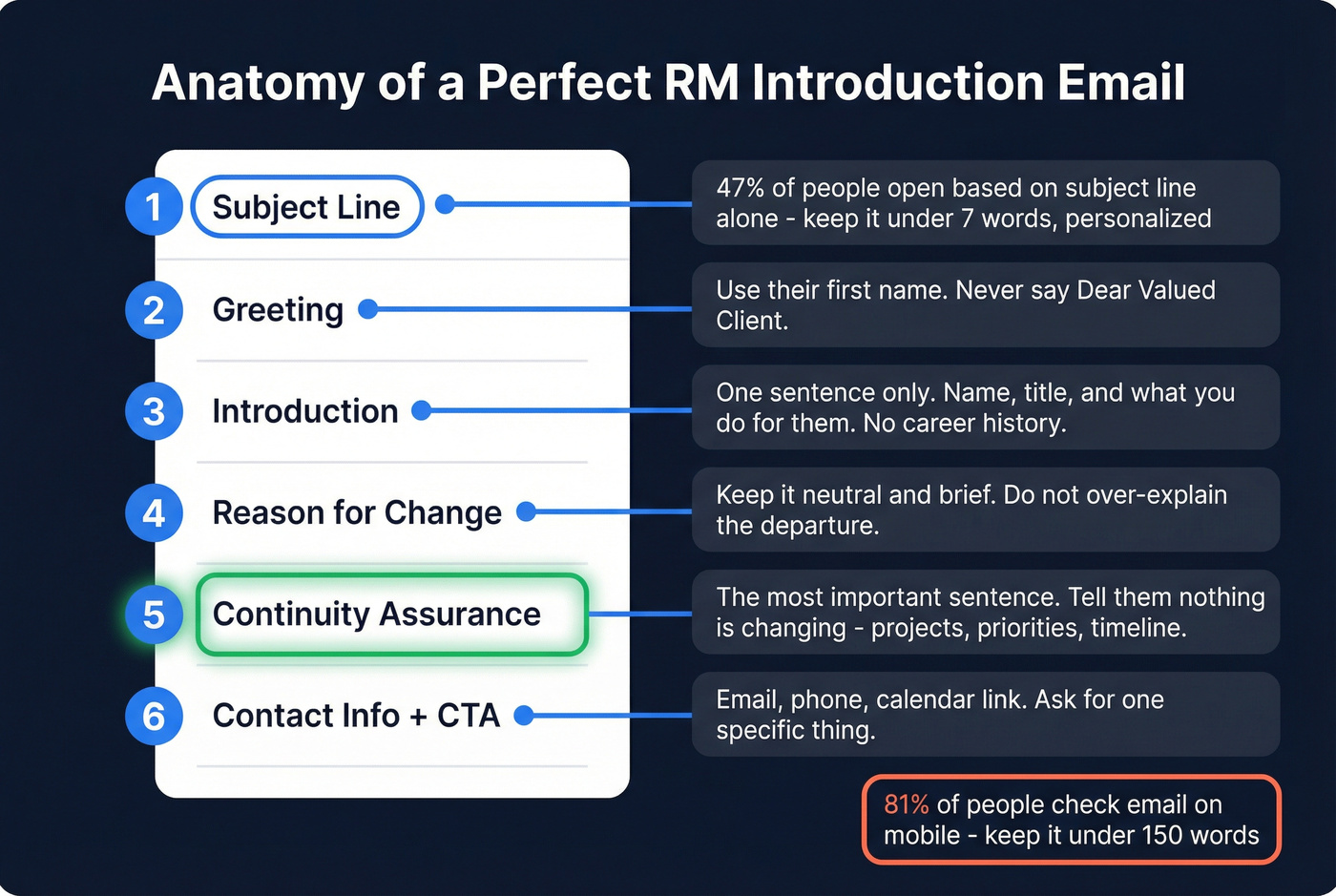
1. Subject line. Short, personalized, and clear. 47% of people decide to open based on the subject line alone. More on this in the next section. If you want more examples, see these reminder email subject lines.
2. Greeting. Use their name. "Hi Sarah" beats "Dear Valued Client" every time.
3. Introduction. One sentence. Your name, your title, and what you do for them. One experienced CSM put it perfectly: "My name is [X], I am your [title], and I will be your primary point of contact. My job is to make sure you are taken care of, and to be your advocate on the inside." That's it. No career history, no dog and pony show.
4. Reason for the change. Keep it neutral and brief. "Alex has moved to a new role within the company" is enough. Don't over-explain.
5. Continuity assurance. This is the most important sentence in the email. Tell them nothing's changing - their projects, their priorities, their timeline. This single sentence does the heaviest lifting of anything you'll write.
6. Contact info + CTA. Give them your email, phone, and calendar link. Then ask for one specific thing: a 15-minute intro call, a reply with their top priorities, or confirmation that they received the email. (If you need a tighter ask, use this sales CTA framework.)
81% of people check email on smartphones. Keep your email under 150 words, use short paragraphs, and make sure your CTA is tappable on mobile.
Subject Lines That Actually Get Opened
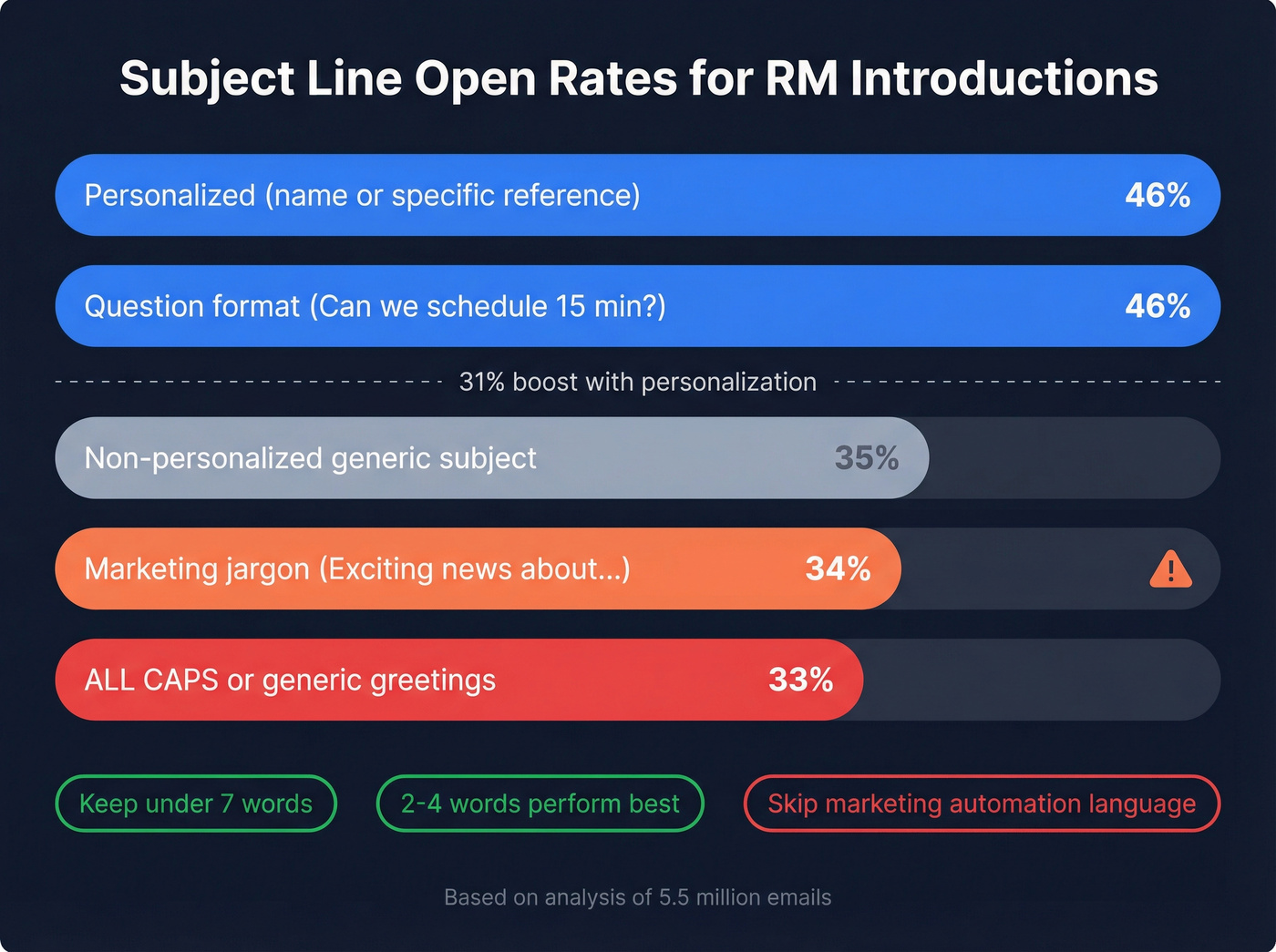
Personalized subject lines hit a 46% open rate versus 35% without personalization - a 31% boost, based on an analysis of 5.5 million emails. Subject lines of 2-4 words performed best. Marketing jargon, generic greetings, and ALL CAPS all pushed engagement below 36%. For more patterns, compare with these cold email subject lines.
For RM introductions specifically, your subject line needs to answer one question: "Who is this and why should I open it?"
I've seen CSMs use subject lines like "New CSM." That's it. No client name, no company name, no context. Don't do this.
| Subject Line | Why It Works |
|---|---|
| "[Your Name] - Your New RM at [Company]" | Name + role = instant clarity. Client knows exactly who's writing and why. |
| "Quick intro from your new account manager" | Casual, low-pressure. Works well for mid-market accounts that prefer informal tone. |
| "[Outgoing RM] asked me to reach out" | Borrows trust from the departing RM. Highest open rates of any format we've tested. |
| "Your account team update at [Company]" | Professional, works for manager-sent announcements. Safe for compliance-heavy industries. |
| "Following up on [Outgoing RM]'s note" | Only works after a warm handoff email. Creates continuity in the inbox thread. |
| "A personal note about your account" | Signals VIP treatment. Use sparingly - only for your top-tier accounts. |
| "[Client Name], meet your new [Title]" | Direct personalization. The client's own name is the strongest open-rate driver. |
| "Continuing our work on [Project Name]" | Project-specific = immediately relevant. Best for B2B accounts with active deliverables. |
| "Your [Company] team - a quick update" | Good for mass introductions. Low urgency, but clear enough to avoid the spam folder. |
| "I'm here to help with [specific need]" | Shows you've done homework. Best for at-risk accounts where the client has open issues. |
The pattern is clear: include the client's name or a specific reference, keep it under 7 words, and make it obvious this isn't a marketing email. Questions also perform well - "Can we schedule 15 minutes this week?" hit 46% open rates in testing.
Skip anything that sounds like it came from a marketing automation platform. "Exciting news about your account" and "Important update" belong in the trash.
12 Copy-Paste Templates for Introducing Yourself as a New RM
Self-Introduction to an Existing Client
The most common scenario: you've been assigned the account, the previous RM is gone (or going), and you need to introduce yourself. Keep it tight.
Subject: [Your Name] - Your New [Title] at [Company]
Hi [Client Name],
I'm [Your Name], your new [title] at [Company]. I'll be your primary point of contact going forward - my job is to make sure you're taken care of and to be your advocate on the inside.
[Previous RM] has brought me up to speed on your account, including [specific detail - e.g., "the Q3 expansion project" or "your upcoming renewal"]. I want to make sure the transition is seamless.
Would you have 15 minutes this week for a quick intro call? Here's my calendar: [link]
Best, [Your Name] [Phone] | [Email]
PS - I noticed [personalized observation from their website, recent news, or company update]. Congrats on that.
Personalization tip: The PS line is the one part of the email that proves you did homework beyond reading the CRM notes. It takes 60 seconds and makes the entire email feel custom.
Tone variation - casual version: Swap "I'll be your primary point of contact going forward" with "I'll be your go-to from here on out." Replace "Best" with "Talk soon." Small shifts, big difference in warmth.
Three-Way Handoff (Outgoing RM Introduces You)
This is the gold standard. Always push for this when the outgoing RM is still available. It requires two emails: one from them, one from you.
Email 1 - From the outgoing RM:
Subject: Farewell from me & introducing [New RM Name]
Hi [Client Name],
I wanted to let you know that I'm transitioning to a new role at [Company]. It's been a pleasure working with you on [specific project or milestone].
I'm leaving you in great hands. [New RM Name] will be your new [title] starting [date]. [He/She/They] has [brief credential - e.g., "5 years of experience in our enterprise team" or "deep expertise in your industry"]. I've walked [him/her/them] through everything on your account.
[New RM Name] will reach out shortly to introduce [himself/herself/themselves]. In the meantime, feel free to reach out to either of us.
Thank you for everything, [Outgoing RM Name]
Email 2 - From you (send within 24 hours):
Subject: Following up on [Outgoing RM]'s note
Hi [Client Name],
As [Outgoing RM] mentioned, I'm [Your Name] and I'll be taking over as your [title]. I've reviewed your account in detail and I'm up to speed on [specific item].
I'd love to set up a quick call this week to introduce myself properly and hear directly from you about your priorities. Would [day/time] work, or feel free to grab a time here: [calendar link]
Looking forward to working together.
[Your Name] [Phone] | [Email]
Personalization tip: Reference something specific from the outgoing RM's handoff notes that the client would recognize. It proves continuity. Also consider the "double opt-in" approach: if you're introducing the client to anyone else on your team (a support contact, a technical lead), get the client's permission first rather than CC'ing strangers into the thread.
Manager Introduces the New RM
Sometimes leadership sends the announcement. This works well for larger accounts or when the change is part of a team restructuring.
Subject: Introducing [New RM Name], Your New [Title] at [Company]
Hi [Client Name],
I'm writing to let you know about a change to your account team at [Company]. [New RM Name] will be stepping in as your [title], effective [date].
[New RM Name] has been with [Company] for [X years] and brings [brief relevant background]. [He/She/They] is fully briefed on your account and committed to maintaining the continuity of service you expect.
During this transition, we're committed to ensuring everything goes smoothly. [New RM Name] will reach out shortly to introduce [himself/herself/themselves] directly.
If you have any questions in the meantime, don't hesitate to reach out to me.
Best regards, [Manager Name] [Title]
Personalization tip: Have the manager mention one specific thing about the client relationship: "We value the partnership we've built over the past two years, especially the work on [project]."
At-Risk or Upset Client Transition
This is the hardest email you'll write. If the client is already unhappy - with the product, the service, or the fact that their RM is changing again - a generic template will make things worse.
Use the 4-step framework: Acknowledge, Address, Agree, Move forward.
Subject: I'm here to help with [specific issue or account name]
Hi [Client Name],
I'm [Your Name], your new [title] at [Company]. I know transitions like this can be frustrating, especially when [acknowledge specific issue - e.g., "you've already been through a team change this year" or "there are open items that haven't been resolved yet"].
I want to be upfront: I've reviewed your account thoroughly, and I understand the concerns around [specific issue]. Here's how I plan to address them:
- [Specific action 1 - e.g., "I've escalated the billing discrepancy to our finance team and expect resolution by Friday"]
- [Specific action 2 - e.g., "I've scheduled an internal review of your support tickets from the past 60 days"]
I'd like to propose a call this week so we can align on priorities and agree on a plan going forward. I don't want to assume - I want to hear from you directly.
[Calendar link] or just reply with a time that works.
[Your Name] [Phone] | [Email]
Personalization tip: Never use this template without filling in every bracket. The specificity is the entire point. If you can't name the issue, you haven't done enough homework.
VIP / High-Value Client Transition
For your top accounts, email alone isn't enough. The email is the appetizer - the real introduction happens on a call.
Subject: A personal note about your account, [Client Name]
Hi [Client Name],
I'm [Your Name], and I'll be taking over as your [title] at [Company]. Given the importance of your account and the depth of our partnership, I wanted to reach out personally rather than send a standard transition notice.
I've spent the past [week/two weeks] reviewing your account history, speaking with [Outgoing RM], and getting up to speed on [specific initiative or goal]. I'm also aware of [specific detail that shows depth - e.g., "your preference for quarterly strategy sessions" or "the integration timeline we committed to"].
I'd like to propose a three-way call with [Outgoing RM] and myself so you can see the handoff firsthand and raise any concerns. Would [date/time] work?
I'm committed to earning the same trust [Outgoing RM] built with you.
Warm regards, [Your Name] [Phone] | [Email]
Personalization tip: For VIP accounts, consider sending a brief handwritten note or a follow-up via their preferred channel (some executives prefer text or a direct message). The email opens the door; the personal touch holds it open.
Mass Introduction to 50+ Accounts (Personalized at Scale)
When you inherit a large book of business, you can't write 50 bespoke emails. But you can batch intelligently.
Segment your accounts into 3-4 groups (by industry, product, account health, or tier) and create a template variation for each. Then personalize the subject line and one sentence per email.
Subject: [Your Name] - Your New [Title] at [Company]
Hi [Client Name],
I'm [Your Name], your new [title] at [Company]. I'm reaching out to introduce myself and let you know I'll be your primary point of contact going forward.
I've reviewed your account and I'm familiar with [one specific detail per segment - e.g., "your current plan" / "the onboarding you completed in Q2" / "your team's usage of our reporting features"]. My goal is to make this transition invisible to you.
If there's anything on your mind - questions, concerns, or just a quick hello - I'm here. You can reply to this email, call me at [phone], or book time here: [calendar link].
Best, [Your Name]
Personalization tip: Even at scale, change the [one specific detail] per segment. "Your current plan" for standard accounts, "the expansion we discussed last quarter" for growth accounts. It takes 10 extra minutes per batch and makes a measurable difference.
Re-Introduction After a Long Silence
This one's for the RM who got assigned an account three months ago and never reached out. Or the one who sent an intro email that bounced and never followed up.
It happens more than anyone admits.
Subject: Long overdue - your [Title] at [Company]
Hi [Client Name],
I'm [Your Name], your [title] at [Company]. I should have reached out sooner, and I want to be straightforward about that.
I've been your point of contact since [month/date], and I owe you a proper introduction. I've reviewed your account and I'm up to speed on [specific detail]. Going forward, I want to make sure you know exactly who to call when you need something.
Can we schedule 15 minutes this week? I'd like to hear what's top of mind for you and make sure nothing has fallen through the cracks.
[Calendar link] or reply with a time that works.
[Your Name] [Phone] | [Email]
Why this works: Honesty disarms. Clients don't expect perfection - they expect accountability. Acknowledging the gap without over-apologizing shows maturity and earns more trust than pretending the silence didn't happen.
New RM for a Brand-New Client (Not a Transition)
Different from a transition: you're not replacing anyone. The client just signed, and you're their first RM. There's no trust to transfer, but there's also no baggage.
Subject: Welcome to [Company] - I'm your [Title]
Hi [Client Name],
Welcome aboard! I'm [Your Name], your [title] at [Company]. I'll be your go-to from here on out.
I've reviewed the details from your onboarding and I'm excited to help you get the most out of [product/service]. Here's what I'd like to cover in our first call:
- Your top priorities for the first 90 days
- How you prefer to communicate (email, phone, Slack - whatever works)
- Any questions from the onboarding process
Would [day/time] work for a 20-minute kickoff? Or grab a time here: [calendar link]
Looking forward to it.
[Your Name] [Phone] | [Email]
Why this works: New clients are in "evaluation mode" - they're deciding whether they made the right purchase. A structured, confident first touchpoint reinforces that decision. The bullet list sets expectations without overwhelming.
Industry-Specific Templates
Banking and Wealth Management
Compliance first: Banking RM emails carry regulatory weight that other industries don't. Before deploying any template at scale, have your compliance team review it. Avoid words like "guarantee" and "promise." Never include performance projections or anything that could be construed as financial advice in the introduction email itself.
Subject: [Your Name] - Your New Relationship Manager at [Bank Name]
Dear [Client Name],
I'm [Your Name], and I've been assigned as your new Relationship Manager at [Bank Name]. I'm reaching out to introduce myself and ensure a smooth transition for your accounts.
I've reviewed your portfolio in detail and I'm fully briefed on your current holdings and financial objectives. The security and confidentiality of your information remain our highest priority - nothing changes on that front.
I'd welcome the opportunity to schedule a call at your convenience to discuss your goals and how I can best support you. I'm available [days/times] or you can reach me directly at [phone].
I look forward to working with you.
Respectfully, [Your Name] [Title] | [Direct Line] | [Branch Location]
Tone note: Banking clients expect formality. "Dear" instead of "Hi." "Respectfully" instead of "Best." This isn't stuffiness - it's the register your clients trust.
SaaS / Customer Success
SaaS introductions should be action-oriented. Your clients care about their onboarding milestones, their support tickets, and their renewal timeline - not your background.
Here's what a weak SaaS intro looks like versus a strong one:
Bad: "I'm excited to be your new CSM! I have 5 years of experience in customer success and I'm passionate about helping clients achieve their goals."
Good: "I'm your new CSM. I've reviewed your account - you completed Phase 1 onboarding last month and your renewal is in Q4. Here's what I want to make sure you know about."
See the difference? The strong version proves you've done the work. The weak version is a cover letter.
Subject: Quick intro - I'm your new CSM at [Company]
Hey [Client Name],
I'm [Your Name], your new CSM at [Company]. I'll be your go-to for everything from onboarding questions to renewals.
I've reviewed your account and I can see you've [specific milestone - e.g., "completed Phase 1 onboarding" or "been live for 6 months"]. Nice work. Here's what I want to make sure you know about:
- [Resource 1 - e.g., "Our new reporting dashboard (launched last month)"]
- [Resource 2 - e.g., "The quarterly business review we can schedule for next month"]
Got 15 minutes this week? I'd love to hear what's working and what's not. [Calendar link]
[Your Name]
B2B Account Management
B2B account transitions need to emphasize business continuity. Your client's concern isn't "who are you" - it's "will my projects stay on track?"
Use this pre-send checklist before hitting send on a B2B intro:
- I can name every active project and its current status
- I know the next deliverable date and who owns it
- I've identified the client's primary stakeholder and their communication preference
- I've reviewed the last 3 months of meeting notes
- I know what the previous RM promised that hasn't been delivered yet
Subject: Continuing our work on [Project Name]
Hi [Client Name],
I'm [Your Name], stepping in as your new Account Manager at [Company]. I've been briefed on the [specific project] and the deliverables we've committed to for [timeframe].
Here's where things stand from my review:
- [Project status item 1]
- [Project status item 2]
- [Next milestone and date]
I want to make sure nothing slips during this transition. Can we schedule 20 minutes this week to align? [Calendar link]
[Your Name]
Insurance and Real Estate
These are relationship-heavy industries where clients expect a personal touch. Emphasize availability and warmth - your clients chose a person, not a platform.
Subject: [Your Name] - Your New [Agent/Advisor] at [Company]
Hi [Client Name],
I'm [Your Name], and I'll be taking over as your [title] at [Company]. I know how important it is to have someone you trust handling [your coverage/your property search/your portfolio], and I don't take that lightly.
I've reviewed your file and I'm up to speed on [specific detail - e.g., "your current policy renewal in March" or "the properties we've been tracking in [area]"]. I'm available by phone, email, or text - whatever works best for you.
I'd love to set up a quick call to introduce myself properly. Would [day] work?
Warmly, [Your Name] [Phone] | [Email]
Personalization tip: In insurance and real estate, the personal touch matters more than the template. If you know the client prefers text, send a brief text after the email: "Hi [Name], just sent you an email - wanted to make sure it didn't get lost. Looking forward to connecting." That two-sentence text often gets a faster response than the email itself.
Mistakes That Kill Your Introduction Email
Look, most of these are obvious - but RMs keep making them. Every single one.
No clear CTA. If you don't tell the client what to do next, they'll do nothing. Every introduction email needs one specific ask: book a call, reply with priorities, or confirm receipt. Not two asks. One.
Sending at the wrong time. The best window for email engagement is 10 AM to 2 PM in the recipient's time zone. Send at 11 PM and your email gets buried under the morning inbox avalanche. If you're testing timing, use a simple A/B testing approach.
Generic subject lines. "New CSM" tells the client nothing. It doesn't have their name, your name, or any reason to open it. Personalized subject lines get a 46% open rate versus 35% for generic ones. That's not a marginal difference - it's the difference between being read and being ignored.
Not knowing the account before reaching out. If a client asks about their last QBR and you blank, the relationship is already damaged. If you know what you're talking about, they'll feel that confidence and be assured they're in good hands. If you don't, they'll feel that too. (A structured pre-call research checklist helps.)
Sending to outdated contact info. People change jobs, email addresses get deactivated, and domains expire. Verify addresses before your first outreach - tools like Prospeo's free tier handle 75 emails per month, which is enough to confirm your key accounts are still reachable. If you're seeing bounces, this guide on 550 Recipient Rejected is a fast fix.
Writing too long. The practitioner consensus is nearly unanimous: keep it simple. Your introduction email isn't a cover letter. 100-150 words. That's it.
Forgetting mobile optimization. 81% of people check email on smartphones. If your email is a wall of text with a tiny CTA link, it's not getting clicked. Short paragraphs, clear formatting, tappable buttons.
After the Email - Your First 90 Days
The email opens the door. What you do in the next 90 days determines whether the client stays.
Day 1-3: Send the introduction email. If possible, schedule a three-way call with the outgoing RM. This is your single highest-impact activity in the first week.
Week 1: First solo check-in. Confirm you've reviewed their account. Ask one specific question that proves you did your homework - not "tell me about your business" but "I noticed your usage dropped in Q2 - was that seasonal or is there something we should address?" That's the difference between a new RM and a prepared one.
Month 1: First value-add touchpoint. Share an insight, a resource, or a proactive recommendation. Confirm their communication preferences - some clients want weekly check-ins, others want to hear from you quarterly. 88% of consumers say authenticity matters when deciding what brands to support. Being genuine about how you'll communicate beats overpromising a cadence you can't maintain.
Month 2-3: First formal review. A QBR, a strategy session, or whatever format fits the relationship. By now, the client should feel like you know their account as well as the previous RM did. If they don't, you moved too fast through the earlier stages. If you need structure, use this QBR agenda.
Most RM training focuses on the introduction email as if it's the hard part. It's not. The hard part is Month 2, when the novelty wears off and the client starts comparing you - consciously or not - to the person you replaced. The email buys you goodwill. The first 90 days is where you spend it or squander it.
FAQ
Should the outgoing RM or the new RM send the introduction email first?
The outgoing RM should always send first. A warm handoff - where the departing RM introduces you by name and vouches for you - dramatically outperforms a cold self-introduction. It transfers trust rather than asking the client to build it from scratch.
How long should an RM introduction email be?
Keep it to 100-150 words. Clients need to know who you are, that you've reviewed their account, and how to reach you. Cut the career history, mission statements, and multi-paragraph pleasantries - they hurt more than they help.
What if the previous RM left on bad terms?
Use the 4-step framework: Acknowledge the disruption, Address how you'll handle things differently, Agree on a plan with the client, and Move forward. Don't badmouth the predecessor - ever. Focus entirely on what you're going to do.
How soon after being assigned should I send the introduction email?
Within 24-48 hours of assignment. The banking client who waited seven months without hearing from their RM is an extreme example, but even a one-week delay sends the wrong signal. Speed communicates that the client matters.
How can I verify client contact info before sending my introduction?
Run your inherited contact list through an email verification tool before your first outreach. Prospeo's free tier verifies 75 emails per month at 98% accuracy - enough to confirm your top accounts are reachable and avoid the embarrassment of a bounced first impression.
RMs who inherit accounts from departing colleagues often work with outdated contact data - wrong emails, old phone numbers, contacts who left months ago. Prospeo refreshes 300M+ profiles every 7 days, so you reach the right stakeholders on day one of your transition.
Stop introducing yourself to contacts who no longer exist.