

How to Verify Your Email List for Cold Email - The Complete 2026 Playbook
Your SDR uploads 5,000 purchased leads into Instantly on Monday morning. By Wednesday, the bounce rate is sitting at 8%, the sending domain is flagged, and every other sequence running on that domain is collateral damage. We've watched this happen more times than we'd like to admit.
If you don't verify your email list before every cold email campaign, this scenario isn't a risk - it's a guarantee. Cold email campaigns average a 3.43% reply rate, with elite campaigns clearing 10%+. But 58% of replies come from that first email, and none of those numbers matter if your messages never reach an inbox.
What You Need (Quick Version)
- Keep your bounce rate under 2% - re-verify at least every 30 days, and always before major sends.
- Best standalone verifiers: Bouncer (top benchmark accuracy), MillionVerifier (price), NeverBounce (integrations).
What Changed in 2025-2026: Why Verification Is Mandatory
The inbox providers stopped being polite.
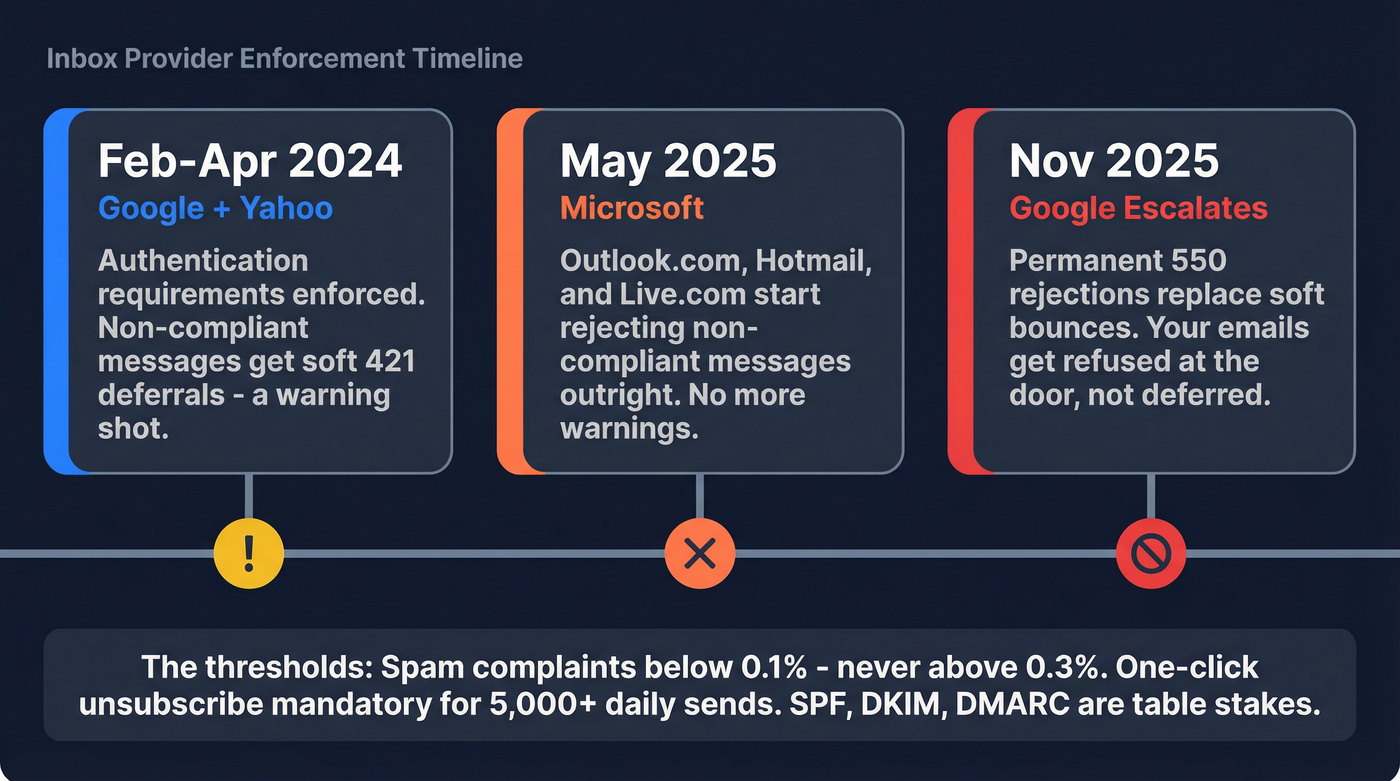
- Feb-Apr 2024: Google and Yahoo began enforcing authentication requirements. Non-compliant messages got temporary deferrals (421 errors).
- May 2025: Microsoft started rejecting non-compliant messages for Outlook.com, Hotmail, and Live.com domains.
- Nov 2025: Google ramped to permanent rejections - 550 errors, not deferrals. Your emails don't bounce softly anymore; they get refused at the door.
The thresholds are tight. Keep spam complaint rates below 0.1%, and never let them hit 0.3%. One-click unsubscribe (RFC 8058) is mandatory for bulk senders. "Bulk" means 5,000+ messages per day to Gmail, Yahoo, or Outlook.com - a number most outbound teams hit within their first week of scaling. Authentication (SPF, DKIM, DMARC) is table stakes; verification won't save you if your sending domain isn't properly configured.
What Email Verification Actually Does
Verification isn't one check. It's five layers, each catching something the previous one missed.
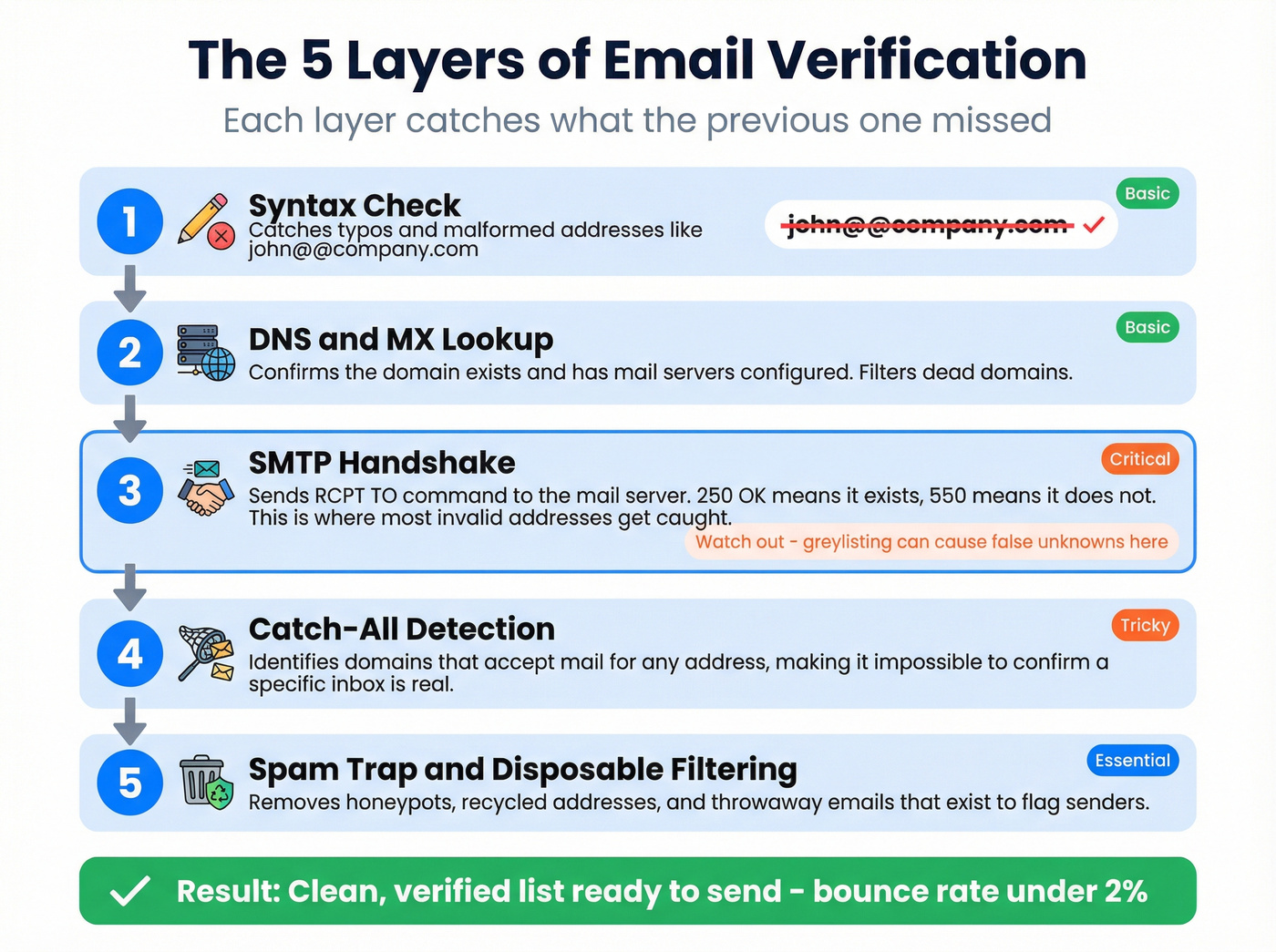
- Syntax check - catches typos and malformed addresses (john@@company.com). Trivial but necessary.
- DNS/MX lookup - confirms the domain exists and has mail servers configured. Filters out dead domains.
- SMTP handshake - the verifier sends an SMTP
RCPT TOcommand to the mail server and reads the response. A250 OKmeans the mailbox exists; a550means it doesn't. This is where most invalid addresses get caught, and where greylisting can cause false "unknown" results since some servers temporarily reject the first connection attempt. - Catch-all detection - identifies domains that accept mail for any address, making it impossible to confirm whether a specific inbox is real.
- Spam trap and disposable filtering - removes honeypots, recycled addresses, and throwaway emails that exist solely to flag senders.
Each layer matters. Skip the SMTP handshake and you're guessing. Skip spam-trap filtering and you're walking into a reputation trap that takes weeks to recover from.
How to Clean a Prospect List Before Sending
This workflow keeps bounce rates under 2%:
- Export your list as CSV. Pull from your CRM, scraping tool, or purchased data source. Include at minimum: email, first name, company domain.
- Upload to your verification tool. Every tool covered below accepts CSV uploads. Most process 10,000 emails in minutes.
- Run the full verification suite. Don't settle for syntax-only checks. You need all five layers. (If you want a deeper tool breakdown, see our guide to email verification.)
- Filter by status. You'll get results tagged as valid, invalid, catch-all, disposable, role-based, or unknown. Each needs a different action.
- Import only valid emails into your sending tool. Push clean contacts to Instantly, Smartlead, Lemlist, or whatever sequencer you're running. (If you’re comparing platforms, start with cold email marketing tools.)
- Re-verify before every major campaign. After four weeks, roughly 2% of a verified list will be invalid. That number compounds fast.
Here's the thing: the critical mistake isn't picking the wrong tool. It's verifying once and assuming you're covered. Email lists decay. People change jobs, domains expire, mailboxes get deactivated. List cleaning is a recurring process, not a one-time event. (More on the underlying mechanics in B2B contact data decay.)

You just read about the 5-step verification process every cold email list needs. Prospeo runs all five layers - syntax, DNS, SMTP, catch-all handling, and spam-trap filtering - before you ever download a contact. 143M+ emails at 98% accuracy, refreshed every 7 days. Stack Optimize kept bounce rates under 3% across every client while scaling to $1M ARR.
Skip the cleanup step entirely. Pull emails that are already verified.
How to Handle Each Status
| Status | Action | Why |
|---|---|---|
| Valid | Send | Confirmed real inbox |
| Invalid | Remove | Will hard bounce |
| Catch-all | Quarantine | Can't confirm; test first |
| Disposable | Remove | Throwaway, no value |
| Role-based | Remove or deprioritize | info@, support@ rarely convert |
| Unknown | Quarantine | Retry later or skip |
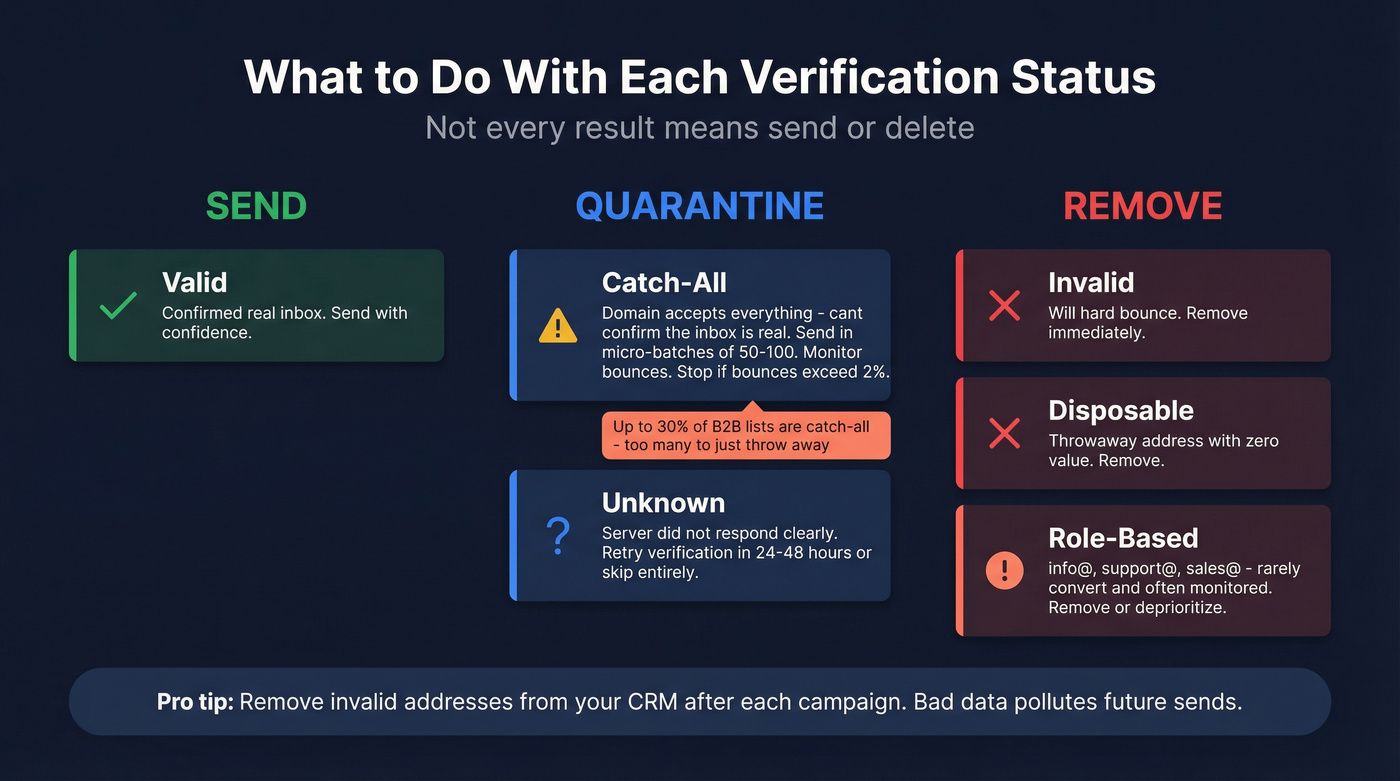
The catch-all problem deserves extra attention. Catch-all domains accept mail for any address - real or fake - so verification tools can't confirm whether a specific inbox exists. Up to 30% of a typical B2B list can come back as catch-all, which is a huge chunk to just throw away.
Quarantine catch-all addresses by default. Send in micro-batches of 50-100. Monitor bounces in real time. If bounces exceed 2% in that segment, stop immediately. Promote engaged contacts to your main sending list and discard the rest. And remove invalid addresses from your CRM after each campaign - keeping your contact database clean prevents the same bad data from polluting future sends. (If you need a system for this, use a CRM hygiene checklist.)
Best Verification Tools for Cold Email
| Tool | Accuracy | Cost / 10K | Free Credits | Catch-All | Rating |
|---|---|---|---|---|---|
| Prospeo | 98% | ~$100 | 75 emails/mo | Yes (built-in) | New |
| Bouncer | 97.8-99.5% | $49 | 1,000 | Yes (flags risky) | G2: 4.8 (232) |
| NeverBounce | 99.1% | $80 | 1,000 | Yes (94% detection) | G2: 4.6 (200+) |
| ZeroBounce | 96.5-99% | $80 | 100 | Yes (AI scoring) | G2: 4.7 (515) |
| MillionVerifier | 99%+ | $37 | None | Basic | Trustpilot: 4.1 (223) |
| Clearout | 98.4% | $40 | Free trial | Yes | G2: 4.7 (307) |
| Emailable | 97.2% | $69 | 250 | Yes | - |
| DeBounce | 97%+ | ~$10 / 5K | - | Basic | - |
| Kickbox | 97% | $70 | - | Yes | - |
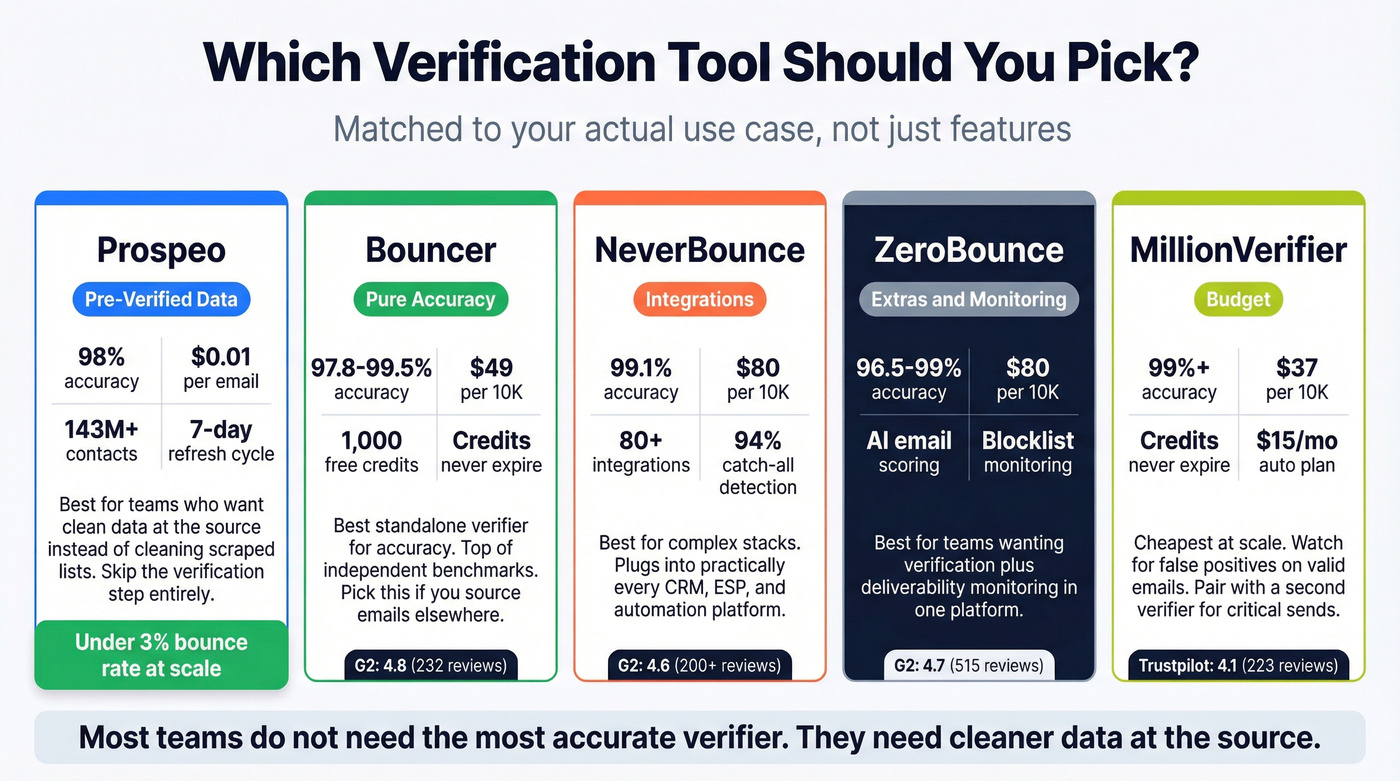
Let's be honest: most teams don't need the most accurate verifier. They need cleaner data at the source. If your average deal size is under $10K and you're running volume-based outbound, you'll get more ROI from a pre-verified data source than from stacking three verification tools on top of scraped garbage. (Related: prospect data accuracy.)
Prospeo
Prospeo isn't a standalone verifier - it's a pre-verified data source, which is a fundamentally different approach. Instead of scraping emails and then cleaning them, you're pulling from a database of 143M+ verified emails that refresh every 7 days. The 5-step verification process - including catch-all handling, spam-trap removal, and honeypot filtering - runs before you ever see a contact. The data arrives ready to send.

Stack Optimize built to $1M ARR using Prospeo data, maintaining 94%+ deliverability and under 3% bounce rates with zero domain flags across all clients. At ~$0.01 per email with a free tier (75 emails + 100 Chrome extension credits monthly), the economics work for solo founders and agencies alike. Native integrations with Instantly, Smartlead, Lemlist, HubSpot, and Salesforce mean clean data flows straight into your sequences without manual CSV gymnastics. (If you’re building the full stack, start with a B2B sales stack blueprint.)
Bouncer
Use this if you're already sourcing emails elsewhere and need the most reliable standalone cleaner. Bouncer consistently scores at the top of independent accuracy tests - 97.8% in La Growth Machine's 47,000-email benchmark, with the vendor claiming 99.5%. Pricing runs $7-8 per 1,000 at pay-as-you-go rates, dropping to ~$49 per 10K at volume. The 1,000 free credits never expire, a small detail that matters when you're not running campaigns every week. G2 rating sits at 4.8 across 232 reviews. In our experience, this is the one to pick first for pure verification accuracy.
Skip this if you want built-in integrations with your CRM or sequencer. Bouncer is a specialist, not a platform.
NeverBounce
Use this if you're running a complex stack with lots of moving parts. NeverBounce's 80+ native integrations are its real differentiator - it plugs into practically every CRM, ESP, and marketing automation platform you can name. Accuracy is strong at 99.1% in the La Growth Machine test, and catch-all detection accuracy hits 94%, notably better than most competitors. At $80 per 10K, it's not the cheapest, but the integration depth saves time that would otherwise go to Zapier workarounds.
Skip this if you're price-sensitive and running simple CSV-upload workflows. You'd be paying a premium for integrations you don't need.
ZeroBounce
Forget accuracy for a second - ZeroBounce's real play is the extras. AI-based email scoring and blocklist monitoring turn it into more than just a verifier. The G2 rating of 4.7 across 515 reviews gives it one of the deepest review bases in this category. Pricing starts at 2,000 credits for $18-20, scaling to $80 per 10K at volume. For teams that want verification plus deliverability monitoring in one platform, it's a solid pick. For pure verification accuracy, Bouncer edges it out.
MillionVerifier
The cheapest option at scale, full stop. $37 per 10K, with credits that never expire and an automated daily verification plan at just $15/month. The consensus on r/sales and r/coldemail is consistent: people love the pricing but flag false positives as a recurring issue - valid emails getting marked invalid. A 100MB CSV upload limit and slow support also show up in complaints. For budget-conscious teams verifying large lists where a few false positives won't tank your campaign, it works. For mission-critical sends, pair it with a second verifier.
Quick Mentions
Clearout hits 98.4% accuracy at $40 per 10K with a G2 rating of 4.7 across 307 reviews - a strong mid-range option. Emailable processes at 0.012 seconds per email with 97.2% accuracy, though $69 per 10K puts it on the pricier side for what you get. DeBounce is the budget pick for small lists at ~$10 per 5K with non-expiring credits. Kickbox runs $70 per 10K and leans into compliance features, making it worth a look for regulated industries.
Re-verifying lists every 30 days costs time and credits. Prospeo's 7-day data refresh cycle means your contacts stay current - not the 6-week industry average that lets 2%+ of your list decay between checks. At ~$0.01 per email, you're paying less than a standalone verifier while eliminating the verification step altogether.
Ditch the verify-then-send workflow. Send from day one.
How Often to Re-Verify
ZeroBounce analyzed 11 billion+ email addresses verified in 2025 and found 23% annual list decay - down from 28% in 2024, but still meaning roughly a quarter of your list goes stale every year. After just four weeks, about 2% of a verified list will contain invalid addresses.
The minimum cadence: re-verify every 30 days. Before any major campaign, re-verify regardless of when you last cleaned the list. We've watched teams lose sending domains over lists that were "only" six weeks old. If you're running cold outreach at scale, list cleaning on a fixed schedule is the only way to protect your sender reputation long-term. (Use this email deliverability checklist to catch the other failure points.)
Mistakes That Still Cause Bounces
Verify once and forget. We've seen teams verify a list in January and blast it in March without re-checking. Two months of decay plus job changes equals a bounce rate that tanks your domain. (If you’re troubleshooting, start with hard bounces.)
Sending to all catch-alls without testing. Catch-all addresses aren't invalid, but they aren't confirmed valid either. Blasting 500 catch-all addresses in one sequence is gambling with your sender reputation.
Ignoring role-based addresses. Addresses like info@, support@, and sales@ rarely convert in cold outreach and often trigger spam complaints. Filter them out or deprioritize them heavily.
Treating verification as a substitute for clean sourcing. This is the one that frustrates us most. If your data source is garbage, verification is just an expensive filter. The best workflow starts with pre-verified data and uses standalone verification as a second pass, not a first line of defense. When you source clean contacts from the start, you spend less time firefighting deliverability issues and more time actually closing deals. (See: data enrichment for cold email.)
Neglecting your existing CRM data. Contact database hygiene isn't just about new lists. Stale contacts accumulate silently, and a clean lead database means every campaign launches from a healthy foundation rather than a decaying one. (Use a repeatable process to keep CRM data clean.)
FAQ
What bounce rate is acceptable for cold email?
Keep total bounces under 2%, with hard bounces ideally under 1%. Once you cross 5%, most sending platforms will flag or suspend your account. Instantly's 2026 benchmark data uses <2% total bounces as the standard threshold for healthy deliverability.
Can I send to catch-all emails safely?
Yes, but quarantine them first and test in micro-batches of 50-100 contacts. Monitor bounce rates in real time - if bounces exceed 2% in that segment, stop immediately. Only promote contacts who engage to your main sending list.
Is there a way to skip manual verification entirely?
Pre-verified data sources run 5-step verification at the point of collection and refresh records on a weekly cycle, so you start with clean data instead of cleaning dirty data after the fact. You can still run a standalone verifier as a second pass, but the heavy lifting is already done.
How long does bulk verification take?
Most tools process a 10,000-email list in 2-10 minutes depending on server response times and catch-all detection depth. Real-time API verification handles single emails in under a second, which is useful for inline form validation or enrichment workflows.
How do I clean a list for opt-in emails vs. cold outreach?
The verification steps are identical - syntax, DNS, SMTP, catch-all, and spam-trap checks all apply. The difference is post-verification handling. For opt-in lists, you also remove unsubscribes and re-engage dormant subscribers. For cold outreach, the priority is removing invalid addresses, catch-alls, and role-based contacts to protect sender reputation from the first touch.