

Domain Warm-Up for Cold Email: 2026 Playbook
You just spun up three fresh Google Workspace inboxes on a brand-new domain. You've got a clean list, a sharp sequence, and a launch date. Then you send 200 emails on day one - and by day three, you're landing in spam. Spam accounts for roughly 47% of global email traffic. ISPs don't know you yet, and they assume the worst. Domain warm-up for cold email is how you prove you're not the other 47%.
The good news: warm-up isn't complicated. It's just methodical. And most teams who burn domains skip exactly one step.
Three Non-Negotiables
Before you read another word:
- Verify your data before day one. A single bad send during warm-up can set you back weeks. A 98%-accuracy verification pass means you're not gambling with bounces. (If you need a framework, start with an email verification tool.)
- Follow a 2-4 week ramp schedule with gating metrics. Not vibes. Actual numbers you check daily. (If you're scaling beyond a few inboxes, use cold email volume best practices as your guardrails.)
- Plain text only, no tracking pixels. For the first two to three weeks, your emails should look like they came from a human, not a marketing platform. (More on why in does open tracking hurt cold email.)
Everything below is the how.
What Domain Warming Actually Means
Domain warm-up is the process of gradually increasing email volume from a new or inactive domain so ISPs learn to trust it. You're building a sending reputation from scratch - proving that real people open, read, and reply to your emails. (If you want the bigger picture, see our email deliverability guide.)
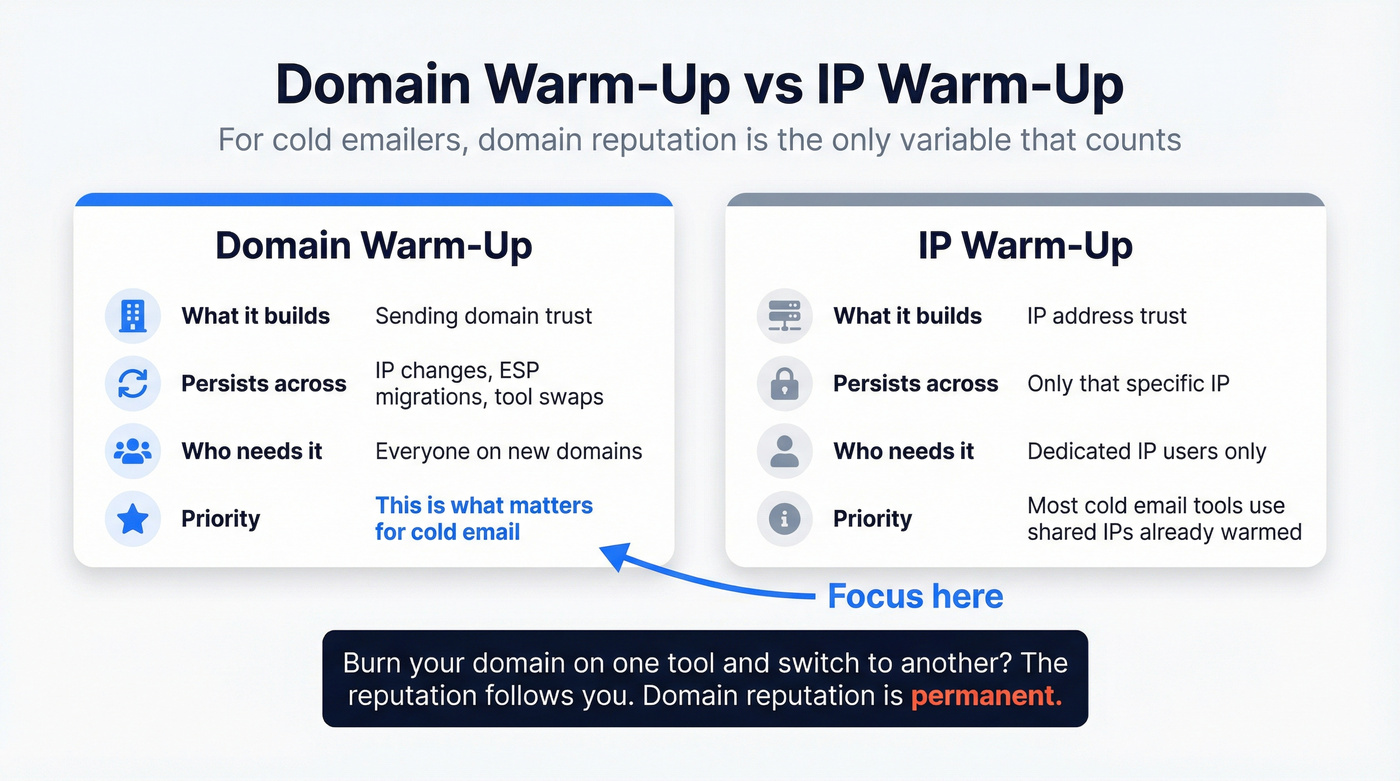
Here's the thing: domain reputation persists across IP changes, ESP migrations, and tool swaps. Burn your domain on Instantly and switch to Smartlead? The reputation follows you. That's what makes domain warming different from IP warm-up, and why it matters more for cold emailers. Most cold email tools use shared IP pools that are already warmed, so your domain is the only variable that counts. (If you're deciding between setups, read dedicated IP vs shared IP cold outreach.)
Already have a domain with some sending history? You probably don't need the full 4-week ramp. If your domain's been active but you're switching ESPs, a condensed 1-2 week warm-up is usually enough. Brand-new domains with zero history need the full program.
| Factor | Domain Warm-Up | IP Warm-Up |
|---|---|---|
| What it builds | Sending domain trust | IP address trust |
| Persists across | IP/ESP changes | Only that IP |
| Who needs it | Everyone on new domains | Dedicated IP users only |
Why the Rules Changed After 2024
The warm-up playbook that worked in 2023 isn't enough anymore. Google and Yahoo's February 2024 bulk sender enforcement raised the bar permanently:
- SPF, DKIM, and DMARC are mandatory for bulk senders (5,000+ emails/day) and effectively required for cold email deliverability at any volume. (If you need the exact setup, use our SPF DKIM DMARC setup for cold email.)
- One-click unsubscribe became required for bulk senders by June 2024.
- Spam complaint rate must stay below 0.3% - Google recommends under 0.1%.
- By November 2025, Gmail tightened enforcement further, issuing temporary and permanent rejections for non-compliant senders.
Google blocks nearly 15 billion undesired emails daily. The filters are smarter, the thresholds are lower, and new domains get zero benefit of the doubt.
Verify Your Data Before Day One
Dirty data kills warm-ups faster than anything else. A bounce rate above 3% during your first week is a warning, and above 5% is a stop signal. With U.S. email list decay running 25-30% per year, that threshold is easier to hit than most teams realize. (If you want the benchmarks behind that decay, see B2B contact data decay.)
Picture this: an SDR sends 50 emails on day two of warm-up. Twelve bounce. That's a 24% bounce rate on a domain with zero history. By day three, Gmail has flagged the domain. The warm-up is over before it started.
The consensus on r/coldemail and r/sales is consistent - the number-one warm-up killer is bad data, not the wrong tool or the wrong schedule. We've seen this play out across dozens of client setups. Stack Optimize built to $1M ARR using Prospeo-verified data and maintained 94%+ deliverability with under 3% bounce and zero domain flags across all clients. At roughly $0.01 per email, verifying a 5,000-contact list costs about $50. That's nothing compared to burning a domain and starting over.


A single bounce spike during warm-up can torch a domain you spent weeks building. Prospeo's 5-step verification and 7-day data refresh cycle ensure every email you send hits a real inbox - 98% accuracy, under 3% bounce rate guaranteed.
Protect your warm-up. Verify your list before you send a single email.
Pre-Warm-Up Checklist
Before you send a single email, run through this list:
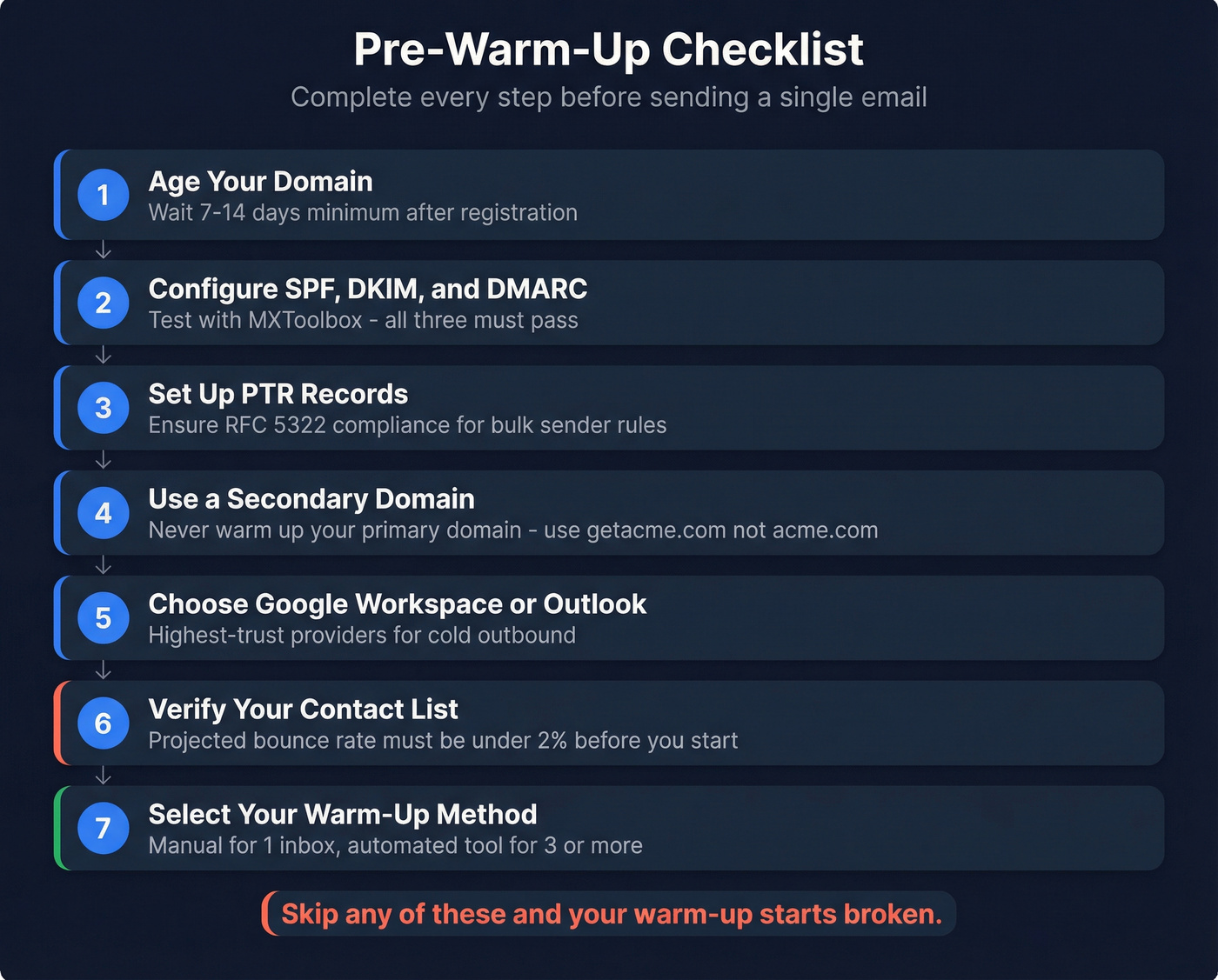
- Domain aged 7-14 days minimum. Don't send from a domain you registered yesterday.
- SPF, DKIM, and DMARC configured and passing. Test with MXToolbox before anything else.
- Valid PTR records and RFC 5322 compliance. These are part of modern bulk-sender compliance expectations and they matter for deliverability.
- Secondary domain set up. Never warm up your primary company domain. Use a variant like getacme.com instead of acme.com.
- Google Workspace or Outlook as your mailbox provider. These are the highest-trust providers for cold outbound.
- Contact list verified with projected bounce rate under 2%. If you skipped the section above, go back.
- Warm-up tool selected or manual plan ready.
Skip any of these and your warm-up starts broken.
Stack Optimize maintained 94%+ deliverability and zero domain flags across all clients using Prospeo-verified data. At ~$0.01 per email, cleaning a 5,000-contact list costs less than a single burned domain replacement.
Don't restart warm-up because of dirty data. Clean your list for $50.
Week-by-Week Warm-Up Schedule
This schedule matches EmailWarmup's timeline and is consistent with MailReach's per-inbox guidance. We've tested variations of it across multiple client accounts, and the numbers hold up. (If you’re comparing providers, see our breakdown of email warm up tools for B2B campaigns.)
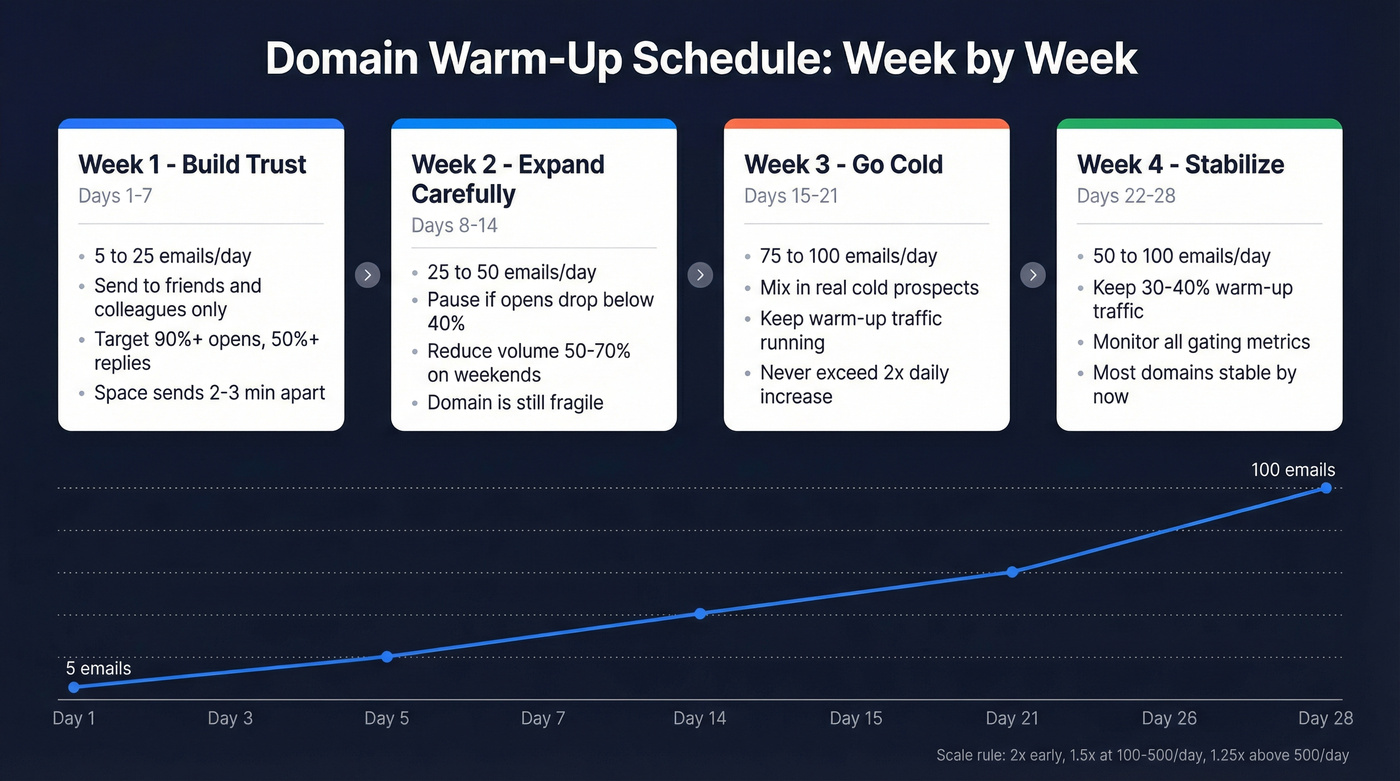
Week 1: Build Trust (Days 1-7)
Start with 5 emails per day and ramp to 25 by day seven. Send only to guaranteed engagers - colleagues, friends, existing contacts who'll open and reply. Target 90%+ open rates, 50%+ reply rates, and zero spam complaints. Space sends 2-3 minutes apart. This isn't about volume; it's about signaling to ISPs that people want your emails.
Week 2: Expand Carefully (Days 8-14)
Ramp from 25 to 50 emails per day. Pause immediately if opens drop below 40% or you receive any spam complaint. Reduce volume 50-70% on weekends - don't stop completely, but ease off. Your domain is still fragile.
Week 3: Introduce Cold Prospects (Days 15-21)
Now you can start mixing in real cold prospects. Ramp into the 75-100/day range, but only on Google Workspace or Outlook. On other providers, stay under 50. Keep your warm-up traffic running alongside real campaigns. Never exceed 2x day-over-day volume increase.
Week 4: Stabilize (Days 22-28)
Maintain 50-100 emails per day. Keep 30-40% of your total volume as warm-up traffic. Brand-new domains with no prior history sometimes need 4-6 weeks total before they're fully stable. Some guides recommend 3 months - that's conservative and applies more to high-volume marketing senders on dedicated IPs. With clean data and proper DNS, most cold email domains stabilize in 2-4 weeks.
The scaling rule of thumb: 2x increases early on, 1.5x between 100-500/day, and 1.25x above 500/day.
For advanced teams: segment your warm-up by provider. Gmail, Outlook, and Yahoo evaluate reputation independently. If your Gmail opens are strong but Yahoo bounces spike, throttle Yahoo sends separately rather than cutting volume across the board.
Gating Metrics
Check these daily. If you hit a warning, slow down. Hit a stop signal? Cut volume in half and diagnose.
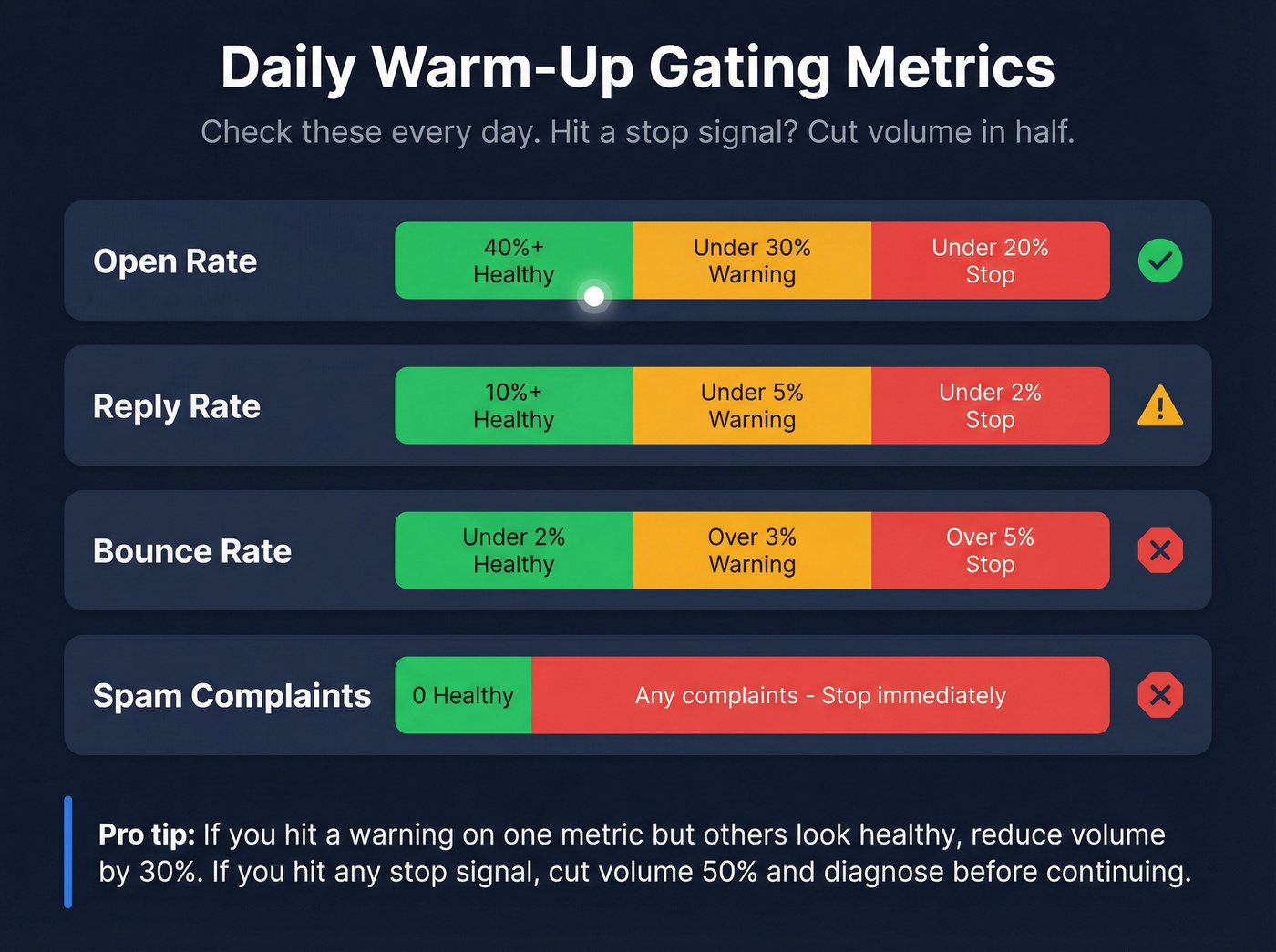
| Metric | ✅ Healthy | ⚠️ Warning | 🛑 Stop |
|---|---|---|---|
| Open rate | 40%+ | <30% | <20% |
| Reply rate | 10%+ | <5% | <2% |
| Bounce rate | <2% | >3% | >5% |
| Spam complaints | 0 | - | Any |
Content Rules During Warm-Up
What you send matters as much as how much you send. During the first two to three weeks:
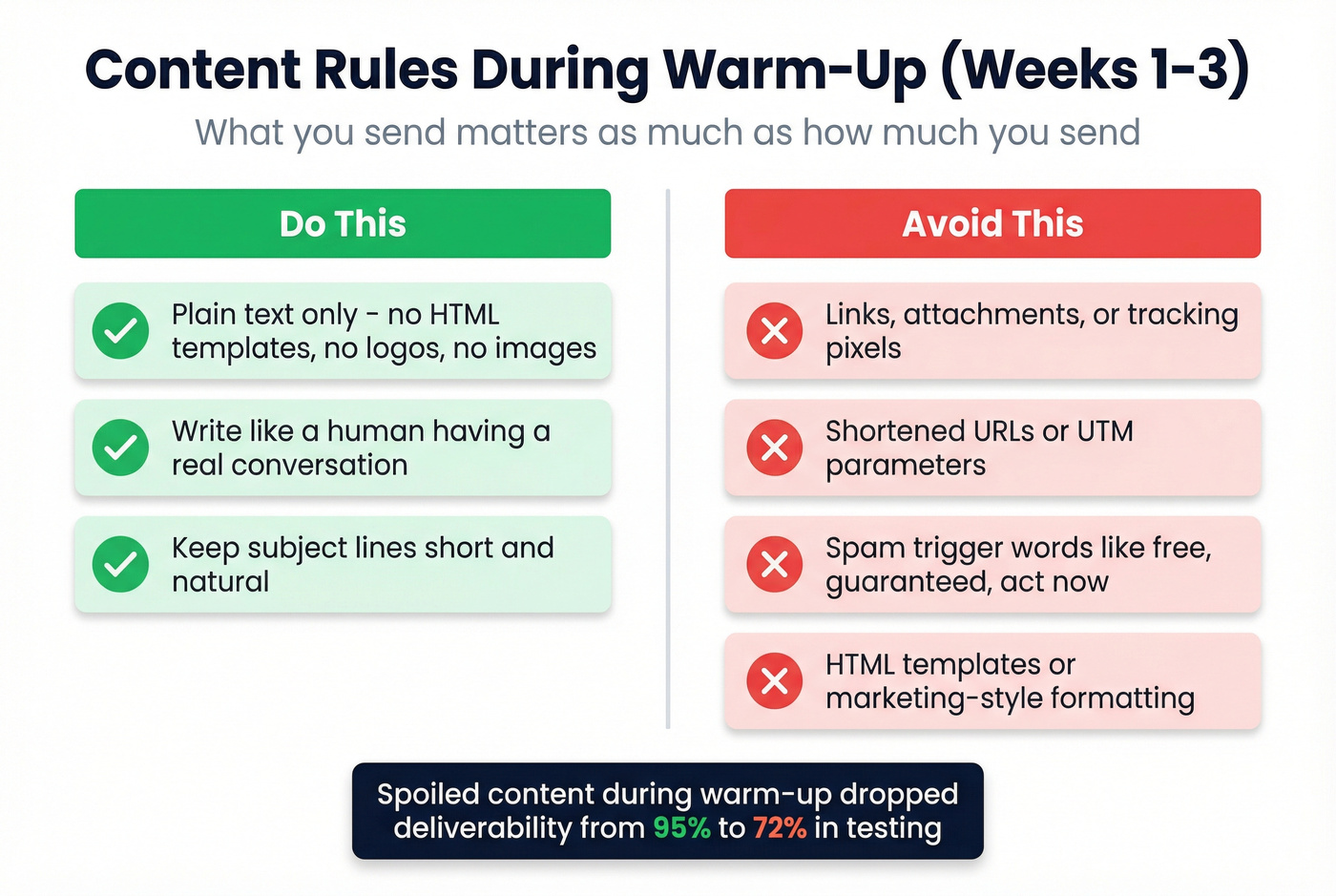
Do:
- Send plain text only - no HTML templates, no logos, no images
- Write like a human having a conversation
- Keep subject lines short and natural
Don't:
- Include links, attachments, or tracking pixels
- Use shortened URLs or UTM parameters
- Use spam-trigger words ("free," "guaranteed," "act now") (see more words to avoid in email subject lines)
A Snov.io test showed that intentionally "spoiling" email content during warm-up dropped deliverability from 95% to 72%. Content quality isn't a nice-to-have - it's structural.
Manual vs Automated Warm-Up
Look, most warm-up guides are written by warm-up tool companies. Let's be honest about that. Manual warm-up works fine for a single inbox if your data is clean. You send to friends and colleagues, they reply, you gradually increase volume. It's free, it's safe, and it's effective.
Where manual breaks down is scale. If you're running 3+ inboxes - which most serious outbound teams are - the coordination becomes a full-time job.
Typical pricing across the market:
- Instantly - ~$30-60/mo, warm-up included with sending
- MailReach - ~$20-30/mo per inbox
- Lemwarm - bundled with Lemlist, ~$40-70/mo depending on plan
- Smartlead - ~$30-50/mo, warm-up included
- Woodpecker - ~$30-60/mo, warm-up as add-on on some setups
- Apollo - warm-up available on select plans, may require credits
For a single inbox, save your money and do it manually. For three or more, pick a tool and automate. (If you’re building a stack, start with our list of cold email marketing tools.)
Do Warm-Up Tools Actually Work?
The best public data comes from a Snov.io test that used fresh Gmail accounts, ran a 3-week warm-up per tool, and measured inbox placement via Glockapps. Baseline deliverability started at 74-76%. After warm-up, Snov.io's own tool hit 95% - take that specific ranking with a grain of salt given it was their test, but the directional finding is solid. Warm-up tools measurably improve deliverability from a cold start.
We've seen this consistently across dozens of client setups. The tools work. They just aren't magic.
Hot take: The warm-up tool you pick matters far less than the data you feed it. I've seen teams spend hours comparing Instantly vs Smartlead warm-up algorithms while sitting on a list with a 12% bounce rate. Fix your data first. The tool is a rounding error by comparison.
Five Mistakes That Burn Domains
Skipping DNS Authentication
SPF, DKIM, and DMARC must be live and passing before you send a single email. Microsoft's warm-up guide reinforces this as step zero. No exceptions.
Ramping Too Fast
Never exceed 2x day-over-day volume. A sudden spike can land you in spam overnight, and recovery takes weeks. Use the gating metrics table above - it exists for exactly this reason.
Sending to Unverified Lists
This is the mistake we see most often, and it's the most preventable. Verify every address before warm-up begins. Prospeo's 5-step verification process - catch-all handling, spam-trap removal, and honeypot filtering - keeps bounce rates under 3% across client campaigns. Skip this if you're only warming a personal inbox for a handful of sends, but for any real outbound operation, verification isn't optional. (If you want a deeper dive, see email verification for outreach.)
Using HTML and Tracking Pixels
Plain text only for the first 2-3 weeks. No images, no logos, no open-tracking pixels. ISPs treat HTML-heavy emails from unknown domains as marketing spam. You can add tracking back once your domain has established trust - not before.
Ignoring Blacklists
Check Spamhaus, Barracuda, and MXToolbox weekly. Once you're listed, recovery is painful and slow. Prevention is the only reliable strategy. (If you need a playbook, use blacklist alert.)
After Warm-Up: Maintenance
Warm-up isn't a one-time event. It's the beginning of ongoing reputation management.
Monitor your domain via Google Postmaster Tools weekly - track reputation, spam rate, and authentication status. If your domain goes inactive for 2+ weeks, deliverability drops noticeably, or you switch ESPs, run a condensed warm-up. Keep 20-30% warm-up traffic running alongside live campaigns to maintain engagement signals.
And verify new contacts before adding them to sequences. List hygiene isn't a launch task - it's a permanent habit. Teams that treat verification as a one-time checkbox inevitably end up re-warming domains three months later, wondering what went wrong.
FAQ
How long does domain warm-up take?
Standard domain warm-up for cold email takes 2-4 weeks. Brand-new domains with no sending history sometimes need 4-6 weeks. Clean data and properly configured DNS can shorten the timeline, but there's no shortcut past the first two weeks.
Do I need to warm up an old domain?
Yes, if it has no recent outbound history. A 10-year-old domain that's never sent cold email needs warm-up just like a new one. ISPs care about sending behavior, not registration age.
Domain warm-up vs IP warm-up - which matters more?
If you're using shared IPs through tools like Instantly, Smartlead, or Apollo, you only need domain warm-up. The shared IP pool is already warmed. IP warm-up only matters if you're on a dedicated IP, and most cold email teams aren't.
What's the best way to prevent bounces during warm-up?
Run every contact through a multi-step email verification tool before sending. Free alternatives like NeverBounce or ZeroBounce work, but they typically verify fewer data points per address than tools with proprietary infrastructure and catch-all handling.
Can I send real campaigns during warm-up?
Starting in Week 3, you can mix in cold prospects. Keep 30-40% of your volume as warm-up traffic and monitor gating metrics closely. If opens or replies dip, pull back to warm-up-only sends until numbers stabilize.