

Mailchimp Deliverability Issues: How to Diagnose & Fix (2026)
Your open rate just cratered 15 points overnight. Nothing changed - same list, same content, same send time. But your emails are hitting spam or vanishing entirely, and Mailchimp doesn't give you enough visibility to quickly pinpoint the root cause.
If you're dealing with Mailchimp deliverability issues, the first step is figuring out which problem you actually have:
- Open rate dropped suddenly - likely a sender reputation problem (shared IP contamination or authentication misconfiguration). If you need a deeper framework, start with an email deliverability guide.
- Bounce rate above 2% - list hygiene or contact data problem (see email bounce rate benchmarks and fixes).
- Complaint rate above 0.1% - list quality or consent problems.
In independent testing of 65,267 emails, Mailchimp delivered just 78.35% to the inbox. Another 20.03% landed in spam. The remaining 2.09% vanished entirely. That's not catastrophic, but it's worse than most competitors - and the tooling gap makes it harder to fix.
For context, a MailerLite benchmark study across 3.6M campaigns found these current median open rates:
| Industry | Median Open Rate |
|---|---|
| Nonprofits | 52.38% |
| Education | 46.71% |
| Overall | 43.46% |
| Software/Web Apps | 39.31% |
| E-commerce | 32.67% |
Apple Mail Privacy Protection inflates open rates, so your real numbers are lower than reported. If you're 10+ points below your industry median, something is broken. (If you want more context, compare against a standard email open rate breakdown.)
How Bad Is Mailchimp's Inbox Rate?
Here's Mailchimp in context against other ESPs tested under identical conditions:
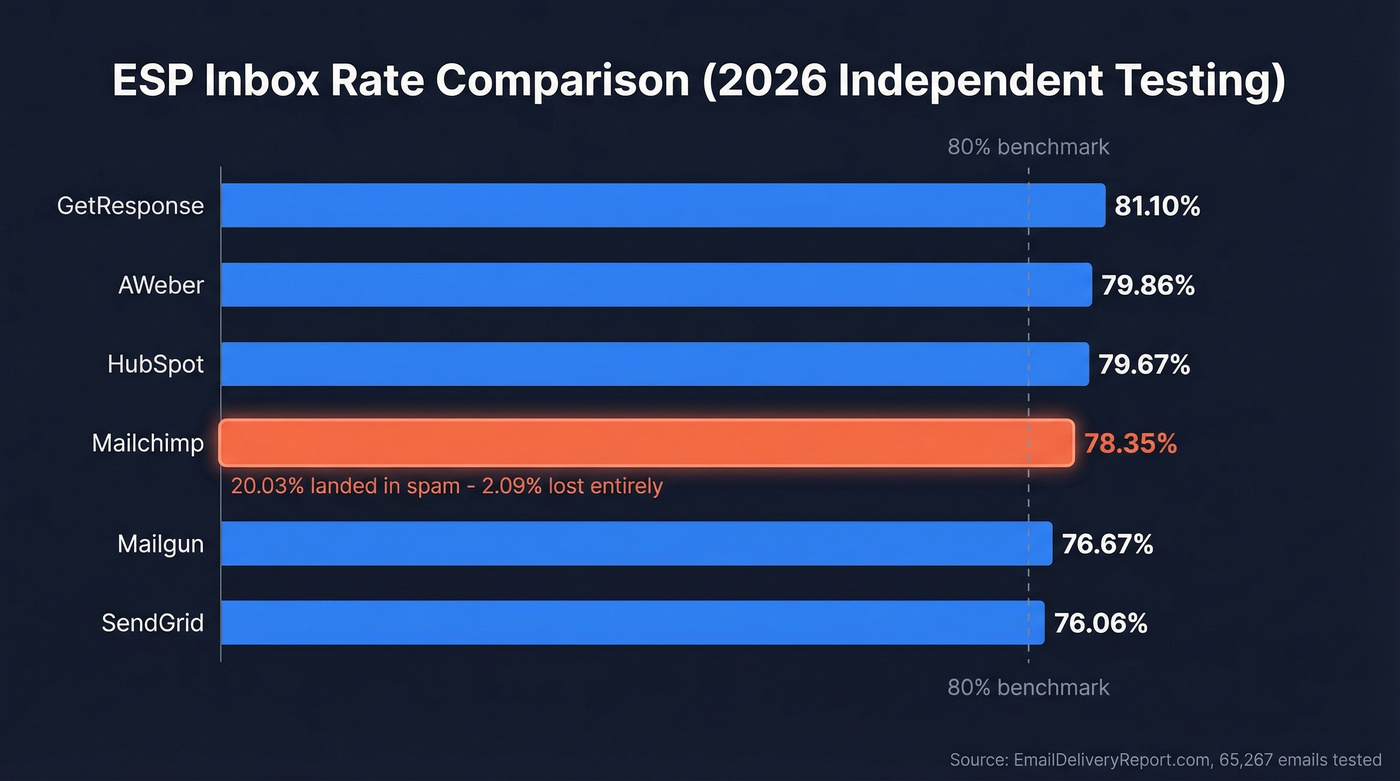
| ESP | Inbox Rate | Spam Rate | Lost |
|---|---|---|---|
| GetResponse | 81.10% | - | - |
| AWeber | 79.86% | - | - |
| HubSpot | 79.67% | - | - |
| Mailchimp | 78.35% | 20.03% | 2.09% |
| Mailgun | 76.67% | - | - |
| SendGrid | 76.06% | - | - |
One in five Mailchimp emails lands in spam. That's the number that should worry you.
Mailchimp earns 4.3/5 on G2 across 12,899 reviews - users love the drag-and-drop builder and templates. But deliverability tooling is where it falls apart. EmailTooltester rates Mailchimp 3.0/5 on deliverability features, the weakest among major ESPs tested. No deliverability dashboard. No sender health score. No built-in list cleaning. You're diagnosing problems blindfolded.
Here's the thing: Mailchimp is still the easiest ESP to set up. But ease of setup means nothing if 20% of your emails never reach the inbox. Most teams outgrow Mailchimp's deliverability infrastructure long before they outgrow its features.
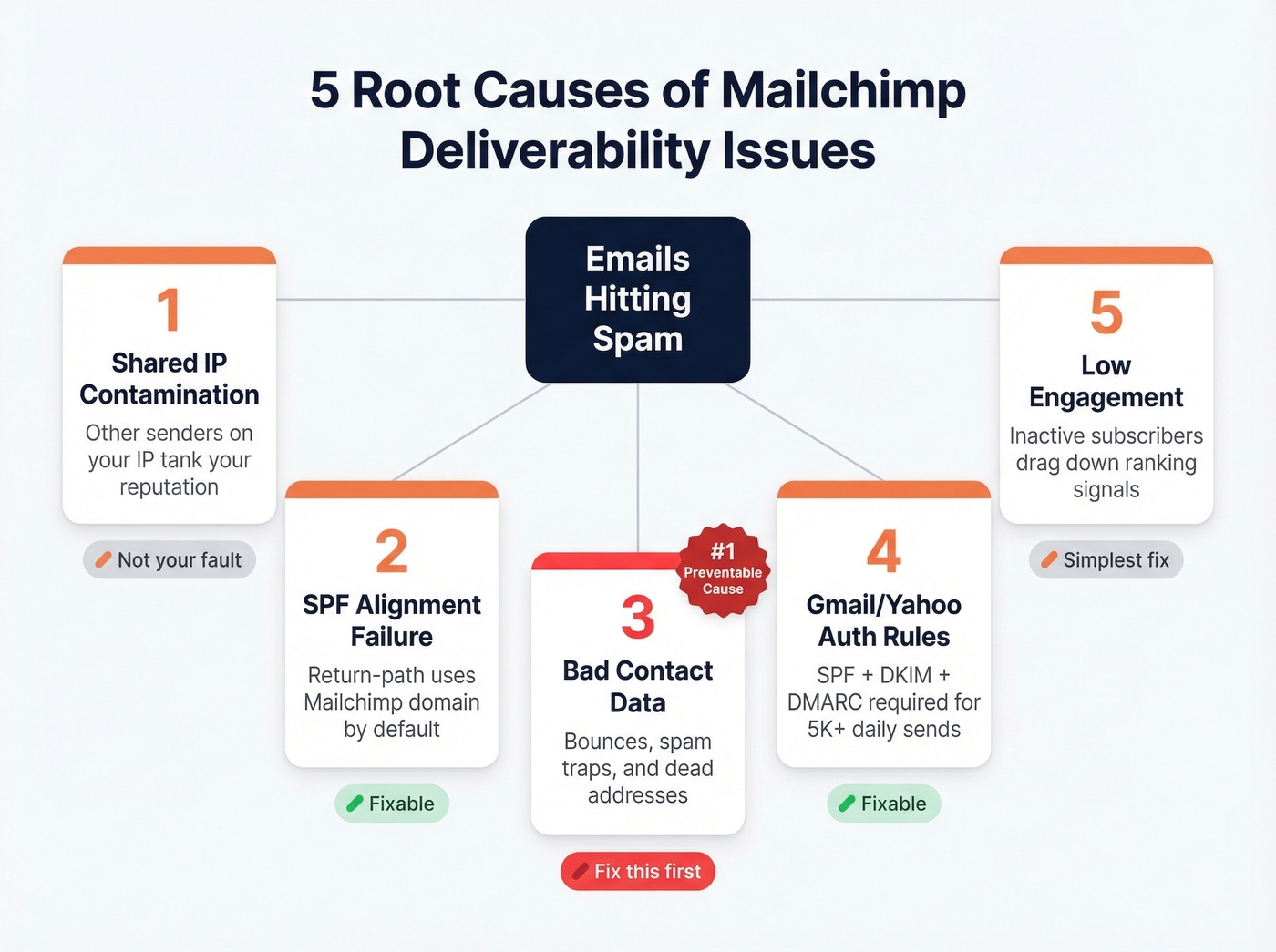
The 5 Root Causes
1. Shared IP Contamination
Mailchimp runs most senders on shared IP addresses. If another sender on your IP buys a list or blasts spam, their behavior tanks the IP's reputation - and your emails go down with it. Mailchimp's own dedicated IP page acknowledges this directly: shared IPs can be harmed by other senders' "spammy practices," and the IP can get blacklisted.
If you suspect blacklist issues, use email reputation tools to confirm what’s happening before you change anything.
Not your fault. And that's what makes it so infuriating.
One Reddit user with an 18,000-subscriber list reported a sudden Yahoo/AOL spam spike. They contacted Yahoo Postmaster, who blamed "user complaints regarding unwanted email from your servers." The sender's response: those aren't my servers. Mailchimp's suggested fix? Ask recipients to mark you as a safe sender. In a separate thread, another user found even double opt-in confirmation emails landing in spam - the very emails designed to prove consent were getting filtered. The consensus on r/Emailmarketing is that Mailchimp's shared IP pools have gotten noticeably worse over the past two years as the platform's user base has grown.
2. SPF Alignment Failure
Partially your fault - and fixable.
Mailchimp's return-path uses its own domain by default, which means SPF alignment fails on every email you send. This is expected behavior, not a misconfiguration - but it means your DMARC policy can only pass through DKIM alignment. Add the two CNAME records Mailchimp provides to your DNS so DKIM signs emails from your domain. Without this, you're relying on Mailchimp's domain reputation instead of your own. (If you want the deeper mechanics, see DMARC alignment and an SPF record example.)
3. Bad Contact Data
Bounce rates above 5% can tank domain reputation fast. Every hard bounce tells inbox providers you don't maintain your list. The reputation damage accumulates silently, long before you see a dramatic performance drop.
This is the #1 preventable cause of inbox placement problems - and it's entirely on you.
We've seen teams blame Mailchimp's infrastructure when the real culprit was a 40,000-contact list that hadn't been cleaned in two years, packed with dead addresses and recycled spam traps. Fix the data first. Always. If you need a remediation checklist, start with spam trap removal.
4. Gmail/Yahoo Authentication Rules
If you're sending more than 5,000 emails per day, Gmail and Yahoo require SPF + DKIM + DMARC authentication, one-click unsubscribe headers, and spam complaint rates below 0.3% (target under 0.1%). Enforcement began in 2024 and has only gotten stricter. Non-compliant emails face outright rejection.
Gmail doesn't provide a traditional feedback loop, so complaint counts won't appear in your Mailchimp reports - watch unsubscribe spikes as a proxy signal.
5. Low Engagement / Inactive Subscribers
Sending to subscribers who haven't opened in six months drags down engagement metrics, which inbox providers use as a ranking signal. Segment aggressively and sunset inactive contacts. This is the simplest fix on the list, and ignoring it undermines everything else you do.
If you’re also running outbound, keep an eye on email velocity so you don’t spike volume and trigger filtering.

Bad contact data is the #1 preventable cause of Mailchimp deliverability issues. Prospeo's 5-step email verification catches invalid addresses, spam traps, and honeypots at 98% accuracy - before they ever hit Mailchimp's servers and tank your domain reputation.
Stop blaming Mailchimp's shared IPs when your list is the problem.
The Repair Playbook
Fix Authentication First
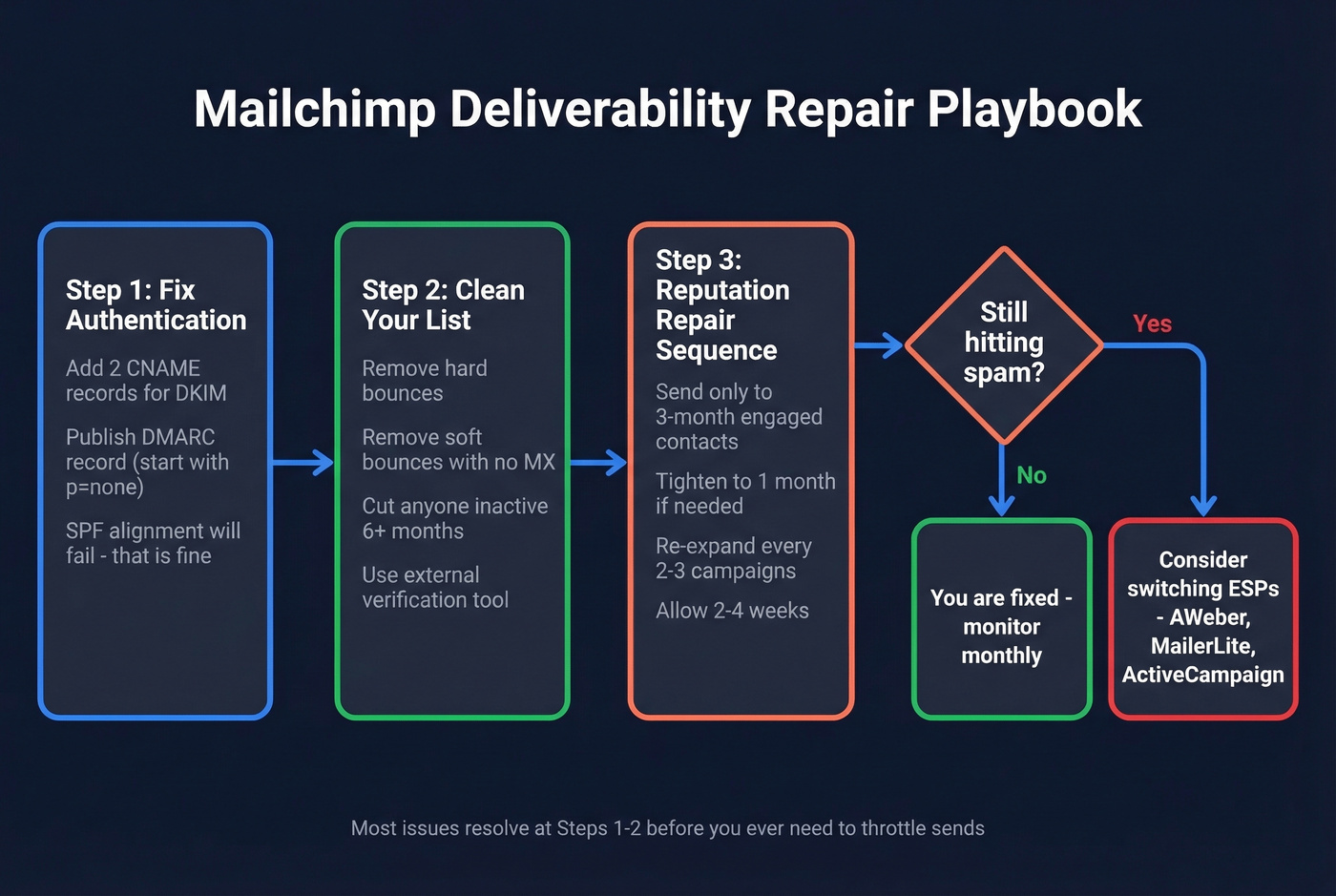
Add the two CNAME records Mailchimp provides for DKIM. Then publish a DMARC record for your domain - start with p=none if you're monitoring, move to p=quarantine once you're confident. SPF alignment will still technically fail. That's fine. DMARC passes via DKIM alignment, which is what matters. To confirm setup end-to-end, use this guide on how to verify DKIM is working.
Clean Your List
If your bounce rate is above 2%, the problem started before you hit send. Remove all hard bounces, soft bounces with no MX record, and anyone who hasn't engaged in 6+ months. Mailchimp scored 0/5 on list cleaning features, so you need an external verification tool.
Run your list through Prospeo's email verification before your next import - it catches invalid addresses, spam traps, and honeypots at 98% accuracy across a 5-step verification process. Free tier gives you 75 verifications per month, and paid plans run about $0.01 per email. This is the upstream fix that prevents bounces from ever reaching Mailchimp's servers and damaging your domain reputation in the first place.
If you’re comparing tools, see our roundup of Bouncer alternatives.
Run the Reputation Repair Sequence
Mailchimp's own reputation repair playbook recommends a 2-4 week process: send only to contacts engaged in the last 3 months. If issues persist, tighten to last month, then last 2 weeks. Re-expand every 2-3 campaigns.
In our experience, combining authentication fixes with list cleaning resolves most cases before you ever need to throttle send frequency. The repair sequence fixes engagement-driven damage - it doesn't fix shared IP contamination or authentication misconfigurations, so handle those first. For a broader framework, see how to improve sender reputation.
Should You Buy a Dedicated IP?
Mailchimp offers dedicated IPs for $29.95/month, but they only make sense above roughly 100,000 emails per month. Below that volume, you won't send enough to build IP reputation, and you'll actually hurt deliverability compared to a shared pool.
Skip this if you're sending fewer than 50K emails monthly. For most Mailchimp users, fixing authentication and list quality delivers better ROI than a dedicated IP ever will.
When to Switch ESPs
Let's be honest: if you've fixed authentication, cleaned your list, run the repair sequence, and emails still hit spam - the problem is Mailchimp's shared infrastructure. At that point, switching is rational.
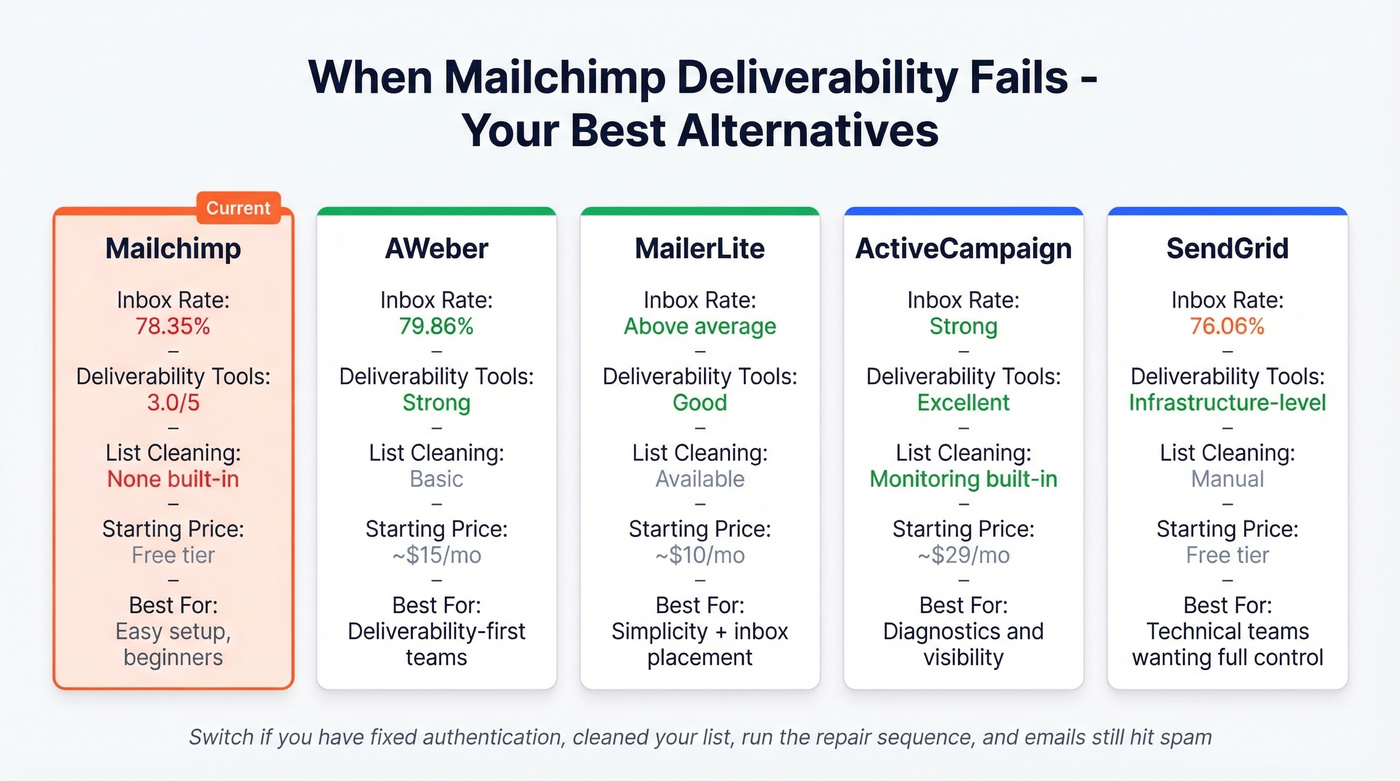
AWeber came out #1 in one practitioner's multi-ESP test and starts around $15/mo for up to 500 subscribers. It's a solid pick if deliverability is your top priority and you don't need complex automation. MailerLite starts around $10/month and offers better deliverability tooling - good for teams that want simplicity without sacrificing inbox placement. ActiveCampaign is strong on monitoring and diagnostics, from roughly $29/mo, and gives you the visibility Mailchimp lacks. SendGrid gives you infrastructure-level control that Mailchimp hides entirely; it has a free tier, with paid plans starting around $20/mo.
I've watched teams spend weeks tweaking Mailchimp settings when the real answer was migrating to MailerLite or ActiveCampaign. If you've exhausted the repair playbook and Mailchimp deliverability issues persist, don't overthink it. Move.
Every hard bounce erodes your sender reputation silently. Prospeo verifies emails at $0.01 each with spam-trap removal and honeypot filtering - the upstream fix that keeps bounce rates under 2% and your emails out of spam folders.
Fix your data before your next send. 75 free verifications to start.
FAQ
Why are my Mailchimp emails going to spam on Yahoo but not Gmail?
Yahoo/AOL spam spikes typically stem from shared IP reputation damage. If another sender on your Mailchimp IP triggered complaints, Yahoo flags the entire IP - while Gmail weighs your domain reputation more heavily, producing different results. Fix DKIM authentication and clean your list first, but persistent shared IP issues require Mailchimp to act or you to switch ESPs.
Does Mailchimp have a deliverability dashboard?
No. Mailchimp offers the weakest deliverability tooling among major ESPs - no dashboard, no sender health score, no built-in list cleaning. Use Google Postmaster Tools to monitor Gmail-specific domain and IP reputation externally, and check MXToolbox for blacklist status.
Can bad contact data cause deliverability problems?
Unverified emails are the single biggest preventable cause. Hard bounces tank sender reputation, which triggers spam filtering across all your campaigns. Verify your list before importing - catch spam traps, honeypots, and invalid addresses before they ever touch your sending infrastructure. Cleaning before every major import is the highest-ROI deliverability fix available.
How long does Mailchimp reputation repair take?
Expect 2-4 weeks of throttled sending to engaged-only segments. Start with contacts active in the last 90 days, tighten to 30 days if needed, then re-expand every 2-3 campaigns. Most senders see inbox rates recover within 3 weeks when combining the repair sequence with authentication fixes and list verification.