

Email Authentication: The Complete Guide to SPF, DKIM, DMARC & Beyond
You open your DMARC aggregate report on a Monday morning and 15% of your legitimate email is failing authentication. SPF passes. DKIM passes. DMARC fails. The report XML is a wall of numbers, and you've got no idea which vendor is breaking alignment. That's the moment most people actually start caring about email authentication - and it's the moment 86% of domains still aren't prepared for, because they haven't published a DMARC record at all.
Google reported 265 billion fewer unauthenticated messages after enforcing authentication requirements for bulk senders. Yahoo enforced similar requirements starting February 2024. Microsoft joined in May 2025 with rejections for high-volume mail that fails DMARC. In 2026, unauthenticated email isn't just risky. It's undeliverable.
That 86% number tells you how poorly this topic has been explained. Most guides are written for people who'll never implement anything. This one assumes you're actually going to set this up.
What You Need (Quick Version)
Every domain sending email in 2026 needs three protocols configured:
- SPF - declares which servers can send on your behalf
- DKIM - cryptographically signs messages to prove they weren't altered
- DMARC - ties SPF and DKIM together, tells receivers what to do when authentication fails, and sends you reports
The enforcement reality is simple: Google and Yahoo have been rejecting unauthenticated bulk mail since February 2024. Microsoft started issuing 550 rejections for high-volume DMARC failures in May 2025. Google moved from soft to stricter enforcement starting November 2025. There's no grace period left.
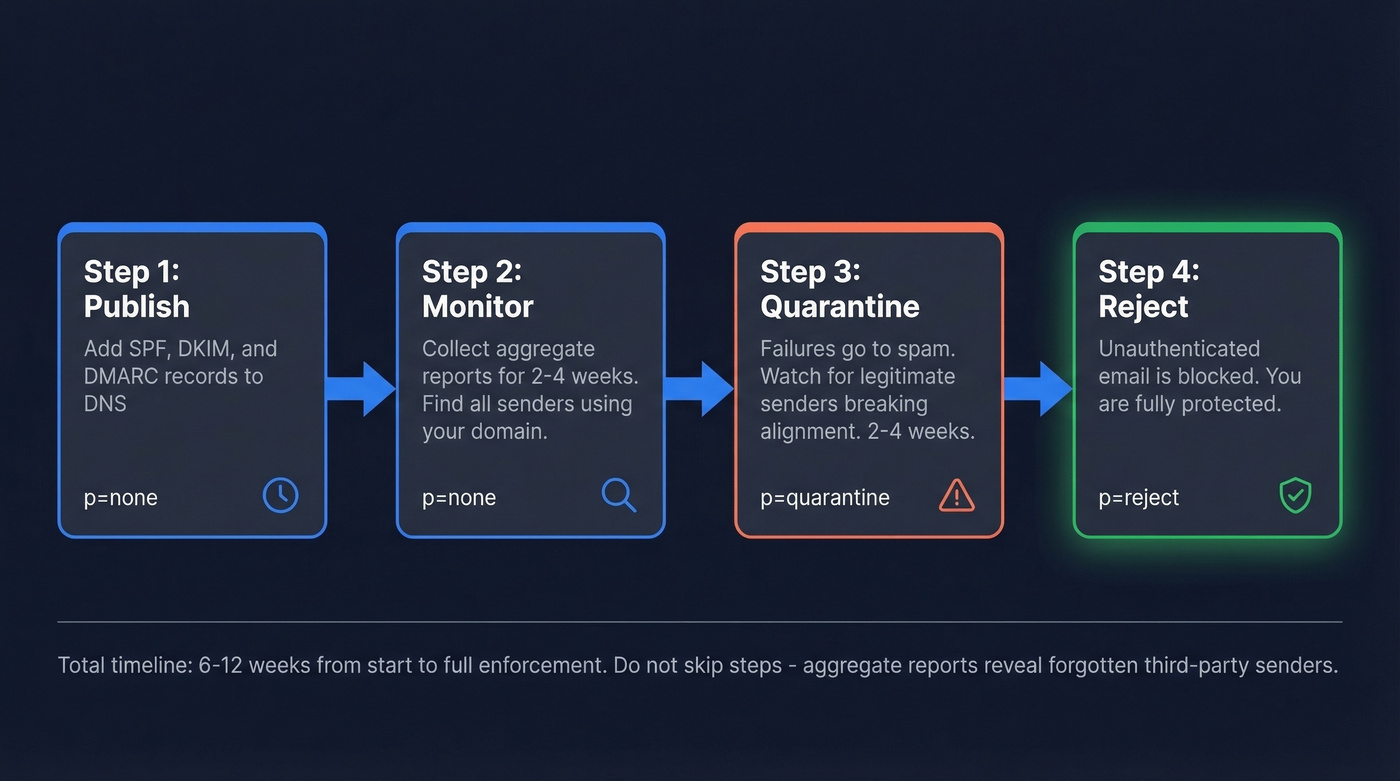
The rollout path: publish DMARC at p=none for 2-4 weeks to collect data. Move to p=quarantine for 2-4 weeks. Then p=reject. Don't skip steps - you need the aggregate reports to catch third-party senders you forgot about.
One thing authentication doesn't fix: bad contact data. If you're sending to invalid addresses, bounces will tank your domain reputation regardless of how perfect your DNS records are.
What Is Email Authentication?
SMTP, the protocol that moves email across the internet, was designed decades ago with no built-in way to verify who's actually sending a message. Anyone can put any address in the "From" field. That's not a bug - it's how the protocol was built. Email authentication is the set of DNS-based protocols that bolt sender verification onto a system that never had it.
Without authentication, nothing stops an attacker from sending email that looks like it comes from your domain. That's how spoofing works. It's how phishing campaigns impersonate your CEO for business email compromise. And it's how your legitimate marketing emails end up in spam - because receivers can't tell you apart from the people pretending to be you.
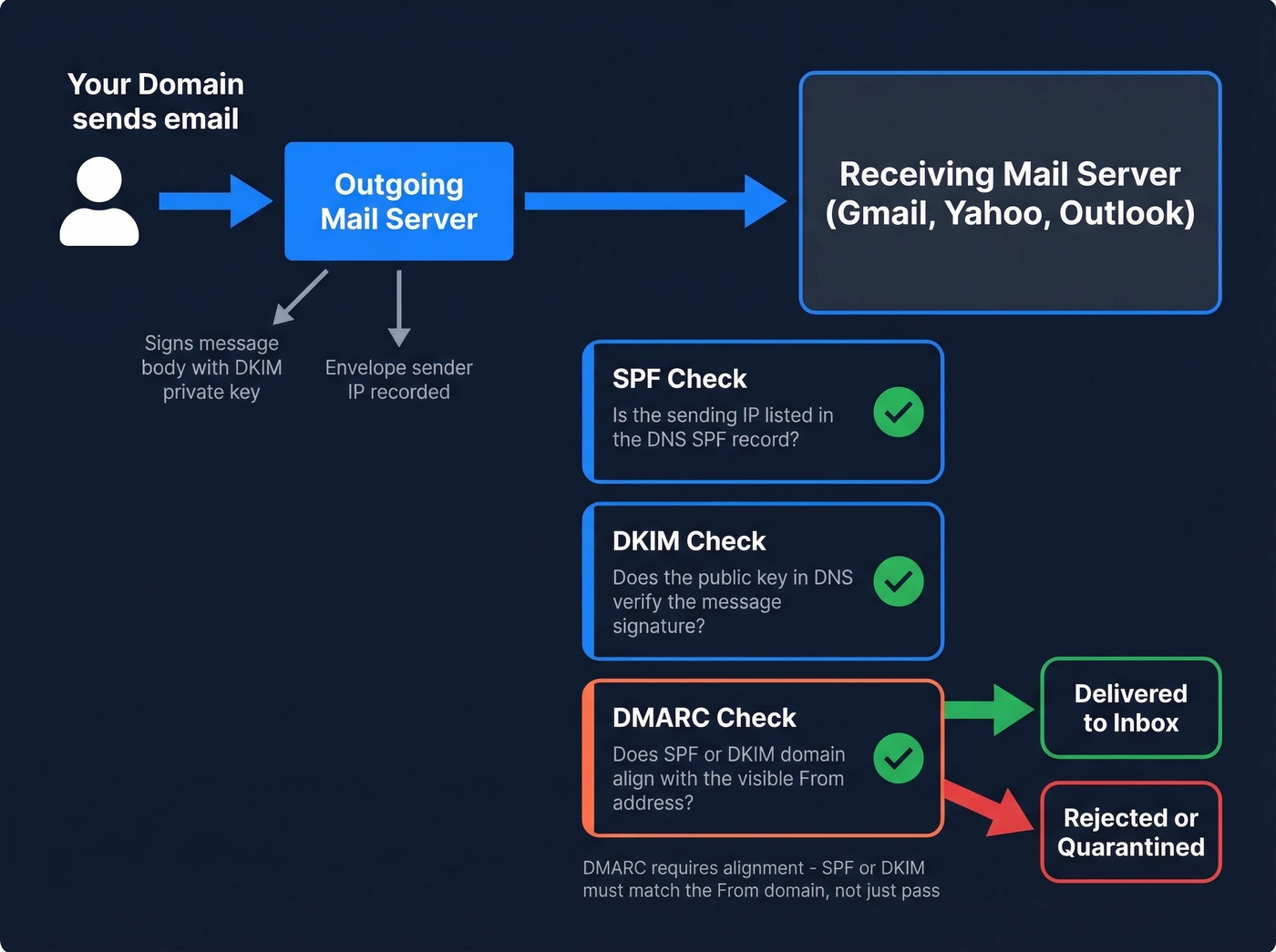
The three core methods - SPF, DKIM, and DMARC - layer together to solve this. SPF checks whether the sending server is authorized. DKIM checks whether the message content is intact. DMARC checks whether either of those results actually aligns with the domain your recipients see in their inbox. Each protocol handles a different piece of the trust chain, and you need all three.
SPF, DKIM & DMARC Explained
SPF - Sender Policy Framework
SPF lets you publish a DNS TXT record listing every IP address and mail server authorized to send email for your domain. When a receiving server gets a message claiming to be from your domain, it looks up your SPF record and checks whether the sending IP is on the list. If it's not, SPF fails.
Here's an annotated example:
v=spf1 include:_spf.google.com include:sendgrid.net ip4:203.0.113.50 -all
v=spf1- required version tag, must be firstinclude:_spf.google.com- authorizes Google Workspace serversinclude:sendgrid.net- authorizes SendGrid for transactional emailip4:203.0.113.50- authorizes a specific IP, likely your on-prem server-all- hard fail everything else; use~allfor soft fail during testing
SPF has a hard limit of 10 DNS lookups per evaluation. Every include: and redirect counts toward that cap. Exceed it and you get a PermError - which most receivers treat as a fail. If you're using multiple SaaS tools, you'll hit this limit fast.
Common SPF mistakes to avoid:
- Publishing multiple SPF records - you can only have one per domain, so merge them
- Using
+all, which authorizes literally everyone, defeating the purpose - Leaving deprecated
ptrmechanisms in your record - Not flattening includes when you're near the 10-lookup limit - tools like dmarcian can help here
SPF alone is almost useless against phishing. An attacker can spoof the visible "From" address while using a completely different envelope sender that passes SPF. That's why you need DKIM and DMARC.
DKIM - DomainKeys Identified Mail
DKIM adds a cryptographic signature to every outgoing message. Your mail server signs the message with a private key. The receiving server looks up the corresponding public key in your DNS TXT record and verifies the signature. If the message was altered in transit - even a single character - verification fails.
The DNS record lives at a selector-specific location:
selector1._domainkey.yourdomain.com TXT "v=DKIM1; k=rsa; p=MIGfMA0GCSqGSIb3DQEB..."
selector1- a label you choose; each sending service gets its own selector_domainkey- fixed namespacek=rsa- key typep=- the public key itself
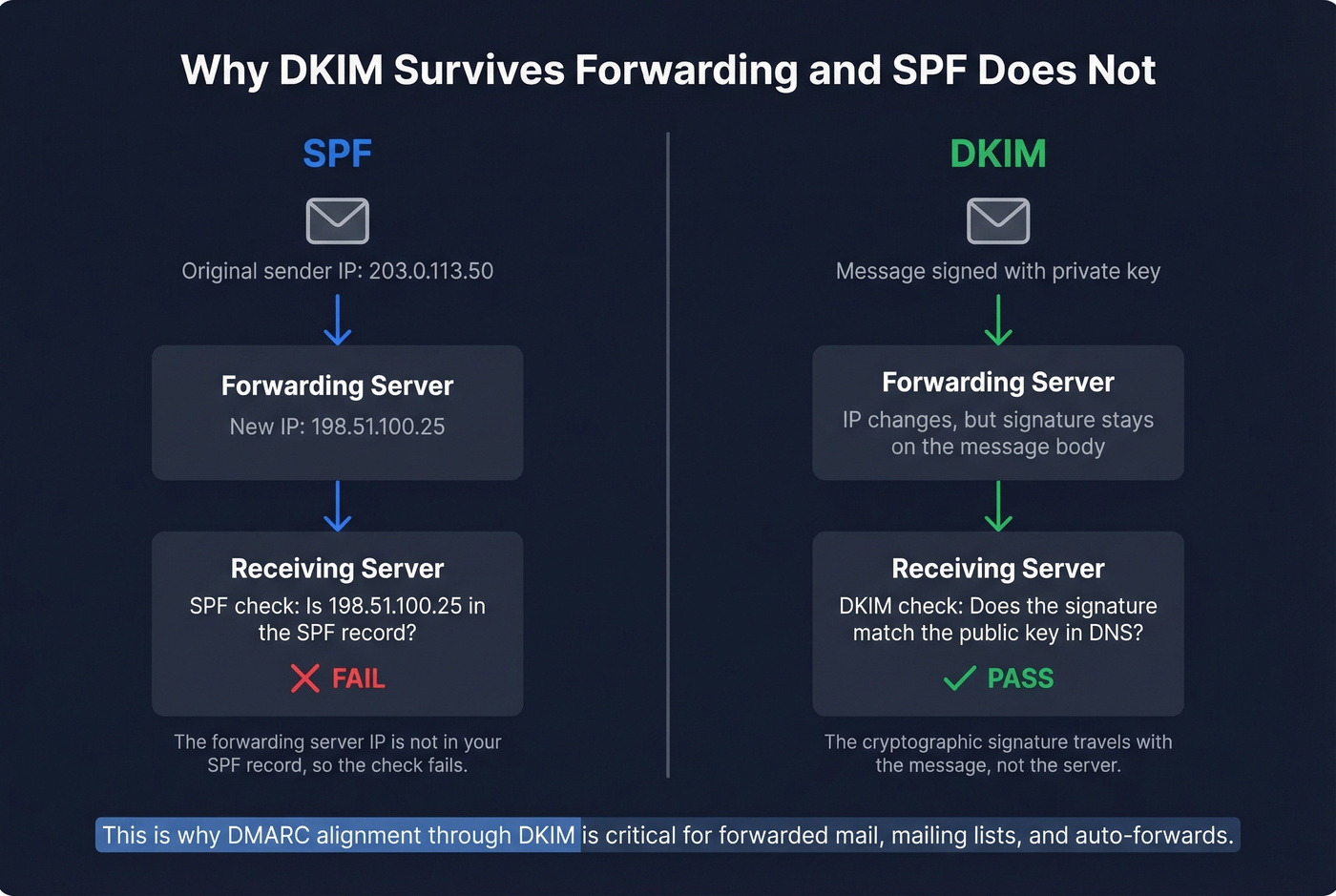
The critical advantage DKIM has over SPF: it survives forwarding. When someone forwards your email, the sending IP changes and SPF breaks, but the DKIM signature stays attached to the message body. For mailing lists, auto-forwards, and any scenario where mail passes through intermediaries, DKIM is your lifeline.
Rotate your DKIM keys at least annually. A 2048-bit key is the current minimum - 1024-bit keys are increasingly rejected. When rotating, publish the new key in DNS first, wait for propagation over 24-48 hours, then switch your signing configuration. Keep the old selector active for a week to cover messages still in transit.
Each third-party sender needs its own DKIM selector configured. If your marketing platform, transactional email service, and helpdesk all send as your domain, each one needs a DKIM key published in your DNS. Miss one and you'll see DKIM failures in your aggregate reports for that sender's traffic.
DMARC - Tying It All Together
DMARC is where SPF and DKIM become useful. On their own, SPF checks the envelope sender and DKIM checks the signing domain - but neither one necessarily matches the "From" address your recipients actually see. DMARC enforces that connection through alignment, and it's the mechanism that lets receivers verify sender legitimacy at scale.
_dmarc.yourdomain.com TXT "v=DMARC1; p=reject; rua=mailto:dmarc-reports@yourdomain.com; ruf=mailto:dmarc-forensics@yourdomain.com; adkim=r; aspf=r; pct=100"
p=reject- policy: reject messages that fail alignmentrua=- where to send aggregate reports, delivered as daily XML summariesruf=- where to send forensic reports with individual failure detailsadkim=r- relaxed DKIM alignment, meaning organizational domain matchaspf=r- relaxed SPF alignmentpct=100- apply policy to 100% of messages
Alignment modes matter. Relaxed alignment (the default) means mail.yourdomain.com aligns with yourdomain.com - the organizational domains match. Strict alignment requires an exact domain match. Most organizations should use relaxed unless they have a specific reason to lock down subdomain usage.
DMARC aggregate reports are the most underused tool in email security. They show results for every message claiming your domain - which IPs sent them, whether SPF/DKIM passed, whether alignment succeeded. These reports are how you discover third-party senders you forgot to authorize and catch spoofing attempts early.
Start at p=none for 2-4 weeks. You won't block anything, but you'll receive reports showing who's sending as your domain. Authorize legitimate senders. Move to p=quarantine for 2-4 weeks - failures go to spam. Once you're confident, move to p=reject. That's the destination. p=none is the starting line, not a permanent state.
| Protocol | What It Authenticates | DNS Record | Survives Forwarding? | Required By |
|---|---|---|---|---|
| SPF | Sending server IP | TXT | No | All providers |
| DKIM | Message integrity | TXT (selector) | Yes | All providers |
| DMARC | Domain alignment | TXT (_dmarc) | Yes (via DKIM alignment) | Major providers for bulk senders (5k+/day) |
2026 Enforcement Timeline
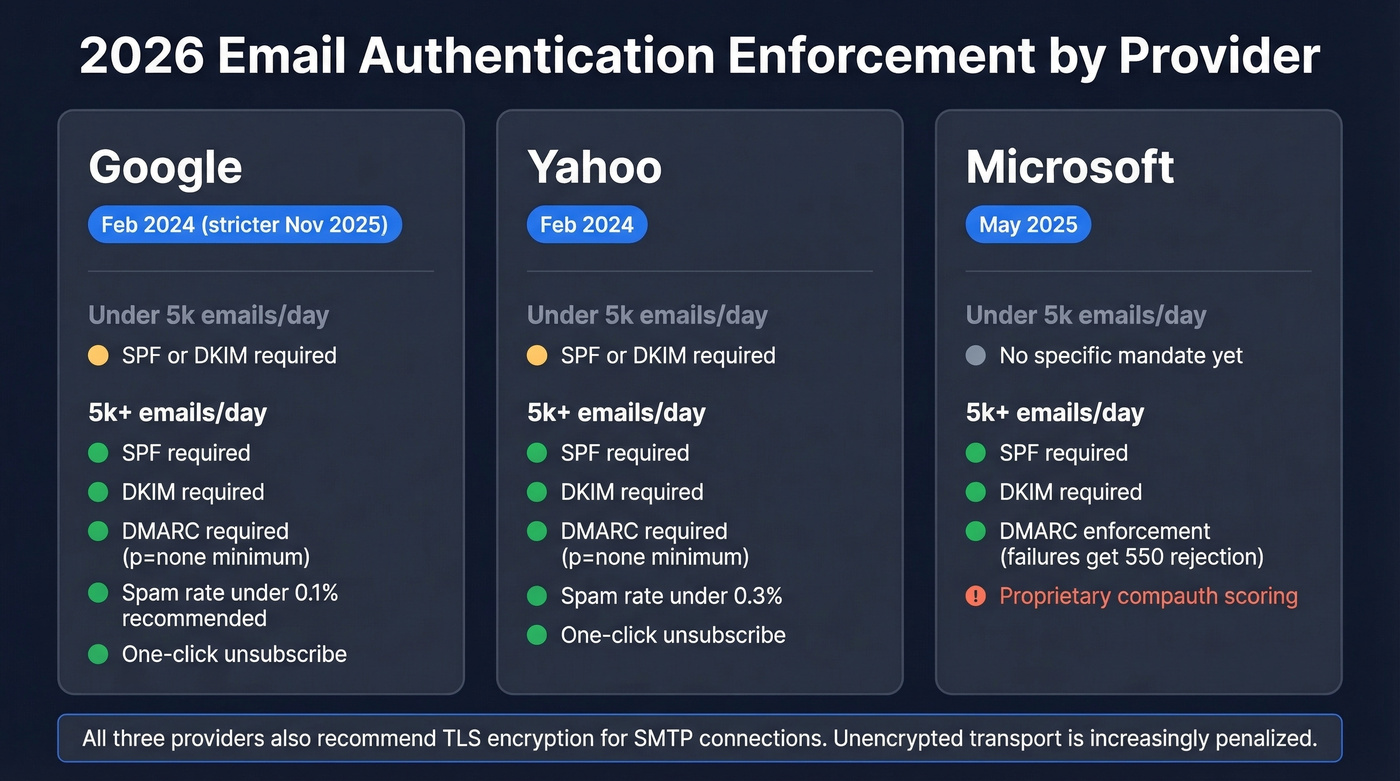
The three major mailbox providers now enforce authentication standards, but their requirements and timelines differ. TLS encryption for SMTP connections is also recommended across all three - unencrypted transport is increasingly penalized.
| Provider | Enforcement Date | Under 5k/day | 5k+/day |
|---|---|---|---|
| Feb 2024 (stricter Nov 2025) | SPF or DKIM | SPF + DKIM + DMARC (p=none min) | |
| Yahoo | Feb 2024 | SPF or DKIM | SPF + DKIM + DMARC (p=none min) |
| Microsoft | May 2025 | - | DMARC enforcement for high-volume senders |
Google's enforcement has teeth. After the initial rollout in February 2024, they ran a soft enforcement period where non-compliant messages got warnings and temporary errors. That period shifted to stricter enforcement in November 2025. Bulk senders without proper authentication now face outright rejection.
Microsoft's approach is blunter. Starting May 2025, messages failing DMARC from high-volume senders get a 550 5.7.515 rejection - no quarantine, no soft fail, just a bounce. Microsoft also evaluates a proprietary compauth (composite authentication) header that combines SPF, DKIM, DMARC, and other signals into a single verdict. A compauth=fail result can trigger junk folder placement even when individual protocols pass, so monitoring Outlook delivery separately is worth the effort.
Beyond authentication, all three providers enforce operational requirements for bulk senders: spam complaint rates must stay below 0.3% (Google recommends under 0.1%), and promotional emails must include one-click unsubscribe honored within two business days. Google's Postmaster Tools added a Compliance status dashboard in mid-2024 - if you're sending at volume, check it weekly.
The 5,000 emails/day threshold defines "bulk sender" for Google and Yahoo. Don't treat it as a safe harbor. Even below that threshold, SPF or DKIM must pass, and a DMARC record gives you visibility into who's using your domain. There's no scenario where skipping DMARC makes sense in 2026.
Let's be honest: DMARC at p=none should've been mandatory a decade ago. The fact that an analysis cited by DMARCguard found 84% of 22 million domains lacked DMARC in November 2024 is an indictment of how the industry communicated the urgency. If you're reading this and your domain is in that 84%, stop reading and go publish a record. The rest of the article will be here when you get back.
Why DMARC Fails When SPF and DKIM Pass
This is the single most confusing failure mode, and it catches experienced admins off guard. You check your headers: SPF passes. DKIM passes. DMARC fails. How?
The answer is alignment. SPF and DKIM can each pass for domains that don't match your visible "From" address. Here's a real-world example from a sysadmin on Reddit who spent days debugging this exact problem:
Authentication-Results:
  spf=pass (sender IP authorized for vendor-bounce.com)
  dkim=pass (signature verified for vendor-signing.com)
  dmarc=fail (From: yourcompany.com   -   neither domain aligns)
The company was routing email through a third-party vendor. SPF passed because the vendor's bounce domain was authorized. DKIM passed because the vendor signed with their own domain. But the "From" header said yourcompany.com - and neither the SPF domain nor the DKIM signing domain matched it. DMARC requires at least one to align. Neither did.
What made this especially frustrating: the failures only showed up in aggregate reports. Direct test messages passed fine. The vendor routing path only kicked in for certain message types, and different receiving servers evaluated the headers inconsistently.
Other common causes of alignment failures:
- Forwarding breaks SPF. When mail is forwarded, the sending IP changes. SPF fails for the original domain. If DKIM also doesn't align, DMARC fails.
- Subdomain inheritance surprises. If you publish DMARC at
yourdomain.comwithp=reject, subdomains without their own DMARC record inherit that policy. A marketing team spinning uppromo.yourdomain.comwithout configuring DKIM alignment will see rejections. - DKIM selector misconfiguration. A third-party sender signs with a selector that points to their domain instead of yours. DKIM passes technically but doesn't align with your From domain.
The fix is always the same: review your aggregate reports, identify which senders aren't aligning, and either configure them to sign with your domain or set up proper DMARC alignment policies.

You just spent hours configuring SPF, DKIM, and DMARC. Don't waste that work by sending to invalid addresses. Prospeo's 5-step email verification delivers 98% accuracy - so your bounce rate stays under 4% and your domain reputation stays intact.
Authentication protects your domain. Verified data protects your reputation.
Beyond the Basics - BIMI and ARC
You'll sometimes see references to Sender ID, ADSP, and VBR - all deprecated. Skip them. The two protocols worth knowing about beyond the core three are BIMI and ARC.
BIMI - Get Your Logo in the Inbox
BIMI (Brand Indicators for Message Identification) displays your brand logo next to authenticated emails in supporting inboxes. It's a visual trust signal and a tangible reward for getting your authentication right.
The prerequisites are strict. Your domain must have DMARC enforcing at p=quarantine or p=reject with pct=100. No exceptions. BIMI doesn't work with p=none.
default._bimi.yourdomain.com TXT "v=BIMI1; l=https://yourdomain.com/logo.svg; a=https://yourdomain.com/cert.pem"
Your logo must be in SVG Tiny-PS format - not a regular SVG, not a PNG. Most design tools can't export it natively; you'll need a converter.
The certificate decision matters most. Gmail requires either a Verified Mark Certificate (VMC) or a Common Mark Certificate (CMC). The Gmail blue checkmark - the one users actually notice - requires a VMC, which in turn requires a registered trademark. CMCs don't need a trademark; you can qualify with proof of 12 months of prior logo use through archive verification or marketing materials. Certificate costs run $500-$1,500/year depending on the certificate authority and validation path. For brands sending millions of emails, the inbox visibility is worth it. Yahoo and Apple Mail also support BIMI logo display with less strict certificate requirements than Gmail.
ARC - The Experiment That's Ending
ARC (Authenticated Received Chain) was designed to preserve authentication results through forwarding chains. It adds three headers - ARC-Authentication-Results, ARC-Message-Signature, and ARC-Seal - creating a signed chain of custody as mail passes through intermediaries.
It never became a universal fix. The IETF has published a draft recommending that RFC 8617 be marked obsolete after roughly a decade of experimentation. The core problems: no scalable internet-wide reputation system for intermediaries, security concerns around permissive forwarders being gamed by attackers, and operational burden that few organizations justified.
The successor direction being discussed is DKIM2, which aims to solve the forwarding problem more cleanly. Don't deploy new ARC implementations. Focus on DKIM alignment instead. If you're already processing ARC headers, treat them as diagnostic information, not a reliable signal.
How to Test Your Setup
Start with the quickest check available. In Gmail, open any sent message, click the three dots, and select "Show original." You'll see Authentication-Results showing SPF, DKIM, and DMARC status in plain text. Takes 10 seconds and catches obvious misconfigurations.
For DNS record validation, MXToolbox is the go-to. Paste your domain and it'll parse your SPF, DKIM, and DMARC records, flag syntax errors, count DNS lookups, and check for common mistakes like multiple SPF records.
For end-to-end header analysis, AboutMy.email is excellent and free. Built by Word to the Wise, it generates a unique email address - you send a message to it, and it returns a full analysis of authentication results, message structure, and best-practice compliance. It's the closest thing to seeing what a receiving server actually sees.
For ongoing monitoring, Google Postmaster Tools is non-negotiable if you're sending at any volume. The Compliance dashboard shows your authentication pass rates, spam complaint rates, and delivery errors over time. Microsoft SNDS provides similar visibility for Outlook and Hotmail traffic.
How Authentication Protects Sender Reputation
The relationship between authentication and sender reputation is direct and measurable. Mailbox providers assign reputation scores at the domain and IP level, and authentication failures are one of the fastest ways to drag those scores down. When unauthenticated messages claiming your domain circulate - whether from spoofing attacks or misconfigured vendors - receivers associate the resulting spam complaints and engagement signals with your domain.
Properly configured SPF, DKIM, and DMARC prevent unauthorized senders from damaging your reputation. DMARC at p=reject ensures that spoofed messages never reach inboxes, which means spam complaints generated by attackers impersonating your domain drop to zero. We've seen this play out with our own sending domains - the difference in Postmaster Tools reputation scores before and after moving to p=reject was stark.
The flip side is equally important: authentication alone doesn't build reputation. Sending to invalid addresses, ignoring spam complaints, or blasting cold lists without verification will erode your reputation even with perfect DNS configuration. Authentication is the foundation. Sending behavior is the structure built on top of it.
Stopping Spam and Spoofing
One of the primary reasons mailbox providers enforce these standards is spam reduction. Google's 265 billion fewer unauthenticated messages statistic isn't just about phishing - it represents a massive reduction in unsolicited bulk email that relied on domain spoofing to bypass filters.
When your domain lacks proper authentication, spammers can forge your address to send messages that piggyback on whatever reputation you've built. Receivers can't distinguish your legitimate campaigns from the spoofed spam, so both get penalized. Publishing DMARC at an enforcement policy stops this by giving receivers explicit permission to reject anything that doesn't pass alignment checks.
For legitimate senders, this creates a cleaner ecosystem. Domains with enforced DMARC policies see measurably better inbox placement because receivers trust messages that pass all three protocol checks. The signal is unambiguous: this message genuinely came from who it claims to be from.
Authentication for Cold Email
Here's the thing: authentication is necessary but not sufficient for cold email deliverability. We've seen teams set up flawless SPF, DKIM, and DMARC records, run warmup sequences for weeks, and still struggle to hit consistent inbox placement. The consensus on r/b2bmarketing matches what we hear from practitioners - 90%+ deliverability feels unrealistic in 2026's enforcement environment, and anyone promising it is probably selling something.
Authentication proves you're a legitimate sender. It doesn't prove you're sending to real people. Bounces from invalid addresses are the fastest way to tank domain reputation, and no amount of DNS configuration fixes that.
The operational checklist for outbound in 2026:
- Cap at 50 emails/day per inbox (25 warmup + 25 cold)
- Monitor reply rates (target 5%+), bounce rates (under 2%), and spam complaints (under 0.1%)
- Skip open-rate tracking pixels - they reduce deliverability and the data is unreliable anyway
- Use Google Postmaster Tools, Microsoft SNDS, and Sender Score for ongoing monitoring
The missing piece most outbound teams overlook is data quality. If 5% of your list bounces, that's a domain reputation hit that compounds with every send. Prospeo's real-time email verification catches invalid addresses before they become bounces - 98% accuracy across 143M+ verified emails means you're sending to real inboxes, not honeypots and dead accounts. Authentication gets you through the front door. Clean data keeps you from getting thrown out.

Bounce rates above 5% destroy sender reputation faster than a missing DMARC record. Prospeo refreshes 300M+ profiles every 7 days - not every 6 weeks - so you're never emailing stale contacts that trigger hard bounces.
Clean DNS records need clean contact data. Get both right.
FAQ
What's the difference between SPF, DKIM, and DMARC?
SPF verifies which servers can send for your domain by checking the sending IP against a DNS TXT record. DKIM adds a cryptographic signature proving the message wasn't altered. DMARC ties them together by requiring alignment with your visible From address and tells receivers whether to reject or quarantine failures. All three are required for bulk sending in 2026.
Do I need DMARC if I send fewer than 5,000 emails per day?
Yes. Even below 5,000/day, SPF or DKIM must pass for Google and Yahoo. A DMARC record at p=none gives you visibility into who's sending as your domain via aggregate reports and protects against spoofing. There's no downside to publishing one.
How do I stop cold emails from landing in spam after authentication?
Keep bounce rates under 2% by verifying every address before sending. Cap volume at 50 emails/day per inbox, monitor spam complaints below 0.1%, and skip open-rate tracking pixels. Clean data matters more than any single DNS record.
How does email authentication protect against spoofing?
SPF, DKIM, and DMARC let receiving servers confirm that a message actually originated from the domain shown in the From header. Without these protocols, anyone can forge your domain. With DMARC at p=reject, spoofed messages are blocked before reaching the recipient's inbox, protecting both your brand and the people receiving the email.