

550 High Probability of Spam: How to Fix It in 2026
The 550 high probability of spam error means a receiving server looked at your email, decided it was spam, and permanently refused delivery. You're probably here because a chunk of your emails are bouncing, your sequences are dead, and every guide you've found opens with "check your SPF record" like that's some revelation.
The triage order most people follow is backwards. They start with email content - tweaking subject lines, removing links, rewriting copy. That's the last thing you should check. The real diagnostic order is authentication → blacklists → data quality → content → provider incident. Get that sequence right and you'll solve this in hours instead of weeks.
Three free tools to check immediately: MXToolbox, Google Postmaster Tools, and Microsoft SNDS.
What the 550 Spam Error Actually Means
A 550 SMTP code is a permanent rejection. The receiving server won't retry. Compare that to a 4xx code (like 421), which is a temporary block - the server might accept the message later. With a 550, you must fix the root cause before resending.
The specific phrase "High Probability of Spam" is SpamExperts' language. SpamExperts is an email filtering gateway that many hosting providers use for inbound and outbound mail scanning. If you're seeing this exact string, that's the filter that caught you.
Read the full NDR (non-delivery report) in your bounce message. It often names the specific blacklist, the authentication failure, or the policy that triggered the block - far more useful than the error code alone.
Provider-Specific Variants
| Provider | Error Code | Typical Wording |
|---|---|---|
| SpamExperts | 550 | "High Probability of Spam" |
| Gmail | 550 5.7.26 | "Unauthenticated email not accepted due to domain's DMARC policy" |
| Microsoft | 550 5.7.520 | "Message blocked because it contains content identified as spam" |
| Generic | 550 | "Spam detected" / "Message rejected" |
Quick Triage Checklist
Before you start changing DNS records, figure out which category your problem falls into. Work through this in order:
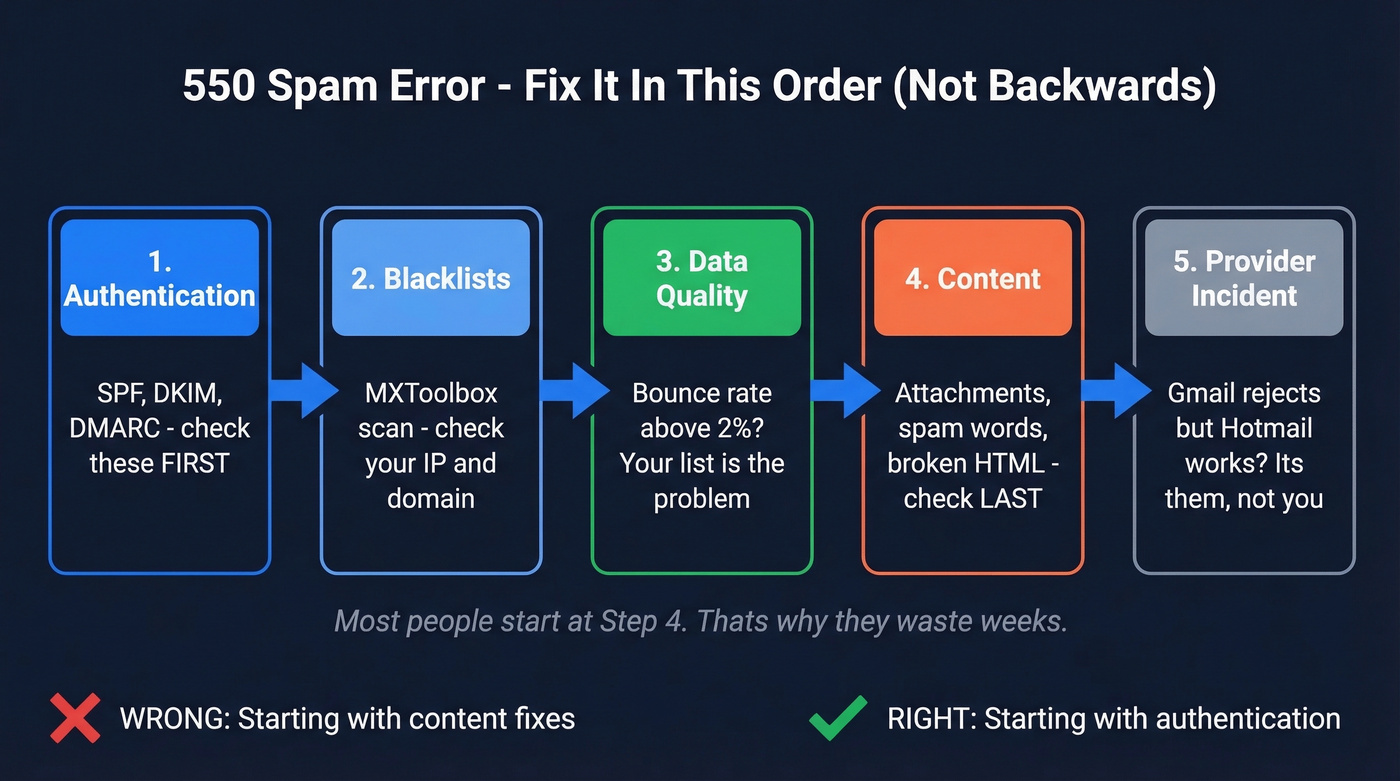
- Authentication failure? Check SPF, DKIM, and DMARC records. Use MXToolbox or your email provider's diagnostic tools. If these are broken, nothing else matters.
- Blacklisted? Run your sending IP and domain through MXToolbox's blacklist checker. Your bounce message often names the specific list.
- Data quality problem? If your bounce rate is above 2-3%, stale or invalid addresses are poisoning your reputation. Fix the list before fixing anything else. (If you need benchmarks and code meanings, see our bounce rate guide.)
- Content trigger? Attachments, spammy language, broken HTML, missing unsubscribe links. Check this last, not first.
- Provider incident? If Hotmail accepts your mail but Gmail bounces everything, that's a provider-specific issue. One Reddit thread documented sudden 550 bouncebacks to Gmail while Hotmail worked fine - and Microsoft's service health dashboard didn't flag it. If you run a self-hosted mail server, check your SMTP logs directly (exim_mainlog, /var/log/mail.log) for rejection details that bounce messages sometimes omit.
Fix Your Authentication
Authentication is the foundation. If SPF, DKIM, or DMARC are misconfigured, you'll get permanent spam rejections regardless of how clean your list is or how good your content looks.
SPF: Common Mistakes
SPF tells receiving servers which IPs are authorized to send on behalf of your domain. The most common failures aren't missing SPF records - they're broken ones.
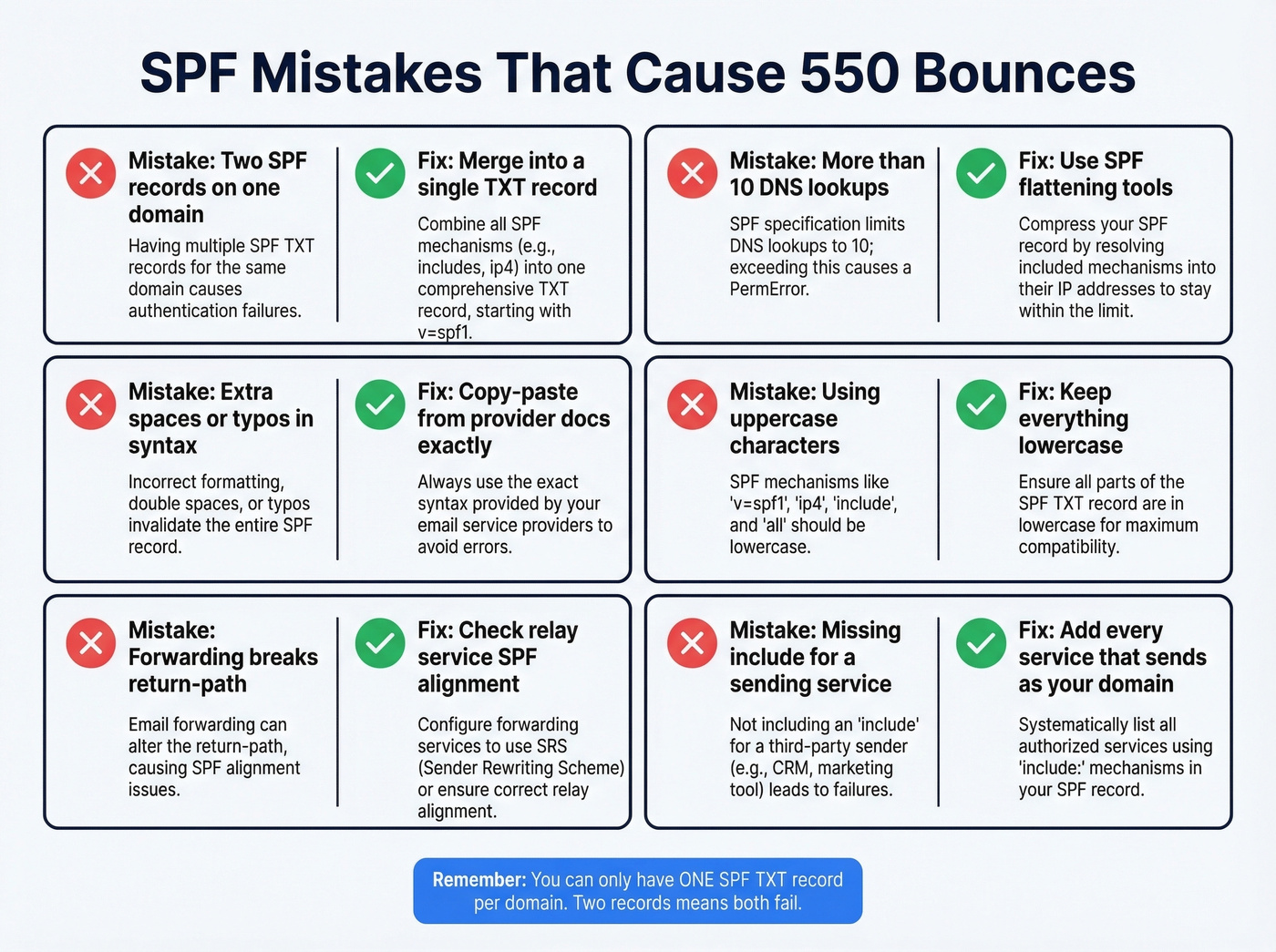
Watch for these syntax mistakes: extra spaces, misspellings, uppercase characters, and the big one - multiple SPF records on the same domain. You can only have one SPF TXT record. Two records means both fail. (More examples: SPF record.)
There's also the 10 DNS-lookup limit. Every include: and redirect: counts as a lookup. If you're using Google Workspace, a CRM, a marketing platform, and a transactional email service, you can blow past 10 easily. Use an SPF flattening tool if you're close. One more gotcha worth knowing: email forwarding and relay services change the return-path, which breaks SPF - if you're forwarding mail through a third-party service, this is likely your culprit.
Copy-paste records for the major providers:
- Google Workspace:
v=spf1 include:_spf.google.com ~all - Microsoft 365:
v=spf1 include:spf.protection.outlook.com -all - Zoho Mail:
v=spf1 include:zoho.com ~all
Multiple sending services? Combine into one record: v=spf1 include:_spf.google.com include:sendgrid.net ~all
DKIM and DMARC Alignment
DKIM signs your emails cryptographically. DMARC ties SPF and DKIM together and tells receiving servers what to do when checks fail. The trap is alignment - your visible "From" domain must match either the SPF domain or the DKIM signing domain. If they don't align, DMARC fails even when SPF and DKIM individually pass. (Deep dive: DMARC alignment.)
DKIM can also fail if the message is altered in transit. Forwarding services and mailing list software are common culprits. If you suspect this, verify your setup end-to-end (see: verify DKIM).
A basic DMARC record to start with:
v=DMARC1; p=none; rua=mailto:dmarc-reports@yourdomain.com
Start with p=none to monitor. Move to p=quarantine after a few weeks of clean reports, then p=reject when you're confident. Gmail has required DMARC compliance for bulk senders (5,000+ emails/day) since February 2024 - this isn't optional anymore.
Make sure your SMTP is authenticating on port 587 (submission), not port 25. DNS propagation takes 24-48 hours after changes, though it's often faster.
Check and Fix Blacklist Listings
If your authentication is clean but you're still getting 550 errors, check blacklists next. MXToolbox scans 100+ blacklists simultaneously - run your sending IP and domain through it right now.
Your bounce message is your best clue. It usually names the specific blacklist that flagged you. Look for references to Spamhaus, Barracuda, Proofpoint, or Microsoft's blocklist. (If you’re on Spamhaus, follow a dedicated Spamhaus blacklist removal process.)
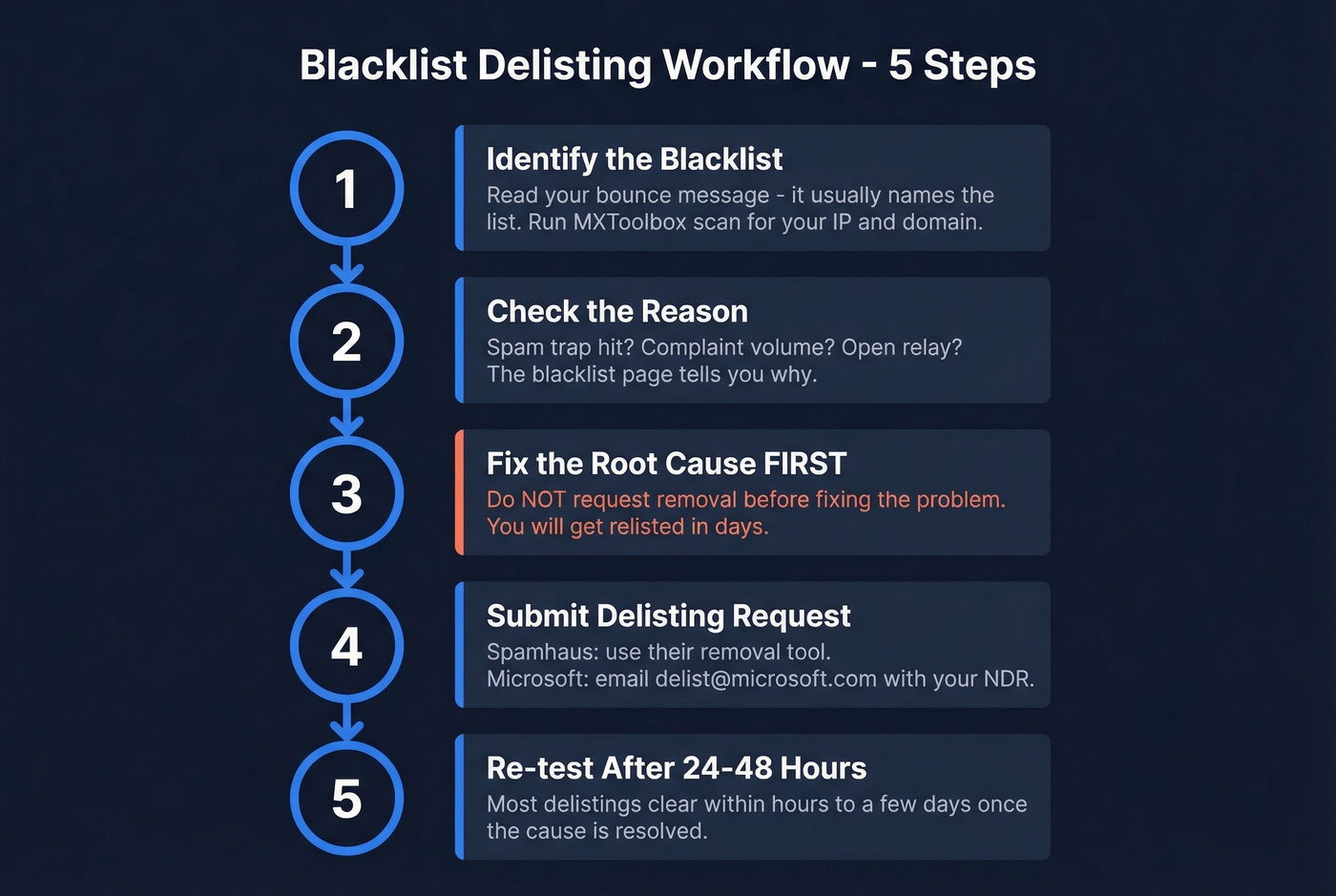
Here's the delisting workflow:
- Identify which blacklist(s) you're on from the bounce message or MXToolbox results.
- Check the reason - most blacklists tell you why you were listed (spam trap hit, complaint volume, open relay).
- Fix the root cause before requesting removal. Delist without fixing the problem and you'll be relisted within days.
- Submit a delisting request. Spamhaus provides a removal process via its site. For Microsoft's blocklist, forward the NDR to
delist@microsoft.com. - Re-test after 24-48 hours. Most delistings clear within hours to a few days once the root cause is fixed.
If your bounce rate has crept above 5-10%, blacklist providers treat that as a red flag on its own. Which brings us to the most common upstream cause.

Bad data is the #1 cause of 550 spam errors. When your list is full of stale, invalid, or spam-trap addresses, blacklists flag you and servers reject you permanently. Prospeo's 5-step verification - with catch-all handling, spam-trap removal, and honeypot filtering - delivers 98% email accuracy on a 7-day refresh cycle. That's why teams using Prospeo see bounce rates drop from 35%+ to under 4%.
Replace the data that's killing your deliverability.
Clean Up Your Sending Data
Here's the causal chain most people miss: bad data → high bounce rate → reputation damage → blacklisting → 550 errors. You can fix your authentication, get delisted, and warm up your domain perfectly - but if you're sending to a list full of invalid addresses, you'll end up right back here within a week.
The thresholds are unforgiving. Keep bounce rates under 1%. Even 2-3% can land you in spam folders for weeks. Above 5-10%, you're in blacklist territory. (Related: spam trap removal.)

Let's be honest: if your deal sizes justify outbound sequences, they justify verifying every address before you send. We've watched teams buy 5,000 contacts from a list provider, load them into a sequence, and crater their domain reputation in 48 hours. Warmup alone can't fix a dirty list. You need to verify before you send.
Prospeo's 5-step verification catches invalid addresses, spam traps, and honeypots before they hit your bounce rate - with 98% email accuracy and a 7-day data refresh cycle that keeps records current. It also handles catch-all domains, the ones that accept everything at the server level but silently discard bad addresses, making them invisible until your reputation is already damaged. Snyk's sales team went from a 35-40% bounce rate to under 5% after switching their data source, generating 200+ new opportunities per month.
Rebuild Your Sender Reputation
Once you've fixed the root cause - authentication, blacklists, or data quality - you need to rebuild trust with receiving servers. That means a structured warmup, not just "sending fewer emails for a while." (More detail: improve sender reputation.)
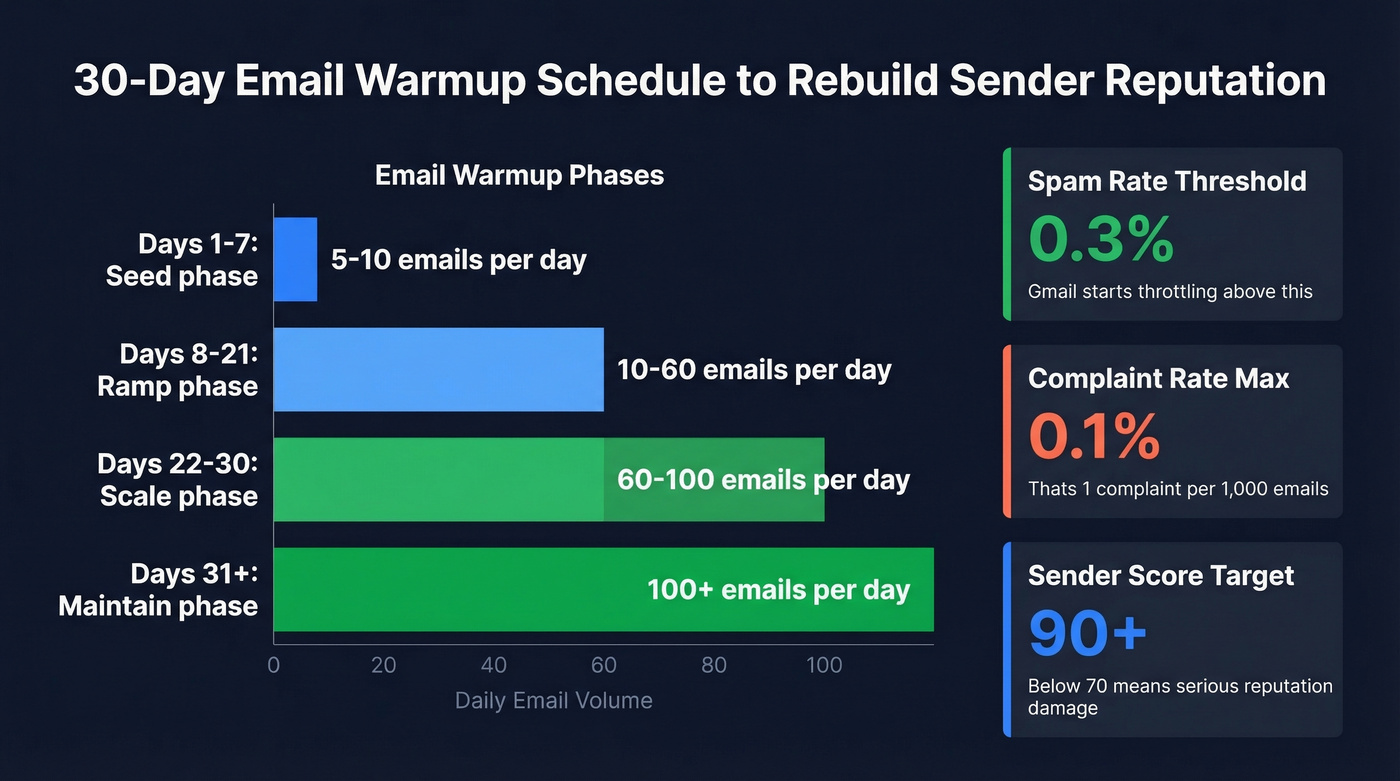
| Phase | Days | Daily Volume | Goal |
|---|---|---|---|
| Seed | 1-7 | 5-10 | Establish baseline |
| Ramp | 8-21 | 10-60 | Build engagement signals |
| Scale | 22-30 | 60-100 | Reach working volume |
| Maintain | 31+ | 100+ | Sustain and monitor |
During warmup, monitor three tools:
Google Postmaster Tools shows your domain reputation (Bad/Low/Medium/High), spam rate, and authentication success rates. If your spam rate crosses 0.3%, Gmail starts throttling aggressively.
Microsoft SNDS gives you IP-level reputation, complaint rates, and trap hits.
Sender Score provides a 0-100 rating. Above 90 is excellent, 80-89 is good, below 70 means you've got serious work to do. (More options: email reputation tools.)
Keep spam complaints under 0.1% - that's 1 complaint per 1,000 emails. Every recipient who marks you as spam instead of unsubscribing chips away at these numbers.
Content and Sending Fixes
If authentication, blacklists, data quality, and reputation all check out, then look at content. For SpamExperts specifically, try these isolation steps:
- Remove attachments and resend. Attachments are a common trigger.
- Strip your email signature temporarily. Signature images and links can trip filters.
- Send variations of your message to pinpoint which element triggers the block.
- Check for spam trigger content: ALL CAPS in subject lines, terms like "free" or "guaranteed," suspicious or shortened URLs, invalid HTML, and missing unsubscribe links. (If you want a systematic check, use an email spam checker.)
On the sending behavior side, keep volume under 100 emails per day per sending address. SpamExperts enforces a hard limit of 10 concurrent SMTP connections per IP - exceed that and you'll get throttled regardless of content quality. Include a clear unsubscribe link in every commercial email. Filters look for it, and its absence is a signal all by itself.
Is It You or Is It Them?
Sometimes the problem isn't on your end.
In April 2023, dozens of users reported sudden 550 5.7.520 blocks from Microsoft on completely normal mail. The service health dashboard didn't flag an incident. Users troubleshot authentication and content for hours before realizing it was a platform-side issue.
The diagnostic clue is provider specificity. If Hotmail accepts your mail but Gmail bounces everything, that's not your SPF record - that's Gmail. The consensus on r/sysadmin is that Gmail rejection upticks happen periodically even with correct DKIM and DMARC setup, while non-Gmail domains accept the same messages fine.
Look, when it's a provider-side issue, your options are limited. You can ask the recipient's admin to allowlist your domain (SpamExperts supports sender allowlisting to bypass checks), but many smaller organizations don't have a dedicated email admin. Confirm your setup is clean, document the issue, and check status pages alongside Reddit threads. If you're seeing the same error across multiple unrelated recipient domains simultaneously, it's probably not you.
Every 550 bounce damages your sender reputation and pushes you closer to blacklists. The fix isn't rewriting subject lines - it's sending to verified addresses. Prospeo checks 143M+ emails through proprietary infrastructure at $0.01 per email, so you clean your pipeline before a single message goes out. Zero spam traps. Zero honeypots. Under 2% bounce rate.
Stop diagnosing bounces and start preventing them.
FAQ
What does "550 High Probability of Spam" mean?
This exact phrase comes from SpamExperts, an email filtering gateway used by many hosting providers. It's a permanent rejection (550 SMTP code) indicating your message's content, authentication, or sender reputation triggered spam detection. You must fix the root cause before resending.
Is a 550 SMTP error permanent?
Yes - a 550 code is a permanent rejection and the server won't retry delivery. Temporary blocks use 4xx codes like 421 or 451. With any 550 bounce, identify and fix the underlying issue before attempting to resend.
How do I fix the 550 high probability of spam error?
Follow this diagnostic order: verify SPF, DKIM, and DMARC authentication first, then check blacklists via MXToolbox, clean your sending list to get bounce rates under 1%, and finally review email content for spam triggers. In our experience, most senders resolve the issue at the authentication or data quality stage - not content.
Can bad contact data cause 550 spam errors?
Absolutely. Sending to invalid addresses inflates your bounce rate above safe thresholds, which damages domain reputation and triggers blacklisting - leading directly to 550 rejections. Verifying every address before sending is the single most effective prevention step.
How long does sender reputation take to recover?
Expect 2-4 weeks of structured warmup after fixing the root cause. Start at 5-10 emails per day and ramp to 100+ over 30 days. Keep spam complaints under 0.1% and bounce rate under 1%. Verify your entire list before restarting sends to avoid re-damaging reputation with stale data.