

Domain Reputation: What It Is & How to Fix It (2026)
One in six legitimate marketing emails never reaches the inbox. The global average is 83.5% inbox placement - meaning if your SDR team sends 500 cold emails a day from your primary domain, roughly 83 vanish before anyone sees them. The culprit is almost always domain reputation.
Here's what most deliverability guides won't tell you: your sending reputation isn't really about the domain itself. It's about your data. Authentication is table stakes. The real differentiator is whether you're sending to people who exist, who want to hear from you, and who engage when they do.
The Quick Version
- Check your reputation now: Google Postmaster Tools for Gmail, Cisco Talos for general web/email reputation, MxToolbox for blacklist scanning. All free.
- If reputation is damaged: Pause sending for 14 days, prune to engaged contacts only, rebuild volume over 6-12 weeks.
- If you send cold outreach: Never use your primary domain. Verify every email before sending. Warm up new domains for 3-6 weeks before going full volume.
What Is Domain Reputation?
Domain reputation is a trust score that inbox providers assign to your sending domain based on authentication setup, sending behavior, and recipient engagement. There's no single universal score. Gmail, Microsoft, Yahoo, and every other provider calculates its own, and most keep the exact formula private to prevent gaming.
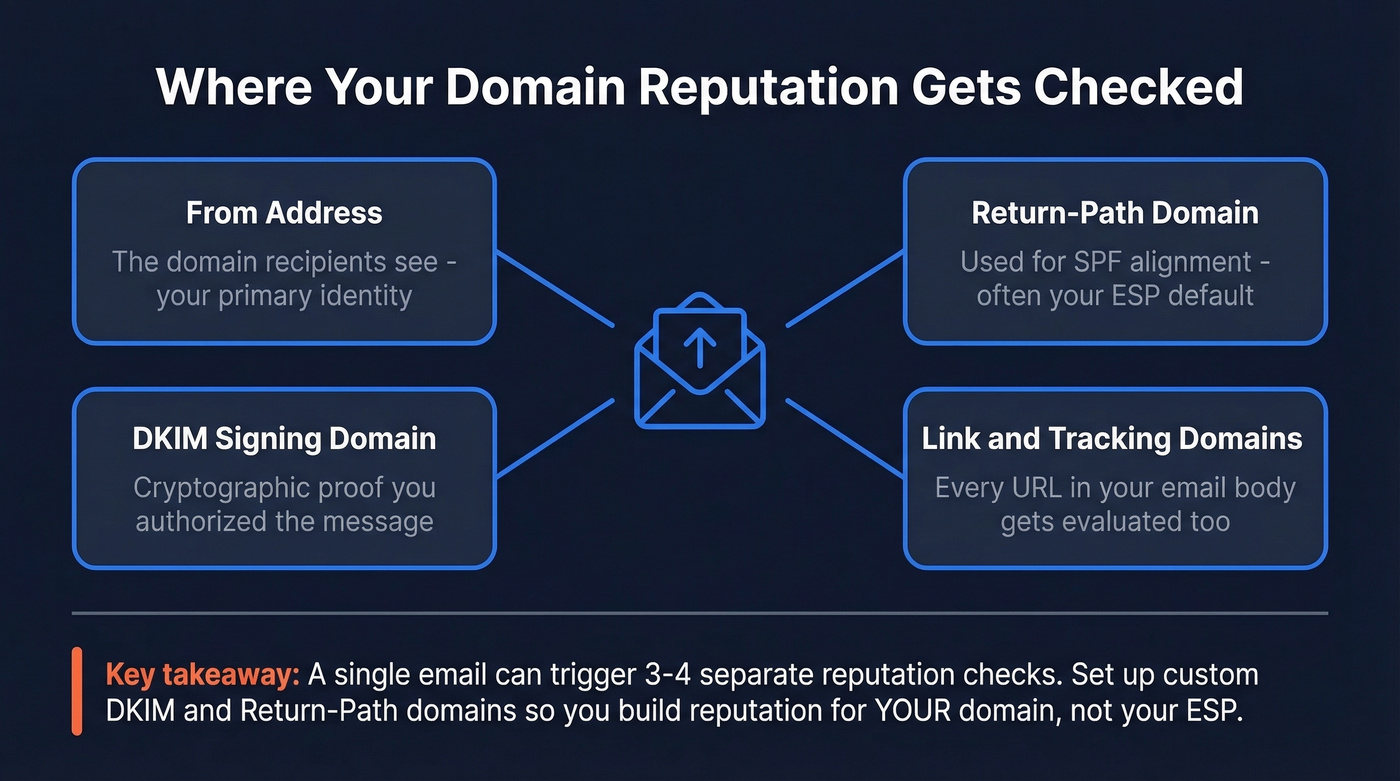
What makes this tricky is that "your domain" isn't just one thing inside an email. As Postmark's deliverability team explains, reputation checks happen wherever your domain appears: the From address, the Return-Path domain used for SPF alignment, the DKIM signing domain, and even the domains in your links and tracking URLs. A single message can involve three or four different reputation evaluations.
That's why setting up custom DKIM and Return-Path domains matters so much. If you're relying on your ESP's default domains, you're building reputation for them, not for yourself. Switch providers, and you start from scratch.
Think of it like a credit score - built slowly, damaged quickly, and it follows you everywhere.
Why It Matters More Than Ever
Inbox providers have been raising the bar since 2024, and the pace isn't slowing down.
February 2024: Gmail and Yahoo began enforcing bulk sender requirements for anyone sending 5,000+ messages per day - SPF, DKIM, and DMARC authentication, RFC 8058 one-click unsubscribe, and spam complaint rates below 0.3%.
May 2025: Microsoft followed with matching SPF/DKIM/DMARC requirements for Outlook.com, Hotmail.com, and Live.com senders.
November 2025: Gmail escalated enforcement further. Non-compliant messages now trigger SMTP 4xx/5xx errors - rejected before reaching the mailbox, not just filtered to spam.
The gap between providers is significant. Gmail delivers 87.2% of legitimate email to the inbox. Microsoft sits at 75.6%. If a quarter of your list is on Outlook, you're fighting a harder battle there, and your sending reputation is the primary lever you have.
What changed isn't the concept. It's the consequences. Two years ago, poor authentication meant your emails landed in spam. Now it means they bounce. Bounces compound - each one further damages the reputation you're trying to protect.
Domain vs. IP Reputation
These two get conflated constantly. They shouldn't be.
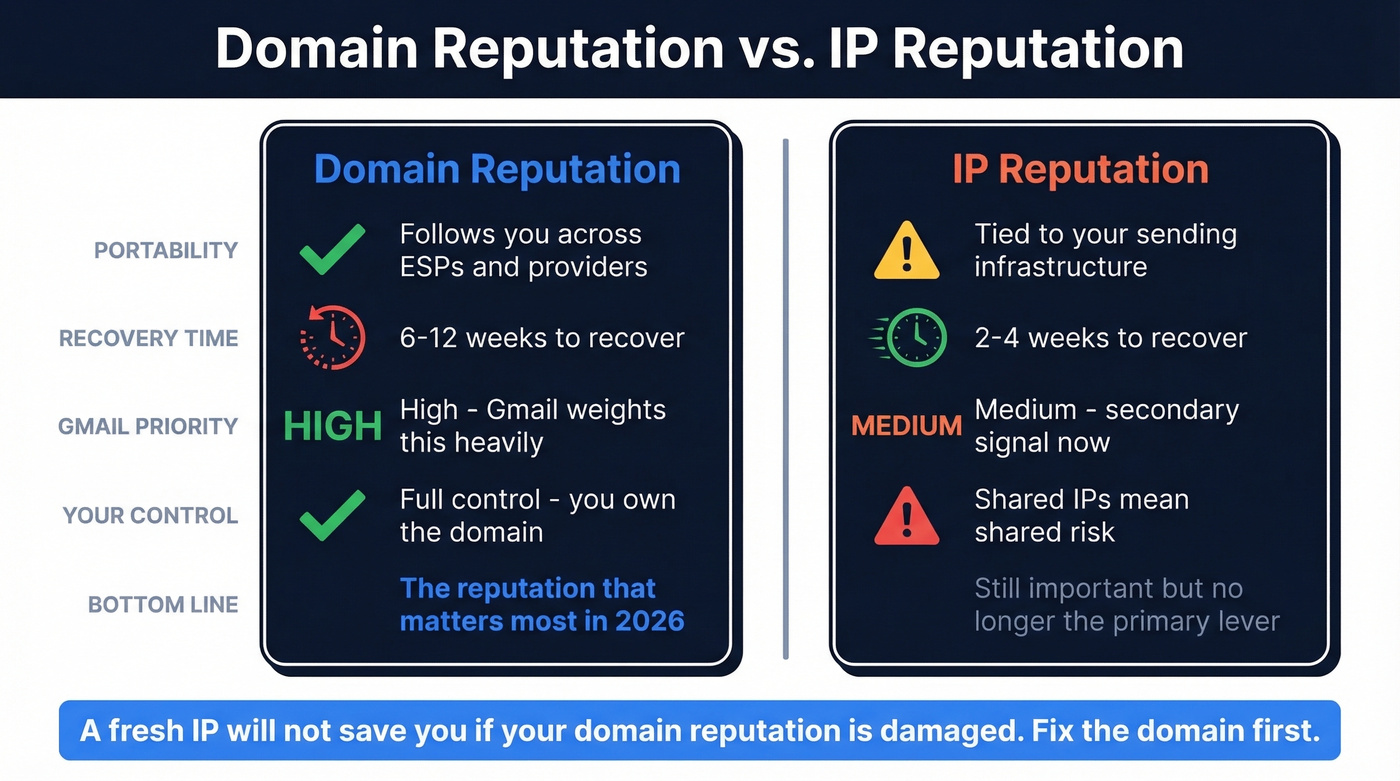
| Factor | Domain Reputation | IP Reputation |
|---|---|---|
| Portability | Follows you across ESPs | Tied to infrastructure |
| Recovery timeline | 6-12 weeks | 2-4 weeks |
| Gmail priority | High | Medium |
| Control level | Full (you own the domain) | Shared vs. dedicated |
| Shared risk | None (domain is yours) | High on shared IPs |
Gmail weights domain signals more heavily than IP because domains are a more stable identifier. IPs change when you switch providers or scale infrastructure. Your domain doesn't. It's a more reliable signal of who you actually are as a sender.
This is why the old advice of "just get a dedicated IP" doesn't solve deliverability problems the way it used to. A dedicated IP isolates you from other senders' bad behavior, which matters. But if your domain reputation is damaged, a fresh IP won't save you. The domain reputation follows you.
The recovery timeline is the most practical distinction. IP reputation can bounce back in 2-4 weeks of clean sending. Domain-level reputation takes 6-12 weeks - a full quarter with compromised deliverability. Prevention matters far more than cure. For a deeper breakdown of root causes, see our Email Deliverability Guide.

Every bounce chips away at your domain reputation - and recovery takes 6-12 weeks. Prospeo's 5-step email verification delivers 98% accuracy with catch-all handling, spam-trap removal, and honeypot filtering. Teams switching from other providers cut bounce rates from 35%+ to under 4%.
Stop sending to dead addresses. Verify every email before it costs you.
How to Check Domain Reputation
You need three tools. The rest are optional.
| Tool | What It Checks | Price | Best For |
|---|---|---|---|
| Google Postmaster Tools | Gmail reputation grades | Free | Gmail deliverability |
| Cisco Talos | Web + email reputation | Free | General reputation |
| MxToolbox | Blacklist scanning | Free checks / $129/mo monitoring | Blacklist monitoring |
| Barracuda Central | Corporate filter status | Free | Enterprise filters |
| Sender Score | 0-100 reputation score | Free | Quick health check |
| Microsoft SNDS | Outlook-specific data | Free | Microsoft deliverability |
Google Postmaster Tools
This is the #1 check, full stop. Google Postmaster Tools gives you Gmail-specific reputation grades (High, Medium, Low, Bad) for both your domain and your sending IPs. Setup requires adding a DNS TXT record - propagation takes up to 48 hours but usually resolves faster.
What's frustrating is that data isn't real-time. Updates come with a 24-48 hour lag, and you need roughly 100+ daily messages to unique Gmail recipients before consistent data appears. During warm-up - the exact period when you need visibility most - you'll often see zero data. We've had domains running for two weeks with nothing showing in the dashboard, which is nerve-wracking when you're trying to gauge whether things are going well.
Cisco Talos Intelligence
Your second check. Talos provides both web reputation and email reputation for any domain. It's free, instant, and doesn't require setup. One caveat: a "Neutral" rating usually means Talos has insufficient data on your domain, not that your reputation is fine. Low-volume senders will almost always show Neutral.
MxToolbox
The blacklist scanner. MxToolbox checks your domain against dozens of DNS-based blocklists in a single query. The free tier is limited - free users get one Domain Health Check per 24 hours. Their Delivery Center starts at $129/mo for ongoing monitoring with alerts. Worth it for teams sending at scale, overkill for most others.
Other Tools
Barracuda Central checks your domain against Barracuda's corporate spam filters - useful if you sell to enterprises running Barracuda. Sender Score gives a quick 0-100 rating based on the last 30 days; above 70 is healthy, below 70 signals problems. Microsoft SNDS provides Outlook-specific data if you're seeing deliverability issues there. Skip SNDS unless you have a confirmed Microsoft problem - the setup isn't worth it for general monitoring.
If you want a fuller list of monitoring options, see our roundup of email reputation tools.
What Affects Your Score
Technical Signals
SPF, DKIM, and DMARC alignment. In 2026, this is table stakes - not a differentiator. If you’re troubleshooting alignment issues, start with DMARC alignment and a clean SPF record.
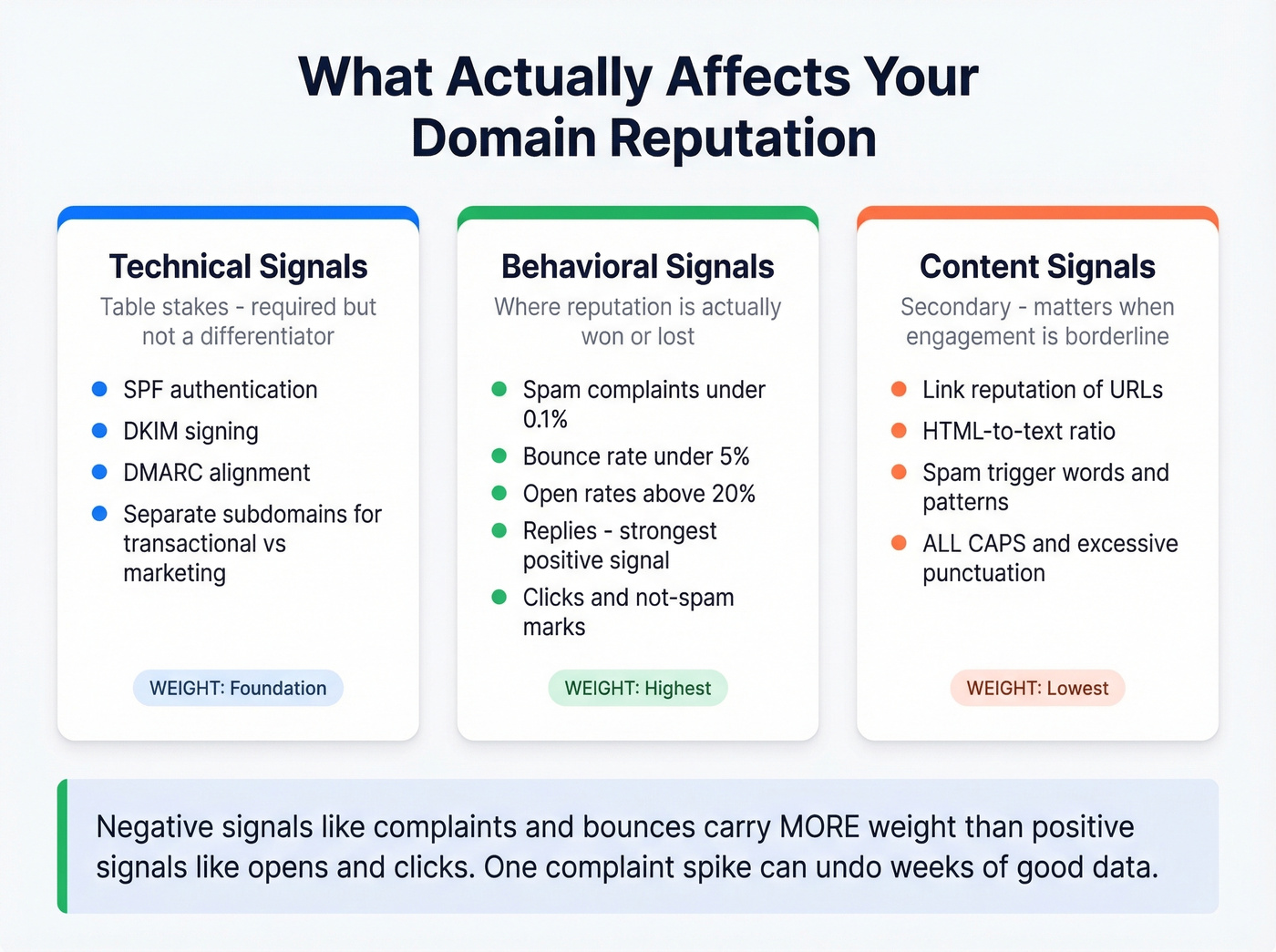
Authentication is required for modern deliverability. Without it, your emails get rejected or filtered before engagement even enters the equation. One often-overlooked technical move: separate transactional and marketing email onto different subdomains. A complaint spike on your marketing stream shouldn't drag down your order confirmations and password resets. If you use custom tracking, make sure you understand what a tracking domain is and how it impacts reputation.
Behavioral Signals
This is where reputation is actually won or lost.
Keep spam complaint rates below 0.1% - Google enforces at 0.3%, but 0.1% is the target for healthy senders. Bounce rates above 5% trigger deliverability warnings. If you’re unsure what “bad” looks like, use these email bounce rate benchmarks and fixes. Open rates above 20% are a health signal, not because opens are a perfect metric, but because consistently low opens tell providers nobody wants your email.
Replies are one of the strongest positive signals. Clicks matter. Marking as "not spam" matters. But the negative signals - complaints, bounces, deletes-without-reading - carry more weight than the positive ones. In our experience, a single complaint spike can undo weeks of good engagement data.
Content Signals
Link reputation, HTML-to-text ratio, and spam trigger patterns play a role, but they're secondary to behavioral signals. If your engagement is strong, you can get away with imperfect content. If your engagement is weak, perfect content won't save you. Keep links to reputable domains, maintain a reasonable text-to-HTML ratio, and avoid the obvious triggers: ALL CAPS, excessive exclamation marks, "act now" language. If you need a quick diagnostic, run your copy through an email spam checker.
How to Warm Up a New Domain
Whether you're launching a new brand domain or spinning up a subdomain for outbound, the warm-up process follows the same logic: start small, prove engagement, scale gradually. (If you’re choosing tooling, compare unlimited email warmup tools before you commit.)
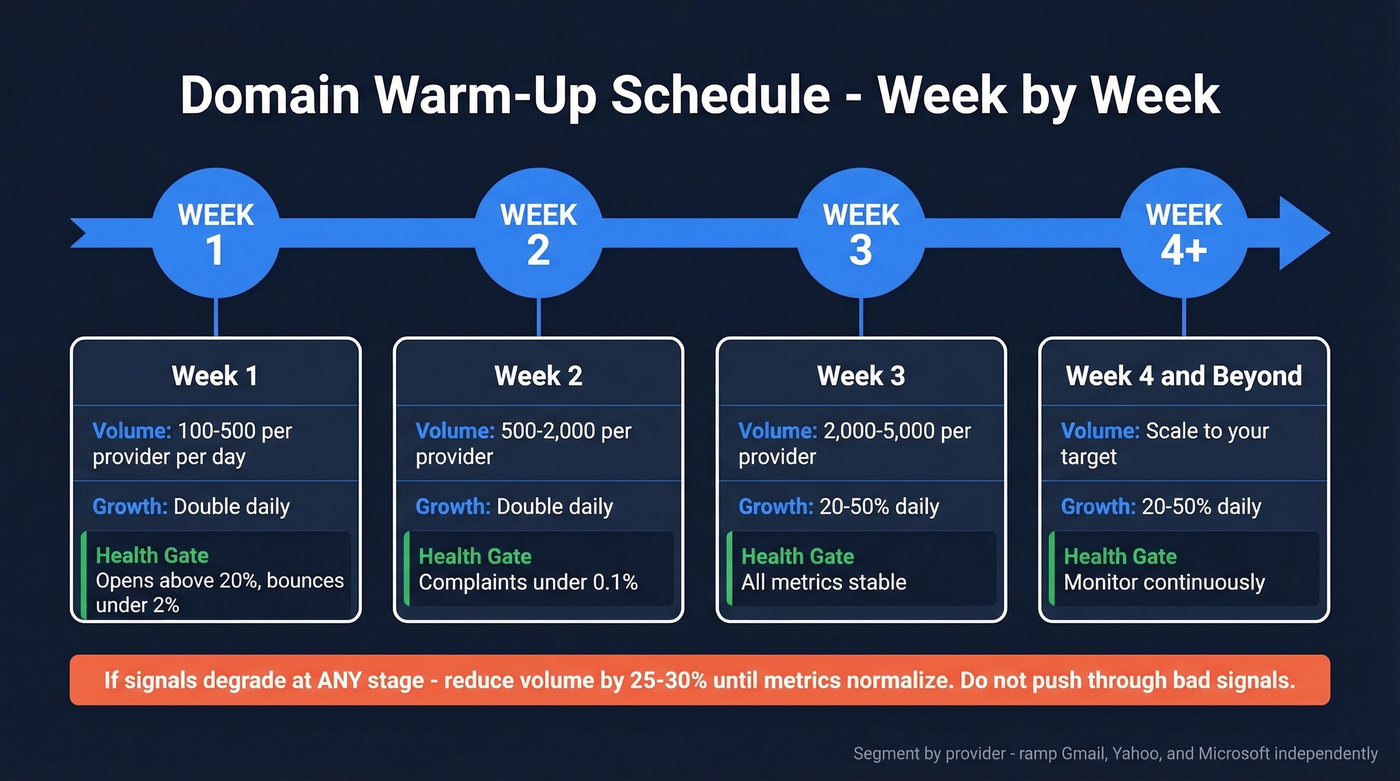
| Week | Daily Volume | Growth Rate | Health Gate |
|---|---|---|---|
| Week 1 | 100-500/provider | Double daily | Opens >20%, bounce <2% |
| Week 2 | 500-2,000/provider | Double daily | Complaints <0.1% |
| Week 3 | 2,000-5,000/provider | 20-50% daily | All metrics stable |
| Week 4+ | Scale to target | 20-50% daily | Monitor continuously |
Segment by provider. Gmail, Yahoo, and Microsoft have different acceptance thresholds. Don't blast your full volume across all providers simultaneously. Ramp each one independently.
If deliverability signals degrade at any point - open rates drop, bounces spike, complaints rise - reduce volume by 25-30% until metrics normalize. Don't push through bad signals hoping they'll resolve. They won't.
Let's be honest: 3-6 weeks feels like an eternity when you've got pipeline targets to hit. But rushing this timeline is the single most common mistake we see with new domains, and the cleanup takes three times longer than the warm-up would have.
How to Recover Damaged Reputation
A practitioner on r/Emailmarketing described a scenario we've seen dozens of times: Google Postmaster Tools showing "Bad," authentication fully configured, no blacklist hits. The damage was entirely engagement-based - they'd expanded prospecting outside their normal list, and the resulting low engagement and complaints tanked their score despite clean technical setup.
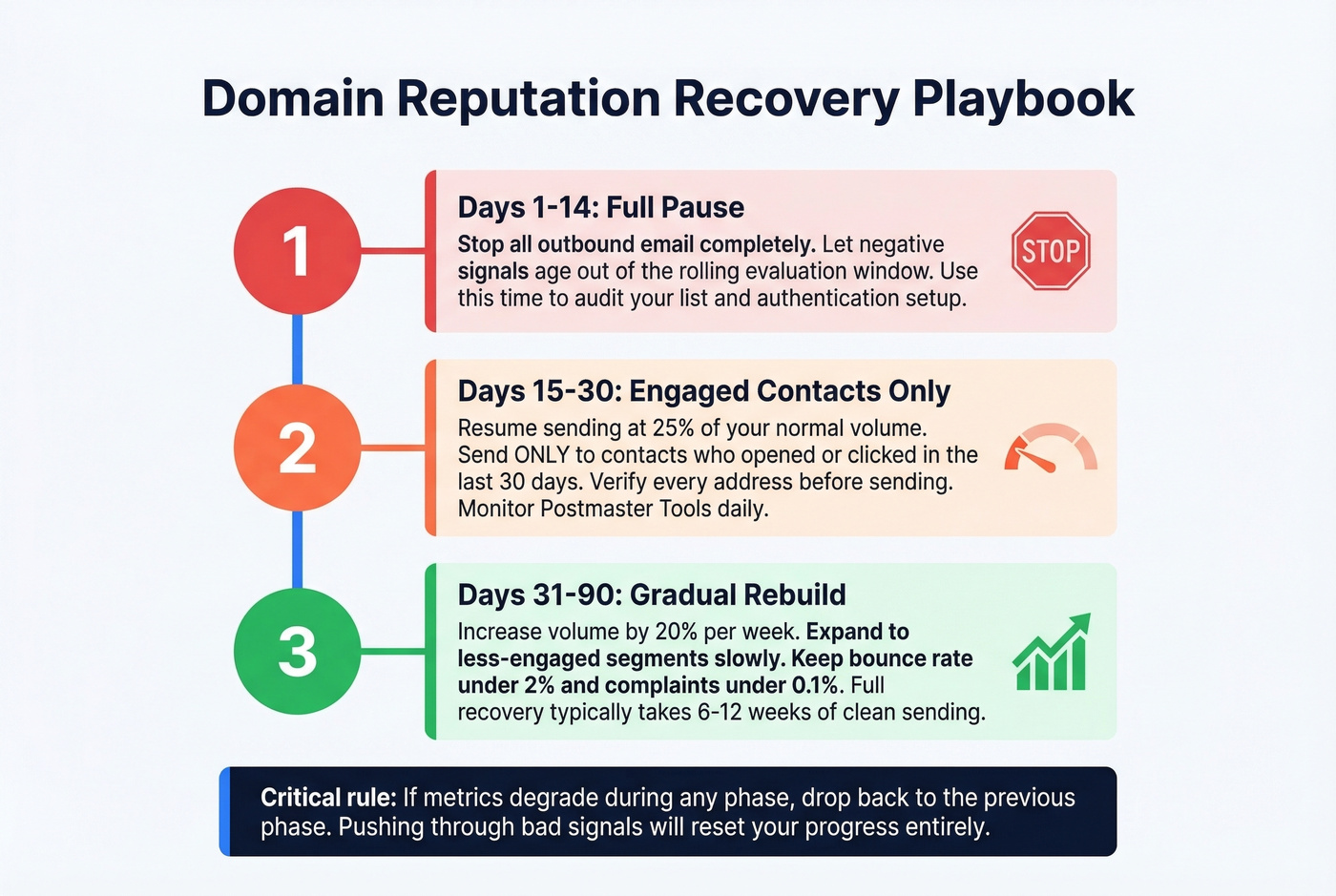
Here's the recovery playbook:
Days 1-14: Pause all outbound. Completely. Let the negative signals age out of the rolling window.
Days 15-30: Resume sending only to your most engaged contacts - people who've clicked in the last 30 days. Suppress anyone with 10+ emails and zero clicks. This is painful because it shrinks your audience dramatically, but you're rebuilding trust with inbox providers.
Weeks 5-12: Gradually expand your audience outward, following the same warm-up ramp logic. Monitor Postmaster Tools daily. If reputation dips, pull back.
If your bounce rate is above 3%, fix the data first. No amount of engagement optimization matters if you're sending to addresses that don't exist. Verify your list before resuming - removing spam traps and invalid addresses that silently destroy reputation. If you suspect traps, follow a dedicated spam trap removal process.
The timeline is 6-12 weeks for full recovery. There are no shortcuts.
Cold Outreach and Sending Reputation
Look, if your deal sizes are under $15k, you probably don't need ZoomInfo-level data infrastructure. But you absolutely need clean data. Sending cold outreach from your primary domain is professional malpractice in 2026. One bad campaign can damage the reputation that your marketing team, customer success emails, and transactional messages all depend on. The non-negotiable setup for cold outbound:
Do:
- Use a dedicated subdomain (e.g., outreach.yourcompany.com)
- Warm it up for 3-6 weeks before sending at volume
- Authenticate it independently with its own SPF, DKIM, and DMARC records
- Verify every single email address before it enters a sequence
- Include a one-click unsubscribe link
Don't:
- Send from your primary domain
- Skip the warm-up period
- Use unverified or scraped lists
- Stuff the email body with multiple tracking links
- Ignore bounce rates above 3%
Bad data is the top operational cause of reputation damage for outbound teams. Bounces from invalid addresses, spam trap hits from stale lists, and honeypot triggers from scraped data all compound into deliverability problems that take months to reverse. Prospeo's 5-step verification catches these before they hit your bounce rate - 98% email accuracy with spam-trap removal and honeypot filtering, refreshed on a 7-day cycle. Stack Optimize built to $1M ARR running client campaigns through Prospeo with 94%+ deliverability, bounce rates under 3%, and zero domain flags across all clients. If you’re building sequences, use this AI cold email outreach playbook to avoid common deliverability traps.
Your domain reputation is only as good as your data. Prospeo refreshes 300M+ profiles every 7 days - not the 6-week industry average - so you're never sending to stale contacts. At $0.01 per email, protecting your sender reputation costs less than a single bounced campaign.
Week-old data beats month-old data. Your inbox placement proves it.
FAQ
How long does it take to fix bad domain reputation?
Expect 6-12 weeks of consistently clean sending. IP reputation recovers faster at 2-4 weeks, but domain-level reputation is stickier because providers treat it as a more stable identity signal. Pause sending, prune to engaged contacts, and rebuild volume gradually.
What's a good reputation score?
Google Postmaster Tools uses qualitative grades - High, Medium, Low, and Bad - rather than numeric scores. Aim for "High" on Postmaster Tools and above 70 on Sender Score. Below 70 signals significant deliverability problems that need immediate attention.
Can I check my sending reputation for free?
Yes. Google Postmaster Tools, Cisco Talos, Sender Score, Barracuda Central, and MxToolbox single checks are all free. Most teams only need the free tools unless they're sending at high volume and need continuous monitoring.
Does domain reputation affect cold outreach deliverability?
It's the single biggest factor determining whether cold messages reach the inbox or vanish into spam. Sending to unverified lists generates bounces and complaints that directly damage your score. Use a dedicated subdomain, warm it up, and verify every address before sending.
What's the difference between domain and IP reputation?
Domain reputation is portable - it follows you across ESPs and IP changes. IP reputation is tied to your sending infrastructure. Gmail weights domain signals more heavily, making them the more important factor for inbox placement. Recovery takes 6-12 weeks for domains versus 2-4 weeks for IPs.