

Outlook Deliverability in 2026: Fix the Junk Folder
You got a 10/10 on mail-tester. SPF passes. DKIM passes. DMARC aligned. Gmail delivers to inbox every time. And Outlook? Junk folder. Every. Single. Time.
Outlook deliverability dropped to 26.77% in Q1 2025, down from 49.33% the year before. Microsoft is the hardest major mailbox provider to land in, and it's getting worse. Most deliverability guides are written for Gmail - that's why your Microsoft inbox placement is broken. Let's fix that.
The Short Version
- Authenticate or get rejected. Microsoft now requires SPF + DKIM + DMARC (at least
p=nonewith alignment) for high-volume senders. Non-compliant mail gets a[550; 5.7.515](https://support.microsoft.com/en-us/topic/fix-ndr-error-550-5-7-515-in-outlook-com-34cfe8f8-6fbf-457e-9e8b-9e4dbaf4e0ef)rejection. - Monitor reputation via SNDS. Green doesn't guarantee inbox placement, but red means you're in trouble. Check it weekly.
- Warm up specifically for Microsoft domains. Send to 30-day engaged contacts first, expand to 60-day, and avoid 90+ day contacts for the first six weeks. Most warm-up tools only optimize for Gmail, and that blindspot will wreck your Outlook placement.
Why Microsoft Filtering Is Harder Than Gmail
There isn't one "Outlook filter." There are two distinct filtering environments, and they behave differently.
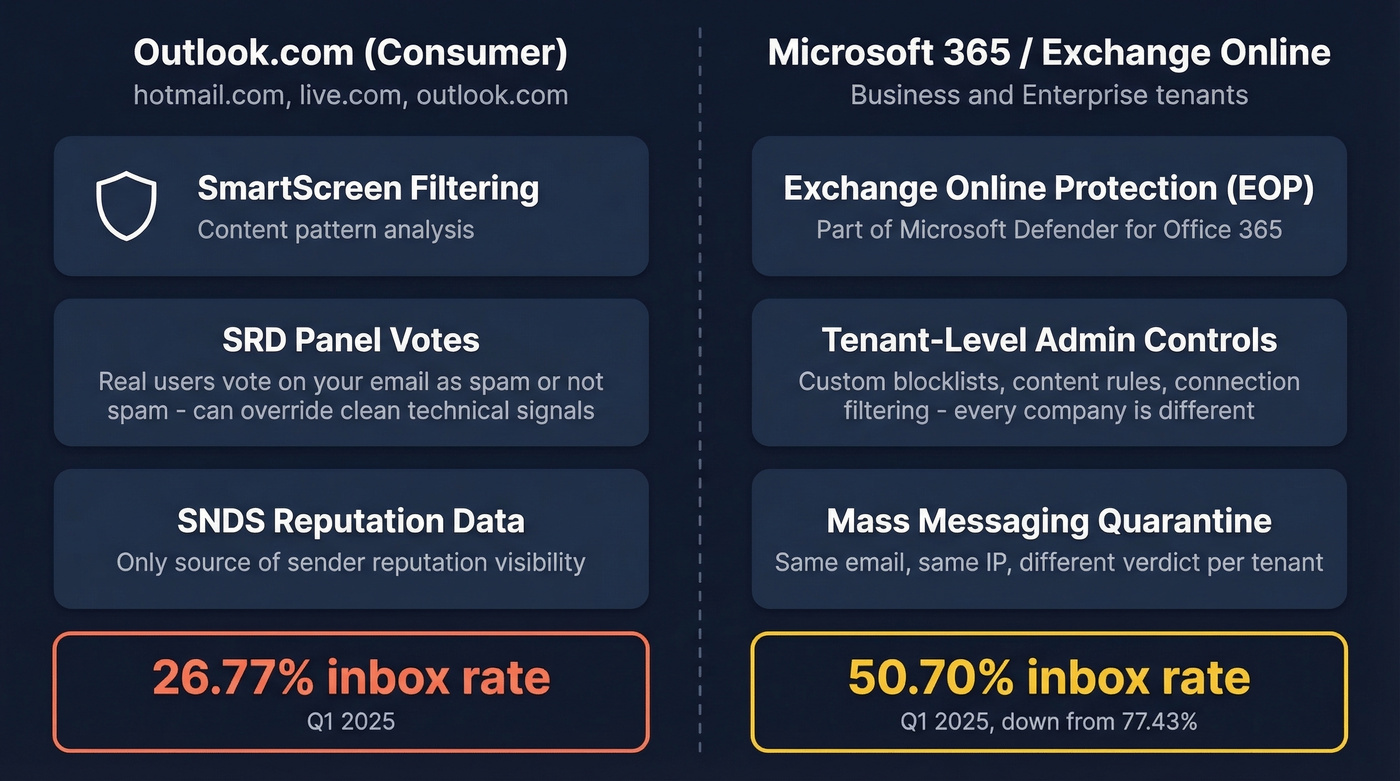
Outlook.com (consumer - outlook.com, hotmail.com, live.com) runs Microsoft's SmartScreen filtering plus a user panel often called SRD, where selected users vote on whether your email is spam. Those votes can outweigh otherwise clean technical signals. A 10/10 mail-tester score can still land in junk if SRD panel users are flagging your messages.
Microsoft 365/Exchange Online uses Exchange Online Protection (EOP) - part of Microsoft Defender for Office 365 - which shares core technology with the consumer filter but adds tenant-level admin controls. Custom blocklists, content rules, connection filtering policies - every company's M365 instance is configured differently. A Moosend test showed the same email from a green-SNDS IP landing in "Others" on Outlook.com but getting quarantined as "mass messaging" on M365.
The numbers tell the story. Outlook.com consumer inboxed just 26.77% in Q1 2025. Exchange/M365 fared better at 50.70%, but that's still down from 77.43% the year before. For B2B senders, this tenant variability is the core challenge - you can't fix inbox placement once and call it done, because you're fighting a different filter at every company.
Microsoft's Authentication Mandate
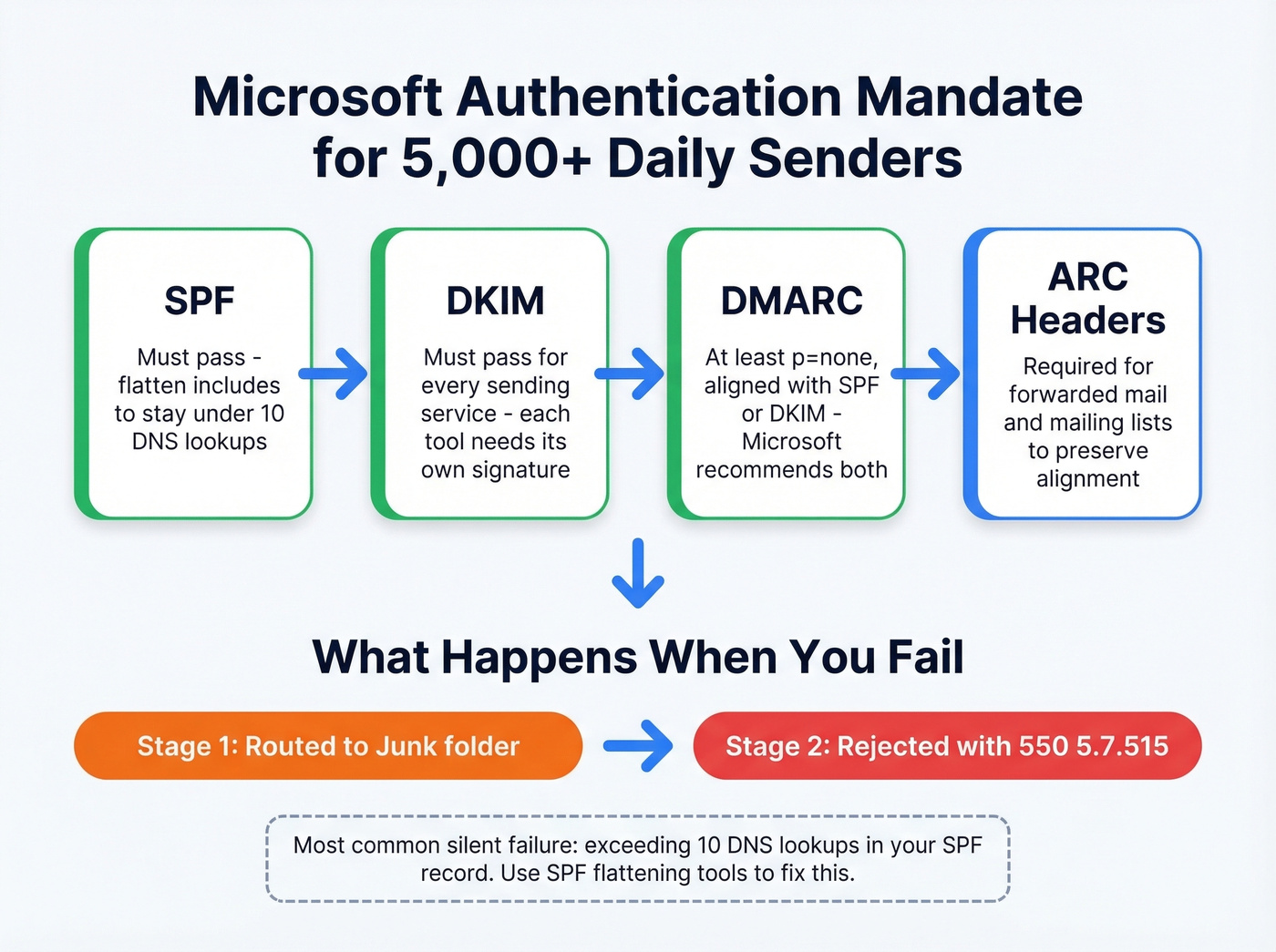
If you're sending more than 5,000 emails per day to consumer Microsoft domains, authentication is now mandatory.
What to do:
- SPF must pass
- DKIM must pass (here’s how to verify DKIM is working)
- DMARC published with at least
p=none, aligned with either SPF or DKIM - Microsoft recommends aligning both (see DMARC alignment) - ARC headers for forwarded mail or mailing lists, since forwarding breaks DMARC alignment without them
What breaks:
- Exceeding 10 DNS lookups in your SPF record - the most common silent failure. Flatten your includes (use these SPF record examples).
- Missing DKIM on any sending service. Every tool that sends on your behalf needs its own DKIM signature.
- Non-compliant mail now routes to Junk first, then gets rejected outright with
550; 5.7.515.

Microsoft rejects non-compliant mail with 550 errors and junks everything else. Sending to invalid addresses during warm-up makes it worse. Prospeo's 5-step verification catches bad emails before they bounce - 98% accuracy, refreshed every 7 days.
Clean your list before Microsoft cleans it for you.
Read Your Reputation with SNDS
Microsoft's SNDS (Smart Network Data Services) is free and essential - think of it as Microsoft's version of Google Postmaster Tools, except it only covers consumer domains and it isn't real-time. You'll need a Microsoft account and typically access to the WHOIS-listed email for your sending IP.
| Signal | Green | Yellow | Red |
|---|---|---|---|
| Spam filter result | <10% flagged | 10-90% flagged | >90% flagged |
| Complaint rate | <0.1% (healthy) | 0.1-0.5% (warning) | >0.5% (serious) |
Data only appears once you're sending 100+ messages per day to consumer Microsoft domains. The RCPT vs DATA count difference reveals how many messages were rejected before transmission - if RCPT shows 1,000 and DATA shows 950, fifty messages bounced at the gate. SNDS retains 90 days of history.
2026 changes worth knowing about: JMRP feeds are being standardized to ARF format, complaint sample downloads are discontinued, sender addresses are being redacted, and the ARF payload now includes only original message headers plus selected authentication headers like Authentication-Results and Received-SPF. Full complaint bodies won't be appended to reports anymore, and automated report links expire after 30 days. If you've built complaint-processing pipelines around the old format, they'll break. Update your systems now.
SNDS is necessary but not sufficient. It isn't real-time, covers zero M365 data, and SRD panel votes can override what your technical signals suggest. If you need a broader view, use dedicated email reputation tools alongside SNDS.
Warm Up for Microsoft Specifically
Reddit threads on r/coldemail consistently flag Gmail-optimized warm-up as the reason setups fail on Microsoft. You need a Microsoft-specific plan. Microsoft's own guidance says maximum deliverability takes 4-8 weeks; the ramp schedule below is practitioner-derived within that window.
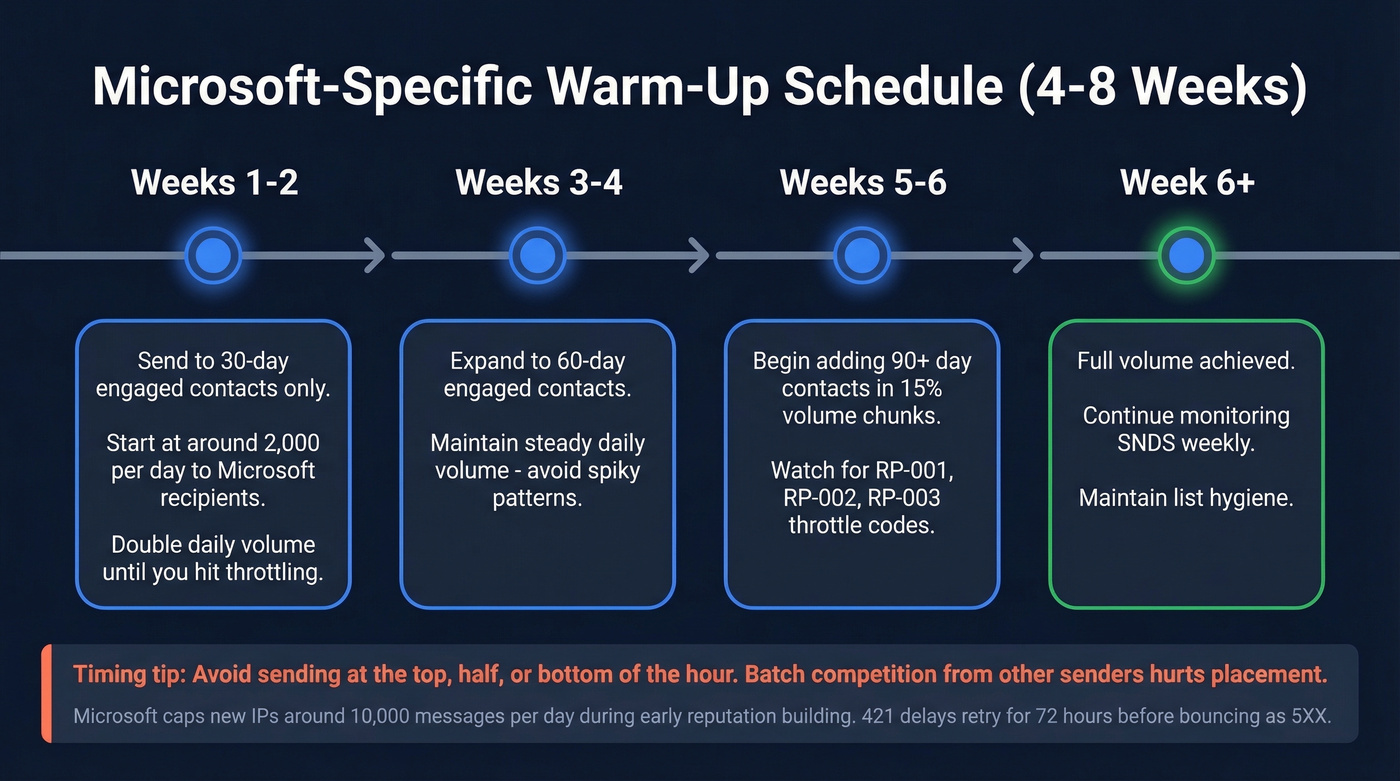
- Weeks 1-2: Send only to contacts engaged in the last 30 days. Start at ~2,000/day to Microsoft recipients, double daily until you hit throttling.
- Weeks 3-4: Expand to 60-day engaged contacts.
- First 6 weeks: Avoid 90+ day contacts entirely. When you add older segments, add them in 15% volume chunks.
Avoid sending at the top, half, or bottom of the hour - that's when every other sender blasts, and batch competition hurts placement. Microsoft often caps new IPs around 10,000 messages/day during early reputation building.
When you get throttled, you'll see RP-001 (exceeded rate limit for IP/domain reputation), RP-002 (exceeded rate limit on this connection), or RP-003 (exceeded connection limit). Back off. Don't panic. Microsoft's 421 delays retry for 72 hours before bouncing as 5XX.
Run your Microsoft-domain contacts through Prospeo's email verification before starting warm-up. Bouncing during ramp-up is the worst possible signal you can send. (If you’re scaling volume, also track your email velocity so you don’t spike.)
When Everything Passes and Outlook Still Junks You
We've seen this pattern dozens of times: authentication passes, SNDS is green, warm-up was done properly - and Outlook still junks you. Even senders with years of clean reputation report sudden 550 blocks from Microsoft domains, and it isn't always tied to an obvious auth failure. Here's the diagnostic checklist:
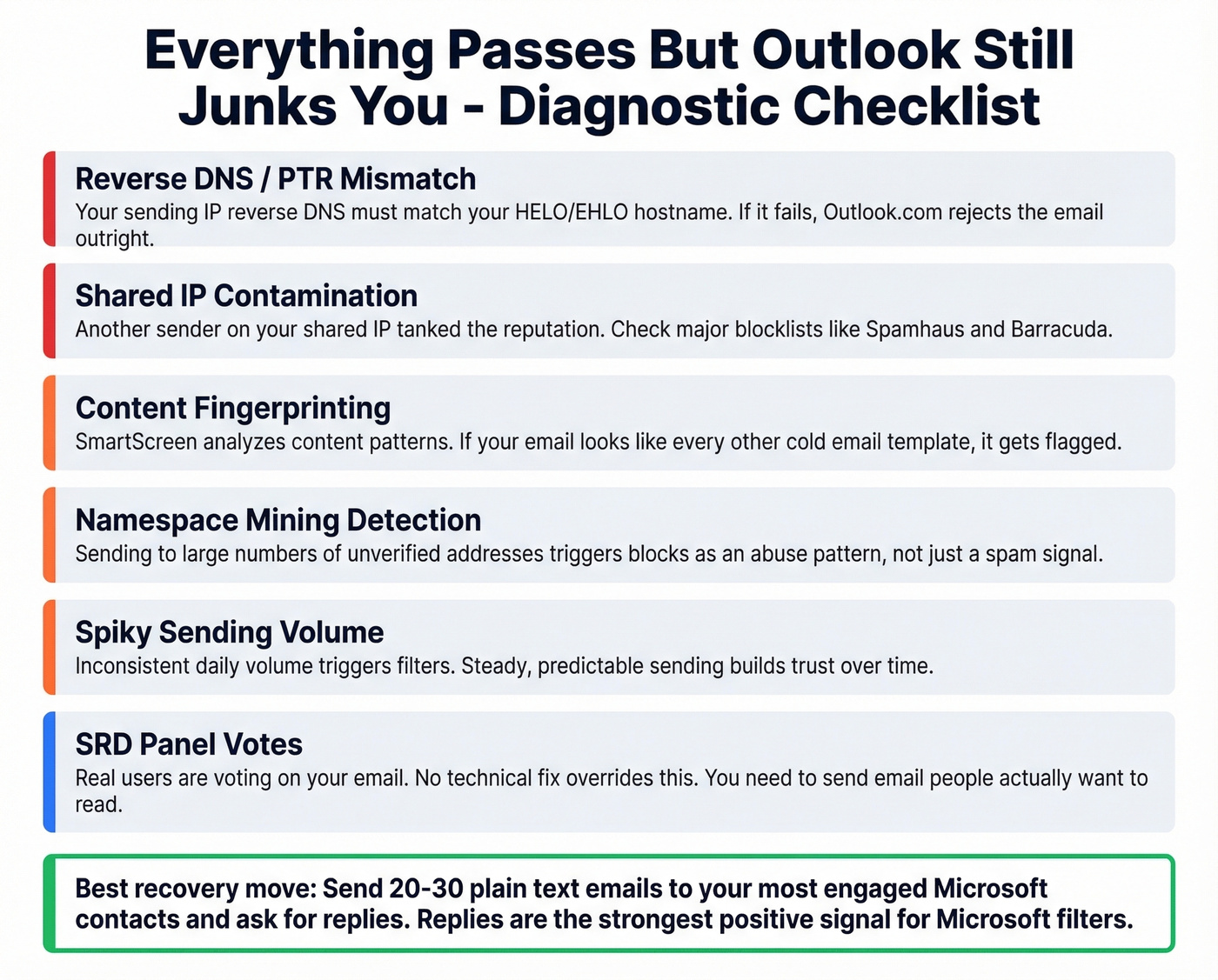
- Reverse DNS / PTR mismatch. Your sending IP's reverse DNS should match your HELO/EHLO hostname. If reverse-DNS lookup fails, Outlook.com won't accept email from the sender.
- Shared IP contamination. Someone else's bad behavior tanks your reputation. Check blocklists.
- Content fingerprinting. SmartScreen analyzes content patterns. If your email looks like every other cold email template, it gets flagged (tighten your email copywriting and test variations).
- Namespace mining. Sending to large numbers of unverified addresses to discover valid ones triggers blocks as an abuse pattern, not just a spam signal.
- Sending consistency. Spiky volume patterns trigger filters. Steady daily volume builds trust.
- SRD panel votes. Real users are voting on your email. No technical fix overrides this - you need to send email people actually want to read.
Here's the thing: if your deal sizes are small and you're sending fewer than 5,000 emails a day, you probably don't need to obsess over Microsoft's authentication mandate. Your real problem is almost certainly list quality or content, not SPF records.
If everything technical checks out and you're still junked, try this: send a small batch of 20-30 plain-text emails to your most engaged Microsoft contacts and ask for replies. Replies are the strongest positive signal you can send Microsoft's filters. For B2B recipients on M365, it's also worth asking their IT admin to verify the Outlook client junk filter is set to "No automatic filtering" - client-side filtering can silently override M365 verdicts.
Clean Data: Where Every Fix Starts
The chain that kills Microsoft email deliverability: stale data leads to hard bounces, hard bounces damage reputation, damaged reputation triggers SmartScreen filtering, and SmartScreen sends you to junk. Every hard bounce tells Microsoft you don't maintain your lists. Enough bounces and you're done.

Verification catches the problem before it starts. Prospeo's 5-step verification process delivers 98% accuracy with catch-all domain handling and spam-trap removal, all on a 7-day refresh cycle - the industry average is six weeks, and a lot of contacts go stale in that time. Stack Optimize built their entire outbound agency on Prospeo data and runs client deliverability at 94%+, with bounce rates under 3% and zero domain flags across all clients.
Before you touch warm-up schedules or authentication records, make sure your list is clean. In our experience, bad data is the root cause of most Outlook deliverability failures we diagnose - and unlike SRD panel votes or tenant-level EOP configs, it's the one variable you fully control. Whether you're targeting consumer Outlook.com inboxes or navigating Office 365 deliverability across dozens of tenant configurations, clean data is where every fix starts. (If you’re troubleshooting bounces, start with email bounce rate benchmarks and codes, then work backward.)
Every bounce during Outlook ramp-up tanks your IP reputation. Prospeo verifies emails against 300M+ profiles with catch-all handling, spam-trap removal, and honeypot filtering - at $0.01 per email. No bounces, no throttling, no 550 blocks.
Zero bounces during warm-up starts with verified data.