

DKIM Explained: What It Is, How to Set It Up, and How to Fix It When It Breaks
Your cold email never reaches the inbox. Not because the copy is bad - because your domain can't prove it actually sent the message. That's the problem DKIM solves, and since the 2024 enforcement wave it's no longer optional for serious senders. Here's exactly how DomainKeys Identified Mail works, how to configure it, and what to do when it breaks.
What Is DKIM in Email?
DKIM stands for DomainKeys Identified Mail. It's an email authentication protocol that lets a sending domain attach a cryptographic signature to outgoing messages. When the receiving mail server gets that message, it checks the signature against a public key published in the sender's DNS records. If the signature matches, the receiver knows two things: the message actually came from that domain, and nobody tampered with it in transit.
Think of it this way: your domain signs every outgoing email with a digital fingerprint. The receiving server checks that fingerprint against a public record. Match? Trusted. Mismatch? Suspicious. Missing entirely? Increasingly, rejected outright.
The protocol originated in the mid-2000s and spent most of its life as a "nice to have." That changed in February 2024 when Yahoo and Gmail both started enforcing authentication requirements for bulk senders. If you're pushing more than 5,000 emails a day without proper email authentication, your messages get throttled, quarantined, or rejected - and those rules remain fully enforced in 2026.
What You Need (Quick Version)
If you're here to fix a problem fast, here's the checklist:
- Set up signing for every sending service. Your ESP, your CRM, your transactional email tool, your marketing platform - each one needs its own keys and selector.
- Use 2048-bit RSA keys minimum. 1024-bit is legacy and weakening. 4096-bit creates DNS headaches. 2048 is the standard.
- Pair with SPF and DMARC. Yahoo's bulk-sender rules require SPF + DKIM plus a DMARC policy, and DMARC won't pass unless at least one of SPF or DKIM passes with domain alignment.
If your emails are landing in spam right now, jump to the troubleshooting section. Otherwise, keep reading - the setup is simpler than most guides make it sound.
Why Email Authentication Matters in 2026
The shift happened in February 2024. Yahoo published updated bulk sender requirements that made authentication non-negotiable: bulk senders must authenticate with both SPF and DKIM, publish a DMARC policy of at least p=none, keep spam complaint rates below 0.3%, and support one-click unsubscribe.
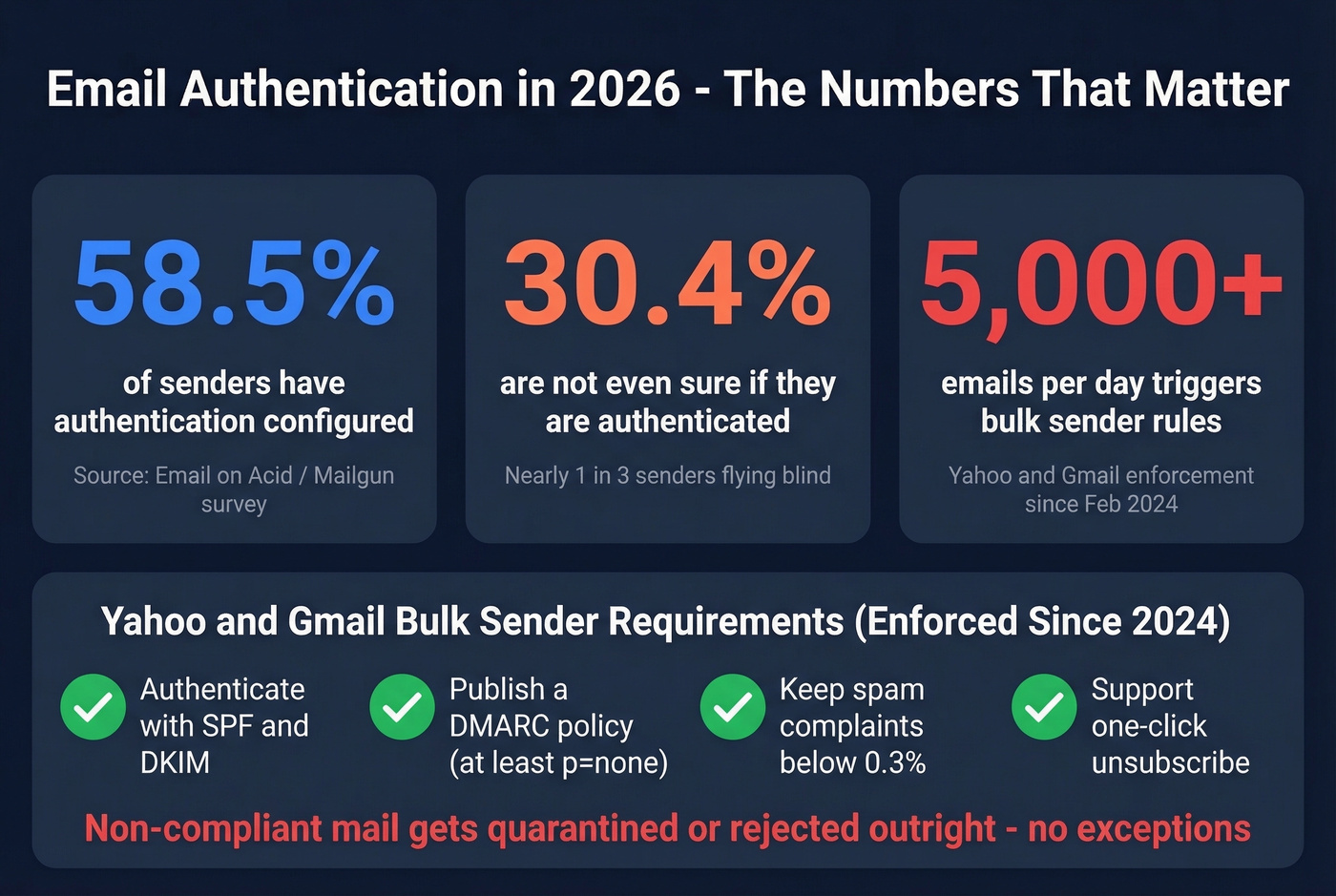
This isn't a suggestion. Non-compliant mail gets quarantined or outright rejected. The enforcement was gradual through the first half of 2024, and the impact was real - by 2026, these requirements are table stakes for anyone sending at scale.
A huge chunk of senders still aren't ready. An Email on Acid analysis of Mailgun survey data found that only 58.5% of senders confirmed they have authentication configured. Another 30.4% weren't even sure. That means nearly a third of email senders don't know whether they're authenticated, which is a staggering number given how long these requirements have been in effect. If you're reading this article, you're already ahead of them - but "ahead of people who don't know" isn't a high bar.
The Reddit sentiment mirrors this confusion. Threads on r/sysadmin are full of non-technical marketers and small business owners suddenly forced into DNS configuration because their emails stopped arriving. The frustration is real, but the fix isn't complicated once you understand the pieces. Beyond inbox placement, DomainKeys Identified Mail helps prevent email spoofing by proving that a message genuinely originated from the claimed domain - a critical security layer for both senders and recipients.
Here's the thing most guides won't tell you: authentication is only half the deliverability equation. You can have a flawless setup and still land in spam if your bounce rates climb above 3-5%. Sending authenticated emails to invalid addresses tanks your sender reputation just as fast as sending unauthenticated ones. Verify your email lists before hitting send - tools like Prospeo check addresses in real time with 98% accuracy, so your authenticated messages actually reach real inboxes.

How Does DKIM Work?
The protocol uses public-key cryptography. The sending server holds a private key; the corresponding public key lives in a DNS TXT record anyone can look up. When your mail server sends a message, it uses the private key to generate a cryptographic signature over selected parts of the message and attaches it as a DKIM-Signature header.
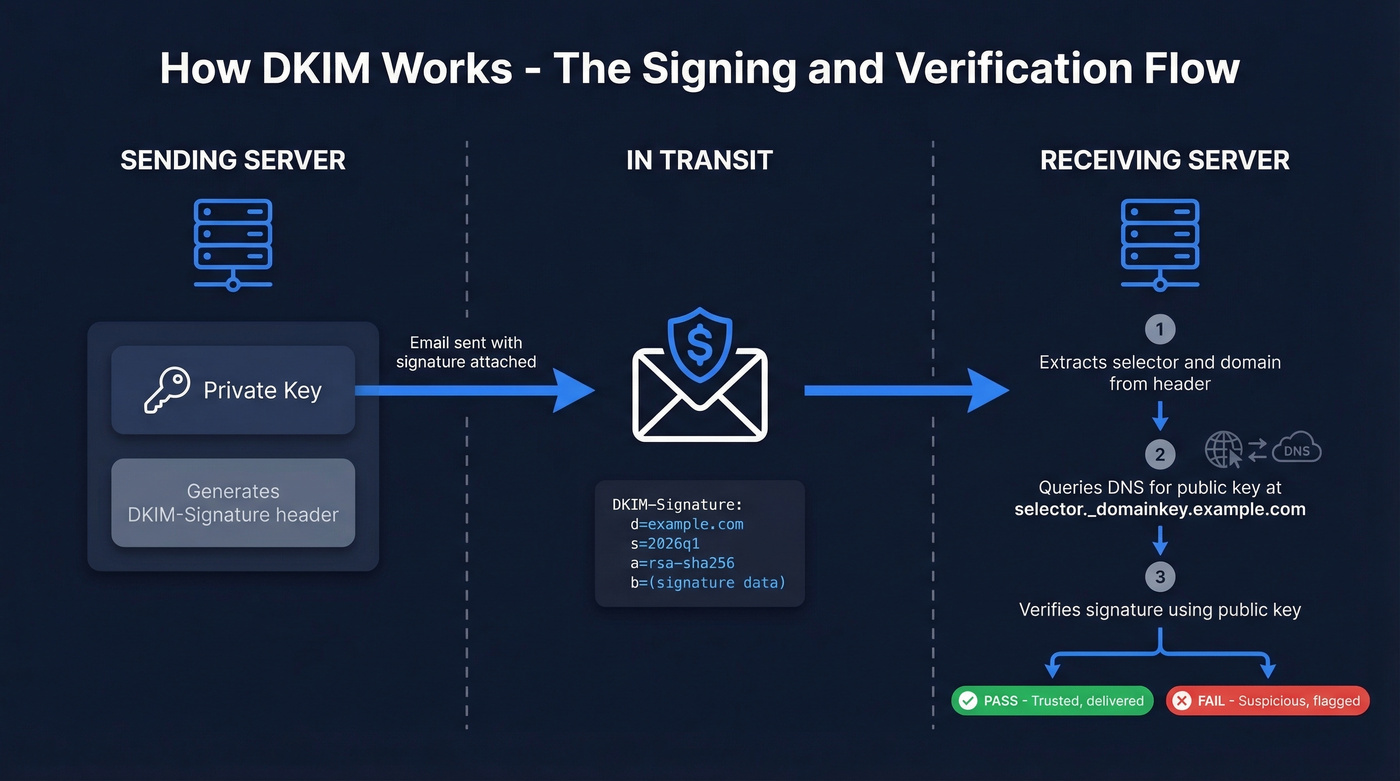
The receiving server reads that header, extracts the selector (s=) and the signing domain (d=), and queries DNS for the public key at selector._domainkey.domain.com. It then uses that public key to verify the signature. If anything was altered between servers - headers or body content - the signature won't verify, and authentication fails.
Some deployments use CNAME records that point to the actual TXT record rather than publishing the key directly. This is common with hosted ESPs. The RFC requires TXT, but CNAME indirection works as long as the full chain resolves to a valid key.
The DKIM-Signature Header
Every signed email includes a header with several key fields:
| Tag | Meaning | Example |
|---|---|---|
d= |
Signing domain | example.com |
s= |
Selector name | 2026q1 |
h= |
Signed headers | from:to:subject |
bh= |
Body hash | (base64 hash) |
a= |
Algorithm | rsa-sha256 |
b= |
Signature data | (base64 signature) |
The selector is what makes the protocol flexible. It's a label that tells the receiver which public key to look up. You can have multiple selectors - one for your marketing ESP, one for your transactional email service, one for your CRM - all under the same domain.
The DNS Record
Your public key lives in a TXT record at the selector's address:
selector1._domainkey.example.com IN TXT "v=DKIM1; k=rsa; p=MIIBIjANBgkqh...IDAQAB"
v=DKIM1 declares the record version. k=rsa specifies the key type. And p= contains the actual public key. If this record is missing, malformed, or points to the wrong key, verification fails - and that's the source of most problems in the real world.
How DKIM, SPF, and DMARC Work Together
Authentication doesn't work in isolation. It's one piece of a three-part model, and understanding how they interact saves you from the "I set everything up but my emails still go to spam" problem.
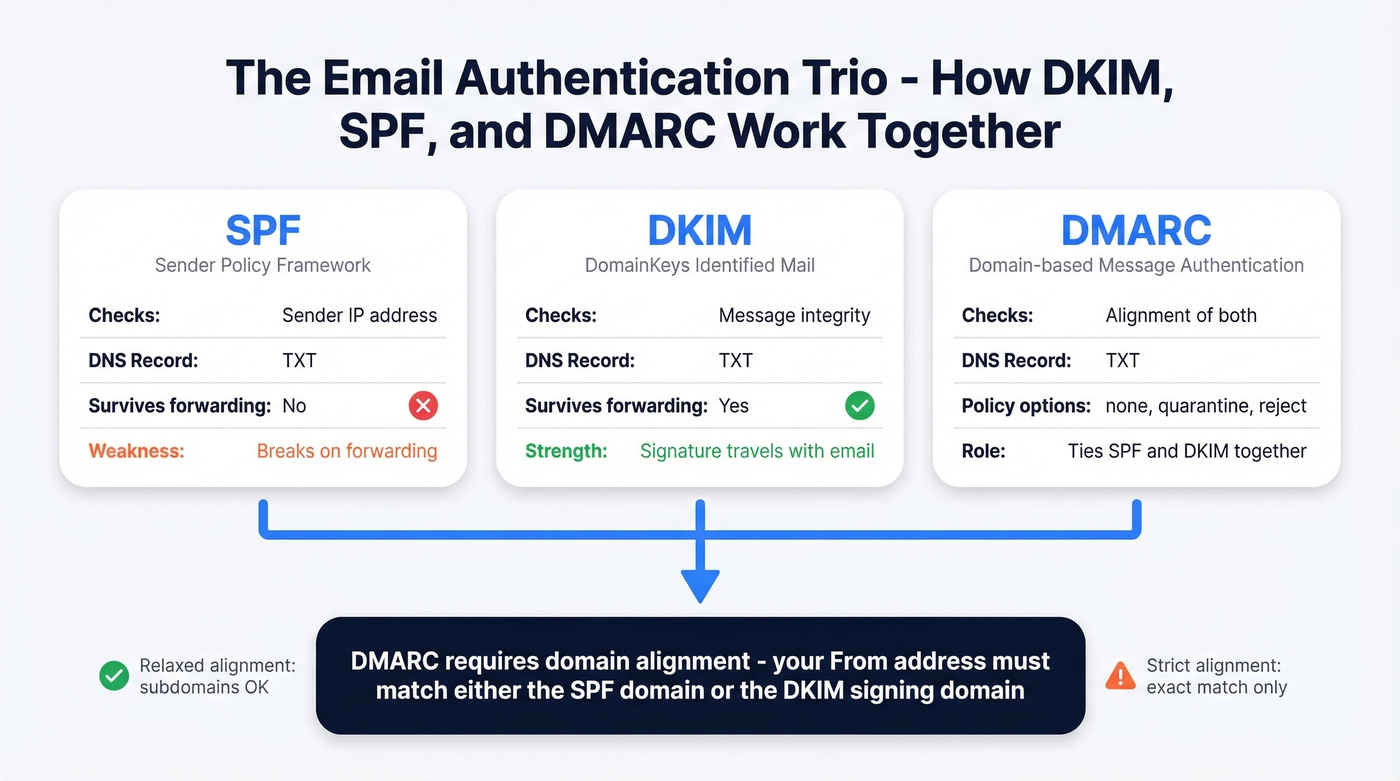
Here's how they compare, per Cloudflare's explainer:
| DKIM | SPF | DMARC | |
|---|---|---|---|
| What it does | Signs messages | Authorizes servers | Sets policy + reporting |
| What it checks | Message integrity | Sender IP address | Alignment of both |
| Survives forwarding? | Yes | No | Depends on alignment |
| DNS record type | TXT | TXT | TXT |
The critical difference: SPF breaks when emails are forwarded because the forwarding server's IP isn't in the original SPF record. A signed message survives forwarding because the signature travels with the message. This is why you need both - they cover each other's blind spots.
DMARC ties them together. It tells receiving servers what to do when authentication fails (nothing, quarantine, or reject) and requires domain alignment. The domain in your From: header must align with either the SPF-authenticated domain or the signing d= domain. Relaxed alignment allows subdomain matching, so mail.example.com aligns with example.com. Strict alignment requires an exact match - mail.example.com would not align with example.com.
To check your results, open any email's raw headers and search for Authentication-Results. You'll see entries for spf=, dkim=, and dmarc= with pass/fail verdicts. If the signature passes but DMARC fails, the problem is almost always alignment - your d= domain doesn't match your From: domain. Gmail's "Show original" view is the fastest way to diagnose this. If you want a deeper breakdown, see our guide on DMARC alignment.

Authentication gets your emails past the spam filter. But sending to invalid addresses destroys the sender reputation you just built. Prospeo's 5-step verification delivers 98% email accuracy - so every authenticated message you send reaches a real inbox, not a bounce.
Stop perfecting DKIM only to bounce off dead addresses.
How to Set Up DKIM
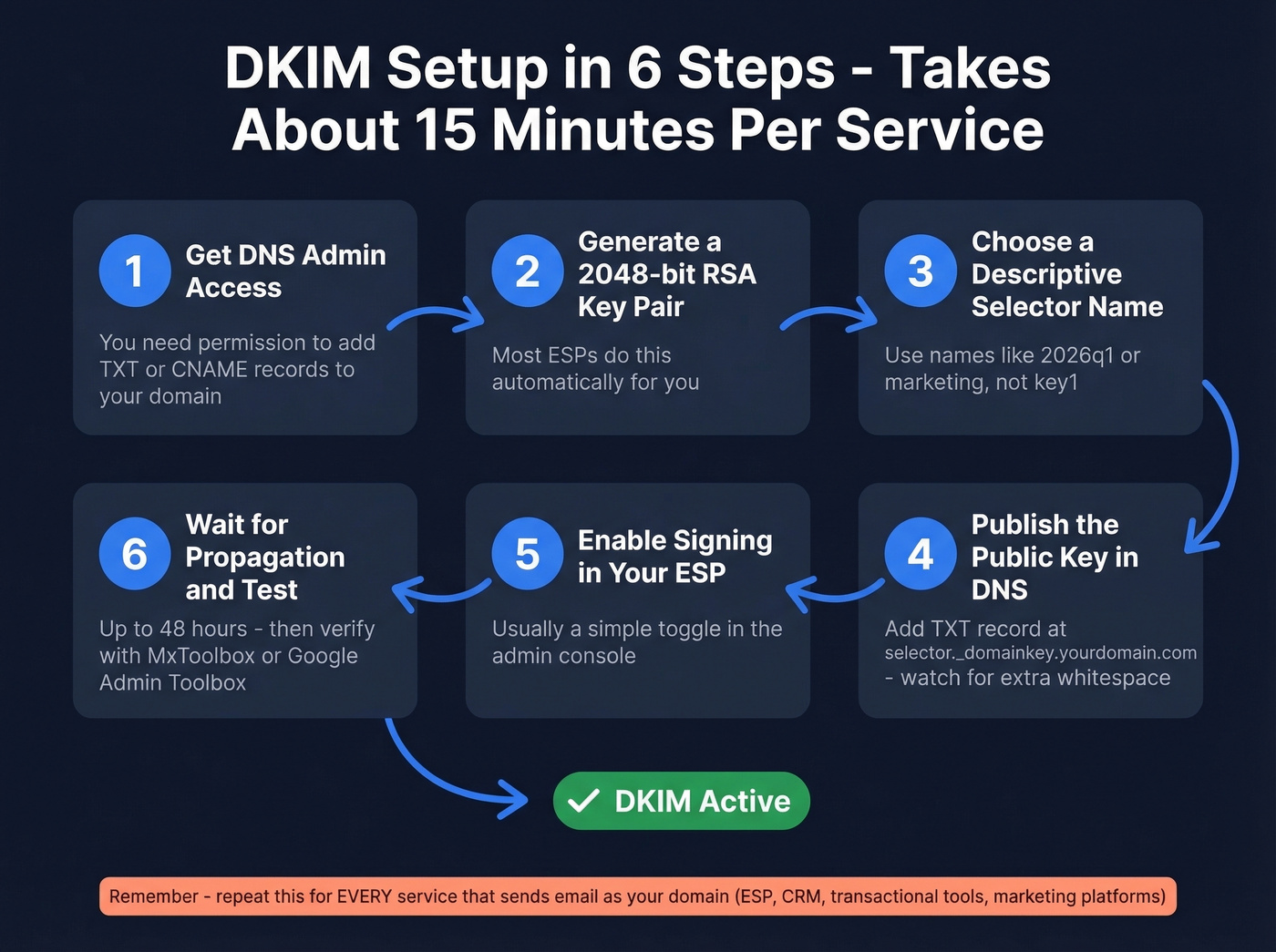
The "this is complicated" narrative is overblown. We've walked dozens of teams through this process, and the whole thing takes about 15 minutes per service. Generate a key, publish a DNS record, flip a switch, test. That's it. The hard part isn't any single step - it's remembering to do it for every service that sends email as your domain.
Step-by-Step Setup
- Get DNS admin access. You'll need to add TXT or CNAME records to your domain's DNS. If someone else manages your DNS, loop them in now.
- Generate a 2048-bit RSA key pair. Most ESPs do this for you automatically. If you're running your own mail server, use OpenSSL.
- Choose a descriptive selector name. Something like
2026q1,marketing, ortransactional- notkey1. You'll thank yourself during rotation. - Publish the public key as a DNS record. Add a TXT record at
selector._domainkey.yourdomain.comwith the value your ESP provides. Double-check for extra whitespace, line breaks, or smart quotes - these are the most common cause of setup failures. - Enable signing in your ESP or mail server. Usually a toggle in the admin console. Until you flip it, your server won't attach signatures.
- Wait for DNS propagation (up to 48 hours), then test. Use MxToolbox's lookup tool or Google's Admin Toolbox to verify the record resolves correctly and the signature validates.
Google Workspace vs Microsoft 365
The two most common business email platforms handle setup differently:
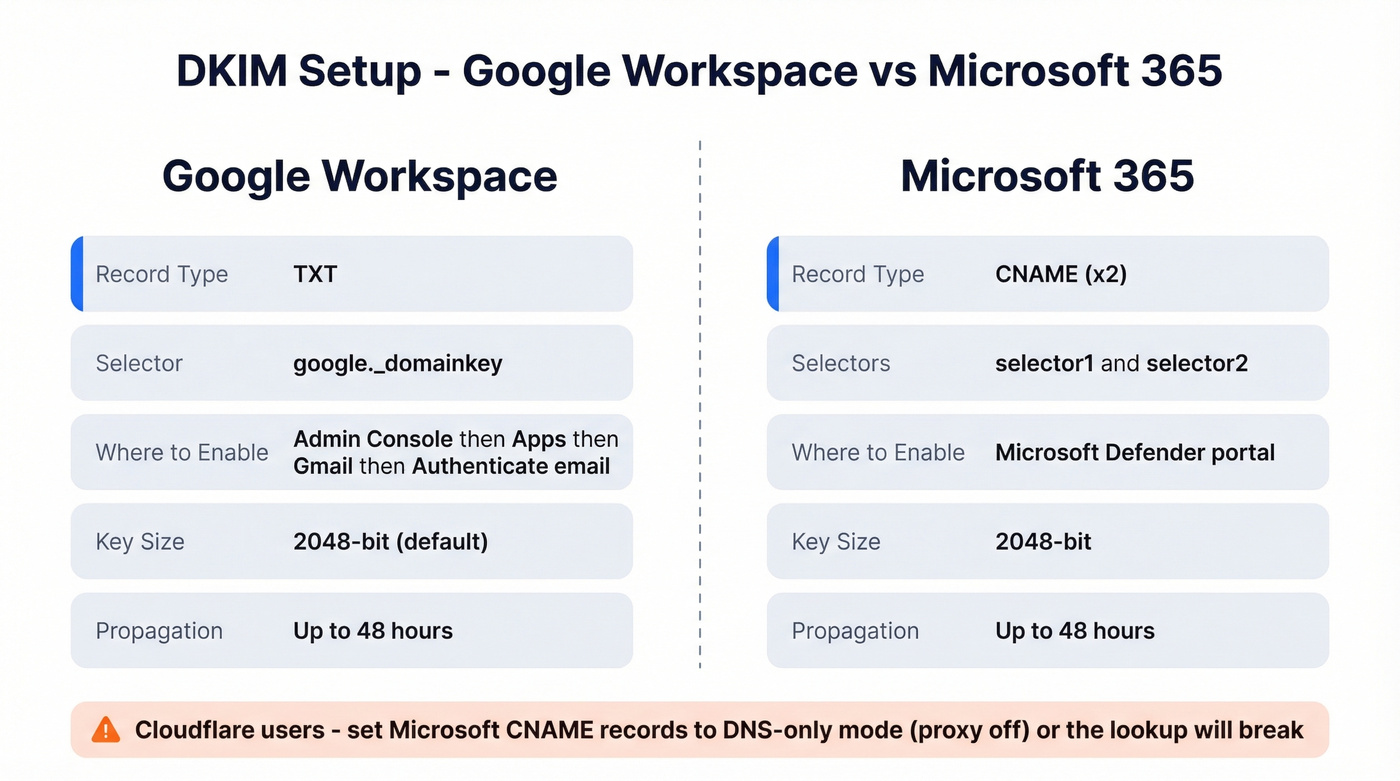
| Google Workspace | Microsoft 365 | |
|---|---|---|
| Record type | TXT | CNAME (x2) |
| Selector | google._domainkey |
selector1, selector2 |
| Where to enable | Admin Console > Apps > Gmail > Authenticate email | Defender portal |
| Key size | 2048-bit (default) | 2048-bit |
| Propagation | Up to 48 hours | Up to 48 hours |
Google Workspace generates a TXT record you publish directly. Microsoft 365 uses two CNAME records (selector1._domainkey and selector2._domainkey) that point to your tenant's onmicrosoft.com hostnames. If you're using Cloudflare for DNS, set those CNAME records to DNS-only mode (proxy off) - Cloudflare's proxy will break the lookup otherwise.
Key Length: 1024 vs 2048 vs 4096
Let's settle this. 2048-bit is the only reasonable choice in 2026.
RFC 8301 lays out the authoritative requirements. Signers MUST use at least 1024-bit RSA keys and SHOULD use at least 2048-bit. The rsa-sha1 algorithm is explicitly banned - signers MUST use rsa-sha256. Verifiers must handle keys from 1024 to 4096 bits.
| Key Length | Status | Recommendation |
|---|---|---|
| 1024-bit | Legacy | Upgrade immediately |
| 2048-bit | Standard | Use this |
| 4096-bit | Niche | Evaluate carefully |
1024-bit keys are still technically valid, and some providers still use them - Postmark, for example, signs customer email with 1024-bit keys. But the security margin is shrinking, and there's no reason to start new deployments at 1024.
4096-bit sounds better on paper, but it creates real operational problems. DNS TXT records have practical size limits, and 4096-bit keys can cause UDP packet truncation in some environments. The security gain over 2048-bit is negligible for email authentication purposes - you're proving your domain sent an email, not protecting state secrets. You'll also see some guides reference "4048-bit" keys. That's a typo. The options are 1024, 2048, and 4096.
One emerging option worth watching: Ed25519 keys, defined in RFC 8463, offer strong security with much shorter key lengths. Adoption is still early, but it's the future of email signing cryptography. For now, 2048-bit RSA is the answer.
If your average deal size is under five figures and you're agonizing over 2048 vs 4096-bit keys, you're optimizing the wrong thing. Get 2048-bit deployed across every sending service, pair it with SPF and DMARC, clean your email lists, and move on.
Key Rotation and Management
If you use more than one email-sending service - and almost every company does - you need a key for each one. Your marketing ESP, your transactional email service, your CRM's outbound emails, your support ticketing system. Each gets its own selector and key pair. This is the most common blind spot we see in deployments, and in our experience it's the reason most "everything looks fine but emails still fail" tickets get filed.
Rotate keys at least annually. Use selector names tied to the rotation cycle - 2026q1 replaced by 2026q3 - so you can track what's current at a glance. Keep the old selector active for 24-48 hours after rotation, because messages already in transit still carry the old signature and need the old public key to verify.
Store private keys in a secure key management system with limited access. Document where keys are stored - not the keys themselves - so your team can find them during an incident. And when publishing public keys to DNS, strip headers, footers, and extra whitespace before pasting. Smart quotes from word processors are a silent killer. They look right but break validation every time.
The consensus on r/sysadmin is that most authentication headaches come from forgotten third-party tools sending unauthenticated email as your domain for months. Audit every service that sends as your domain. If it doesn't have signing configured, it's a liability. If you're running outbound at scale, it also helps to monitor email velocity so you don't trigger provider throttling.
How to Troubleshoot DKIM Failures
Most failures are DNS typos and formatting issues, not cryptographic mysteries. The diagnostic process is straightforward once you know where to look.
Step 1: Pull the full raw headers from a failed message. In Gmail, click the three dots, then "Show original." In Outlook, open message properties.
Step 2: Find the Authentication-Results header. Look for dkim=fail, dkim=temperror, or dkim=permerror and note the reason string.
Step 3: Extract the d= (domain), s= (selector), and i= (identity) values from the DKIM-Signature header. Also check x= - if the signature has expired, that's your answer right there.
Step 4: Query DNS at s._domainkey.d - for example, selector1._domainkey.example.com. Confirm the record exists, contains v=DKIM1, and has a non-empty p= value. If you're using CNAME records, verify the full chain resolves to a valid TXT record.
Step 5: Match the error to the fix:
| Error | Likely Cause | Fix |
|---|---|---|
| Body hash did not verify | Forwarding, gateway, or antivirus modified content | Use relaxed canonicalization; check for content-altering intermediaries |
| Key not found | Wrong selector or DNS delay | Verify selector name; wait 48 hrs |
| Signature mismatch | Content altered by gateway or mailing list software | Check for footer injection, antivirus scanning, or MIME restructuring |
| Permerror | DNS syntax error | Check semicolons, quotes, TXT record splitting |
One less obvious issue: if you're using 4096-bit keys, the TXT record can exceed UDP packet size limits in some environments, causing truncation or fragmentation. Some resolvers handle this gracefully via TCP fallback; others don't. If you're seeing intermittent failures with a 4096-bit key, downgrade to 2048-bit and the problem disappears.
If you're still stuck, follow a dedicated checklist for how to verify DKIM is working before you change anything else.
Authentication and Deliverability
Setting up DomainKeys Identified Mail is necessary but not sufficient for reaching the inbox. Deliverability depends on authentication working alongside clean sending practices - low bounce rates, minimal spam complaints, and consistent sending volume. A properly configured signature tells mailbox providers your domain is legitimate, but it doesn't override signals from poor list hygiene or spammy content.
Think of it as the foundation. Without it, nothing else matters. With it, every other deliverability lever becomes more effective. If you're trying to improve outcomes fast, start with how to improve sender reputation and keep an eye on your email bounce rate.
FAQ
Does DKIM encrypt my emails?
No. It verifies that a message wasn't altered during delivery and confirms the sending domain's identity - it doesn't encrypt message contents. For encryption in transit, you need TLS. For end-to-end encryption, you need S/MIME or PGP. Signing and encryption solve completely different problems.
Can I have multiple DKIM records?
Yes - use different selectors for each record, like selector1._domainkey and marketing._domainkey. This is exactly how you support multiple ESPs sending as the same domain. Each service gets its own selector and key pair, and they coexist without conflict.
Is DKIM mandatory in 2026?
Effectively yes for bulk senders. Since February 2024, Yahoo requires SPF and DKIM authentication plus a DMARC policy for anyone sending 5,000+ messages per day. Non-compliant mail gets quarantined or rejected. Even below that threshold, proper signing significantly improves deliverability.
Why are my emails still going to spam after setup?
A passing signature doesn't guarantee inbox placement - it's one signal among many. The most common culprit is bounce rate: if more than 3-5% of your emails bounce, mailbox providers flag your domain regardless of authentication. Verify lists before every campaign. Prospeo checks emails in real time with 98% accuracy across 143M+ verified addresses, keeping bounce rates low enough for authentication to actually pay off.
You just spent hours configuring DNS records, rotating keys, and aligning DMARC. Don't waste that work on stale contact lists. Prospeo refreshes 300M+ profiles every 7 days - not the 6-week industry average - so your outbound hits real people at real companies.
Your deliverability stack is only as good as your data.