

AI Email Writer: 14 Best Tools Ranked for 2026
A professor posted on Reddit last year with a blunt message for students: "We can tell when ChatGPT wrote your email, and it's offputting." The thread blew up. TAs chimed in agreeing - the overly formal, personality-free prose is instantly recognizable. If academics can spot it in a three-sentence email, your prospects definitely can too.
Here's the thing most AI email writer tool pages won't tell you: the writing is the easy part. Every tool on this list can generate a passable cold email in seconds. The hard question is whether anyone reads it - and that depends on data, deliverability, and knowing when to let the AI draft and when to write it yourself.
The Short Answer
Before we get into the weeds, here's the quick version for three common scenarios:
- Free and flexible: ChatGPT or QuillBot handles 80% of email writing needs at zero cost. Don't overthink it.
- Sales teams: Lavender for coaching and scoring. Pair it with a verification tool like Prospeo so your emails actually land instead of bouncing.
- Marketing teams: Use the AI already built into your ESP - HubSpot, ActiveCampaign, Brevo. Don't pay for a separate tool when your platform already does this.
What Is an AI Email Writer?
An AI email writer is any tool that uses large language models to draft, rewrite, or polish email content. Most run on GPT-4o or a similar foundation model under the hood. You provide the recipient, context, tone, and goal. The model generates a draft. You edit it and send.
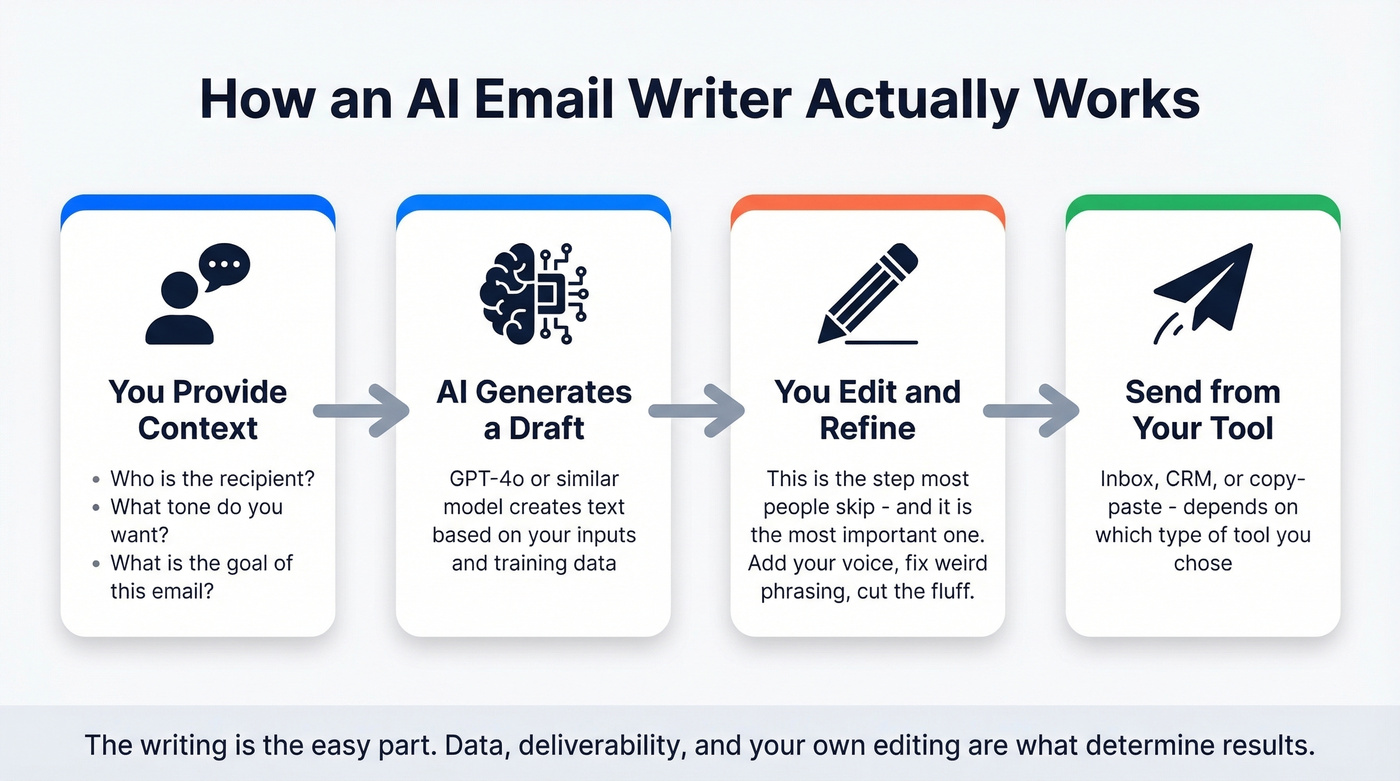
That's the entire value proposition. The differences between tools come down to where the AI lives - standalone app, inbox plugin, or CRM feature - what data it pulls from to personalize, and whether it does anything beyond raw text generation like scoring your email or coaching you on what to fix.
Four Types of AI Email Tools
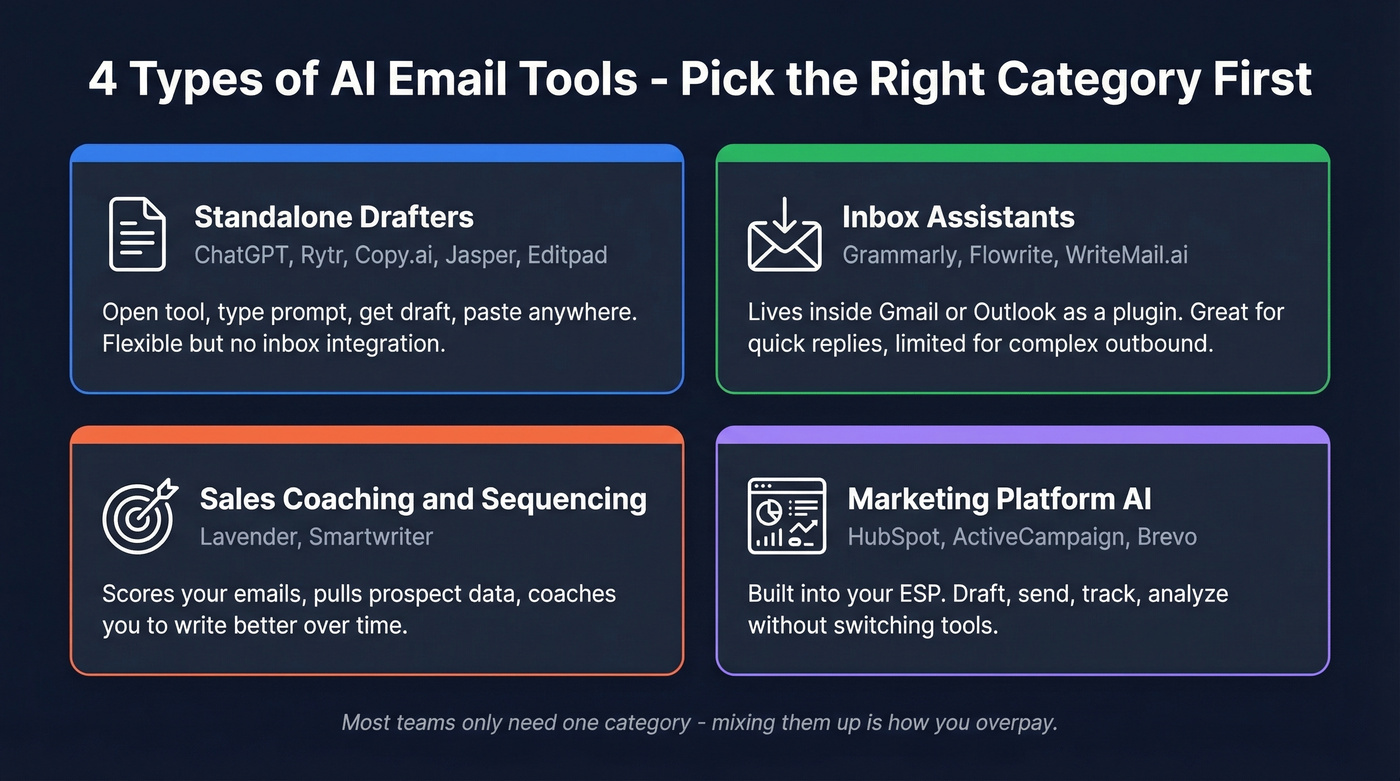
Most tools in this space are the same product with different logos. The real question isn't which brand to pick - it's which category you need. AI email tools break into distinct product types, and mixing them up is how teams end up paying for the wrong thing. Gallup found that 45% of US employees now use AI at work, but most rely on general-purpose tools, not specialized email products.
Standalone Drafters
General-purpose AI writing tools that happen to be great at email. ChatGPT, Rytr, Copy.ai, Editpad, and Jasper all fall here. You open the tool, type a prompt, get a draft, and paste it wherever you need it. No inbox integration, no CRM connection - just raw text generation. They're the Swiss Army knife: flexible but not specialized.
Inbox Assistants
Tools like Grammarly, Flowrite, and WriteMail.ai sit inside your email client as a plugin or browser extension. They add buttons and sidebars to Gmail or Outlook so you can generate or rewrite text without leaving your inbox. The tradeoff: convenient but limited in scope. Great for quick replies, less useful for crafting complex outbound sequences.
Sales Coaching and Sequencing
This is where Lavender and Smartwriter live. These tools don't just write - they analyze. Lavender scores your email and tells you why it'll underperform. Smartwriter pulls prospect signals from web sources to generate deeply personalized opening lines at scale. Expandi's breakdown draws a clear line between these outbound-focused tools and everything else.
Marketing Platform AI
HubSpot, ActiveCampaign, and Brevo have all embedded AI email drafting directly into their platforms. The advantage is obvious: you draft, send, track, and analyze without switching tools. The disadvantage is equally obvious: you're locked into that ecosystem. If you're already using HubSpot, this is the path of least resistance.
Best AI Email Writers in 2026
Most of these tools are good enough. The question is whether you need a free drafting tool, a sales coaching engine, or a platform-native feature.
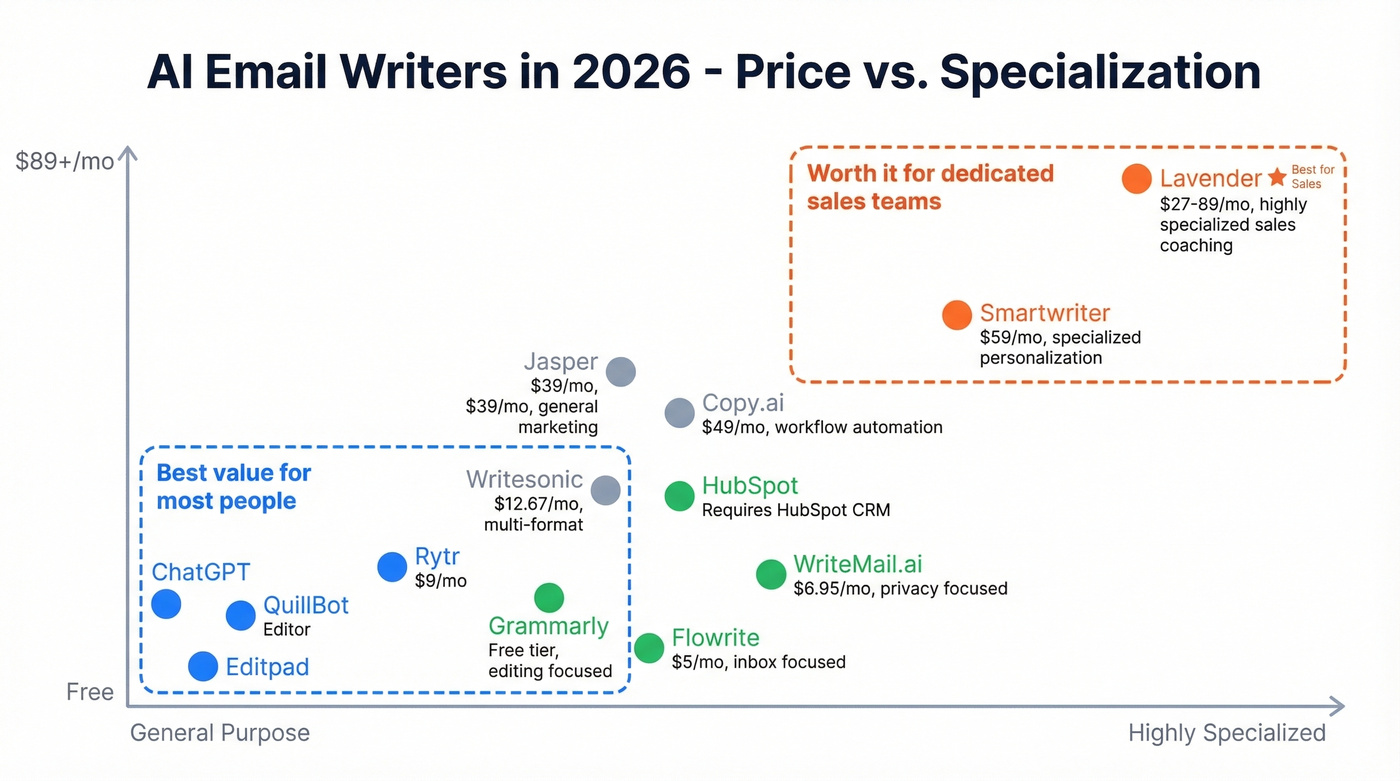
| Tool | Category | Starting Price | Best For | Our Take |
|---|---|---|---|---|
| ChatGPT | Standalone Drafter | Free / $20/mo | General email drafting | Best free option |
| Lavender | Sales Coaching | $27/mo | Sales rep improvement | Worth it for reps |
| HubSpot | Marketing Platform | Free | CRM-native generation | Skip unless on HubSpot |
| Smartwriter | Sales Personalization | $59/mo | Personalized cold outreach | Best for volume outbound |
| Jasper | Standalone Drafter | $39/mo | Marketing copy teams | Overkill for email only |
| Copy.ai | Standalone Drafter | $49/mo | Workflow automation | Strong for repeatable flows |
| Rytr | Standalone Drafter | $9/mo | Budget individuals | Best under $10/mo |
| QuillBot | Standalone Drafter | Free | Quick rewrites | Best free editor |
| Editpad | Standalone Drafter | Free | No-signup quick drafts | Fastest to first draft |
| WriteMail.ai | Inbox Assistant | Free / $6.95/mo | Privacy-first drafting | Best for data privacy |
| Writesonic | Standalone Drafter | $12.67/mo | Multi-format content | Better for blogs than email |
| Flowrite | Inbox Assistant | $5/mo | Short pro replies | Cheap and focused |
| Grammarly | Inbox Assistant | Free / $12/mo | Editing & tone polish | Best paired with a drafter |
| Mailmeteor | Standalone Drafter | Free | Quick drafts for Gmail | Basic but works |

ChatGPT
ChatGPT is the most flexible AI email writer available, and it's free. You can draft cold outreach, internal updates, follow-ups, apology emails - anything. The $20/mo Plus plan adds more capacity and priority access, but most people won't need it for email.
The limitation is workflow friction. There's no inbox integration, no CRM pull, no send button. You're copying and pasting. For a sales rep sending 50 personalized emails a day, that's a dealbreaker. For everyone else writing a handful of emails, it's the obvious starting point. We've seen teams try to replace ChatGPT with specialized tools and come back within a month because the flexibility wasn't worth giving up.
Use this if: You write fewer than 20 emails a day and want maximum flexibility at zero cost.
Skip this if: You need inbox-native generation or CRM-driven personalization at scale.
Lavender
Lavender is the only AI email tool that actually coaches you. Instead of just generating text, it scores your draft on a 0-100 scale and tells you exactly what to fix - subject line length, reading level, question count, personalization depth. It pulls CRM and prospect data to suggest personalization angles you'd miss on your own.
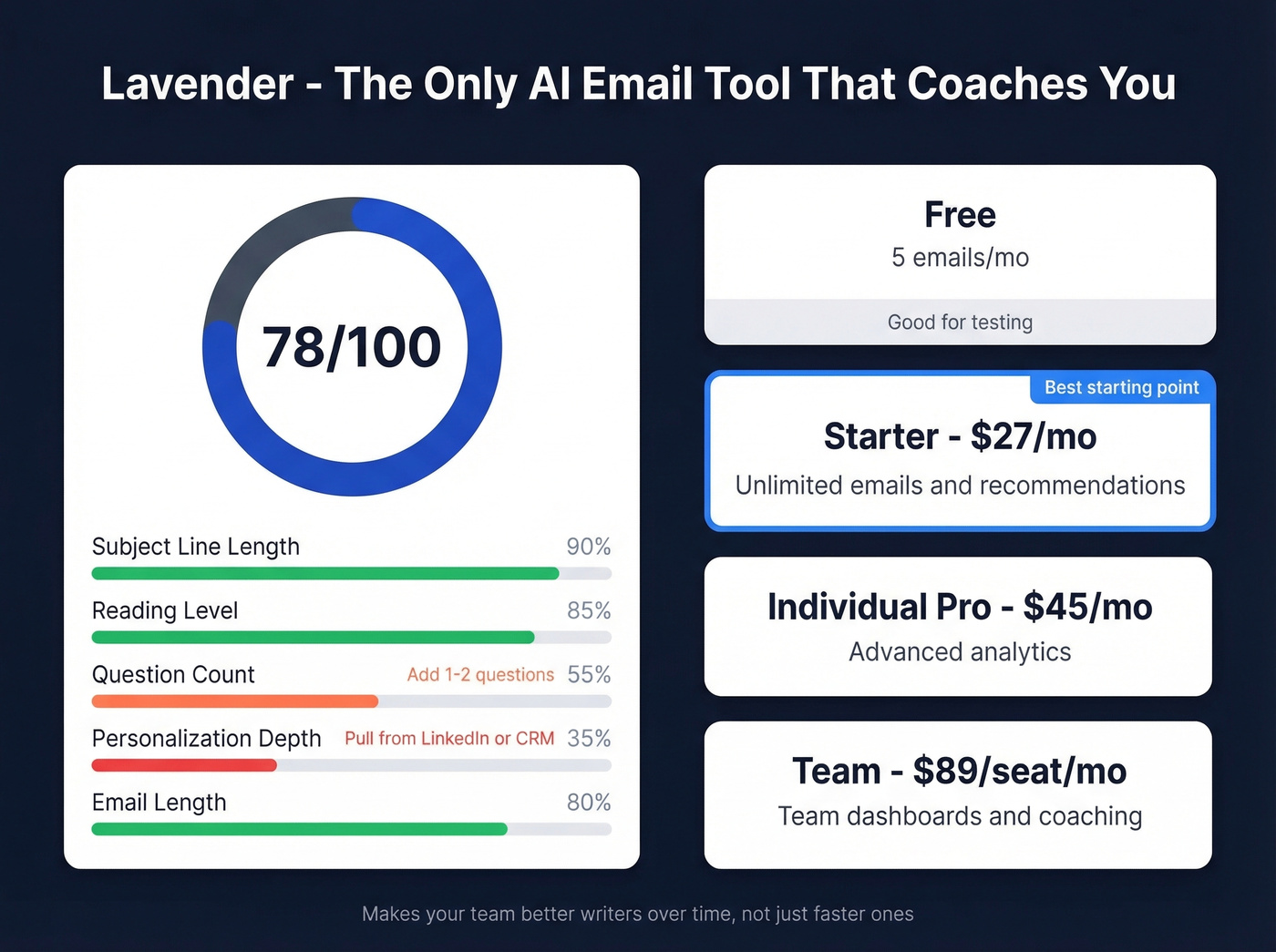
Pricing runs $27/mo for Starter with unlimited emails and recommendations, $45/mo for Individual Pro, and $89/seat/mo for teams. The free plan lets you analyze 5 emails per month - enough to see if the scoring model clicks with your workflow. One complaint that surfaces in reviews: the G-Suite integration can be glitchy, with icons occasionally disappearing or not responding. Not a dealbreaker, but annoying when you're mid-sequence.
If your reps are sending cold emails and you're only going to pay for one tool, Lavender's coaching model delivers more long-term value than any pure text generator. It makes your team better writers over time, not just faster ones.
HubSpot AI Email Writer
HubSpot's AI email writer is free and lives inside the CRM. You draft with slash and highlight commands, send from HubSpot, and track opens and clicks without leaving the platform. For existing HubSpot users, this is the no-brainer choice - you're already paying for the CRM, so the AI email feature is a bonus.
The tool handles both sales outreach and marketing campaigns. Output quality is solid for standard business emails. Where it falls short: if you aren't a HubSpot user, there's no reason to adopt the CRM just for the email generator. The personalization depth doesn't match dedicated sales tools like Lavender or Smartwriter either.
Smartwriter
Smartwriter generates prospect-specific opening lines using prospect and company signals. Pricing starts at $59/mo for 400 lead credits, $149/mo for 1,200, and $359/mo for 3,500. Each plan includes up to 15 personalized lines per lead. It's purpose-built for teams running high-volume cold outreach who need personalization that goes beyond "Hi {first_name}." Not cheap, but the per-lead economics work if your reply rates justify the spend.
Jasper
Jasper ($39/mo) is a content platform that happens to do email well. Marketing teams producing blog posts, ad copy, landing pages, and email campaigns in the same workflow get the most value here. Email is one output among many. If you're only writing emails, Jasper is overkill - you're paying for capabilities you won't use.
Copy.ai
Copy.ai starts at $49/mo with a free tier for basic use. The standout feature is workflow automation: you can chain AI steps together - research, draft, personalize, format - rather than running one-off prompts. For marketing teams that need repeatable email production at scale, it's a strong pick. For individual email writing, it's more tool than you need.
Rytr
At $9/mo, Rytr is the budget champion. The interface is clean, the output quality is surprisingly decent for short-form content like emails, and the free tier gives you enough to test properly. It won't replace Lavender for sales coaching or Smartwriter for personalization, but for solo founders and freelancers who need to draft emails faster without spending real money, Rytr punches above its weight.
QuillBot
QuillBot's free tier is a fast way to rewrite an email you've already drafted. Paste in your text, rewrite for clarity, and get a cleaner version in seconds. It's best as an email editor rather than a full outbound engine. For quick tone and readability improvements, nothing's simpler.
Editpad
Editpad's free tool uses a structured form approach - sender, receiver, purpose, type, tone, key points - rather than open-ended prompting. It also includes post-generation editing actions to refine what you got. No account required. For going from zero to a sendable draft, it's the quickest path available.
WriteMail.ai
Free for 5 emails per month, then $6.95-$19.95/mo. WriteMail.ai's benchmarks show 87% faster writing speed. Solid for privacy-conscious users who want basic AI assistance without handing their data to a large platform.
Writesonic
Starting at $12.67/mo, Writesonic is a multi-format AI writer where email is a secondary use case. If you're already using it for blog posts or ad copy, the email templates are a nice add-on. As a standalone email tool, there are better options above.
Flowrite
At $5/mo, Flowrite is a lightweight inbox plugin for generating short professional replies. Fast, cheap, and focused on one thing. Don't expect it to handle complex outbound sequences or marketing campaigns.
Grammarly
Grammarly (free/$12/mo) is better as an editor than a generator. The tone detection feature is the standout - it tells you when your email sounds too aggressive, too passive, or too formal. Pair it with any drafting tool on this list for a solid one-two punch.
Mailmeteor
Mailmeteor's free AI email writer generates email drafts from a prompt. Type what you need, get a draft, and paste it into Gmail. No scoring, no personalization engine, no analytics. For one-off emails where you just need a starting point, it works. For anything more, look elsewhere.

The best AI email writer in the world can't save you from a 35% bounce rate. Prospeo gives you 98% verified email accuracy with a 7-day refresh cycle, so every AI-crafted email actually reaches a real inbox.
Stop writing perfect emails to dead addresses. Fix the data first.
How to Avoid Sounding Robotic
The biggest risk with these tools isn't the technology - it's the workflow.
Build a Prompt Library
A top frustration on r/Emailmarketing isn't writing quality - it's prompt management. People waste time rewriting prompts they've already perfected for similar tasks. Build a prompt library organized by email type with structured fields for each. A cold outreach prompt should have slots for audience (VP Sales at mid-market SaaS), offer (the specific value prop), CTA (book a 15-min call vs. reply with interest), and tone (direct and casual vs. consultative). Save your best-performing prompts, iterate on them, and treat them like templates rather than throwaway inputs.
Edit, Don't Generate
Here's the contrarian take: you don't need a generator. You need an editor. Write the first draft yourself in 90 seconds - it'll have your voice, your quirks, your personality. Then run it through ChatGPT or Grammarly to tighten the structure, fix awkward phrasing, and adjust tone. The result sounds like you, but better.
The reverse workflow - AI generates, you edit - almost always produces something that sounds like everyone else. Research backs this up: people read about 20% of an email's content, so every word needs to earn its place.
The 3-Sentence Test
If your AI-generated email is longer than three sentences, cut it. Cold emails that convert are short. Internal emails that get read are short. The AI will always give you more than you need because it's optimized for completeness, not brevity. Your job as the editor is to delete ruthlessly.
When NOT to Use AI
Some emails should never touch an AI tool. Job applications, investor updates, apology emails, and any message where the relationship matters more than the information - these need your actual voice.
The Reddit backlash is real: recipients in professional and academic contexts recognize AI-written prose and find it offputting. It signals that you didn't care enough to write it yourself. An email with zero grammatical errors, perfect paragraph structure, and generic compliments reads as less trustworthy than one with a minor typo and a genuine observation. When the stakes are high and the relationship matters, close the AI tool and write it yourself.
Hot take: If your deals average under $15k, a free AI email generator plus good data is all you need. The teams spending $89/seat/month on premium writing tools are usually the ones who should be spending that budget on better contact data instead.
Email Benchmarks Worth Knowing
Before you obsess over which tool writes the best subject line, let's ground this in reality. Cold email benchmarks from Smartlead's 14.3B sends paint a sobering picture:
| Metric | Average | Good | Great |
|---|---|---|---|
| Open Rate | 42% | 50%+ | 60%+ |
| Reply Rate | 3% | 5%+ | 8%+ |
| Meeting Rate | 1% | 2%+ | 3%+ |
| Bounce Rate | 7.5% | <5% | <2% |
A 3% reply rate means 97 out of 100 emails go nowhere - regardless of how polished the copy is. Apple's Mail Privacy Protection inflates open rates, so replies and meetings are the metrics that actually matter.
On the marketing side, MoEngage's analysis of 17.3B emails found that behavior-based personalized emails drive up to 300.7x conversion rates compared to generic blasts. That's not a typo. The gap between personalized and non-personalized is enormous - and no AI tool closes it without good underlying data.
That 7.5% average bounce rate is quietly devastating. Verify every address before you send.
The Missing Piece: Your Contact Data
Look, we've watched this play out dozens of times. Your SDR sends 500 AI-generated cold emails. 38 bounce or hit spam traps. Your domain reputation drops overnight. The AI wrote a perfect email. The data underneath it was garbage.
Average email deliverability hovers around 83% - roughly 1 in 6 emails never reaches the inbox. The culprits aren't AI-generated copy. They're authentication gaps with SPF, DKIM, and DMARC, poor domain reputation, and dirty lists full of dead addresses and job-changers.
Every AI email tool page ignores this. They show you the shiny draft and skip the part where your beautifully written email bounces off a dead inbox.
AI writes the email. But who are you sending it to? Prospeo's 300M+ profiles with 30+ filters - intent data, technographics, job changes - let you target the right buyers before your AI drafts a single word. At $0.01 per email, bad data is no longer an excuse.
Pair your AI email writer with data that actually converts.
FAQ
Is there a free AI email writer that's actually good?
ChatGPT handles most email types for free and remains the most flexible option in 2026. QuillBot offers free rewrites for polishing. HubSpot's tool is free inside the CRM. For verification, Prospeo's free tier gives you 75 verified emails per month - pair it with any free drafter for a complete workflow.
Do AI-written emails trigger spam filters?
Spam filters primarily evaluate sender reputation, authentication records (SPF, DKIM, DMARC), and engagement history - not whether AI wrote the copy. That said, AI can introduce spammy phrasing like "guaranteed results" or excessive exclamation marks if you don't edit the output before sending.
What's the best AI email writer for sales outreach?
Lavender ($27/mo) for coaching and email scoring - it improves your reps over time, not just their speed. Smartwriter ($59/mo) for personalized opening lines at high volume. Pair either with an email verification tool to keep bounce rates under 5% and protect your sending domain.
How do I stop AI emails from bouncing?
Bounces are a data problem, not a writing problem. Verify every email address before sending using a dedicated verification tool. Prospeo's 5-step verification catches invalid addresses, spam traps, and catch-all domains - Snyk cut bounces from 35-40% to under 5% this way. No amount of copywriting improvement fixes a dead address.
Can recipients tell when an email is AI-generated?
Often, yes. The telltale signs include overly formal tone, generic compliments ("I was impressed by your company's innovative approach"), and paragraphs that say nothing specific. To counter this, use AI for the first draft, then rewrite the opening and closing in your own voice. The goal is a message that sounds human - because ultimately, you wrote it.