

AOL Deliverability: The 2026 Guide (Most Advice Is Obsolete)
You run a GlockApps test. Gmail lands 50% inbox. Yahoo and AOL? 50% spam. Blocklist clean, SpamAssassin scores 0.00. Here's the thing: most AOL deliverability advice points to postmaster links that are literally dead - theemailtoolbox.com is for sale. Senders on r/email and r/coldemail report the same pattern over and over: Gmail and Outlook fine, Yahoo/AOL spam. The rules changed, and most guides haven't caught up.
What You Need (Quick Version)
AOL deliverability is Yahoo deliverability - same filtering infrastructure, same modern tooling. Three things to check right now:
- Verify SPF + DKIM + DMARC alignment in Yahoo Sender Hub
- Check your complaint rate - must be under 0.3%, aim for under 0.1%
- Verify your list before sending - invalid addresses and spam traps destroy domain reputation at Yahoo/AOL faster than at any other provider
AOL Is Yahoo Now
In practice, AOL and Yahoo are the same deliverability ecosystem: same sender requirements, same complaint-rate thresholds, same Sender Hub dashboard.
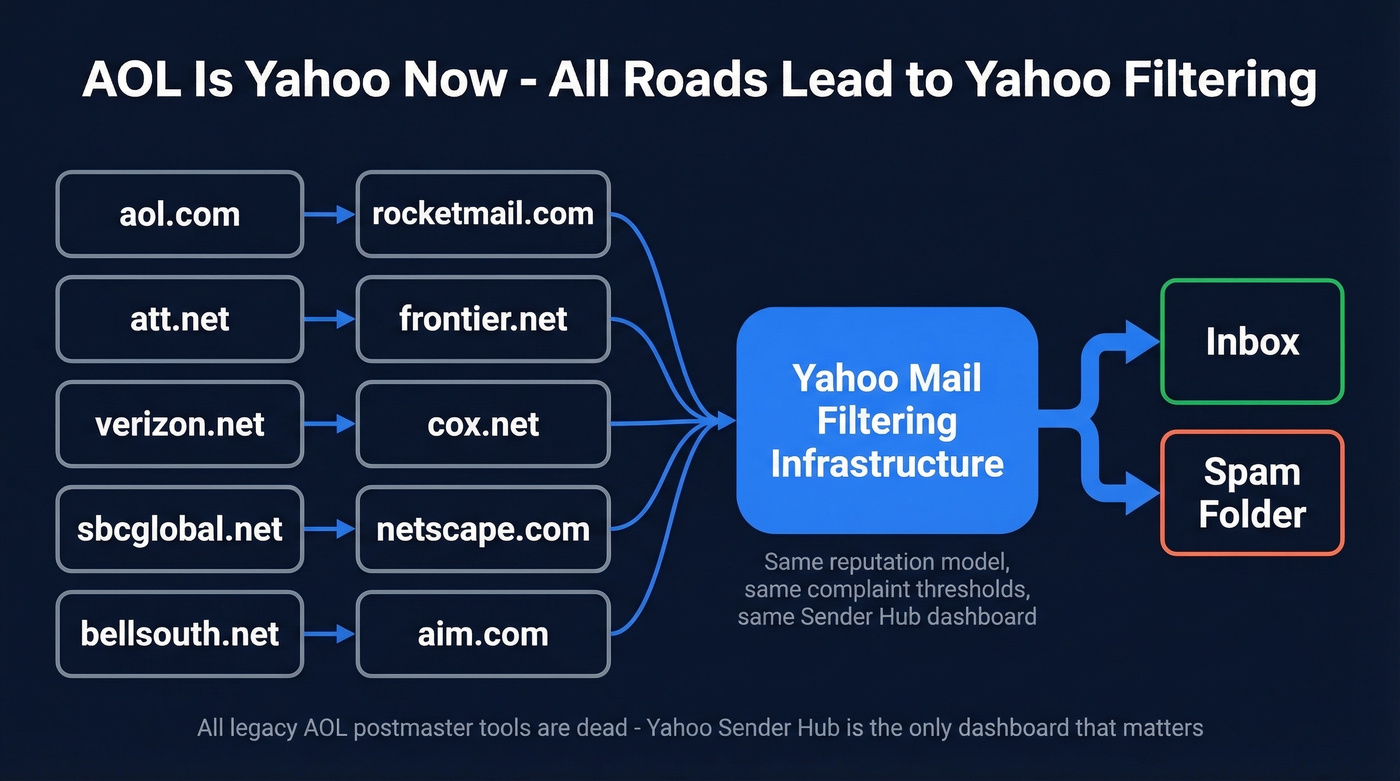
These domains all route through Yahoo's filtering and reputation model: aol.com, att.net, verizon.net, sbcglobal.net, bellsouth.net, rocketmail.com, frontier.net, cox.net, netscape.com, and aim.com. If you're troubleshooting inbox placement to any of them, you're troubleshooting Yahoo. Most legacy "AOL postmaster" links people share are dead. Yahoo Sender Hub is the only dashboard that matters now.
What Changed (2024-2026)
- Feb 2024 - Yahoo and Google began rolling out enforcement of bulk sender requirements.
- April 2024 - Stricter enforcement across the ecosystem.
- April 2025 - A widely discussed Yahoo update put much more weight on domain-focused reputation, making IP-only tactics far less effective.
- 2026 - Domain reputation and authentication are the baseline across major providers.
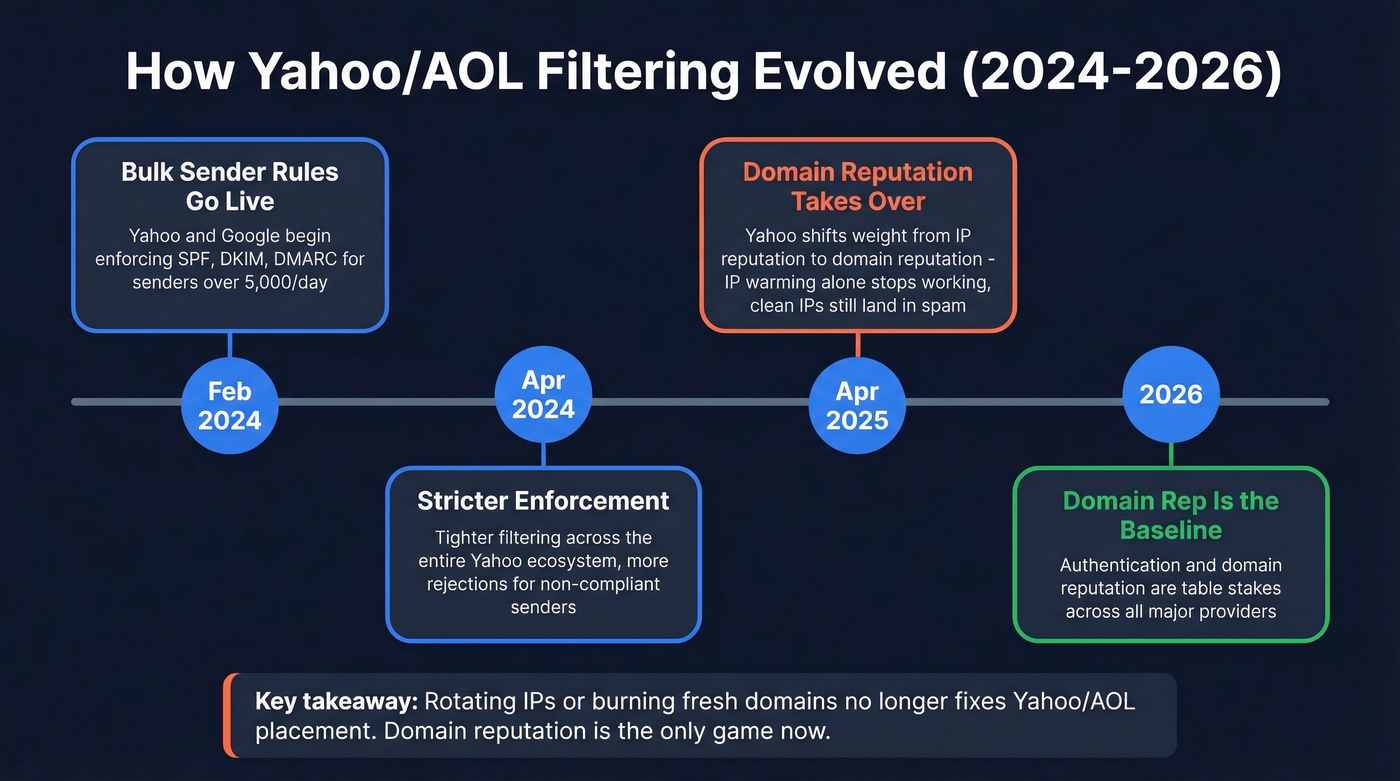
The April 2025 shift caught a lot of senders off guard. We've seen teams with clean IPs and proper authentication still landing in spam because their domain reputation was trashed by months of high bounce rates. IP warming doesn't fix domain reputation.
This isn't just a marketing sender problem either - Exchange Online admins reported sudden delivery failures to Yahoo/AOL domains starting around mid-January 2024, according to Microsoft community threads.
Look, if you're still rotating IPs or burning fresh domains to fix Yahoo/AOL placement, you're fighting the last war. Domain reputation is the only game now.

Yahoo's domain-reputation model punishes every bounce and spam trap hit. Prospeo's 5-step verification - with catch-all handling, spam-trap removal, and honeypot filtering - catches exactly the triggers that tank AOL/Yahoo placement. 98% accuracy at ~$0.01/email.
Fix your AOL inbox rate by fixing your list first.
Current Sender Requirements
Yahoo publishes these on senders.yahooinc.com/best-practices:
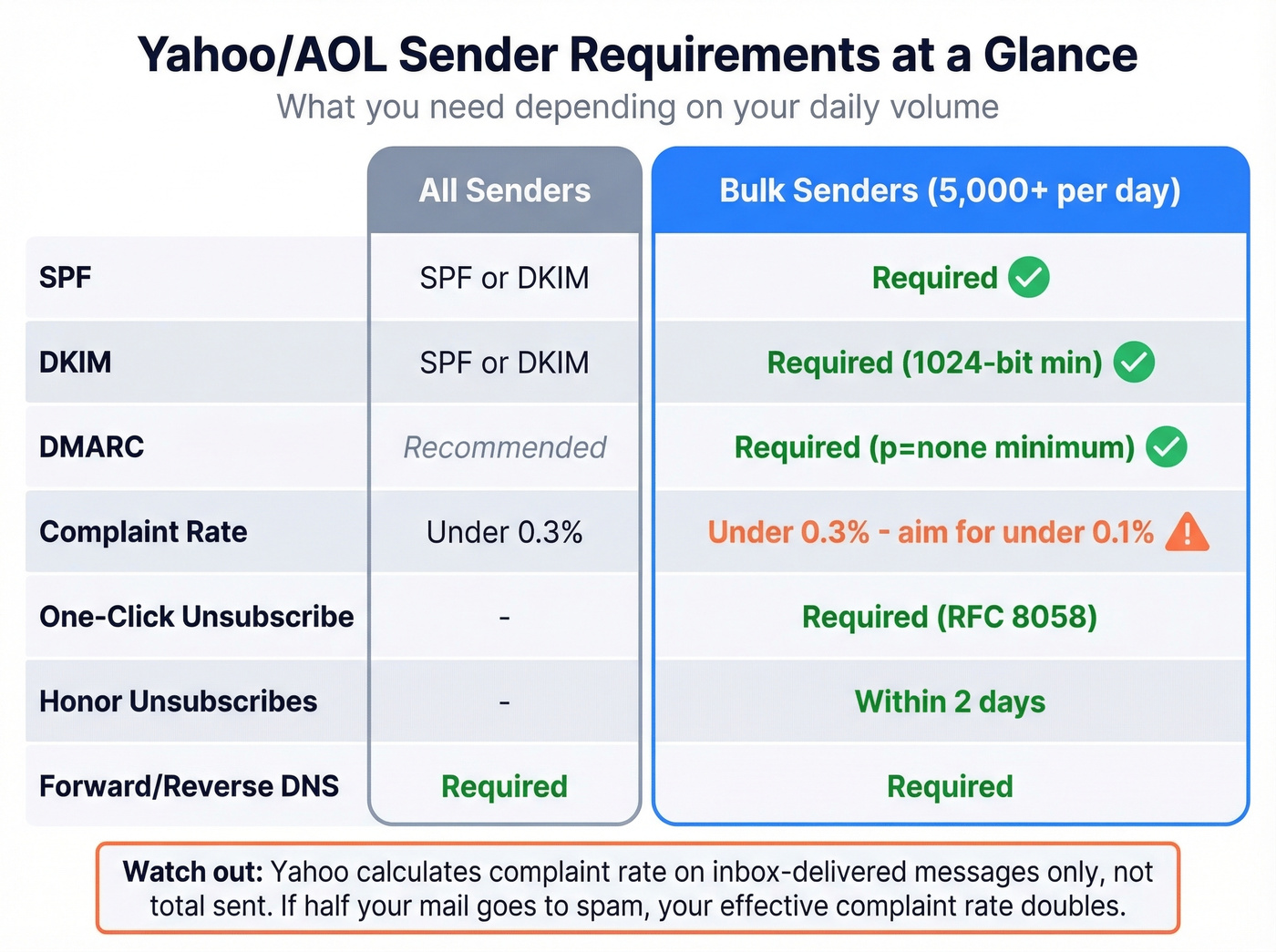
| Requirement | All Senders | Bulk (5,000+/day) |
|---|---|---|
| SPF | SPF or DKIM | Required |
| DKIM | SPF or DKIM | Required (1024-bit min) |
| DMARC | Recommended | Required (p=none min) |
| Complaint Rate | Under 0.3% | Under 0.3% (aim <0.1%) |
| One-Click Unsub | - | Required (RFC 8058) |
| Honor Unsubs | - | Within 2 days |
| Forward/Reverse DNS | Required | Required |
The complaint rate threshold trips people up. Yahoo calculates it on inbox-delivered messages only - not total sent. So if Yahoo filters half your mail to spam, your denominator shrinks and the percentage spikes. Your internal metrics will look fine while Sender Hub shows you're over the line.
Reply rate also matters as a positive engagement signal. In our testing, senders maintaining reply rates above 5-10% on Yahoo/AOL addresses consistently see better inbox placement than those relying on authentication alone. That's a big deal, and it's something most deliverability guides skip entirely.
Monitor With Yahoo Sender Hub
Sender Hub is the monitoring tool that matters for AOL/Yahoo. To activate Insights:
- Log in and go to Dashboard
- Select your verified DKIM domain
- Click Activate on the Insights panel
- Wait 24-48 hours for data to populate - your domain needs to meet Yahoo's minimum daily volume threshold
Once active, you'll see complaint rates, delivered message counts, and reputation signals. If your complaint rate is above 0.1%, you've got work to do. Above 0.3%, expect active throttling.
One thing that catches people: if you were enrolled in Yahoo's old Complaint Feedback Loop, you need to re-enroll through Sender Hub. The old system doesn't carry over.
Troubleshooting Bounces
Yahoo's SMTP error code page is the reference:
| Code | Type | Action |
|---|---|---|
| 421/451 | Temporary | Back off and retry - Yahoo's telling you to slow down |
| 553/554 | Permanent | Remove address immediately - invalid recipient, auth failure, policy rejection, or a Spamhaus listing |
Continuing to send to permanent bounces is one of the fastest ways to tank domain reputation. Remove hard bounces on first occurrence, and remove soft bounces after 3 consecutive failures. Yahoo also flags unresolvable From domains and RFC 5321/5322 violations - check your DNS records before assuming it's a content problem.
Clean Your List to Fix Inbox Placement
Under Yahoo's domain-reputation model, bad data is a direct path to the spam folder. Every invalid address generates a bounce. Every spam trap flags your domain. Catch-all addresses that silently accept and never engage drag your reputation down over time.

This is where list verification becomes non-negotiable. We've run enough campaigns through Yahoo/AOL to know that the difference between 95% and 98% email accuracy isn't marginal - it's the difference between inbox and spam folder at scale. Prospeo's 5-step verification catches the specific triggers Yahoo penalizes: spam traps, honeypots, and catch-all domains. At roughly $0.01 per email with a free tier of 75 verifications per month, it's cheap insurance against domain reputation damage.
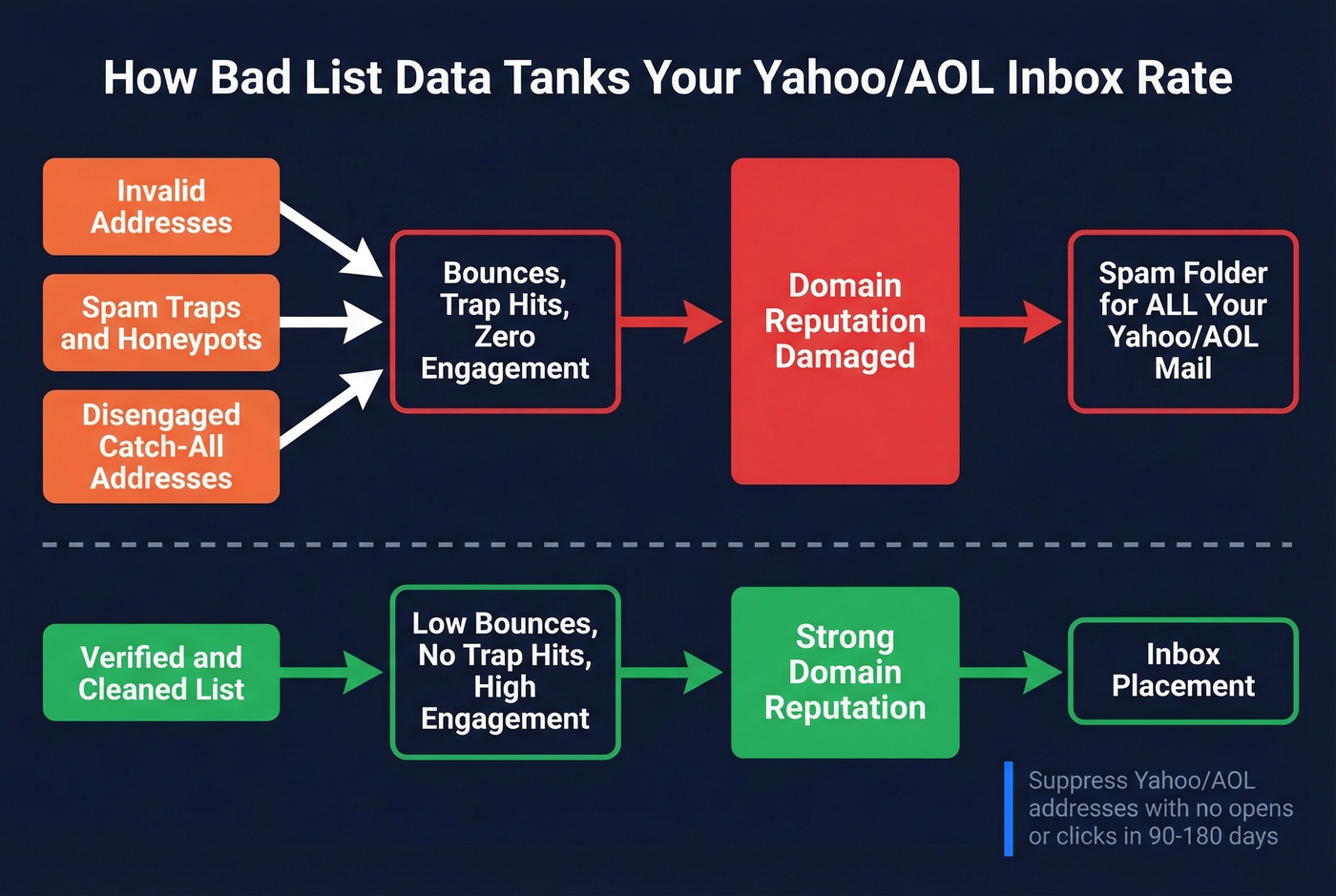
Beyond verification, segment by engagement. Suppress Yahoo/AOL addresses that haven't opened or clicked in 90-180 days. Yahoo's filtering weighs engagement heavily, and sending to a disengaged list is almost as damaging as sending to invalid addresses. Let's be honest - if someone hasn't opened your emails in six months, they're not going to start now, and keeping them on your list is actively hurting your placement with everyone else.
Skip list verification if you're only sending to addresses collected via double opt-in within the last 30 days. Everyone else needs it.
Sending to dead AOL addresses doesn't just waste credits - it destroys the domain reputation you need for every other provider too. Prospeo refreshes data every 7 days (not 6 weeks) so you're never emailing contacts that went stale last month.
Clean data is the cheapest deliverability fix that actually works.
FAQ
Is AOL deliverability different from Yahoo deliverability?
No. AOL and Yahoo use the same filtering ecosystem today - same authentication requirements, same complaint thresholds, same Sender Hub tools. Fix Yahoo, fix AOL. All AOL-family domains (aol.com, aim.com, netscape.com) route through Yahoo's infrastructure.
What's a safe complaint rate for Yahoo/AOL?
Yahoo's hard ceiling is 0.3%, but aim for under 0.1%. Remember Yahoo calculates this on inbox-delivered messages only, not total sent - so if half your mail hits spam, your effective complaint rate doubles. Monitor it weekly in Sender Hub.
Can email verification improve Yahoo/AOL inbox placement?
Yes. Invalid addresses and spam traps inflate bounce rates, which directly damage domain reputation under Yahoo's current filtering model. Cleaning your list before every send keeps you under Yahoo's thresholds and protects the domain reputation you've built.