

How to Use ChatGPT for Email Writing (Without Sounding Like a Robot)
It's 4:47 PM. You've got 23 unread emails, a follow-up you promised three hours ago, and a cold outreach sequence that needs five variations by tomorrow. ChatGPT can fix this - but only if you stop asking it to write your emails from scratch.
We spend eight hours and 42 minutes a week writing emails, and only 42% of those emails are fully read. The average office worker receives 121 emails a day, and four in ten recipients won't read past eight sentences. That's a lot of effort poured into messages that get skimmed, archived, or flat-out ignored.
The real move is simple: draft rough, then let ChatGPT rewrite. That one habit saves time and keeps your voice intact.
What You Need (Quick Version)
- Paste the Custom Instructions block from the "Make It Sound Human" section into ChatGPT.
- Draft rough, then ask ChatGPT to polish. Generating from scratch creates generic fluff you'll end up rewriting anyway.
- Use Temporary Chat mode for anything sensitive.
- For cold outreach, verify recipient emails before sending. Great copy doesn't matter if it bounces.
Prompting Fundamentals
Four principles separate a useful email prompt from generic slop.
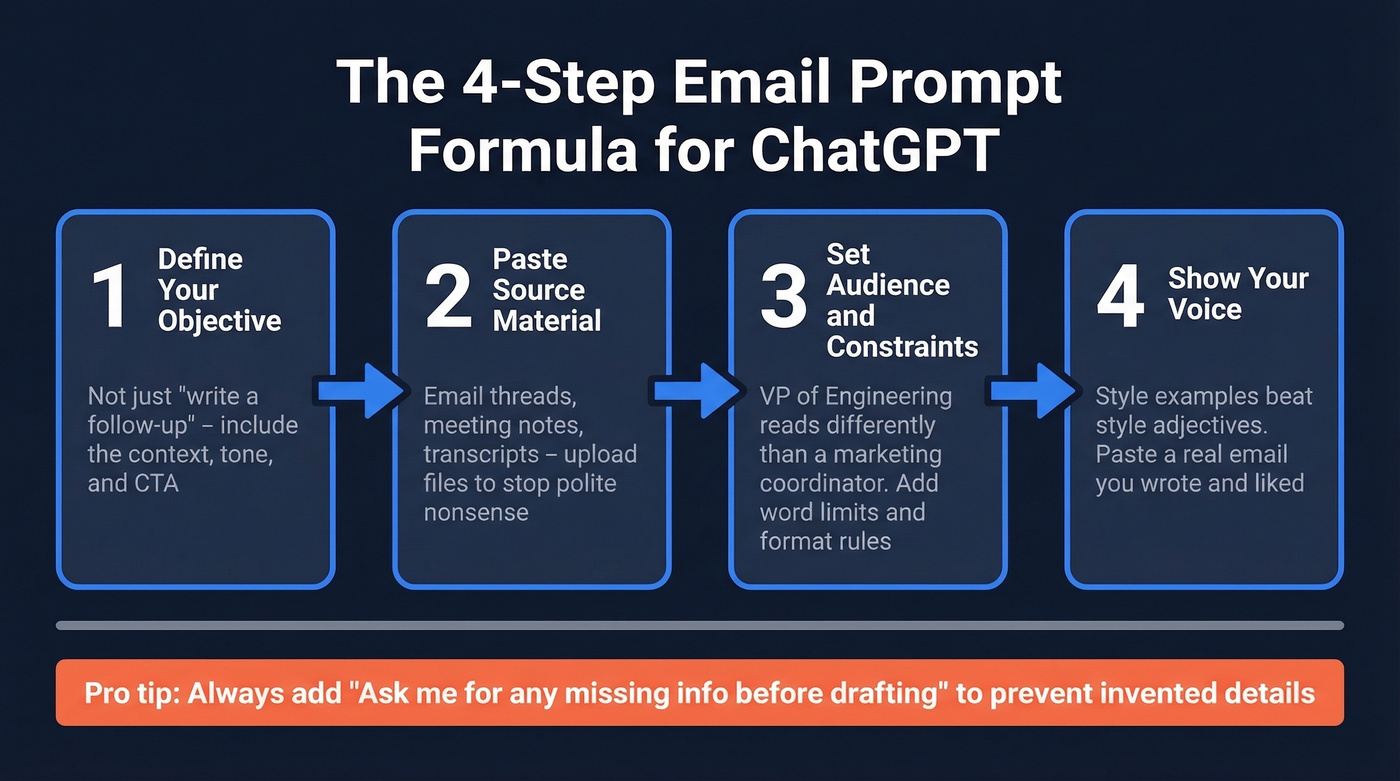
Start with your objective. "Write a follow-up" is vague. "Write a follow-up to a prospect who attended our webinar but didn't book a demo, tone is casual, CTA is a 15-minute call" gives ChatGPT a target it can actually hit.
Then give it source material. Paste the email thread, meeting notes, or the customer's last message. If you have a transcript or a messy doc, upload it and tell ChatGPT what to pull from it. File uploads are the fastest way to stop "polite nonsense" and get a reply that actually references what happened.
Define the audience and constraints. A VP of Engineering reads differently than a marketing coordinator. Add limits like "under 120 words," "one question max," or "two bullets only."
Give examples of your writing so it mirrors your voice instead of defaulting to corporate robot mode. This Forbes prompt guide gets the core idea right: style examples beat style adjectives every time.
One line I add constantly: "Ask me for any missing info before drafting." It forces clarifying questions instead of invented details.
Two power-user moves worth knowing. Canvas makes longer edits easier because you can iterate inline without losing the thread. Reasoning mode is great for structure - ask it to outline the argument first, then draft the email, and the result comes out tighter.
Here's the thing: if your email is under 120 words, you don't need "AI creativity." You need ruthless editing. ChatGPT is at its best as an editor, not a novelist.
18 Copy-Paste Email Prompts
Every prompt uses bracket placeholders. Swap in your details, paste into ChatGPT, then edit the output like a human would.
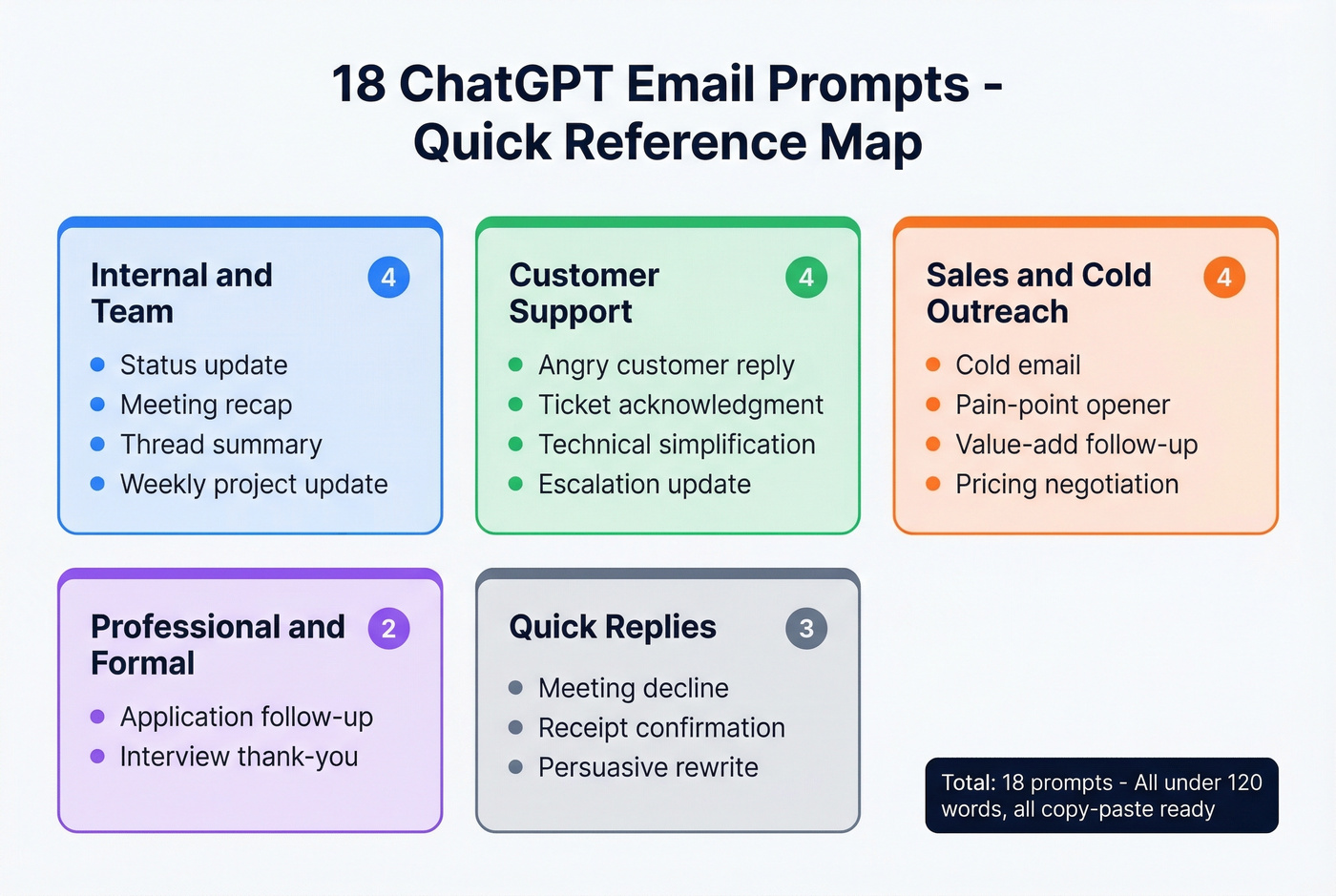
Internal and Team Emails
Your boss just asked for a status update in five minutes. Use this:
"Draft a status update email to [recipient/role] about [project]. Lead with the headline result, then 2-3 supporting details. Include risks and one specific ask (if needed). Keep it under 130 words. Data: [paste key metrics]."
This one turns messy notes into something people will actually read:
"Turn these meeting notes into a clear recap email. Attendees: [names]. Key decisions: [list]. Action items: [list with owners + deadlines]. Tone: direct, no fluff. End with a short 'Reply if anything is wrong' line. Notes: [paste]."
When an email thread has spiraled into 14 replies and someone needs the summary:
"Summarize this email thread into a forwardable recap for [person/role]. Include: (1) decisions made, (2) open questions, (3) next step + owner. Thread: [paste thread]."
And when you need to update your team without wordsmithing:
"Write a weekly project update email for [project name]. Summarize progress on [milestones], flag [roadblock], and outline next steps for [timeframe]. Keep it under 150 words. Use bullets only for action items."
Customer Support
Use this when a customer is angry and you need to de-escalate fast:
"Write a reply to a customer upset about [issue]. Include: (1) a specific acknowledgment of their frustration, (2) one-sentence explanation of what happened, (3) the fix + timeline, (4) what I need from them (if anything). Tone: empathetic, confident, no corporate fluff."
A clean "we got it" acknowledgment that doesn't sound like a bot:
"Draft a support acknowledgment email for a ticket about [issue]. Set expectations: next update within [timeframe]. Keep it under 70 words. No apologies unless we caused the issue."
When your technical answer needs to be readable by a non-technical customer:
"Rewrite this troubleshooting response for a non-technical reader. Keep the steps, simplify the language, and add a short 'What to expect' line at the end. Original: [paste]."
For escalation updates that don't alarm anyone:
"Write an escalation update email for [issue]. Explain we escalated to [team], what happens next, and when they'll hear back. Tone: reassuring, calm, specific."
Sales and Cold Outreach
Generic cold emails get deleted. Precision wins.
This is the default cold email prompt we keep coming back to - Saleshandy has a solid framework for this style of structure:
"You're a [your role] at [company]. Write a cold outreach email to [prospect title] at [company type]. Their likely challenge: [specific pain point]. Our product solves this by [one-sentence value prop]. Add one real piece of value (stat, insight, or resource) tailored to [industry]. End with a low-pressure CTA suggesting [specific action, e.g., 15-minute call]. Tone: casual, helpful. Under 120 words. No 'I hope this finds you well.'"
For emails that lead with their world, not yours:
"Write a cold email that opens with a specific challenge for [prospect title] in [industry]: [pain point]. Then connect it to a measurable outcome: [result]. Mention [product] in one sentence max. CTA: [action]. Tone: peer-to-peer, not salesy."
A follow-up that adds value instead of repeating yourself:
"Write a follow-up to [prospect name] who didn't reply to my first email about [topic]. Add a new angle or useful detail (not a bump). Under 80 words. End with a simple yes/no question."
A negotiation email that proposes tiers - useful when procurement enters the chat:
"Draft a pricing negotiation email to [prospect name/role]. Offer 3 options: (1) baseline plan at [$], (2) mid-tier with [feature] at [$], (3) annual prepay with [discount] at [$]. Include a short justification tied to [value metric]. Ask which option they prefer. Tone: firm, friendly, no pressure."
Professional and Formal
A job application follow-up that doesn't sound needy:
"Write a follow-up email for a [role] application I submitted [timeframe] ago at [company]. Express continued interest, reference one specific thing about the role/company: [detail]. Ask about timeline. Professional, warm, under 110 words."
A thank-you email that actually feels specific:
"Draft a thank-you email after an interview for [role] at [company]. Reference [topic discussed] and connect it to how I'd contribute in the first 60 days. Keep it under 100 words."
Quick Replies (Batch)
These shouldn't take more than 30 seconds. Pick one.
"Write a polite decline to a meeting about [topic]. Give a brief reason: [reason]. Offer an alternative: [async update / delegate / reschedule]. Two sentences max."
"Draft a brief acknowledgment confirming I received [document/request] and will review by [date]. One sentence."
"Rewrite my draft to be more persuasive and confident without adding fluff. Keep the same meaning, cut 20% of the words, and end with a clear CTA. Draft: [paste]."
Make AI-Written Emails Sound Human
ChatGPT's default email output is terrible. It's overly formal, stuffed with filler, and full of "polite nothing." The fix is telling it how you write, once, and letting that rule every draft.
The Custom Instructions Block
Paste this into ChatGPT's Custom Instructions (Settings > Personalization > Custom Instructions). Do it once and stop fighting the same robotic defaults every day.
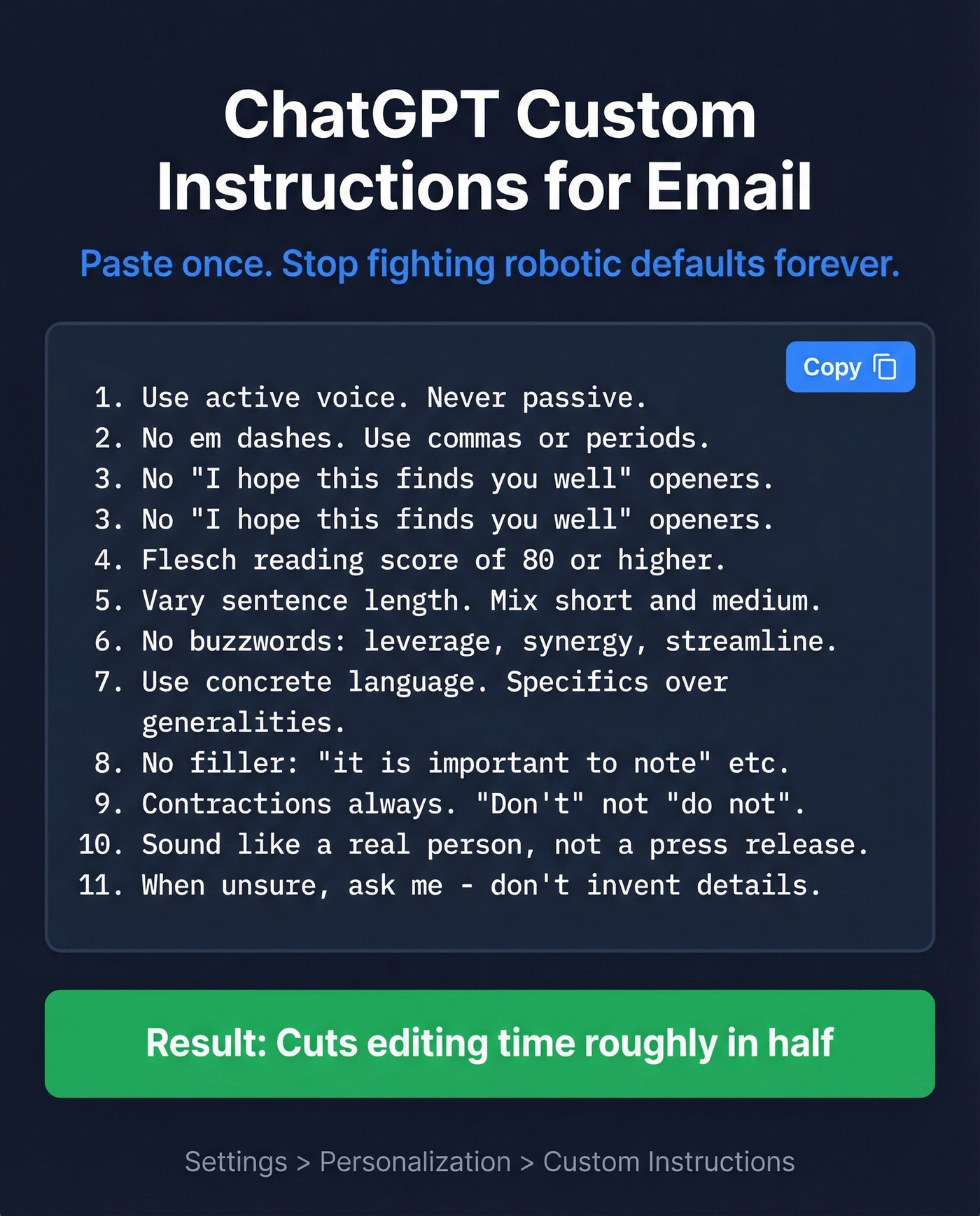
Writing style rules for all emails:
- Use active voice. Never passive.
- No em dashes. Ever. Use commas or periods instead.
- No "I hope this message finds you well" or similar openers.
- Flesch reading score of 80 or higher.
- Vary sentence length. Mix short and medium.
- No buzzwords: "leverage," "synergy," "streamline," "cutting-edge."
- Use concrete language. Specifics over generalities.
- No filler phrases: "it's important to note," "I wanted to reach out."
- Contractions always. "Don't" not "do not."
- Sound like a real person, not a press release.
- When unsure about details, ask me   -   don't invent.
In our testing across real outreach and support threads, this block cuts editing time roughly in half because you're no longer deleting the same five phrases on repeat.
Red Flags That Scream "AI"
If your email starts with "I hope this finds you well," you've already lost.
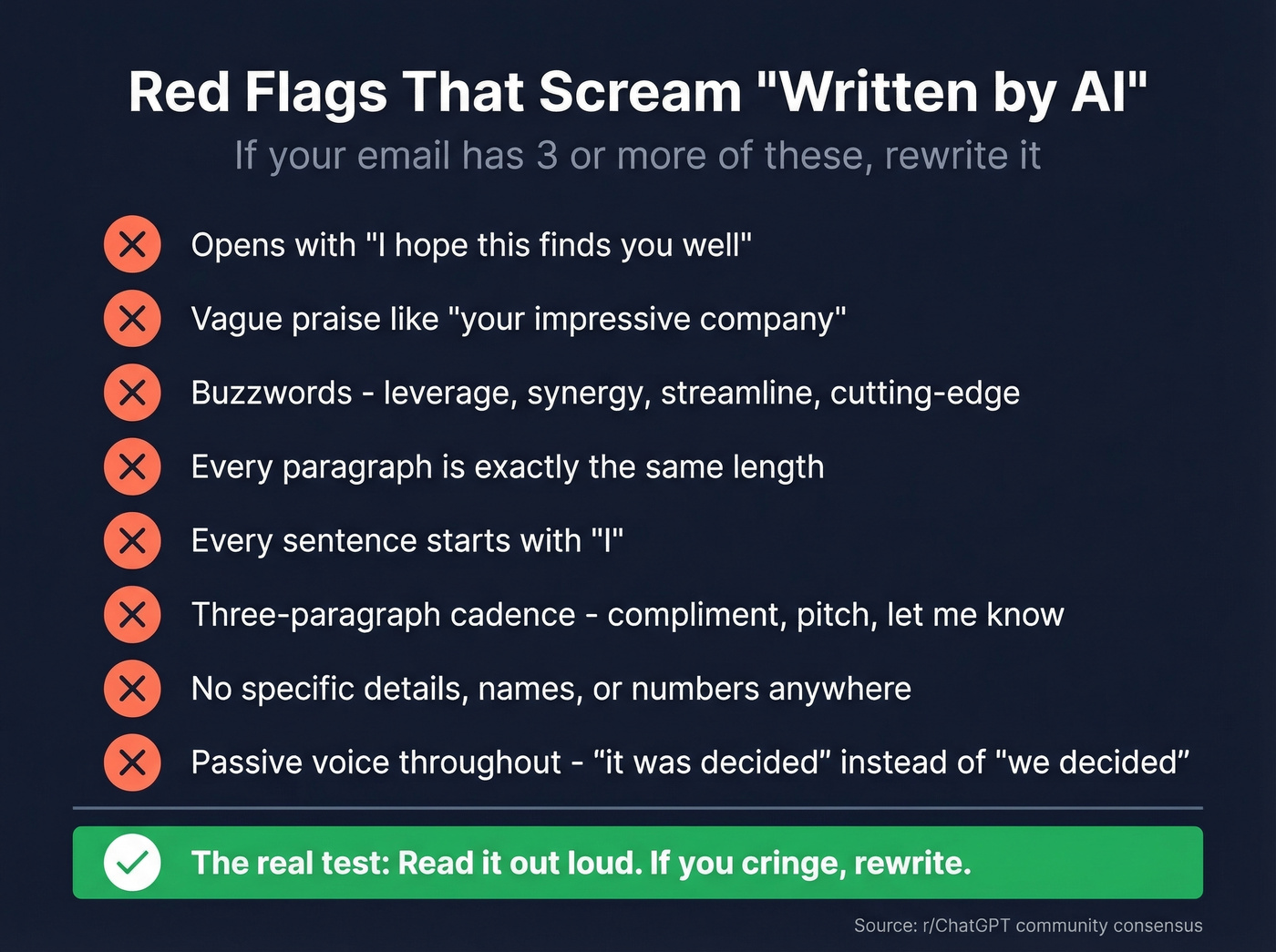
The other tells are just as obvious: vague praise ("your impressive company"), jargon ("drive outcomes"), and the same stiff three-paragraph cadence - compliment, pitch, "let me know." Recruiters and professors flag this constantly because it all reads like the same template with different nouns swapped in.
The r/ChatGPT community has long threads on "Custom Instructions that stop the corporate voice," and this r/UCDavis thread about AI-written student emails is a perfect example of how detectable the cadence becomes. The consensus across Reddit is clear: if every paragraph is the same length and every sentence starts with "I," people notice.
Before and After
Before (default ChatGPT output): "I hope this email finds you well. I'm reaching out to introduce our innovative platform that leverages cutting-edge technology to streamline your sales operations. I'd love to schedule a call at your earliest convenience to discuss how we can help drive meaningful results for your team."
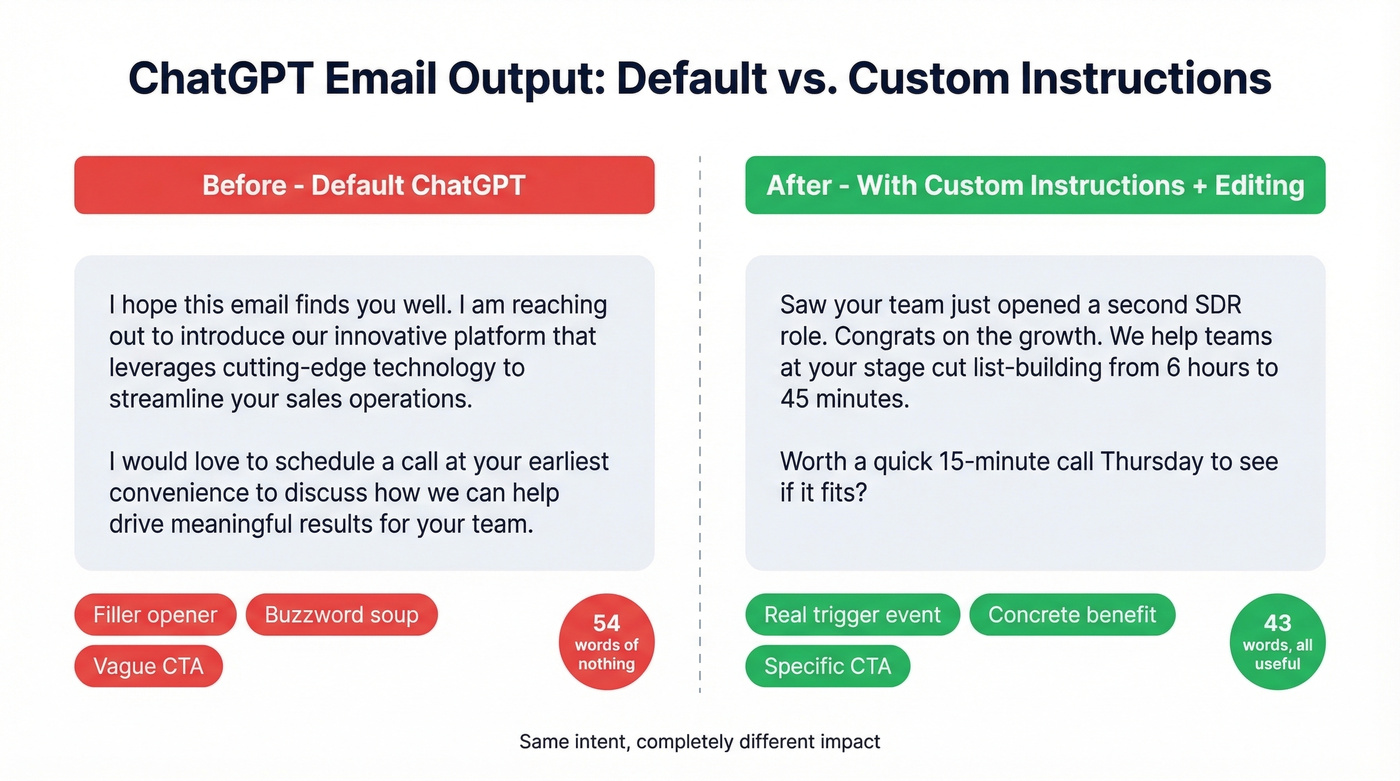
After (with Custom Instructions + editing): "Saw your team just opened a second SDR role. Congrats on the growth. We help teams at your stage cut list-building from 6 hours to 45 minutes. Worth a quick 15-minute call Thursday to see if it fits?"
That's not magic. It's one real trigger, one concrete benefit, and a specific CTA.
Let's be honest about something: Claude Sonnet follows tone instructions more reliably than ChatGPT for pure email writing. If you're doing high-stakes tone work, Claude produces a smoother first draft. ChatGPT wins when you want drafting plus research plus iteration in one place.
AI detectors like GPTZero or ZeroGPT can be a gut-check, but don't obsess over them. They throw false positives all the time. Your real test is simpler: read the email out loud. If you cringe, rewrite it.

You just spent 20 minutes crafting the perfect cold email with ChatGPT. If it bounces, that's 20 minutes wasted - and a hit to your domain reputation. Prospeo verifies emails at 98% accuracy so every word you write actually reaches a real inbox.
Great copy deserves a verified email address behind it.
Privacy: What Happens to Your Data
Every email you paste into ChatGPT is stored on OpenAI's servers indefinitely unless you delete it. Deleting a chat triggers a 30-day server removal process.
A Nightfall analysis found that 63% of ChatGPT user data contained personally identifiable information, and only 22% of users were aware of opt-out settings. People paste sensitive stuff without thinking about where it goes.
The practical workaround is Temporary Chat mode. It keeps the conversation out of your history and deletes it after 30 days. Use it for anything with client data, internal financials, or PII.
Real talk: don't paste employment contracts, HR communications, or legal documents into ChatGPT. The convenience isn't worth the risk.
When NOT to Use ChatGPT
Skip it entirely for these:
- Sensitive HR communications - terminations, performance reviews, compensation discussions
- Legal matters - contract negotiations, compliance responses, anything that could end up in discovery
- Emails containing PII you can't risk - SSNs, medical info, financial records
- Long-form newsletters and campaigns - AI long-form gets detected faster and erodes trust over time
If you're unsure, ask yourself: "Would I be comfortable if this email's origin became public?" If the answer is no, write it yourself.
AI Email Tools Beyond ChatGPT
Standalone tools like ChatGPT require tab-switching. Inbox-native tools work inside Gmail or Outlook and can see the thread context. That difference determines whether you'll actually use the tool daily.
| Tool | Type | Best For | Free Tier | Starts At |
|---|---|---|---|---|
| ChatGPT | Standalone | Most people | Yes | $20/mo (Plus) |
| Claude | Standalone | Natural tone | Yes | $20/mo |
| Gemini | Inbox-native | Gmail users | Yes | $20/mo |
| Gmelius | Inbox-native | 30+ emails/day | No | $21/user/mo |
| Mailmeteor | Inbox-native | Budget bulk | 50 emails/day free | $4.99/mo |
| Jasper | Standalone | Enterprise marketing | No | $69/user/mo |
| Rytr | Standalone | Quick drafts | 10K chars/mo | $9/mo |
Our rule of thumb: don't pay $21/month for Gmelius if you send 10 emails a day. Pay for it if email is literally your job and you live in your inbox.
For cold outreach specifically, writing is only half the equation. Deliverability is the other half, and bounces are the fastest way to wreck a domain.
Verify Before You Send
Here's the pattern we see constantly: someone spends 20 minutes crafting the perfect cold email with ChatGPT, sends it to a stale list, and 15% bounce. That doesn't just waste effort. It actively damages your sender reputation, pushing future emails into spam even for people who want to hear from you.
We've sent and audited enough outbound to be blunt about this: the bounces hurt more than the ignores. A few bad sends can tank deliverability for weeks.
Before any cold outreach campaign, run your list through verification. Prospeo handles this with 98% email accuracy on a 7-day refresh cycle, so you're not verifying against data that went stale a month ago. Upload a CSV, verify in minutes, and only pay for valid addresses. The free tier includes 75 emails per month plus 100 Chrome extension credits.
ChatGPT handles the writing. But who are you writing to? Prospeo gives you 300M+ professional profiles with 30+ filters - buyer intent, job changes, technographics - so your AI-crafted outreach hits the exact right person at $0.01 per email.
Stop perfecting emails to the wrong people.
FAQ
Can people tell when ChatGPT wrote your email?
Yes, if you use default output. Generic openers like "I hope this finds you well," vague praise, and a rigid three-paragraph cadence are dead giveaways. Use Custom Instructions, edit for specificity, and read it out loud before sending.
Is ChatGPT free for writing emails?
Yes. The free tier handles email drafting for most use cases, including all 18 prompts in this guide. ChatGPT Plus ($20/month) adds faster responses and priority access during peak hours.
Which AI model writes the best emails?
Claude Sonnet produces the most natural tone out of the box. ChatGPT is the most versatile when you need drafting, research, and iteration in one place. Gemini is easiest if you live in Gmail and want in-line replies.
How do I write cold outreach emails with ChatGPT?
Fill in a tight persona, a real pain point, and a specific CTA using the sales prompts above. Draft rough first, then let ChatGPT tighten it. Before sending, verify your list so your best email doesn't die in a bounce.