

Cirrus Insight Pricing, Reviews, Pros & Cons (2026)
Quick Verdict
Cirrus Insight is worth it for Salesforce teams on Gmail or Outlook who need activity sync beyond what Einstein Activity Capture offers - especially attachment syncing and more usable Salesforce reporting on captured activity. We'd recommend starting with the $14/user/month Salesforce Sync tier and validating reliability before upgrading. Skip it if sync consistency is non-negotiable; the tool is improving but still has rough edges.
What Is Cirrus Insight?
Cirrus Insight bridges Salesforce and your inbox (Gmail or Outlook), automatically logging emails, calendar events, tasks, and attachments so reps don't have to. It runs a sidebar inside your email client for managing Salesforce records without switching tabs. Over 3,000 organizations use it across Sales Cloud, Service Cloud, and Financial Services Cloud.
Pricing Breakdown
Cirrus Insight's pricing page doesn't actually show prices - it pushes you through a "30-second survey," then nudges you toward a demo. Frustrating, to say the least.
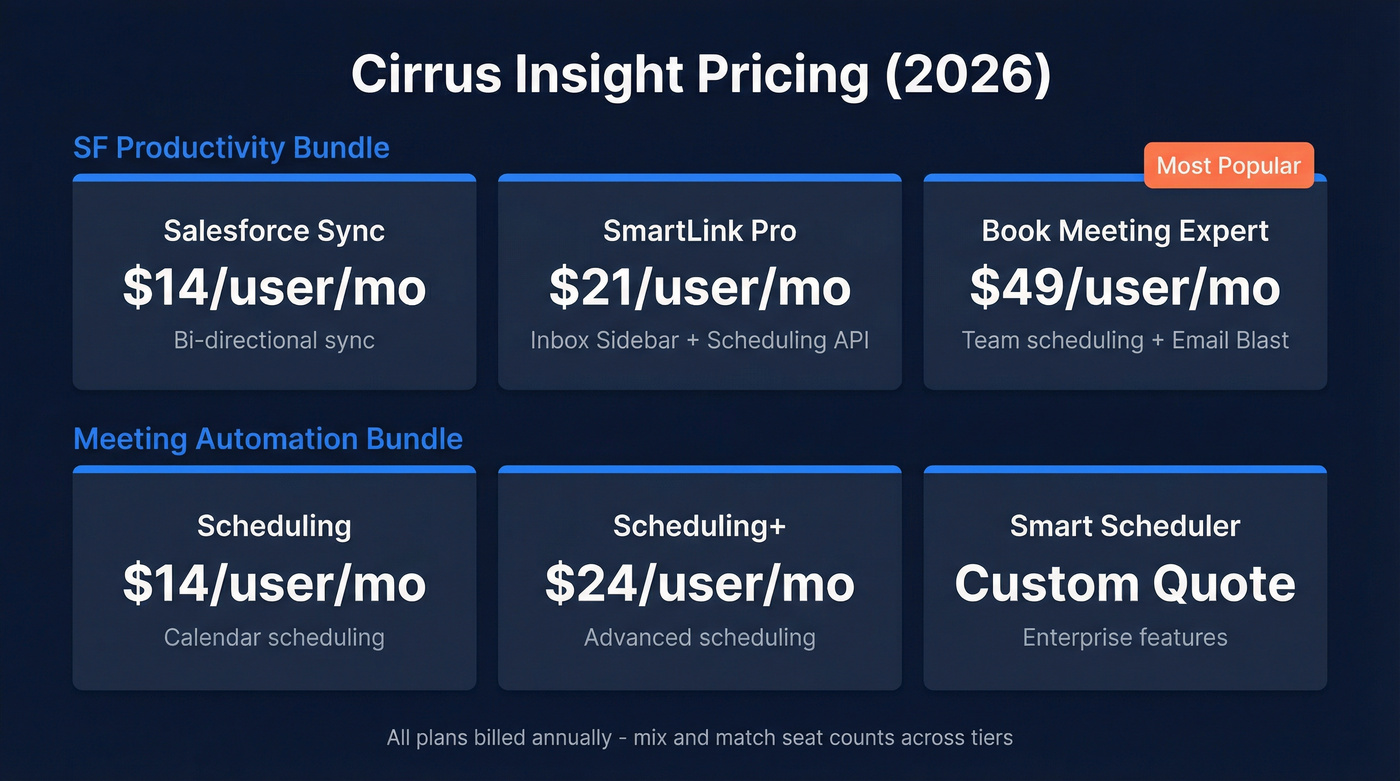
The tiers are well-documented on review aggregators, though:
| Bundle | Tier | Price/User/Mo | Key Features |
|---|---|---|---|
| SF Productivity | Salesforce Sync | $14 | Bi-directional sync |
| SF Productivity | SmartLink Pro | $21 | + Inbox Sidebar, Scheduling API |
| SF Productivity | Book Meeting Expert | $49 | + Team scheduling, Email Blast |
| SF Productivity | Smart Scheduler | Custom | Quote required |
| Meeting Automation | Scheduling | $14 | Calendar scheduling |
| Meeting Automation | Scheduling+ | $24 | Advanced scheduling |
All plans bill annually. One nice detail: Cirrus lets you buy different seat counts for different features. You could put 10 reps on Salesforce Sync but only 5 on Calendar Scheduling - modular purchasing that most competitors don't offer.
For a 10-person team, SmartLink Pro runs $2,520/year while Book Meeting Expert hits $5,880/year. That's a meaningful spread, so start at the bottom tier and upgrade only when you've confirmed sync reliability in your environment.
What Users Like
Cirrus Insight holds a 4.2/5 on G2 across 1,512 reviews, with a matching 4.2 on Capterra from 113 reviews. Top themes tell a clear story:
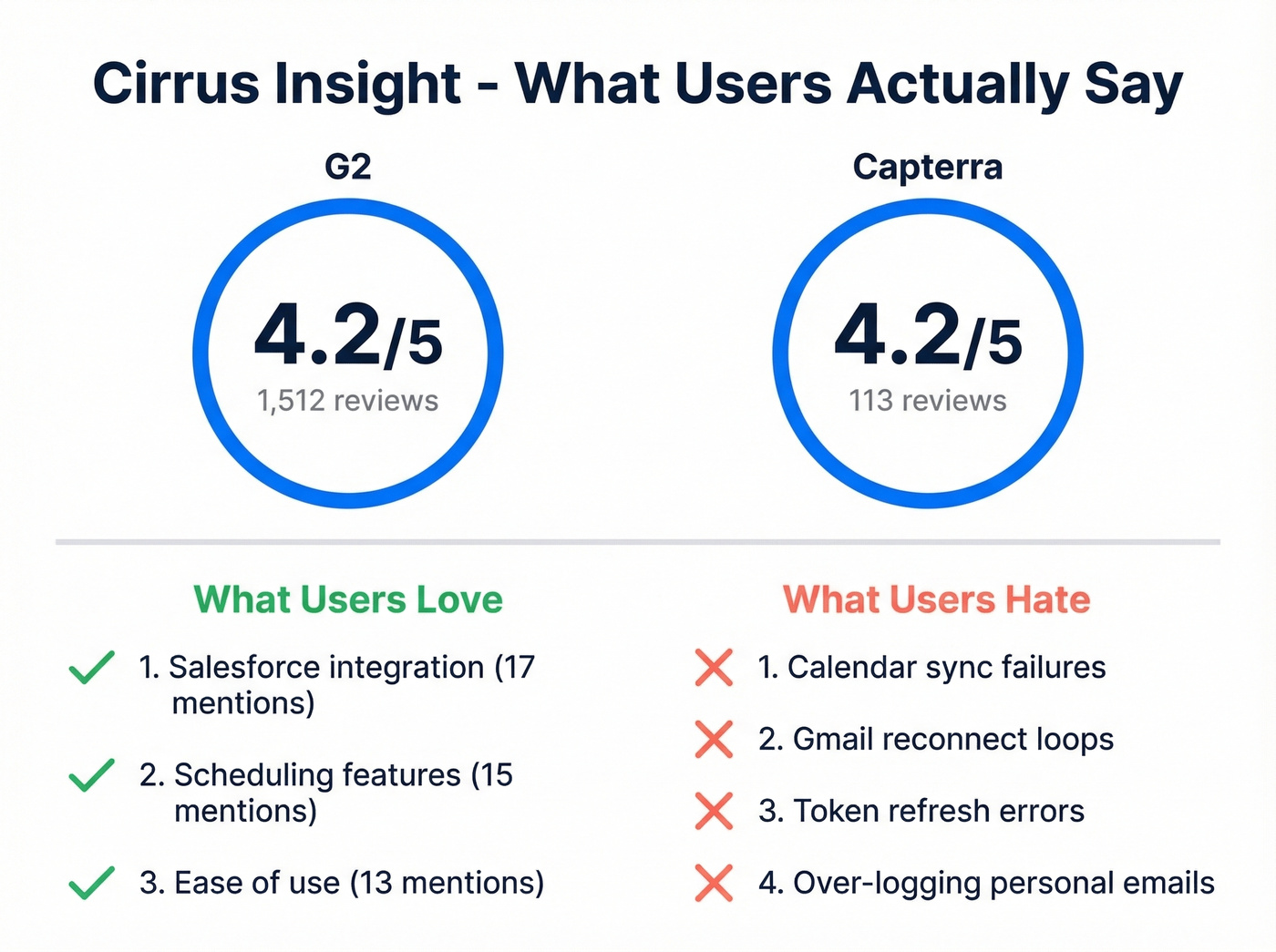
- Salesforce integration (17 mentions on G2) - the core value prop delivers. Reps manage Salesforce without leaving their inbox.
- Scheduling (15 mentions) - booking links and team scheduling get consistent praise.
- Ease of use (13 mentions) - once set up, the daily workflow is straightforward.
The biggest win is automated activity logging. It saves reps from manual CRM entry and gives managers reporting data they can actually trust - which, let's be honest, is the whole reason you're evaluating this tool in the first place.

Cirrus Insight automates logging - but what's the point if the contacts in Salesforce have bad emails? Prospeo enriches your CRM with 98% verified emails and 50+ data points per contact, refreshed every 7 days. Native Salesforce integration. No contracts, $0.01/email.
Fix the data first, then automate the sync.
What Users Complain About
The complaints are specific and recurring. On G2, top negative themes include missing features (8 mentions), learning curve (6), poor customer support (6), and slow loading (5). Capterra reviews dig deeper into the technical pain:
- Calendar sync failures - multiple users report Salesforce calendar not syncing to Google Calendar, with month-long support loops that go nowhere.
- Gmail reconnect loops - the sidebar drops connection and cycles through "trying to reconnect" states. Maddening when you're mid-deal.
- Token refresh errors - Google authentication breaks erratically, killing sync until you manually fix it.
- Over-logging - Cirrus can log too aggressively, capturing personal emails or flooding Salesforce with storage-eating activity records.
The counterbalance: Cirrus is actively fixing these. Their December 2025 release notes show improved calendar sync reliability, reduced duplicate meeting records, Salesforce Sidebar stability fixes, and faster sync processing. October 2025 patched Outlook reply tracking and included backend work to address sidebar slowness. Progress is real, but it's slow.
Cirrus Insight vs Einstein Activity Capture
Salesforce admins frequently weigh Cirrus against EAC - the same questions keep surfacing on r/salesforce. Here's the short version:
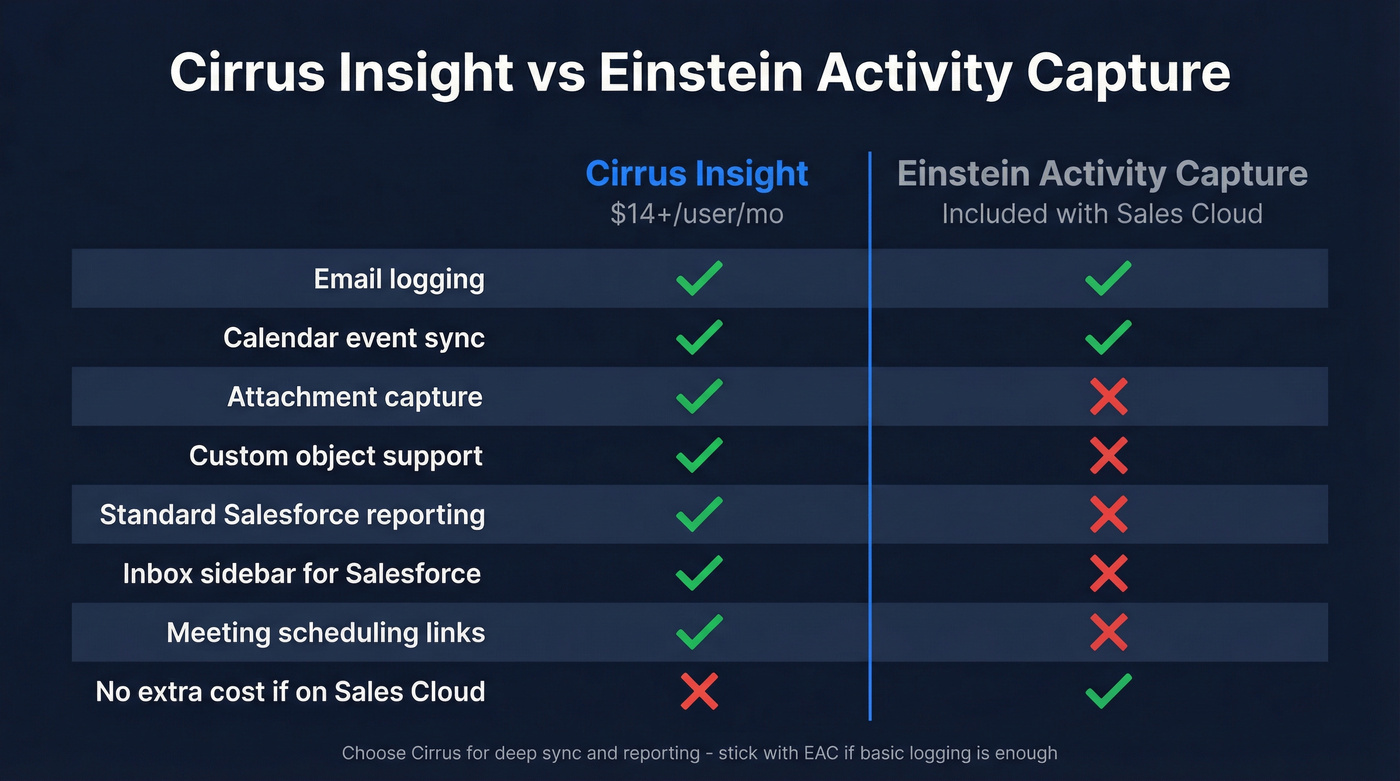
Use Cirrus if you want inbox-based Salesforce workflow (sidebar + scheduling) and you care about capturing emails, calendar events with invitees, tasks, and attachments directly into Salesforce for standard reporting.
Stick with EAC if basic email and event logging is enough and it's already bundled with your Sales Cloud license. EAC is Salesforce-native and often included with certain Sales Cloud Einstein tiers. Just know the limits: no custom objects, no attachments, no advanced reporting, and Gmail capture is limited to 6 months of past emails.
For teams that need something in between, the $14/month Salesforce Sync tier from Cirrus is cheap enough to run alongside EAC as a trial.
Alternatives Worth Considering

Fix Your Data Before You Fix Your Sync
Here's the thing: most teams shopping for Cirrus Insight actually have a data quality problem disguised as a sync problem. If your Salesforce contacts have bad emails, you're automating around garbage. We've seen this pattern dozens of times.
Prospeo verifies and enriches contact data before it enters the CRM - 98% email accuracy with a 7-day data refresh cycle. It integrates natively with Salesforce and returns 50+ data points per contact. Free tier gives you 75 emails/month; paid plans run about $0.01/email with no contracts and self-serve onboarding.
If you're comparing vendors, it can also help to scan a broader list of data enrichment services and how they differ on accuracy, refresh, and integrations.
Yesware - Email Engagement Over Deep Sync
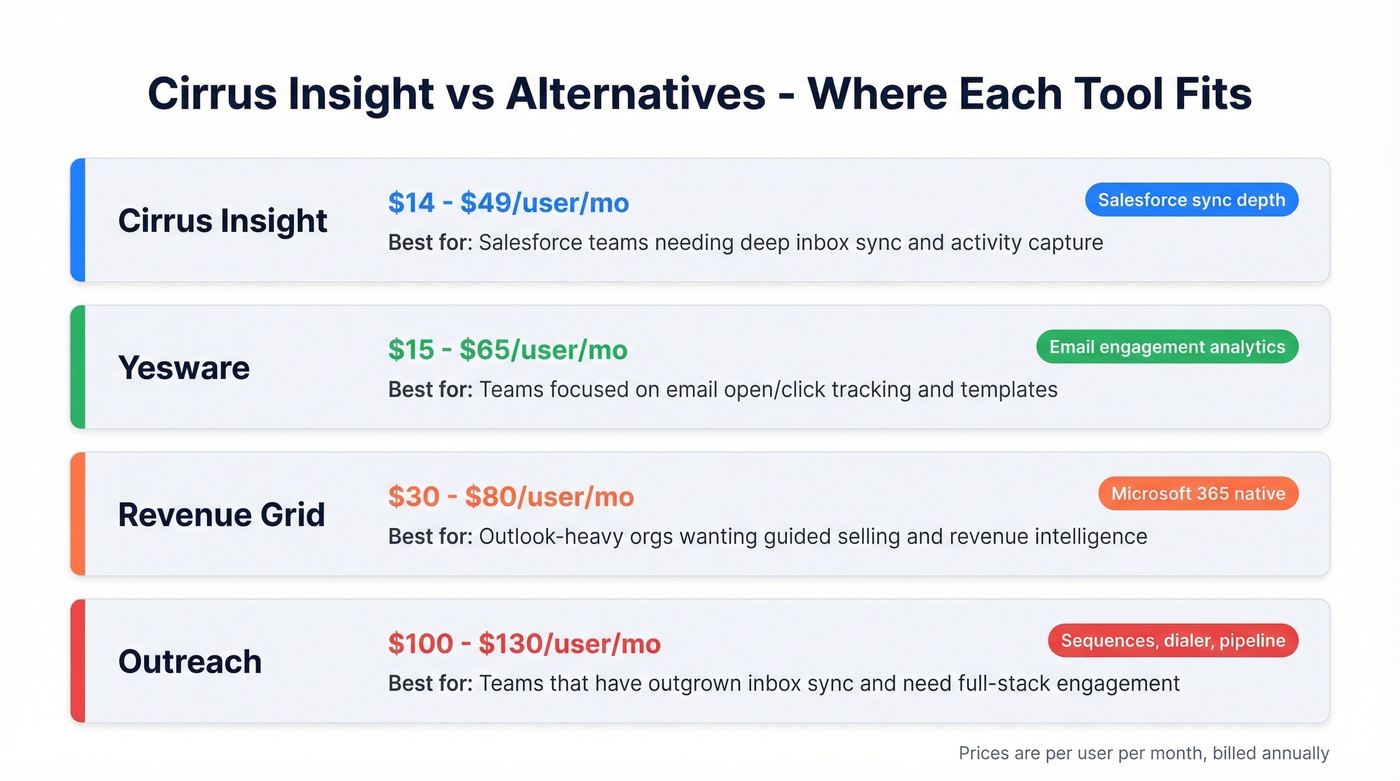
At $15-$65/user/month, Yesware is a strong competitor for inbox-level email tracking and templates with solid Gmail and Outlook support. In our experience, teams that care more about open/click tracking than Salesforce field mapping end up happier with Yesware than Cirrus.
Revenue Grid - Built for Outlook-Heavy Orgs
If your company runs Outlook and your reps live in Microsoft 365, Revenue Grid deserves a look. It leans into guided selling and revenue intelligence beyond basic sync. Expect roughly $30-$80/user/month depending on modules and contract size.
Outreach - Only If You Need the Full Stack
$100-$130/user/month. That's 3-5x what Cirrus costs, and it should be - Outreach handles sequences, dialer, analytics, and pipeline management. Don't buy it for inbox sync. Buy it when you've outgrown inbox sync entirely.
Final Verdict
For a 5-person Salesforce team on Gmail or Outlook, start with Salesforce Sync at $14/user/month. That's $840/year - cheap enough to test without a painful procurement cycle. Don't upgrade to SmartLink Pro or Expert until you've validated that sync works reliably in your specific environment. The tool is actively maintained, but sync reliability still isn't bulletproof.
And if reps are complaining about bad contact data more than manual logging, Cirrus isn't your first problem. Fix the data with a tool like Prospeo, then automate the sync.
FAQ
How much does Cirrus Insight cost per user?
Cirrus Insight starts at $14/user/month billed annually for the Salesforce Sync tier. SmartLink Pro is $21/user/month and Book Meeting Expert is $49/user/month. You can mix seat counts across tiers to control costs.
Is Cirrus Insight better than Einstein Activity Capture?
Cirrus Insight captures attachments, supports custom objects, and enables standard Salesforce reporting on synced activity - none of which EAC offers. Choose EAC if basic email/event logging is sufficient and it's already bundled with your Sales Cloud license.
Does Cirrus Insight work with Gmail and Outlook?
Yes, it supports both via browser extensions and add-ins. Gmail users report more frequent reconnect issues, while Outlook stability has improved with recent 2026 patches.
What's a good alternative if Cirrus Insight sync is unreliable?
First, check whether bad contact data is the root cause - that's often the real issue. For inbox-level tracking without deep Salesforce sync, Yesware ($15-$65/user/month) is a reliable option. For full-stack sales engagement, Outreach and Revenue Grid are worth evaluating at higher price points.
Teams evaluating Cirrus Insight at $14-$49/user/month often overlook the real bottleneck: reps are reaching out to stale contacts. Prospeo's 7-day data refresh cycle keeps your pipeline current - 83% enrichment match rate, 92% API match rate, and zero annual contracts.
Stop syncing outdated contacts into Salesforce. Start with clean data.