

Demand Gen Best Practices: The 2026 Practitioner's Playbook
You launched Demand Gen two weeks ago. The CMO's already asking why ROAS looks worse than Search, the CFO wants to reallocate budget, and you're staring at two in-platform conversions wondering if this whole thing was a mistake.
Here's the problem: you're measuring it wrong, you're probably underfunding it, and you skipped at least one of the four demand gen best practices Google says actually matter. Advertisers who adopted at least three of four recommended practices saw over 40% more conversions on average, per Google's own internal analysis spanning April 2024 through December 2025. That's not a marginal improvement - that's the difference between a campaign your CFO kills and one that becomes a permanent budget line.
The Four Pillars (Quick Version)
Google's framework boils down to four pillars. Nail three and you're in the top tier of Demand Gen advertisers:
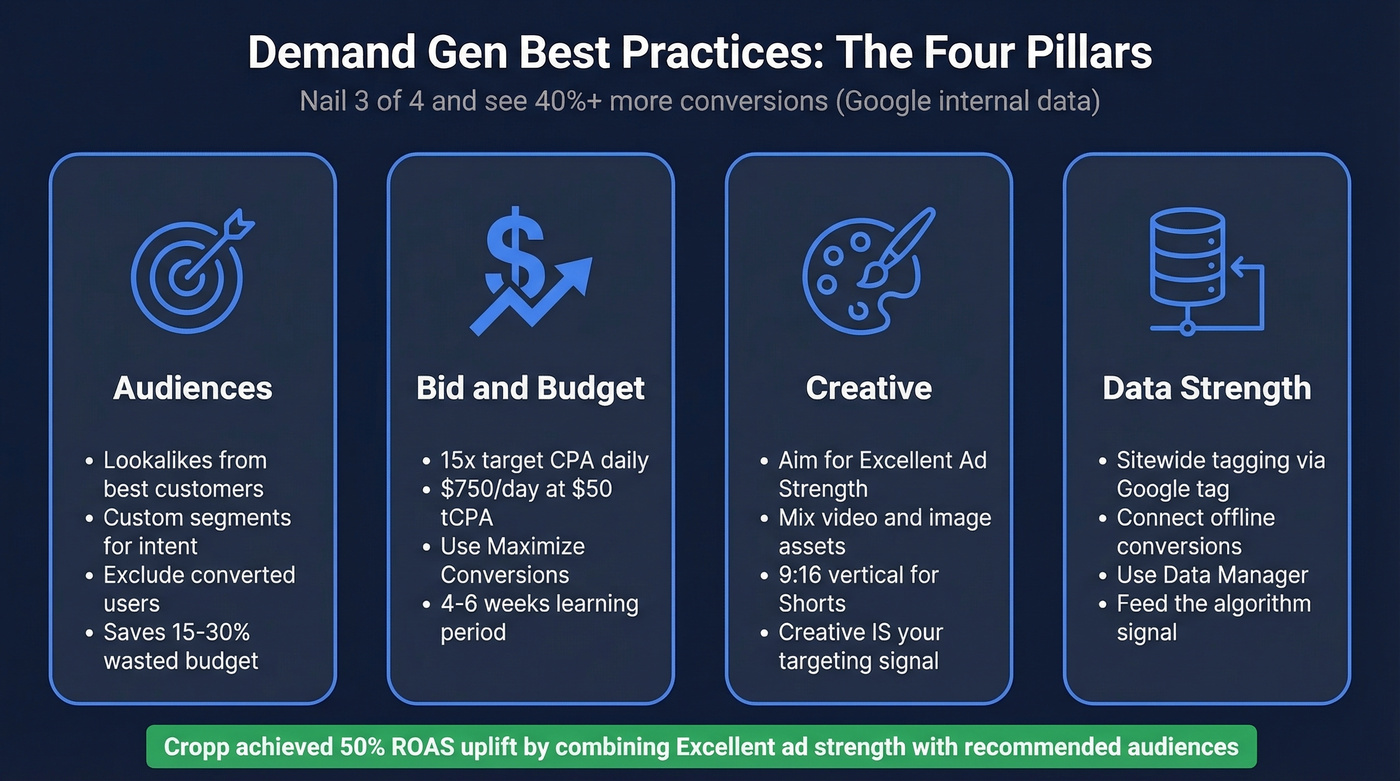
- Audiences: Seed lookalikes from your best customers, layer custom segments for search-intent targeting, and exclude converted users. Missing exclusions alone can waste 15-30% of your budget.
- Bid & Budget: Set your daily budget around 15x your target CPA. If your tCPA is $50, that's $750/day. Yes, really.
- Creative: Aim for "Excellent" Ad Strength". Polish fashion retailer Cropp hit a 50% ROAS uplift by combining Excellent ad strength with Google's recommended audience solutions.
- Data Strength: Implement sitewide tagging via Google tag gateway and connect offline conversion sources through Data Manager.
The rest of this guide breaks down exactly how to execute each one - with the budget math, creative specs, and measurement framework most guides skip.
How Demand Gen Works in 2026
Demand Gen isn't what it was 18 months ago. A late-2025 algorithm shift moved the system from contextual matching (showing ads based on page content) to interest-based matching (showing ads based on user behavior). Practitioner Thomas Eccel put it well: "Demand Gen is not a contextual matching algorithm anymore. It's an interest-based algorithm that first identifies what a user is likely to buy, then finds the best creative to show them."
This matters because your creative, copy, and product data now function as targeting signals - not just presentation. The algorithm reads your assets to understand what you're selling and who wants it. Bad creative doesn't just look bad. It actively degrades your targeting.
Your ads can appear across YouTube in-feed, YouTube Shorts, Discover, Display, and Gmail Promotions. In June 2025, Google opened channel control in beta, letting you opt out of specific surfaces - a welcome change for teams that want to keep campaigns off Gmail or focus exclusively on Shorts. Placement quality varies on Display inventory, and placement-level control is limited compared to Search, so use channel controls to restrict surfaces if you see junk placements creeping in.
| Surface | Format Strength | Best For |
|---|---|---|
| YouTube in-feed | Video, image | Brand storytelling |
| YouTube Shorts | 9:16 video | Reach, awareness |
| Discover | Image, carousel | Visual products |
| Gmail Promotions | Image, text | Retargeting, offers |
Supported formats include single image, video, carousel (2-10 cards), and product feeds. Video Action Campaigns were sunset in 2024, with the full transition to Demand Gen complete by July 2025, making it the primary conversion-focused video campaign type in Google Ads.
Audience Strategy That Works
Here's each audience type, when it earns its place, and when to skip it entirely.
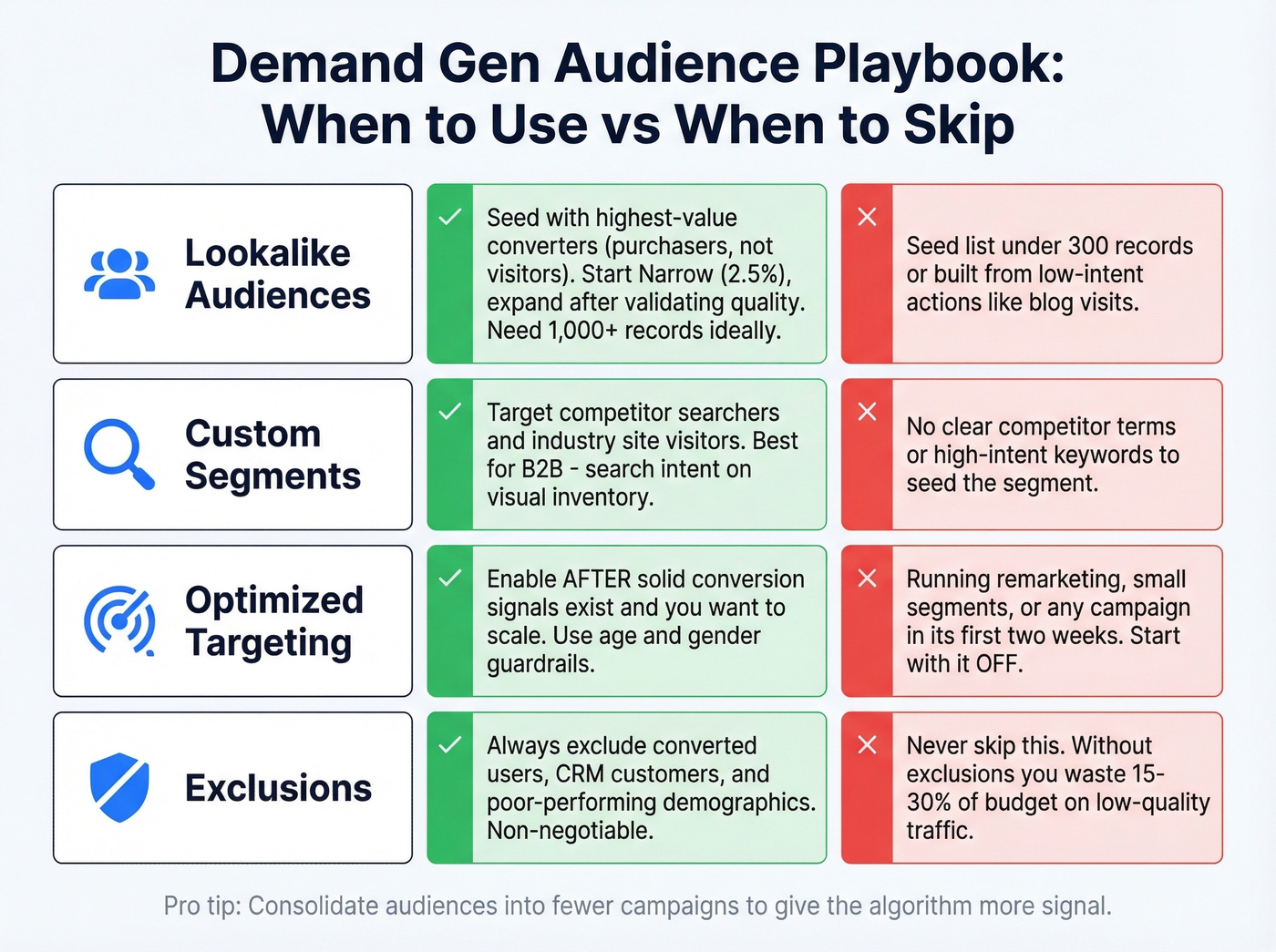
Lookalike audiences - Demand Gen is the only Google campaign type that still supports them post-similar-audiences sunset. Seed them with your highest-quality converters (purchasers, not just page visitors). Google offers three expansion tiers: Narrow (2.5%), Balanced (5%, the default), and Broad (10%). Start with Narrow for high-value seed lists and expand only after validating conversion quality. If your purchase list is under 1,000 records, supplement with signups or qualified leads - a 500-person purchaser list often outperforms a 10,000-person newsletter list, but you need enough volume for the model to find patterns. Skip when: Your seed list is under 300 records or built from low-intent actions like blog visits.
Custom segments - These bring search intent into visual placements. Target users based on what they've searched for or websites they've visited. For B2B, this is powerful: target people who've searched for your competitors or visited industry review sites, then hit them with a video ad on YouTube. It's the closest thing to Search targeting on visual inventory. Skip when: You don't have a clear list of competitor terms or high-intent keywords to seed.
Optimized targeting - Start with it OFF. When you're running tight segments like remarketing, cart abandoners, or specific demographics, optimized targeting blows out your audience and wastes budget on low-intent users. Google added age and gender guardrails, which helps, but the default behavior is still too aggressive for early campaigns. Enable it only after you've accumulated solid conversion signals and want to scale. Skip when: You're running remarketing, small audience segments, or any campaign in its first two weeks.
Exclusions - This is where most campaigns leak money. Without proper exclusions, Demand Gen can waste 15-30% of budget on low-quality traffic. Exclude converted users, existing customers already in your CRM, and demographic segments performing far below average. For B2B, exclude broad consumer affinity segments that have no business being in your funnel.
A common debate in r/PPC is whether to split campaigns by audience type or consolidate. Consolidation generally wins because it gives the algorithm more signal to work with. Observe for two weeks before expanding aggressively.
Budget and Bidding Math
Every guide tells you to "test with a small budget." That's bad advice. Either commit $100/day for six weeks or don't bother. A $20/day "test" targeting the entire US teaches you nothing - the algorithm never exits learning phase, and you draw conclusions from noise.
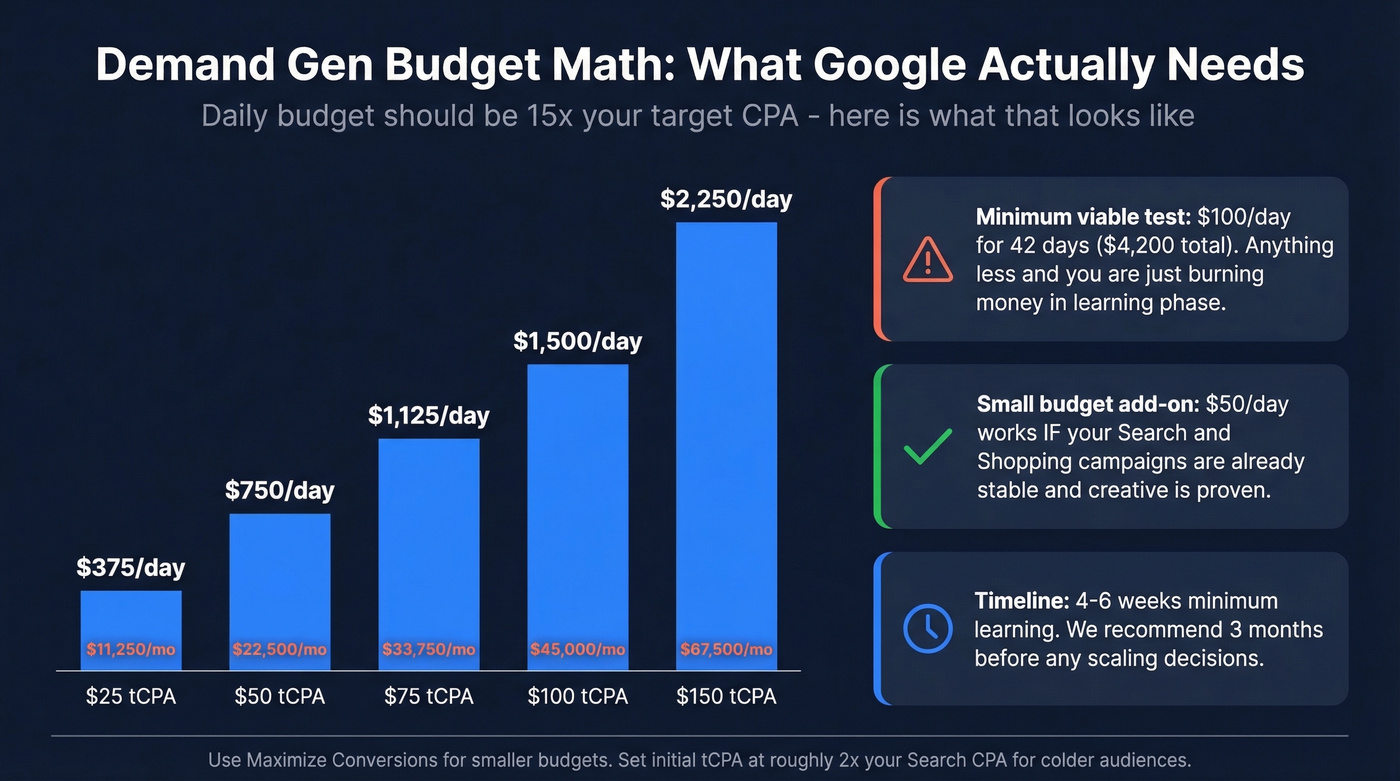
Google cites 15x your target CPA as the daily budget threshold. Let's do the math:
| Scenario | Formula | Example |
|---|---|---|
| tCPA-based | 15x target CPA daily | $50 tCPA -> $750/day |
| tROAS-based | 20x (avg conv value / tROAS) | $100 value, 400% tROAS -> $500/day |
| Small-budget add-on | ~$50/day minimum | When core channels are stable |
| Minimum test commitment | $100/day x 42 days | ~$4,200 before meaningful data |
That $50 tCPA example translates to $22,500/month. For a lot of teams, that's the entire paid social budget. Google doesn't mention this in the shiny product pages, but it's the reality of what the algorithm needs to learn.
For smaller budgets, ~$50/day can work as an add-on channel - but only when your core campaigns (Search, Shopping) are already stable and your creative is proven. Don't use Demand Gen as your testing ground for new messaging.
On bidding: use Maximize Conversions for smaller budgets. Max Clicks sounds tempting for early data, but it optimizes for cheap, low-intent traffic that teaches the algorithm the wrong lessons. Set a target CPA roughly 2x your standard Search campaign performance as a starting point - you're reaching colder audiences, so expect higher initial costs. Aim for 30-50 conversions per month per campaign to give Smart Bidding enough signal to stabilize.
Google recommends 4-6 weeks as a minimum learning period to account for conversion delays. We recommend three months before making any scaling decisions. The audiences are colder, conversion paths are longer, and the algorithm needs time to find the right users across YouTube, Discover, Display, and Gmail.

Your lookalike audiences are only as strong as the seed data behind them. Prospeo gives you 300M+ verified profiles with 98% email accuracy - so you can build high-quality customer match lists that actually train the algorithm right.
Stop feeding Google stale data. Seed your Demand Gen campaigns with contacts that convert.
Creative That Converts
Creative isn't just presentation anymore - it's your primary targeting signal. The algorithm uses your assets to understand what you sell and who wants it. "Excellent" Ad Strength isn't a vanity metric; Cropp's 50% ROAS uplift came directly from hitting Excellent ad strength combined with recommended audiences.
Mix video and image assets. Use 9:16 vertical video for Shorts placement - it's where reach is cheapest. Google's auto-video enhancements can generate shorter clips and adapt aspect ratios, but starting with native vertical creative still outperforms auto-cropped landscape footage.
For ecommerce, product feeds are non-negotiable. You need Merchant Center approval (allow up to 3 days), at least 4 eligible products (50+ performs meaningfully better), square 1:1 images for maximum coverage, and a 1:1 logo at 1200x1200 px. Add at least four sitelinks.
| Format | Headline | Description | Business Name | Key Spec |
|---|---|---|---|---|
| Single image | 40 chars | 90 chars | 25 chars | 1.91:1, 4:5, 1:1 |
| Video | 40 chars | 90 chars | 25 chars | 9:16 for Shorts |
| Carousel | 40 chars | 90 chars | 25 chars | 2-10 cards |
| Product feed | - | - | - | 50+ products, 1:1 images |
Measurement: Skip the Vanity Metrics
Here's a story that changed how we think about measurement. A practitioner ran a geo-lift test: $100/day spend, and Google Ads reported just 2 conversions. Looks terrible, right? But when they compared the test market to the control, actual sales went from 7.1/day to 11/day - an uplift of roughly 4 incremental sales per day. The blended cost per order? $25-$33. That's excellent for a top-of-funnel channel.
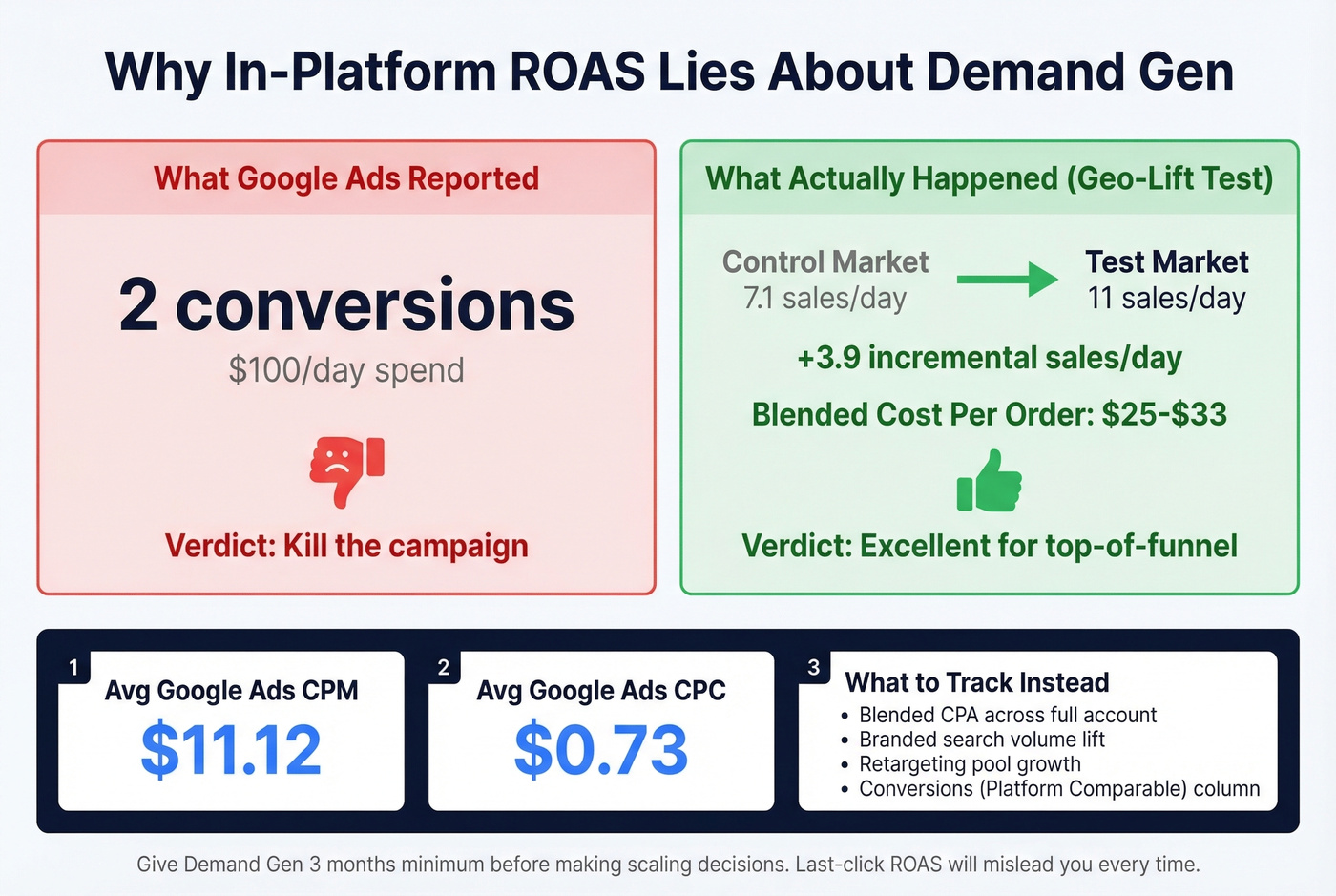
This is why in-platform ROAS is a vanity metric for demand generation. The campaign influences purchases that show up in organic, direct, and branded search - none of which get attributed back to the Demand Gen click or view. If you're judging by last-click ROAS, you'll kill it every time.
For context, average Google Ads benchmarks sit around $11.12 CPM and $0.73 CPC across all campaign types. Demand Gen's in-platform numbers will look different from Search because you're reaching colder audiences at the top of the funnel - comparing the two directly is an apples-to-oranges mistake.
Use the "Conversions (Platform Comparable)" column in your reporting. It includes view-through conversions and gives a more honest picture without affecting your bidding strategy.
The metric that actually matters is blended CPA across your entire account. Did overall cost per acquisition improve when the campaign was running? Did branded search volume increase? Did your retargeting pools grow? These are the signals that tell the real story. Give it three months minimum before making scaling decisions.
Demand Gen vs Performance Max
These aren't competitors - they're complements. The decision framework is straightforward:
| Factor | Demand Gen | Performance Max |
|---|---|---|
| Funnel stage | Upper/mid | Mid/lower |
| Creative control | High | Low |
| Audience control | High (lookalikes, custom) | Limited (signals only) |
| Best for | Awareness, engagement | Conversion capture |
| Feed strategy | Visual surfaces | Shopping-focused |
The recommended layering order: Search/Shopping first, then PMax, then Meta if applicable, then Demand Gen. Each layer captures demand at a different temperature. A feed-only PMax tactic keeps Performance Max focused on Shopping while Demand Gen handles the visual surfaces - reducing overlap and giving you cleaner attribution. Threads in r/PPC frequently complain about PMax "junk traffic" from Display/YouTube; Demand Gen with proper channel controls gives you the visual reach with more control over where you show.
Look, here's our hot take: most teams add Demand Gen too early. If your Search campaigns aren't profitable yet, Demand Gen won't save you - it'll just burn money faster on prettier placements. Get Search and Shopping humming first. Demand Gen is an accelerant, not a foundation.
Common Mistakes and Fixes
Judging by in-platform ROAS - Use blended CPA and geo-lift tests. Demand Gen influences conversions it doesn't get credit for.
Running tiny budgets ($10-20/day) - Commit $100/day minimum for 6 weeks. Anything less starves the algorithm.
Skipping exclusions - Exclude converted users, existing customers, and underperforming demographics. This alone can recover 15-30% of wasted spend.
Leaving optimized targeting on for tight segments - Turn it off for remarketing and specific demographic targeting. Enable only after you have conversion data.
We watched one team kill a campaign after 11 days because it "only" had 3 conversions. They relaunched with the same setup three months later, let it run for eight weeks, and it became their second-best channel by blended CPA. Patience isn't optional here.
Not verifying lead data (B2B) - Demand Gen generates upper-funnel leads, and if 35% have bad contact info, your SDR team wastes a week calling dead numbers. Run every lead through Prospeo before your sales team touches it - 98% email accuracy and a 30% mobile pickup rate on a 7-day data refresh cycle. The cost of one bad-data week dwarfs the cost of a verification tool.
Excluding converted users and existing customers is a top demand gen best practice - but you can't exclude what you can't match. Prospeo enriches your CRM with 50+ data points per contact at a 92% match rate, so your exclusion lists are airtight and your budget stops leaking.
Plug the 15-30% budget leak. Enrich your CRM for $0.01 per email.
What Results Actually Look Like
Most case studies cherry-pick metrics. Here are three with enough context to be useful.
| Brand | Metric | Result | Context |
|---|---|---|---|
| Cropp | ROAS | +50% | Excellent ad strength + recommended audiences |
| Zen9 | Conversions | +1,750% | H2 2024 vs H2 2023, CPC down 75% |
| Canadian retailer | Revenue | +685% | VAC to Demand Gen migration, 6 weeks |
Cropp's result validates the creative-first approach - hitting Excellent ad strength was the primary lever. Zen9's numbers are dramatic: +1,750% conversions with only 8% more spend, driven by a 75% CPC reduction as the algorithm matured over six months. The Canadian fashion retailer saw +477% sessions, +750% purchases, and +685% revenue within six weeks of migrating from Video Action Campaigns - a strong signal that the algorithm genuinely outperforms its predecessor.
The pattern across all three: adequate budget, strong creative, proper audience setup, and patience measured in months, not days. These demand gen best practices aren't theoretical - they're the common thread in every success story worth studying.
FAQ
What's the minimum budget for Demand Gen campaigns?
Google recommends 15x your target CPA as a daily budget. For a $50 tCPA, that's $750/day or roughly $22,500/month. Commit at least $100/day for six weeks to generate meaningful data - anything less keeps the algorithm stuck in learning phase.
How long before campaigns show results?
Expect 4-6 weeks minimum before the algorithm stabilizes, but plan for three months before making scaling decisions. You need 30-50 conversions per month per campaign for Smart Bidding to optimize effectively on colder, upper-funnel audiences.
Can Demand Gen work for B2B lead generation?
Yes - custom segments bring search intent to visual placements, and lookalike audiences built from CRM data target decision-makers effectively. Verify lead contact data before handing to sales so SDRs only call numbers that ring.
How do I measure Demand Gen without last-click ROAS?
Track blended CPA across your entire account, branded search volume lift, and retargeting pool growth. Run geo-lift tests to isolate incremental impact - one practitioner found 4 incremental sales/day that in-platform reporting missed entirely, yielding a $25-$33 blended cost per order.