

Disposable Email: What It Is & When to Use It in 2026
Most "best disposable email" articles list 10+ services and call it a day. That's useless. There are only three worth using, and honestly, you probably shouldn't be using a disposable email at all. Email aliases do the same job without the ticking time bomb of an expiring inbox - but if you need a throwaway address right now, we'll make sure you pick the right one.
What Is a Disposable Email Address?
Disposable email address - also called temp mail, burner email, or throwaway email - is exactly what it sounds like. You get a temporary address, use it for whatever you need, check the inbox for a confirmation link, and walk away. The address self-destructs after a set window, often 10 minutes to 24 hours.
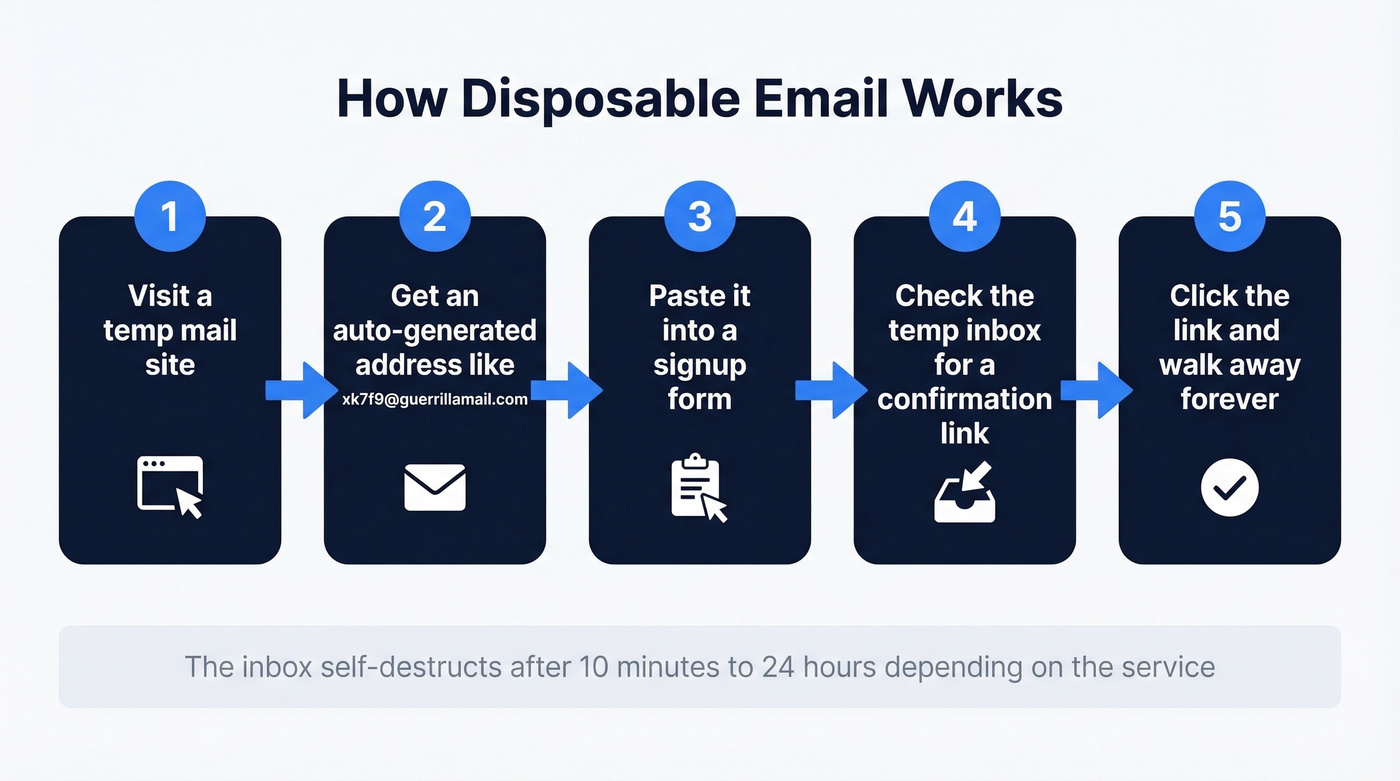
The flow is dead simple. Visit a service, get an auto-generated address like xk7f9@guerrillamail.com, paste it into a sign-up form, wait for the confirmation email to land, click the link, and forget the address ever existed. No registration, no password, no connection to your real inbox.
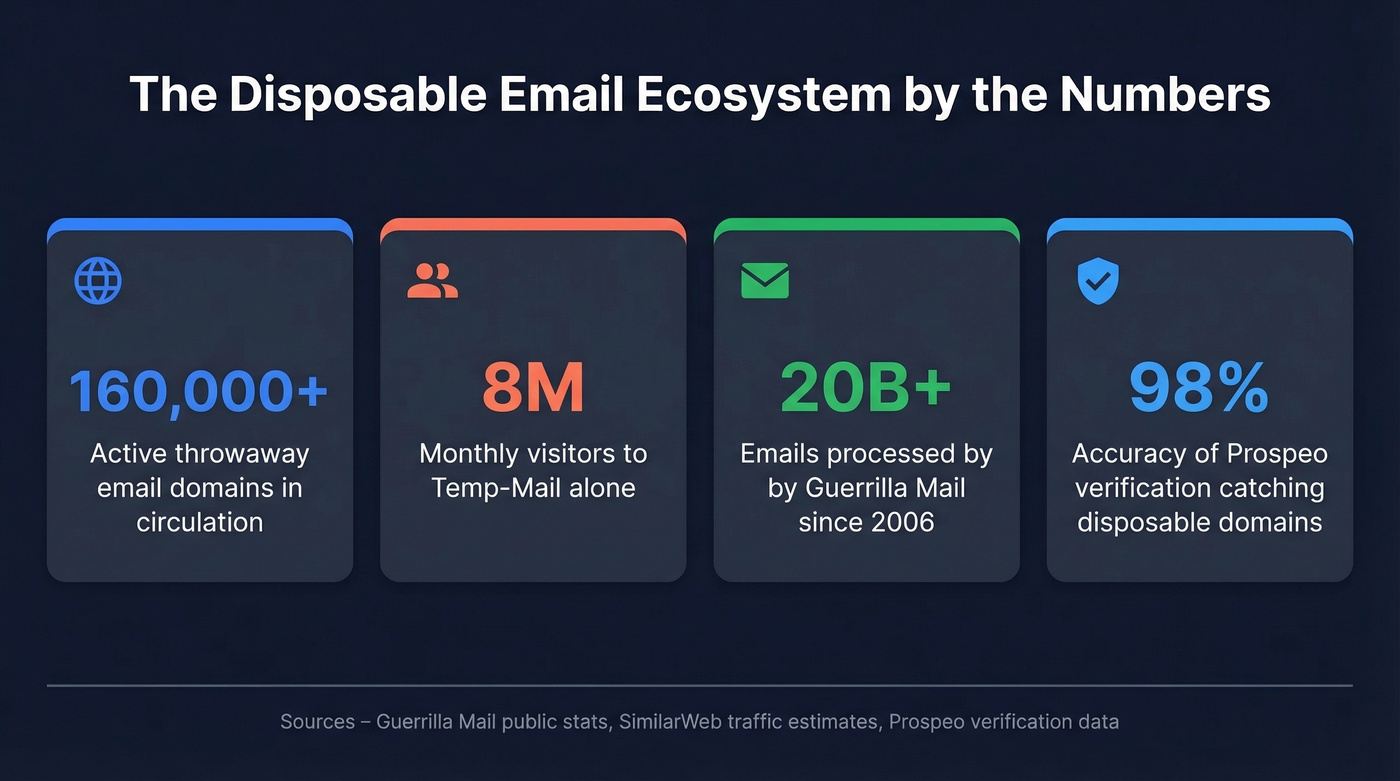
The ecosystem is bigger than most people realize. There are 160,000+ active throwaway email domains in circulation, and the largest service - Temp-Mail - pulls roughly 8 million monthly visitors on its own. Guerrilla Mail handles another 5 million. These aren't niche tools. They're a parallel email infrastructure used by millions of people every day, mostly to avoid handing their real address to services they don't trust.
Here's the honest framing, borrowed from security writer Ask Leo: temp mail provides minimal security, some privacy, and strong spam management. Most services offer no encryption, many inboxes are publicly accessible or guessable, and the websites you sign up for can still track your IP and browser fingerprint. It's a spam shield, not a privacy tool. That distinction matters.
Quick Picks
Need a throwaway inbox right now? Guerrilla Mail. It's one of the only major services that lets you send and receive, it gives you a 60-minute window, and it has a free API.
Want ongoing email privacy without expiring inboxes? Apple Hide My Email ($0.99/mo with iCloud+) or SimpleLogin ($30/yr). Both create permanent aliases that forward to your real inbox. You control when to shut them off.
Running a business and need to keep throwaway addresses off your lists? Prospeo's email verification catches disposable domains, spam traps, and invalid addresses before they tank your sender reputation - 98% accuracy across 143M+ verified emails, with a free tier to test it.
Disposable vs. Aliases vs. Forwarding
People use "disposable email" as a catch-all for anything that isn't their real address. But there are four distinct approaches, and they work very differently.
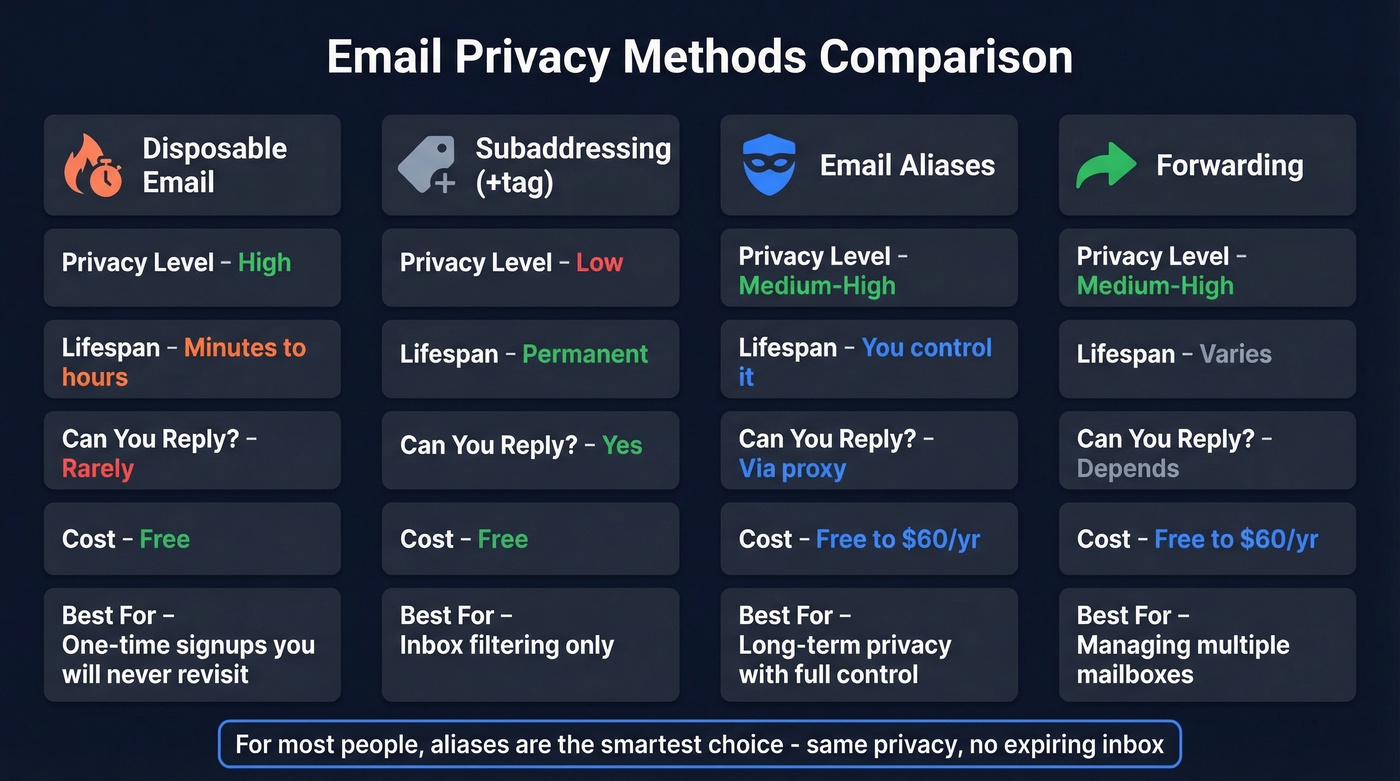
| Disposable | Subaddressing | Aliases | Forwarding | |
|---|---|---|---|---|
| Privacy | High | Low | Medium-High | Medium-High |
| Lifespan | Minutes to hours | Permanent | You control | Varies |
| Can Reply? | Rarely | Yes | Via proxy | Depends |
| Cost | Free | Free | Free-$60/yr | Free-$60/yr |
| Best For | One-time signups | Inbox filtering | Long-term privacy | Multiple mailboxes |
Subaddressing is the you+newsletter@gmail.com trick. It routes to your main inbox and lets you filter, but it's barely privacy - anyone can strip the +tag and see your real address. Some sites also reject the + character entirely.
Aliases are separate addresses that deliver to your real inbox. SimpleLogin, Firefox Relay, and Apple Hide My Email all work this way. The catch: if you reply from your real address instead of through the alias, the recipient sees who you actually are. Most alias services handle this with reply proxying now, but test it before you rely on it.
Forwarding services work like aliases but typically run through a third-party provider. Services like AnonAddy let you forward to multiple mailboxes simultaneously, which standard aliases don't always support.
In practice, aliases beat throwaway inboxes for anything beyond a single one-time signup. Temp mail only wins when you genuinely never need to access that inbox again.
When to Use Temp Mail
Throwaway email has a narrow but legitimate set of use cases:
- One-time sign-ups where you need access once and never again - downloading a PDF, accessing a one-time tool
- Free trial access when you want to evaluate software without committing your real address
- Gated content downloads - whitepapers, reports, webinar recordings behind email walls
- Testing forms during development or QA
- Avoiding newsletter spam from sites you don't trust to honor unsubscribe requests
The developer use case deserves special mention. QA teams and CI/CD pipelines need programmatic account creation, and temp mail APIs make that possible without burning real addresses. If you're running automated tests that trigger email confirmations, a throwaway email API is the cleanest solution.
The common thread: you don't need the inbox after the immediate task is done. The moment you need password recovery, two-factor codes, or receipts, a temporary address becomes a liability.
When NOT to Use It
This is where people get burned.
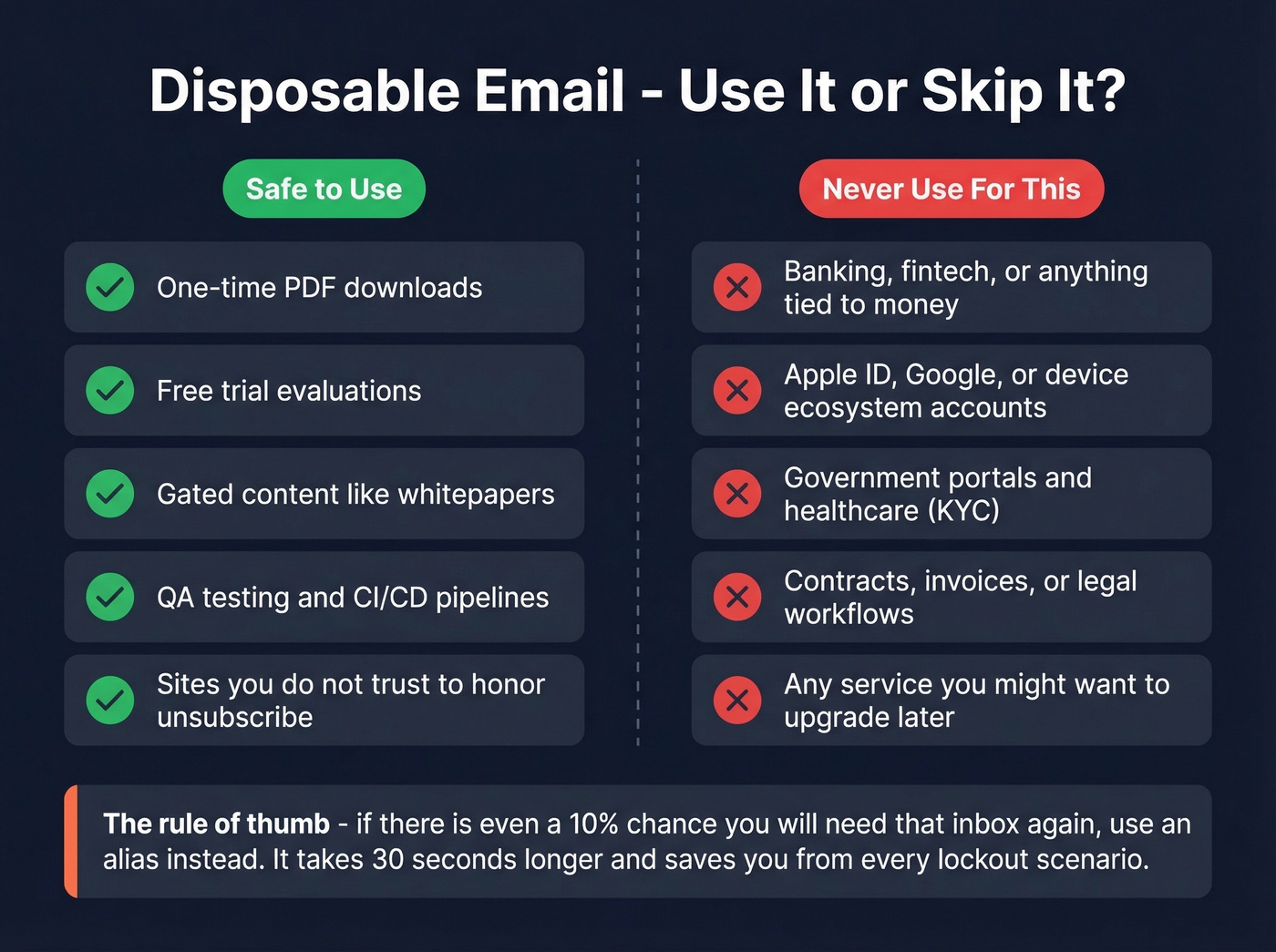
Never use a throwaway address for banking, fintech, or any account tied to your money. Your bank sends security alerts, transaction confirmations, and password resets to that address. When the inbox expires, you've locked yourself out.
The same goes for Apple ID, Google accounts, or any device ecosystem. These accounts accumulate years of purchases, photos, and data. Tying them to a temporary address is asking for a catastrophic lockout. KYC and regulated services - insurance, government portals, healthcare - also require persistent email, and using a burner address raises compliance red flags.
For business procurement and legal workflows, the answer is equally clear: contracts, invoices, and vendor communications need an audit trail. A temporary inbox provides zero ownership and zero auditability.
Here's a scenario that plays out constantly: you sign up for a free trial with a burner address. The tool works great. You want to upgrade. But the service requires email verification to process payment - and your inbox expired three hours ago. Now you're creating a new account, losing your trial data, and starting over. We've seen this happen to teammates more than once.
If your use case has even a 10% chance of needing that inbox again, skip temp mail entirely. An alias takes 30 seconds longer to set up and saves you from every one of these failure modes.
Best Services Worth Using
Let's cut through the noise.
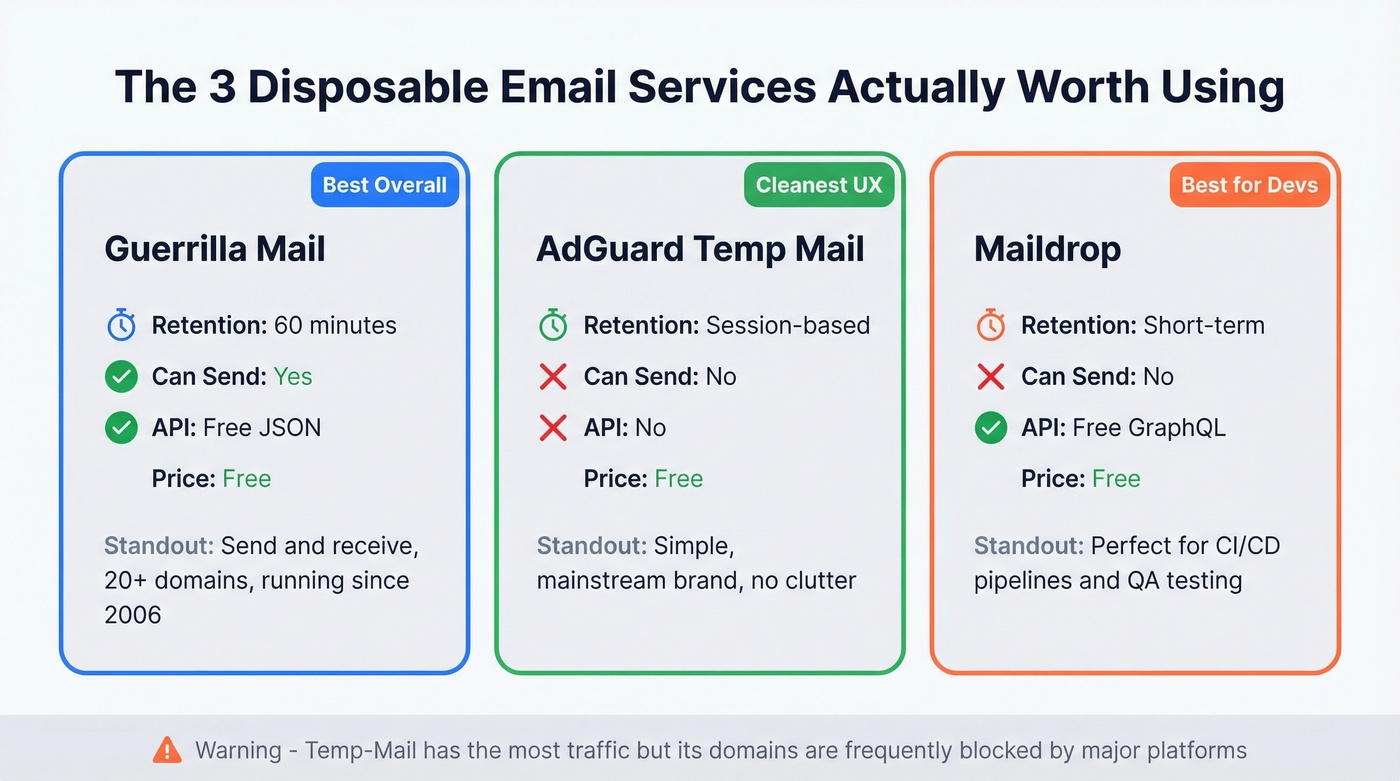
| Service | Retention | Send? | API | Price |
|---|---|---|---|---|
| Guerrilla Mail | 60 min | Yes | JSON (free) | Free |
| AdGuard Temp Mail | Session-based | No | No | Free |
| Maildrop | Short-term | No | GraphQL | Free |
| Temp-Mail | ~24 hours | No | Yes (paid) | Free+ |
| 1SecMail | Short-term | No | REST | Free |
| 10 Minute Mail | 10 min (to 100 min) | No | No | Free |
| Mailinator | Short-term | No | Yes (paid) | Free+ |
Guerrilla Mail
Skip this if you need more than 60 minutes of inbox access. For everything else, Guerrilla Mail is the best throwaway email service available.
It's one of the only major options that lets you send messages - not just receive them. That alone puts it in a different category. The service has been running since 2006, has processed over 20 billion emails, and offers 20+ alternative domains, a free JSON API, and custom domain support for $9.99/year. In our testing, the 60-minute window was tight but workable for most sign-up flows - you just can't dawdle. The "scramble address" feature generates a random address instantly, which saves time when you're moving fast.
AdGuard Temp Mail
If you want a clean, receive-only inbox with a mainstream brand behind it, AdGuard Temp Mail is a strong pick. It's free, instantly generates a random address, and it's intentionally simple.
Tradeoffs: no API, no custom domains, no send capability, and no attachments. If you change your address, the previous inbox is deleted.
Maildrop
A word of warning: don't treat Maildrop as private. Addresses are easy to make up on demand, which also means they're easy to guess. That's a dealbreaker for anything sensitive.
For developers, though, Maildrop is excellent. No signup, no interface clutter - just an address and a GraphQL API. It's a go-to for teams that need programmatic inbox access without paying for it. Use it for CI/CD pipelines and QA, not for signing up for services you care about.
Temp-Mail
Temp-Mail is the biggest service by traffic at roughly 8 million monthly visitors. It offers mobile apps, a paid API, and premium plans with extended storage and custom domains. Inboxes last about 24 hours.
The problem: Temp-Mail's domains are so widely used that they're frequently blocked by major platforms. This isn't rare - it's a recurring complaint in r/privacy and SaaS-related Reddit threads. The most popular service is paradoxically one of the least reliable for actually signing up for things.
1SecMail
A clean, no-frills service with a REST API, multiple domains, no ads, and no signup. Solid developer-friendly option when you want automation without dealing with a heavy UI.
Quick Mentions
10 Minute Mail does exactly what the name says - 10 minutes, extendable to 100 minutes with repeated clicks. The simplest possible option for a truly one-time task.
Mailinator runs a public inbox model with 100+ alternative domains. The free tier has zero privacy, but paid plans run $50-$159/month and add private inboxes, team features, and an API for serious testing.
YOPmail keeps messages for 8 days across 20+ domains. No API.
TemporaryMail.com locks inboxes to your browser session - no one else can access your messages - and keeps emails for 7 days.

If disposable emails are sneaking onto your prospect lists, your bounce rates are climbing and your domain reputation is paying the price. Prospeo's 5-step verification catches throwaway domains, spam traps, and honeypots across 143M+ verified emails - at 98% accuracy.
Stop letting burner addresses wreck your deliverability.
Developer-Focused Tools
If you're building software that sends email confirmations, you need a way to test those flows without burning real addresses. Here's what actually works.
| Tool | API Type | Best For | Limitation |
|---|---|---|---|
| Maildrop | GraphQL | Free automated testing | Guessable addresses |
| 1SecMail | REST | Automated testing | Receive-only |
| Guerrilla Mail | JSON | Send + receive testing | 60-min window |
| Mailinator (paid) | API | Enterprise-scale QA | $50-$159/mo |
Skip 10 Minute Mail and YOPmail entirely - no API access means no automation. They're consumer tools.
The recurring pain point on Reddit is that popular temp-mail domains get blocked constantly, and developers specifically look for services with API access so they can create accounts programmatically. Stick with the tools above and you'll avoid scraping inbox pages or building brittle workarounds.
Why Sites Block Throwaway Addresses
There are 160,000+ active temporary email domains, and that number grows constantly. Many major services operate 50-100+ domains, rotating new ones in as old ones get blocklisted. It's an arms race, and the platforms are winning.
Major services maintain blocklists of known throwaway domains. When you try to sign up with anything@guerrillamail.com, the form rejects it before you even hit submit. The bigger and more popular the service, the faster its domains get flagged.
Services counter by spinning up new domains, and detection vendors increasingly use DNS and MX record checks - not just static lists - to identify temporary email infrastructure.
For consumers, this means burner addresses are becoming less reliable for their primary use case. For businesses trying to keep throwaway addresses out of their contact lists, the solution is email verification at the point of collection.
Better Alternatives for Privacy
If you want email privacy without the expiration headache, alias services are the answer.
Apple Hide My Email
If you're in the Apple ecosystem, this is the easiest option. Hide My Email generates random addresses that forward to your iCloud inbox. You can create unlimited addresses, manage them across all your Apple devices, and disable any address instantly. It requires iCloud+ at $0.99/mo - effectively free for anyone already paying for iCloud storage.
SimpleLogin
SimpleLogin is the power-user pick. At $30/yr, you get custom aliases, random aliases, on-the-fly alias creation, PGP encryption, forwarding to multiple mailboxes, and 2FA with YubiKey support. It's the most feature-rich alias service available, and it's owned by Proton (the company behind ProtonMail), which adds credibility on the privacy front.
DuckDuckGo Email Protection
Free, strips trackers from incoming emails, and generates @duck.com forwarding addresses. It does one thing well and charges nothing for it.
Firefox Relay
Free tier available, with paid plans around $1/month for higher limits. If you use Firefox, the integration is convenient - it suggests creating an alias when you hit an email field on a signup form.
| Service | Price | Key Feature |
|---|---|---|
| DuckDuckGo Email Protection | Free | Tracker removal |
| Firefox Relay | Free / ~$1/mo | Browser integration |
| Apple Hide My Email | $0.99/mo | Apple ecosystem |
| SimpleLogin | $30/yr | Custom aliases, PGP |
| IronVest | $39/yr | Masked emails suite |
| StartMail | $59.95/yr | Full encrypted email |
IronVest ($39/yr) earned PCMag's Editors' Choice. StartMail ($59.95/yr) is a full encrypted email service with masking built in - overkill for most people, but solid if you want everything in one place.
How Throwaway Addresses Wreck Your Email Lists
This section is for the other side of the equation: businesses whose contact lists are filling up with temporary addresses.
Here's the scenario. Your marketing team sends 10,000 emails. 400 bounce. Half of those bounces are disposable email addresses that were technically valid when the person signed up - but the inbox expired within hours. Your bounce rate just hit 4%, well past the 2% healthy threshold and the 3% warning line, approaching the 5% point where ESPs start throttling your sending.
The damage compounds. High bounce rates hurt your sender reputation. A damaged sender reputation means more of your legitimate emails land in spam. And if recycled temporary domains get repurposed as spam traps, you're now hitting honeypots - that can get your domain blacklisted entirely.
The fix is verification at the point of entry. Prospeo's email verification runs a 5-step process that catches disposable domains, spam traps, catch-all addresses, and invalid mailboxes before they ever reach your CRM. At 98% accuracy across 143M+ verified emails, with a 7-day data refresh cycle, it catches the addresses that would otherwise silently destroy your deliverability.
If you want to go deeper on bounce thresholds and what ESPs actually penalize, see our guide to bounce rate benchmarks and fixes.
There are 160,000+ disposable email domains in circulation. Every one that lands on your outbound list is a wasted credit and a hit to your sender score. Prospeo flags disposable addresses automatically, refreshes data every 7 days, and costs roughly $0.01 per verified email.
Keep throwaway addresses off your lists before you hit send.
Common Mistakes to Avoid
Using it for important accounts. You lose access to password resets, 2FA codes, and security alerts the moment that inbox expires. If there's any chance you'll need the account again, use an alias instead.
Forgetting expiration windows. Guerrilla Mail gives you 60 minutes. 10 Minute Mail gives you 10. Know your window before you start a signup flow, because nothing's more frustrating than watching a confirmation email arrive to a dead inbox.
Assuming full anonymity. A temporary address hides your real email from the service you're signing up for. It doesn't hide your IP address, browser fingerprint, or browsing behavior. The website still knows plenty about you.
Reusing the same temp address across multiple sites. This creates a cross-site tracking vector - exactly the thing you were trying to avoid. Generate a fresh address for every signup.
Expecting long-term storage. If an email contains something you need - a download link, a license key, a receipt - forward it to your real inbox immediately. Don't assume it'll be there tomorrow.
Ignoring provider security risks. Some services run aggressive ads, log your activity, or operate inboxes that anyone can guess. Stick with established providers like Guerrilla Mail or AdGuard that have reputations to protect.
Disposable Email FAQ
What is a disposable email?
A disposable email is a temporary, self-destructing address you use for one-time tasks like sign-ups or gated content downloads. The inbox typically lasts 10 minutes to 24 hours and expires automatically. No registration or password required, and there's no link to your real inbox.
Is it legal to use temp mail?
Yes, using temporary email is legal in most jurisdictions - it's a privacy tool, not an inherently illegal one. That said, using it to bypass terms of service, commit fraud, or evade KYC requirements can violate specific laws or platform policies. Legality depends on what you do with it, not the tool itself.
Can websites detect throwaway addresses?
Yes. Verification services maintain blocklists of 160,000+ known temporary domains and use DNS/MX record checks to identify new ones. Many platforms reject matches during sign-up instantly. The more popular the service, the more likely its domains are already blocked.
What's the difference between disposable email and aliases?
A temporary inbox expires automatically and deletes all messages. An email alias forwards messages to your real inbox permanently - you control when to deactivate it and never lose access. For anything beyond a single throwaway task, aliases are the better choice.
How do businesses filter out temporary addresses?
Email verification tools flag throwaway domains, spam traps, and invalid addresses in real time at the point of collection. Prospeo's 5-step verification process catches these at 98% accuracy, keeping bounce rates under control and protecting sender reputation.