

DNSBL: Complete Guide to DNS Blocklists, Impact Tiers, and Delisting
You just discovered your domain's on a blocklist. Open rates cratered overnight, support tickets are piling up, and you're staring at an MxToolbox results page full of red Xs wondering which ones actually matter. Here's the thing: most of them don't. But the ones that do can shut down your outbound pipeline entirely.
We've helped dozens of teams work through this exact panic. The pattern is always the same - frantic Googling, shotgun delisting requests, then relisting a week later because nobody fixed the root cause. This guide covers how a DNSBL actually works under the hood, which lists deserve your attention, and exactly how to get delisted and stay delisted.
What Is a DNSBL?
A DNSBL - DNS-based blocklist, sometimes called a DNS blackhole list - is a database published as a DNS zone that mail servers query in real time to decide whether to accept, flag, or reject incoming email. If the sender's IP address or domain appears in the list, the receiving server can block the message before it ever hits the inbox.
The concept dates back to 1997, when Paul Vixie created the first real-time blackhole list (RBL) to combat spam at the network level. The idea was elegant: instead of every mail admin maintaining their own block list, publish one centrally and let DNS do the distribution. Nearly three decades later, DNS blocklists remain a foundational layer of email filtering - even as authentication protocols like SPF, DKIM, and DMARC have added new defenses on top.
Today, dozens of these lists exist. Some are operated by well-funded security organizations with transparent criteria. Others are run by individuals with opaque listing policies - and as Mailgun has noted, some are outright fraudulent. Understanding which lists matter, how queries work, and how to get delisted is essential knowledge for anyone running outbound email at scale.
Already Listed? Start Here
If you're here because you're listed right now, here's the short version.
Three lists that actually matter: Spamhaus ZEN (which combines SBL, XBL, and PBL), Barracuda BRBL, and SpamCop. A listing on any of these can materially impact deliverability across enterprise filters and major mailbox providers. Everything else is secondary.
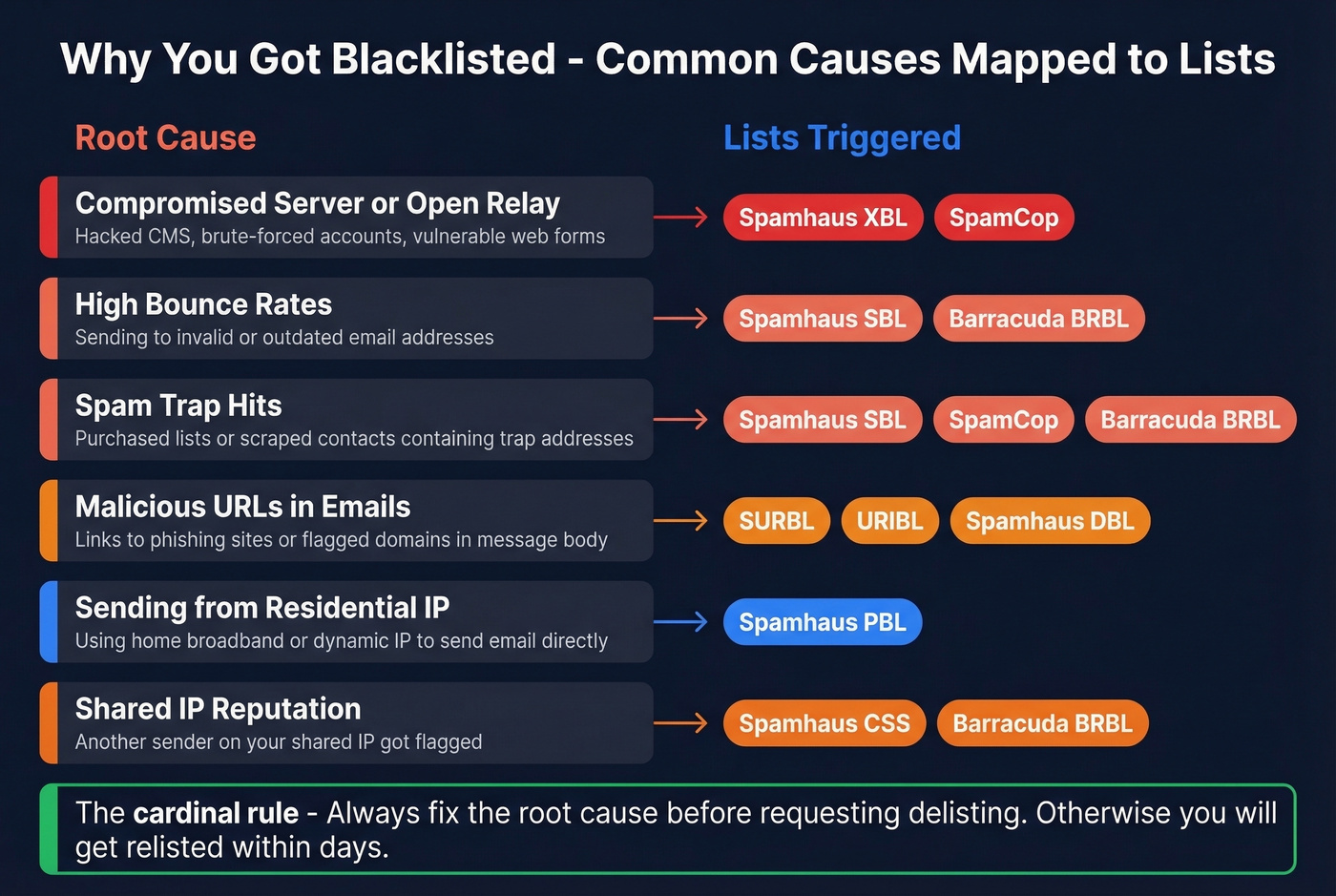
The cardinal rule: fix the root cause before you request delisting. If you delist without resolving the underlying issue - a compromised server, bad contact data, an open relay - you'll get relisted within days. Identify the problem, patch it, then submit your removal request. The full delisting playbook is in Section 8 below, with exact timeframes and URLs for every major list.
Quick self-check: Run your sending IP through MxToolbox for a fast scan, but verify any critical listings directly with the provider. Aggregator tools can have stale caches.
How the DNS Query Mechanics Work
The mechanics behind a blocklist query are surprisingly simple. When your mail server connects to a receiving server, that server takes your sending IP address, reverses the octets, appends the blocklist's zone name, and performs a DNS lookup. The response tells it whether you're listed.
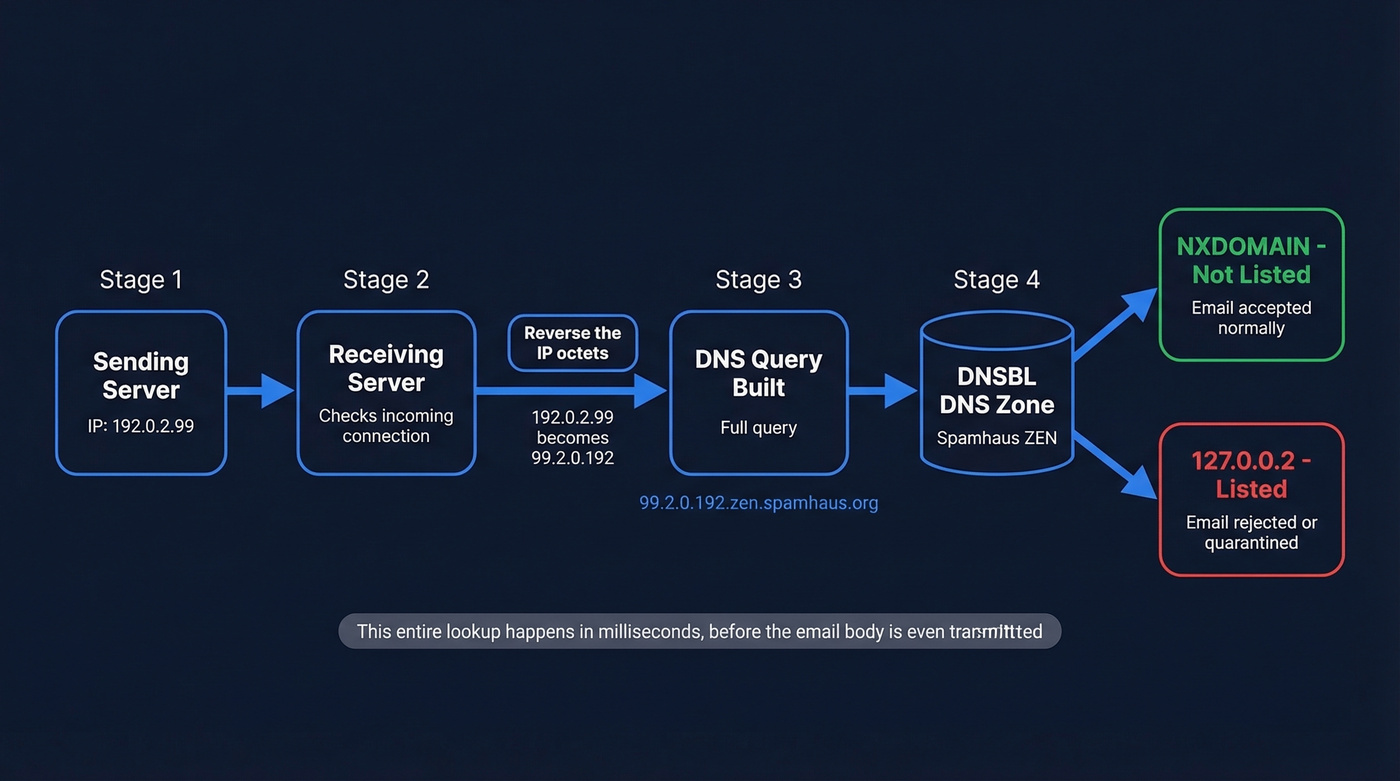
Say your sending IP is 192.0.2.99 and the receiving server checks against dnsbl.example.com. The query becomes:
99.2.0.192.dnsbl.example.com
The receiving server issues a DNS A record query for that name. Two things can happen:
- NXDOMAIN response: The IP isn't listed. No action taken.
- A record returned (typically
127.0.0.2): The IP is listed. The server can reject, quarantine, or score the message accordingly.
Per RFC 5782, every listed entry must have an A record, and should have a TXT record explaining why it's listed. The A record value isn't a real IP address - it's a return code. Different 127.0.0.x values indicate different listing categories (spam source, open relay, botnet, etc.), which lets mail servers make nuanced decisions rather than binary block/pass.
You can test this yourself with dig:
dig +short 99.2.0.192.zen.spamhaus.org
If you get 127.0.0.2 back, that IP is listed in Spamhaus ZEN. NXDOMAIN means you're clean. The TXT record query gives you the human-readable reason:
dig +short TXT 99.2.0.192.zen.spamhaus.org
On Windows, use nslookup instead:
nslookup -type=a 99.2.0.192.zen.spamhaus.org
This entire lookup happens in milliseconds during the SMTP connection - before the email body is even transmitted. That's what makes blocklists so efficient: they reject bad traffic at the door.
Types of DNS Blocklists
Not all blocklists check the same thing. The four main types operate at different stages of the email transaction and examine different identifiers.
| Type | What It Checks | Example Lists | Where It Fits |
|---|---|---|---|
| IP-based | Sender's IP address | Spamhaus SBL/XBL, Barracuda | Connection stage |
| URI DNSBL | URLs in message body | SURBL, URIBL | Content stage |
| RHSBL | Sender's domain | Spamhaus DBL | Content stage |
| Policy list | IP allocation type | Spamhaus PBL | Connection stage |
IP-based lists are the oldest and most widely deployed. They answer a simple question: has this IP been associated with spam or abuse? URI-based lists emerged later to catch messages from clean IPs that contain links to known-bad domains - a common pattern in phishing. RHSBLs (Right-Hand Side Blocklists) check the domain in the sender's address rather than the IP. Policy lists like the PBL are different entirely: they flag IP ranges that shouldn't be sending email directly, like residential broadband blocks, regardless of whether any spam has been sent.
Understanding these distinctions matters because a PBL listing isn't an accusation - it's a policy statement. We've seen teams panic over a PBL listing when the fix is simply routing mail through their ISP's relay or a proper SMTP provider.
Which Blocklists Actually Matter
Anyone can create a blocklist. Some are maintained by dedicated security teams with transparent criteria and responsive delisting processes. Others are run by a single person with a grudge and a DNS server. The practical question isn't "am I on a blocklist?" - it's "am I on one that anyone checks?"
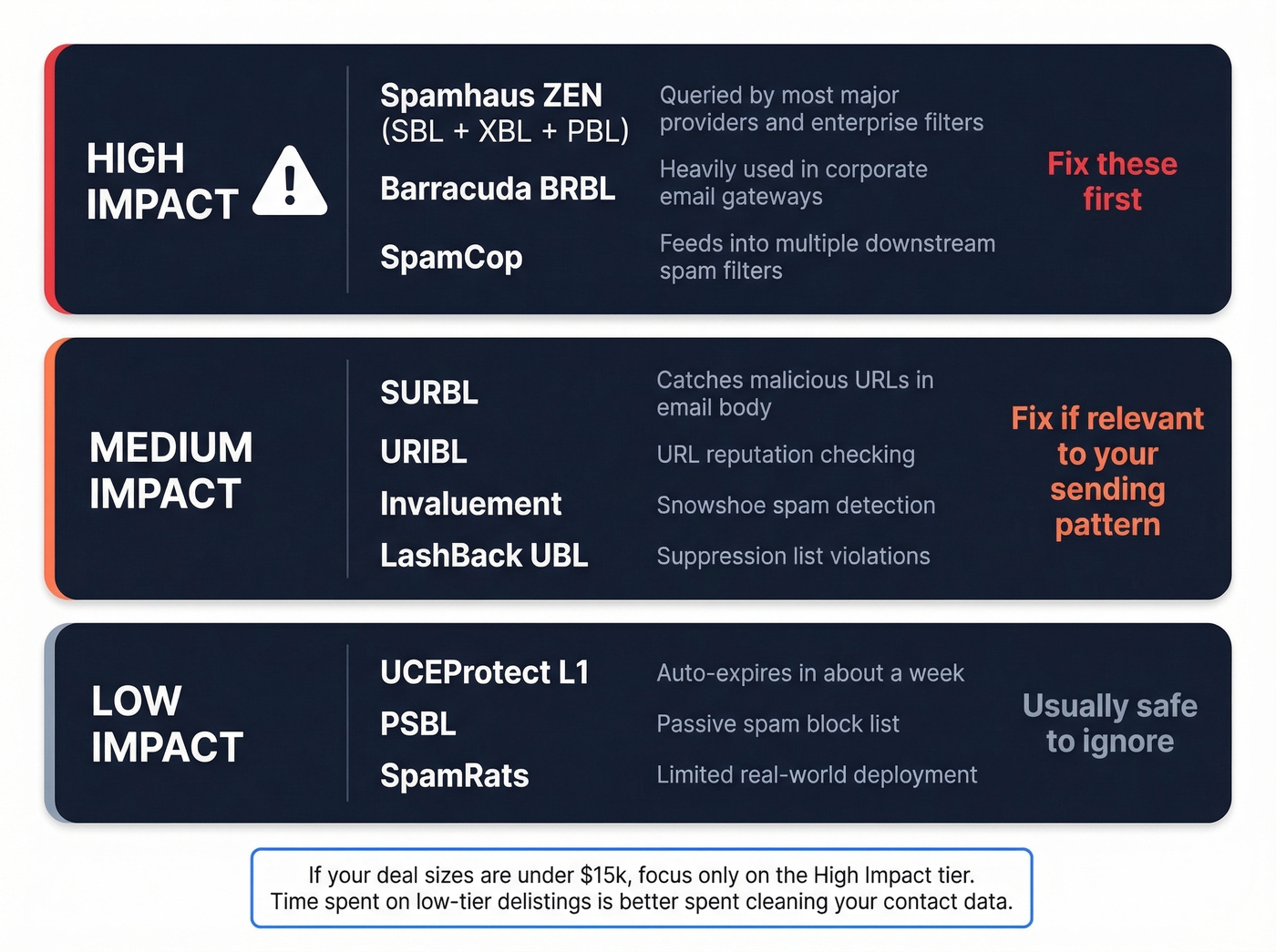
Running your IP against 100+ lists and panicking over every red flag is a waste of time. Here's the triage framework we use.
| Impact Tier | Lists | Why It Matters |
|---|---|---|
| High | Spamhaus SBL/XBL/DBL/ZEN, Barracuda BRBL, SpamCop | Widely queried by major providers and enterprise filters |
| Medium | SURBL, URIBL, Invaluement, LashBack UBL | Used by content filters and specific provider ecosystems |
| Low | UCEProtect L1, PSBL, SpamRats | Limited deployment; rarely affects major mailbox providers |
The high-impact tier is where you focus your energy. A Spamhaus ZEN listing can tank inbox placement fast across a huge number of real-world receiving environments. Barracuda BRBL is heavily used in corporate environments. SpamCop feeds into multiple downstream filters.
Medium-tier lists matter in specific contexts. SURBL and URIBL catch malicious URLs in message bodies, so they're relevant if your emails contain links to flagged domains. Invaluement is respected for catching snowshoe spam that slips past IP-based lists.
Low-tier lists? Don't lose sleep. UCEProtect L1 auto-expires in about a week, and their L2/L3 escalation tiers are widely criticized in sysadmin communities as closer to extortion than security - they list entire ASNs and netblocks based on aggregate behavior, catching enormous amounts of legitimate traffic in the process. The consensus on r/sysadmin is pretty clear: don't pay UCEProtect for express removal, and don't lose sleep over their escalation tiers.
If you're running outbound sequences with deal sizes under $15k, you probably don't need to monitor more than the high-impact tier. The time you'd spend chasing low-tier delistings is better spent cleaning your contact data.
Spamhaus Blocklist Taxonomy
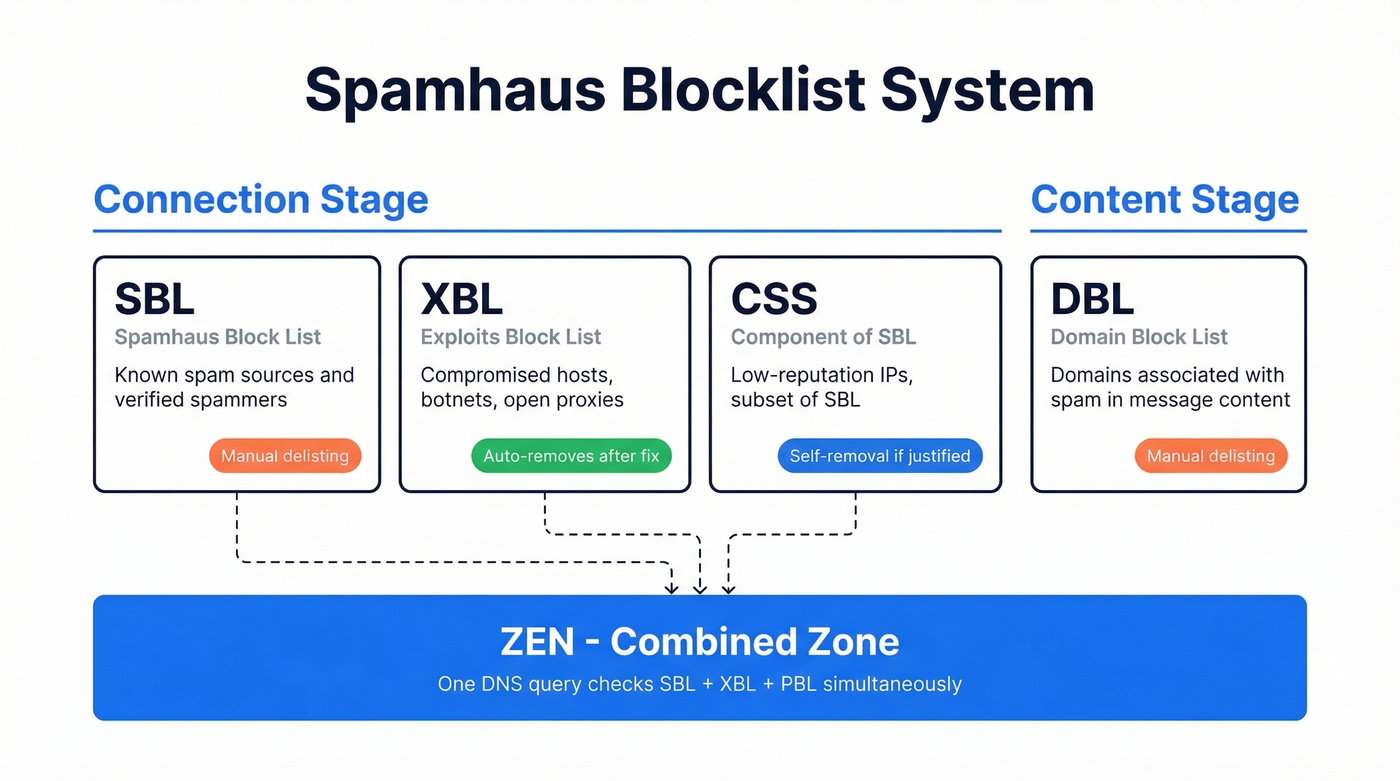
Spamhaus deserves its own breakdown because it's not one list - it's six, each serving a different purpose. Which one you're on determines your response.
| List | What It Targets | Stage | Delisting |
|---|---|---|---|
| SBL | Known spam sources | Connection | Manual request |
| XBL | Exploited hosts/botnets | Connection | Auto after fix |
| CSS | Low-rep IPs (subset of SBL) | Connection | Manual request |
| PBL | Dynamic/residential IPs | Connection | Self-removal if justified |
| DBL | Spam-associated domains | Content | Manual request |
| ZEN | Combined SBL + XBL + PBL | Connection | Depends on component |
Spamhaus recommends applying SBL, PBL, and XBL checks at the initial SMTP connection stage, and DBL at the content filtering stage. ZEN is the combined zone - one query that checks all three connection-stage lists simultaneously.

Most DNSBL listings trace back to one thing: sending to bad addresses. High bounce rates signal spam behavior to blocklist operators. Prospeo's 5-step email verification - with catch-all handling, spam-trap removal, and honeypot filtering - delivers 98% accuracy. Teams like Snyk cut bounce rates from 35% to under 5%.
Stop fixing blocklist problems. Start preventing them with verified data.
How to Check Your Listing Status
Start with an aggregator tool for a broad scan, then verify critical findings directly.
Aggregator tools like MxToolbox Blacklist Check and MultiRBL (multirbl.valli.org) query dozens of blocklists simultaneously and give you a dashboard view. They're great for a quick health check. But here's the caveat sysadmins consistently flag: these tools can have stale caches. A listing that cleared hours ago might still show as active, or a fresh listing might not appear yet.
Direct DNS queries are the ground truth. For any listing that matters - especially Spamhaus, Barracuda, or SpamCop - verify directly:
# Check Spamhaus ZEN
dig +short 99.2.0.192.zen.spamhaus.org

# Check Barracuda
dig +short 99.2.0.192.b.barracudacentral.org

# Check SpamCop
dig +short 99.2.0.192.bl.spamcop.net
Replace 99.2.0.192 with your IP's reversed octets. If you get an A record back, you're listed. NXDOMAIN means you're clean.

Also check your SMTP server logs. Rejection messages from receiving servers often include the specific blocklist that triggered the block, which is more reliable than any third-party scanner.
Common Reasons for Blacklisting
Blacklisting rarely happens randomly. There's almost always a traceable cause, and understanding it is the prerequisite to getting delisted - and staying delisted.
Compromised Servers and Open Relays
The most common cause of XBL listings. If your server's been compromised - whether through a vulnerable web form, a brute-forced email account, or an unpatched CMS plugin - it's likely sending spam without your knowledge. Open relays (servers that accept and forward mail from any sender) are rarer now but still appear in misconfigured environments. Check your outbound mail logs for volume spikes or unfamiliar recipients.
Bad Data and Purchased Lists
This is the most preventable cause, and the one we see most often in outbound sales teams. You buy a list, load it into your sequencer, and start blasting. Half the addresses are invalid. Bounces spike. The valid addresses that didn't opt in hit "report spam." Spam traps - addresses specifically designed to catch unsolicited senders - trigger automatic listings.
The chain is predictable: unverified data leads to bounces, bounces lead to complaints, complaints lead to blocklist listings. The fix is straightforward - verify every address before it enters your sending sequence. Tools like Prospeo catch invalid addresses, spam traps, and honeypots at 98% accuracy through a 5-step verification process, breaking the chain at the source before bad data ever reaches a mailbox provider's radar.
Dynamic IPs and the PBL Trap
Here's one that catches self-hosters off guard: you can be listed before you send your first email. ISPs proactively submit residential and dynamic IP ranges to policy blocklists like the Spamhaus PBL. If you're running a mail server on a home connection or a VPS with a dynamic IP, you're already listed. The fix isn't delisting - it's routing your outbound mail through a proper SMTP relay or dedicated sending service with a static IP and clean reputation.
Shared Hosting Reputation Bleed
If you're on shared hosting, your sending reputation is tied to your neighbors. One bad actor on the same IP block can get the entire range listed. This is especially common on budget hosting providers. The solution is either a dedicated IP for your mail server or an external SMTP provider that manages IP reputation professionally.
How to Get Delisted
Look, the delisting process isn't complicated - but skipping steps will cost you. Rush the request without fixing the root cause and you'll be back on the list within days. The teams that get relisted are always the ones who skip Step 2.
Step 1: Identify all active listings. Run your IP through MxToolbox, then verify high-impact listings directly via DNS queries.
Step 2: Diagnose the root cause. Check server logs for compromise indicators, audit outbound mail volume for spikes, review bounce rates, and look for unauthorized accounts sending mail.
Step 3: Fix it. Patch the vulnerability, remove the compromised account, clean your sending list, configure SPF/DKIM/DMARC if you haven't already. Document what you did - some lists ask for this in the removal request.
Step 4: Request delisting. Each provider has its own process and timeline:
| Provider | Delisting Method | Typical Timeframe | Removal URL |
|---|---|---|---|
| Spamhaus SBL | Manual request + explanation | 24-48 hrs | https://www.spamhaus.org/sbl/removal/ |
| Spamhaus XBL | Auto after fix (uses CBL) | Hours to 24 hrs | https://cbl.abuseat.org/lookup.cgi |
| Spamhaus PBL | Self-removal form | Immediate | https://www.spamhaus.org/pbl/removal/ |
| Barracuda BRBL | Online form | 12-24 hrs | https://www.barracudacentral.org/rbl/removal-request |
| SpamCop | Automatic expiry | 24-48 hrs | No form needed |
| UCEProtect L1 | Auto-expire | ~7 days | Paid express available at uceprotect.net |
Step 5: Monitor. Set up ongoing monitoring - MxToolbox offers alerts - so you catch future listings before they crater your deliverability.
For Spamhaus SBL specifically, your removal request needs to explain what happened and what you've done to prevent recurrence. Generic "please remove me" requests get ignored. Be specific: name the vulnerability, describe the patch, and confirm the fix is in production. I've seen requests rejected three times in a row because the submitter kept writing one-sentence explanations. Spamhaus wants to see that you understand the problem and have actually fixed it.
You just spent hours getting delisted. Now what? The fastest way to get relisted is sending to unverified contacts from stale databases. Prospeo refreshes all 300M+ profiles every 7 days - not the 6-week industry average - so your lists never go stale enough to trigger spam traps.
Stay off DNSBLs permanently. Start with data that's refreshed weekly.
DNSBLs and Modern Authentication
DNS blocklists don't operate in isolation. They're one layer in a multi-layer filtering stack that modern mailbox providers use to decide what reaches the inbox.
The other major layer is email authentication: SPF (Sender Policy Framework), DKIM (DomainKeys Identified Mail), and DMARC (Domain-based Message Authentication, Reporting & Conformance). These protocols verify that the sender is who they claim to be - but they don't say anything about whether the sender is trustworthy. That's where blocklists and reputation systems come in.
Gmail, Yahoo, and Microsoft now require authentication for bulk senders. SPF + DKIM + DMARC aren't optional anymore. Yet adoption remains surprisingly low. According to Mailgun's State of Email Deliverability survey, only 55.4% of senders had SPF configured, 58.5% had DKIM, and just 42.5% had DMARC in place. Those numbers have improved since, but the gap is still real.
Here's the critical framing: authentication and reputation are independent layers. Perfect SPF/DKIM/DMARC won't save you from a Spamhaus listing. And a clean blocklist record won't help if your authentication is broken. You need both.
Think of it this way: authentication proves you're you. Blocklists determine whether "you" are welcome. Content filtering evaluates what you're saying. A message has to pass all three layers to reliably reach the inbox.
Inbound Filtering Best Practices
If you're on the other side - configuring blocklists for your own mail server - the goal is maximum spam blocking with minimal false positives.
Use scoring, not binary blocking. RFC 6471 recommends treating results as one input to a scoring system (SpamAssassin-style) rather than an absolute block/pass decision. A single hit adds points; multiple hits from different lists add more. Only messages exceeding a threshold get blocked. This dramatically reduces false positives.
Start with the reliable baseline. Spamhaus ZEN + Barracuda BRBL + SpamCop gives you coverage of the high-impact tier with minimal false-positive risk. Sysadmins on r/sysadmin and the DirectAdmin forums consistently recommend this combination as the starting point.
Be cautious with niche lists. Lesser-known blocklists can change listing criteria or experience data issues, suddenly blocking legitimate mail with no warning. One Reddit thread documented sudden blocks from Bonded Sender and NixSpam that caught admins completely off guard.
Monitor your dependencies. Lists shut down. When they do, their DNS zones can start returning positive results for every query (wildcard DNS), which means every incoming email gets flagged. This isn't theoretical - it's happened multiple times.
Dead and Deprecated Lists
If any of these are still in your mail server config, remove them now. Defunct blocklists that return wildcard responses will cause mass false positives - blocking legitimate email from every sender.
| List | Shutdown Date | Risk |
|---|---|---|
| SORBS | June 2024 | Wildcard DNS possible |
| NixSPAM | January 2025 | Wildcard DNS possible |
| Osirusoft | August 2003 | Long dead; still found in legacy configs |
SORBS shutting down was significant - it was widely deployed despite a reputation for aggressive listings and painful delisting. Older admin discussions frequently mention SORBS requiring donations to expedite removal, a practice that drew consistent criticism from mail admins for years. If you're still querying dnsbl.sorbs.net, you're rolling the dice on false positives every day.
Let's be honest about the broader lesson here: treat your blocklist configuration as a living document. Review it at least quarterly. Spamhaus's own best practice guide recommends monitoring the health and responsiveness of every list you depend on, and we'd add that a quarterly audit takes about 15 minutes and can save you from a catastrophic false-positive event.
FAQ
Is a DNSBL the same as an RBL?
Yes. RBL (Real-time Blackhole List) was the original term coined by Paul Vixie in 1997. DNSBL became the preferred, vendor-neutral term as more lists emerged. They describe identical technology - you'll still see both used interchangeably across mail server documentation and admin forums.
How long does delisting take?
SpamCop auto-delists in 24-48 hours. Spamhaus SBL processes manual requests in 24-48 hours. Barracuda handles removals in 12-24 hours. UCEProtect L1 auto-expires in roughly 7 days. Always fix the root cause first - requesting removal without a fix leads to relisting within days.
Does being listed mean I'm a spammer?
Not necessarily. The Spamhaus PBL lists dynamic and residential IP ranges proactively - you can appear without ever sending a single email. Other listings result from compromised servers, shared hosting neighbors, or bad contact data rather than intentional abuse.
How do I prevent getting blacklisted?
Verify all email addresses before sending - catching invalid addresses, spam traps, and honeypots eliminates the bounce-and-complaint chain that triggers most listings. Beyond list hygiene, authenticate with SPF/DKIM/DMARC and never send to purchased or scraped lists without verification. Skip this step and you're just waiting for the next listing.
Can I run my own DNSBL?
Technically, yes - it's just a DNS zone. RFC 5782 defines the query format. But running one responsibly requires transparent listing criteria, a functional delisting process, and ongoing maintenance per RFC 6471. Most organizations are better served consuming established lists rather than maintaining their own.