


Best Dooly Alternatives in 2026 (Post-Shutdown Guide)
Here's the upside of Dooly's shutdown: every alternative on this list is better at its specific job than Dooly was at all of them combined. Dooly tried to be a note-taker, a CRM overlay, and a pipeline manager simultaneously. The tools that replaced it each nail one of those jobs. If you're looking for Dooly alternatives, you're actually upgrading.
If you're a Salesforce team that lost your workflow on June 30, 2025, this guide gets you back up fast. A recurring question in the HubSpot community: do HubSpot users even need a Dooly replacement? Probably not - HubSpot's native UI handles most pipeline workflows fine. This guide focuses on Salesforce teams, where the pain is real.
Key Dates After Dooly's Shutdown
Dooly merged with Mediafly in August 2024, and the platform shut down on June 30, 2025. All user access was suspended that day. None of your CRM or other data was maintained past July 30, 2025.
There's no need to shut down your CRM integration or request a data purge. For billing questions, use billing@dooly.ai.
Our Top Picks (TL;DR)
We've tested all three top picks against the core Dooly workflows. Here's where to start:
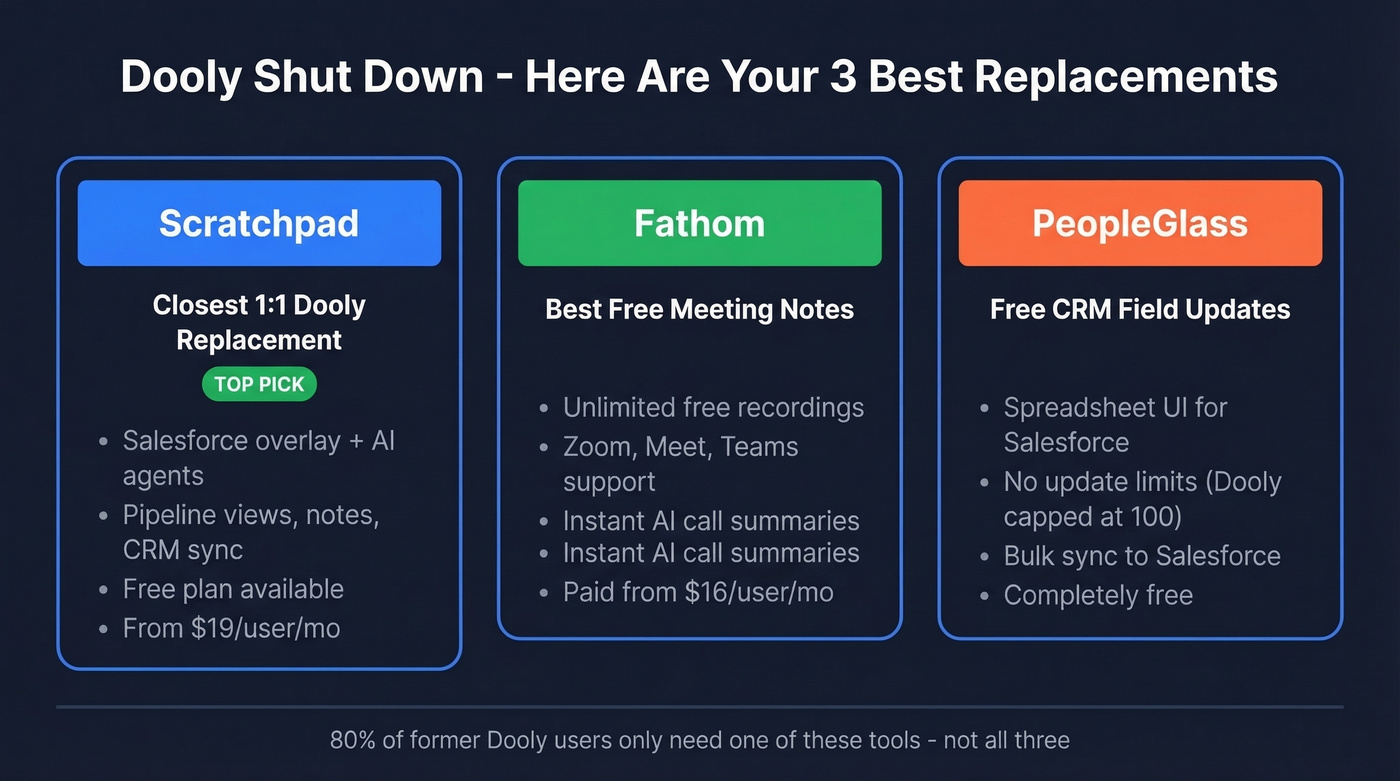
- Scratchpad - The closest 1:1 replacement for Salesforce overlay workflows. Free plan available, paid from $19/user/mo.
- Fathom - Best free option if you used Dooly primarily for meeting notes and CRM sync. Unlimited free recordings, no catch.
- PeopleGlass - Free Salesforce field updates in a spreadsheet UI. If Dooly's CRM update workflow was your main use case, start here.

New CRM overlay is only half the fix. Your reps still need accurate contact data to fill those pipeline views. Prospeo gives you 300M+ profiles with 98% email accuracy and 125M+ verified mobiles - refreshed every 7 days, not every 6 weeks.
Pair your new Dooly replacement with data that actually converts.
What to Switch To
Scratchpad
The closest thing to Dooly, and in most ways better. Scratchpad is built as an AI-native Salesforce interface with AI-enhanced sheets, sales notes, collaborative workspaces, AI suggestions, and CRM hygiene monitoring that syncs with no delays. Their AI Agents go beyond note-taking - they analyze sales calls and suggest updates to next steps, close dates, and amounts. You review and approve, or let it automate.

Scratchpad is actively marketing itself as the Dooly replacement, and we'd say the claim holds up. It does include 10 hours of recording per month on the free plan, but if you only need meeting transcription, Fathom is the better pick.
Pricing: Free plan gives you 3 views, 10 hours of recording, and 100 AI credits/month. Solo runs $19-$24/user/mo depending on billing cycle. Team is $49-$62/user/mo. Enterprise is custom. For context, Dooly's paid plans were commonly in the $10-$60/user/mo range - Scratchpad's Solo tier can save you money if you don't need a full team rollout.
Fathom
Fathom's free tier includes unlimited recordings and transcriptions across Zoom, Meet, and Teams, plus instant AI call summaries. That's genuinely unlimited - not a 14-day trial. If Dooly was your meeting notes tool, this is the no-brainer replacement.

Individual paid plans start at $16/user/mo on an annual plan and unlock team features. CRM field sync, deal views, and coaching scorecards require the Business tier at $25-$34/user/mo. The free tier is pure meeting intelligence - no CRM overlay. For teams that need both meeting notes and Salesforce sync, pair Fathom with PeopleGlass rather than paying for Business.
PeopleGlass - Free CRM Updates
Dooly capped you at 100 field updates per month on its base plan. That limit frustrated teams constantly. PeopleGlass has no such limit.
It's a lightweight, spreadsheet-like app for viewing and updating CRM data: accounts, contacts, opportunities, notes. Bulk updates sync directly to Salesforce. It supports private columns that don't write back, which is a nice touch for personal notes. The catch: it's Salesforce-only and requires API access. If that's you, start here before evaluating anything else.
Avoma
Meeting intelligence with a smart pricing model. Only "recorder" seats cost money - viewers and collaborators are free. That makes Avoma ideal for teams with a few power users recording calls and many reps just reviewing. Startup tier runs $19/recorder seat/mo annually or $29 monthly. Organization is $24-$39/seat/mo. There's an unrestricted 14-day free trial with no credit card required.
Recapped
A different angle entirely. Recapped combines deal rooms with CRM auto-population - think Dooly's CRM sync plus a client-facing collaboration layer. They offer 5-7 day implementation, Salesforce integration in 20 minutes, unlimited users, and a 30-day opt-out guarantee. Pricing is custom, but based on comparable deal-room tools, expect $40-$80/user/mo for mid-market teams. Best for enterprise teams running complex, multi-stakeholder deals where buyer-side visibility matters as much as internal CRM hygiene.
Laserfocus
A simpler Salesforce overlay at ~$30/user/mo with a free tier available. Lighter on collaboration features than Scratchpad, but if you want a clean Salesforce sidebar without the complexity, it's worth a trial. In our experience, teams that found Dooly too heavy actually prefer something like Laserfocus.
Skip this one if you need meeting recording or AI call analysis - it doesn't do either.
Pricing Comparison
| Tool | Free Tier | Paid From | Best For | Our Pick? |
|---|---|---|---|---|
| Scratchpad | Yes (3 views, 10 hrs) | $19/user/mo | SF overlay (closest match) | Top pick |
| Fathom | Yes (unlimited) | $16/user/mo (annual) | AI meeting notes | Best free option |
| PeopleGlass | Yes (unlimited) | Free | Spreadsheet CRM updates | Best for CRM-only |
| Avoma | 14-day trial | $19/seat/mo (annual) | Meeting intelligence | |
| Recapped | No | ~$40-$80/user/mo | Deal rooms + CRM | |
| Laserfocus | Yes | ~$30/user/mo | Simple SF overlay | |
| Dooly (was) | Limited (100/mo) | Was $10-$60/user/mo | Shut down June 2025 | - |
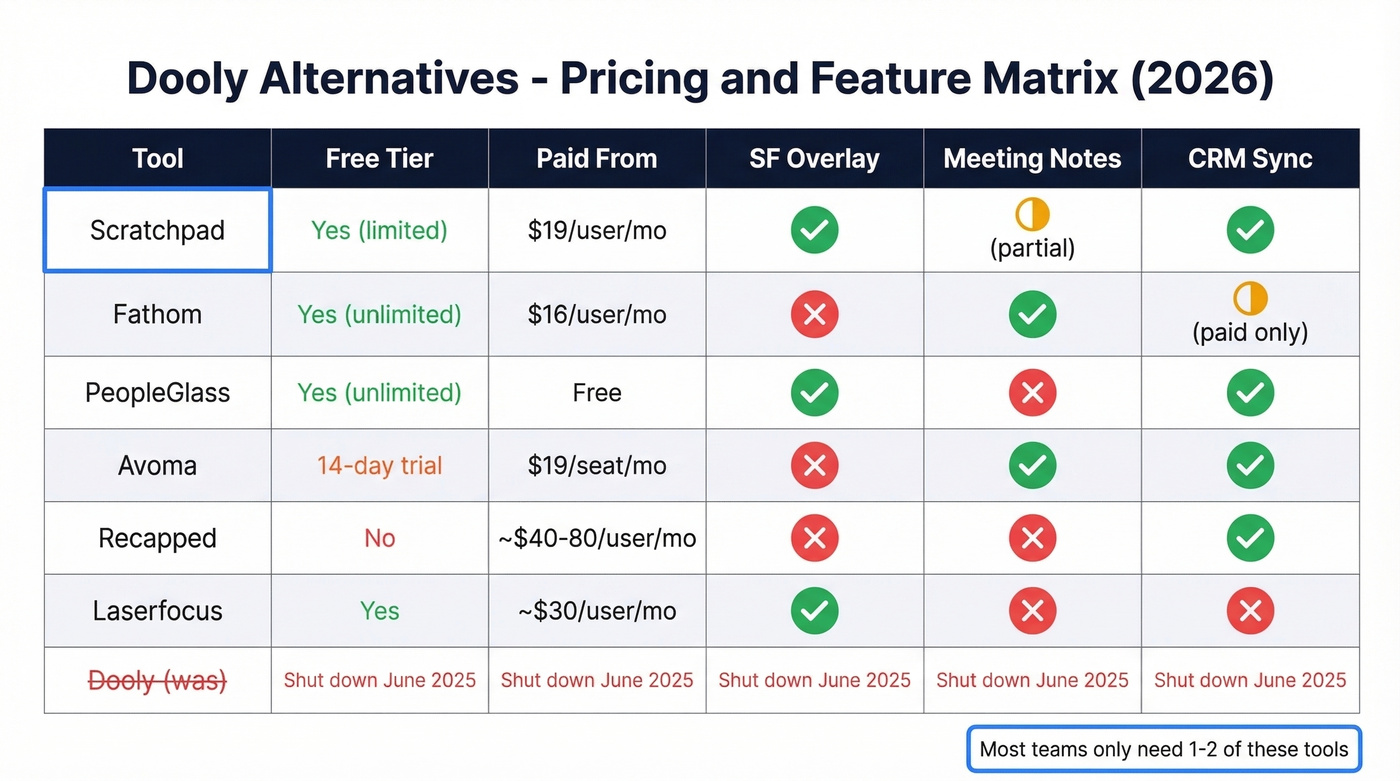
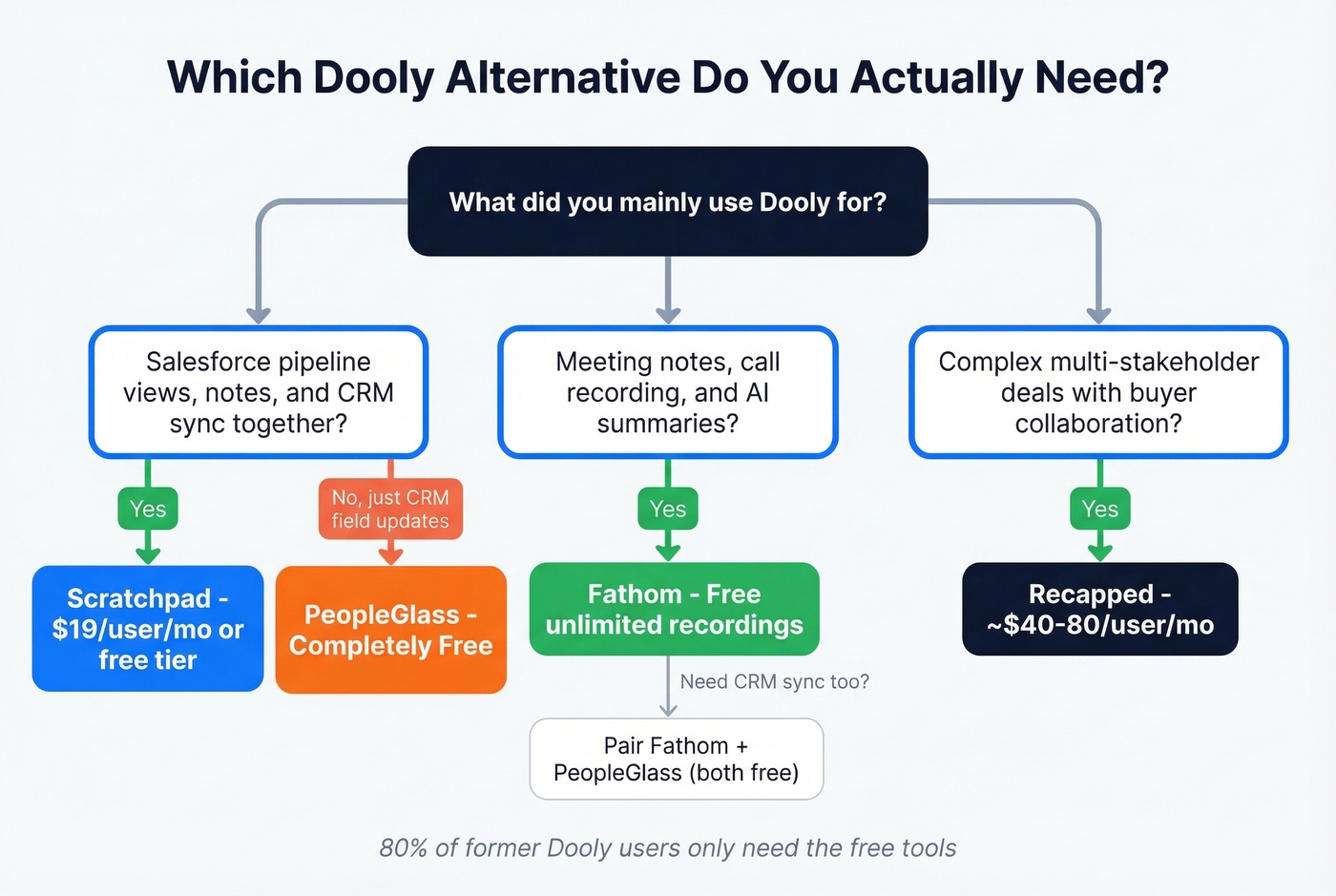
Let's be honest: most teams overestimate how much of Dooly they actually used. If you think about it, 80% of you only need PeopleGlass (free) or Fathom (free). Scratchpad is the right call only if you genuinely used Dooly's pipeline views, notes, and CRM sync together. Don't pay for a full replacement if you only used one feature.
Migration Checklist
Whether you've already switched or you're still figuring it out, run through these steps:
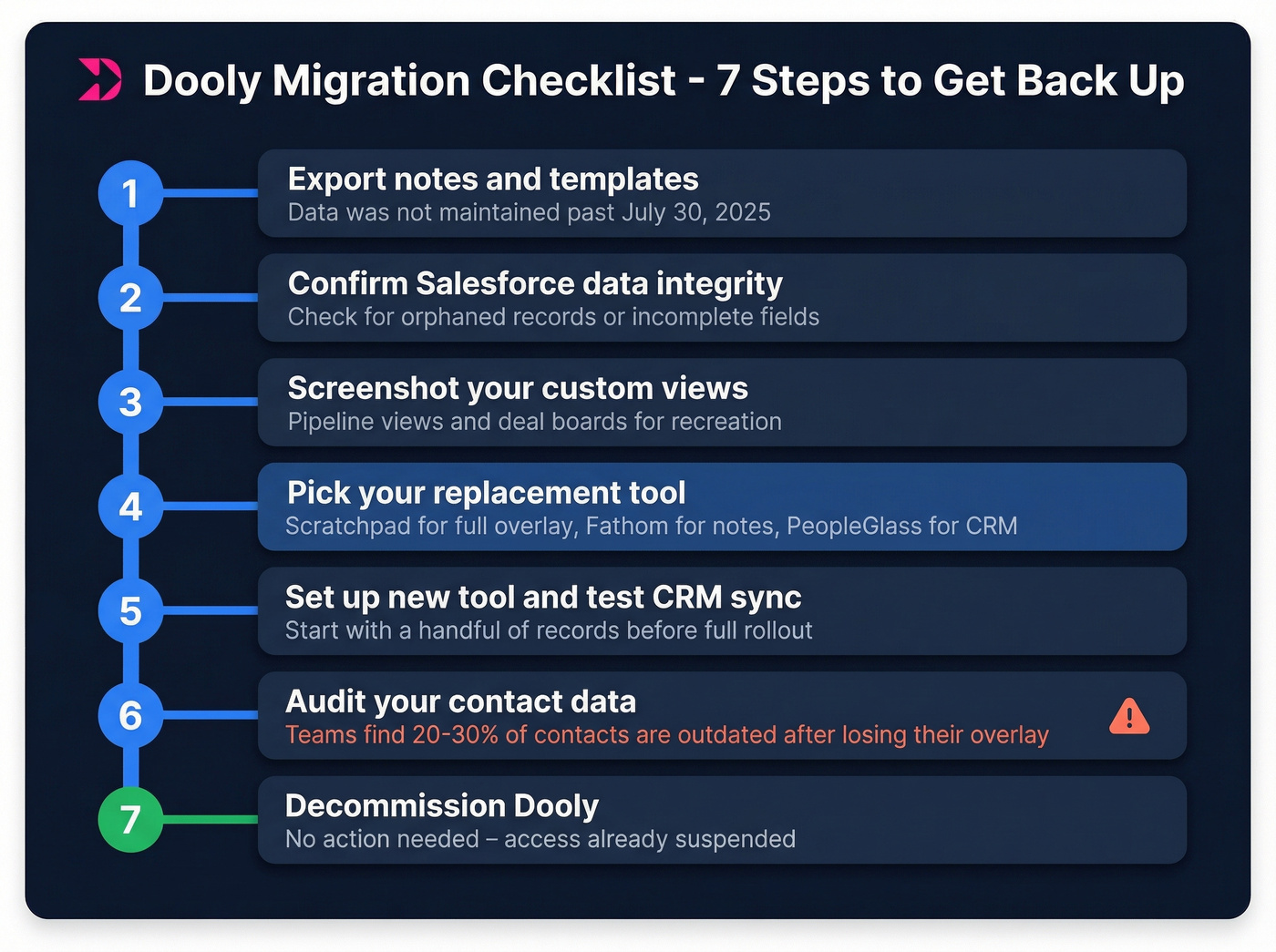
- Export notes and templates. If you didn't do this before June 30, check whether your CRM captured the synced data. CRM and other data wasn't maintained past July 30.
- Confirm Salesforce data integrity. Verify that Dooly's sync didn't leave orphaned records or incomplete field updates in your CRM.
- Screenshot custom views. If you built pipeline views or deal boards in Dooly, recreate them in your new tool. Screenshots help you remember the layout.
- Pick your replacement. Scratchpad for the full Dooly experience, Fathom for meeting notes, PeopleGlass for CRM updates. Most teams need one, maybe two.
- Set up the new tool and confirm CRM sync. Test with a handful of records before rolling out to the full team.
- Audit your contact data. Here's the thing - a forced migration is the perfect time to clean stale emails and dead phone numbers from your CRM. Dooly masked data quality gaps by making field updates easy, and without it, bad data surfaces fast. We've seen teams discover 20-30% of their contact records are outdated the moment they lose their overlay tool. Prospeo verifies emails at 98% accuracy, covers 125M+ mobile numbers, and integrates natively with Salesforce and HubSpot. Its 7-day refresh cycle keeps records current, and the free tier handles 75 emails/month to get started. If you want to compare options, start with our guide to data enrichment services.

- Decommission Dooly. No action needed on your end - there's no need to request a data purge or shut down your CRM integration.
You're rebuilding your Salesforce workflow from scratch - don't rebuild it on bad data. Prospeo's CRM enrichment returns 50+ data points per contact at a 92% match rate, with native Salesforce and HubSpot integrations that sync in minutes.
Clean tools deserve clean data. Start with 75 free emails.
FAQ
What happened to my Dooly data?
All user access was suspended on June 30, 2025, and no CRM or other data was maintained past July 30, 2025. If you didn't export before the cutoff, check your Salesforce for any records that synced before shutdown. There's no recovery path through Dooly or Mediafly.
Does Mediafly replace Dooly?
No. Mediafly is a sales enablement platform - not a note-taking or CRM overlay tool. There's no migration path from Dooly to Mediafly for the workflows reps actually used. You need a purpose-built replacement like Scratchpad or PeopleGlass instead.
Do HubSpot users need a Dooly alternative?
Probably not. HubSpot's native deal board, note-taking, and meeting tools cover most of what Dooly offered out of the box. The pain is concentrated on Salesforce teams, where the native UI makes simple field updates painful. If you're on HubSpot, save your money.
How do I keep CRM data clean after switching?
Use a data enrichment tool to verify emails and phone numbers during the transition. Stale contact data compounds when you're rebuilding workflows - catching it now saves reps from bounced emails and dead dials later. Prospeo's free tier covers 75 emails/month, and paid plans are credit-based with no contracts.