

Email Address Verification: How It Works, What It Costs, and Why It Matters in 2026
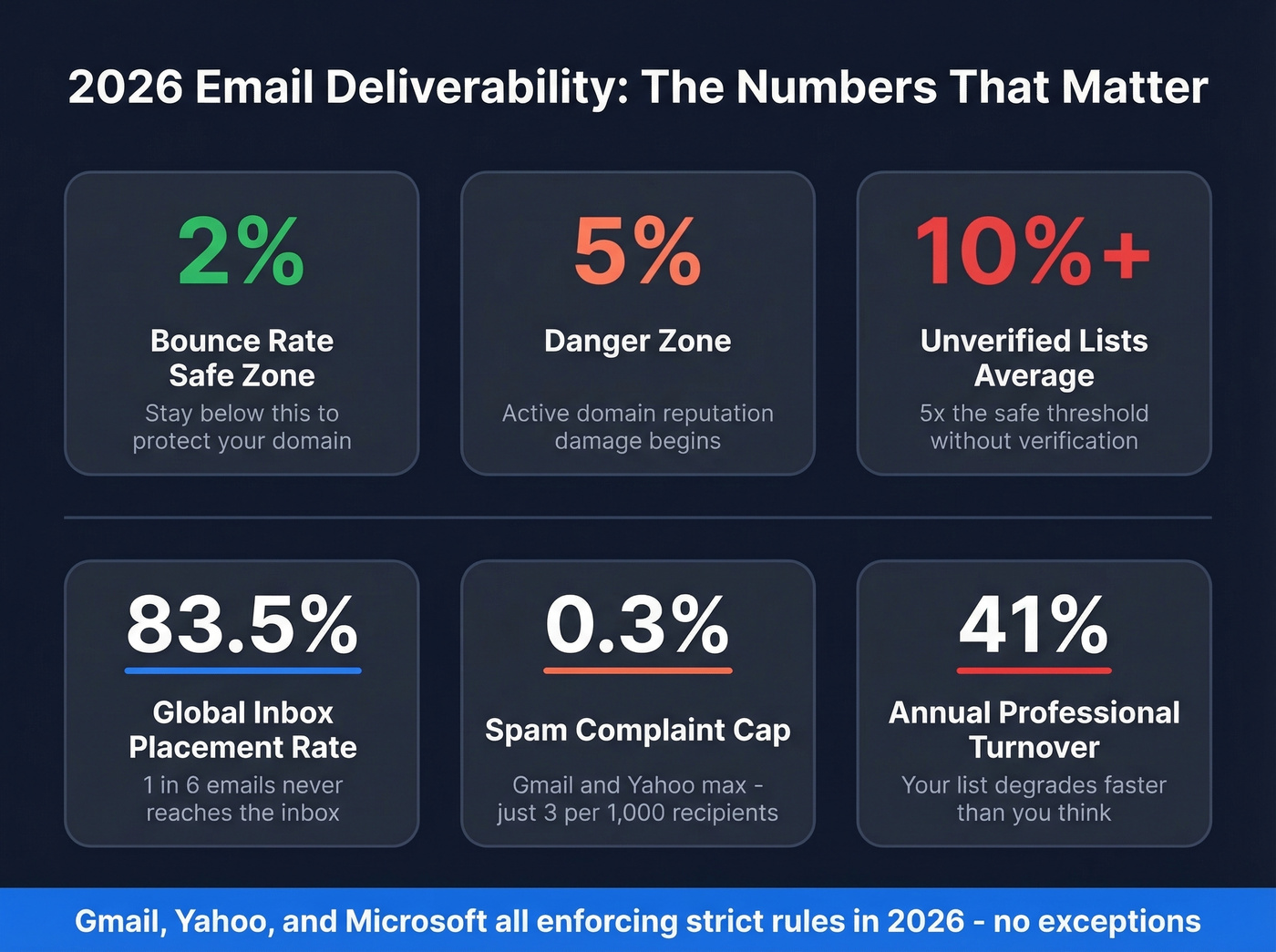
A practitioner on r/salestechniques reported cold outreach bounce rates of 18-22%. After adding email address verification to their workflow, they dropped to 7% in three weeks. No changes to targeting. No changes to copy. Just verification. That's the gap between a functioning outbound engine and a burned domain - and with global inbox placement sitting at just 83.5%, meaning 1 in 6 legitimate emails never reaches the inbox, verifying your contacts isn't optional anymore.
The Quick Version
- Bounce-rate thresholds: Below 2% is safe. Above 5% is domain-reputation territory. Gmail, Yahoo, and Microsoft now enforce these aggressively.
- What it costs: Most standalone tools run ~$6-$149 per 10,000 verifications. MillionVerifier sits around $6 for 10K; Hunter charges $149.
- Re-verification cadence: Quarterly at minimum. With 41% average professional turnover in 2023, lists degrade fast.
What Is Email Address Verification?
Email address verification confirms that a specific mailbox exists on a mail server and can accept messages. It's not the same as validation, though the terms get used interchangeably all the time. Validation checks syntax - is the format correct, does it have an @ symbol, a valid domain structure? Verification goes deeper. A verifier queries DNS records and initiates an SMTP conversation with the receiving mail server to determine whether the mailbox is real.
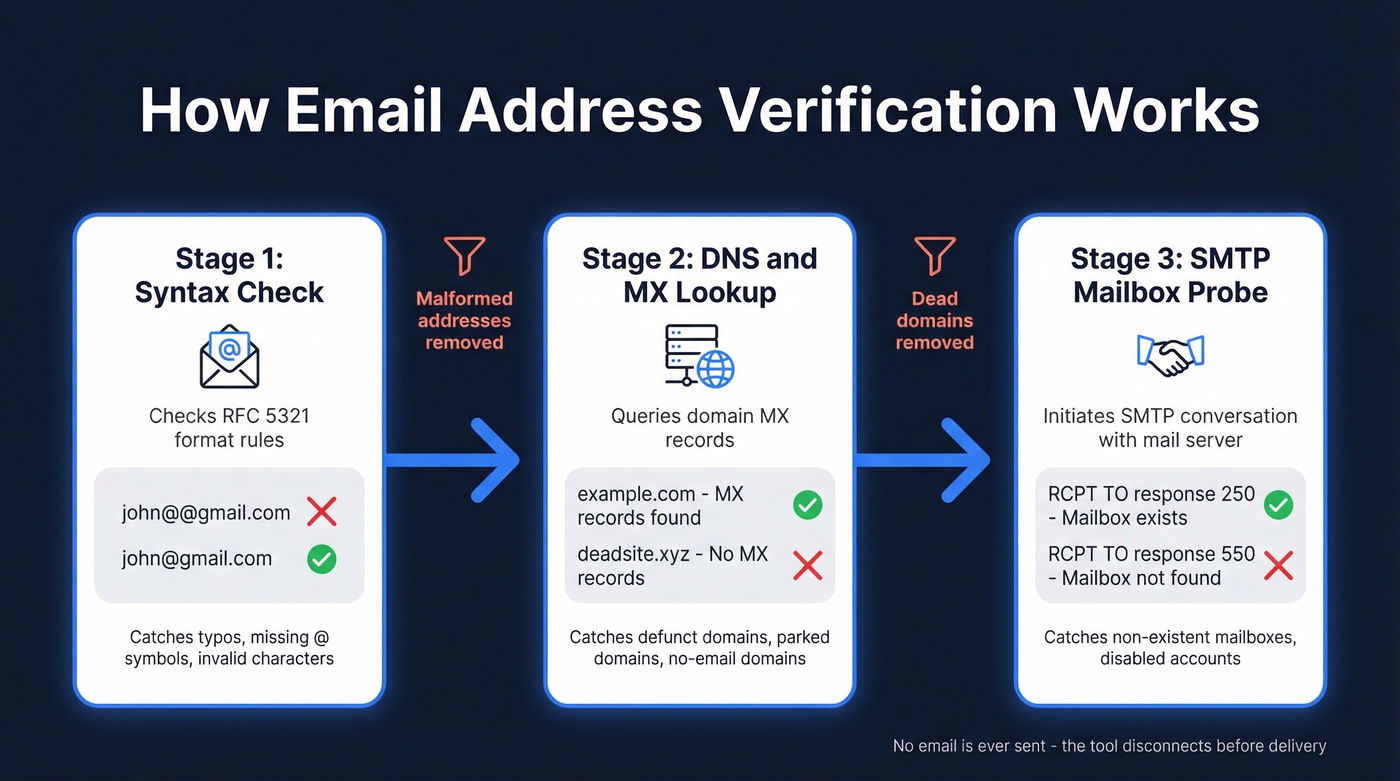
No email is ever sent during the process. The tool initiates a handshake with the mail server, gets a response about whether the mailbox exists, and disconnects before any message is delivered. The recipient never knows their address was checked.
Beyond deliverability, verification also protects against form abuse and bot signups. Automated bots routinely stuff fake addresses into web forms, polluting your CRM with junk data and inflating your list with contacts that'll never convert - or worse, that are spam traps designed to catch careless senders. Running an authenticity check at the point of entry stops this pollution before it starts. The core verification pipeline runs three stages: syntax check, DNS/MX lookup, and SMTP mailbox probe, each filtering out a different category of bad addresses.
Why It Matters More in 2026
Deliverability rules shifted dramatically starting in February 2024, when Gmail and Yahoo began enforcing strict requirements for anyone sending more than 5,000 messages per day. SPF, DKIM, and DMARC authentication became mandatory. One-click unsubscribe became required. The spam complaint rate cap dropped to 0.3% - meaning if more than 3 out of every 1,000 recipients mark you as spam, you're in trouble.
Gmail tightened enforcement in November 2025 with increased SMTP rejections for non-compliant senders. Microsoft followed with its own bulk sender mandate effective May 2025. With all three major providers now enforcing these rules, 2026 is the first full year where non-compliant senders have nowhere to hide.
Bounced emails are a primary signal ISPs use to assess sender reputation. A bounce rate above 2% puts you in warning territory. Above 5%, you're actively damaging your domain. If you're running cold outreach without verifying addresses before each send, you're likely sitting at 10%+ based on aggregate benchmarks - five times the safe threshold.
The 41% annual professional turnover stat makes this worse. Even a list that was perfectly clean six months ago has degraded significantly. People change jobs, companies restructure, email servers get decommissioned. That Reddit poster who went from 22% to 7% bounce rate didn't change their targeting or their copy. They just started verifying before sending.
How the Verification Process Works
Verification tools follow a three-stage pipeline defined by the same protocols that govern email delivery itself. Understanding these stages helps you interpret results and troubleshoot when things go wrong.
Stage 1: Syntax Check
The first pass is simple: does this string look like a valid email address? The format rules come from RFC 5321, and they're more complex than most people realize. A basic regex catches obvious problems - missing @ symbols, spaces, double dots - but RFC-compliant addresses can include quoted strings, special characters, and edge cases that trip up naive pattern matching.
Syntax checks are fast and cheap, but they're table stakes. They'll catch typos like "john@gmial.com" but won't tell you whether john@gmail.com is a real person.
Stage 2: DNS and MX Lookup
Once an address passes syntax, the verifier queries the Domain Name System for the domain's MX (Mail Exchange) records. These records tell the internet which servers handle email for that domain. If there are no MX records - or the records point to non-routable IPs - the address can't receive mail regardless of whether the mailbox exists.
Most domains have multiple MX servers with different priority levels. The verifier checks that at least one resolves to a reachable server. This stage catches defunct domains, parked domains, and domains that simply don't have email configured.
Stage 3: SMTP Mailbox Probe
This is where the real verification happens, and it's also where things get complicated. The verifier opens a connection to the mail server and initiates an SMTP handshake - the same protocol any email client would use to deliver a message.
The conversation follows a specific sequence: the verifier sends an EHLO command to identify itself, then a MAIL FROM to specify a sender address, then RCPT TO with the target email address. The server's response to RCPT TO is the key signal - a 250 response code means the mailbox exists, while a 550, 551, or 553 means permanent failure. Temporary codes like 450, 451, or 452 indicate the server can't confirm right now, often due to greylisting or rate limiting.
Here's the thing: SMTP has no dedicated "does this mailbox exist?" command. Verification tools are pretending to send an email, reading the server's response, and disconnecting before the DATA stage. Some servers rate-limit these attempts, return misleading responses, or blacklist IPs that probe too aggressively. That's why no tool can guarantee 100% accuracy, and why results vary between providers.
What Verification Results Mean
Every verification tool returns results in categories, but the categories aren't always intuitive.
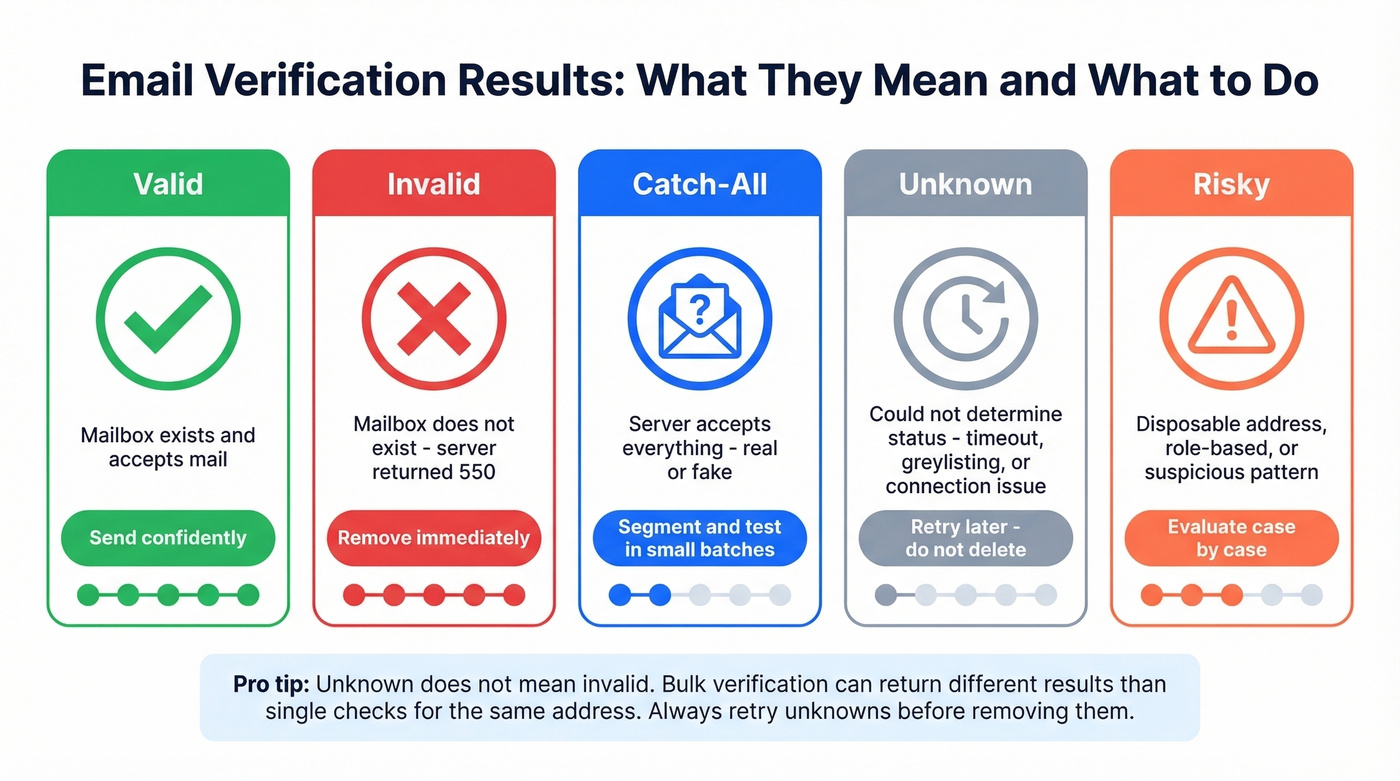
| Result | What It Means | What to Do |
|---|---|---|
| Valid | Mailbox exists, accepts mail | Send confidently |
| Invalid | Mailbox doesn't exist (550) | Remove immediately |
| Catch-All | Server accepts everything | Segment, test small |
| Unknown | Couldn't determine status | Retry, don't delete |
| Risky | Disposable, role-based, etc. | Evaluate case by case |
The "unknown" category deserves special attention because it's the most misunderstood. Unknown doesn't mean invalid - it means the verifier couldn't get a definitive answer. This happens when servers greylist, when there are timeout issues, or when the server simply doesn't cooperate.
A practitioner on r/Emailmarketing tested this directly: the same known-valid Yahoo address returned "unknown" in MillionVerifier's bulk API but "OK" when checked individually. The vendor's support team confirmed it was a connection issue during the bulk run. Bulk verification can produce different results than single-check verification for the same address, and "unknown" often reflects infrastructure limitations rather than mailbox status.
Tools with more granular status classifications give you better visibility into why an address came back uncertain. EmailListVerify offers 18 different statuses, which lets you distinguish between "mailbox doesn't exist" and "server temporarily refused connection" - and that distinction changes your response from "delete" to "retry."

Prospeo's 5-step verification - including catch-all handling, spam-trap removal, and honeypot filtering - is built into every email it returns. 98% accuracy means bounce rates under 2%, not 22%.
Stop paying twice - once to find emails, again to verify them.
The Catch-All Problem
Catch-all domains are the verification industry's unsolved problem. These servers accept mail for any address at the domain - real or fake. Send to john@catchall-company.com and it arrives. Send to asdfghjkl@catchall-company.com and it also arrives. The SMTP response is 250 for everything.
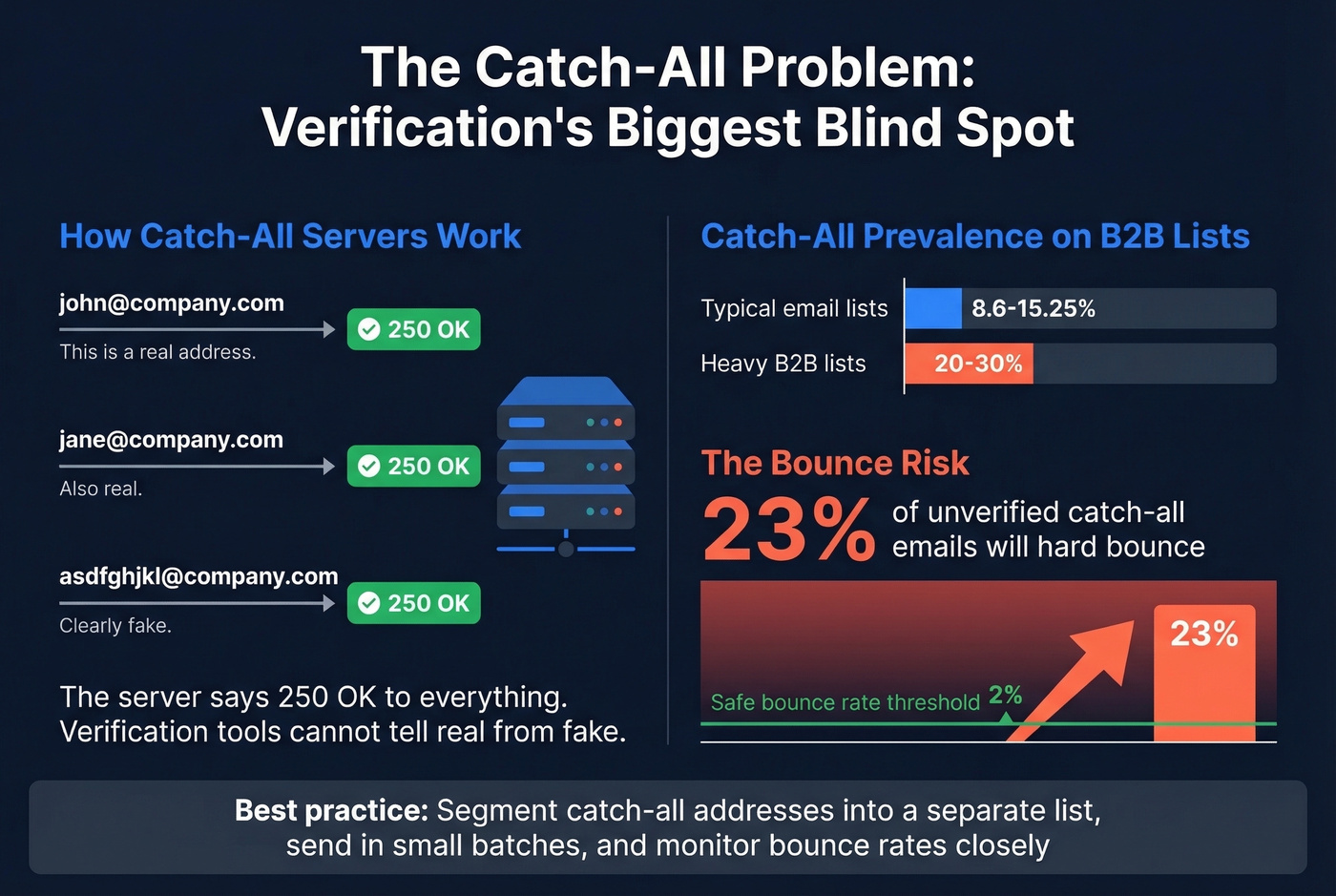
This matters because catch-all domains are everywhere in B2B. Estimates put prevalence at 8.6-15.25% of typical email lists, with some B2B lists running as high as 20-30%. And 23% of unverified catch-all emails will hard bounce when you actually send to them - enough to push your bounce rate well above the 2% safety threshold. The consensus on r/coldemail is consistent skepticism toward any tool claiming to "solve" catch-all verification, and they're right to be skeptical.
Any tool claiming to fully resolve catch-all addresses is misleading you. The server literally returns the same response for every address. What good tools can do is flag catch-all domains, analyze naming patterns like firstname.lastname, and apply activity scoring to estimate deliverability. But the fundamental limitation is baked into how these servers work.
The practical approach: segment catch-all addresses into a separate list, send in small batches, monitor bounce rates closely, and prioritize addresses that match known naming conventions at the domain.
How Accurate Are Verification Tools?
Let's be honest - most accuracy claims in this space are marketing. Every tool says 98% or 99%. The real numbers are less impressive, and the two most-cited benchmarks both come from vendors with skin in the game.
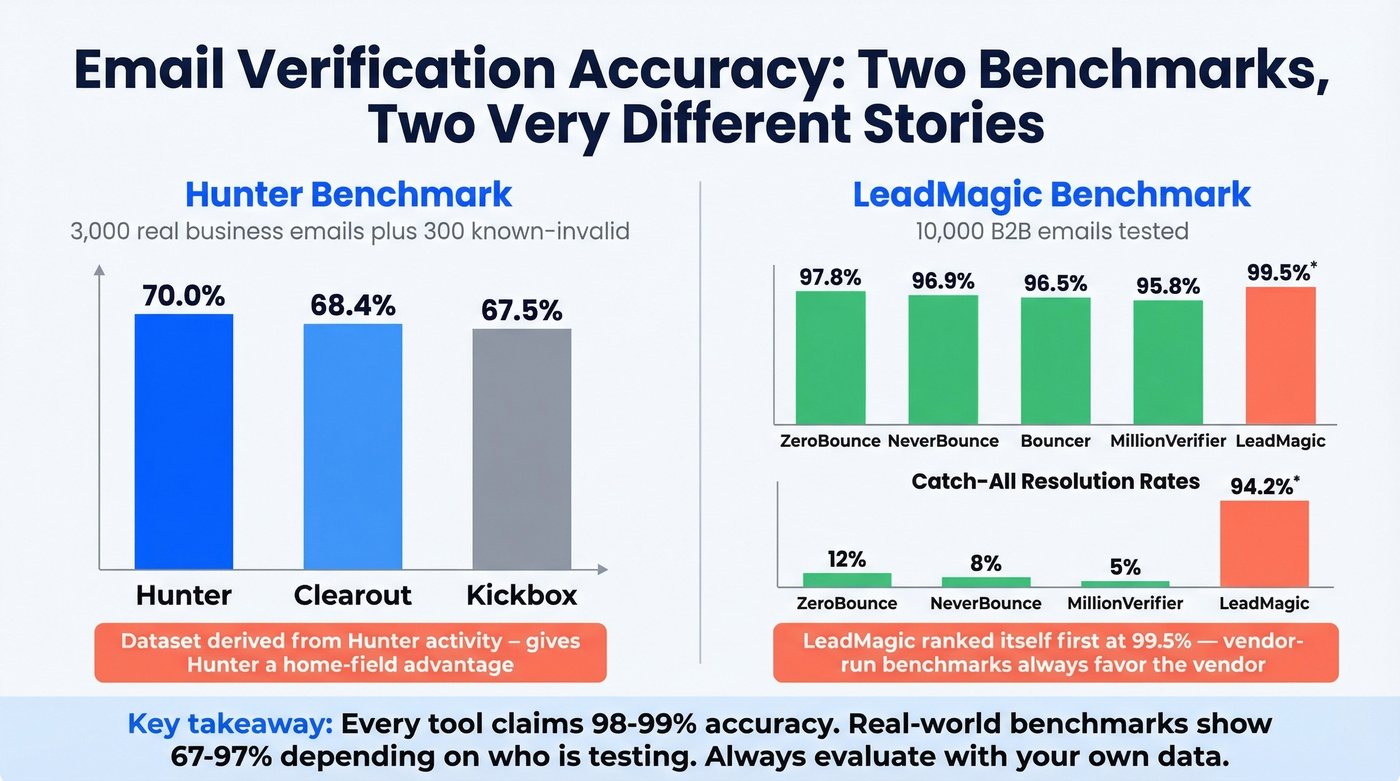
Hunter's benchmark tested 15 verifiers against 3,000 real business emails segmented by company size, plus 300 known-invalid addresses. The top score was Hunter's own tool at 70%, followed by Clearout at 68.4% and Kickbox at 67.5%. Hunter discloses that their dataset was derived from Hunter activity, which gives their own tool an edge. Still, it's the most methodologically transparent benchmark available.
A separate LeadMagic test of 10,000 B2B emails showed higher numbers: ZeroBounce at 97.8%, NeverBounce at 96.9%, Bouncer at 96.5%, and MillionVerifier at 95.8%. The catch-all resolution rates told a different story - ZeroBounce resolved just 12% of catch-alls, NeverBounce 8%, and MillionVerifier 5%. LeadMagic ranked itself first at 99.5% with 94.2% catch-all resolution, which tells you everything you need to know about vendor-run benchmarks.
| Tool | Hunter Test | LeadMagic Test | Catch-All Resolved | Notes |
|---|---|---|---|---|
| Hunter | 70.0% | - | - | Own benchmark |
| Clearout | 68.4% | - | - | Strong mid-market |
| ZeroBounce | - | 97.8% | 12% | Low catch-all |
| NeverBounce | - | 96.9% | 8% | Low catch-all |
| Bouncer | - | 96.5% | 15% | 4.9/5 on Capterra (233 reviews) |
| MillionVerifier | - | 95.8% | 5% | Cheapest option |
We've seen teams get wildly different accuracy from the same tool depending on whether they're targeting SMBs or Fortune 500 companies. Accuracy drops significantly on mid-market and enterprise domains, where stricter server configurations make SMTP probing less reliable - the server infrastructure matters as much as the verification engine.
What It Costs in 2026
Pricing ranges from absurdly cheap to surprisingly expensive, and the spread doesn't always correlate with quality. Speed matters too - Emailable processes 2M verifications per hour, Bouncer handles 180K/hour, and ZeroBounce runs at about 133K/hour. If you're cleaning a list of 500K contacts, that's the difference between 15 minutes and 4 hours.
| Tool | Cost per 10K | Free Tier | Best For |
|---|---|---|---|
| MillionVerifier | ~$6 | - | Budget bulk cleaning |
| EmailListVerify | $24 | Free single checks (limited) | Mid-range with 18 statuses |
| Bouncer | $45 | 1,000 free | Quality + value balance |
| NeverBounce | $50 | 1,000 free | ESP integrations |
| Emailable | $50 | - | Speed (2M/hour) |
| Clearout | $58 | 100 free | Catch-all handling |
| ZeroBounce | $64 | 100 free | Accuracy + integrations |
| BriteVerify | ~$100 | No free trial | Legacy enterprise |
| Hunter | $149 | Free single checks; free plan up to 100/mo | Bundled with finder |
| Prospeo | ~$0.01/email | 75 emails/mo | Pre-verified finder |
Most free tiers are lead magnets, not solutions. A hundred free verifications tells you nothing about how a tool handles your actual list at scale. The 1,000-credit tiers from Bouncer and NeverBounce are more useful for genuine evaluation.
Here's the frustrating part about the "two-tool tax": if you're finding 5,000 emails per month in one tool and verifying them in another, you're paying twice for a problem that shouldn't exist. At ZeroBounce rates, that's an extra $32/month just for verification - on top of whatever you're paying for the finder. Over a year, that's $384 in pure friction cost, plus the time spent managing two tools, reconciling results, and debugging discrepancies between them. Skip this if your current finder already includes verification, but if it doesn't, Prospeo's approach of baking verification into the email-finding process - every contact pulled from a 143M+ database refreshed on a 7-day cycle - eliminates the second tool entirely.
Building Verification Into Your Workflow
Verification isn't a one-time event. It's a recurring process that belongs at four touchpoints in your data workflow.
At point of capture. Every web form, sign-up flow, and lead capture mechanism should validate email addresses in real time. This catches typos and disposable addresses before they enter your CRM. If you're operating in the EU, make sure your verification provider is GDPR-compliant - processing email addresses through third-party servers counts as data processing.
Before every campaign. Bulk-clean your list before loading it into your sequencer. Even if the addresses were valid when you collected them, job changes and domain decommissions create decay. Run a fresh check to catch addresses that have gone stale since your last send.
During CRM enrichment. When you're enriching contacts with new data, validate emails as part of the same workflow. Tools like Zapier, Make, and native CRM integrations make this automatable - and it's where the time savings really compound for teams processing thousands of records monthly.
On a recurring cadence. Quarterly re-verification is the floor, not the ceiling. With 41% annual professional turnover, a list that was clean in January is already degrading by April. Scheduled list hygiene prevents this silent decay from tanking your sender reputation.
In our experience, the smarter move is to stop verifying emails you already found and start finding emails that are already verified. We've watched teams cut their verification spend in half by switching from the find-then-verify model to a pre-verified source with built-in catch-all handling, spam-trap removal, and honeypot filtering. That shift collapses two workflow steps into one and removes an entire category of data quality headaches.
Lists degrade fast with 41% annual turnover. Prospeo refreshes all 300M+ profiles every 7 days - not the 6-week industry average - so your data stays clean without quarterly re-verification runs.
Fresh data every week at $0.01 per email. No contracts required.
Common Verification Mistakes
Relying on syntax-only checks. Syntax validation catches formatting errors. It doesn't tell you whether the mailbox exists. If your "verification" is just a regex, you're not verifying anything.
Never re-verifying. That 41% annual turnover stat isn't abstract. It means roughly 4 out of every 10 business email addresses in your CRM will go stale within a year. Set a quarterly re-verification cadence and treat it as non-negotiable.
Treating "unknown" as "invalid." Unknown means the verifier couldn't get a definitive answer - not that the address is bad. Deleting unknowns wholesale means throwing away potentially valid contacts. Retry them individually or with a different provider before writing them off.
Ignoring catch-all results. Sending blindly to catch-all addresses is how you end up with a 23% hard bounce rate on that segment. Segment them, test in small batches, and monitor closely.
Skipping verification before major campaigns. Your list hasn't been touched in 30+ days? Verify before you send. Getting "unknown" on 15% of your list and being told "that's normal" isn't acceptable - it's a sign you need a better tool or a different approach.
Never validating at point of capture. Every bad address that enters your CRM costs you downstream - in bounces, in wasted sequence slots, in sender reputation damage. Real-time validation at the form level is the cheapest fix in this entire workflow.
Bounce Rate Benchmarks
Not all bounce rates are created equal. The benchmarks vary dramatically depending on whether you're looking at clean ESP traffic or the broader universe of all senders.
| Threshold | Status | What It Means |
|---|---|---|
| Below 2% | Safe | ISPs consider you a good sender |
| 2-5% | Warning | Reputation damage accumulating |
| Above 5% | Critical | Active deliverability impact |
Clean ESP datasets show average total bounce rates around 0.9%, combining roughly 0.21% hard bounces and 0.70% soft bounces. Industry-specific numbers from Mailchimp data put ecommerce at 0.29%, retail at 0.31%, and software/SaaS at 0.93%.
The "all senders" average - which includes cold outreach, purchased lists, and scraped data - runs 10.68%. If you're doing cold outbound without verification, that's the neighborhood you're in. The gap between 0.9% and 10.68% is almost entirely explained by list hygiene. Email address verification closes it.
FAQ
What's the difference between verification and validation?
Validation checks syntax and format only. Verification goes further - querying DNS records and probing the mail server via SMTP to confirm the mailbox exists and accepts mail. Most tools do both, but the terms aren't interchangeable. If you need deliverability assurance, you need the full verification pipeline.
Does the process send an email to the address?
No. Verification initiates an SMTP handshake but disconnects before the DATA stage - no message is ever delivered. The recipient has no way to know their address was checked.
How often should I re-verify my list?
Quarterly at minimum, and before every major campaign. With 41% annual professional turnover, roughly 10% of a B2B list goes stale every 90 days. High-volume outbound teams should consider monthly re-verification.
Can tools accurately check catch-all domains?
Not reliably. Catch-all servers return "250 OK" for any address - real or fake. Tools can flag an address as catch-all, but they can't confirm whether the specific mailbox exists. Segment these contacts and test in small batches with close bounce monitoring.
Can I get verified emails without a separate verification tool?
Yes. Prospeo delivers pre-verified emails from a 143M+ contact database refreshed every 7 days, with 98% accuracy and built-in catch-all handling. You skip the standalone verification step entirely and get contacts ready to sequence - 75 free emails per month to start.