

Email Subject Lines for Introducing Someone (With Templates)
You're about to connect two people who should know each other. The email itself takes a few minutes to write - but the subject line? That's where most people freeze. A vague subject gets ignored, a clever one feels forced, and a long one gets chopped on mobile.
Here's what actually works, based on real data and a lot of intro emails we've sent ourselves.
Quick Picks
If you're in a hurry, grab one and go:
- [Name] <> [Name] - widely recognized shorthand for intros
- [Name], meet [Name] - warmer, works when the relationship is less formal
- Intro: [Name] + [Name] - adds a label that makes it easy to search later
All three fit on a mobile screen, signal exactly what the email is, and won't trigger spam filters.
What the Data Says
A Belkins analysis of 5.5 million emails found personalized subject lines hit a 46% open rate versus 35% for generic ones. Reply rates doubled - 7% versus 3%. That dataset covers cold email, but the subject line lessons map cleanly to intros too.
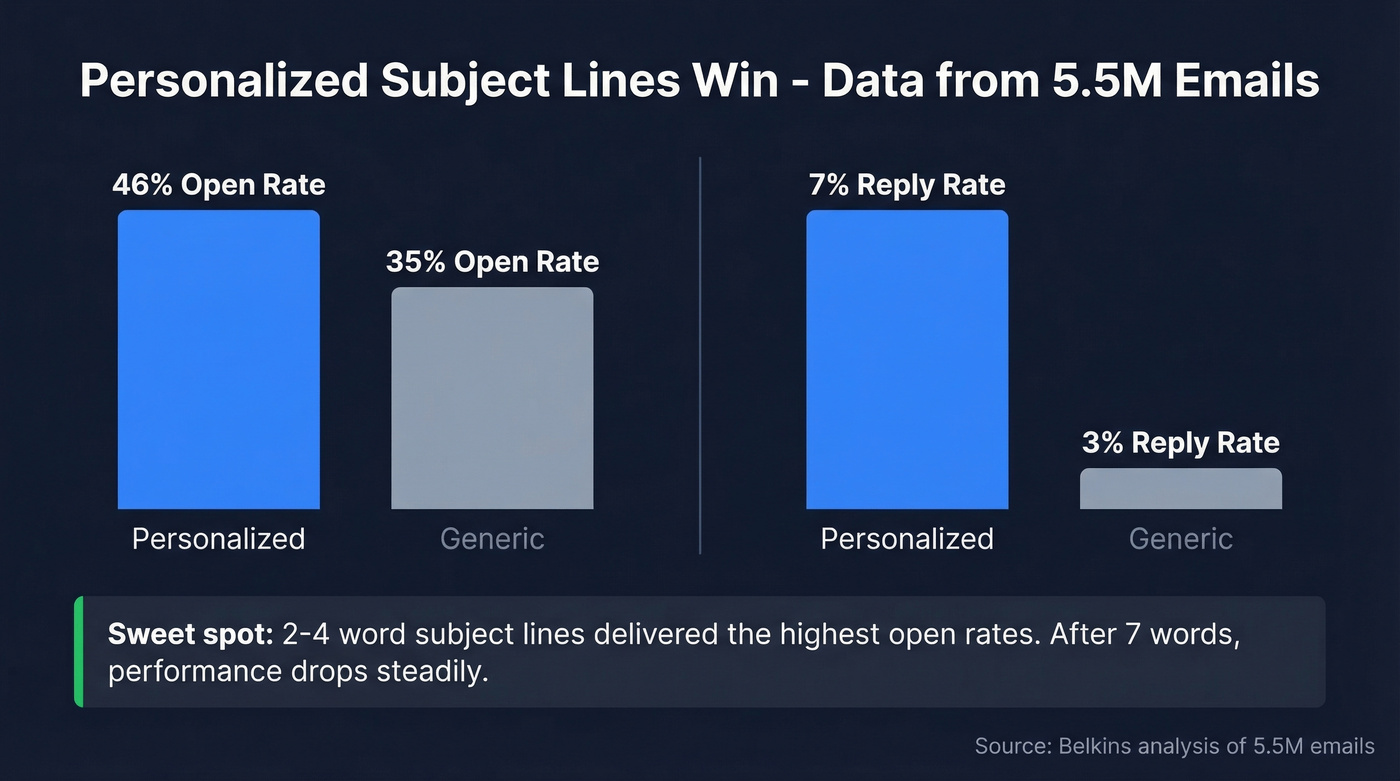
The most useful finding for intro emails is length: subject lines of 2-4 words delivered the highest open rates. After seven words, performance drops steadily.
Keep it short, include both names, don't overthink it. The subject line's job is to get the email opened. The body does the rest.
Keep It Under 50 Characters
Subject lines get truncated differently depending on where your recipient reads email. Here's the breakdown from Twilio SendGrid:
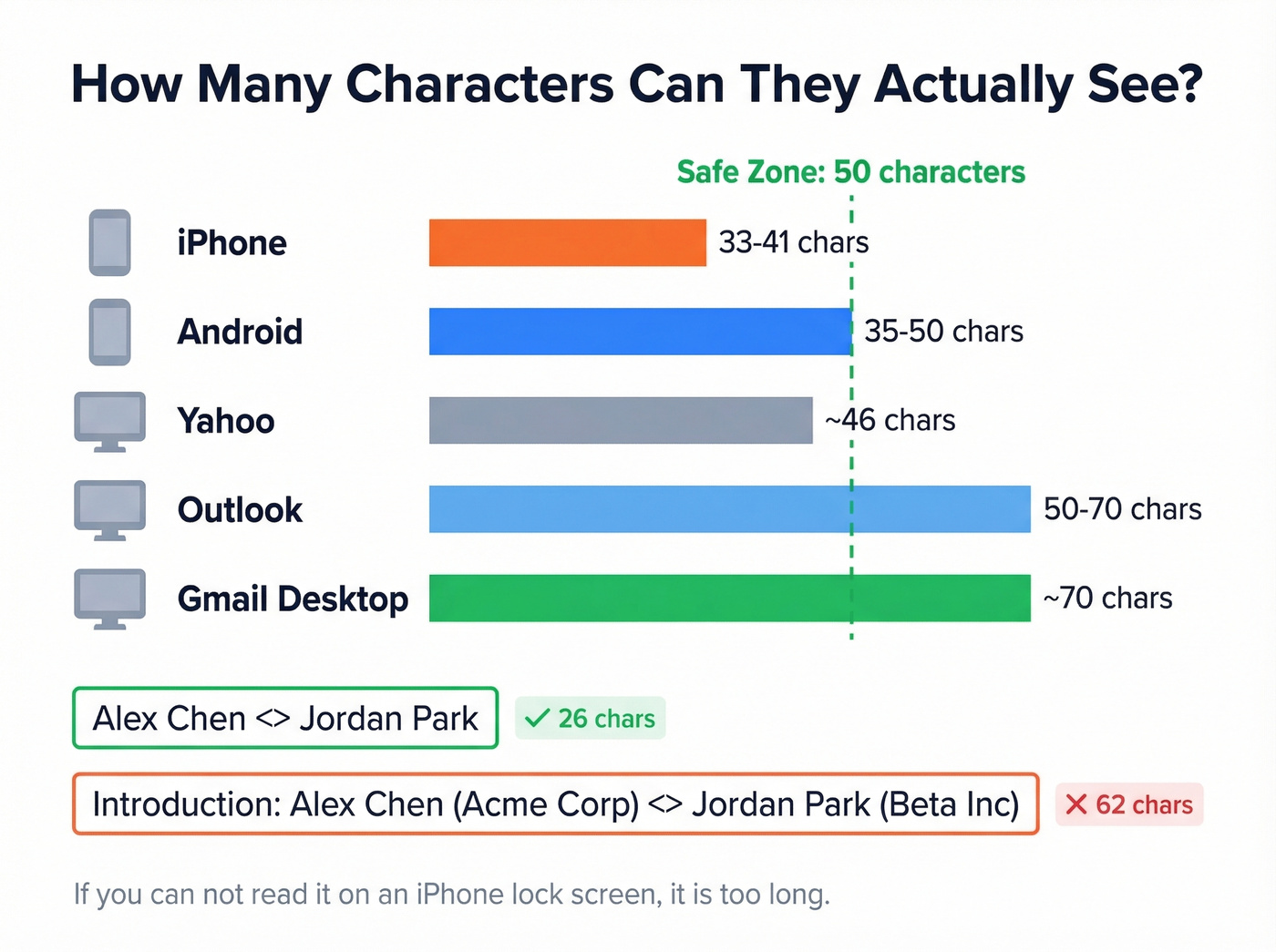
| Device / Client | Characters Shown |
|---|---|
| iPhone | 33-41 |
| Android | 35-50 |
| Gmail (desktop) | ~70 |
| Outlook | 50-70 |
| Yahoo | ~46 |
The safe zone is 50 characters or fewer. "Alex Chen <> Jordan Park" runs about 26 characters - plenty of room. "Introduction: Alex Chen (Acme Corp) <> Jordan Park (Beta Inc)" pushes past 60 and gets clipped on every phone. If you can't read the full subject on an iPhone lock screen, it's too long.
Subject Lines for Introducing Someone
Professional Introductions
- [Name] <> [Name]
- Intro: [Name] + [Name]
- [Name], meet [Name]
- Connecting you two
- Intro re: [topic]
- [Name] <> [Name] - [one-line context]
Referral-Based
- Intro: [Name] (recommended by [Connector])
- Following up on [mutual context]
- Quick intro re: [goal]
- [Name] mentioned you'd be a great fit
- Connecting you - [Mutual Contact] suggested it
- Intro: [Name] re: [specific project or role]
Event and Context-Based
- Great meeting at [event] - intro
- [Event] follow-up: [Name] <> [Name]
- From [event]: [Name], meet [Name]
- [Event] connection - [Name] <> [Name]
Internal / Company
- Intro: [Name] (Sales) <> [Name] (Product)
- Looping in [Name] for [project]
- [Name], meet [Name] from [team]
Casual
- [Name] meet [Name]
- Thought you two should connect
- You two need to know each other
- Two of my favorite people - meet each other
Self-Intro Subject Lines
Self-introductions play by different rules. You're not a trusted connector - you're a stranger asking for attention. Lead with context, not your name.
A thread on r/coldemail captures this well: seeing your own name in a subject line from someone you don't know screams "sales automation." The consensus is pretty clear - people immediately assume it's a mass blast.
Better approaches:
- "Quick question about [topic]"
- "[Mutual contact] suggested I reach out"
- "Idea for [company/team]"
- "Fellow [industry] member - quick intro"
- "Loved your [talk/post] on [topic]"

Writing the perfect intro subject line means nothing if the email bounces. A failed delivery makes you look careless - and damages the trust both parties have in you. Prospeo verifies emails with 98% accuracy so every introduction you send actually lands.
Verify both addresses before you connect two people. It takes seconds.
The Double Opt-In Rule
Here's the thing: the best introduction subject line in the world won't save an intro nobody asked for. Jordan Harbinger calls single opt-in intros the "worst approach" - and he's right. We've seen single opt-in intros damage relationships more than help them, and it's frustrating how many people still skip this step.
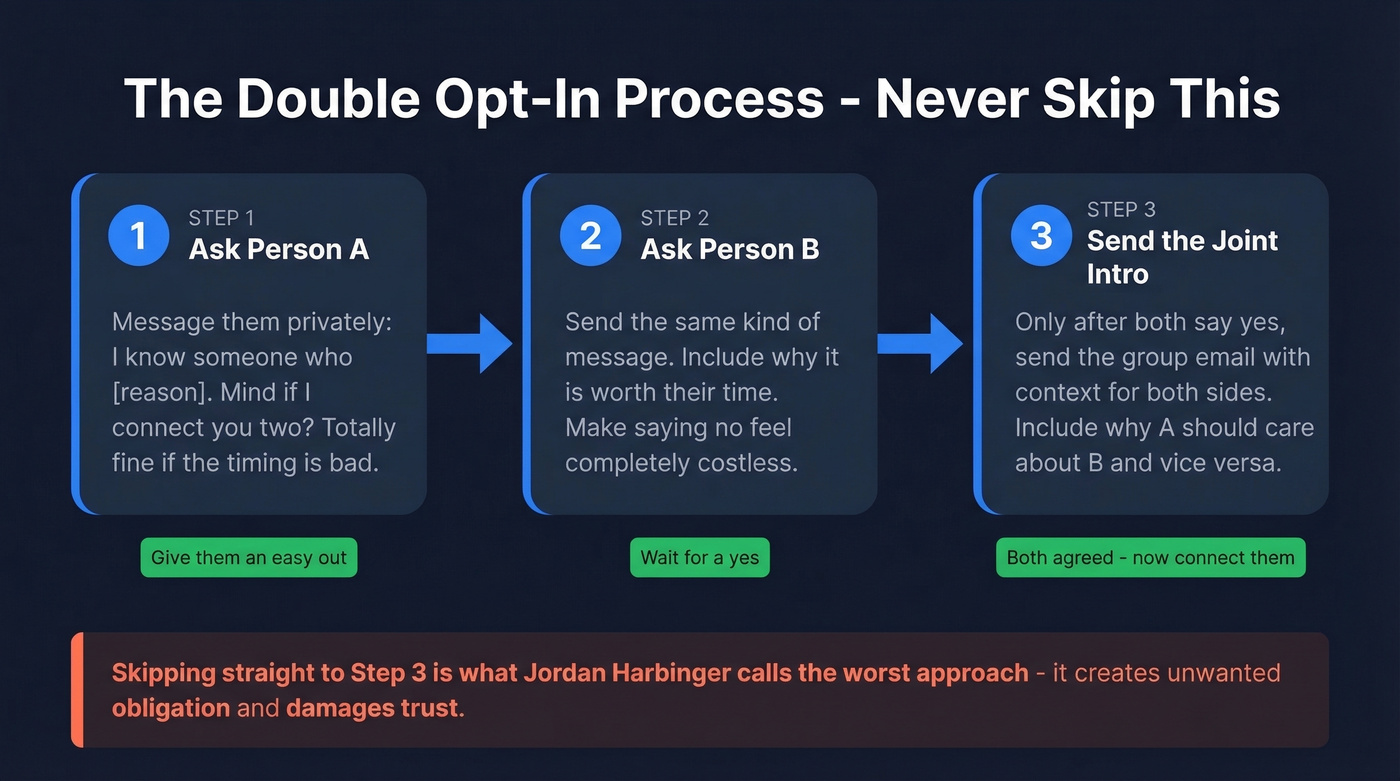
Step 1 - Ask Person A privately: "I know someone who [reason]. Mind if I connect you two? Totally fine if the timing's bad."
Step 2 - Ask Person B the same way. Include why it's worth their time. Give them an easy out.
Step 3 - Only after both say yes, send the joint intro with context for both sides.
That "totally fine if the timing's bad" line matters. It gives people a graceful exit. Commsor's warm intro guide uses a similar permission template - the key is making "no" feel costless.
The Full Intro Email
Subject: Sarah <> Marcus
Hi Sarah and Marcus,
I wanted to connect you two - I think there's a natural fit here.
Sarah - Marcus runs product marketing at Relay. His team just launched a PLG motion driving 40% of their pipeline. You mentioned wanting to explore that exact model.
Marcus - Sarah leads growth at Conduit and has scaled two PLG funnels from zero. She's the sharpest person I know on activation metrics.
I'll let you two take it from here. Maybe a quick 15-minute call?
Best, [Your name]
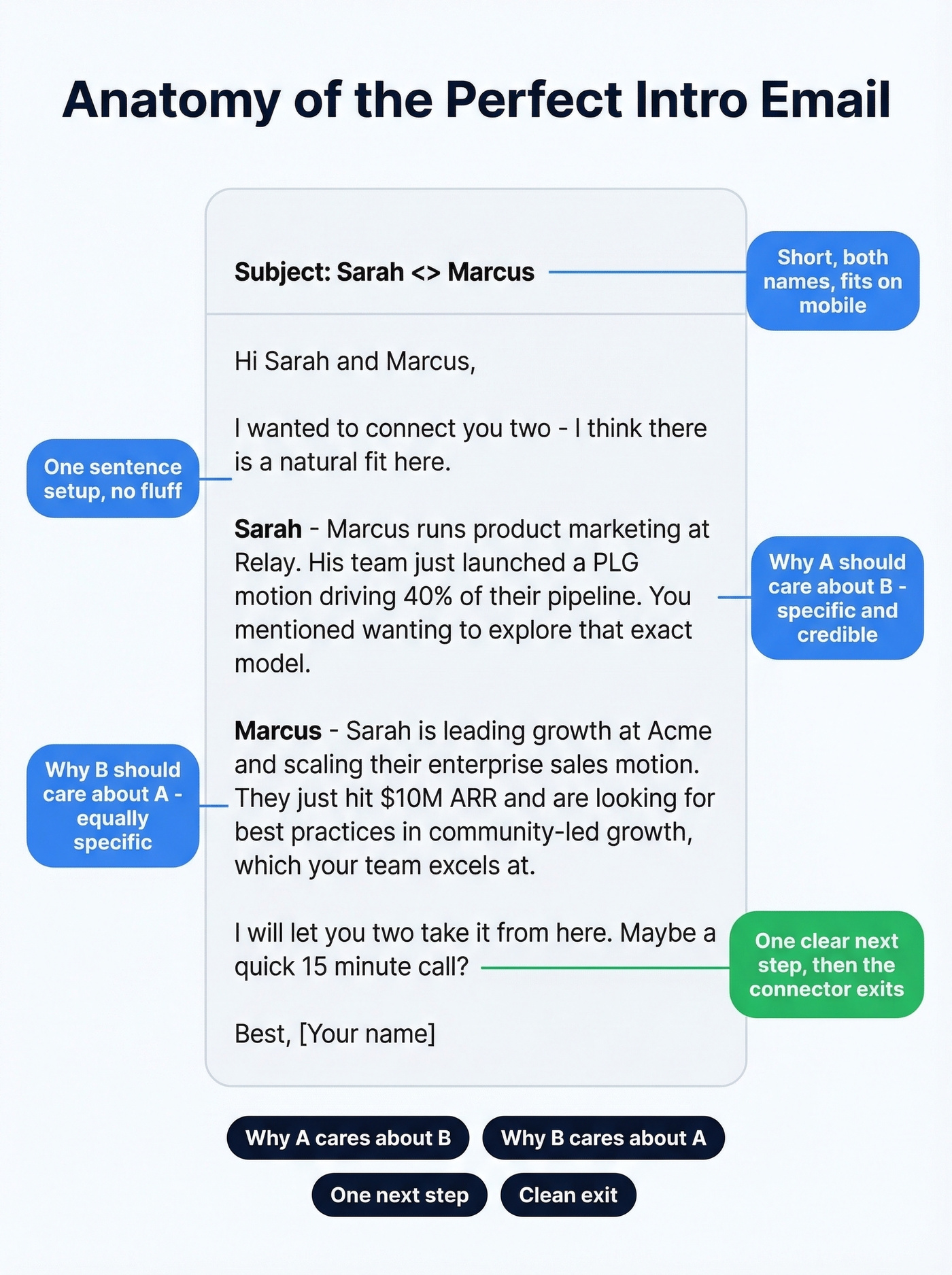
Structure: why A should care about B, why B should care about A, one next step, clean exit for the connector. That's it. Don't pad it with pleasantries or your own bio - nobody needs that in an intro email.
After You Hit Send
The first responder should reply-all, then move the connector to BCC so they're informed without getting buried in the thread. As the connector, once you see the reply-all, you're done. Don't hover. Don't follow up asking "did you two connect?" Aim to respond within 24-48 hours if you're the one being introduced - the connector put their reputation on the line, and a slow reply disrespects that.
Mistakes to Avoid
The ambush email. May Busch calls this exactly what it is - an ambush. You CC two people who never agreed to be introduced, and now one of them is stuck fielding follow-ups from someone they can't help. A Reddit thread on r/careeradvice describes this perfectly: someone got introduced to a job seeker without consent and couldn't shake the follow-ups for weeks.
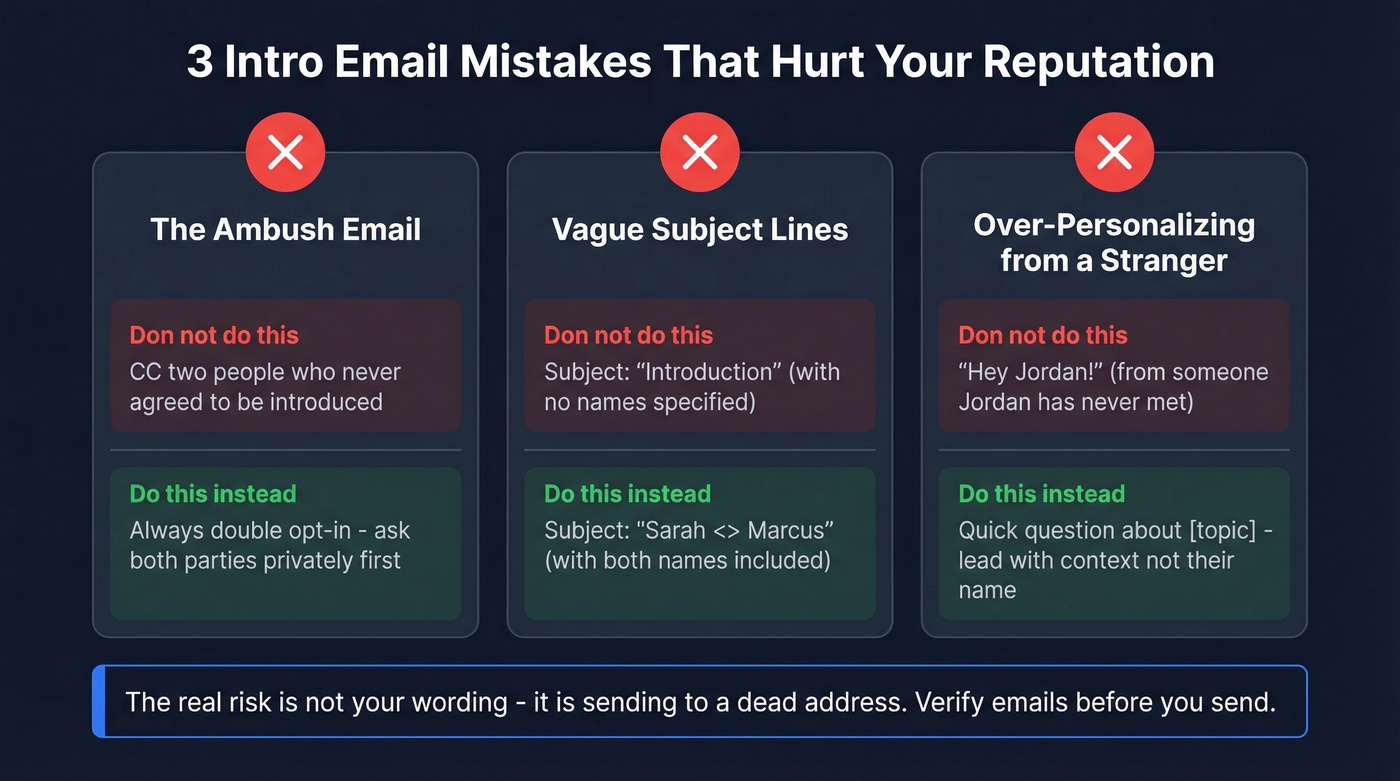
Vague subjects. "Introduction" with no names tells the recipient nothing. Include both names so they know exactly what they're looking at before they open it.
Over-personalizing from a stranger. Dropping someone's first name into a subject line when you don't know them reads as automated. In warm intros between people who know you, names are fine. For cold self-intros, lead with context instead.
Verify Before You Send
A bounced introduction email undercuts your credibility as a connector. We've had this happen - you vouch for someone, the email bounces, and suddenly you look careless. Run the address through Prospeo's email verification before sending. It catches invalid addresses with 98% accuracy, and the free tier gives you 75 verifications per month.
Also make sure SPF, DKIM, and DMARC are configured on your sending domain. These matter more than any single word in your subject line for deliverability. And don't worry about the "<>" symbol - authentication and sender reputation carry far more weight than any single character.
Let's be honest: most people agonize over subject line wording when the real risk is sending to a dead address. A perfect subject line that bounces is worse than a boring one that lands.
Self-introductions need more than a great subject line - you need the right email address in the first place. Prospeo's database of 143M+ verified emails lets you find anyone's real work address, not a dead alias or a catch-all black hole.
Find verified emails for the people you actually want to reach.
FAQ
Can I introduce two people without asking first?
No - always use double opt-in. Email both parties separately, explain why the connection is worth their time, and only send the joint intro after both agree. Skipping this creates unwanted obligation and can damage your relationship with both people.
Is "[Name] <> [Name]" professional enough?
Yes. The "<>" format is widely recognized shorthand for introductions across business, tech, and venture circles. It scans fast, fits within mobile truncation limits (about 26 characters for two short names), and immediately signals what the email contains.
How do I verify an email before sending an intro?
Run the address through a verification tool before hitting send. Prospeo's free tier includes 75 email verifications per month at 98% accuracy - enough to confirm every introduction you send. A bounced intro wastes everyone's time and damages your credibility as a connector.
What subject line works for introducing yourself?
Lead with context, not your name. Lines like "Quick question about [topic]" or "[Mutual contact] suggested I reach out" outperform generic self-introductions. Strangers seeing their own name in a subject line from an unknown sender typically assume it's automated outreach.