

Best Email Tracking Chrome Extensions in 2026
You sent 50 cold emails yesterday. Your tracker says 35 were opened. Your real open count? Probably 12-15.
The gap between what any email tracking Chrome extension reports and what actually happened has never been wider. Apple Mail Privacy Protection generates machine opens, corporate firewalls block tracking pixels entirely, and Gmail's image proxy inflates counts. Open tracking is the most oversold feature in sales tech.
But it's not useless. In our testing across dozens of campaigns, the teams that get value from email tracking share two traits: they understand the limits, and they feed their tracker clean data. Pick the right extension, verify your list before sending, and open rates become a useful directional signal instead of a vanity metric.
Our Picks (TL;DR)
Annual billing prices shown where applicable.
| Pick | Tool | Why | Starting Price |
|---|---|---|---|
| Best free tracker (no strings) | Snov.io Email Tracker | Truly free, unlimited, no branding. 4.9-star rating. | $0 |
| Best free tracker + CRM | Streak | Email and link tracking free forever, with a CRM if you grow into it. 4.5/5 on G2. | $0 (CRM from $49/mo) |
| Best for data quality before tracking | Prospeo | Verify your list first so tracking data reflects real engagement, not bounces. 98% email accuracy. | $0 (75 emails/mo free) |
How Email Tracking Works
Every email tracking Chrome extension uses the same trick: a tiny, invisible 1x1 pixel image embedded in your outgoing email. When the recipient opens the email and their mail client loads images, that pixel fires a request back to the tracker's server, capturing a timestamp, the recipient's approximate location via IP, device type, and sometimes which email client they're using. Some extensions also wrap your links through a redirect so they can log when someone clicks through to your proposal or pricing page.
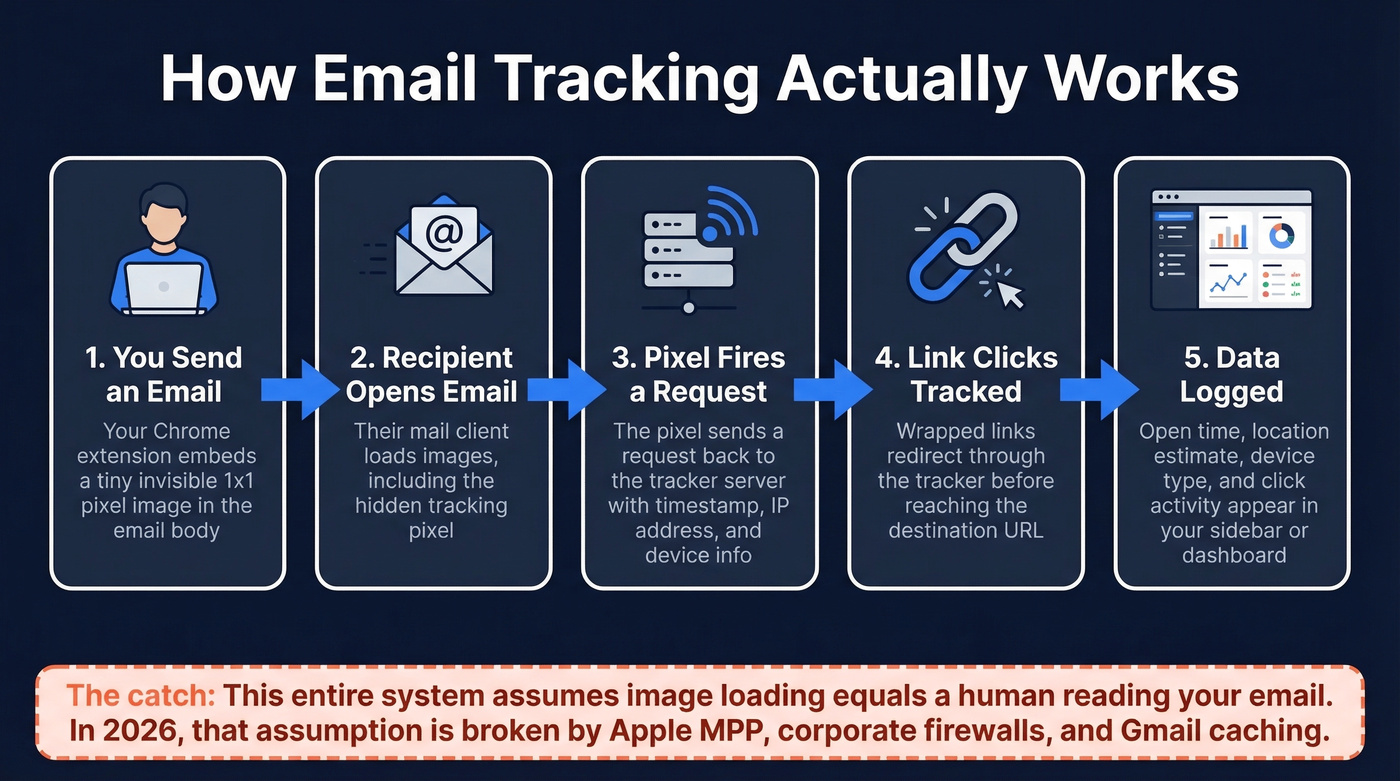
The whole system depends on one fragile assumption: that image loading equals a human reading your email. In 2026, that assumption is broken.
Why Open Tracking Breaks
Three forces are making open-rate data unreliable, and every sales team needs to understand them before trusting a tracker's dashboard.
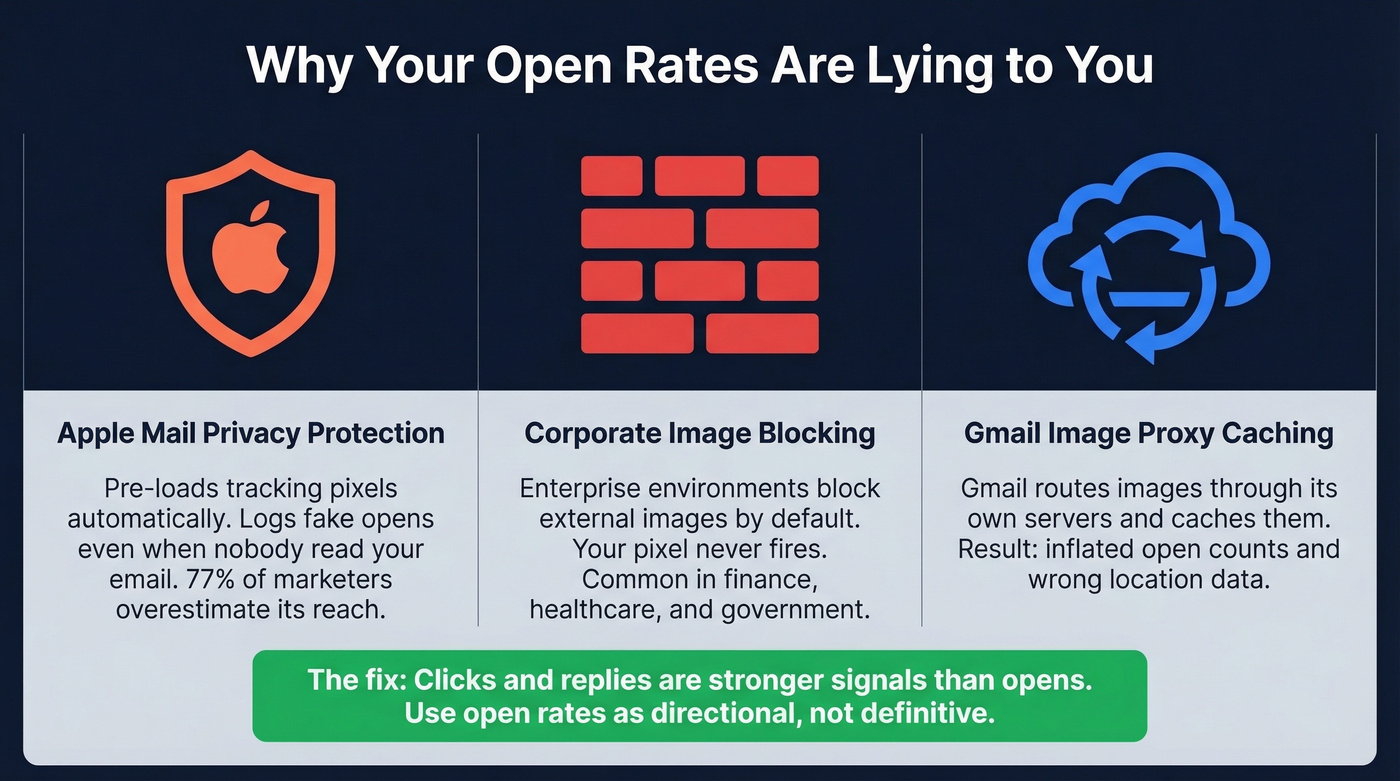
Apple Mail Privacy Protection generates fake opens. Launched in September 2021, MPP pre-loads tracking pixels and masks IP addresses - so your tracker logs an "open" even when the recipient never looked at your email. It requires opt-in, but 77% of marketers mistakenly believe MPP is automatic, which means most teams overestimate its reach while still being blindsided by its effect. iOS 18 made things worse by adding AI previews and inbox categories that further muddy engagement signals.
Corporate image blocking kills the pixel entirely. Many enterprise email environments block external images by default. Your tracking pixel never loads. The recipient reads your email, clicks nothing, and your tracker shows zero engagement - especially common in financial services, healthcare, and government.
Gmail's image proxy caches pixel loads. Gmail routes images through its own proxy servers, which can cache the pixel and serve it from Google's servers on subsequent loads. The result: inflated open counts and inaccurate location data.
Deliverability varies across trackers. Salesflare's 2026 comparison ranks trackers using a mix of tracking features, user reviews, and an automated deliverability test via MailReach. If your tracker's domains get flagged, every email you send through it suffers - a hidden cost most "free" trackers don't advertise.
Here's the thing: clicks and replies are stronger signals than opens. Use open tracking as a directional indicator, not a source of truth. And the fix isn't a better tracker - it's better data going in.

Open tracking on bounced emails is wasted data. Prospeo's 5-step verification delivers 98% email accuracy, so every open and click you track reflects a real person reading your message - not a delivery failure or spam folder hit.
Clean your list first. Then your tracker actually means something.
Best Extensions Compared
Snov.io Email Tracker
If you want free, unlimited tracking with zero upsell pressure, install this one and stop reading.
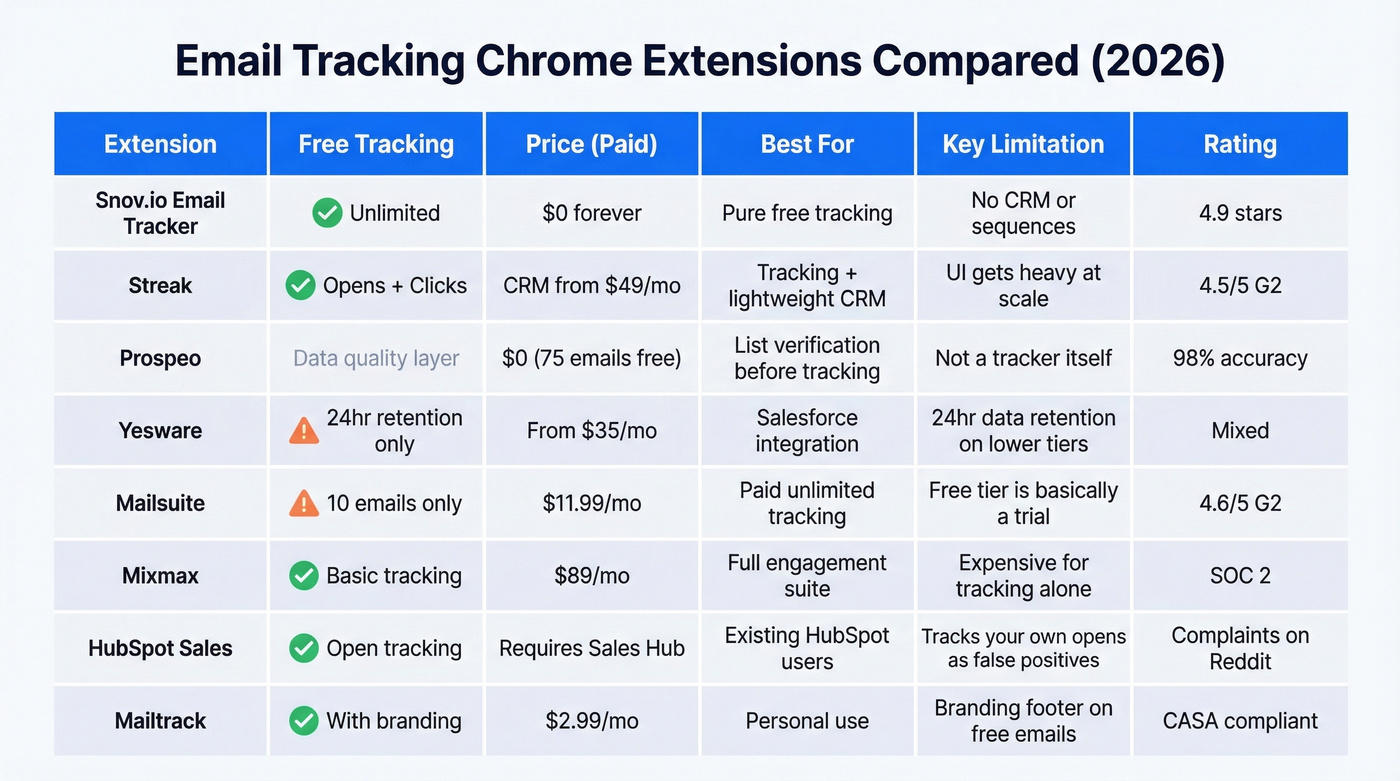
Snov.io's standalone tracker is the rare extension that's genuinely free with no asterisks. No branding on your emails, no cap on tracked messages, no "upgrade to unlock" gates. It runs a standard tracking pixel inside Gmail, gives you desktop notifications when someone opens, and logs a full open history in the Gmail sidebar.
The scheduling feature lets you queue emails up to three months out, and the reminder system nudges you when recipients don't open, don't click, or don't reply. With 100K+ extension users and 8K+ five-star reviews, it's one of the most well-reviewed options in this category.
The tradeoff is scope. This is tracking only - no CRM, no sequences, no pipeline management. For individuals and small teams who want clean, free tracking without the bloat, it's the obvious first install.
Streak: When You Need More Than Tracking
Streak takes the opposite approach - it's a full CRM that lives inside Gmail, and email tracking is just one piece. The tracking itself (opens and link clicks) is free forever, along with snippets and mail merge at 50 sends per day. That's a genuinely useful free tier, and it carries a 4.5/5 on G2 from teams who've used it long-term.

Where Streak gets interesting is the growth path. When you start needing pipeline stages, shared contacts, and reporting, CRM tiers start at $49/user/month on annual billing ($59 monthly). Pro+ runs $69/$89, and Enterprise hits $129/$159. Not cheap, but you're getting a CRM that never leaves your inbox.
The limitation is real, though. Reddit threads and reviews consistently flag that Streak's UI can feel overwhelming once you're managing 100+ threads, and integrations outside the Gmail ecosystem are limited. If your stack runs on Salesforce or HubSpot, Streak's CRM won't replace those. But as a free tracker with an optional CRM upgrade path, it's hard to beat.
Choose Snov.io if you want pure tracking with zero clutter. Choose Streak if you want tracking today and might need a lightweight CRM tomorrow.
Prospeo
Most email tracking guides skip the step that matters most: verifying your list before you track anything.
Tracking opens on emails that bounce or land in spam produces meaningless data. It's like checking if someone read a letter you mailed to the wrong address. Prospeo isn't a tracking extension - it's the data quality layer that makes tracking extensions useful.
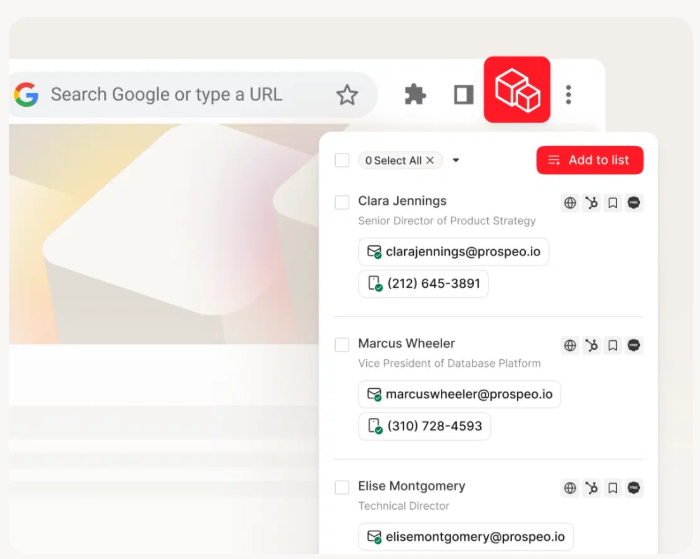
The database covers 300M+ professional profiles, 143M+ verified emails, and 125M+ verified mobile numbers, built from 800M+ collected records and run through a 5-step verification process that handles catch-all domains, removes spam traps, and filters honeypots. The result is 98% email accuracy - which means your tracking data actually reflects human behavior, not delivery failures. Data refreshes every 7 days, compared to the 6-week industry average.
The Chrome extension (40K+ users) finds verified emails and phone numbers from any website in one click. The free tier gives you 75 emails and 100 Chrome extension credits per month. Paid plans run roughly $0.01 per email.
We've seen the impact firsthand in customer results: Snyk dropped bounce rates from 35-40% to under 5%, and Meritt cut bounce rate from 35% to under 4%.
The best email tracking Chrome extension can't fix bad data. Prospeo verifies 143M+ emails with catch-all handling, spam-trap removal, and a 7-day refresh cycle - so your tracking dashboard shows real engagement, not noise from outdated contacts.
Stop tracking ghosts. Start with verified emails at $0.01 each.
Yesware: The 24-Hour Gotcha
The single biggest gotcha in this entire category: Yesware's Free and Pro tiers only retain tracking data for 24 hours. Send on Monday, check on Wednesday - your data is gone. For any B2B sales cycle longer than a day (which is all of them), this makes the lower tiers nearly useless for tracking.
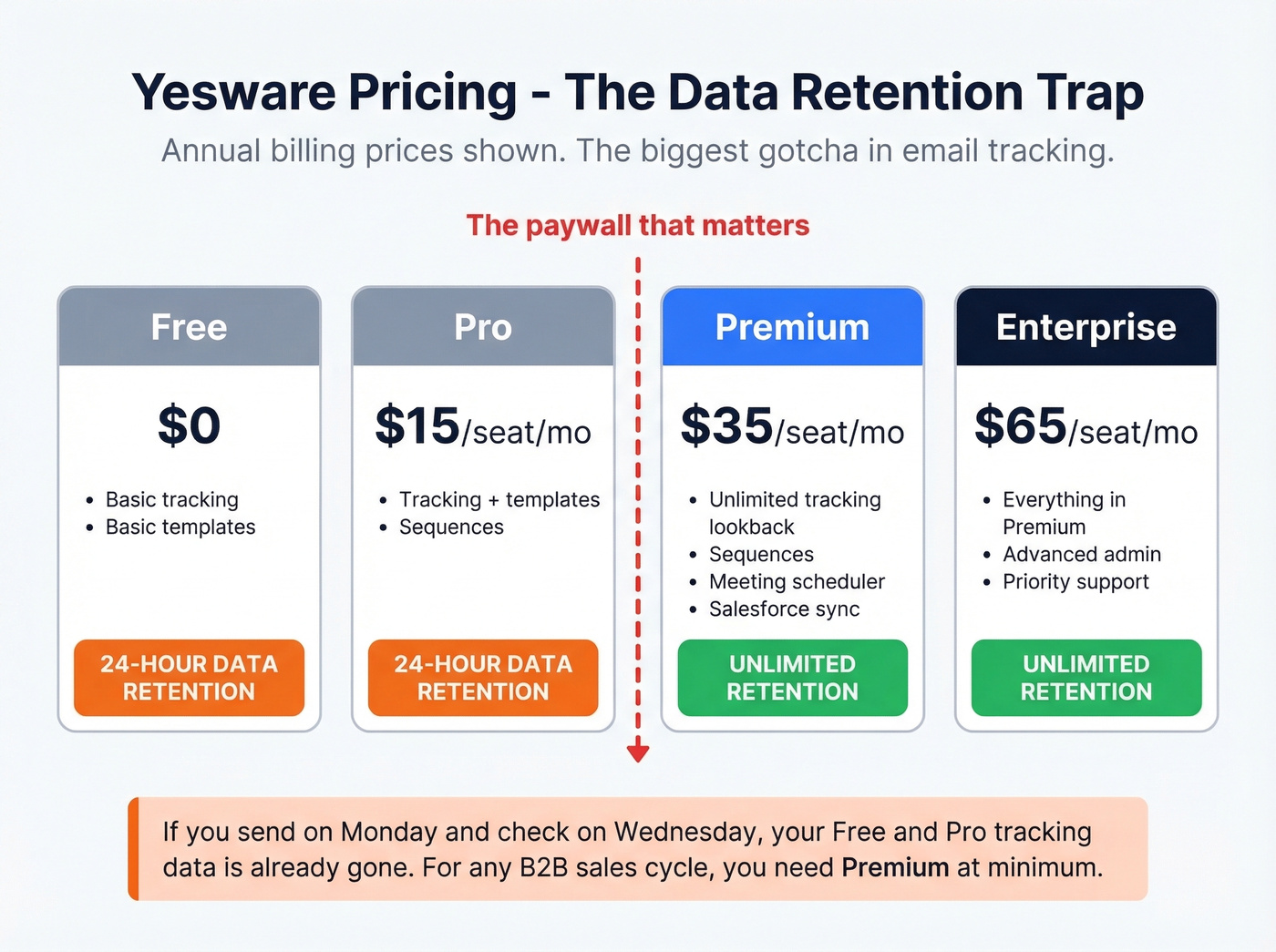
Yesware at the Premium tier ($35/seat/month annual) and above is a different story - tracking, templates, sequences, meeting scheduler, and Salesforce sync all in one extension. Pricing runs from free to $15/seat/month (Pro, annual), $35 (Premium), and $65 (Enterprise). You need Premium for unlimited lookback.
If your team's already on Premium and needs sequences plus Salesforce integration, Yesware earns its price. Skip it if you're on Free or Pro thinking you're getting full tracking - you're not.
Mailsuite
Mailsuite markets itself as having "3,000,000+" users. What "free" actually means: open tracking on 10 emails, link click tracking on 10 emails, and 100 campaign sends per month. That's a trial, not a plan.
The Advanced tier at $11.99/user/month (4.6/5 on G2) unlocks unlimited tracking and removes branding. It's CASA compliant and reviewed yearly. The product works fine - the marketing just oversells the free experience. A Woodpecker review calls out upgrade pop-ups, and Reddit threads echo the same frustration. If you're willing to pay $12/month, Mailsuite is solid. For genuinely free tracking, look elsewhere.
Mixmax
Mixmax is a full engagement suite - tracking, sequences, scheduling, rules engine - aimed at mid-market sales teams. The price reflects that ambition: $89/user/month on annual billing, $105 monthly. After a 14-day free trial, you drop to Mixmax Free, which still includes email tracking, scheduling, and basic sequences.
SOC 2 Type II, GDPR, HIPAA, and CPRA compliant - which matters if you're in a regulated industry. But let's be honest: $89/seat is only justifiable if you're using at least three of Mixmax's features daily. If you installed it for tracking and occasionally use sequences, you're overpaying by 5x.
HubSpot Sales
HubSpot's Chrome extension tracks email opens and sends real-time desktop notifications when a contact opens an email.
The catch: HubSpot's extension can show false positives, including cases where it tracks "opened" when the sender opens their own sent email. This is a persistent complaint on r/hubspot, and it inflates your open counts in a way that undermines the whole point of tracking. Link click tracking requires a Sales Hub seat. Use this if you're already paying for HubSpot. Don't install it just for tracking.
Mailtrack
Free with branding - a small "sent with Mailtrack" footer on every email. Premium runs $2.99/user/month on annual billing, $5.99 monthly. CASA compliant. Lightweight and simple, best for personal use where the branding doesn't matter. If you're sending to prospects or clients, that footer screams "I'm tracking you," which defeats the purpose.
Hunter MailTracker
Free tracker from the Hunter.io ecosystem. Hunter's paid plans start at $20/month for broader email-finding features. 4.7/5 on the Chrome Web Store. Best for teams already using Hunter who want tracking bundled into their existing workflow. The tracking itself is basic - opens and link clicks, no scheduling or sequences.
Right Inbox
Paid from $7.95/month on annual billing. 4.8/5 on G2. Covers email tracking, scheduling, reminders, and recurring emails. A budget option for Gmail power users who want more than tracking but less than a full engagement suite. No free tier, which is unusual in this category - but you avoid the bait-and-switch "free" experience that plagues tools like Mailsuite.
Pricing Comparison
Every extension in this category markets itself as "free and unlimited." The reality is more nuanced - annual vs. monthly billing creates significant price gaps, and "free" often means capped, branded, or time-limited.
| Tool | Free Plan | Free Limits | Paid From | Key Gotcha |
|---|---|---|---|---|
| Snov.io Tracker | Yes | Unlimited, no branding | $0 (free forever) | No CRM or sequences |
| Streak | Yes | Unlimited tracking | $49/user/mo (CRM) | CRM features are paid |
| Yesware | Yes | 24-hr lookback only | $15/seat/mo (annual) | Data expires after 24 hrs |
| Mailsuite | Yes | 10 emails tracked | $11.99/user/mo | "Unlimited" is misleading |
| Mixmax | Yes | Basic after trial | $89/user/mo (annual) | Expensive for tracking only |
| HubSpot Sales | Yes | Basic tracking | Sales Hub seat for clicks | Self-opens counted |
| Mailtrack | Yes | Unlimited + branding | $2.99/user/mo | Footer on every email |
| Hunter MailTracker | Yes | Unlimited tracking | $20/mo (Hunter plans) | Tracking is basic |
| Right Inbox | No | N/A | $7.95/mo | No free tier |
Best value: Snov.io for free tracking, Streak for free tracking plus a CRM growth path, Mailtrack Premium at $2.99/mo if you just want the branding removed.
Feature Matrix
These are Chrome extensions, so everything runs in your browser. We've split tracking features from ecosystem features to keep this scannable.
| Tool | Opens | Link Clicks | Scheduling | Free Cap |
|---|---|---|---|---|
| Snov.io Tracker | Yes | Yes | Yes | Unlimited |
| Streak | Yes | Yes | No | Unlimited |
| Yesware | Yes | Yes | Yes | 24-hr lookback |
| Mailsuite | Yes | Yes | Yes | 10 emails |
| Mixmax | Yes | Yes | Yes | Basic (post-trial) |
| HubSpot Sales | Yes | Yes | Yes | Basic |
| Mailtrack | Yes | No | No | Unlimited + branding |
| Hunter MailTracker | Yes | Yes | No | Unlimited |
| Right Inbox | Yes | Yes | Yes | None (paid only) |
Streak and HubSpot Sales include built-in CRMs. Yesware and Mixmax sync with Salesforce. The remaining tools are standalone trackers - pair them with your existing CRM via Zapier or native integrations.
GDPR and Email Tracking
If you're tracking emails sent to EU recipients, GDPR applies regardless of where you're based. We've seen teams get burned by assuming their tracker handles compliance automatically - it doesn't. You're responsible for consent and disclosure regardless of which extension you install.
The practical checklist:
- Explicit opt-in required. No pre-checked boxes. Recipients must actively consent to being tracked.
- Disclose what you collect. Open times, approximate location, device type - all of it needs to be in your privacy policy.
- 30-day response window. Data subject requests for access, deletion, or export must be handled within 30 days.
- Fines are real. Up to EUR 20 million or 4% of global revenue, whichever is higher.
- Retention norms. Most compliant tools delete tracking data after 12-24 months.
Among the tools listed here, Mixmax holds SOC 2 Type II, GDPR, HIPAA, and CPRA compliance. Mailtrack and Mailsuite are CASA compliant.
FAQ
Are email tracking Chrome extensions accurate?
Not fully. Apple Mail Privacy Protection generates fake opens, corporate firewalls block tracking pixels entirely, and Gmail's image proxy inflates counts. Treat opens as a directional signal - clicks and replies are far more reliable indicators of genuine engagement.
What's the best free email tracking extension?
Snov.io Email Tracker offers unlimited tracking with no branding and no upgrade gates - it's the cleanest free option. Streak is the runner-up if you want a free CRM alongside tracking. Mailsuite caps free tracking at 10 emails, and Mailtrack adds a branded footer.
Can recipients tell I'm tracking their email?
Most extensions use an invisible 1x1 pixel, so recipients won't see anything visual. Mailtrack's free tier adds a footer that reveals tracking. Tech-savvy recipients can inspect email source code and spot tracking pixels or wrapped redirect links - keep this in mind when emailing developers or security teams.
Do tracking extensions affect deliverability?
They can. Tracking pixels add external image calls, and some spam filters flag known tracking domains. Salesflare's 2026 comparison tests deliverability with MailReach and shows significant variance across tools - test before committing one extension to your entire team.
Should I verify my list before using a tracker?
Yes. Tracking opens on emails that bounce or land in spam produces meaningless data and damages sender reputation. Prospeo's free tier (75 verified emails/month) lets you clean your list before sending, so your open and click data reflects real engagement instead of delivery failures.