

How to Connect Any Outreach Tool to Your CRM Without a Data Disaster
You connected your shiny new outreach tool to HubSpot last Tuesday. By Friday, your CRM has duplicate contacts everywhere, your sales manager can't trust the pipeline report, and someone on the team is manually deleting records one by one.
The #1 complaint on r/revops when people connect an outreach tool to a CRM? "Half-baked" syncs that create duplicates and break every time the CRM pushes an update. McKinsey research shows automating even a third of sales tasks boosts productivity 10-15% and grows revenue 10% - but only if the data flowing between systems is clean. Here's how to get it right.
Clean Your Data First
Most CRM integrations fail because of dirty data, not bad software. When outbound volume scales up, CRMs fill with partially completed records, inconsistent lifecycle stages, and fields that mean different things depending on who touched them. Reporting becomes useless, and ops spends more time cleaning than building.
The fix is upstream: verify and enrich your contact data before it enters the sync loop. Garbage in, garbage out applies doubly when records are flowing between two systems on autopilot.
Prospeo handles this natively - upload a CSV or connect through its Salesforce and HubSpot integrations, and records come back enriched with 50+ data points. Emails are verified at 98% accuracy, and the API match rate sits at 92%. One customer, Meritt, saw their bounce rate drop from 35% to under 4% after switching to verified data, and their pipeline tripled. Clean data at the top means clean reports, clean pipeline, and clean forecasts downstream.

Native Integration vs. Middleware
A G2 buyer-behavior study found 82% of software buyers say integration with existing tools is crucial when evaluating new software. But not all integrations are equal.
| Dimension | Native | Zapier/Make Middleware |
|---|---|---|
| Sync latency | Near real-time (seconds) | Minutes (often 5-15 min polling) |
| Cost | Often included in plan | Usage-based, scales fast |
| Sync depth | Bi-directional, custom fields, deeper object support | Trigger-based; depth depends on the workflow you build |
| Support | One vendor owns it | Split across vendors |
| Security | Direct connection | Data flows through a third party |
If a native connector exists, use it. Middleware bridges gaps between tools that don't talk to each other directly - it's a workaround, not a replacement for a real integration.
How Outreach CRM Activity Sync Works
Understanding the mechanics prevents most "why didn't my data sync?" panic.
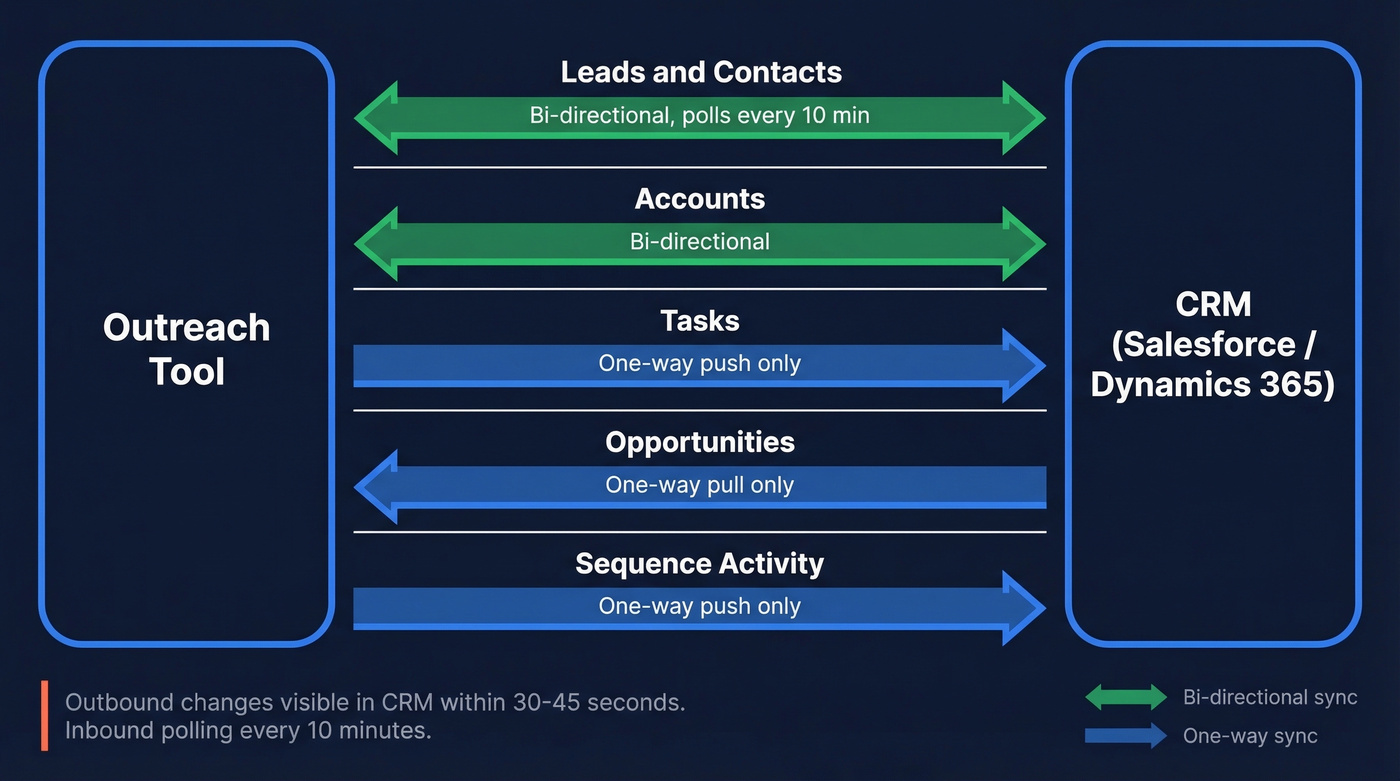
Using Outreach.io's Salesforce connector as the reference model: Outreach pulls new and updated records from your CRM every 10 minutes via automatic polling and can be configured to shorter intervals. When pushing updates back, it waits 60 seconds to bundle multiple changes into one package, reducing unnecessary load. Outbound changes are usually visible in Salesforce within 30-45 seconds.
The sync covers Lead, Contact, Account, Opportunity, and Task objects. But there are directional limits that trip people up:
- Tasks only push from Outreach to CRM - tasks created in your CRM won't appear in Outreach.
- Opportunities sync down from CRM to Outreach, but edits in Outreach don't push back up.
- Sequence data flows one way for most activity objects, so your reporting strategy needs to account for which system is the source of truth.
Compatibility includes Salesforce Lightning, Salesforce Classic, Salesforce Console, SKUID Overlay, and Microsoft Dynamics 365 Sales. Teams evaluating email sequencing integrations with Dynamics should confirm their edition supports the required API endpoints before committing. Knowing these boundaries before go-live saves hours of debugging.

Every outreach-to-CRM sync starts with data quality. Prospeo enriches contacts with 50+ data points at a 92% match rate - directly through native Salesforce and HubSpot integrations. No middleware. No duplicates from unverified records tanking your pipeline reports.
Stop syncing dirty data. Start with 98% verified emails.
Step-by-Step: Link Your Outreach Tool to a CRM
This sequence works regardless of which outreach platform you're connecting.
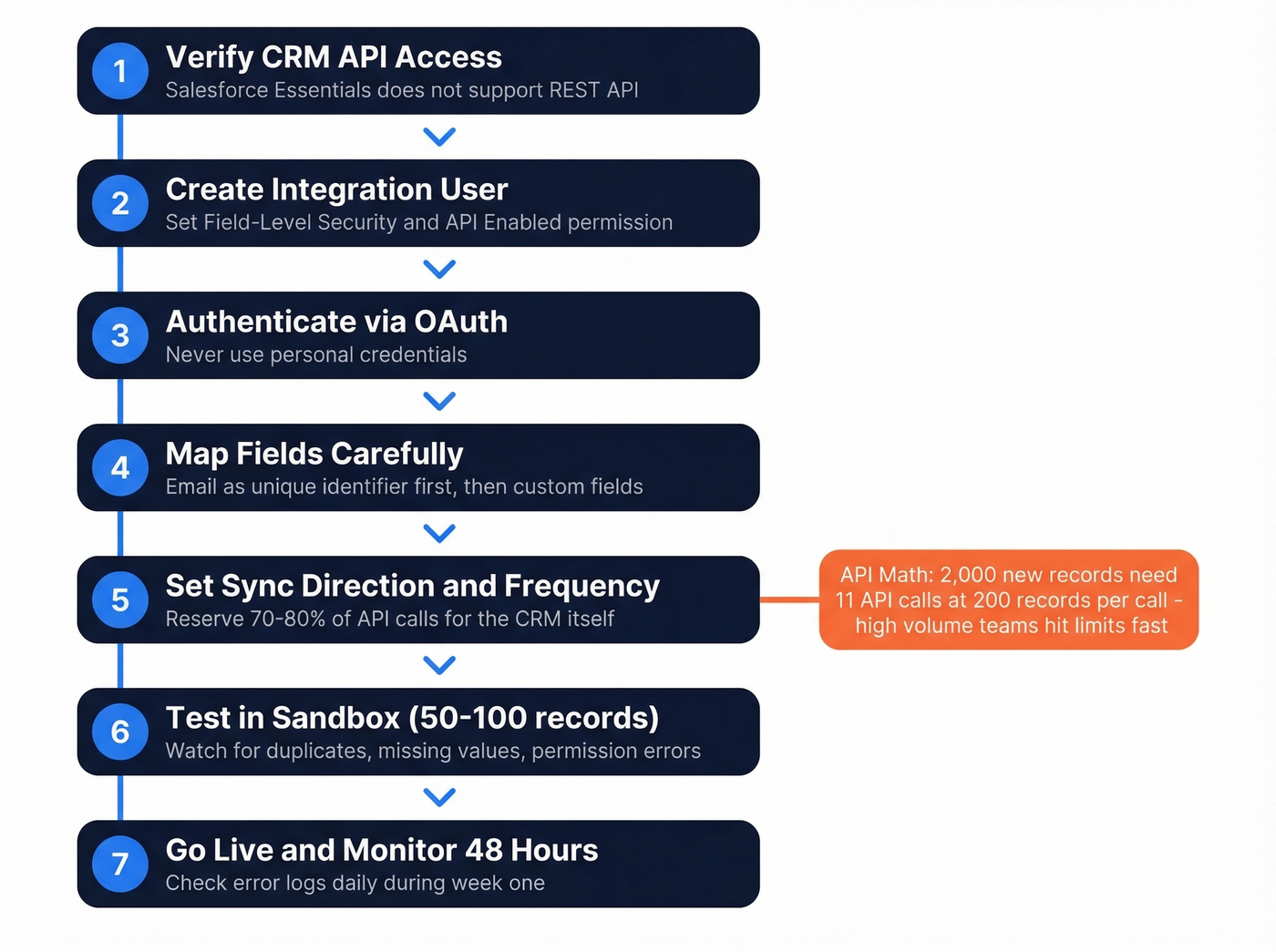
- Verify your CRM edition supports API access. Salesforce Essentials doesn't support REST API access - even with add-ons. Professional editions need a Web API Package plus purchased API call bundles.
- Create a dedicated integration user with permissions to create, read, and edit required objects. Enable Field-Level Security on all mapped fields, and make sure the user has API Enabled permission.
- Authenticate via OAuth using the integration user - never personal credentials.
- Map fields carefully. Start with email as the unique identifier, then map custom fields. Enable "Update CRM" for any field you want to push from your outreach platform to the CRM.
- Configure sync direction and frequency. Set your outreach tool's API call allocation to 20-30% of your CRM's total limit, reserving 70-80% for the CRM itself.
- Test in sandbox with 50-100 records. Watch for duplicates, missing field values, and permission errors. If you plan to add Salesforce contacts to an outreach sequence, test this workflow specifically - permission mismatches on the Contact object are the most common failure point.
- Go live and monitor for 48 hours. Check error logs daily during the first week.
Here's the thing about API math that most setup guides skip: Salesforce detects up to 2,000 new records in a single polling call, but imports cap at 200 records per API call. So 2,000 new records requires 11 API calls just for the initial import. High-volume outbound teams hit limits fast.
Integration Matrix With Pricing
Not every outreach tool connects the same way to every CRM. Here's a practical matrix with directional pricing for 2026:
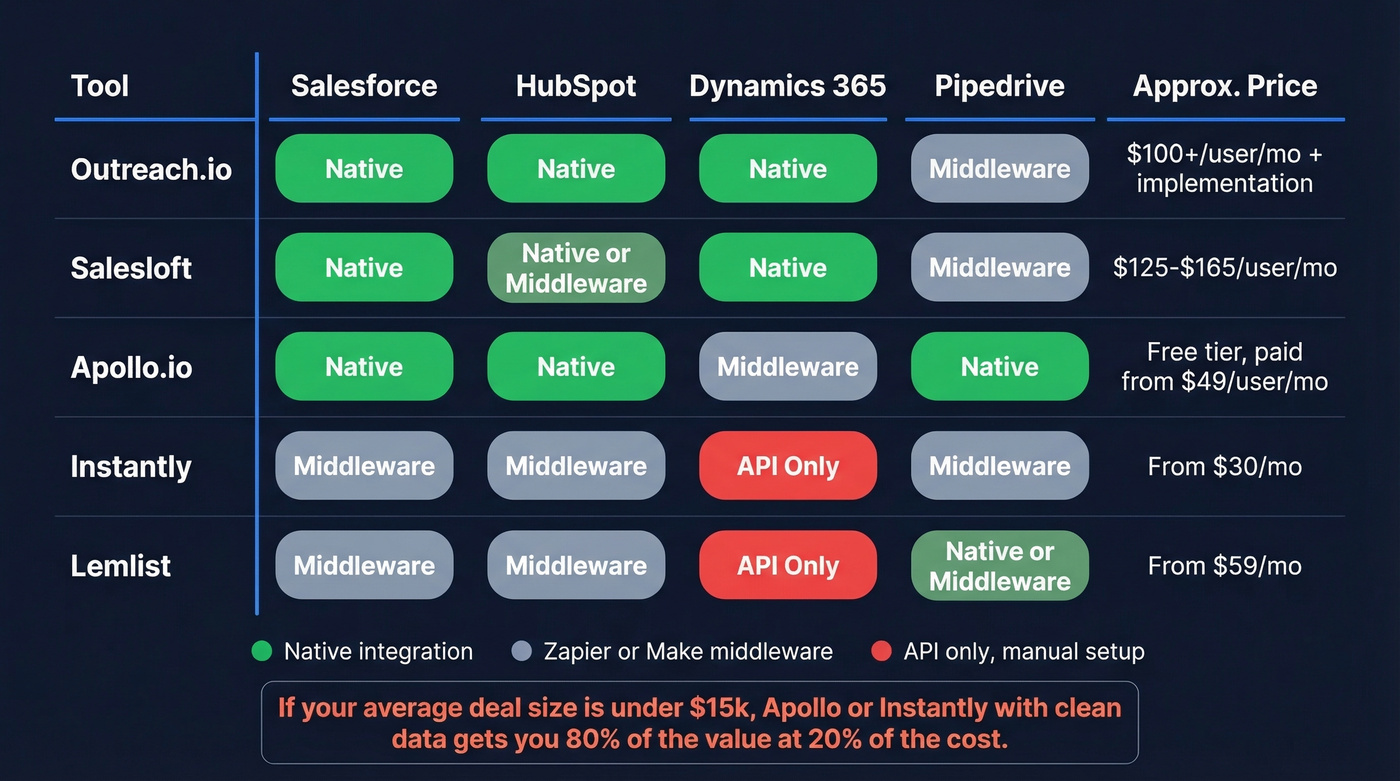
| Tool | Salesforce | HubSpot | Dynamics 365 | Pipedrive | Approx. Pricing |
|---|---|---|---|---|---|
| Outreach.io | Native | Native (via HubSpot Data Sync) | Native | Zapier/Make | ~$100+/user/mo + $1K-$8K implementation |
| Salesloft | Native | Native or middleware | Native | Zapier/Make | ~$125-$165/user/mo (annual) |
| Apollo.io | Native | Native | Zapier/Make | Native | Free tier; paid from ~$49/user/mo |
| Instantly | Zapier/Make | Zapier/Make | API only | Zapier/Make | From ~$30/mo |
| Lemlist | Zapier/Make | Zapier/Make | API only | Native or middleware | From ~$59/mo |
Enterprise tools like Outreach.io and Salesloft invest heavily in native Salesforce connectors. Lighter tools like Instantly and Lemlist lean on middleware - which works, but expect the latency and dedup tradeoffs we covered above.
Let's be honest: if your average deal size is under $15k, you probably don't need Outreach.io or Salesloft-level integration complexity. Apollo or Instantly with a clean data layer will get you 80% of the value at 20% of the cost.
Five Mistakes That Kill Your Integration
1. Connecting before cleaning data. This is the single most common failure pattern we see. Syncing unverified contacts means bounces, outdated records, and inflated activity metrics flowing into your CRM from day one. Verify and enrich your contact list before it enters the sync loop - not after.

2. No dedup rules or unique identifier strategy. If your outreach tool uses email as the unique ID and your CRM uses domain + name, you'll create duplicates on every sync. Align on email as the primary identifier across both systems before enabling the connection.
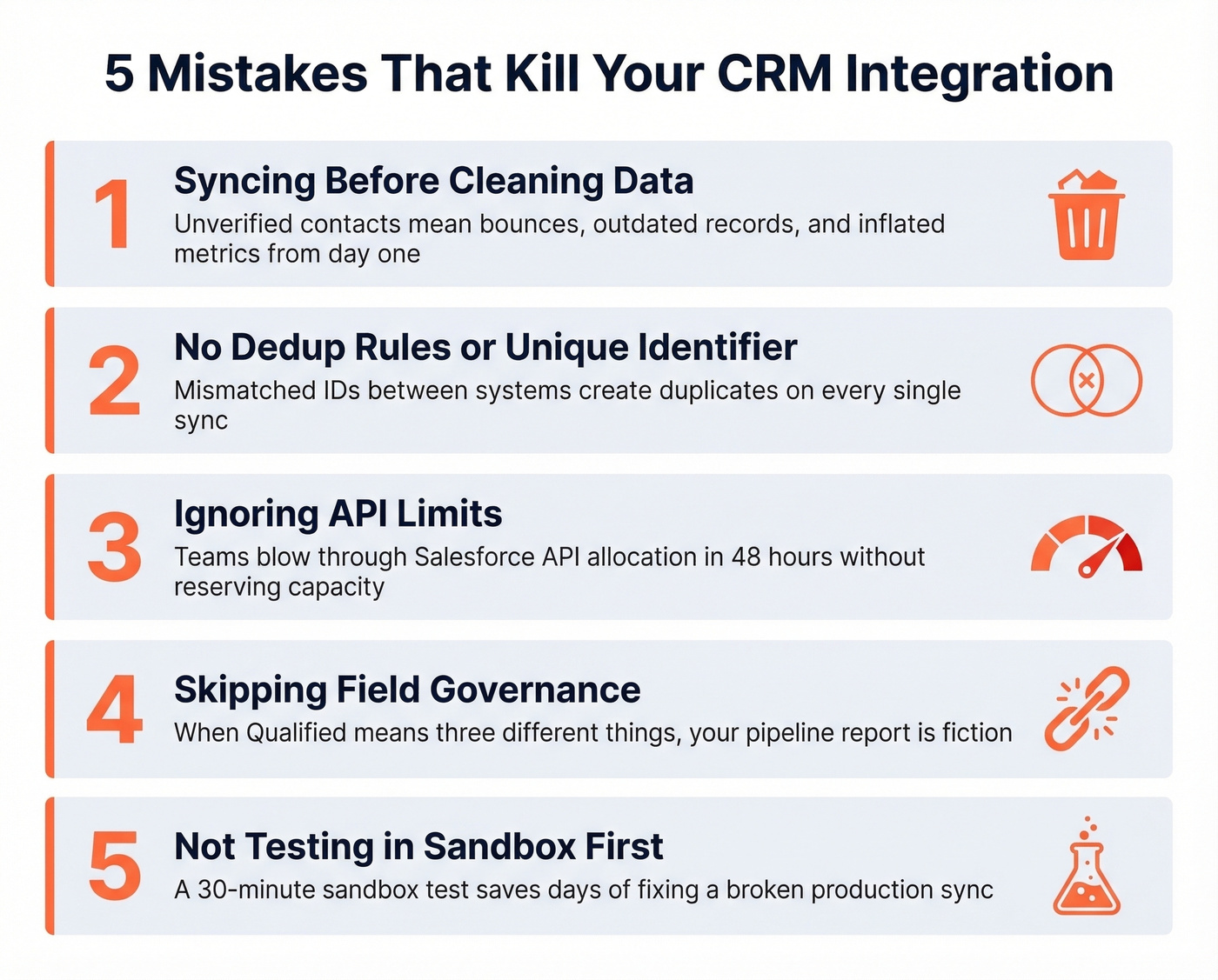
3. Ignoring API limits. We've seen teams blow through their Salesforce API allocation in the first 48 hours because they didn't reserve capacity. Set your outreach tool's allocation to 20-30% of total API calls, not 100%.
4. Skipping field governance. Outreach doesn't map to sub-statuses. If your CRM relies on sub-status fields, you need a custom field workaround. Document every field mapping before go-live - not after someone asks why "Qualified" means three different things.
5. Not testing in sandbox first. A sandbox test with 50-100 records takes 30 minutes. Fixing a broken production sync takes days. Skip this if you enjoy explaining to your VP of Sales why the pipeline report is fiction.
Troubleshooting a Broken Sync
When data stops flowing, resist the urge to start toggling settings.
Start with error logs - both your outreach tool and CRM maintain sync logs, and they'll tell you more in 30 seconds than an hour of guessing. Isolate the failing step: is it the polling call, the field mapping, or the write-back? Narrowing the failure point cuts debugging time in half.
The sneakiest culprit is validation rules. A single required field that's empty can silently block entire batches without throwing an obvious error. Check authentication too - OAuth tokens expire, integration users lose permissions when admins update roles, and API limits get hit during high-volume sends. In our experience, about 60% of "broken sync" tickets trace back to one of these three causes, not the integration software itself.
One detail that catches almost everyone: after mapping a new field, existing records won't populate with the new value until that field actually changes. You'll need to trigger a manual sync to backfill - otherwise you'll stare at blank columns wondering what went wrong.
If you’re building a longer-term fix, it helps to document your lead status definitions, set up lead scoring, and standardize your firmographic filters so your CRM stays consistent as volume grows.
FAQ
Can I connect my outreach tool to multiple CRMs at once?
Most outreach tools support one primary CRM connection. If you're running two CRMs, middleware like Zapier can mirror data between them - but expect dedup headaches. Consolidating to one CRM is almost always the better move, and the consensus on r/sales backs this up.
How do I stop duplicates after connecting?
Set email as the unique identifier and configure dedup rules in your CRM before enabling the sync. Most duplicates come from mismatched identifiers where one system uses email and the other uses domain plus name.
How do I add contacts to a sequence from Salesforce?
Most native integrations let reps select Leads or Contacts directly inside Salesforce and push them into an outreach sequence with a single click. In Outreach.io, this is handled through the Salesforce sidebar - select your contacts, choose a sequence, and the records sync automatically. Make sure the integration user has write access to the Contact object, and confirm that each record has a verified email before adding it.
What's the best way to keep CRM data clean automatically?
Use a platform with a short data refresh cycle and native CRM integrations. Prospeo refreshes records every 7 days - the industry average is 6 weeks - and plugs directly into Salesforce and HubSpot, keeping contacts enriched and emails verified without manual cleanup.
Meritt dropped their bounce rate from 35% to under 4% and tripled their pipeline - just by feeding verified data into their CRM sync. Prospeo's native integrations push enriched, deduplicated contacts into Salesforce and HubSpot at $0.01 per email.
Fix your integration at the source - clean data in, clean reports out.