

Firmographic Filters: Which to Use, How to Layer Them, and What Breaks
You've got 10,000 accounts in your CRM. Your reps can realistically work 200 this quarter. The difference between a great quarter and a wasted one comes down to which 200 you pick - and that's a firmographic filters problem. Not which filters you choose, but whether the data behind them was accurate this morning.
What You Need (Quick Version)
- Use 10+ filters, not just job title + industry + location. Three filters isn't targeting - it's a rough sketch.
- Layer firmographic fit with intent signals. Only ~5% of accounts are in-market at any given time. Filters without timing are expensive guessing. (If you need a framework, start with an ideal customer profile and score accounts against it.)
- If your data refreshes monthly or slower, your filters drift fast. Expect ~2.5% monthly data decay and ~30% annual rot unless you refresh aggressively.
What Firmographic Filters Actually Are
Firmographic filters are to companies what demographics are to people. They're the descriptive attributes - industry, headcount, revenue, location, ownership structure - that let you segment businesses into targetable groups. Where demographics tell you someone's a 35-year-old in Chicago, firmographics tell you a company is a 200-person SaaS business in Series B, headquartered in Austin, running Salesforce and HubSpot.
Every B2B prospecting workflow starts here. When you search with firmographic data, you're defining the universe of companies that match your ideal customer profile before layering on behavioral signals. (This is also where most teams decide whether they need a best B2B database or a narrower provider.)
The Complete Filter Checklist
| Category | Filters |
|---|---|
| Identity | Company name, domain, unique IDs (EIN/VAT/company number) |
| Size & Financials | Headcount, department headcount, annual revenue, funding stage, funding amount |
| Geography | HQ location, regional offices |
| Industry | NAICS code, SIC code, industry keywords, sub-industry |
| Org Structure | Ownership type, parent company, subsidiaries, legal structure |
| Technographics | Technologies used, tech stack categories, recent tech changes |
| Growth Signals | Headcount growth %, department growth, founding date, job postings, recent funding |
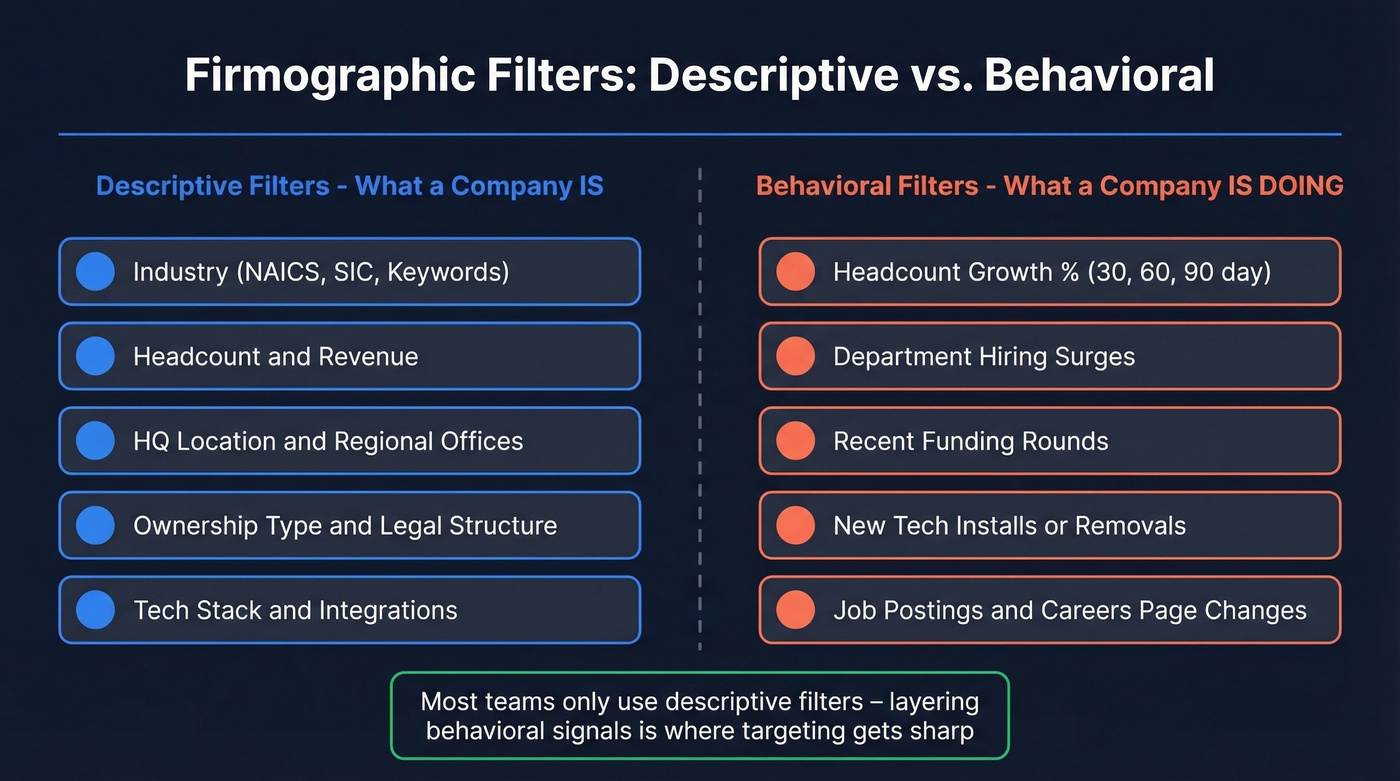
The split that matters is descriptive vs. behavioral. Descriptive attributes like industry, HQ, and headcount tell you what a company is. Behavioral attributes - headcount growth, tech changes, hiring patterns - tell you what a company is doing. Most teams only use the first kind, and that's where lists start to fall apart. (If you want a deeper breakdown, see our guide to technographics.)
Industry Filters: NAICS, SIC, or Keywords?
NAICS codes use a 6-digit hierarchy updated every five years. Drilling to 4-6 digits gives you precision; staying at 2 digits is too broad. "Manufacturing" covers everything from semiconductors to dog food.
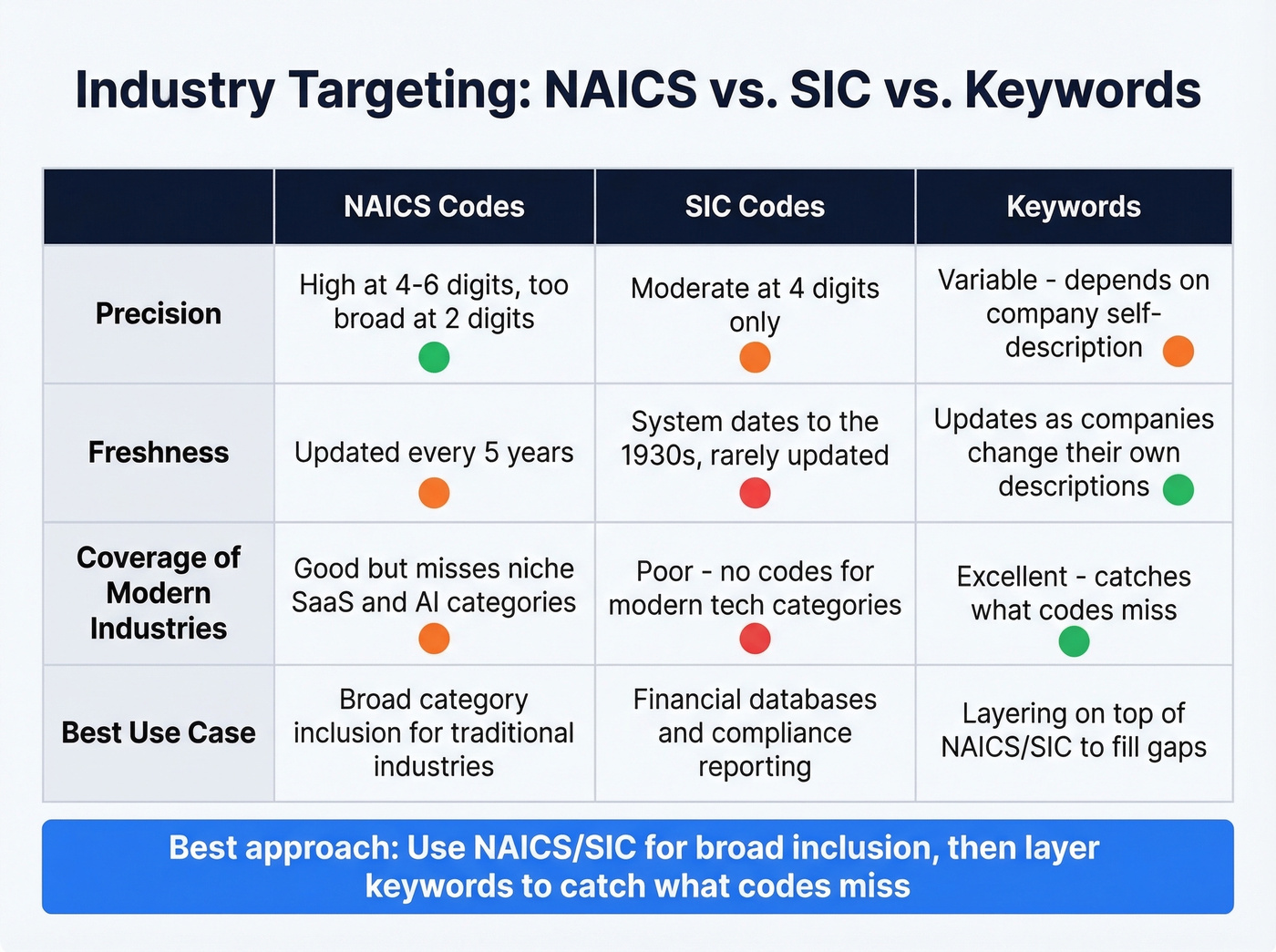
SIC codes are a 4-digit system from the 1930s, still common in financial databases. Good luck finding a clean SIC code for "AI-powered DevOps platform."
Keyword-based targeting reflects how companies actually describe themselves and updates faster than static classification codes. The downside? Inconsistency. Companies describe themselves however they want.
The right move: use NAICS/SIC codes for broad category inclusion, then layer keyword filters to catch what the codes miss. (If you're building lists at scale, a bulk lead generation workflow helps you keep this consistent.)

Layering NAICS codes with keyword filters only works if the data behind them is fresh. Prospeo's 30+ search filters - including technographics, buyer intent, headcount growth, and funding - refresh every 7 days, not the 6-week industry average. That means the firmographic stack you just built won't decay before your reps even open the list.
Build the 3-layer filter stack with data that's accurate this week, not last month.
Common Filter Mistakes That Break Lists
1. Trusting headcount buckets. Wide ranges like 51-200 employees lag behind reality. A company that hired 60 people last quarter might still show as "51-200" for months. Look for platforms offering min-max ranges instead of buckets.
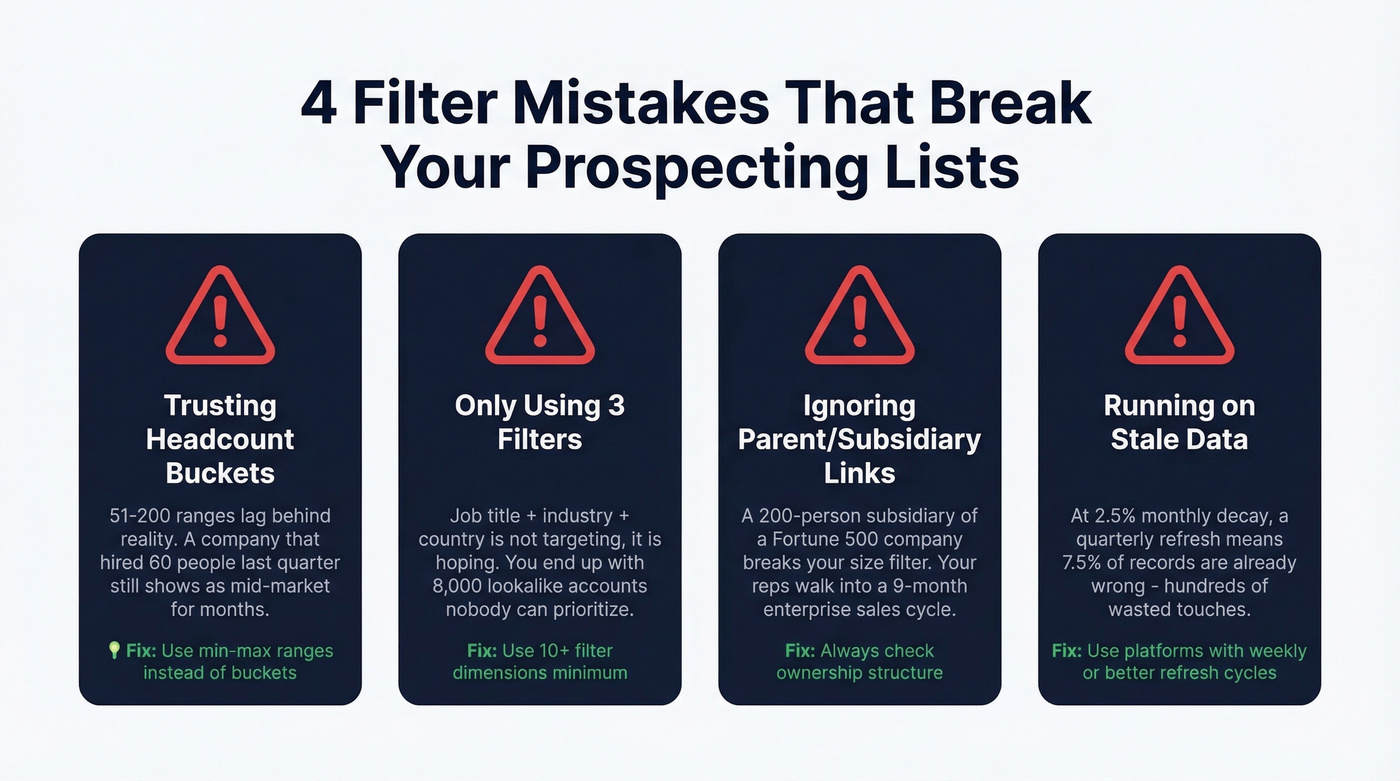
2. Dumping generic criteria and calling it targeting. We've watched teams throw a job title, an industry, and a country into their database and wonder why their lists have 8,000 lookalike accounts. One thread on r/sales_intelligence put it bluntly: that's not filtering, that's hoping. Effective B2B data search requires specificity across at least ten dimensions. (If you're pressure-testing your outbound motion, use these B2B sales best practices as a checklist.)
3. Ignoring the parent/subsidiary trap. A 200-person subsidiary of a Fortune 500 company breaks your size filter. Your reps think they're calling mid-market and walk into an enterprise procurement process with a 9-month sales cycle and a legal team that wants to redline every clause. Always check ownership structure when headcount or revenue is a key qualifier. (This is also why ABM teams track account based marketing benchmarks by segment.)
4. Running on stale data. Contact data decays at ~2.5% per month. A quarterly refresh means roughly 7.5% of your records are already wrong - hundreds of wasted touches on a 10,000-account list. (If you're evaluating vendors, compare against the best data enrichment tools.)
The 3-Layer Filter Stack
Here's the thing: firmographic filters are necessary but wildly insufficient on their own. Only ~5% of your target accounts are actively in-market at any given time, which means 95% of a firmographic-only list isn't ready to buy.
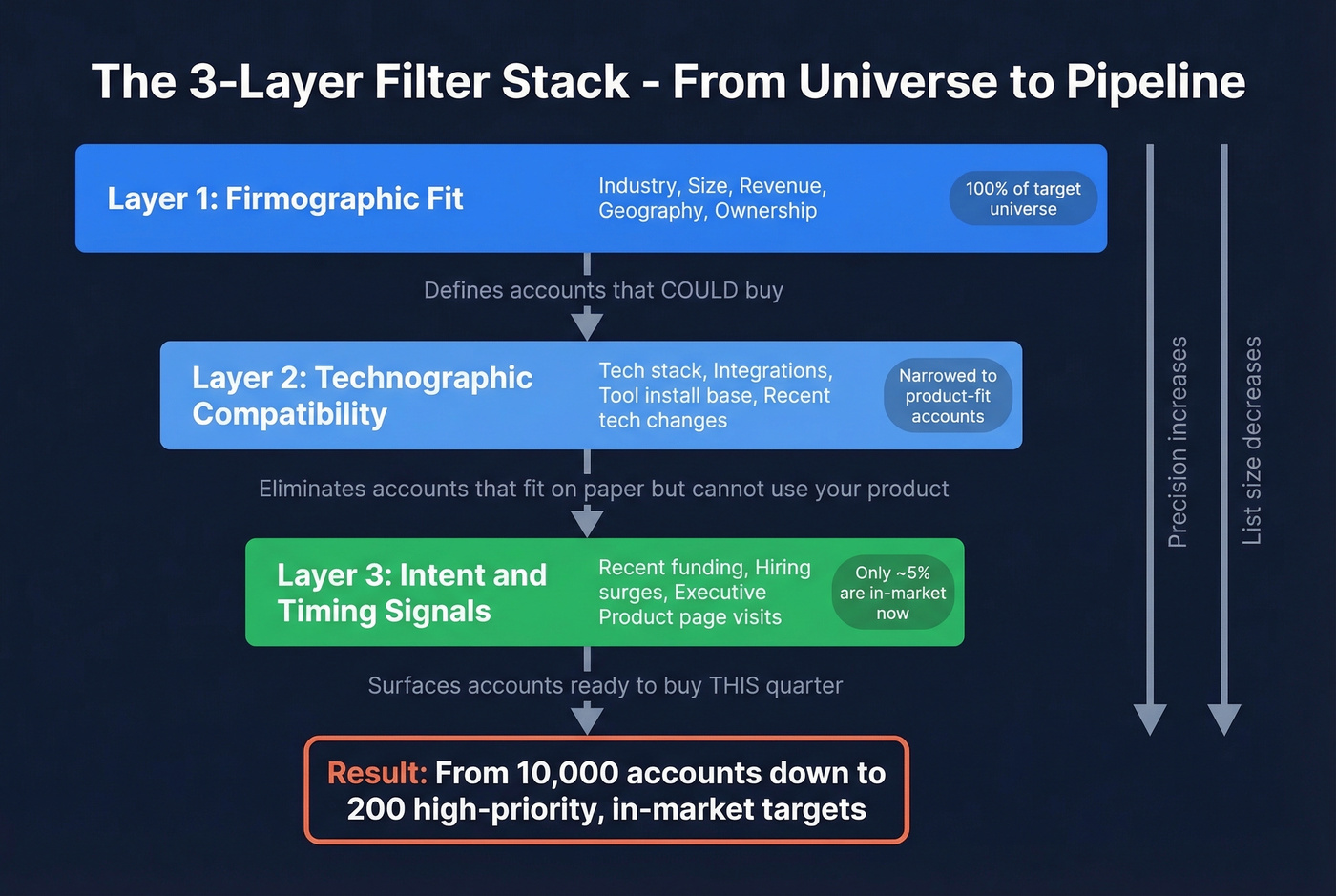
You need three layers.
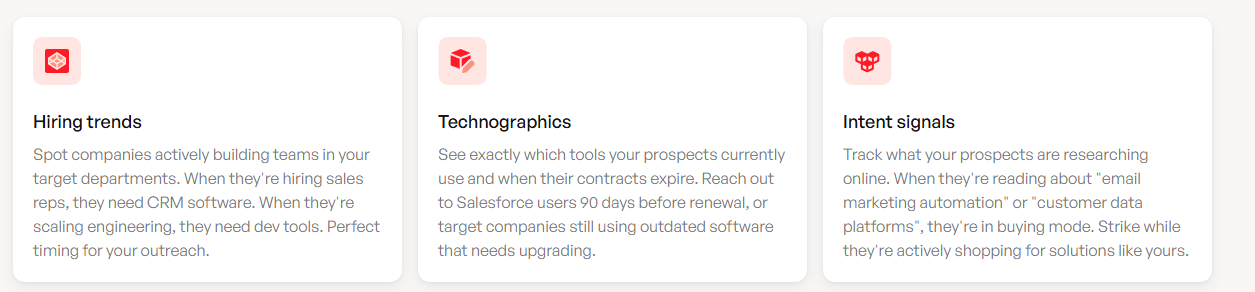
Layer 1: Firmographic fit. Industry, size, revenue, geography, ownership. This defines the accounts that could buy.
Layer 2: Technographic compatibility. If you're selling a Salesforce integration, filter for Salesforce users. If you replace a legacy tool, filter for that tool's install base. Combining company-level and technographic filters at this stage eliminates accounts that fit on paper but can't actually use your product. (If you’re shopping vendors for this, start with technographic data tools.)
Layer 3: Intent and timing signals. Recent funding, hiring surges in RevOps or sales, executive changes, careers page updates, new compliance badges, product page changes. A recurring theme on r/LeadGeneration is that these micro-signals are stronger buying indicators than any static filter - and in our experience running outbound campaigns, that tracks. One client we worked with saw reply rates jump from 3% to 11% after adding hiring-signal filters to an otherwise identical firmographic list. (To operationalize this, see how to identify buyer intent signals and then automate sales signals.)
Let's be honest about one more thing: review your ICP quarterly based on win/loss data. Last quarter's ideal profile won't always match this quarter's closed-won accounts, and clinging to outdated criteria is just as dangerous as stale contact records.
Using Filters for Lead Generation
Your filters are only as good as the data underneath them. At ~2.5% monthly decay, a database refreshing every six weeks has already lost ~3.75% accuracy before you export a list. Over a year, that's roughly 30% rot.
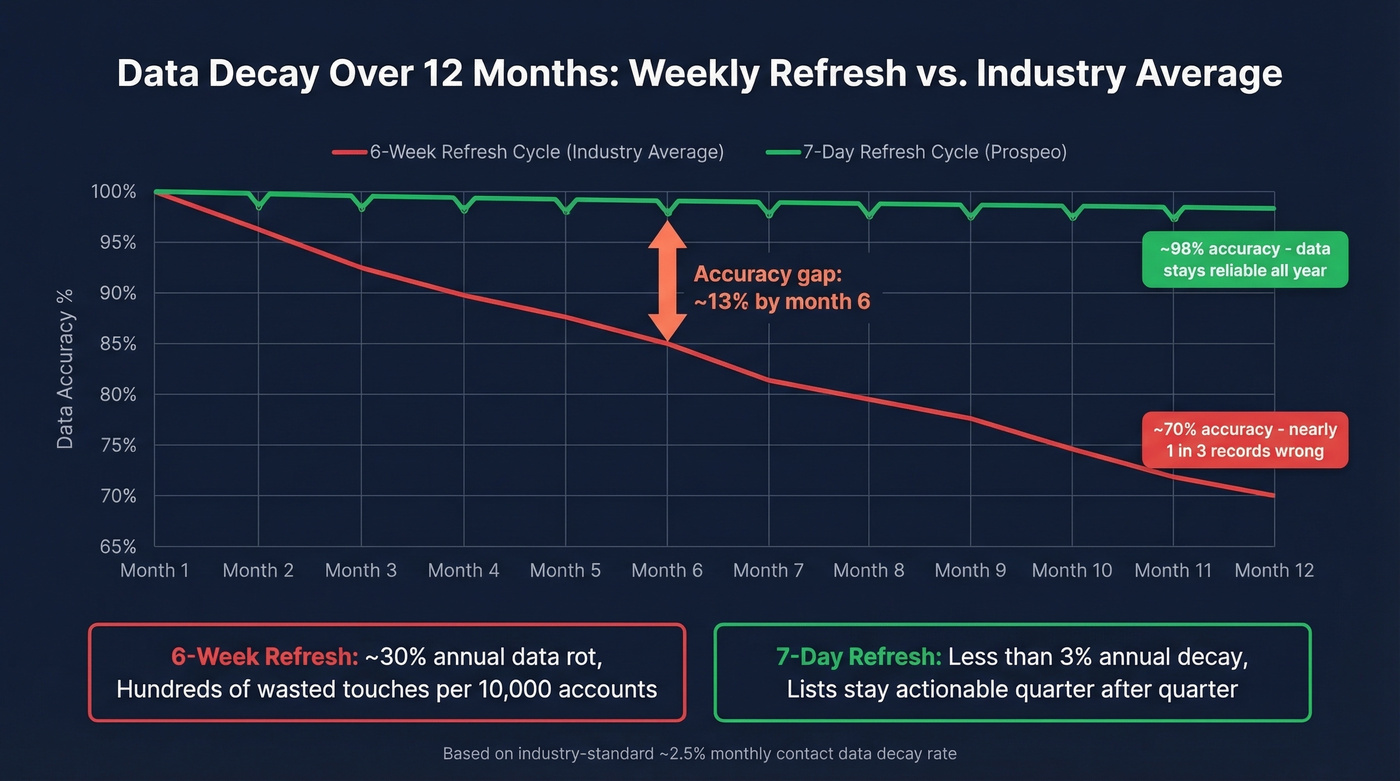
Prospeo runs a 7-day data refresh cycle with 98% email accuracy, compared to the ~6-week industry average. That gap compounds fast at scale. With 30+ search filters spanning buyer intent, technographics, job changes, headcount growth, department headcount, funding, and revenue, it covers every category in the checklist above. (If you're building a repeatable motion, pair this with a B2B prospecting strategies playbook.)
Three enrichment models exist. Batch means scheduled refreshes - cheap but stale. Real-time means live queries - fresh but slower. Waterfall queries multiple providers sequentially for better find rates, though not necessarily better freshness. If data freshness is your bottleneck, prioritize platforms with weekly or better refresh cycles over those that simply query more sources. (More context: benefits of data enrichment.)
Skip waterfall enrichment if you're already on a platform with weekly refresh and 90%+ match rates. The added complexity isn't worth it when your primary source is already strong.
At ~2.5% monthly decay, stale data turns even the best firmographic filters into expensive guesswork. Prospeo delivers 98% email accuracy on 300M+ profiles with a 7-day refresh cycle - so the 200 accounts your reps work this quarter are the right 200. At $0.01 per email, precision targeting doesn't require an enterprise budget.
Stop filtering on top of rotten data. Get contacts that actually connect.
Firmographic Filters FAQ
What's the difference between firmographic and technographic filters?
Firmographic filters describe company identity - size, industry, revenue, location - while technographic filters describe the technology stack a company runs. Layer both to reach the right companies with a message about tools they already use. Most platforms treat them as separate filter categories you can combine in a single search.
How many filters should I use?
Ten or more for any serious outbound campaign. Add headcount, revenue range, growth signals, ownership status, and technographics beyond the default three. More dimensions mean smaller, sharper lists - teams using 10+ criteria typically see 2-3x higher reply rates than those using three.
Which tools offer the most firmographic filters?
Prospeo offers 30+ filters including intent data powered by Bombora across 15,000 topics, with a 7-day refresh cycle and 98% email accuracy. It starts with a free tier and scales at ~$0.01/email with no contracts. ZoomInfo offers broad filters but starts at ~$15,000+/year. Apollo has a free tier with paid plans from ~$49/user/month, though its email accuracy sits around 79% in independent testing.
How do firmographic filters support ABM programs?
They form the foundation of any account-based strategy by letting you define and prioritize target lists against ICP criteria - revenue, headcount, industry, and ownership structure. When you layer intent signals on top, you move from static account lists to dynamic ones that surface the accounts most likely to convert this quarter. That shift from "who fits" to "who fits and is buying right now" is where ABM programs actually start generating pipeline instead of just organizing spreadsheets.