

Bulk Lead Generation: How to Build Lists of 10,000+ Leads Without Burning Your Budget or Your Domain
You just hit Apollo's export limit at 2,000 contacts. Your manager wants 10,000 by Friday. You Google "ZoomInfo pricing" and see $14,995/year for the Professional plan. Meanwhile, the #1 question on every B2B subreddit is some version of "how do you generate leads at scale without spending a fortune?"
Most bulk lead generation guides list 25-60 tools and call it a day. You don't need 25 tools. You need 2-3, configured correctly, with a verification layer that keeps your domain alive.
Poor data quality costs US businesses $611 billion annually. Most of that waste comes from teams who scaled volume without scaling accuracy.
What follows is the actual workflow - ICP to verified list to outreach - with real pricing, accuracy benchmarks that go beyond vendor claims, and a framework for picking the right stack.
What You Need (Quick Version)
Your bulk lead gen stack has three layers: data, verification, and outreach. One tool for each. Sometimes two tools collapse into one. Here's the quick pick by budget:
- Best free starting point: Apollo.io - generous free tier with built-in sequences
- Best for scale + outreach combo: Instantly.ai - lead database plus unlimited email accounts on outreach plans
- Best for waterfall enrichment: Clay - 100+ data sources, spreadsheet-style builder for technical teams
Now let's break down how to actually do this right.
What Bulk Lead Generation Actually Means
Building targeted contact lists of 1,000+ B2B prospects per campaign - then enriching, verifying, and activating those lists across outbound channels - is what separates bulk lead gen from general lead generation. You're proactively assembling the audience rather than waiting for them to find you.

Why does volume matter? Multi-channel sequences across email, phone, and social generate 3.5x more leads than single-channel approaches. You can't run a multi-touch, multi-channel sequence to 200 people and expect pipeline. You need thousands of contacts segmented by intent, title, and company size - then worked systematically.
But volume without quality is worse than nothing.
Picture this: you export 5,000 contacts from a cheap contact database, load them into your sequencer, and hit send. Eight hundred bounce. Your bounce rate spikes to 16%. Gmail flags your domain. Deliverability drops from 95% to 62% overnight. Now your good emails aren't landing either. The 4,200 valid contacts you had? Half of them never see your message.
B2B contact data decays at roughly 30% annually. People change jobs, companies get acquired, email servers get reconfigured. A list that was 90% accurate in January is 63% accurate by December. That's why the verification step isn't optional - it's the difference between a pipeline-generating machine and a domain reputation disaster.
Email marketing converts at 6.5% on average with a $30-45 CPL - the highest-ROI B2B prospecting channel by a wide margin. But only if your emails actually land in inboxes.

You just read about the 20-40% dead addresses hiding in bulk lists. Prospeo's 5-step verification delivers 98% email accuracy and keeps bounce rates under 3% - so you scale to 10,000+ leads without torching your domain. At $0.01 per email with 30+ ICP filters, you get enterprise-grade bulk lead gen without the $14,995 ZoomInfo price tag.
Stop rebuilding sender reputation. Start building pipeline.
The Bulk Lead Generation Workflow (5 Steps)
Every successful high-volume list-building operation follows the same five steps. Skip one, and the whole thing breaks.

Step 1 - Define Your ICP With Surgical Precision
The biggest mistake in bulk lead generation isn't picking the wrong tool. It's targeting the wrong people at scale.

One practitioner on Reddit nailed it: "Clean data + tighter ICP filtering. Fewer leads, but way better conversations." That's the whole game. Account-based targeting increases close rates by 40%, and intent-based targeting boosts conversion rates by up to 2x - not because ABM is magic, but because you're talking to people who actually have the problem you solve.
Before you touch any database, nail these criteria:
- Industry and sub-industry (not just "SaaS" - "B2B SaaS, Series A-C, selling to mid-market")
- Company size (headcount range, revenue range, or both)
- Geography (country, region, metro - this affects compliance too)
- Job titles and seniority (VP+ for enterprise, Director for mid-market, Manager for SMB)
- Technographics (what tools do they use? If you sell a Salesforce integration, filter for Salesforce users)
- Buying signals (recent funding, headcount growth, job postings in relevant departments, intent data)
- Negative filters (exclude industries, company sizes, or geographies you can't serve)
Most teams define their ICP once and never revisit it. Run a quarterly analysis of your closed-won deals. The patterns will surprise you.
Step 2 - Build Your Initial List
You've got three methods for building your initial list. Each has a use case.
Use a database tool if: you want 1,000-50,000 targeted contacts with verified emails and phones, ready to load into your sequencer within hours. This is the path for 90% of teams, and the right tool makes the difference between a clean list and a deliverability nightmare.

Use scraping if: you're technical, budget-constrained, and willing to invest time in post-processing. An n8n + Google Custom Search API + Apify stack can pull 1,000+ leads per day at near-zero cost. But you'll need a verification layer on top (more on that in Step 4).
Use a hybrid approach if: your ICP is niche enough that no single database covers it well. Scrape company lists from industry directories, then enrich with a database tool to get contact details.
Skip purchased "lead lists" from brokers. They're the fastest path to domain reputation damage. Cold lead lists rarely convert because recipients don't know you, and the data is typically weeks or months old.
Step 3 - Enrich and Fill the Gaps
No single data source covers every contact. That's just the reality of B2B data.
Single-source enrichment typically achieves 50-60% match rates. You search for 10,000 people, you get emails for 5,000-6,000. Waterfall enrichment - running unmatched records through a sequence of providers - pushes match rates to 80-93%. Organizations with properly enriched CRM data generate 44% more Sales Qualified Leads.
But waterfall enrichment has real tradeoffs. Cognism raises valid concerns about compliance risks - some providers in the waterfall chain aren't GDPR/CCPA-compliant, and mixing verified and unverified data can corrupt good records. The complexity of configuring multiple providers with different data formats and refresh rates is non-trivial.
If you do go waterfall, Clay is the best builder for it (more on that in the tools section). Just know what you're signing up for.
Step 4 - Verify Everything (Non-Negotiable)
We've seen teams skip this step because they "trust" their data provider. Then they send 5,000 emails, bounce 800, and spend the next three months rebuilding sender reputation.

Without verification, expect 20-40% dead addresses in any list - even from paid databases. With a proper bulk verifier, you can get bounce rates under 3%. That's the difference between a campaign that generates pipeline and one that gets your domain blacklisted.
Segmented and personalized emails drive 6x higher transaction rates. None of that matters if your emails don't reach inboxes. Verify first. Always. (If you need a shortlist, see our picks for an email verifier.)
Step 5 - Load, Segment, and Launch
Your verified list is only as good as how you activate it. Here's the checklist:
- Push to your CRM - native integrations with Salesforce, HubSpot, Smartlead, Instantly, Lemlist, and others cover most stacks. If your tool doesn't have a native integration, Zapier or Make bridges the gap.
- Segment by intent tier - contacts showing active buying signals (intent data, recent job change, funding) go into your highest-touch sequence. Everyone else gets a lighter cadence.
- Segment by persona - VPs get different messaging than Directors. Technical buyers get different messaging than economic buyers.
- Segment by company size - your pitch to a 50-person startup shouldn't read like your pitch to a 5,000-person enterprise.
- A/B test subject lines - run at least two variants per segment. Small differences compound across 10,000 contacts. (Use a repeatable framework for A/B testing so you don’t fool yourself.)
- Schedule by time zone - sending at 8am recipient-local-time consistently outperforms batch blasts.
- Send test emails first - check rendering, links, and spam scoring before you launch to the full list.
Best Tools for Building Lead Lists at Scale (2026)
There are too many tools in this space. Here's what actually matters for high-volume list building: email accuracy (claimed vs. real), cost per 10,000 leads, and whether the tool forces you into an annual contract to get reasonable pricing.
Master Comparison Table
| Tool | Email Accuracy | Starting Price | Cost/10K Leads | Best For |
|---|---|---|---|---|
| Apollo.io | 70-80% real | Free / $49/mo | ~$200-400 | Free starting point |
| Clay | Varies by source | Free / $134/mo (annual) | ~$500-1,000 | Waterfall enrichment |
| Instantly.ai | Not published | $47/mo (leads) | ~$250-500 | Outreach + data combo |
| ZoomInfo | ~87% | $14,995/yr | ~$1,500-3,000 | Enterprise w/ budget |
| Cognism | ~87% (Diamond) | ~$15,100/yr | ~$1,000-2,000 | EU/GDPR compliance |
| Snov.io | 98% claimed | $39/mo | ~$200 | Mid-range scaling |
| BetterContact | 99.5% claimed | $15/mo | ~$150-300 | Budget waterfall |
| Lusha | 81% | Free / $22.45/user/mo (annual) | ~$300-500 | Chrome extension |
| Hunter.io | High (verification-based) | Free / $49/mo | ~$250-400 | Email-only lookup |
| RocketReach | 90-98% claimed | $33/mo | ~$300-600 | Broad coverage |
| UpLead | 95% guarantee | $99/mo | ~$400-600 | Accuracy guarantee |
| Seamless.AI | Not published | $147/mo | ~$500-800 | Real-time search |
| LeadIQ | Not published | $45/mo | ~$300-500 | Prospect capture |
| Lead411 | 96% (4.5/5 G2) | $49/mo | ~$200-400 | US B2B + triggers |
| Kaspr | Not published | ~$99/mo | ~$400-600 | EU phone numbers |

A few Tier 3 standouts worth noting: Lead411 carries a 96% email deliverability rate and a 4.5/5 on G2 from 474 reviews - strong for US-focused B2B with trigger-based selling. Cognism's Diamond Data phone verification and GDPR-first approach make it the go-to for EU-heavy teams, though pricing starts around $15,100/year and scales to $103,000+ for enterprise. UpLead's 95% accuracy guarantee means you get credits back for any bounced email - a unique model in this space.
Prospeo - Best High-Volume Tool for Accuracy and Value
Pair with Instantly, Smartlead, or Lemlist for sequencing - Prospeo handles the data layer, your outreach tool handles the sending. This is the stack we'd recommend for any team sending 5,000-50,000 emails per month. If you’re evaluating vendors, start with the broader roundup of B2B data providers.
The database covers 300M+ profiles with 143M+ verified emails and 125M+ verified mobile numbers. The 98% email accuracy holds up in production - Meritt went from 35% bounce to under 4%, and Snyk's 50-person AE team dropped from 35-40% bounce to under 5% while generating 200+ new opportunities per month.

The mobile numbers are a differentiator most people overlook. 125M+ verified mobiles with a 30% pickup rate - compared to ZoomInfo's roughly 12.5% and Apollo's 11%. At ~$0.01 per email and 10 credits per mobile, the unit economics are hard to beat. Free tier gives you 75 verified emails per month plus 100 Chrome extension credits/month to test before you commit anything. (If phone is part of your channel mix, here’s a deeper guide to verified direct dials.)
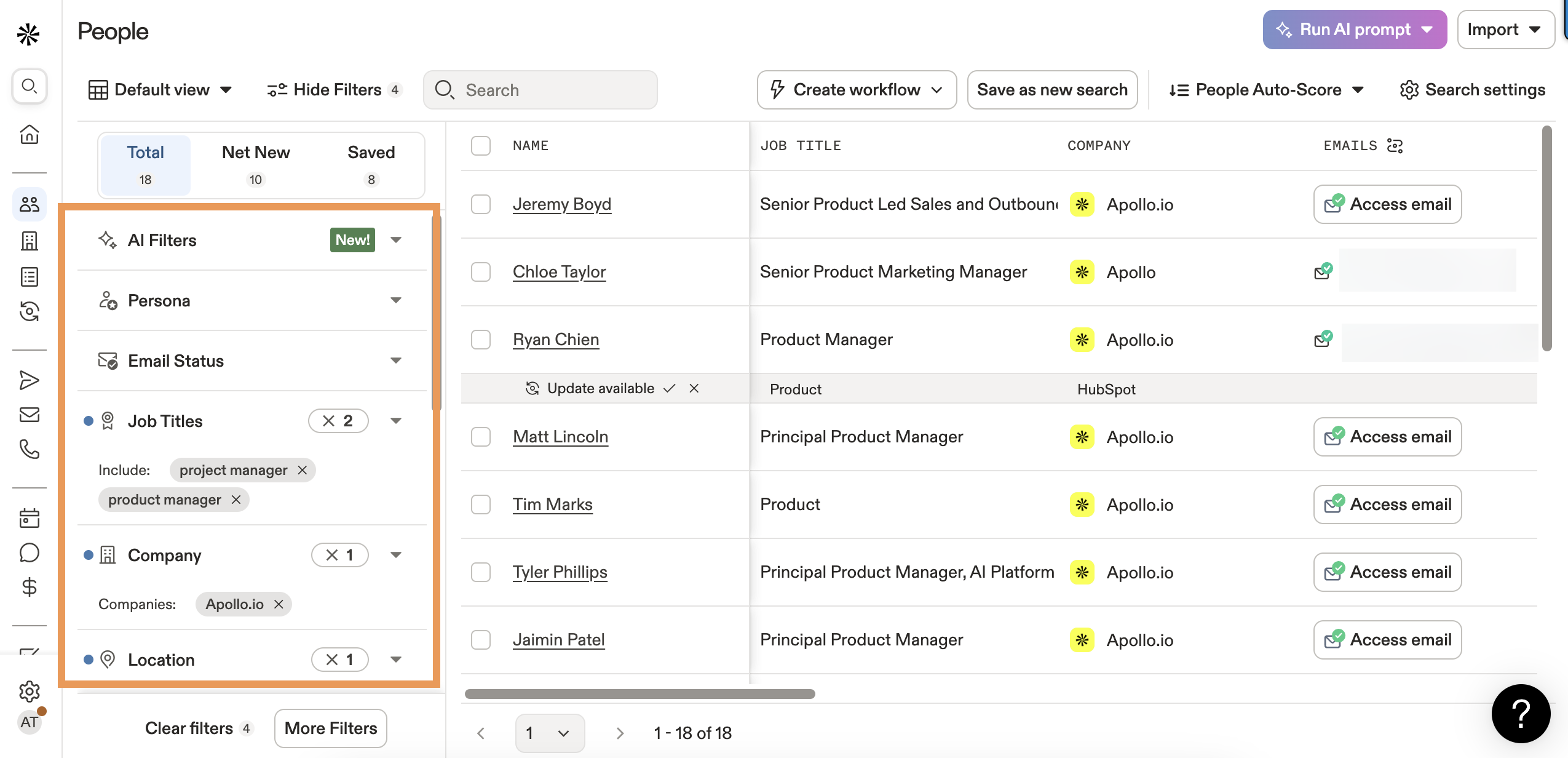
Apollo.io - Best Free Starting Point
Apollo's free tier is genuinely generous and the obvious starting point for bootstrapped teams. 275M+ contacts, built-in sequences, and enough credits to test whether outbound works for your business before spending a dollar. If you’re using it heavily, it’s worth understanding Apollo.io accuracy before scaling volume.
Pros:
- Free tier with real functionality (not a crippled trial)
- Built-in sequences for email, calls, and social touches - no separate outreach tool needed
- $49-119/mo paid tiers with monthly billing
- 275M+ contacts across 73M companies
Cons:
- The 91% accuracy claim doesn't hold up at scale. Real-world accuracy runs 70-80%, with bounce rates hitting 20-30% on larger exports. That's a meaningful gap when you're sending 10,000 emails.
- Export limits via the credit system cap your ability to pull bulk lists quickly
- Data is crowdsourced plus public scraping - quality varies significantly by segment
Apollo is great for getting started. It's not great for teams sending 10,000+ emails per month who can't afford deliverability hits. At that scale, the "free" tool costs you in bounces and wasted outreach time.
Clay - Best for Waterfall Enrichment
Here's who should use Clay: technical RevOps teams that want maximum match rates and enjoy building workflows in a spreadsheet-style interface. Clay's 100+ data sources and waterfall logic are unmatched.
Here's who shouldn't: anyone who wants to search a contact database and export a list in 10 minutes. Clay has a learning curve, and the credit system gets expensive at scale. If you’re comparing approaches, see options beyond Clay in our guide to waterfall alternatives.
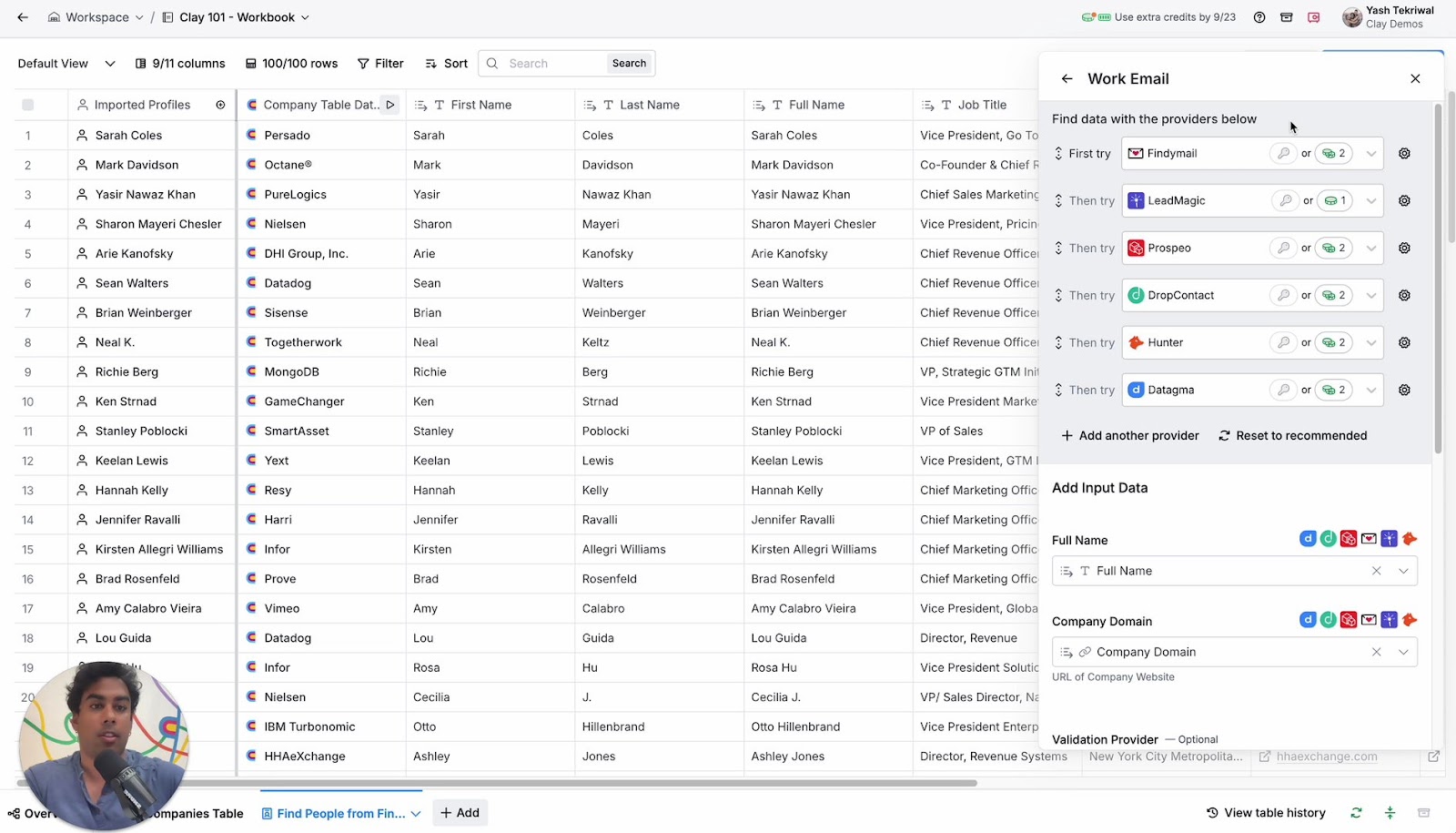
Clay reached $100M ARR in two years and carries a $3.1B valuation - the market has spoken on product-market fit. Pricing runs $134/mo (Starter) to $720/mo (Pro), with the Pro plan offering up to 7x cheaper per-credit costs than Starter. That inverted pricing structure is frustrating - it penalizes smaller teams who need it most.
The waterfall approach pushes match rates to 80-93%, but you're managing complexity. Different providers have different accuracy standards, and mixing verified with unverified data can corrupt your good records. For teams with the technical chops, it's powerful. For everyone else, a high-accuracy single source gets you 90% of the way there with 10% of the effort.
Instantly.ai - Best for Outreach + Data Combo
Instantly collapsed the "data + outreach" stack into one platform, and the market loves it - 4.8/5 on G2 from 3,715 reviews. Here's the honest breakdown:
| What works | What doesn't |
|---|---|
| 450M+ contacts in the leads database | Email accuracy data isn't published - a red flag for bulk senders |
| Unlimited email accounts on outreach plans (huge for domain rotation) | The leads database is newer and less proven for targeted searches |
| Leads from $47/mo, outreach from $37/mo - run both for under $85/mo | Credit tiers get expensive at high volume ($197/mo for 10,000+ credits) |
| Only pay for verified leads |
Instantly is ideal for solo founders or small teams who want one login for everything. For teams sending 10,000+ emails per month, verify Instantly's exports through a dedicated verification tool before sending. (If you’re shopping sequencers, compare options in our roundup of cold email outreach tools.)
ZoomInfo - Best for Enterprise With Budget
Here's my hot take on ZoomInfo: it's still the best all-in-one enterprise sales intelligence platform. But most teams don't need all-in-one.
If your average deal size is under $25K or your team is under 20 reps, you're paying for capabilities you'll never touch.
Use this if: you're a 20+ rep sales org running outbound, ABM, and intent from one platform. You need Bombora intent data, Gartner Magic Quadrant credibility for procurement, and you have $15K+ to spend annually.
Skip this if: you're a team of 5 trying to generate 10,000 leads per month. A 10-seat ZoomInfo contract with intent data and mobile numbers runs $30-60K/year. That's real money for a Series A company. And you'll still need to verify the data - email accuracy runs around ~87%, which means roughly 1,300 bounces per 10,000 contacts.
The database is massive - 500M+ contacts, 100M+ company profiles, 1 billion monthly buying signals. But the "talk to sales" pricing gate, mandatory annual contracts, and module-based upselling are a tax on RevOps teams who just want accurate contact data. If you’re benchmarking total cost, see our breakdown of ZoomInfo pricing.
Pricing starts at $14,995/year for Professional (5,000 credits, 3 seats). Advanced runs $24,995/year. Elite hits $39,995/year. Additional users cost $1,500-2,500 each.
Snov.io - Mid-Range Bulk Scaling
Snov.io's sweet spot is teams that need 20,000-100,000 credits per month without enterprise pricing. The database covers 850M+ emails, and the platform bundles warm-up, sequences, and a social automation add-on ($69/slot/month). Pricing scales from $39/mo (1,000 credits) to $553.50/mo (annual) for 100,000 credits on the Pro Ultra tier. Annual billing saves 25%. The built-in bulk prospect search and bulk verification tools make it genuinely useful for volume operations. It's not the most accurate database, but the all-in-one approach keeps your stack simple.
BetterContact - Budget Waterfall Entry Point
BetterContact is the cheapest way into waterfall enrichment. 3B+ contact records across 20+ data sources, starting at just $15/mo for 200 email credits. The 99.5% email verification accuracy claim is aggressive, but the waterfall approach does tend to produce cleaner results than single-source tools at the same price point. Think of it as Clay's little sibling - less powerful, less configurable, but dramatically cheaper and simpler. Good for teams testing whether waterfall enrichment is worth the complexity before committing to Clay's pricing.
Lusha - Chrome Extension Specialist
I watched a team try to run large-scale list building through Lusha and hit the wall fast. The Chrome extension is excellent for one-off lookups - 100M+ profiles, 81% accuracy, clean UI. But the credit system punishes bulk users: 1 credit per email, 5 credits per phone number. At Pro pricing ($22.45/user/month with 3,000 credits/year), you're burning through credits fast on any list over 500 contacts. Free tier gives you 40 credits/month - enough to test, not enough to scale. Use Lusha for enriching specific high-value prospects, not for building 10,000-contact lists.
The Cost Math - What 10,000 Leads Actually Costs
The sticker price of a lead gen tool tells you almost nothing. Here's what 10,000 verified leads actually costs by method:
| Method | Monthly Cost | Cost per 10K Leads | Verification Included? | Hidden Costs |
|---|---|---|---|---|
| DIY scraping | ~$25-100/mo | ~$50-150 | No (add verifier) | Dev time |
| Prospeo | ~$39-99/mo | ~$100 | Yes (built-in) | None |
| Snov.io | $189-369/mo | ~$200 | Yes (built-in) | Annual lock-in |
| Apollo.io | Free-$119/mo | ~$200-400 | Partial | Bounce cleanup |
| Instantly.ai | $47-97/mo | ~$250-500 | Claimed | Outreach separate |
| Clay waterfall | $314-720/mo | ~$500-1,000 | Depends on sources | Complexity |
| ZoomInfo | $1,250-3,333/mo | ~$1,500-3,000 | No | Annual contract |

Here's the calculation most people miss. That "$99/month" tool? Factor in per-user fees for your 3-person team ($99 x 3 = $297/mo), the annual contract you signed to get that rate ($3,564/yr upfront), implementation time (40+ hours of RevOps configuration at $75/hr = $3,000), and the CRM integration add-on ($50/mo). You're looking at $7,164 in Year 1 - not $1,188.
Then there's the hidden cost of bounces. If your tool delivers 80% accuracy on 10,000 contacts, that's 2,000 bounces. Each bounce degrades your sender reputation. Once deliverability drops below 80%, even your valid contacts stop seeing your emails. The "cheap" tool with 80% accuracy costs more than the "expensive" tool with 98% accuracy when you factor in domain damage and wasted outreach time.
Sales reps waste 21% of their time - roughly one full workday per week - dealing with bad data. That's not a minor inconvenience. That's a structural drag on your entire revenue operation. (If you’re building QA around this, start with a data quality scorecard.)
Data Accuracy - Claims vs. Reality
Every data provider claims 90%+ accuracy. Here's what actually happens when you send 10,000 emails:
| Tool | Claimed Accuracy | Real-World Accuracy | Bounces per 10K | Impact |
|---|---|---|---|---|
| Prospeo | 98% | 98% | ~200 | Minimal |
| UpLead | 95% guarantee | ~90-95% | ~500-1,000 | Low |
| Apollo.io | 91% | 70-80% | ~2,000-3,000 | Significant |
| Lusha | 81% | ~78-81% | ~1,900-2,200 | Moderate |
| ZoomInfo | ~87% | ~83-87% | ~1,300-1,700 | Moderate |
| Industry avg | - | 60-70% | ~3,000-4,000 | Severe |
The accuracy gap between claimed and real-world performance is where teams get burned. Apollo's 91% claim sounds great until you're staring at a 25% bounce rate on your first campaign.
The math is simple. At 98% accuracy, you get 250 bounces per 5,000 emails. At 75% accuracy, you get 1,250. That's 1,000 extra bounces - each one chipping away at your sender reputation, your deliverability, and your team's confidence in the data.
The proof is in the customer results: Snyk's 50-person AE team went from 35-40% bounce to under 5%, generating 200+ new opportunities per month. GreyScout dropped from 38% bounce to under 4% and grew their sales pipeline 140%.
Skip the waterfall complexity. Prospeo's 300M+ profiles refresh every 7 days - not 6 weeks - so your 10K list doesn't decay before you hit send. With 143M+ verified emails, 125M+ mobile numbers, and an 83% enrichment match rate, one tool replaces three layers of your stack.
One database. Verified data. Lists ready by Friday.
The DIY Scraping Route
If you're technical and budget-constrained, there's a legitimate path to generating leads in bulk that costs almost nothing in tool fees.
The core stack: n8n (self-hosted is free, cloud ~$24/mo) + Google Custom Search API (free tier: 100 queries/day) + Apify (from ~$49/mo). One practitioner on Reddit built an n8n workflow scraping 1,000+ targeted leads per day with zero paid API costs - using Google Custom Search to find professional profile URLs, then extracting name, title, bio, and contact details. itrinity scaled from 10 emails per day to 400 per week using Apify for automated lead extraction.
The workflow: define search queries targeting your ICP, Google Custom Search API returns profile URLs, scrape and extract structured data, clean and deduplicate, then append to Google Sheet or push to CRM. Total stack cost: $0-100/month.
Look, I won't pretend this is easy. There are real tradeoffs.
Data quality is rough. One practitioner scraping Google Maps for solar leads found 75-80% of results were irrelevant junk, even with solid keywords. Raw scraping requires significant post-processing - custom filtering, deduplication, format normalization.
No verification. Scraped email addresses are unverified by default. You absolutely need a verification layer before sending to any scraped list. This is where the "free" scraping route picks up cost - either through a verification tool or through the domain damage you'll take from sending to unverified addresses.
Constant maintenance. Anti-scraping protections change. APIs update. Workflows break. You're trading money for ongoing engineering time.
The DIY route works best as a supplement to a database tool - scrape niche company lists, then enrich contacts through a B2B data provider. Worst case, you've got a company list. Best case, you've built a pipeline of contacts no one else has.
Compliance Guardrails for Bulk Outreach
Scaling to 10,000+ contacts means you're firmly in "marketing campaign" territory, and regulators have opinions about that.
US: CAN-SPAM + TCPA
CAN-SPAM is relatively permissive for B2B cold email. The requirements:
- Truthful subject lines (no deceptive headers)
- Accurate sender identification
- Physical mailing address in every email
- Clear opt-out mechanism
- Honor opt-out requests within 10 business days
- No harvested email addresses
TCPA is where it gets expensive. Violations run $500-$1,500 per incident. If you're using auto-dialers, prerecorded messages, or ringless voicemail, you need prior express written consent. You also need to check the National DNC Registry before calling.
State-level variations add complexity. California, Florida, and Texas have stricter consent requirements than federal law. If you're operating across states, comply with the strictest applicable standard.
EU/UK: GDPR + PECR
Here's where sending at scale gets genuinely complicated. In the UK, cold email to individual business email addresses (john@company.com) requires opt-in under PECR. You can email generic addresses (info@company.com) if there's genuine interest. Using automated bulk email tools makes it a "marketing campaign" - which triggers the opt-in requirement.
Cold calling B2B is permissible if the number isn't on the TPS/CTPS list and there's legitimate interest. Physical mail is OK with genuine interest.
The frustration for teams using Apollo, Clay, or ZoomInfo in the UK is real - the tools make it trivially easy to build lists that you aren't legally allowed to email. Know your jurisdiction before you hit send. (If you need the operator view, use this GDPR for Sales and Marketing playbook.)
Practical Checklist
- Include unsubscribe link in every email
- Honor opt-outs within 10 business days (do it same-day)
- Use accurate sender name and email address
- Include physical mailing address
- Check DNC/TPS registries before calling
- Document consent for any automated calling
- Use GDPR-compliant data providers with opt-out enforcement and DPAs available
- Segment EU/UK contacts separately and apply stricter rules
- Don't send to purchased lists without verification and compliance review
- Don't ignore state-level regulations just because CAN-SPAM is federal
FAQ
How many leads can I generate per month on a budget under $100?
Apollo's free tier gives you limited exports but real database access. DIY scraping with n8n can pull 1,000+ leads per day at near-zero cost, though you'll need verification on top. Prospeo's plans starting at ~$39/mo deliver 5,000-10,000 verified contacts, meaning $100 gets you well into five-figure territory with the right tool.
What's the difference between waterfall enrichment and single-source databases?
Single-source enrichment queries one provider and typically achieves 50-60% match rates. Waterfall enrichment runs unmatched records through multiple providers sequentially, pushing match rates to 80-93%. Waterfall adds compliance risk from mixing verified and unverified data. A high-accuracy single source with a 92%+ API match rate can outperform a poorly configured waterfall without the overhead.
How do I verify a bulk email list before sending?
Run your list through a verification tool that checks MX records, validates mailbox existence, flags catch-all domains, and removes spam traps and honeypots. Target a sub-3% bounce rate before launching any campaign. Never send to an unverified list - domain reputation damage from high bounce rates takes months to recover and affects deliverability for all your emails.
Is it legal to send cold emails to purchased lead lists?
In the US, CAN-SPAM allows cold B2B email if you include opt-out mechanisms, honor unsubscribes within 10 business days, use accurate sender info, and include a physical address. In the UK and EU, GDPR/PECR restrict cold email to individual business addresses without prior opt-in. California, Florida, and Texas have stricter requirements than federal law - always check local regulations.
What's a good bounce rate for bulk cold email campaigns?
Under 3% is the target for any serious outbound operation. Between 5-10% means your list needs immediate cleaning. Above 10% means stop sending and verify everything. Unverified scraped lists routinely hit 20-40%, which can blacklist your domain in a single campaign. Choosing a tool with built-in verification is the simplest way to stay under that 3% threshold from day one.