


ZoomInfo pricing in 2026: what you'll actually pay (and why)
ZoomInfo pricing doesn't hurt because the sticker price is shocking. It hurts because the meter's hidden: seats, credits, add-ons, onboarding, and renewal terms that quietly turn "we can swing $15k" into "why's this $60k now?"
Quote-based pricing isn't automatically a scam. But it does shift power to the vendor, and I've watched teams get boxed in simply because nobody modeled credit burn before procurement got involved.
Here's the fix: treat credits like your electricity bill. Estimate usage, plan for spikes, and get the rules in writing.
Quick answers (budget + trial + best move)
- Budget range: most teams land at $15k-$50k+/year; bigger GTM stacks with intent + enrichment often run $60k-$250k+/year.
- ZoomInfo Lite ($0): ZoomInfo offers ZoomInfo Lite with 10 monthly credits (or 25 credits with Community Edition) for light prospecting and a browser-extension-style workflow.
- Free trial: ZoomInfo often offers a 7-day free trial that requires you to verify a business email; expect unlimited searches/views and tighter limits on exports/usage.
- What drives cost: seats + export/enrichment credits + add-ons (intent, WebSights, Workflows, Chorus, Ops).
- Best move: treat credits as the real cost center. Exports and enrichment are where budgets blow up.
- Negotiation shortcut: get a renewal cap, credit top-up pricing, and cancellation notice window written into the Order Form.
ZoomInfo pricing in 2026: realistic ranges by scenario
ZoomInfo doesn't publish list pricing, so you'll see a lot of "starts at $15,000" chatter online, even though ZoomInfo pushes back on the idea that it has a universal $15k starting price. Finance doesn't need a debate; it needs a defensible range you can plan around. Treat $15k as a floor, not a quote.
The other reality: credits are the multiplier. A team that "just exports contacts" can look cheap on paper, then get expensive fast the moment RevOps turns on enrichment, CRM sync, or bulk workflows.
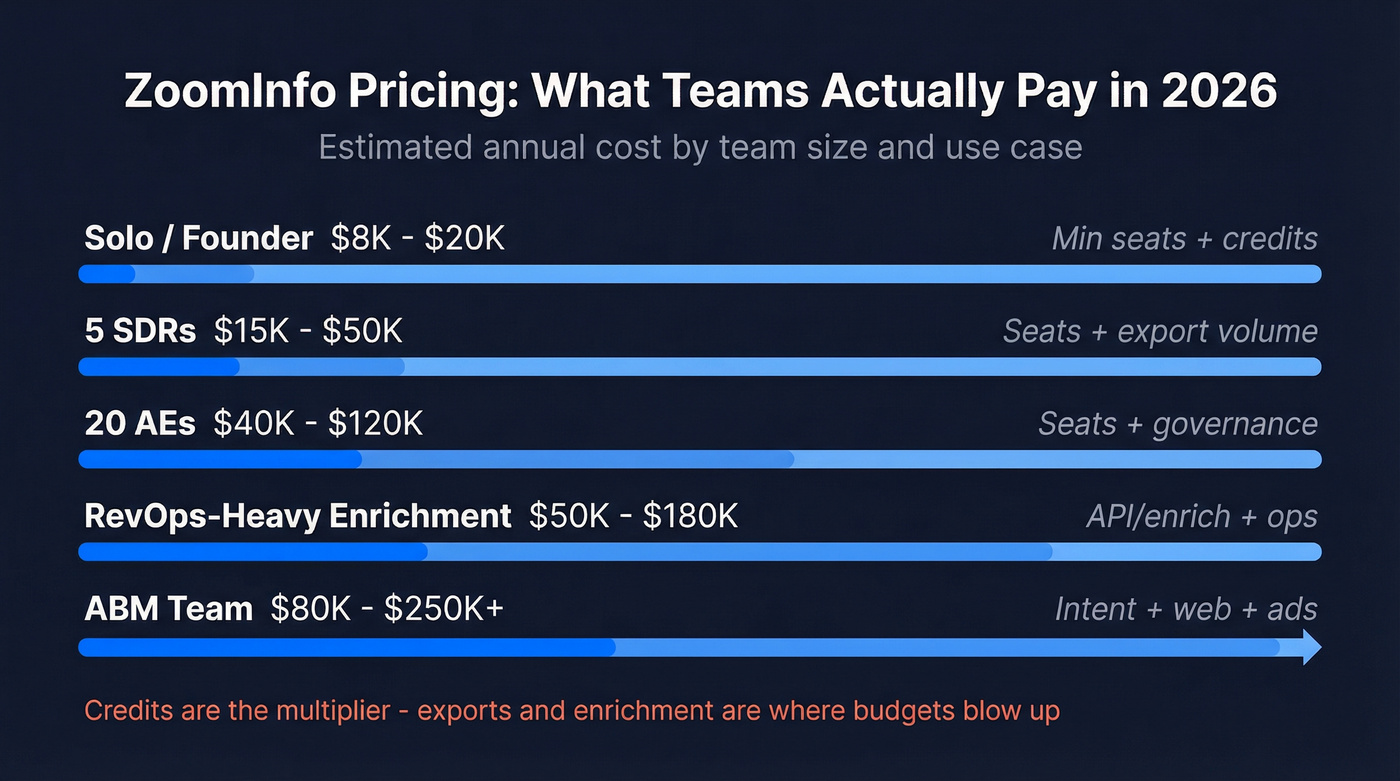
Estimated annual cost table (by team stage)
| Team stage | Typical annual range | What drives it |
|---|---|---|
| Solo/founder | $8k-$20k | Min seats + credits |
| 5 SDRs | $15k-$50k | Seats + export volume |
| 20 AEs | $40k-$120k | Seats + governance |
| RevOps-heavy enrich | $50k-$180k | API/enrich + ops |
| ABM team | $80k-$250k+ | Intent + web + ads |
What's usually included in those ranges (the stuff that moves your quote):
- Base licenses (seats) for named users
- A monthly export credit pool (the main meter)
- Optional intent (topics/clusters)
- Optional WebSights (website visitor identification)
- Optional Workflows (automation / routing / plays)
- Optional enrichment / Operations capabilities (CRM + data ops)
- Optional Chorus AI (conversation intelligence)
- Onboarding / implementation (especially when integrations + governance are involved)
A few blunt heuristics that hold up:
- Under ~10 outbound seats: ZoomInfo's hard to justify if you only need emails + dials. You'll pay platform money for a point-solution workflow.
- ABM with real orchestration: ZoomInfo makes sense when you're paying for signals + plays, not just contacts. (If you’re building this motion, see account-based prospecting.)
- Messy CRM: enrichment can either clean your house or set it on fire. If you don't have dedupe + field rules, delay the rollout.
Is there a free plan? Yes: ZoomInfo Lite ($0)
ZoomInfo Lite is the "try it without procurement" entry point. It's $0 and includes 10 monthly credits, or 25 monthly credits if you qualify for Community Edition.
It's useful for lightweight prospecting and getting a feel for the interface.
It's not a substitute for a full outbound workflow, because credits disappear the moment you export at scale.
ZoomInfo plans and packaging (official names in 2026)
ZoomInfo's packaging has changed enough that older "Pro/Advanced/Elite" pricing posts can steer you wrong for today's SalesOS lineup. In 2026, you'll usually see Sales and Marketing suites, with Copilot-branded tiers on the Sales side.
Sales (SalesOS) packaging at a glance
| Sales plan | Positioning | Best for |
|---|---|---|
| Professional | Core prospecting | Small outbound |
| Copilot Advanced | AI + signals + plays | Scaling teams |
| Copilot Enterprise | Custom + services | Complex orgs |

What actually changes by tier (the practical difference):
- Professional is the core database + prospecting workflow. It gets reps moving fast, but it's also the easiest to outgrow once you want orchestration.
- Copilot Advanced is where ZoomInfo starts acting like a GTM system: buyer intent signals and clusters, website visitor signals, Workflows, and go-to-market plays that push reps toward "next best action" instead of "search and export."
- Copilot Enterprise is for orgs that want ZoomInfo to behave like infrastructure: custom intent signals, custom integrations, advanced reporting/analytics, a dedicated CSM, and white-glove onboarding. This is the tier where services and governance become part of the purchase, not an afterthought.
Marketing (MarketingOS) packaging at a glance
| Marketing plan | Included credits | Intent topics |
|---|---|---|
| Marketing Demand | 75K | 25 topics |
| ABM Lite | Varies | Varies |
| ABM Enterprise | 150K | Unlimited |
Marketing plans are often easier to model up front because ZoomInfo shows included credits and intent-topic packaging for these editions.
What's commonly extra
Most buyers don't buy "ZoomInfo" as a single line item. They buy a bundle that can include:
- Chorus AI (conversation intelligence)
- Workflows (automation)
- WebSights (visitor identification)
- OperationsOS (data ops / enrichment workflows)
- TalentOS (recruiting data)
That's why two companies with "10 seats" can end up with quotes that don't resemble each other at all.
How pricing works: seats, credits, and add-ons
Most quotes come down to three levers:
- User licenses (seats)
- Credits (exports and usage)
- Modules/add-ons (intent, visitors, workflows, enrichment, etc.)
Here's the fourth lever that matters in real life: implementation complexity. The more you want the platform to touch your CRM, MAP, routing, and warehouse, the more you're buying a platform deal, not a rep tool.
Seat-based licensing (what buyers miss)
A seat is a named user. Vendors enforce this because it's the cleanest control point.
Trying to "save money" by sharing logins backfires every time: adoption drops, ops loses visibility, and you end up buying the seats anyway, just later, under time pressure.
Credit-based consumption (the meter)
Credits are what turn a reasonable quote into a renewal headache.
If 10 reps export 300 contacts/month each, that's 3,000 exports/month before you count re-exports after refresh windows, bulk actions, enrichment jobs, and whatever your CRM sync is doing in the background. If your workflow is "search -> export -> sequence," credits are your unit economics. (For more on building that motion, see B2B prospecting strategies.)
Add-ons & ecosystem (where quotes balloon)
ZoomInfo integrates with Salesforce, HubSpot, Marketo, Eloqua, Dynamics, Outreach, Salesloft, and Snowflake. That's valuable.
It's also a pricing lever: integrations often pull in services, governance, and higher-tier packaging.

ZoomInfo's credit system turns a $15K quote into $60K because exports and enrichment eat your budget. Prospeo charges ~$0.01 per email with 98% accuracy - no hidden meters, no seat minimums, no annual lock-in. Teams using Prospeo book 26% more meetings than ZoomInfo users.
Stop doing credit math. Start booking meetings.
ZoomInfo credits explained (plain English + what to confirm)
Most teams lose money in one of two ways: they underestimate credit burn, or they don't define what counts as billable usage until after rollout.
We've tested enough data tools to know the pattern: the UI makes it feel like you're "just browsing," then the export/enrichment rules show up like a surprise utility bill.
The typical credit model in practice (what usually happens)
Across GTM data platforms, the pattern's consistent:
- Search and viewing (browsing profiles, filtering, list building) usually isn't the paid meter.
- Exporting a contact/account is what consumes credits.
- Enrichment/sync (pushing data into Salesforce/HubSpot) often consumes credits too, sometimes at a different rate and sometimes from the same pool.
- Credits commonly reset monthly for the standard pool.
- Larger "bulk" pools are often annual allocations (or a separate bucket).
- When you run out, you either hit a hard stop or buy a paid top-up.
ZoomInfo can implement this in different ways by package and contract. The point is simple: assume exports/enrichment are the meter until your Order Form and entitlements prove otherwise.
A concrete example: view vs export vs enrich vs re-export
Here's a scenario that exposes the real cost.

You have 6 SDRs. Each SDR:
- builds lists and views 400 contacts/month (often not metered)
- exports 200 contacts/month into a sequencer
- RevOps runs enrichment nightly for new leads created in the CRM
- after 30-90 days, reps re-export "old" contacts to refresh titles/emails
What happens in practice:
- Reps think they're doing "200 exports/month."
- RevOps quietly adds a second consumption stream (enrichment).
- Re-export rules create a third stream (refresh behavior).
This is why teams feel blindsided: the rep workflow's visible, but the ops workflow is the silent credit eater, and it can be bigger than the rep usage once you start syncing at scale.
Directional "industry anchor" numbers (not official list pricing)
To sanity-check a quote, it helps to know what third-party estimates tend to converge on for entry-to-mid packages:
- Annual anchors: ~$15k, ~$25k, and ~$40k show up frequently as common deal bands for smaller teams.
- Credit pool anchors: smaller packages often behave like "a few thousand exports per year"; larger packages behave like "many thousands to tens of thousands per year."
Use these as a smell test. If you're being pitched a "great deal" but the credit pool is tiny, you're looking at a delayed price increase.
What to confirm in writing (the questions that save you money)
Put these in your buying doc and don't accept vague answers.

1) Exactly what burns credits
- export vs reveal vs bulk export
- enrichment/sync into CRM
- re-export rules (refresh windows)
2) Credit behavior
- do credits reset monthly or roll over?
- do unused credits expire at month-end or contract-end?
- are there separate buckets (monthly vs annual bulk)?
3) Overage mechanics
- hard stop vs paid top-up
- top-up unit price
- whether top-ups expire
4) Priority order
- does the system burn monthly credits first, then annual bulk?
- or does it burn the annual pool first?
Look, if one pool covers both "rep exports" and "automated enrichment," RevOps becomes the bad guy for "using up credits." Separate pools or explicit carve-outs prevent internal fights.
How quotes are usually structured (so you can read the proposal)
Most proposals follow the same skeleton:
- Base platform fee tied to seats (sometimes shown as per-seat, sometimes bundled)
- Included credits (monthly and/or annual)
- Add-ons (intent, WebSights, Workflows, Chorus, Ops)
- Services (onboarding, implementation, training)
- Term + payment cadence (annual is standard; quarterly is sometimes possible and often costs more overall)
If your quote doesn't break these out, ask for a version that does.
You can't negotiate what you can't see. (If you want a broader comparison set, see B2B prospecting tools.)
Worked quote archetypes (example structures you'll recognize)
These are example structures, not guarantees. They're here so you can map what you're being sold to a real budget.
Archetype A: "5-seat outbound, SalesOS only" (lean setup)
Who it fits: a small SDR team doing straightforward prospecting.
What the quote often includes:
- 5 seats (named users)
- Small monthly export credit pool
- Basic integrations (CRM + sequencer)
- Minimal services/onboarding
Typical total: $15k-$35k/year
Where it goes wrong: the credit pool's sized for "best behavior," not real outbound. If reps hit the cap, you'll buy top-ups at worse unit economics.
Archetype B: "RevOps enrichment + governance" (platform setup)
Who it fits: teams treating ZoomInfo as data infrastructure.
What the quote often includes:
- Sales seats + admin/ops access
- Larger credit pool sized for both rep exports and enrichment
- Operations/enrichment module and/or API access
- Workflows for routing/automation
- Implementation services for CRM rules, dedupe, field mapping
Typical total: $60k-$180k/year
Where it goes wrong: enrichment gets turned on before governance is ready. You pay for credits and you pay for cleanup, and then everyone blames the tool instead of the rollout plan. (If you need guardrails, see data enrichment strategies.)
Mini budget calculator (60-second model you can apply)
You don't need a perfect model. You need one that prevents sticker shock.
Calculator inputs
- Seats (SDRs, AEs, RevOps admins)
- Exports per user per month (average + peak)
- Do you enrich into CRM? (yes/no; frequency)
- Add-ons (intent, WebSights, Workflows, Chorus, Ops)
- Integrations (CRM + MAP + sequencer + warehouse)
- Onboarding/services (standard vs white-glove)
- Governance (dedupe, lead-to-account mapping, field overwrite rules)
Simple model
Annual cost (low/expected/high) = (Seat cost x seats) + (Credit cost x annual credits) + Add-ons + Services
Example: 5 SDRs
- Exports: 250 per SDR/month -> 1,250 exports/month
- Annual exports: 15,000
- Add-ons: intent + CRM sync (if you're serious)
That's why the "expected" range for 5 seats is wide: $15k-$50k/year depending on credit pool sizing and add-ons.
Sanity check metric: track cost per usable contact, not cost per export.
Cost per usable contact = annual spend / (deliverable + reachable + in-ICP contacts)
If 20% of exports are unusable, your unit economics are instantly worse than your spreadsheet. (Related: data quality.)
Hidden costs and gotchas buyers miss
This is enterprise software sold like enterprise software. The traps aren't mysterious; you just have to plan for them.
- Add-ons quietly become "required." WebSights, Workflows, intent, Chorus: once a stakeholder wants it, it's suddenly "must-have."
- Top-ups cost more than you expect. Credit burn ramps faster than headcount.
- Adding seats mid-term can get pricey. Negotiate seat-add pricing and proration now, not later.
- Onboarding/services appear late. Especially when you want custom integrations or governance help.
- Trial-to-paid mismatch: confirm what changes when you convert (credits, intent topics, export limits, integrations, admin features).
- Pricing perception is rough. Capterra reviews repeatedly flag "high and inflexible pricing," and that matches how these deals feel in the final mile.
One strong opinion: I hate seeing early-stage teams buy a platform contract to solve a list-building problem. If your average deal size is in the low five figures, you usually don't need the full suite; you need clean, verified contacts and a workflow your team will actually use.
Skip the platform purchase if you can't answer this in one sentence: "What will we do with intent/workflows that we can't do today?"
Negotiation + contract terms checklist (what to get in writing)
You win this deal in the Order Form, not the demo.
G2 pricing insights show discounts are normal: ~15% average discount for Sales and ~20% for Marketing. G2 also shows typical ROI timelines around 14 months (Sales) and 19 months (Marketing), which is a polite way of saying you need enough runway and adoption to justify the spend.
The redlines I'd request (copy/paste)
Ask for these as explicit clauses or addenda:
- Renewal uplift cap: a hard ceiling (even a simple % cap helps).
- Seat-add pricing: locked per-seat rate + proration method for mid-term hires.
- Credit top-up pricing: pre-negotiated unit price and expiry terms.
- Hard-stop vs overage: choose one; don't let it be ambiguous.
- Credit definitions: a plain-English list of what actions consume credits (export, enrich, re-export).
- Services scope: what onboarding includes, timeline, and who owns data governance tasks.
Auto-renewal & cancellation (don't assume anything)
ZoomInfo's public License Terms & Conditions point commercial terms back to the Ordering Document. That's normal.
Here's the key: don't assume the cancellation notice window. If you miss it, you can end up paying for another term even if you stopped using the product, and yes, I've seen that exact mistake cost a team a full extra year because the champion left and nobody calendared the notice date.
SLA & remedies that matter
Two terms are worth paying attention to:
- 99.9% availability language with defined remedies if uptime misses the guarantee under specific conditions.
- A 95% accuracy remedy concept: if more than 5% of licensed contacts aren't employed/affiliated as specified, there's a correction window and a potential termination/refund remedy.
Don't just file these away. Make sure your team knows the process to invoke them.
Procurement script (10 exact questions to ask ZoomInfo sales)
- What's the total annual price including seats, credits, add-ons, and onboarding?
- How many monthly credits are included, and what actions consume them?
- Are searches/views unlimited, and what's the export limit?
- Do credits reset monthly, roll over, or expire? Spell it out.
- What's the overage policy (hard stop vs paid top-up) and unit pricing?
- Does enrichment/sync consume credits? If yes, which pool and at what rate?
- If we add seats mid-term, what's the per-seat price and proration method?
- Which integrations are included, and what's considered custom work?
- What's the cancellation notice requirement, and where's it written in the Order Form?
- Can we include a renewal uplift cap in the Order Form?
Free trial + is it worth it in 2026?
ZoomInfo's free trial is often a 7-day window that requires business email verification. Trials usually allow unlimited searches/views, with export/usage limits depending on the offer (and sometimes intent topics included).
On G2, ZoomInfo Sales is rated 4.5/5 from 8,997 reviews, and the average time to implement is 1 month. On Capterra, ZoomInfo Sales is 4.1/5 (316 reviews), and "high and inflexible pricing" shows up repeatedly.
How to use the 7-day trial to validate ROI (do this, not a product tour)
- Match rate: pick 50 target accounts; find the exact personas you sell to.
- Bounce rate: export a small set and run deliverability checks. (If you need a process, see how to fix email bounce back.)
- Connect rate: test direct dials and track real conversations.
- ICP coverage: test your hardest segments (EMEA, niche industries, SMB vs enterprise).
- Workflow fit: push into CRM/sequencer and watch for duplicates and field overwrites.
If the trial "wins" because you exported a ton of contacts, you didn't validate anything. A trial only counts if the workflow survives contact -> CRM -> sequence without creating a data mess.
Worth it vs not worth it
It's worth it when you're buying a GTM system: data + signals + orchestration + governance. That's where it beats most point solutions.
It's not worth it when you're paying enterprise contract weight to do basic list building. If your team just needs verified contacts and a clean enrichment loop, you'll feel the credit model every single week.
If ZoomInfo pricing is the problem (a clean escape hatch)
If your main issue is the contract structure (annual terms, opaque credit math, surprise add-ons), tools like Prospeo can be a better fit for day-to-day prospecting and enrichment because the unit economics are transparent and the data refresh is weekly.
Prospeo is "The B2B data platform built for accuracy" with 300M+ professional profiles, 143M+ verified emails, and 125M+ verified mobile numbers, refreshed every 7 days. It's self-serve, no contracts, and it's built for teams that want to know exactly what a lead costs before they scale outbound.
ZoomInfo refreshes data every 4-6 weeks. By then, your exports are already bouncing. Prospeo refreshes every 7 days, verifies emails through a 5-step proprietary process, and delivers a 98% accuracy rate - at 90% less cost.
Get fresher data for a fraction of what ZoomInfo charges.
Summary: how to budget without getting surprised
ZoomInfo pricing isn't public, so don't pretend you can Google one number and be done. Budget in ranges ($15k-$50k+/year for most teams), assume credits drive the real cost, and get cancellation/renewal terms into the Order Form.
If you can't model credits and lock renewal/cancel terms, don't sign. Use the trial to force clarity.