

120+ Business Email Address Examples (Ranked by Professionalism)
Sending a proposal from mike_da_plumber_99@yahoo.com is like handing someone a business card printed on a napkin. A proper business email address looks like mike@hendersonplumbing.com - your name, your domain, done. A Babbel/Inc survey of 2,000 U.S. office workers found that 28% say an email has damaged their career. Your address is the first thing a prospect, client, or hiring manager sees.
A business email address is an email tied to your company's domain - you@yourcompany.com instead of you@gmail.com. The credibility difference is enormous, and the cost is trivial. Below you'll find every format worth considering, the ones to avoid, and how to set everything up correctly.
Why Your Email Address Matters
That same Babbel survey found 88% of workers regretted an email immediately after sending it. Now imagine the regret is baked into the address itself - every message you send carries a first impression you can't undo.
Try the business card test. You meet someone at a conference. They hand you a card that reads coolguymike1987@hotmail.com. That card goes in the trash. A card reading mike@hendersonplumbing.com gets saved. The content of the email doesn't even matter yet - the address already did the filtering.
A custom domain typically costs $10-20/year. Business email hosting starts around $1.67/month with basic providers like Bluehost. For less than the cost of a single lunch, you signal to every recipient that you're a real business. You also own the address - if you switch hosting providers, your domain and all its addresses come with you. There's no ROI calculation needed here. It's table stakes.
What Does a Professional Email Look Like?
If you're short on time:
- Best personal format:
firstname.lastname@yourdomain.com- always. It's the universal default for a reason. - A solid starter set of role addresses:
hello@,support@,billing@. Add more only when someone will actually own each inbox. - A custom domain starts around $10/year. If you're still using @gmail.com for client-facing email, fix that today.
Personal Business Email Examples (Ranked)
Not all formats are equal. We've organized these into three tiers based on professionalism, clarity, and how easy the address is to dictate over the phone. One technical note: the local part - everything before the @ - can't exceed 64 characters, so keep it tight.
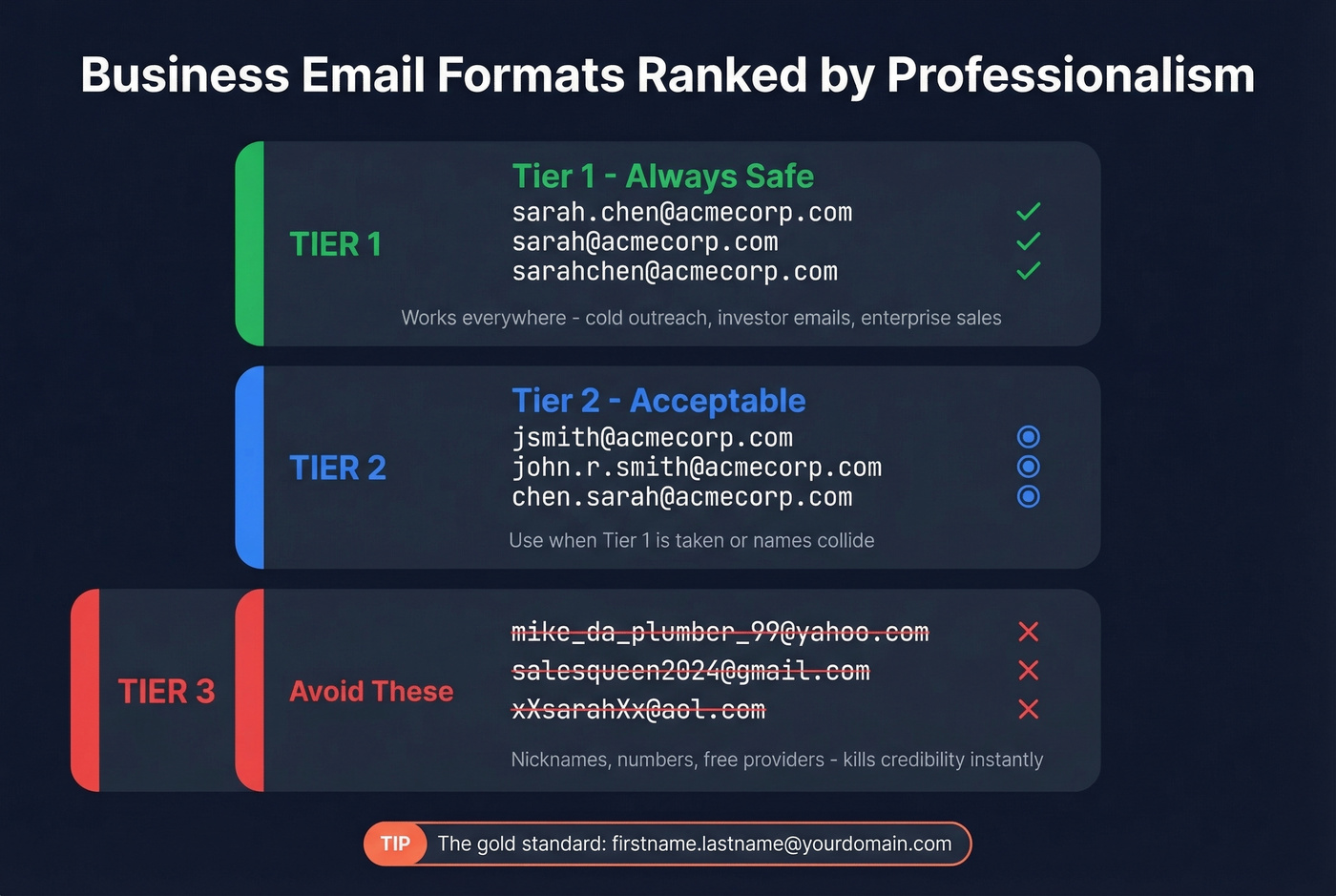
Tier 1 - Always Safe
These formats work in every context: cold outreach, investor emails, enterprise sales, job applications. You can't go wrong here.
| Format | Example |
|---|---|
| firstname.lastname@ | sarah.chen@acmecorp.com |
| firstname@ | sarah@acmecorp.com |
| firstnamelastname@ | sarahchen@acmecorp.com |
| firstname.lastname@ with hyphen | sarah.o-brien@acmecorp.com |
| firstname@ for solo founders | james@studiowest.com |
More Tier 1 examples: david.martinez@, anna@, tomwilson@, priya.sharma@, alex@, rachel.kim@, carlos.rivera@, emma.johnson@, wei.zhang@, olivia@. The pattern is simple - your real name, no numbers, no nicknames. firstname.lastname@ is the gold standard because it's instantly recognizable and scales across a whole company.
Tier 2 - Acceptable
These work fine when Tier 1 formats are taken or when you need to differentiate common names. They're professional but slightly less intuitive.
| Format | Example |
|---|---|
| firstinitiallastname@ | jsmith@acmecorp.com |
| firstname.middleinitial.lastname@ | john.r.smith@acmecorp.com |
| firstnamelastinitial@ | johns@acmecorp.com |
| lastname.firstname@ | chen.sarah@acmecorp.com |
| firstname.lastname with number | john.smith2@acmecorp.com |
Additional Tier 2 examples: mgarcia@, lisa.m.wong@, robertj@, patel.anita@, david.lee3@, kwilliams@, susan.a.park@, thomasr@. The number suffix isn't ideal, but it's the standard duplicate resolution method - better than inventing a creative workaround that confuses everyone.
One warning on initial-based formats: sysadmins on Reddit regularly share horror stories about first-initial + lastname combinations that accidentally spell inappropriate words. Maintain a forbidden-username list and check every new address against it before provisioning.
Tier 3 - Avoid These
These formats actively hurt your credibility. If you're using one, migrate now.
| Format | Why It's Bad |
|---|---|
mike_da_plumber_99@yahoo.com |
Nickname + numbers + free provider. Triple threat. |
salesqueen2024@gmail.com |
Role-based personal address ages instantly |
john.smith@hotmail.com |
Hotmail signals "I set this up in 2003" |
j$mith@company.com |
Special characters look spammy and can trigger filters |
theboss@company.com |
Ego addresses don't age well |
john.smith.senior.vp.sales@co.com |
Too long, impossible to dictate |
xXsarahXx@aol.com |
This isn't Xbox Live |
info.john@company.com |
Confuses personal and role addresses |
johnny123@company.com |
Numbers on a company domain look like a temp account |
mrfixitpro@gmail.com |
Cute for a side hustle, terrible for a business |
first_last@company.com |
Underscores get obscured in underlined links |
Here's the thing: if you're a freelancer using a Gmail address, that's survivable. But the moment you're invoicing clients or sending proposals, a custom domain is non-negotiable.
Role-Based Addresses Every Business Needs
Personal addresses identify people. Role-based addresses identify functions - and they're what customers, partners, and vendors expect to find. Assign a primary owner for every shared address. When three people have access and nobody's responsible, emails die in the inbox.
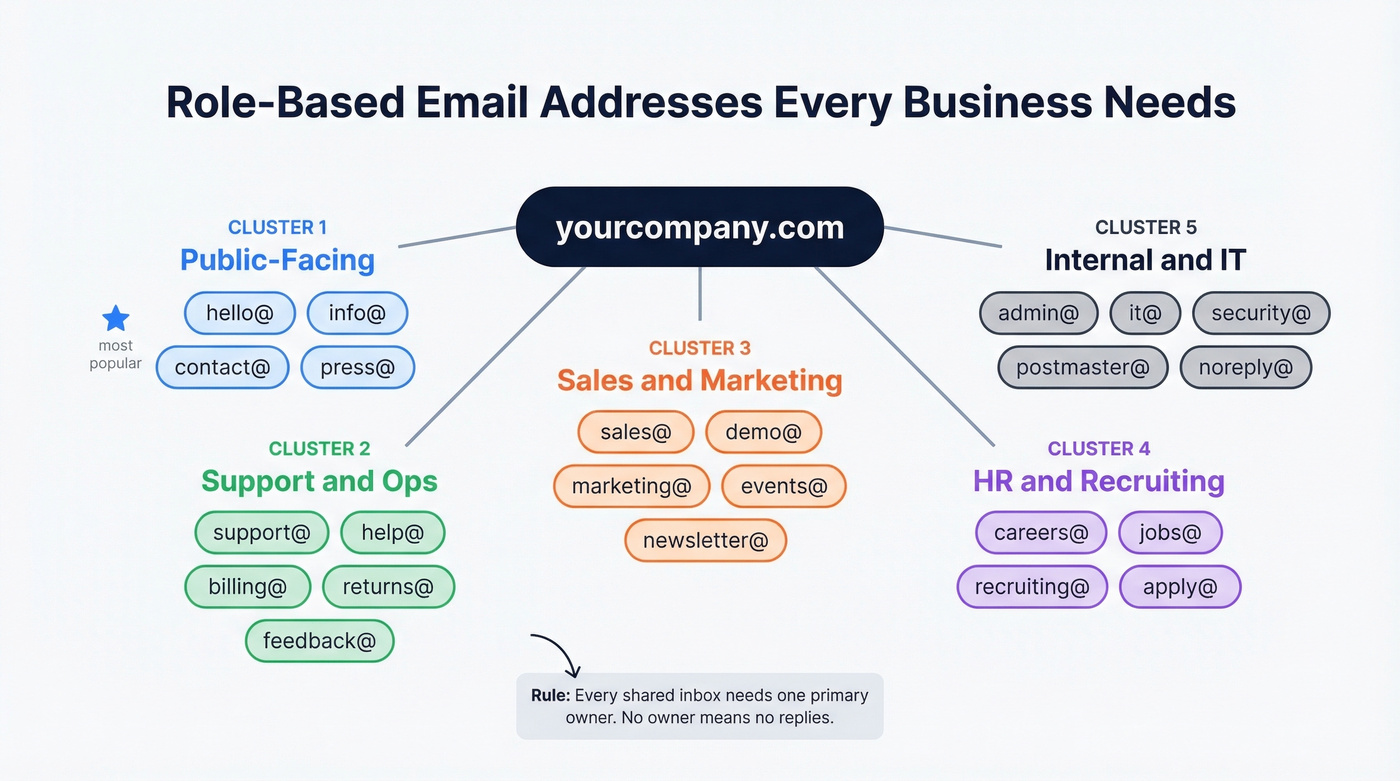
General & Public-Facing
These go on your website, business cards, and marketing materials:
hello@ · info@ · contact@ · press@ · partnerships@ · hi@ · general@ · inquiries@
hello@ has largely replaced info@ as the friendlier default. Either works. Pick one and put it everywhere - don't split traffic across both.
Support & Operations
These handle the post-sale relationship:
support@ · help@ · billing@ · returns@ · feedback@ · orders@ · shipping@ · warranty@ · complaints@ · service@ · tracking@
For most small businesses, support@ forwarding to the founder's inbox is plenty. You don't need returns@ until you're actually processing returns at volume.
Sales, Marketing & HR
sales@ · demo@ · marketing@ · events@ · newsletter@ · careers@ · jobs@ · recruiting@ · apply@ · sponsors@ · ads@ · talent@
Internal & IT
admin@ · it@ · security@ · abuse@ · postmaster@ · noreply@ · dev@ · ops@ · legal@ · compliance@ · privacy@
postmaster@ and abuse@ are widely recommended operational addresses. Most small businesses skip them, but if you're sending any volume of email, set them up as aliases.

Now you know what a professional business email looks like. But what about finding them? Prospeo's database holds 143M+ verified business emails in firstname.lastname@ formats across 300M+ professionals - all at 98% accuracy with a 7-day refresh cycle.
Stop guessing email formats. Look up the real address in seconds.
Industry-Specific Work Email Examples
Different industries have different conventions. These formats feel natural in context:
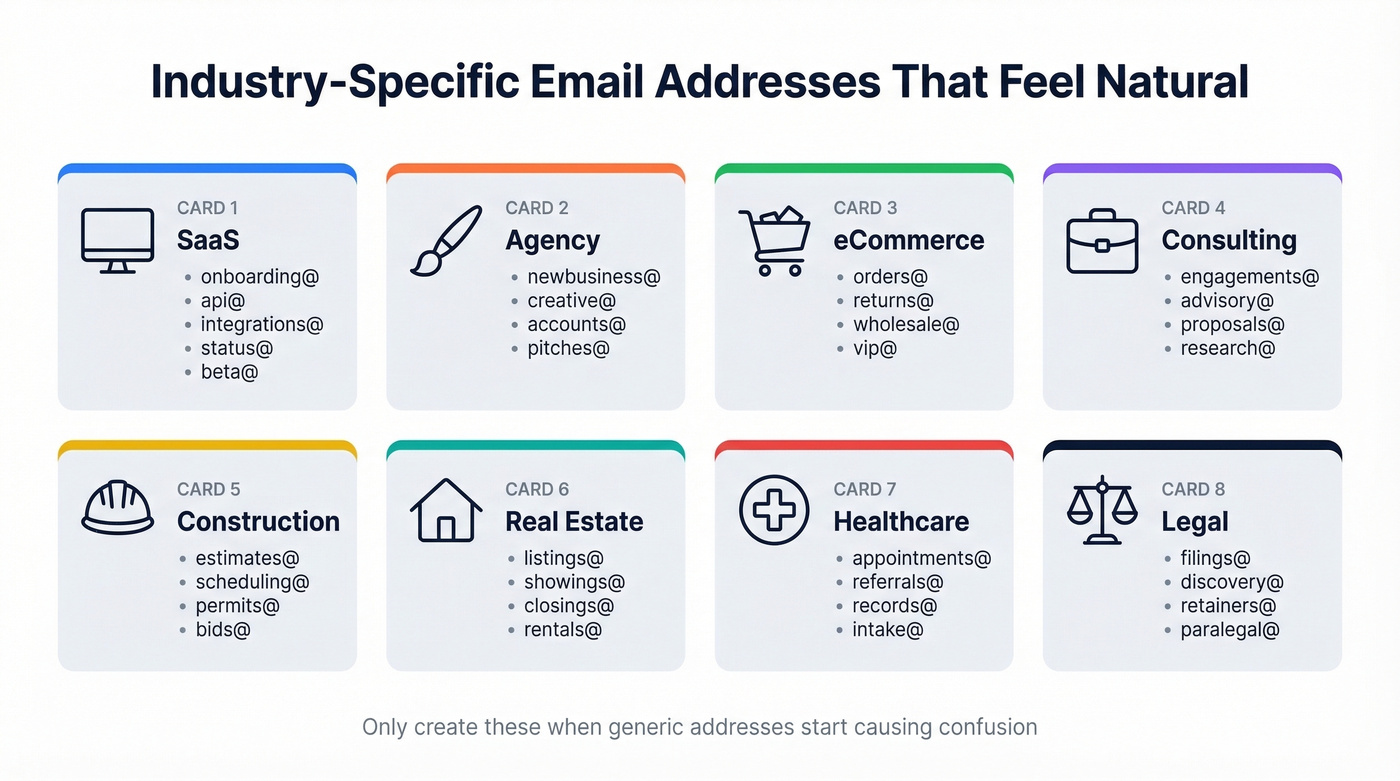
| Industry | Examples |
|---|---|
| SaaS | onboarding@, api@, integrations@, changelog@, status@, beta@ |
| Agency | newbusiness@, creative@, accounts@, strategy@, pitches@ |
| eCommerce | orders@, returns@, wholesale@, vip@, fulfillment@, loyalty@ |
| Consulting | engagements@, advisory@, proposals@, research@ |
| Construction/Trades | estimates@, scheduling@, permits@, jobs@, inspections@, bids@ |
| Real Estate | listings@, showings@, closings@, rentals@, leasing@, appraisals@ |
| Healthcare | appointments@, referrals@, records@, intake@, pharmacy@, triage@ |
| Legal | filings@, discovery@, retainers@, paralegal@, dockets@ |
| Education | admissions@, registrar@, alumni@, financial-aid@, faculty@ |
| Hospitality | reservations@, concierge@, banquets@, groups@, catering@ |
These aren't mandatory - they're useful when your business has grown enough that generic addresses create confusion. A construction company getting estimate requests through info@ is leaving money on the table compared to estimates@hendersonplumbing.com.
A Naming Policy You Can Copy
Once you have more than five people, you need a written naming policy. Otherwise you'll end up with jsmith@, sarah.chen@, and bob@ all in the same company - and your directory will be a mess.
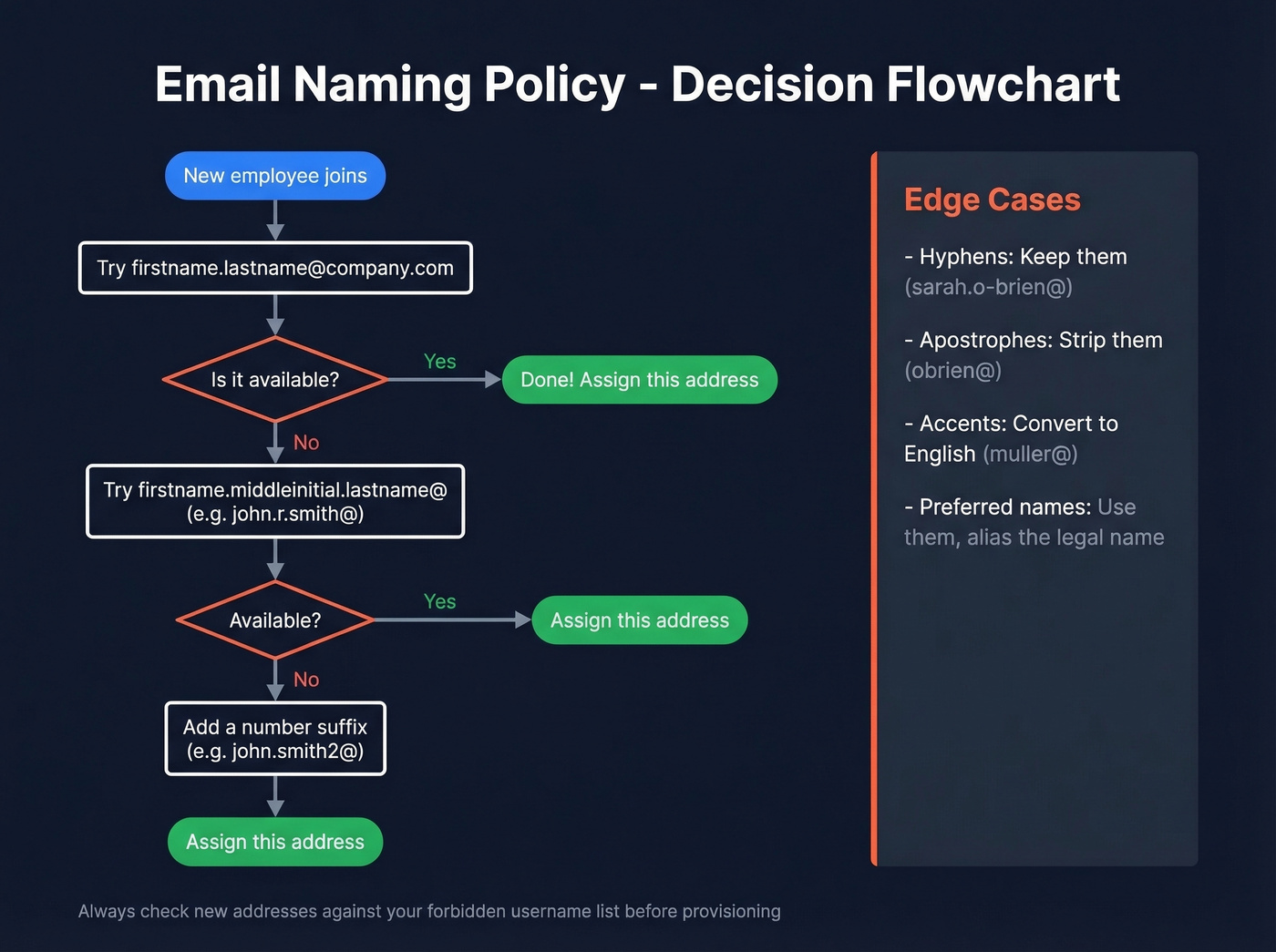
The Default Rule
Washington State's government email naming standard is a clean template for businesses too.
Primary format: FirstName.LastName@yourdomain.com
Duplicate resolution: Add a middle initial first, like John.R.Smith@. If that's also taken, add a number: John.Smith2@. The middle initial approach is always preferable - numbers feel impersonal.
Plus-addressing: Allow firstname.lastname+tag@ for filtering and routing. Most modern email providers support this natively.
Handling Edge Cases
This is where sysadmin teams on Reddit consistently struggle. We've seen the same questions come up dozens of times, so here's a policy that handles the tricky stuff cleanly:
- Hyphens in names like O'Brien or Smith-Jones - keep the hyphen in the email.
sarah.o-brien@reads naturally. - Apostrophes get stripped.
O'Brienbecomesobrien. Apostrophes break most email systems. - Diacritics and accents on names like Garcia or Muller get converted to the closest English equivalent:
garcia@,muller@. This reduces typing friction without disrespecting the name. - Legal vs. preferred names - honor the preferred name. If someone goes by their middle name, that's their primary address. Create an alias for the legal name if needed for HR systems.
- Forbidden usernames - maintain a blocklist of first-initial + lastname combinations that spell inappropriate words. Check every new address before provisioning. This saves you from an embarrassing IT ticket later.
A CEO might push back on firstname.lastname@ because shorter formats are easier to dictate on the phone. The counter-argument is simple: your name is already on your website, your business filings, and your social profiles. Consistency and professionalism outweigh the marginal convenience of a shorter address.
How to Set Up Your Business Email
Step-by-Step Setup
Four steps:
- Register a domain at $10-20/year. Use your company name. Avoid hyphens and unusual TLDs -
.comis still king for credibility. - Choose an email hosting provider. See the pricing table below. Google Workspace is a common default.
- Create your accounts. Start with personal addresses for each team member plus your core role addresses:
hello@,support@,billing@. - Configure DNS records. This is the step everyone skips and then wonders why emails land in spam. SPF, DKIM, and DMARC should be set up from day one - covered in the next section.
We've seen IT admins proudly set up 20 addresses on day one, then wonder why every email lands in spam because nobody touched the DNS records. Don't be that admin.
Email Hosting Pricing
| Provider | Starting Price | Best For |
|---|---|---|
| Google Workspace | ~$7/user/mo | Most businesses - Drive, Docs, Calendar included |
| Microsoft 365 | ~$6/user/mo | Teams already using Office apps |
| Zoho Mail | Free plan available | Startups on a tight budget |
| Bluehost | ~$1.67/mo | Email-only, no extras needed |
| Domain registration | $10-20/year | Required for all options above |
If You're a 1-3 Person Team
Don't overthink this. You need one personal address and one catch-all alias - hello@ forwarding to your personal inbox. That's it. We've seen small business owners on Reddit agonize over setting up five role addresses for a two-person company. Every unanswered inbox is a liability, not an asset.
A catch-all address means anything sent to *@yourdomain.com lands in your inbox. You can give out sales@ on your website and invoices@ on your billing without creating separate accounts. When you grow, you split them out.
Let's be honest: a catch-all forwarding to a single inbox will serve you better than a complex multi-address setup early on. Complexity doesn't signal professionalism - responsiveness does.
Make Your Emails Actually Arrive
Setting up a professional address means nothing if your emails land in spam. 84.24% of B2B sending domains have zero DMARC protection. Adoption among the top 1.8 million domains jumped 75% between 2023 and 2026 - from 27.2% to 47.7% - but the vast majority of smaller domains remain completely unprotected. Don't be one of them.
SPF, DKIM, and DMARC Explained
Three DNS records. Each does one job.
SPF tells receiving servers which IP addresses can send email on behalf of your domain. Example TXT record for Google Workspace:
v=spf1 include:_spf.google.com -all
The -all at the end means "reject anything not on this list." One critical constraint: SPF evaluations have a 10 DNS lookup limit. If you're using multiple sending services - Google, SendGrid, and Mailchimp together, say - you can hit this fast.
DKIM adds a cryptographic signature to every outgoing email, proving it hasn't been tampered with in transit. Your email provider generates the keys; you just add the TXT record they give you.
DMARC ties SPF and DKIM together and tells receivers what to do when checks fail. Start with a monitoring-only policy:
v=DMARC1; p=none; rua=mailto:dmarc-reports@yourdomain.com
Then progress to p=quarantine and eventually p=reject. DNS changes typically propagate within a few hours, though allow up to 48 hours before troubleshooting.
Common DNS Mistakes
The mistakes we see most often:
- Duplicate SPF records. You can only have one SPF TXT record per domain. If you add a second one for a new sending service, both break. Merge them into a single record with multiple
include:statements. - Wrong DKIM selector name. Copy-paste the exact selector your provider gives you. One wrong character and DKIM silently fails.
- Ignoring DMARC reports. The
rua=tag sends you aggregate reports. Actually read them - they'll show you if someone's spoofing your domain or if a legitimate service isn't authenticated. - Exceeding the SPF lookup limit. Each
include:andredirect:counts as a lookup. Flatten your SPF record or use a service to stay under 10.
Protect Your Sender Reputation
Authentication protects your sending domain. But there's a second threat that DNS records can't fix: sending to invalid addresses. Mailbox providers enforce a 0.3% spam complaint threshold - exceed it and your deliverability tanks. High bounce rates from bad addresses accelerate that damage.
Before any outbound campaign, verify your contact list. Prospeo checks emails in real time with 98% accuracy, catching invalid addresses, spam traps, and honeypots before they hit your sender score. The free tier covers 75 verifications per month - enough to validate a small campaign list before you press send.
Setting up role-based addresses like sales@ and support@ is step one. Step two is filling those inboxes with real opportunities. Prospeo finds verified emails for your ideal buyers at $0.01 per lead - 90% cheaper than ZoomInfo - so your outreach lands, not bounces.
Your domain is professional now. Make your prospecting match.
FAQ
What's a good example of a business email address?
The best format is firstname.lastname@yourcompany.com - like sarah.chen@acmecorp.com. It's professional, easy to remember, and scales as your team grows. For solo founders, firstname@yourdomain.com works just as well.
Is a Gmail address unprofessional for business?
For external communication, yes. A custom domain costs $10-20/year and immediately signals you're an established company, not a side project. The moment you're emailing clients or prospects, switch to you@yourbusiness.com.
What is a valid company email?
A valid company email uses your custom domain and follows a recognizable naming convention - like sarah@yourcompany.com. It should resolve to an active mailbox with properly configured SPF, DKIM, and DMARC records so messages reach the recipient's inbox instead of spam.
How many email addresses does a business need?
Start with one personal address per team member plus 2-3 role addresses like hello@, support@, and billing@. Add more only when a real person will own each inbox. Unmonitored addresses are worse than no address at all - they create black holes where customer emails go to die.
How do I verify business emails before sending outbound?
Use a real-time verification tool before every campaign. Prospeo's 5-step verification catches invalid addresses, spam traps, and honeypots at 98% accuracy - the free tier covers 75 checks per month. Keeping bounce rates under 2% is critical for protecting your domain reputation.