

18 Gentle Reminder Email Templates That Get Replies Without the Passive-Aggression
You sent a proposal Tuesday. It's Friday. Radio silence. So you open a new draft and type "Just a gentle reminder..." and you've already lost. That phrase, meant to soften the ask, does the opposite. As Ask a Manager puts it, "gentle reminder" signals "I think you might be offended by a normal workplace interaction and so I am approaching you very gingerly." It reads as passive-aggressive, not polite.
The fix is simple: drop the word "gentle," get specific about what you need, and give a deadline. Below are 18 templates that do exactly that, plus the data on timing, subject lines, and automation that separates reminders that get replies from ones that get ignored.
The Formula Behind Every Good Reminder Email
Every template in this article follows the same three-part structure: Context (what this is about), Specific ask (what you need them to do), and Deadline (by when). That's it.
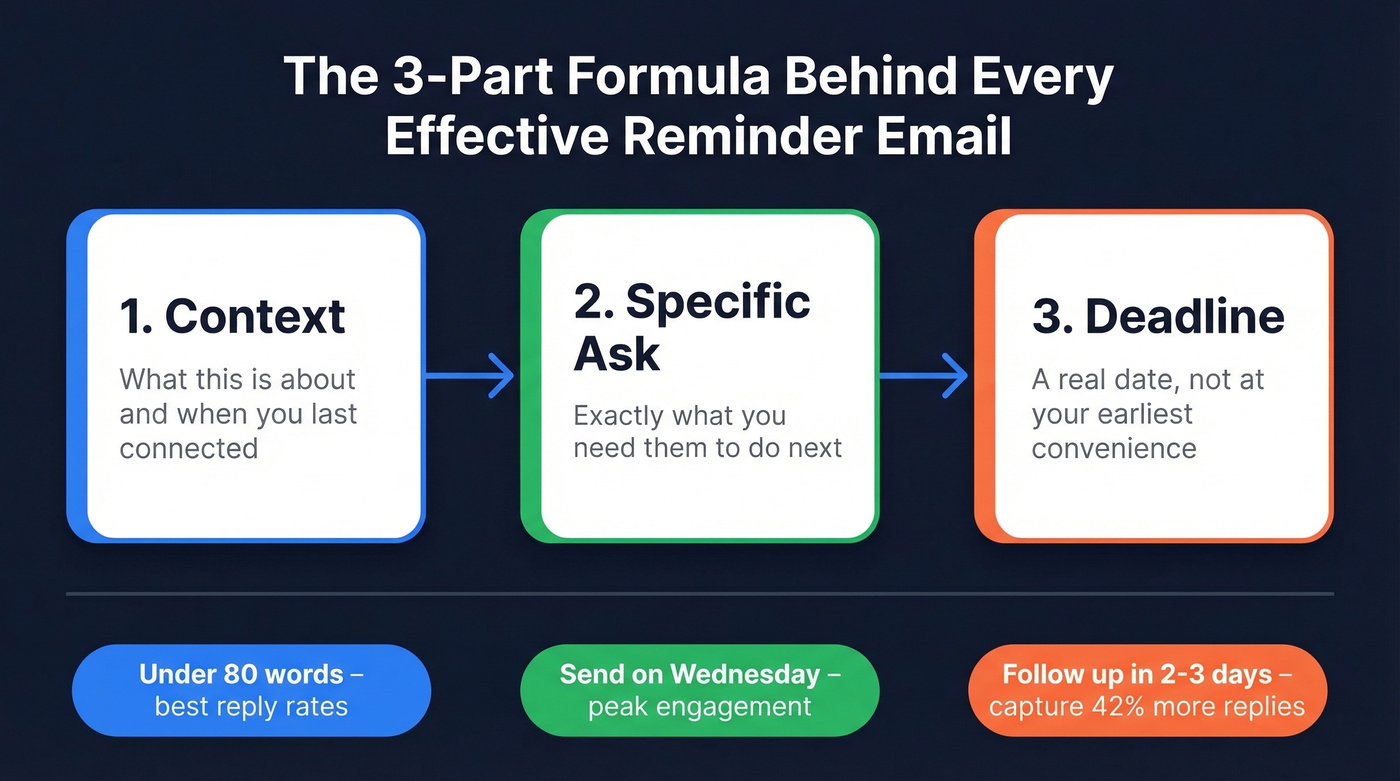
Keep the whole thing under 80 words. Instantly's 2026 benchmark data shows the best-performing emails stay under 80 words with a single clear CTA. Send on Wednesday - Tuesday and Wednesday produce the highest reply rates, with Wednesday edging ahead. Follow up 2-3 days after the first email. 58% of replies come from the first touch, but follow-ups capture the other 42%. Don't leave that on the table.
Is "Gentle Reminder" Passive-Aggressive?
For a lot of people, yes. The phrase has become a workplace pet peeve. Ask a Manager's Alison Green has explicitly called it out: "everyone is entitled to have their own language pet peeves... Mine is 'gentle reminder.'" The comment sections on those posts are full of professionals describing it as irritating, condescending, or the email equivalent of someone smiling while they're annoyed at you. The consensus on r/work and r/NoStupidQuestions is the same - a "polite" reminder email often reads as passive-aggressive to most recipients.
Here's the irony: genuinely direct language is widely accepted as professional. "Hard stop at 3 PM" is fine. "I need your sign-off by Thursday" is fine. But "gentle reminder that I need your sign-off" adds a layer of performative softness that makes people bristle.
Drop "gentle." Drop "friendly." Just say what you need. "Following up on the proposal I sent Tuesday - are you able to review by Friday?" Clear, respectful, and it doesn't trigger anyone's passive-aggression radar.
How to Write a Reminder Email That Gets Replies
Every effective reminder email follows the same five-part structure. You don't need to reinvent it each time.
- Subject line - Short, specific, no fluff
- One-line context - What this is about and when you last connected
- Specific ask - Exactly what you need them to do
- Deadline - A real date, not "at your earliest convenience"
- Easy next step - Make replying frictionless ("Reply yes and I'll send the contract")
One CTA, not three. We've seen reminder emails fail not because the ask was wrong, but because the recipient couldn't figure out what they were supposed to do next.
❌ Vague reminder:
"Hi Sarah, just a gentle reminder about the project. Let me know your thoughts when you get a chance. Thanks!"
✅ Specific reminder:
"Hi Sarah, following up on the Q3 budget proposal I sent Monday. Could you approve or flag changes by Thursday EOD? That gives us time to loop in finance before the Friday deadline. Happy to jump on a quick call if anything needs discussion."
The second version has context, a specific ask, a deadline, and an easy next step. It's not "gentle" - it's clear. That's what gets replies.
Subject Lines That Get Opened
Your subject line determines whether the email gets read or buried. Data from a Belkins analysis of 5.5M B2B emails gives us real numbers to work with.
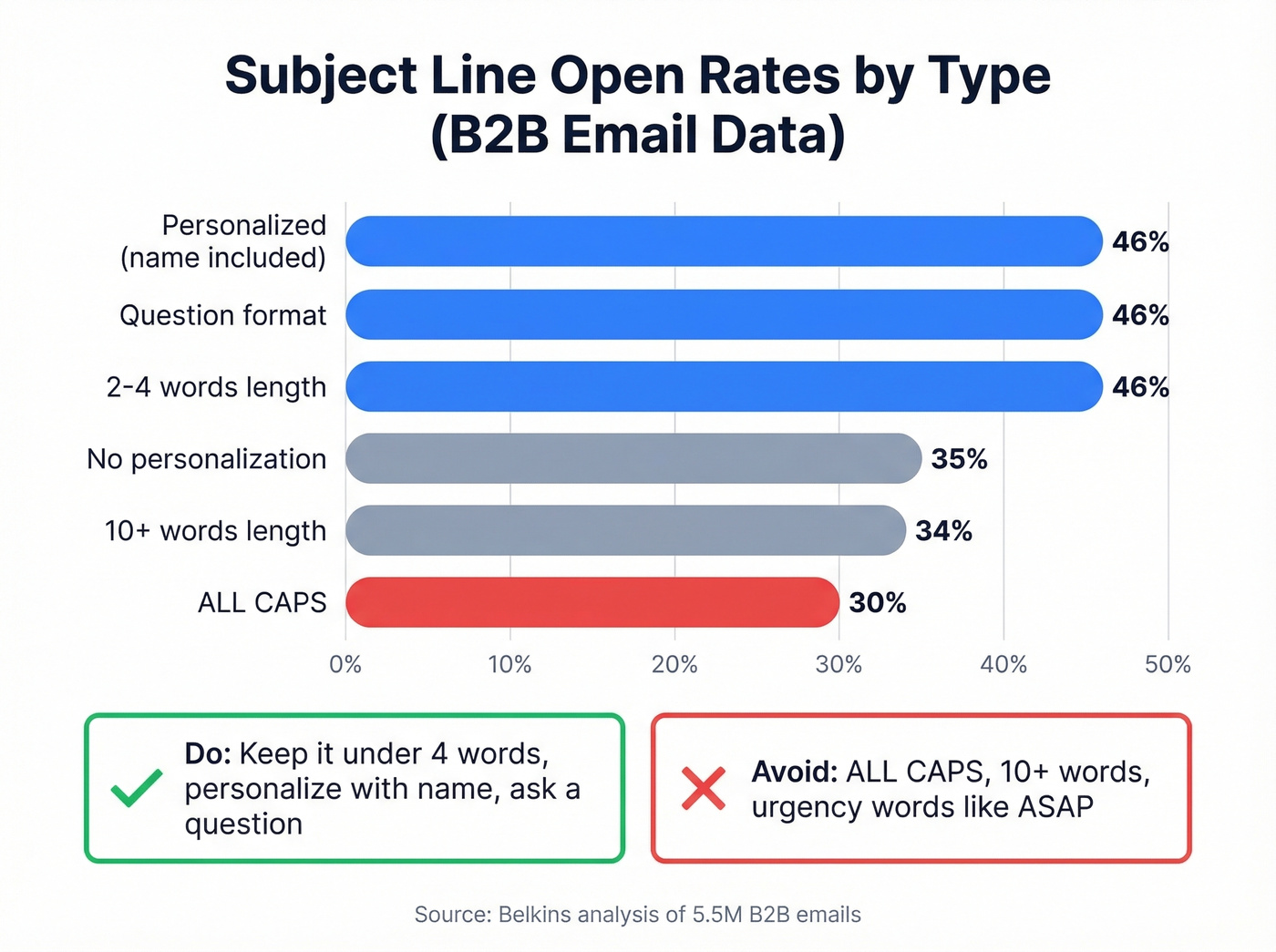
Personalized subject lines hit a 46% open rate vs 35% without personalization - a 31% lift. Question-framed subject lines also hit 46%. The sweet spot for length is 2-4 words (46% opens), while anything over 10 words drops to 34%. ALL CAPS? About 30%. Don't shout.
One caveat: Apple Mail Privacy Protection can inflate open rates by up to 18 points, so treat these numbers as directional rather than absolute. The relative differences still hold.
Reminder emails also drive roughly 49% higher reply rates than single-touch campaigns. That means your follow-up subject line might be the most important one you write all week.
Ten subject lines organized by formula:
| Formula | Example |
|---|---|
| Question | Still interested? |
| Question | Any update on the proposal? |
| Question | Can you review by Friday? |
| Personalized | [Name], quick follow-up |
| Personalized | [Name] - invoice #4521 |
| Direct | Proposal expires Thursday |
| Direct | Budget approval - need by EOD |
| Direct | Meeting tomorrow at 2 PM |
| Soft | Following up on our call |
| Soft | One more thing on [project] |
iPhone truncates subject lines around 33-41 characters. If your key info is past character 40, mobile readers won't see it. Skip urgency words like "ASAP" - they drop opens below 36%.

A perfect reminder email is worthless if it bounces. Prospeo's 98% verified emails mean your carefully crafted follow-ups actually land in inboxes - not spam folders. At $0.01 per email, bad data stops killing your reply rates.
Stop writing great reminders to dead email addresses.
When to Send (and How Often)
Timing matters more than most people think. Combining Flowlu's escalation framework with Instantly's 2026 data, here's the cadence that works:
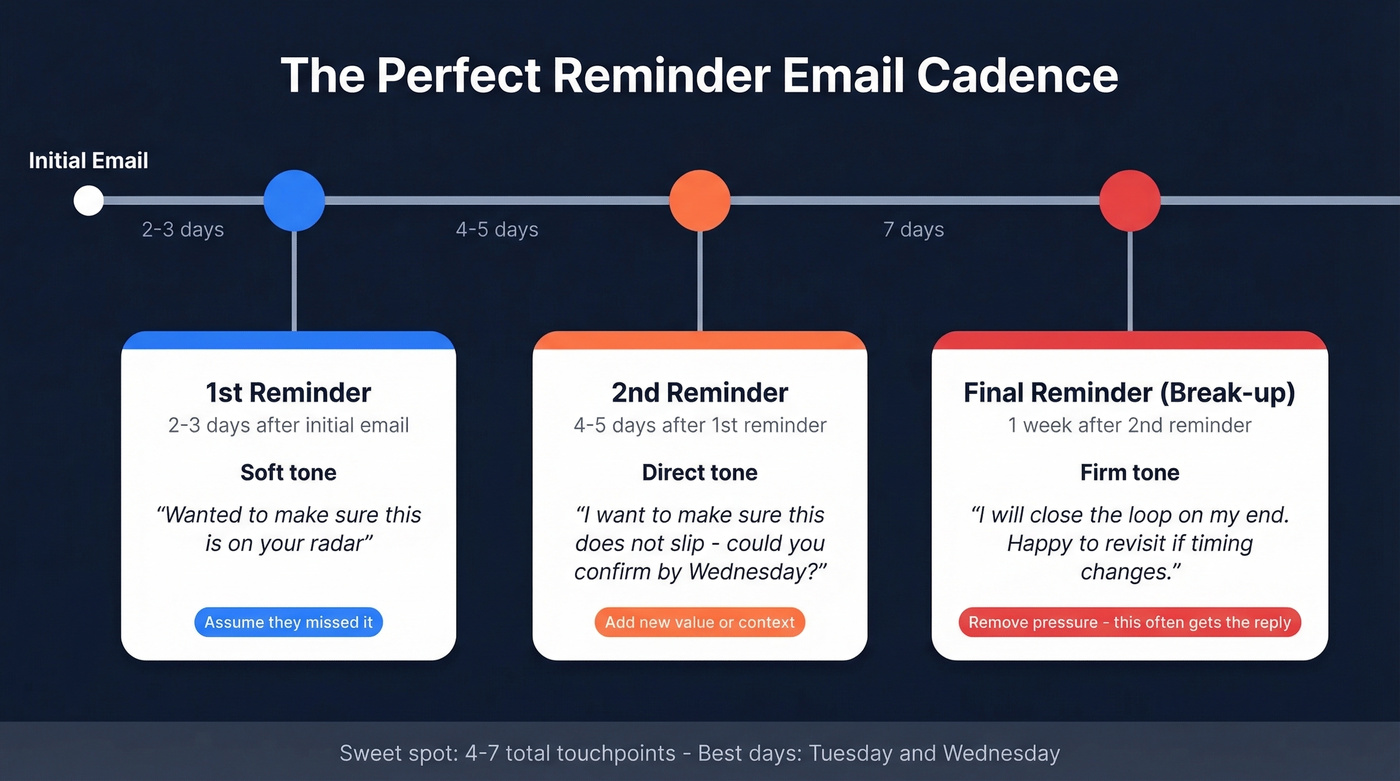
1st reminder (2-3 days after initial email): Soft tone. Assume they missed it. Brief, friendly, restate the ask.
2nd reminder (4-5 days after first reminder): Direct tone. Add context or new value. Clear deadline. "I want to make sure this doesn't slip - could you confirm by Wednesday?"
Final reminder (1 week after second reminder): Firm tone. This is your break-up email. "I'll assume this isn't a priority right now and close the loop on my end. Happy to revisit if timing changes."
Space touches 3-4 days apart. The sweet spot for total touchpoints is 4-7 - beyond that, you're getting diminishing returns unless each follow-up adds genuinely new information.
Let's be honest about break-up emails: they work because they remove pressure. In our experience, the break-up email is often the one that finally gets a reply - people respond when they feel the window closing. Tuesday and Wednesday are your best send days. Reply rates peak mid-week when people are in execution mode, not catching up from the weekend or winding down for it.
18 Polite Reminder Email Examples
Every template below stays under 80 words with a single CTA. Copy, customize, send.
No Response Follow-Up
Template 1 - Soft first follow-up
Subject: Following up on [topic]
Hi [Name], wanted to circle back on the [proposal/question] I sent [day]. I know things get buried - just want to make sure it's on your radar. Could you take a look by [date]? Happy to answer any questions.
Why it works: Assumes good intent, gives a deadline, keeps it brief.
Template 2 - Direct second follow-up
Subject: [Name], any update on [topic]?
Hi [Name], following up again on [topic] from [date]. I'd love to move forward but need your [input/approval/decision] by [date] to stay on track. What's the best way to get this across the finish line?
Template 3 - Break-up email
Subject: Closing the loop on [topic]
Hi [Name], I've reached out a few times about [topic] and haven't heard back. I'll assume the timing isn't right and close this out. If things change, just reply to this thread.
Why it works: Removes pressure. Break-up emails trigger replies because they signal the window is closing.
Payment & Invoice Reminders
This is where escalation tone matters most. Match your tone to how overdue the invoice actually is.
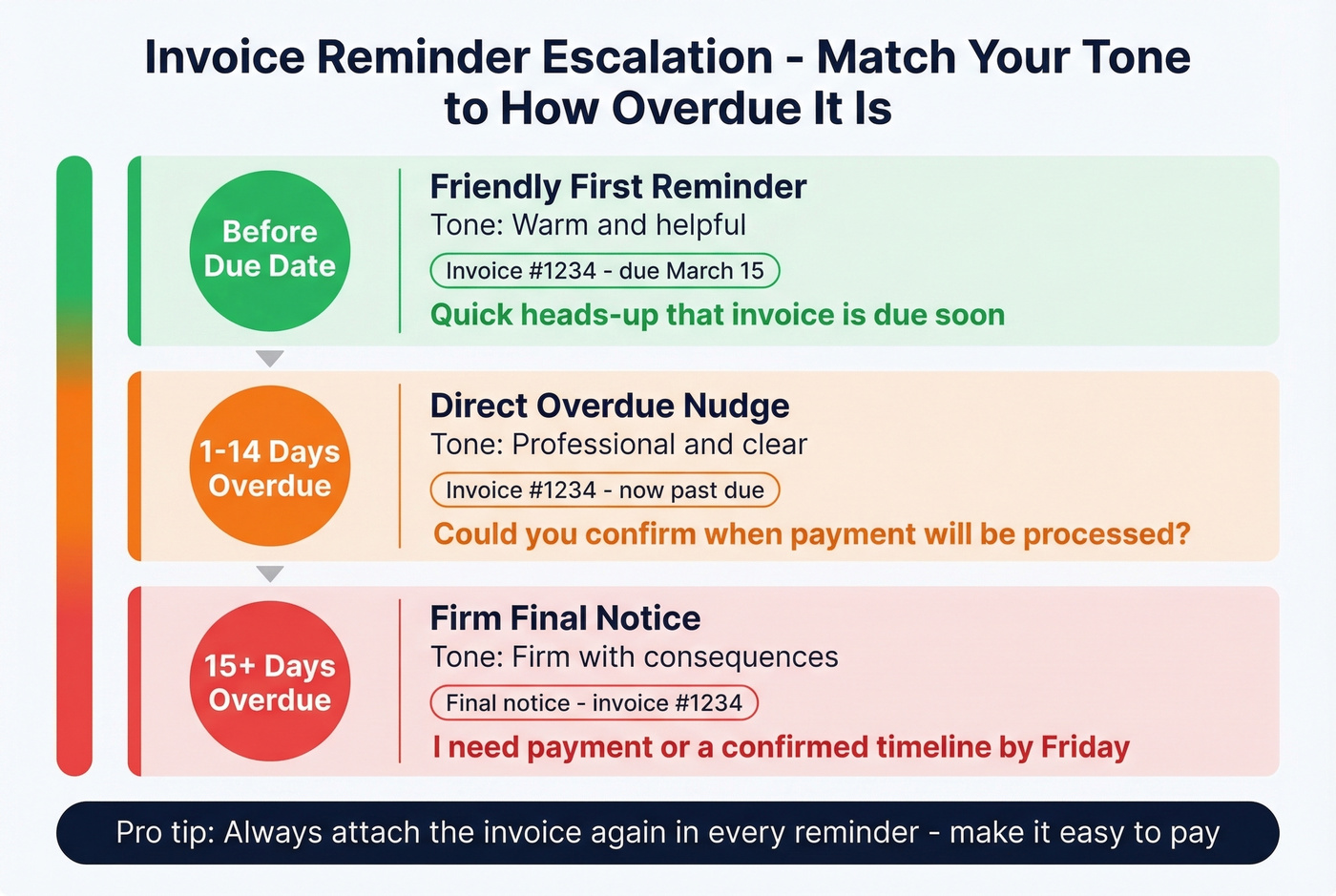
Template 4 - Friendly first reminder
Subject: Invoice #[number] - due [date]
Hi [Name], quick heads-up that invoice #[number] for [amount] is due [date]. I've attached it again for easy reference. Let me know if you need anything to process it.
Template 5 - Overdue nudge
Subject: Invoice #[number] - now past due
Hi [Name], invoice #[number] for [amount] was due [date] and is now [X days] overdue. Could you confirm when payment will be processed?
Template 6 - Firm final notice
Subject: Final notice - invoice #[number]
Hi [Name], this is my third follow-up on invoice #[number], now [X days] overdue. I need payment or a confirmed timeline by [date]. After that, I'll escalate per our agreement terms.
Meeting & Appointment Reminders
Template 7 - Upcoming meeting confirmation
Subject: Confirming our call [day] at [time]
Hi [Name], looking forward to our meeting [day] at [time]. Here's the agenda: [one-liner]. Let me know if anything's changed on your end.
Template 8 - Reschedule offer
Subject: Need to reschedule [day]?
Hi [Name], I know schedules shift - if [day] at [time] no longer works, here are two alternatives: [option A] or [option B]. Just reply with your preference.
Pro tip: Offering exactly two alternatives converts better than open-ended "when works for you?" questions. Two options feel like a decision, not a task.
Template 9 - No-show follow-up
Subject: Missed you today - reschedule?
Hi [Name], looks like we missed each other for our [time] call. No worries - want to reschedule? I'm open [day A] or [day B] afternoon.
Deadline Reminders
Template 10 - Upcoming deadline heads-up
Subject: [Project] deadline - [date]
Hi [Name], quick reminder that [deliverable] is due [date]. Let me know if you're on track or if anything's blocking you - happy to help clear the path.
Template 11 - Missed deadline follow-up
Subject: [Deliverable] was due [date]
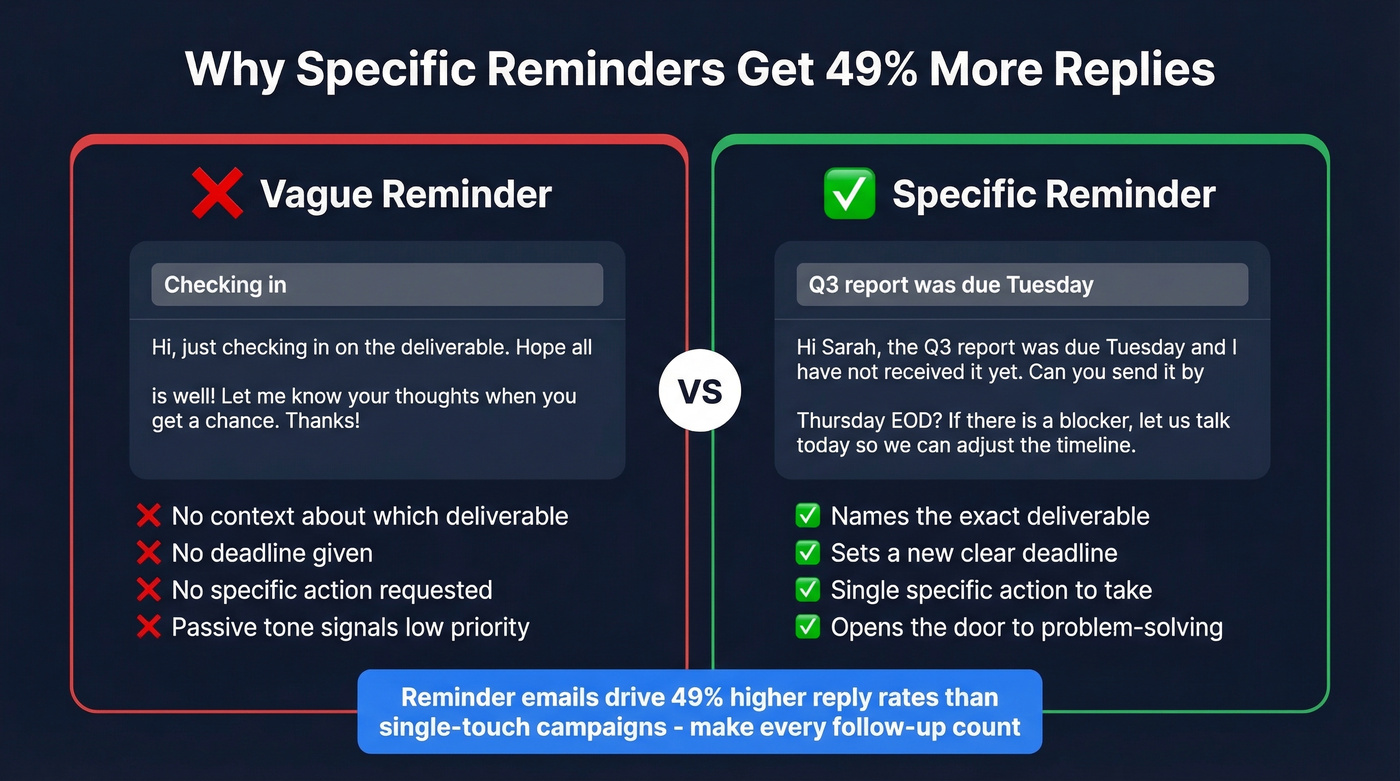
Before → After comparison:
❌ "Hi, just checking in on the deliverable. Hope all is well!"
✅ "Hi [Name], [deliverable] was due [date] and I haven't received it yet. Can you send it over by [new date]? If there's a blocker, let's talk today so we can adjust the timeline."
The second version names the gap, sets a new deadline, and opens the door to problem-solving.
Boss or Manager Reminders
Template 12 - Waiting on approval
Subject: Need your approval for [project]
Hi [Name], the [proposal/budget/plan] is ready for your sign-off. I need approval by [date] to keep [downstream task] on schedule. It's in [location/link] - should take about 5 minutes.
When to use this: Your manager is the bottleneck and a downstream team is waiting. The "5 minutes" framing lowers the perceived effort.
Template 13 - Waiting on feedback
Subject: Your feedback on [document]?
Hi [Name], I sent [document] on [date] and would love your input before I finalize. Could you share feedback by [date]? Even a quick "looks good" works.
Contract & Proposal Follow-Ups
Template 14 - Proposal sent, no reply
Subject: Thoughts on the proposal?
Hi [Name], following up on the proposal I sent [date]. Any questions or changes needed? I'd like to finalize by [date] so we can hit our [milestone] timeline.
Template 15 - Contract awaiting signature
Subject: Contract ready for signature
Hi [Name], the contract is in your inbox via [DocuSign/link]. Once signed, we can kick off [next step] by [date]. Let me know if anything needs adjusting.
Template 16 - Proposal expiring
Subject: Proposal pricing expires [date]
Hi [Name], the pricing in our proposal holds through [date]. After that, I'll need to re-quote based on current rates. Want to lock it in?
Event RSVP Reminders
Template 17 - Initial RSVP nudge
Subject: RSVP - [event name] on [date]
Hi [Name], we're finalizing the guest list for [event] on [date]. Can you confirm attendance by [RSVP deadline]? Event link: [link].
Template 18 - Final headcount request
Subject: Final headcount - need your RSVP today
Hi [Name], we're locking in catering for [event] today. If I don't hear back by [time], I'll mark you as unable to attend. Just reply "yes" or "no" - takes two seconds.
Why it works: The "I'll assume no" framing creates urgency without being pushy.
Phrases That Help vs. Phrases That Backfire
| ❌ Skip This | ✅ Use This Instead |
|---|---|
| Gentle reminder | Quick follow-up on [X] |
| Per my last email | Circling back on [X] from [date] |
| Just checking in | Any update on [X]? |
| ASAP | By [specific date/time] |
| As per our discussion | Following up on our [date] call |
| Friendly reminder | [No preamble - just state the ask] |
| At your earliest convenience | By end of day [date] |
| Hope this finds you well | [Skip - go straight to the ask] |
The Belkins data backs this up: jargon and urgency words like "ASAP" drop open rates below 36%. A real date beats a vague plea every time.
Most Reminder Problems Are List Problems
Look, if you're sending more than a handful of reminders per week and getting silence, the issue probably isn't your copy. It's your contact data.
A VerifiedEmail report found a 14-percentage-point gap between email delivery rate (98.16%) and actual inbox placement (84.3%). That means roughly 1 in 7 "delivered" emails never reaches the inbox. Your perfectly crafted follow-up bounces, and your sender reputation takes the hit.
Skip this section if your bounce rate is already under 3%. For everyone else: if your average deal size is under $15k, you don't need a six-figure sales intelligence platform. But you absolutely need verified email addresses. That's the unsexy foundation that makes everything else work.
Automating Reminders Without Burning Sender Rep
Once you've got templates that work, automate the cadence so you're not manually tracking who hasn't replied.
| Tool | Free Plan | Paid From | Free Automations? |
|---|---|---|---|
| Brevo | 9,000 emails/mo | $0 | Yes |
| Prospeo (verification) | 75 verifications/mo | ~$0.01/email | Yes (API) |
| MailerLite | Free tier available | $15/mo | Limited |
| ActiveCampaign | 14-day trial | $19/mo | Yes |
| Mailchimp | Free tier available | $13/mo | No |
The step most people skip is verification. We've watched teams spend hours perfecting their reminder sequence only to send it to addresses that bounce. Prospeo handles this as step zero - verifying emails in real time with 98% accuracy, filtering out catch-all domains, spam traps, and honeypots before you hit send.
If you're building multi-touch follow-ups, start with proven sales follow-up templates and then automate the cadence.

When your reminder sequence hits email 3 with no reply, the problem might not be your copy - it might be your data. Prospeo refreshes 300M+ contacts every 7 days, so your follow-ups reach real people at current addresses, not job-changers and bounced inboxes.
Fresh data turns silent prospects into actual replies.
FAQ
How many times should I follow up?
The sweet spot is 4-7 touchpoints total. After three follow-ups with no response, send a break-up email - it often triggers a reply because it signals the window is closing. Beyond 7 touches without new information, you're hurting your sender reputation more than helping your pipeline.
What's the best day to send a reminder email?
Wednesday consistently produces the highest reply rates across B2B benchmarks. Mid-week emails catch people in execution mode rather than Monday inbox-clearing or Friday wind-down. Pair that with a morning send (8-10 AM recipient time) for best results.
Is it rude to send a reminder to your boss?
Not at all - frame it as helping them stay on track. Use Template 12 or 13 above: state the deliverable, the deadline, and the downstream impact. You're removing a task from their mental backlog, not nagging.
How do I make sure my reminder reaches the inbox?
Verify the email address before sending. A bounced email means your reminder never existed. With a 14-point gap between delivery and inbox placement, verification isn't optional. Prospeo's free tier covers 75 verifications per month, enough for most small-batch follow-up lists.
Can I use the same template for every situation?
A good template gives you the structure - context, ask, deadline - but you should always customize the details. The 18 examples above cover the most common scenarios, from invoice follow-ups to meeting confirmations, so pick the closest match and adapt it in under a minute.