


10 Best Guru Alternatives for Teams That Need Better Search
Your support team can't find anything in Guru anymore. The knowledge is there - hundreds of verified cards, carefully maintained - but search returns irrelevant results, and reps end up pinging Slack instead. You're not alone. Across 2,378 G2 reviews, "Search Functionality" is mentioned 152 times, making it the single most-cited con. Here are 10 Guru alternatives worth evaluating, plus a framework for picking the right one.
Our Picks (TL;DR)
| Scenario | Pick |
|---|---|
| Best overall for mid-market | Slite |
| Best for Atlassian shops | Confluence |
| Best for speed and simplicity | Nuclino |
| Best all-in-one workspace | Notion |
| Fixing bad CRM data alongside your KM switch | Prospeo |
Why Teams Switch From Guru
Guru isn't a bad product. It holds a 4.7/5 on G2 and a 4.8/5 on Capterra from 639 reviews. The verification workflow is genuinely best-in-class, and the browser extension delivers answers without breaking a rep's flow. 84% of users leave five-star reviews.
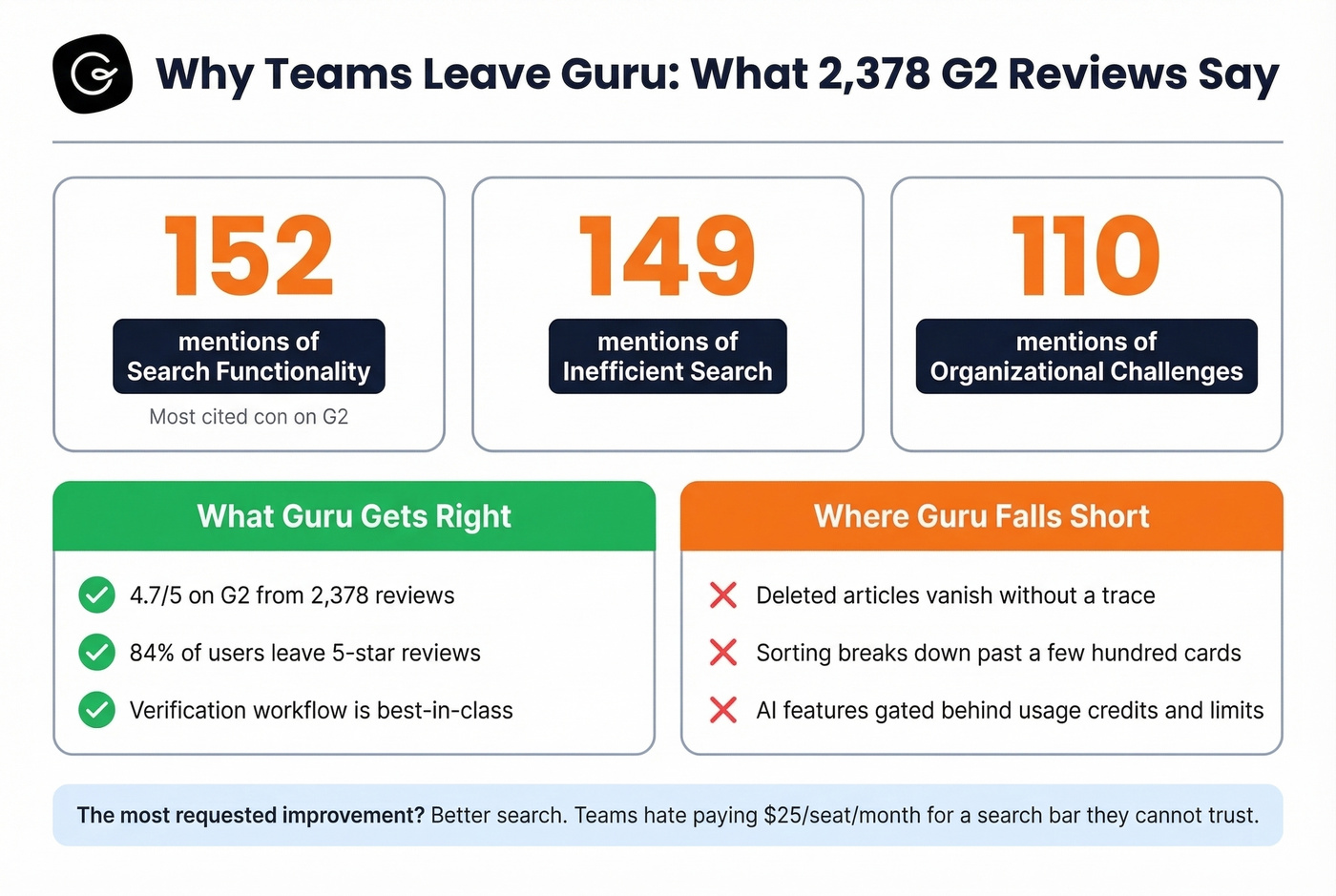
But the complaints that do exist cluster around one theme: search. G2 reviewers flag "Search Functionality" 152 times, "Inefficient Search" 149 times, and "Organizational Challenges" 110 times. That's not a fringe complaint - it's the dominant pain point by a wide margin.
Capterra reviews add texture. Users report that deleted articles vanish without a trace, making it impossible to confirm whether something was intentionally removed or accidentally lost. Sorting and filtering break down as content scales past a few hundred cards, and during company-wide updates, teams get confused about which card to update, which to hide, and which to archive.
Then there's the pricing friction. Guru's AI features ship with usage limits and credits, and the Enterprise plan uses true usage-based pricing. At $25/seat/month for a team of 50, you're looking at $1,250/month before you even get into higher-tier packaging. The most-requested improvement is better search - and teams hate paying premium prices for a search bar they can't trust.
Push vs. Pull: The Decision That Matters Most
Before you compare feature lists, decide what model your team actually needs. Guru is a "push" tool - it delivers answers where you already work, via browser extension, Slack, and Teams. You don't navigate to Guru; Guru comes to you. That's genuinely differentiated.
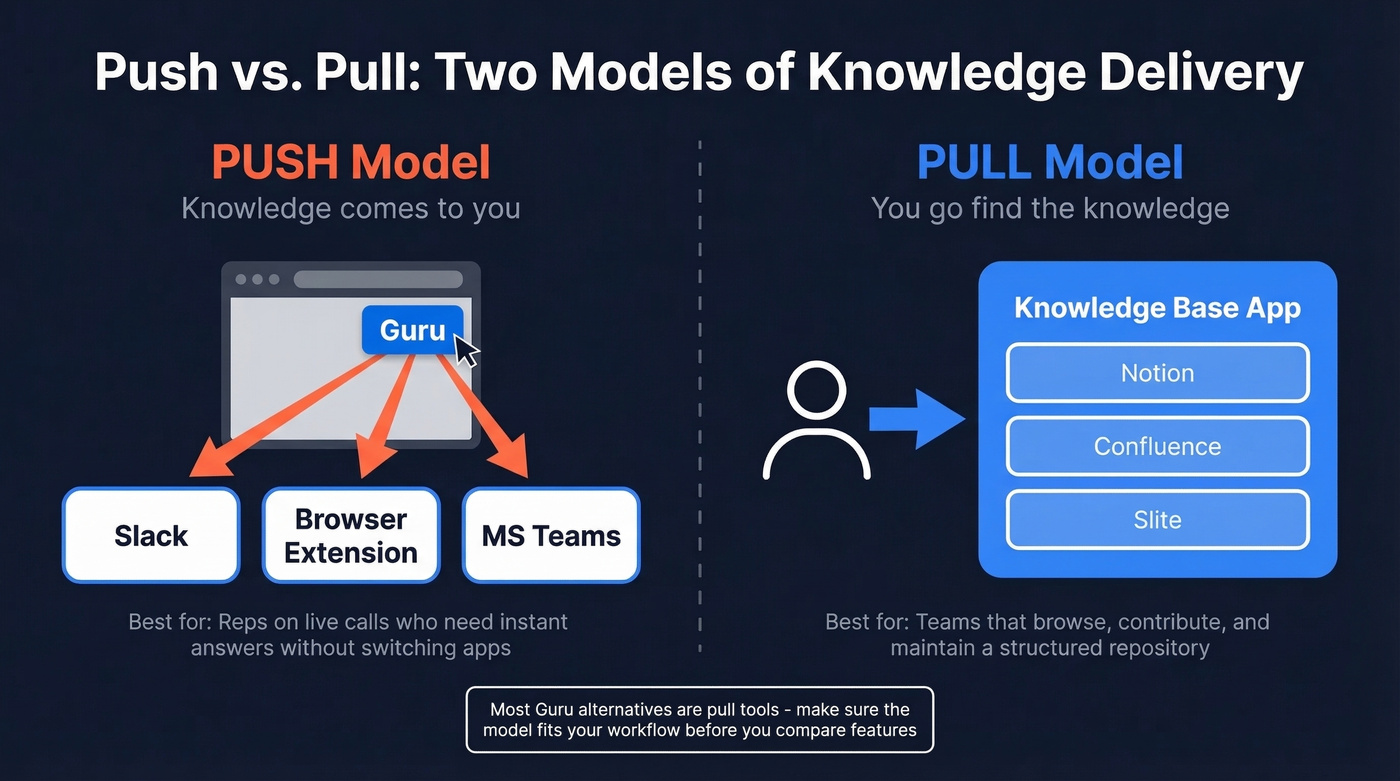
Most alternatives are "pull" tools. Notion, Confluence, and Slite expect you to open the app, navigate to the right page, and find the answer yourself. The search might be better, but the delivery model is fundamentally different.
The category is also shifting toward automated content hygiene - duplicate detection, freshness signals, and governance workflows that keep internal knowledge bases from rotting. If your team lives in Slack and needs instant answers during customer calls, the push model matters. If your team needs a structured repository they browse and contribute to, pull works fine. Guru's verification workflow, where subject-matter experts are automatically prompted to review and re-verify content, is another genuine differentiator that most pull-model tools don't replicate. Keep both factors in mind.

Switching from Guru means your team is already rethinking their stack. While you're at it, fix the bad contact data clogging your CRM. Prospeo enriches your existing records with 50+ data points at a 92% match rate - 98% email accuracy, 7-day refresh cycle, no contracts.
Clean up your CRM data the same week you migrate your knowledge base.
Pricing Comparison
| Tool | Starting Price | Free Tier? | AI Included? | Best For |
|---|---|---|---|---|
| Slite | $8/user/mo | No | Yes (capped) | Mid-market KM |
| Confluence | $5.42/user/mo | Yes (10 users or fewer) | Yes (Rovo in paid plans) | Atlassian teams |
| Notion | Free | Yes | +$10/user/mo | All-in-one workspace |
| Nuclino | ~$6-10/user/mo | Yes (50 items) | Business only | Speed + simplicity |
| Bloomfire | ~$158K/yr median | No | Yes | Enterprise KM |
| Document360 | ~$200-800/mo est. | No | Business+ | Customer-facing docs |
| ClickUp | ~$7/user/mo | Yes | Available | PM + docs combo |
| Slab | ~$8/user/mo | Yes | Available | Simple internal wiki |
| Tettra | ~$8.33/user/mo | Yes (small teams) | Available | Small team Q&A |
| Archbee | ~$50/mo | No | Yes | Developer docs |
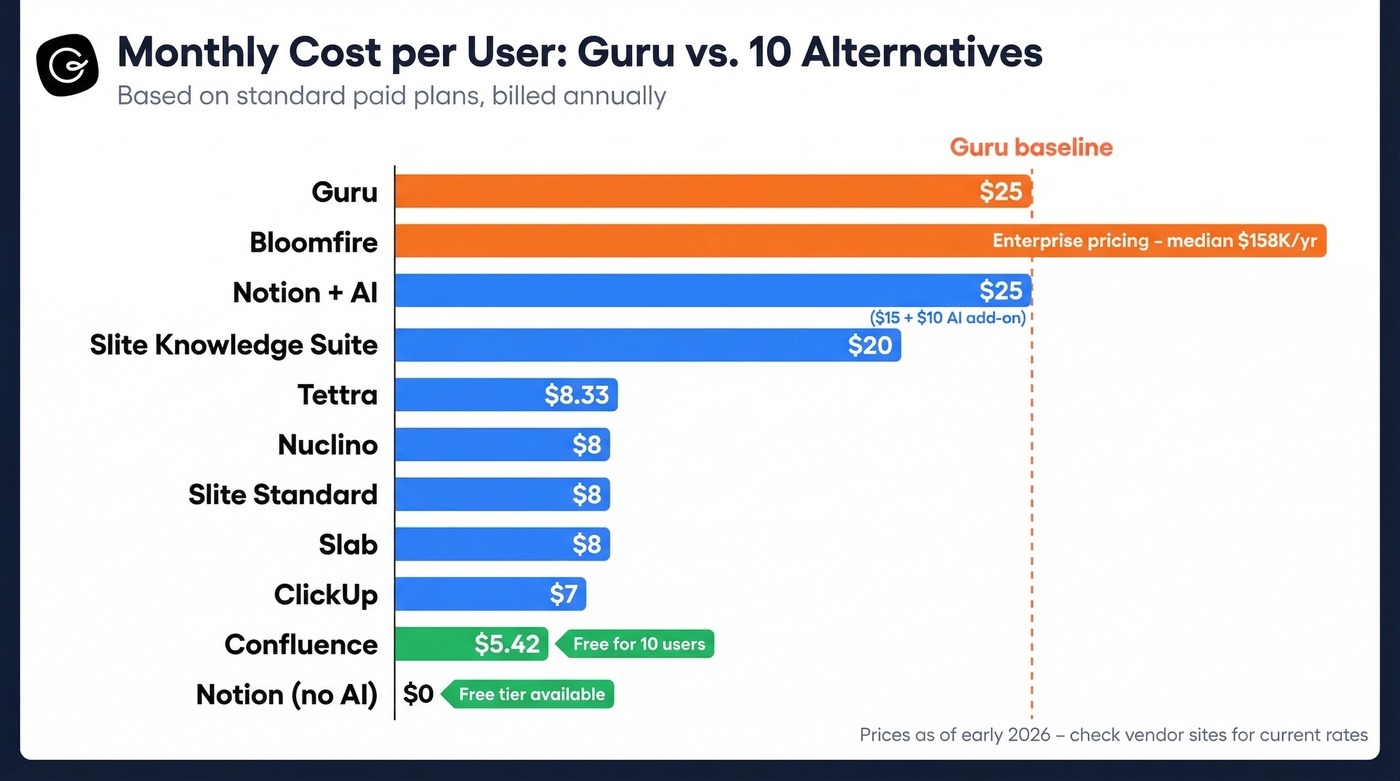
For reference, Guru starts at $25/seat/month on annual billing and $30/seat/month on monthly.
The 10 Best Guru Alternatives in 2026
1. Slite
Use this if you want Guru's verification model with better search, and you're a mid-market team of 20-200 people that needs a clean, collaborative editor. Slite's doc verification workflow mirrors Guru's approach - content owners get prompted to review and re-verify - but the search experience is noticeably smoother. At $8/user/month on Standard, it's roughly a third of Guru's per-seat price.
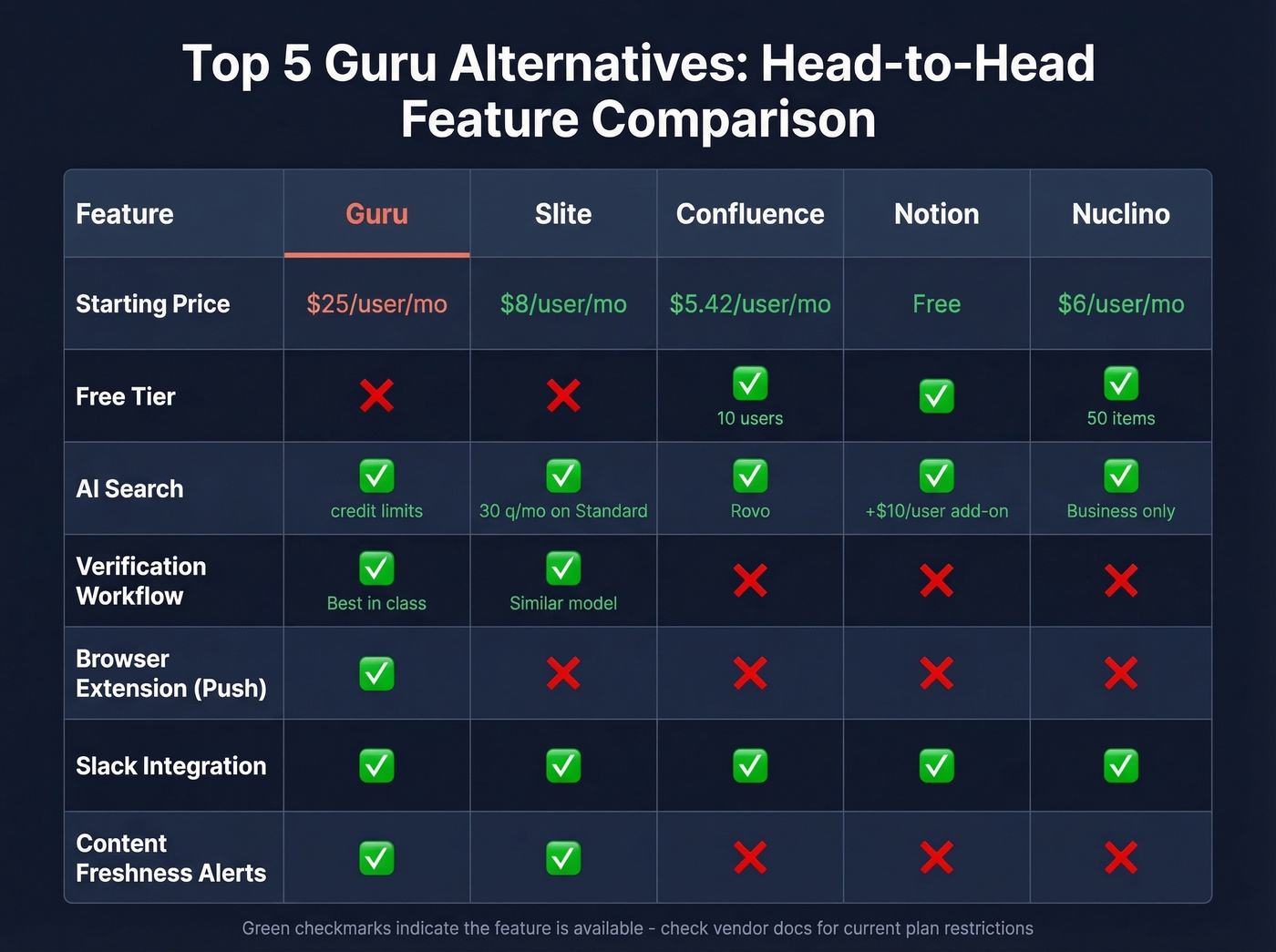
Skip this if you need heavy AI usage. Standard plans cap AI at 30 questions per user per month. The Knowledge Suite tier bumps that to 100 questions at $20/user/month but starts at 10 users. Reddit users also flag clunky navigation, slow loading, and missing basics like text color formatting - so if your team is picky about editor polish, test thoroughly before committing.
The sweet spot: teams that outgrew Guru's search but still want structured verification without Confluence's learning curve.
2. Confluence
Use this if you're already in the Atlassian ecosystem or you need the cheapest option that still scales. Confluence is free for up to 10 users, and Standard runs $5.42/user/mo billed annually. For a 50-person team, that's $271/month versus $1,250/month on Guru. Rovo in paid plans is included in paid plans, and the Jira integration is the real ecosystem play - if your engineering team already lives in Jira, Confluence becomes the obvious documentation layer.
Skip this if you value intuitive navigation. Confluence carries a 4.4/5 on Capterra, solid but noticeably lower than Guru's 4.8. The learning curve is real, especially for non-technical teams. Page hierarchies get messy fast, and finding the right space/page/child-page requires tribal knowledge that defeats the purpose of a knowledge base.
Here's the thing: Confluence wins on price and ecosystem. It loses on usability. For teams under 50 people who can tolerate the ramp-up, it's hard to beat the value.
3. Notion
Notion is the tool everyone already has an opinion about, so let's be honest: it's the best workspace consolidation play and the worst dedicated knowledge management tool on this list. Both things are true simultaneously.
The free tier is generous, and Business runs around $15/user/month annually with AI as a $10/user/month add-on. You get docs, wikis, project tracking, and databases in one place. The flexibility is unmatched. But Notion has no automated verification, no outdated-page detection, and no built-in way to flag knowledge gaps. You have to manually convert new pages into Wiki format to get even basic organization features. One Reddit user nailed it: there's no way to report "no search results" to identify what's missing from your team wiki.
For teams that want to consolidate five tools into one and can self-enforce content hygiene, Notion is compelling. For teams that need a pure knowledge management tool with guardrails, look elsewhere.
4. Nuclino
Use this if your team values speed above all else. Nuclino loads fast, the interface is minimal, and you can go from signup to first published doc in minutes. The free plan covers 50 items and 2GB of storage - enough for a small team to evaluate properly. Paid plans run ~$6-10/user/month depending on tier.
Skip this if you need AI-powered enterprise search on day one. Sidekick, Nuclino's AI assistant, is gated to the Business tier. And the 50-item free plan limit means you'll hit the paywall quickly if you're migrating a real knowledge base.
5. Bloomfire
$158K/year. That's the ~$158K/yr median Bloomfire contract per Vendr data. If you're still reading, you're either an enterprise org with budget, a dedicated KM team, and multimedia knowledge assets - or you're morbidly curious.
Bloomfire's search can deep-index content across file types, including video and spoken word, which is genuinely rare. The company claims customers save 100+ hours per employee per year, and at that price, you'd better be measuring it. Scope-based pricing, multi-year contracts, and separate implementation fees make this enterprise pricing disguised as a knowledge base. Best for organizations with 500+ employees and a real KM budget line.
6. Document360
A purpose-built customer-facing knowledge base with approval workflows, version control, and an AI chatbot on the Business+ tier. If you need external documentation rather than an internal wiki, Document360 is the specialist pick. Every tier is quote-only - expect $200-800/month for SMB/mid-market deployments.
The fact that a documentation tool won't document its own pricing is genuinely irritating.
7. ClickUp
KM is a secondary feature in ClickUp, not the core product. If you already use ClickUp for project management and want to bolt on a docs/wiki layer without adopting another tool, the free tier and ~$7/user/month paid plans make it painless. But search, organization, and verification all lag behind dedicated tools. Don't switch to ClickUp for knowledge management - only add it if you're already there.
8. Slab
Slab offers a clean, simple documentation tool with a free tier and paid plans from around $8/user/month. Best for small teams that want a no-frills internal wiki without the complexity of Confluence or Notion's sprawling feature set. It doesn't try to be everything, and that's the appeal.
9. Tettra
A lightweight wiki with strong Slack integration, free for small teams and around $8.33/user/month on paid plans. Best for teams under 25 people who want a simple Q&A-style knowledge base where questions get routed to the right expert. If your team's primary workflow is "someone asks a question in Slack and nobody knows where the answer lives," Tettra was built for exactly that problem.
10. Archbee
Archbee starts at ~$50/month and focuses on developer-facing documentation with API docs, code blocks, and versioned content. Best for engineering teams that need technical documentation alongside internal knowledge. It's not a general-purpose KM tool, and it doesn't pretend to be.
Honorable mentions: If self-hosting and data sovereignty matter, look at Docmost or Outline - both are open-source and avoid vendor lock-in entirely. Stonly is worth a look for support teams that need interactive guides rather than static articles.
When to Stay With Guru
Not every team should switch. Guru's verification workflow is still the best in the category - no other tool automates the cycle of assigning subject-matter experts, prompting reviews, and flagging stale content as cleanly. The browser extension and in-workflow delivery model are genuinely differentiated. If your team is under 500 cards and search isn't a daily frustration, Guru is probably still the right tool.
Our hot take: If Guru fixed search and made AI features accessible across lower tiers, half these alternatives wouldn't exist. The product's core strengths are real. The gaps are specific and well-documented, but they're gaps - not fundamental flaws. Most teams switching from Guru don't hate the product. They hate paying premium prices for a search bar that doesn't work.
Migration Checklist
For a mid-sized org with 3,000-10,000 knowledge cards, expect 6-10 weeks including a pilot phase:
- Week 1: Triage content. Audit every card. Archive anything untouched in 6+ months. Tag what's verified vs. stale.
- Weeks 2-3: Pilot import. Migrate ~500 high-traffic records to the new tool.
- Weeks 3-6: Staged connector rollouts. Bring over integrations in batches - Slack first, then CRM, then everything else.
- Weeks 6-10: 30-60 day pilot. Measure adoption rate, time saved per query, and search success rate before full rollout.
While you're cleaning house on your knowledge stack, audit your contact data too. We've seen teams invest weeks migrating their wiki only to discover their CRM is full of bounced emails and dead phone numbers. Prospeo handles that side - 98% email accuracy, a 7-day refresh cycle, and a free tier so you can test without a contract.
If you're also cleaning up the CRM side of the stack, compare data enrichment services before you commit to a vendor.
You're paying $25/seat/month for search that doesn't work. Prospeo costs roughly $0.01 per verified email and delivers 98% accuracy - because B2B tools should earn their price tag. 15,000+ companies already switched.
Stop overpaying for tools that underdeliver. Start with 75 free emails.
FAQ
What's the cheapest alternative to Guru?
Confluence is free for up to 10 users and $5.42/user/month on Standard - the lowest paid price on this list. Nuclino's free tier covers 50 items for very small teams. Both undercut Guru's $25-30/seat/month by 75%+.
Which Guru competitor has the best AI search?
Slite includes AI search on all paid plans, though Standard caps it at 30 questions per user per month. Confluence bundles Rovo AI at no extra cost on paid tiers, making it the best value for AI-powered knowledge retrieval.
How long does it take to migrate from Guru?
For 3,000-10,000 knowledge cards, expect 6-10 weeks including a pilot phase. Start with a one-week content triage, pilot ~500 records, then run a 30-60 day measurement period before full rollout.
Is Guru still worth it for small teams?
For teams under 500 cards where search isn't a daily frustration, Guru's verification workflow and browser extension remain best-in-class. The pain points - search quality, pricing tiers, content organization - compound as you scale past that threshold.