

How to Ask for an Email Introduction Without Being Awkward
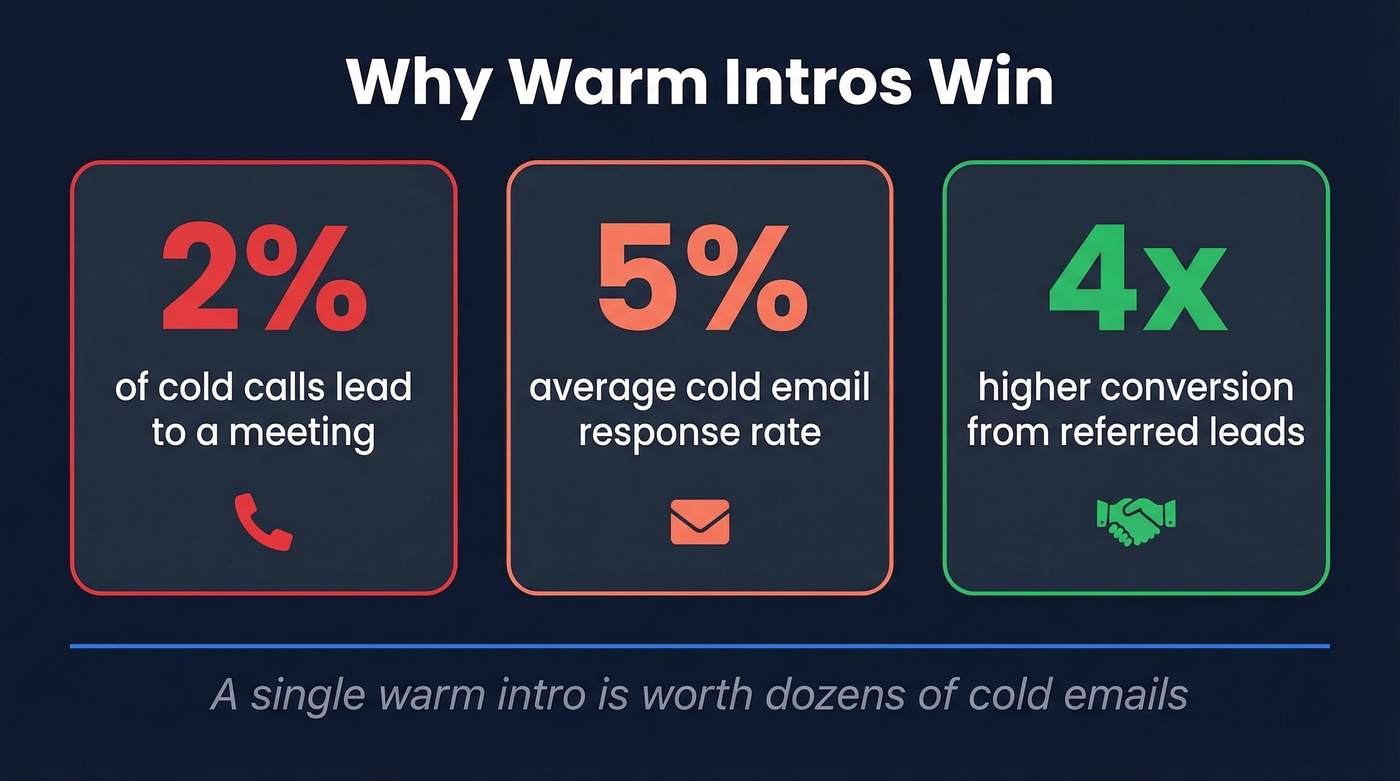
You found the perfect prospect, hiring manager, or investor - and your former colleague is connected to them. You want to ask for an email introduction, but you don't want to be weird about it. Fewer than 2% of cold calls lead to meetings, cold emails hover around a 5% response rate, and referred leads convert 4x more often than leads from other channels. Warm intros are one of the highest-converting outreach methods that exist. Here's how to request one without making it awkward.
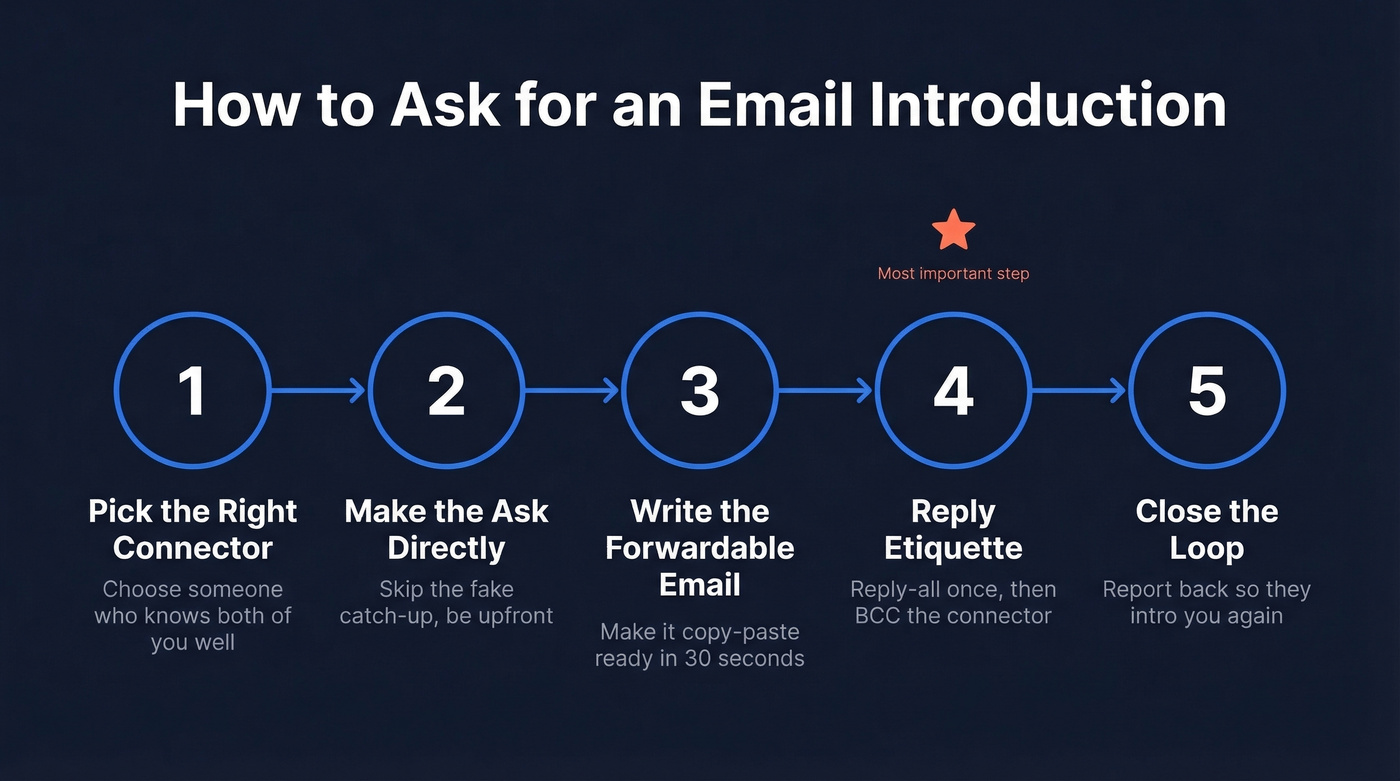
Five Steps to a Warm Intro
1. Pick the Right Connector
Not all mutual connections are equal. Before you send a request, evaluate two things: how well the connector knows the target, and how well the connector knows you. An acquaintance who met someone at a conference once can't vouch for you - and asking them to puts both of you in an uncomfortable spot.
The strongest intros come from people who've worked directly with both parties. If you've got multiple mutual connections, pick the one with the deepest relationship to the target, not the one who's easiest to reach. And make sure you actually have the connector's current email - if you're not sure, Prospeo's email finder can verify it. No point crafting the perfect ask if it bounces.
2. Make the Ask Directly
Stop asking for intros over coffee. If you already have a relationship with the connector, text or email the ask directly. They'll appreciate you respecting their time. Skip the fake catch-up - don't open with "Hey! How have you been? We should grab lunch!" and then bury the real request in paragraph three. We've all received those messages. We all see through them.
LinkedIn DMs work for the initial ask, but the character limit means you can't fit much. Use LinkedIn to get the conversation started, then move the actual forwardable message to regular email where you have room to be specific.
Here's a template you can adapt:
Subject: Quick Ask - Intro to [First + Last Name]
Hey [Connector],
I noticed you're connected to [Target Name] at [Company]. I'm [one sentence on why you want to meet them].
Would you be open to making an intro? I've drafted a short email below you can forward if it's easier.
If you're not comfortable making the connection, no problem at all.
Thanks, [Your name]
That last line gives the connector permission to say no without damaging the relationship. If they reply with something like "Send me something I can forward" or "Mind shooting me an email blurb?" - that's a yes. Send the forwardable email immediately.
3. Write the Forwardable Email
This is the single most important part of the entire process. I've watched people nail the ask, get a green light from the connector, and then fumble it by sending something the connector has to rewrite from scratch. The test is simple: can the connector forward this from their phone in 30 seconds without editing a word? If yes, you've nailed it.
Don't write "Thanks for offering to introduce me" if they haven't actually offered yet. That creates social pressure and makes the connector less likely to forward it.
Hi [Target Name],
I'm [Your Name], [your role] at [Company]. We help [one sentence framed around the target's problem].
I'd love 15 minutes to share how we've helped companies like [relevant example]. Would next week work?
Best, [Your Name]
For investor intros, lead with thesis fit - why this investor, not just any investor - then one or two traction bullets, then a clear ask. Generic "we're raising a round" emails get ignored because they signal you didn't do your homework.
4. Reply Etiquette After the Intro
This is where most people fumble. A common question on r/socialskills is "do I reply-all or just reply to the new person?" The rules are straightforward:
- The person who requested the intro responds first. Always. Don't wait for the target to make the first move.
- Respond within one business day. Same day is better. Waiting longer signals you don't value the connector's effort.
- Reply-all once to thank the connector, then move them to BCC on your next message. This shows you followed up without trapping them in a thread they don't need to be in.
5. Close the Loop
After the meeting happens - or doesn't - report back to the connector. A two-line message is enough: "Hey, I met with [Target] last week. Great conversation - we're exploring [X] together. Thanks again for the intro."
This isn't just polite. It's strategic. Connectors who see their intros lead somewhere are far more likely to make future ones. In our experience, people who never close the loop stop getting intros over time - and they usually don't realize why.
Why Double Opt-In Matters
Here's an absolute rule: never introduce two people without both parties' permission. Ever.
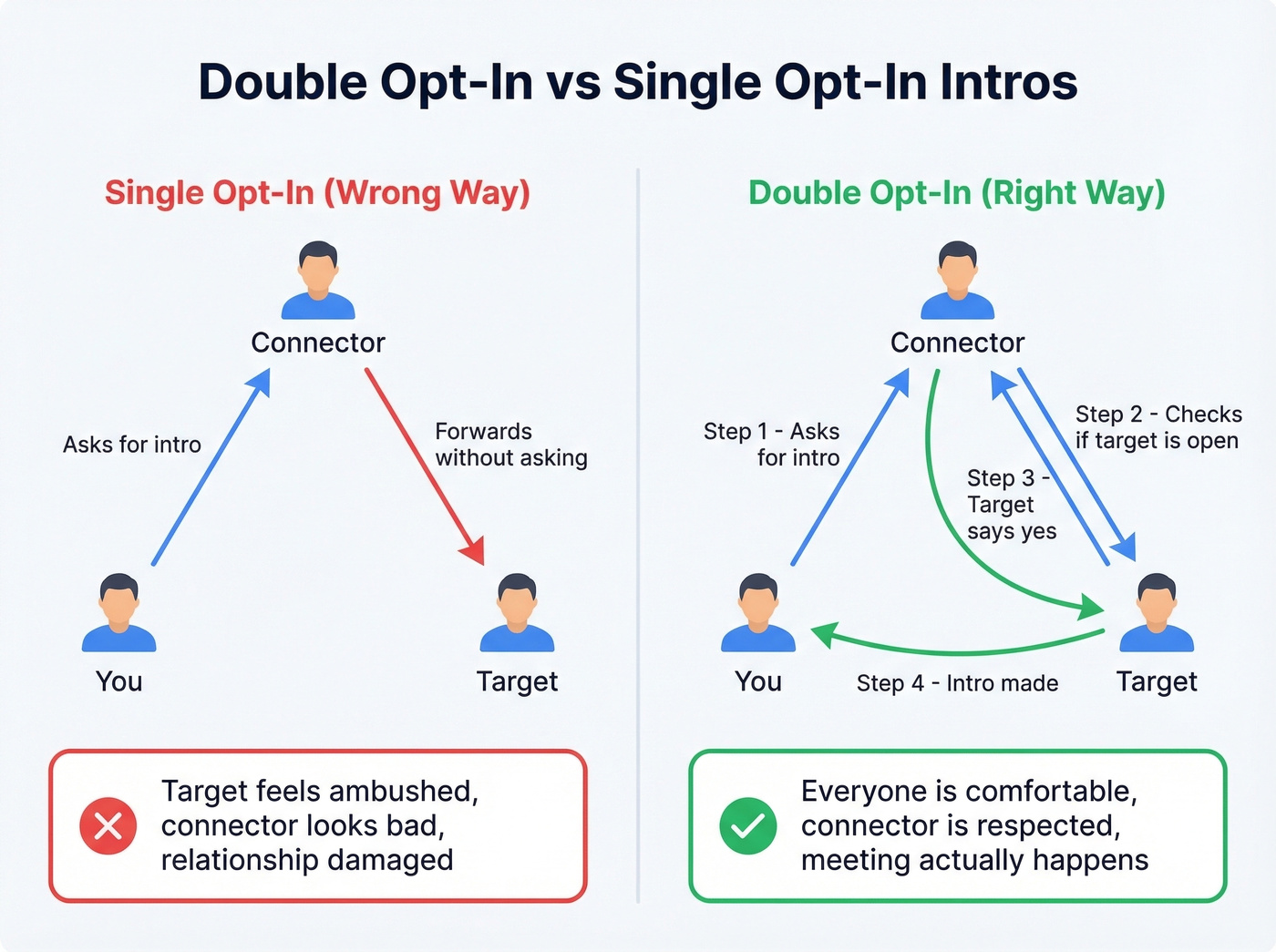
There's a Reddit thread where someone was introduced to a job seeker without being asked first. They couldn't help, felt obligated anyway, and then got repeated follow-ups they didn't want. The connector thought they were being helpful. Instead, they damaged two relationships.
Before making an intro, the connector should check with the target first: "Hey, would you be open to an intro to someone who does X?" Quick, painless, and prevents all of this. The cost of a bad intro falls disproportionately on the connector - HBR makes this point well. Make it easy for them to say no.

A perfect intro request means nothing if it bounces. Prospeo verifies emails with 98% accuracy across 300M+ professional profiles - so your carefully crafted forwardable email actually lands in the connector's inbox.
Don't let a bad email address waste your best warm intro.
Mistakes That Kill Intro Requests
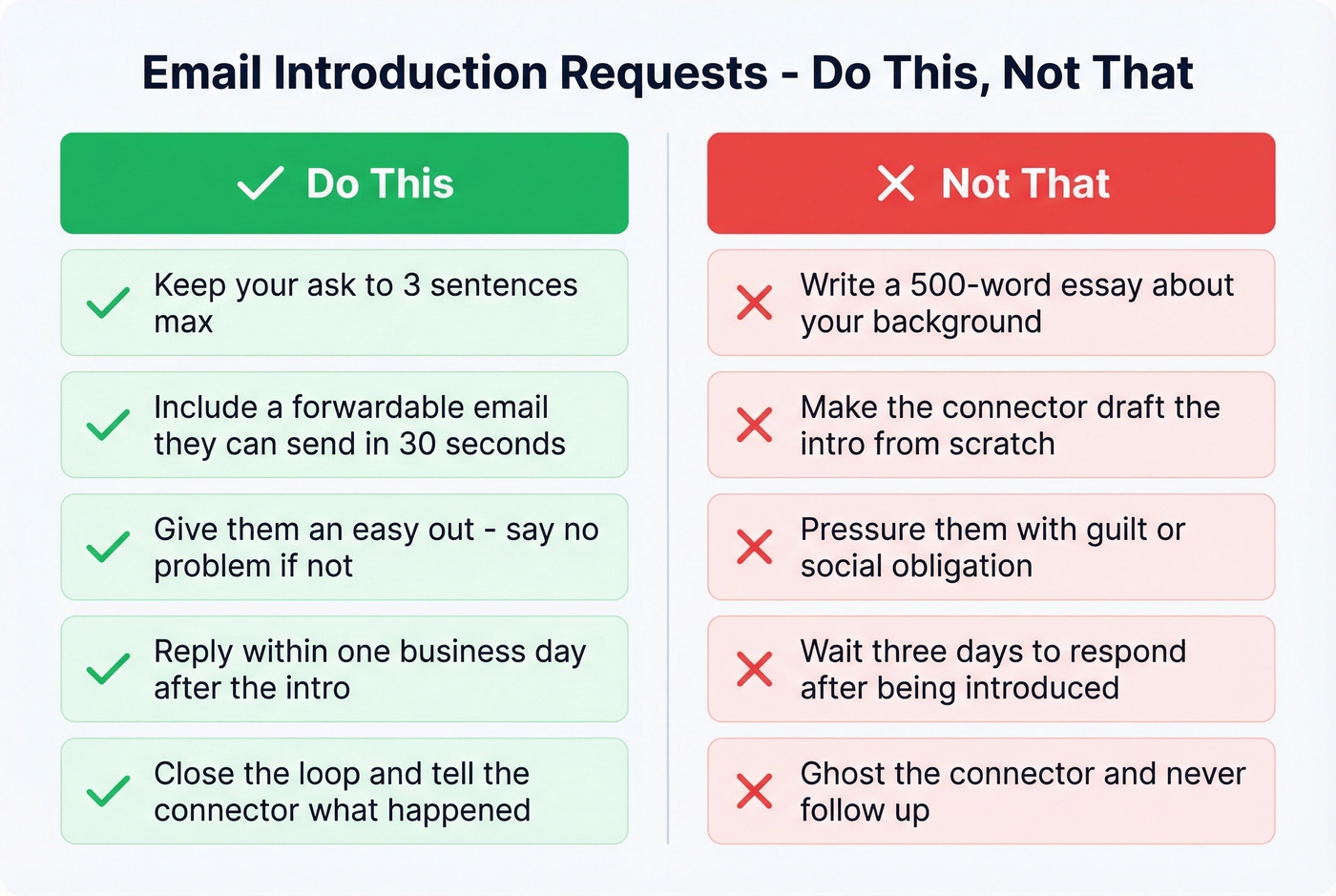
- Writing a 500-word essay about yourself. The connector doesn't need your life story. Three sentences max.
- Asking without context. "Can you introduce me to your friend?" with no explanation forces the connector to do your thinking for you.
- Not including a forwardable email. When the connector says "send me something I can pass along," that's your green light. Don't fumble it by making them wait three days.
- Never closing the loop. The connector went out on a limb. Tell them what happened.
When the Intro Doesn't Happen
Sometimes the connector says no. Sometimes they just never respond. Don't take it personally and don't push.
Here's the thing: most professionals only need two or three great connectors, not a massive network. Invest deeply in a few relationships rather than spraying intro requests across every mutual connection you can find. We've seen sales reps with 5,000 LinkedIn connections who can't get a single warm intro, and founders with 200 connections who get three a week. Depth beats breadth every time.
Your plan B is reaching out directly with a warm-ish cold email. Reference the mutual connection ("I noticed we're both connected to [Connector Name]") without implying they endorsed you. It's not as powerful as a true intro, but it's miles better than a fully cold email. If you go this route, make sure you're sending to a verified address - bounced emails kill your domain reputation fast.
When the intro doesn't happen, you need a Plan B that still converts. Prospeo gives you direct-dial mobiles and verified emails for any prospect - so you can reach decision-makers even without a mutual connection.
Skip the gatekeeper. Reach prospects directly at $0.01 per email.