

How to Ask Someone's Availability in an Email - Examples That Actually Get Replies
Figuring out how to ask someone's availability in an email shouldn't take three drafts. But most meeting requests fail because they force the recipient to do the scheduling work - essentially assigning homework to someone who already has 117 unread messages. Here's how to write ones that get answers.
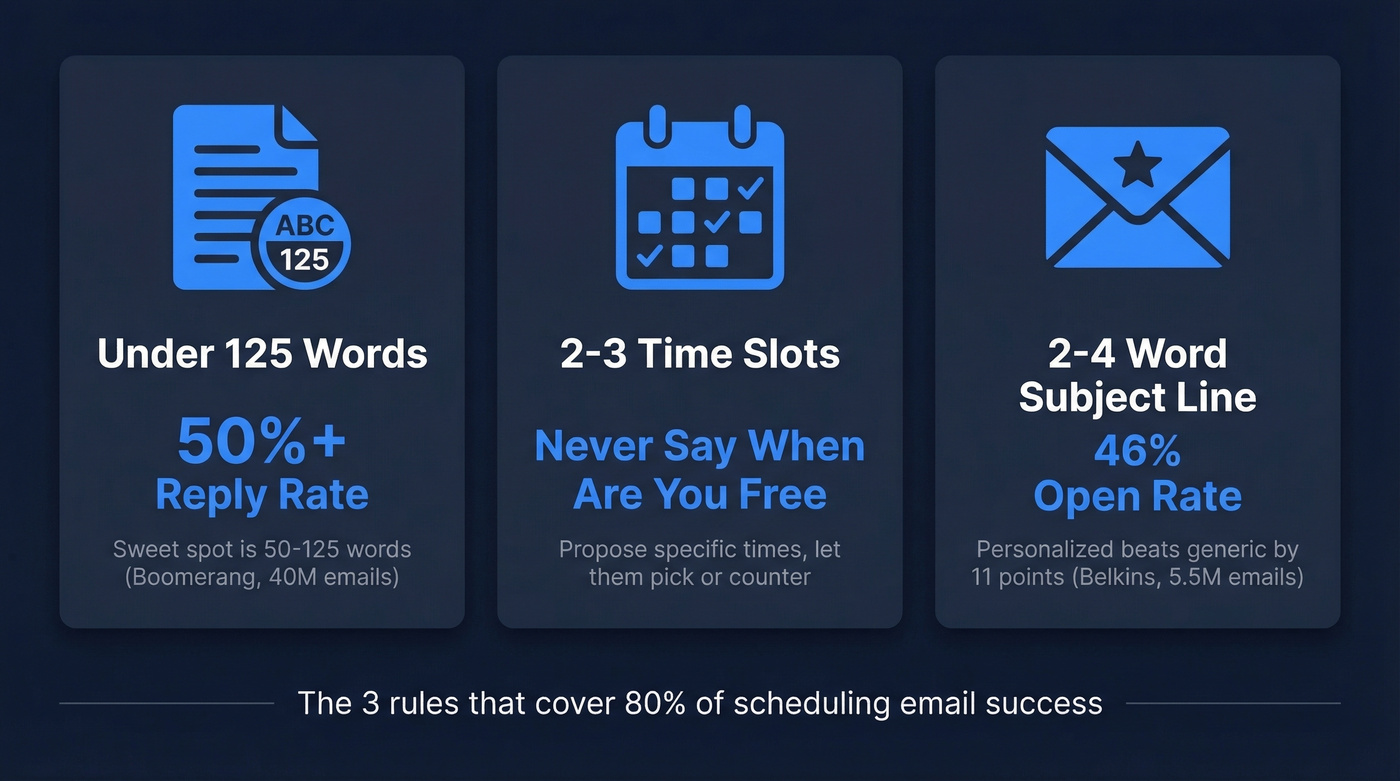
Three Rules That Cover 80% of the Problem
- Keep it under 125 words. A [Boomerang study of 40M+ emails] found the 50-125 word range hits response rates above 50%.
- Offer 2-3 specific time slots. Never write "when are you free?" Propose slots and let them pick.
- Use a 2-4 word personalized subject line. A Belkins study of 5.5M emails found personalized subjects hit 46% open rates vs. 35% without.
Why Availability Emails Get Ignored
The average knowledge worker receives [117 emails and 153 chat messages daily], with interruptions roughly every two minutes. Your meeting request competes with all of that. If it takes more than 10 seconds to parse, it's getting skipped.
Length is the biggest killer. Response rates drop from ~50% at 125 words to about 44% at 500 words. Readability matters just as much - emails written at a 3rd-grade reading level got 36% more replies than college-level writing. And here's a stat that doesn't get enough attention: slightly positive or negative tone outperforms neutral emails by 10-15%. Don't be afraid to show genuine enthusiasm or urgency. Short words, short sentences, clear ask.
Anatomy of an Effective Scheduling Email
Every effective request has five parts:
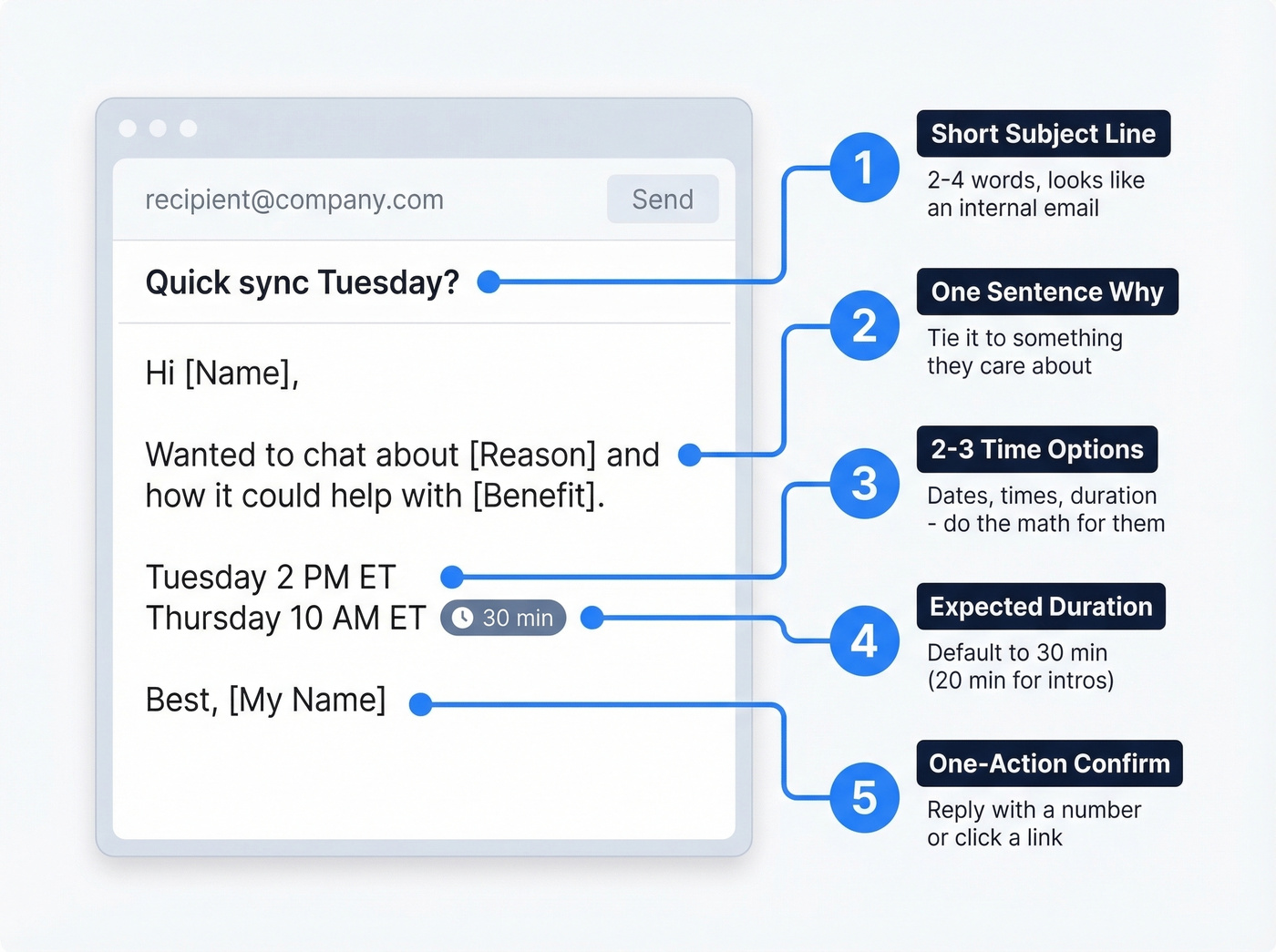
- Short subject line - "Quick sync on Q3 rollout" beats "Request for Meeting Availability Regarding Upcoming Project Timeline."
- One sentence why - tie the meeting to something the recipient cares about.
- 2-3 time options - dates, times, duration. Do the calendar math for them.
- Expected duration - default to 30 minutes (or 20 minutes for quick intros). It forces efficiency and signals respect.
- One-action confirm - "Reply with a number" or a scheduling link. Not a negotiation.

You just crafted the perfect scheduling email - short, specific, with 2-3 time slots. But none of that matters if it bounces. Bounced emails damage your domain reputation and tank future deliverability. Prospeo verifies emails in real time with 98% accuracy, so every meeting request you send actually reaches the inbox.
Verify 75 emails free every month - no credit card, no contracts.
Subject Lines That Get Opened
The Belkins data is clear: 2-4 word subject lines hit 46% open rates. At 9-10 words, you're down to ~35%. Question-style subjects ("Quick call Thursday?") also averaged 46% - the top-performing category.
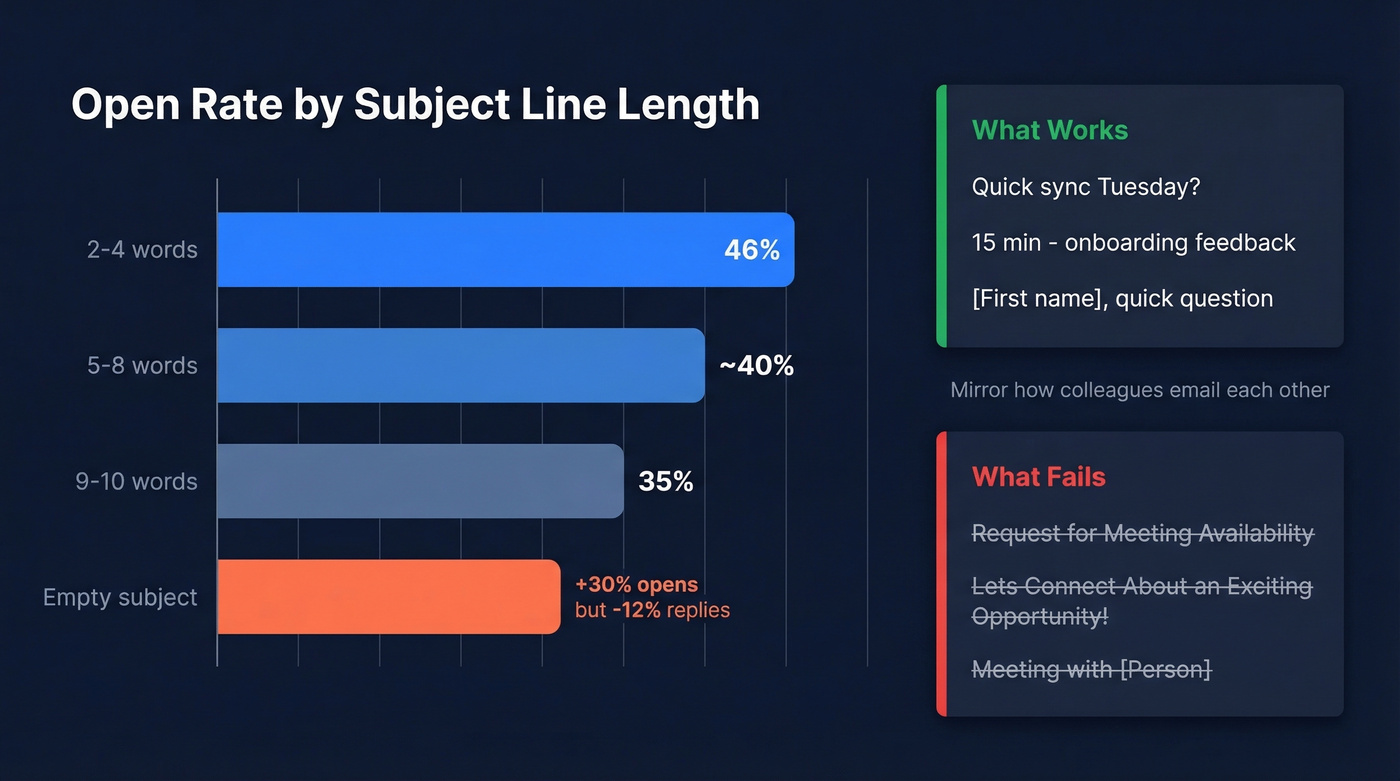
The best subject lines look like internal emails, not sales pitches. 30MPC calls this "internal camouflage" - mirror how colleagues email each other. "Q3 planning" beats "Exclusive Opportunity to Discuss Strategic Alignment."
Good examples:
- "Quick sync Tuesday?"
- "15 min - onboarding feedback"
- "[First name], quick question"
Bad examples:
- "Request for Meeting Availability"
- "Let's Connect About an Exciting Opportunity!"
- Empty subject line - gets +30% opens but -12% replies. Net negative.
Example Emails by Scenario
Cold Outreach
Subject: Quick call, [First name]?
Hi [First name],
[One sentence referencing their company, role, or a trigger event].
Would either work for a 20-minute call?
- Tuesday at 2:00 PM ET
- Thursday at 10:00 AM ET
Happy to adjust if neither fits.
C-suite adjustment: For senior executives, drop the scheduling link and keep the email to two sentences plus time slots. We've tested both approaches - manual time proposals consistently outperform for director-level and above because they signal you've thought about the ask instead of blasting a Calendly link.
Warm Contact
Subject: Catch up this week?
Hey [First name],
I'd love 30 minutes to [specific topic - e.g., "walk through the new dashboard before launch"]. Does Wednesday at 11 AM or Friday at 2 PM work?
That's it. With warm contacts, less framing is more. They already know you - just state the topic and the times.
Cross-Time Zone
Microsoft research notes that nearly a third of meetings now span multiple time zones, a 35% increase since 2021. When scheduling internationally, use city names instead of abbreviations. Practitioners on StackExchange are emphatic about this: "CST" can mean Central Standard Time or China Standard Time. That's a 14-hour gap.
Subject: Sync on [topic] - time options
Hi [First name],
Could we do 30 minutes this week?
- Wednesday at 15:00 UTC / 11:00 AM New York / 4:00 PM London
- Thursday at 16:00 UTC / 12:00 PM New York / 5:00 PM London
time.is/compare makes it easy to find overlap if neither works.
Calendar Link Version
This one's simple. Write one sentence on why, drop your Calendly or Google Calendar Appointment Schedule link, and add a fallback: "If you'd rather pick from specific times, I'm open Tuesday and Thursday afternoons ET." Calendar links eliminate back-and-forth and work best for cold outreach at scale. In our experience, warm contacts and senior stakeholders prefer manually proposed times - so offer both options when you aren't sure.
When They Don't Respond
Don't "just check in." A 3-7-7 follow-up cadence - follow up at Day 3, then Day 10, then Day 17 - captures 93% of replies by Day 10. Most people aren't ignoring you. They're buried.
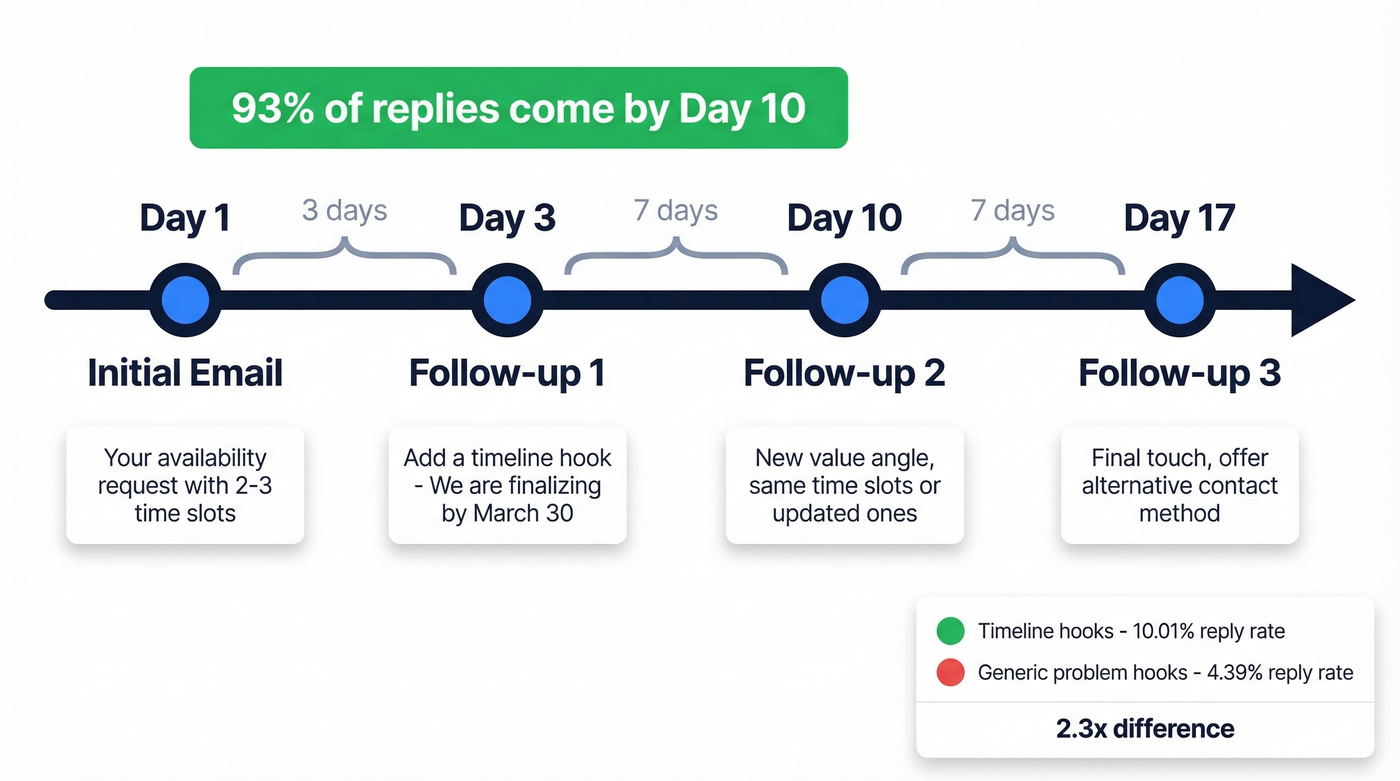
Add value in each follow-up. Timeline-based hooks ("we're finalizing this by March 30") average a 10.01% reply rate vs. 4.39% for generic problem hooks - a 2.3x gap. That's the single biggest lever in your follow-up sequence.
Subject: Re: Quick call, [First name]?
Hi [First name],
We're finalizing [specific thing] by [date] - wanted to make sure you had a chance to weigh in. Same times still work, or reply with a day that's better.
Mistakes That Kill Your Request
A vague subject line like "Meeting" tells the recipient nothing. The Medium scheduling etiquette guide puts it well: title every invite with the objective, not just "Meeting with [Person]." State the purpose in 2-4 words.
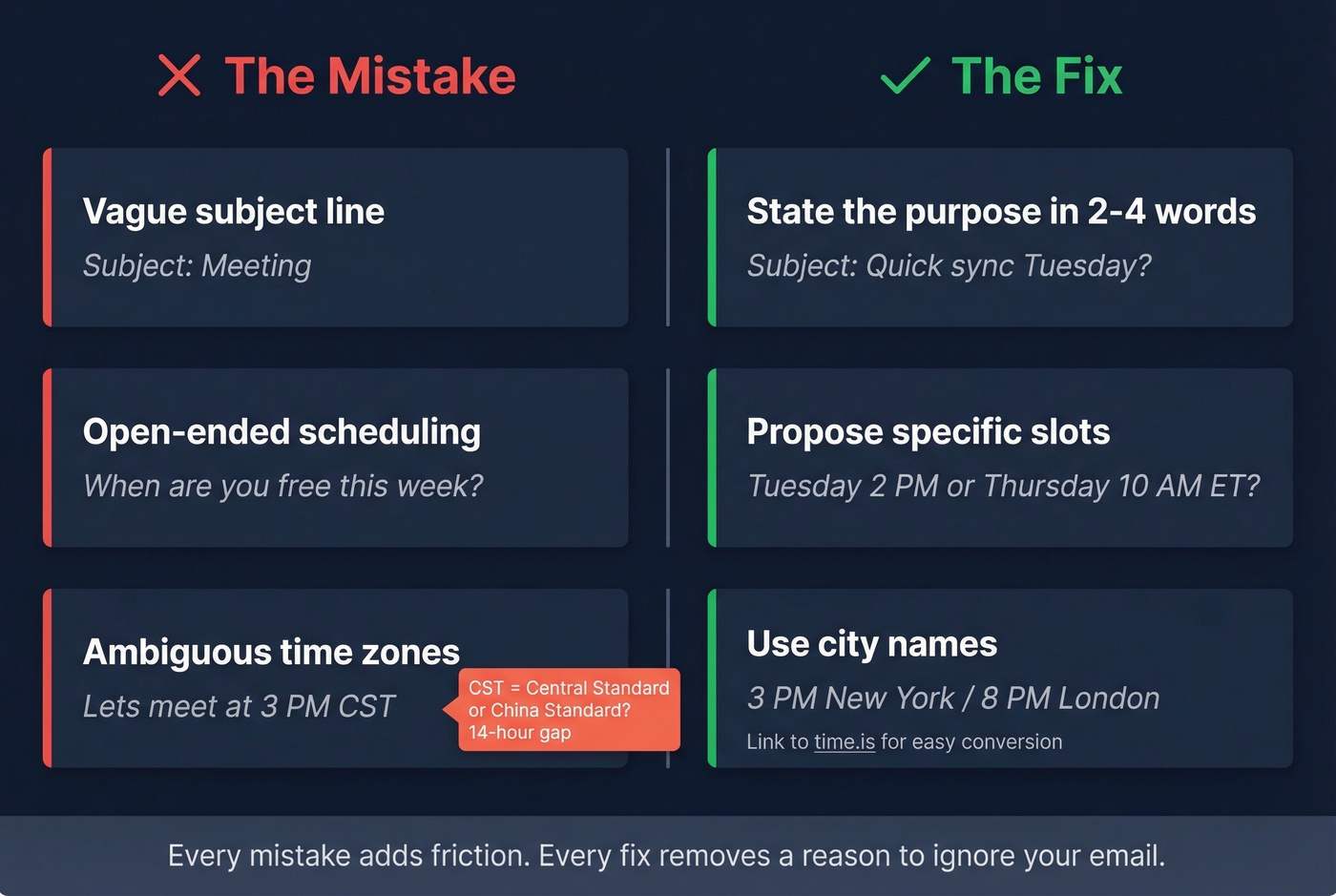
Open-ended "when are you free?" is the second-biggest killer. You've just assigned homework. Propose specific slots and let them pick or counter.
Time zone abbreviations trip up more emails than people realize. CST, IST, EST - all ambiguous. Use city names (New York, London, Mumbai) or link to time.is.
Here's the thing most people miss: the best availability email is worthless if it bounces. Bounced emails hurt your domain reputation and reduce future deliverability. If you're doing outbound at any volume, verify your contact list first. Prospeo checks emails in real time with 98% accuracy, and the free tier covers 75 verifications per month - enough to clean a small campaign list before launch.
A perfectly worded availability request sent to a dead address does more damage to your sender reputation than no email at all. We've seen teams obsess over copy for weeks while sending to lists with 15%+ bounce rates. Fix the list first, then worry about the wording.
Sending availability emails at scale means you need verified contact data, not guesswork. Prospeo's database of 143M+ verified emails refreshes every 7 days, so you're never reaching out to dead addresses. At $0.01 per email, cleaning your outbound list costs less than a single bounced reply costs your domain.
Stop crafting perfect emails that land in the void.
FAQ
How many time options should I offer?
Two or three specific slots. More overwhelms; fewer feels like a demand. Always add "or suggest a time that works better" as an escape valve so the recipient doesn't feel boxed in.
Should I use a scheduling link or propose times manually?
Scheduling links (Calendly, Google Calendar, Outlook booking pages) eliminate back-and-forth at scale. For warm contacts or senior executives, proposing times manually feels more personal and gets better response rates. When in doubt, offer two proposed slots and include a scheduling link as a backup - it covers both preferences without making the recipient think twice.
How do I make sure my meeting request actually reaches the inbox?
Verify the email address before sending. Bounced emails damage domain reputation and tank future deliverability. Real-time verification catches invalid addresses before they cause problems - even cleaning 50-75 addresses before a small campaign can make a measurable difference in your sender score.