

What 67,149 Recorded Sales Presentations Reveal About Closing Deals
Three minutes in, the CFO is checking email. The champion who booked the call is staring at the agenda slide with glazed eyes. You're on slide 4 of your company overview, and you've already lost the room.
If you want to know how to give a sales presentation that actually closes, stop opening with your logo and mission statement.
Gong analyzed 67,149 recorded sales presentations and tied them to CRM outcomes. The patterns that separate closed-won from closed-lost are specific, measurable, and repeatable - especially in screen-shared virtual demos. This framework is built for mid-funnel virtual calls: the meeting where discovery is mostly done and you need to prove the solution fits.
The Data in 30 Seconds
- Spend most of your time on the problem, its cost, and its cause - not your product. Urgency sells. Features don't.
- Keep your company overview under 2 minutes. Going longer correlates with a sharp drop in win rates.
- End with a specific ask, not "any questions?" Data-backed proposals beat vague closes.
Start with Discovery, Not Slides
You haven't earned the right to present until you've done real discovery. Before building a single slide, answer four questions: What tools does the prospect use today? What are the limitations? What do those limitations cost in time, money, or headcount? What happens if they change nothing?
If you can't answer all four, you're not ready to present - you're ready to ask more questions.
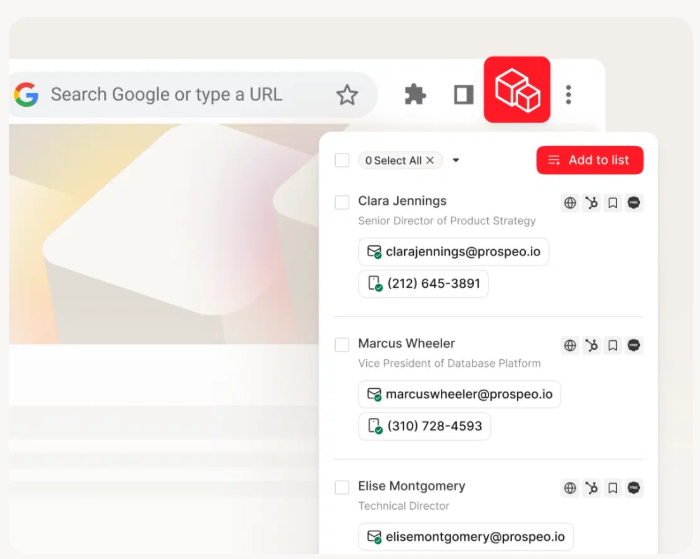
The other half of prep is knowing who's in the room. Verify attendee titles and reporting lines. Check the company's tech stack so you can reference tools they already use. Prospeo's Chrome extension pulls verified contact data and technographics from any company website in one click - useful when a new stakeholder gets added to the invite 30 minutes before the call.
The 7-Slide Framework
Forget 47-slide decks. This 7-slide sequence works extremely well for buyer-focused presentations:
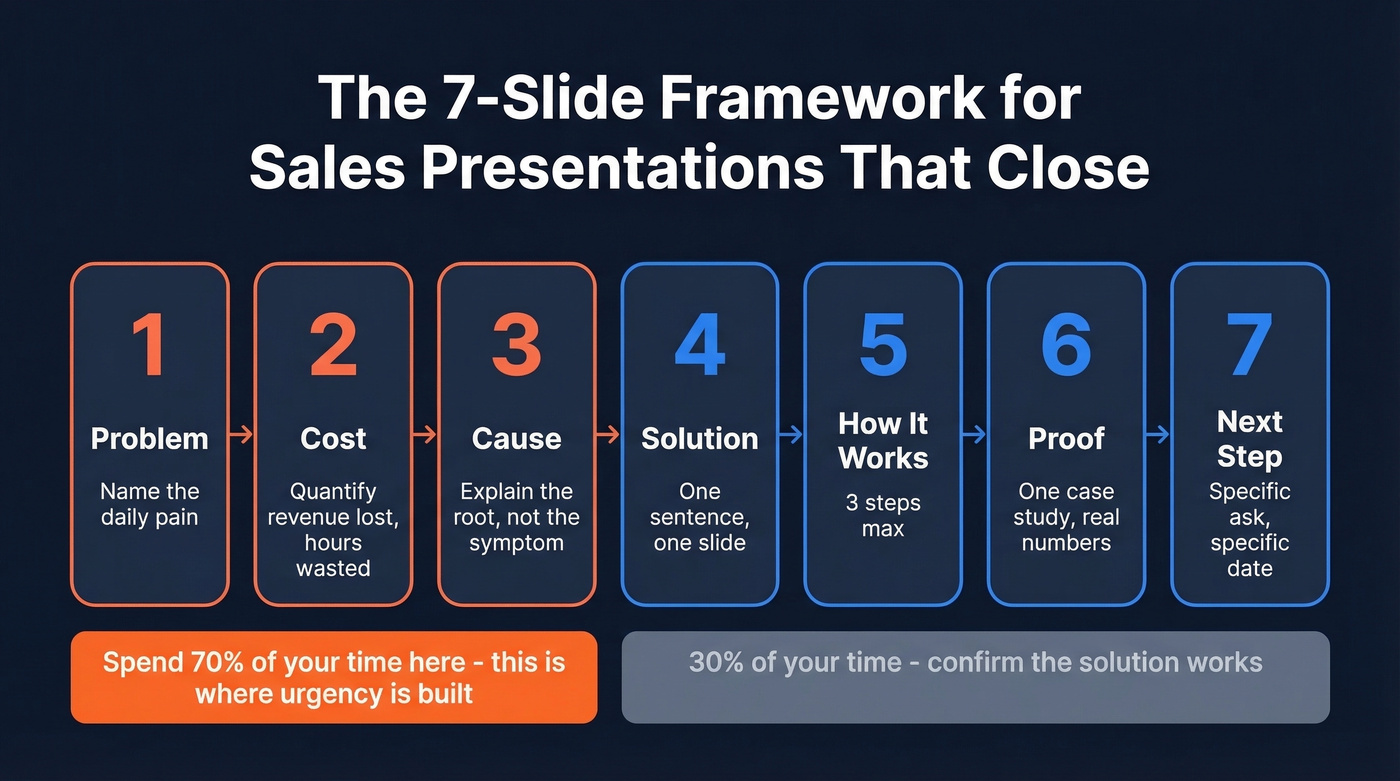
- Problem. Name the pain your buyer lives with daily. "Manual data entry" beats "operational inefficiency."
- Cost. Quantify what the problem costs. Revenue lost, hours wasted, deals missed. This is what builds urgency.
- Cause. Explain why the problem exists. You understand the root, not just the symptom.
- Solution. One slide. What your product does in one sentence.
- How It Works. Three steps max. If you can't explain implementation in three, simplify.
- Proof. One case study with real numbers. Not three logos - one story with a before-and-after metric.
- Next Step. A specific ask. A pilot scope, a pricing review date, a timeline commitment.
Here's the critical timing rule: spend roughly 70% of your time on slides 1-3. Most reps rush through the problem to get to the demo. That's backwards. The problem creates buying urgency; the demo just confirms the solution works.
For enterprise deals, Andy Raskin's 5-part narrative framework - made famous by the Zuora deck - is worth studying. It opens with a big shift in the world, walks through winners and losers, paints a "promised land" future state, positions features as tools to get there, and closes with evidence. Different flavor, same principle: lead with the world, not with yourself.

Slides 1-3 are about proving you understand the buyer's world. That means knowing their tech stack, org structure, and pain points before you present. Prospeo's 30+ search filters and Chrome extension give you technographics, verified contacts, and company signals on 300M+ profiles - so you walk in prepared, not guessing.
Stop presenting blind. Research every stakeholder in under 60 seconds.
Winning on Zoom and Virtual Calls
92% of B2B buyers prefer virtual sales interactions, so your delivery skills on camera matter more than your handshake. One concept per slide isn't minimalism - it's how you keep attention on a small screen. Keep slides uncluttered, present data visually, and manage your pacing deliberately.
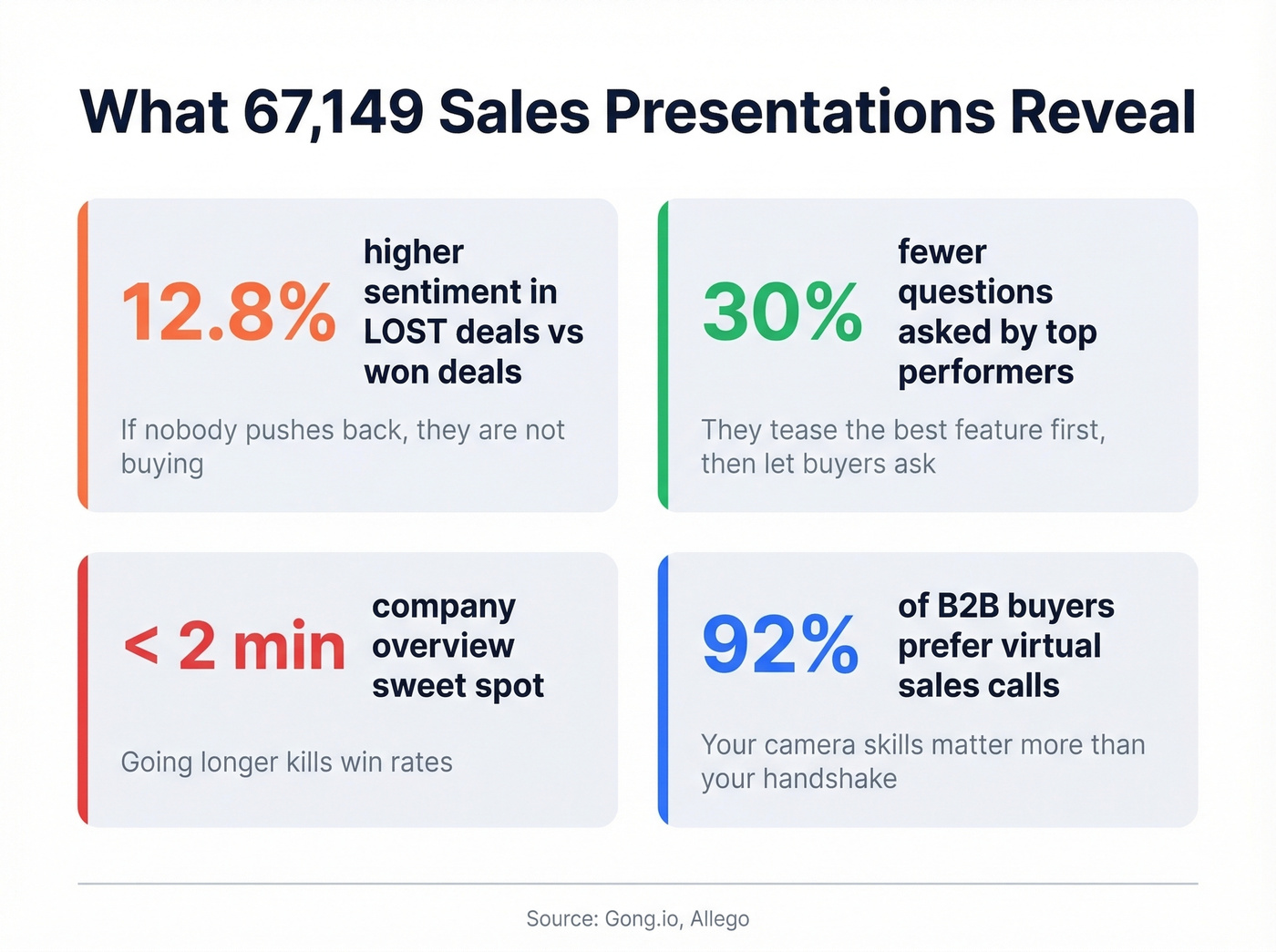
Top performers run demos as an upside-down pyramid, leading with the highest-impact feature instead of saving it for a grand finale. They get nearly a third more buyer questions and ask 30% fewer questions themselves. They tease rather than overload.
Now here's the hot take nobody wants to hear: lost deals have 12.8% higher sentiment scores than closed-won deals. When a prospect agrees with everything and shows zero friction, that's not a good sign - it's a red flag. Ask any rep who's done 500+ demos and they'll tell you the same thing: the prospect who nods along to everything is the one who ghosts you. Real buyers push back. If nobody's challenging you, they aren't engaged enough to buy.
Handling Objections Mid-Presentation
When an objection lands mid-demo, most reps panic. Call analysis quantifies this: unsuccessful reps speed up from 173 to 188 words per minute when flustered. Top performers do the opposite - they pause, slow down, and ask a clarifying question.
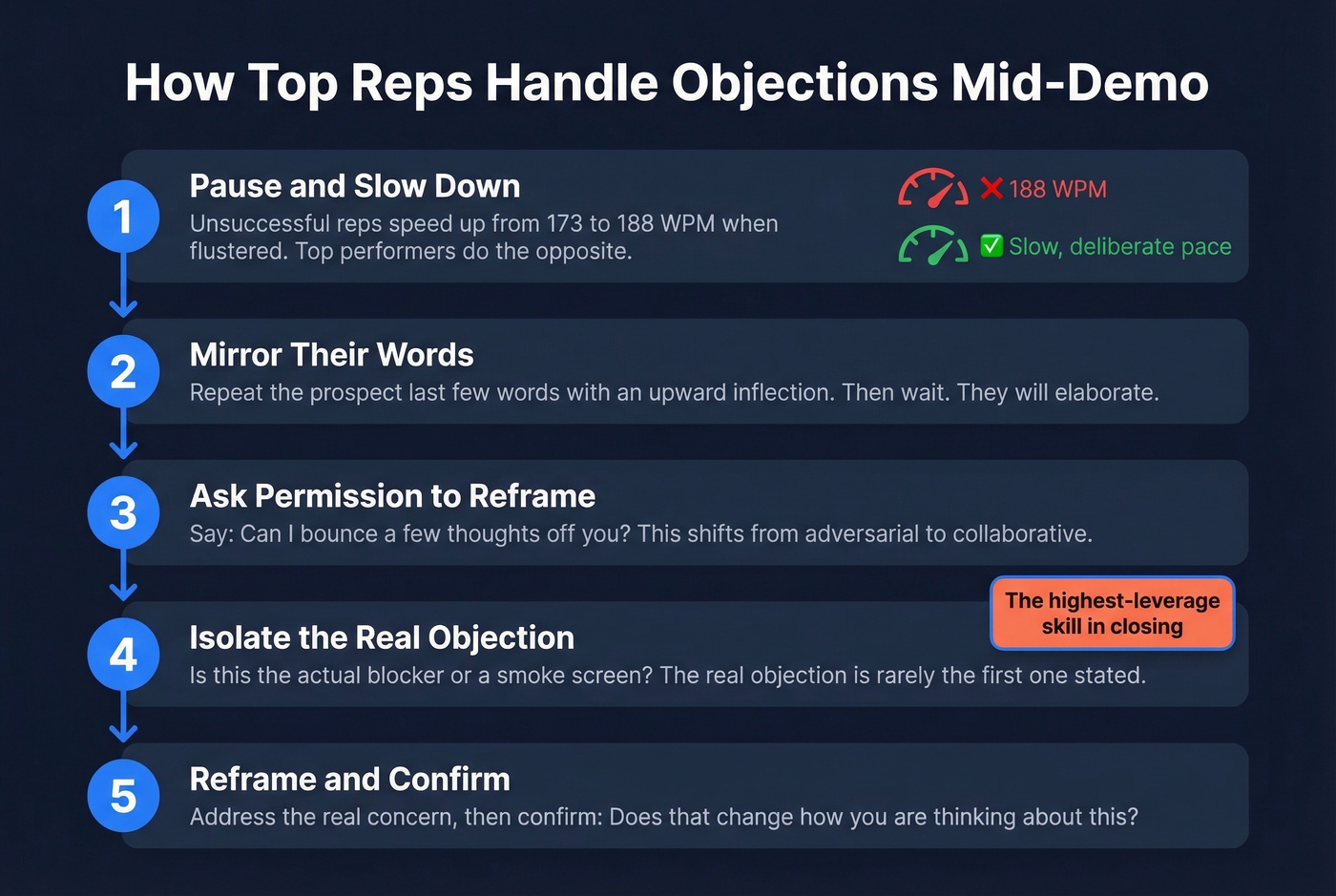
The mirroring technique from Chris Voss works well here. Repeat the prospect's last few words with an upward inflection. "Too expensive?" Then wait. They'll elaborate, and what they say next is usually the real objection.
Before you reframe, ask permission: "Can I bounce a few thoughts off you?" This shifts the dynamic from adversarial to collaborative. Then isolate - is this the actual blocker, or a smoke screen? The real objection is rarely the first one stated. In our experience, slowing down enough to find it is the single highest-leverage skill in making a presentation land.
How to Close Your Presentation
Do this: "Based on what we covered, I'd suggest a two-week pilot scoped to your SDR team. Can we get 30 minutes with your VP of Sales next Tuesday to review pricing and timeline?"
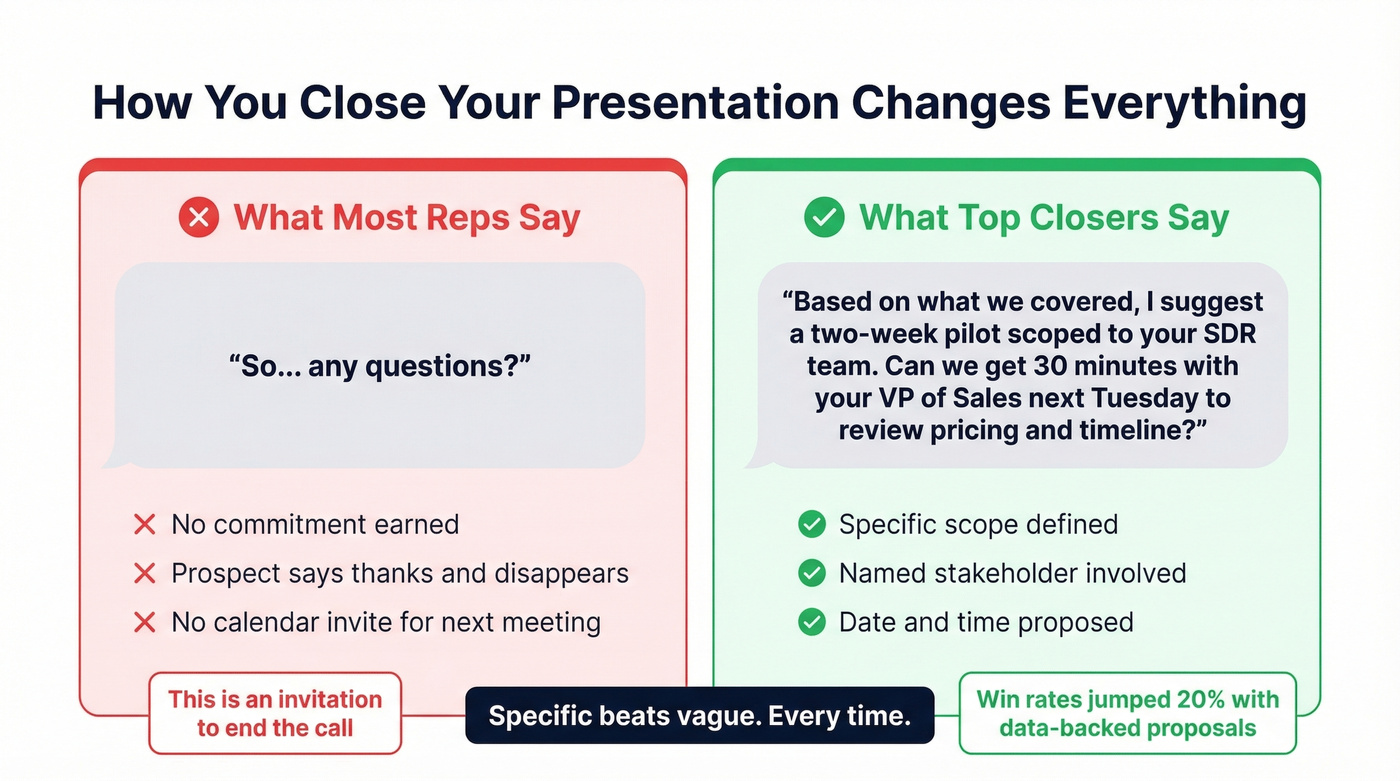
Not this: "So... any questions?"
That's not a close. That's an invitation to end the call.
Bryan Vasquez at LinkBuilder.io replaced urgency-based CTAs with data-backed proposals and tailored value maps - win rates jumped 20% over two quarters. Specific beats vague. A concrete next step beats a generic one every time.
Let's be honest: knowing how to give a sales presentation is ultimately about earning the next commitment, not just delivering information. If you walk out of a call without a calendar invite for the next meeting, you didn't close - you presented.
A new VP gets added to the invite 30 minutes before your call. You need their title, reporting line, and what they care about - now. Prospeo's Chrome extension pulls verified emails, direct dials, and 40+ data points from any LinkedIn profile or company page in one click. 98% email accuracy, 125M+ verified mobiles.
Know who's in the room before you share your screen.
FAQ
How long should a sales presentation be?
Aim for 7-12 slides and 15-25 minutes of total talk time. Engagement drops sharply when reps monologue beyond a few minutes without interaction - build in pauses and questions every 3-4 slides to reset attention.
Should I include pricing in my presentation?
Yes - if you've completed thorough discovery first. Hiding pricing creates distrust. Include a ballpark range on your "Next Step" slide so the prospect can self-qualify and bring the right budget holder to the next conversation.
How do I research prospects before presenting?
Verify attendee emails and job titles, check the company's tech stack, and review recent funding or hiring signals. We've found that even 15 minutes of targeted research before a call dramatically changes how the conversation flows - you're referencing their world instead of guessing at it.
How do I stand out from competitors in a sales presentation?
Lead with the prospect's problem, not your product. Structuring your pitch around the buyer's world - their pain, their cost, their timeline - immediately differentiates you from every competitor who opens with a company overview and feature list. Skip the "about us" slide entirely if you can. Nobody cares about your founding story until they believe you understand theirs.