

How to Obtain Email Addresses That Actually Work
You upload 2,000 "verified" contacts into your sequencer, hit send, and watch the bounce rate climb past 12% before lunch. Your domain reputation takes the hit. Deliverability tanks for the next three campaigns. And the database you paid for? It charged you full price for every one of those dead addresses.
This isn't a hypothetical. ZeroBounce data shows about 28% of all emails checked in 2024 were invalid or risky - up from 22% two years earlier. Knowing how to obtain email addresses that actually deliver is the difference between a pipeline that compounds and a domain that's circling the drain.
8 Methods to Find Email Addresses
Here are eight proven approaches, ranked by speed and scalability:
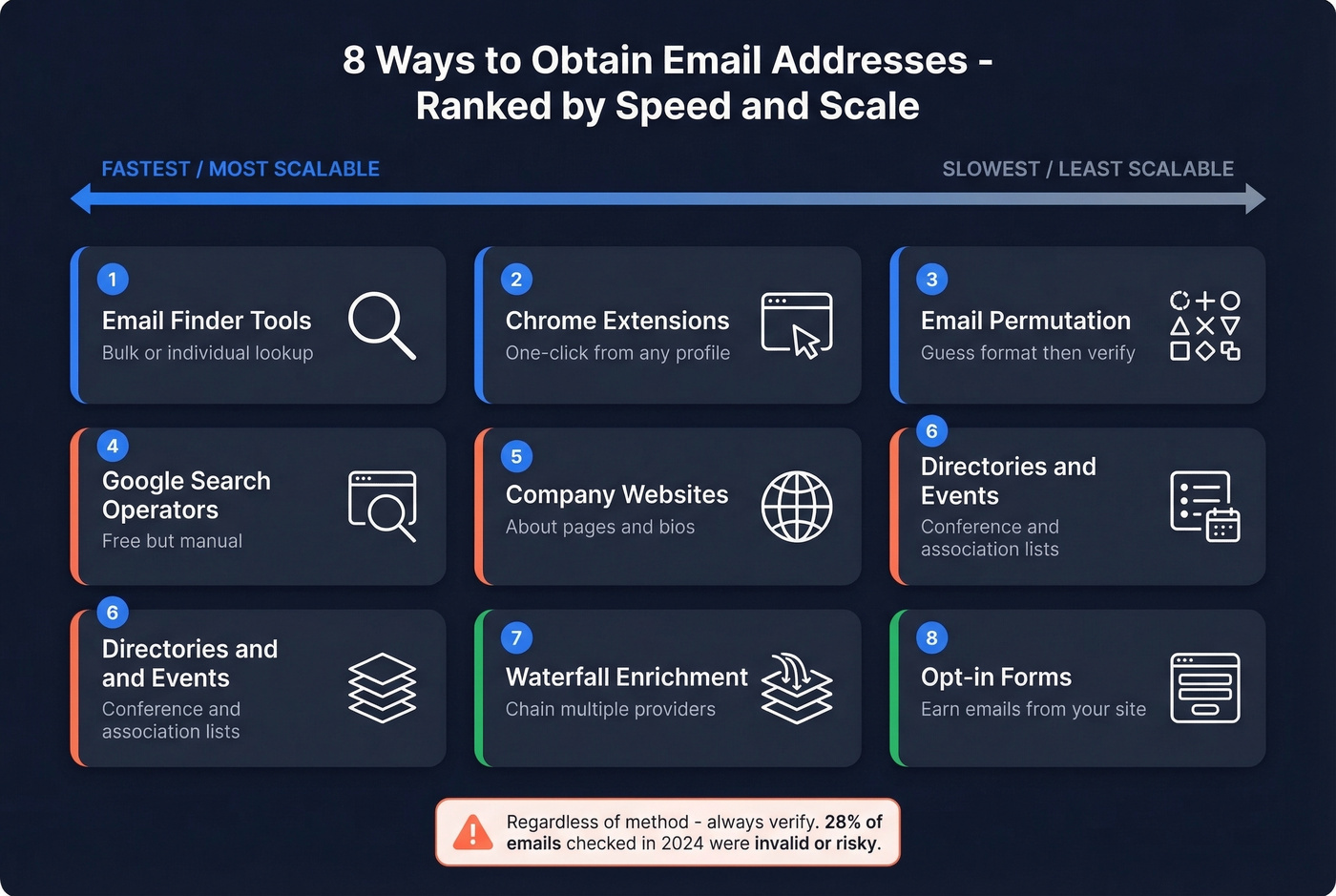
- Email finder tools - fastest for individual or bulk lookup
- Chrome extensions - one-click discovery while browsing professional profiles
- Email permutation patterns - guess-and-verify using company format conventions
- Google search operators - free, manual, diminishing returns at scale
- Company websites and social profiles - about pages, team pages, bios
- Professional directories and events - conference lists, association pages
- Waterfall enrichment - chain multiple providers to maximize coverage
- Opt-in forms and lead magnets - collect emails from your own website visitors
Regardless of method, always verify. That 28% invalid rate isn't someone else's problem.
How to Get Someone's Email Address
Email Finder Tools
Email finder tools combine database lookups, real-time web crawling, and verification into a single workflow. You input a name and company, and the tool returns a verified email address - ideally in seconds.
Here's the thing most people miss: the billing model. 8 out of 10 email finder tools charge full price for emails that bounce. You pay per search whether the result is valid, catch-all, or completely dead. Pay-per-valid tools only charge when they return a deliverable address - a difference that compounds fast when you're running hundreds of lookups per week. We've seen billing model alone cut effective cost per valid email by 40-60%.
Chrome Extensions
If you're prospecting one contact at a time - browsing company pages, professional profiles, or CRM records - a Chrome extension is the fastest workflow. Click the icon, get the email, move on.
Hunter and ContactOut both offer solid extensions. The key risk with any extension is data freshness: B2B contact data decays at roughly 2.1% per month, so extensions pulling from static databases serve you increasingly stale results over time. Look for extensions backed by real-time verification, not cached lookups.
Email Permutation Patterns
Every company has a default email format. If you know the pattern, you can construct the address yourself. The trick is knowing which pattern to guess - and it changes dramatically by company size.
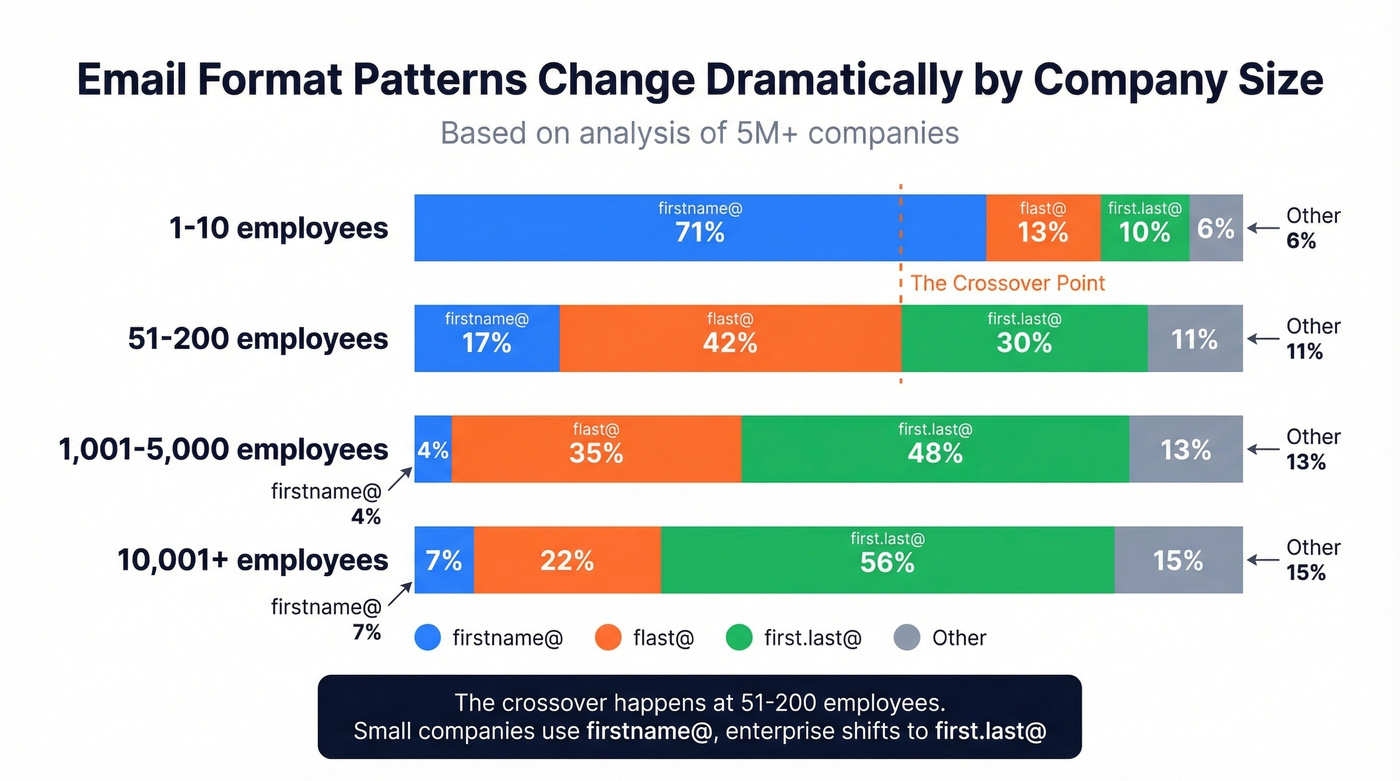
An analysis of 5M+ companies found these dominant formats:
| Company Size | firstname@ | flast@ | first.last@ |
|---|---|---|---|
| 1-10 employees | 71% | 13% | 10% |
| 51-200 | 17% | 42% | 30% |
| 1,001-5,000 | 4% | 35% | 48% |
| 10,001+ | 7% | 22% | 56% |
The crossover happens around 51-200 employees. Small companies default to firstname@. Mid-market and enterprise shift to first.last@ or flast@. This matters because guessing the wrong format and sending without verification damages your domain reputation - mailbox providers track bounces, and a spike tells them you're not maintaining your list.
Generate permutations first, then run them through a verification tool before sending anything. Never send unverified guesses.
Google Search Operators
For one-off lookups when you need to find someone's email quickly, Google is surprisingly effective:
site:company.com "@company.com"
"firstname lastname" "@gmail.com"
intitle:"contact" site:company.com
"firstname lastname" email OR contact site:company.com
These work well for finding publicly listed emails on company pages, press releases, and speaker bios. You can also search old social media posts where people shared their email publicly. The limitation is scale: you can find 5 emails this way in 20 minutes, but you can't find 500.
Company Websites and Social Profiles
About pages, team pages, and press releases often list direct emails for key contacts. Twitter/X bios occasionally include email addresses, especially for founders and solo consultants. This approach works for 1-5 prospects when you need a specific person's contact. It breaks completely at scale.
Professional Directories and Events
Conference attendee lists, industry association member pages, and professional directories are underused sources. Trade show organizers often publish speaker and sponsor contact details. These are high-quality contacts because they've self-identified as active in your target industry.
If you're closing deals under $15K and selling to SMBs, you probably don't need a $15K/year data platform. Conference lists, Google operators, and a free-tier email finder will get you 80% of the way there. Save the enterprise tooling for enterprise deals.
Waterfall Enrichment
No single email finder covers every contact. A typical single-provider not-found rate runs 30-40%, which means you're leaving a third of your target list on the table. Waterfall enrichment solves this by chaining multiple providers - if Provider A returns nothing, the query cascades to Provider B, then C.
The compounding problem is data decay. At 2.1% per month, a list that's six months old has about 12% dead addresses. The industry average refresh cycle is six weeks, which means most databases are already stale by the time you search them. A 7-day refresh cycle - the tightest window available in the category - is the difference between finding someone's current email and finding the one they had two jobs ago.
How to Collect Emails From Your Website
If you're running inbound, the email collection game shifts from "find" to "earn." And the benchmarks are more brutal than most marketers expect.
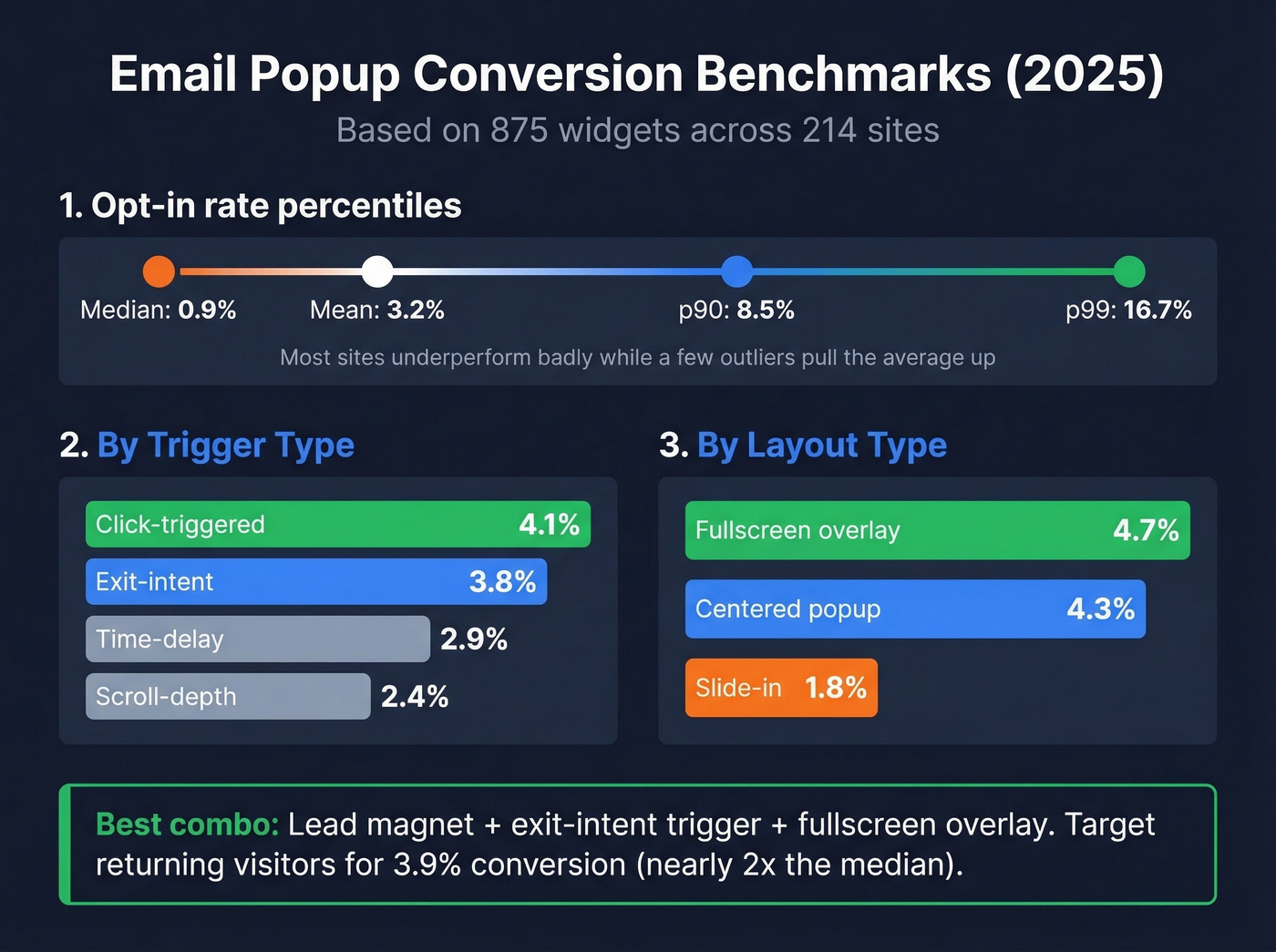
A 2025 analysis of 875 widgets across 214 sites found that the mean popup opt-in rate is 3.2%, but the median is just 0.9%. That gap tells you most sites are underperforming badly while a few outliers pull the average up. The p90 hits 8.5%, and p99 reaches 16.7%.
Trigger type matters more than most teams realize:
| Trigger | Conversion Rate |
|---|---|
| Click-triggered | 4.1% |
| Exit-intent | 3.8% |
| Time-delay | 2.9% |
| Scroll-depth | 2.4% |
Layout matters too. Fullscreen overlays convert at 4.7%, centered popups at 4.3%, and slide-ins at just 1.8%. The highest-converting combo we've seen is a lead magnet - checklist, template, benchmark report - paired with an exit-intent trigger on a fullscreen overlay.
Don't limit yourself to the obvious placements. Sticky bars in the header, embedded forms within blog content, and even custom 404 pages with an opt-in offer all capture emails that standard popups miss. Targeting returning visitors specifically lifts conversion to 3.9%, nearly double the overall median. And use double opt-in - it dramatically improves list quality and gives you cleaner consent proof.

You just read that 28% of emails checked in 2024 were invalid. Prospeo's 5-step verification and 7-day data refresh cycle keep that number under 2% for our users. 98% email accuracy, pay only for valid addresses, starting at $0.01 per email.
Stop guessing email formats and start sending to verified inboxes.
Why Skipping Verification Wrecks Deliverability
Even the best email finder can't save you if you skip verification. The data degrades whether you act on it or not.
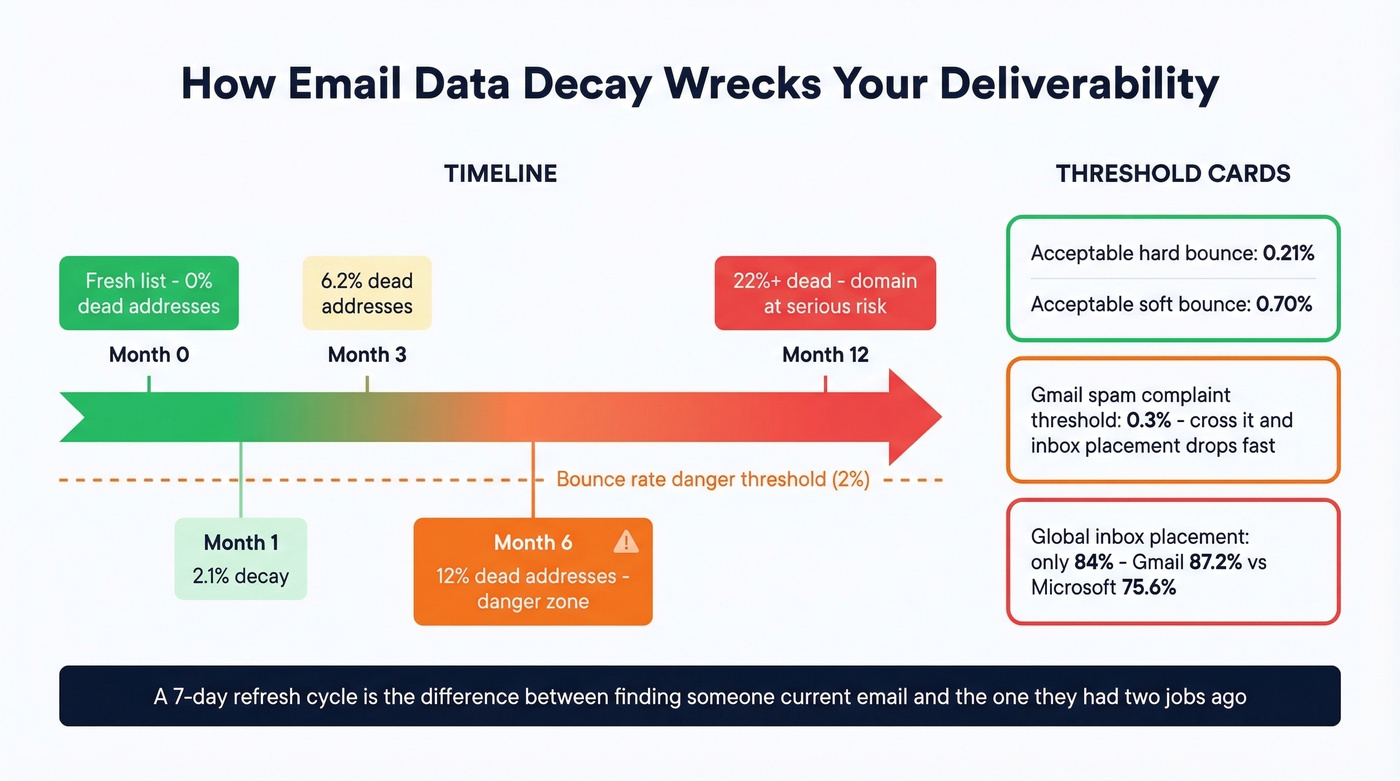
At 2.1% monthly decay, a list you built in January has about 12% dead addresses by July. Mailchimp's benchmarks put the acceptable hard bounce rate at 0.21% and soft bounce at 0.70%. SaaS companies average 0.93% total. If you're above 2%, you've got a data quality problem that's actively hurting deliverability.
Global inbox placement sits at about 84% - meaning one in six emails never reaches the inbox even under normal conditions. Break that down by provider and the picture gets worse: Gmail delivers 87.2% to inbox, but Microsoft only manages 75.6%. If your target accounts run Outlook, you're already fighting uphill. Adding bounces and spam complaints to that equation is a recipe for blacklisting.
Gmail's spam complaint threshold sits at 0.3%. Cross it, and your inbox placement drops fast. Catch-all domains make this trickier - they accept all mail regardless of whether the specific address exists, so your emails "deliver" but nobody reads them. A good verification tool flags catch-all addresses separately so you can decide whether to risk them.
Best Email Finder Tools Compared (2026)
A quick note on the numbers below. Verification accuracy means: when the tool returns a result, how often is it deliverable? Verified rate means: out of a test list, what percentage of contacts ended up with a verified email.
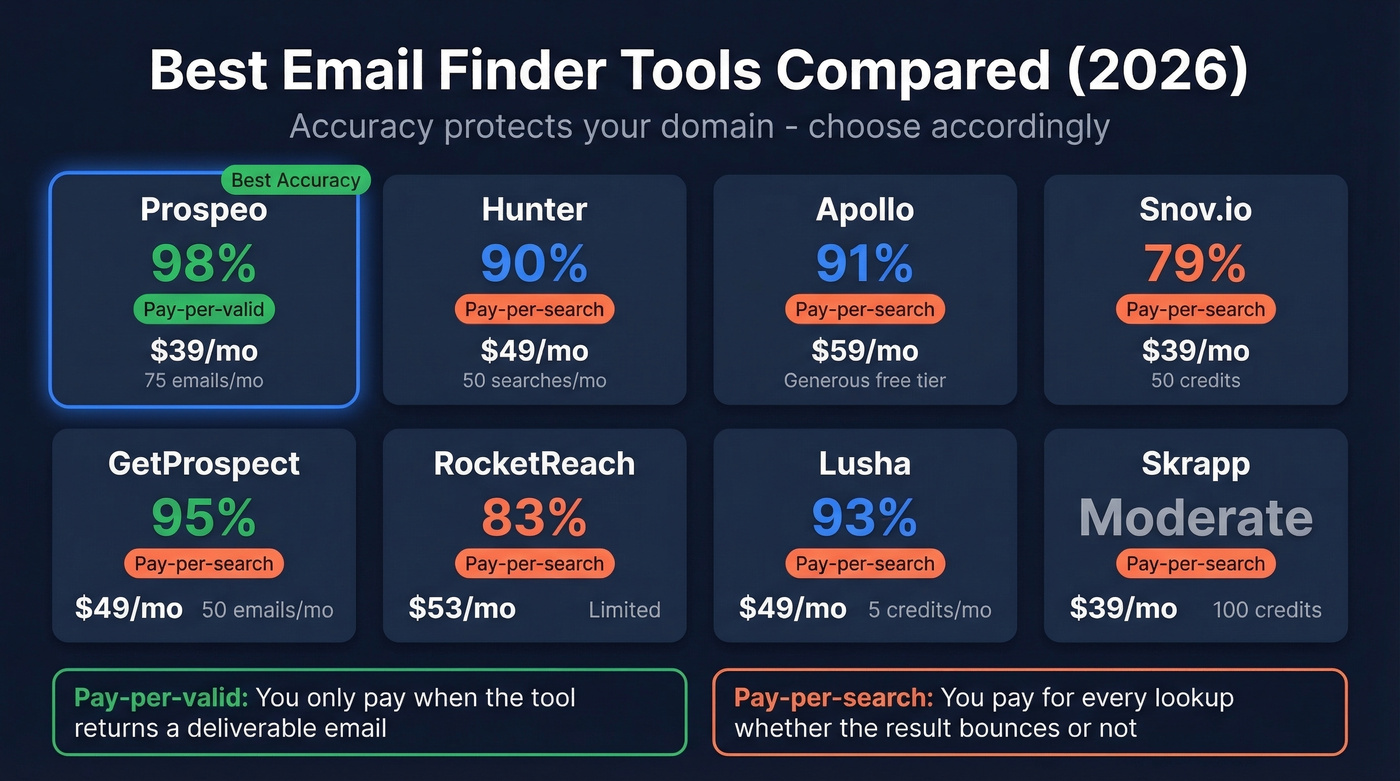
In an independent 5,000-contact benchmark, verified rates ranged from 17% to 78% depending on the tool and the contact list tested. High accuracy with lower verified rate means fewer results but more reliable ones; high verified rate with lower accuracy means more results but more bounces. For outbound email, accuracy protects your domain.
| Tool | Verification Accuracy | Price (Billing) | Free Tier | Best For |
|---|---|---|---|---|
| Prospeo | 98% | ~$39/mo (pay-per-valid) | 75 emails/mo | Accuracy + freshness |
| Hunter | ~90% | $49/mo (pay-per-search) | 50 searches/mo | Domain discovery |
| Apollo | ~91% | $59/mo (pay-per-search) | Generous | Free tier + sequences |
| Snov.io | ~79% | $39/mo (pay-per-search) | 50 credits | All-in-one outbound |
| GetProspect | ~95% | $49/mo (pay-per-search) | 50 emails/mo | Bulk prospecting |
| RocketReach | ~83% | ~$53/mo (pay-per-search) | Limited | Executive lookups |
| Lusha | ~93% | ~$49/mo (pay-per-search) | 5 credits/mo | Phone numbers |
| Skrapp | Moderate | ~$39/mo (pay-per-search) | 100 credits | Budget option |
Prospeo - Best for Accuracy and Freshness
Prospeo's 98% email accuracy, 7-day data refresh, and pay-only-for-valid billing model make it the clear pick for teams that can't afford bounces - outbound agencies, high-volume SDR teams, and anyone whose domain reputation has taken hits from bad data.
The platform covers 300M+ professional profiles and 143M+ verified emails, with a proprietary email-finding infrastructure that doesn't rely on third-party providers. At about $0.01 per email, it's 90% cheaper per lead than ZoomInfo. The free tier gives you 75 emails per month to test without a credit card. Native integrations with Salesforce, HubSpot, Instantly, Lemlist, and Clay mean you're not manually exporting CSVs.
Real-world proof: Meritt dropped their bounce rate from 35% to under 4% after switching, and tripled their pipeline from $100K to $300K per week. For email sequences, pair Prospeo with Instantly or Lemlist - it's built to integrate, not to replace your sequencer.

Waterfall enrichment works - but only if your first provider has fresh data. Prospeo refreshes 300M+ profiles every 7 days, not the 6-week industry average. That means fewer cascades, fewer dead addresses, and an 83% enrichment match rate before you ever need a second provider.
Start with the freshest B2B email data in the category.
Hunter.io - Domain Discovery Done Right
Hunter's domain search is its signature feature - enter a domain and get a list of all associated email addresses with confidence scores and sources. Emails marked with a green "Verified" shield are deliverable; anything that can't be validated gets a confidence score instead.
In the 5,000-contact benchmark, Hunter posted a 37.6% verified rate. That's lower than top performers in that specific test, but Hunter's strength isn't single-person lookup - it's breadth of domain discovery. When you need to map an entire org chart's emails, Hunter is the starting point. The free plan includes up to 50 searches per month, and paid plans start at $49/month.

One thing to watch: Hunter charges per search regardless of result quality, so budget accordingly at volume.
Apollo.io - Best Free Tier for Startups
Apollo's free tier is the most generous in the space, and the database is massive. Basic plans start at $59/month, Professional at $99/month. The built-in sequencer means you can find contacts and email them from the same platform - a genuine advantage for bootstrapped teams trying to source prospect contact details without juggling multiple subscriptions.
The tradeoff is data quality on older contacts. The consensus on r/sales and r/coldemail is pretty consistent here. One poster noted Apollo data "feels bad sometimes" with "lots of bounces on older contacts." In Saleshandy's 100-contact test, Apollo scored 91% - solid but not best-in-class. Another user trying to prospect UK companies said they "tried Apollo and it wasn't able to pull some of my current clients." If you're sending at high volume and need sub-2% bounce rates, pair Apollo with a dedicated verification tool.
Snov.io, GetProspect, and the Rest
Snov.io is the all-in-one play - email finder, sequences, and a lightweight CRM in one platform. Starter plans begin at $39/month with 50 free credits to test. In the 5,000-contact benchmark, Snov.io posted a 20.1% verified rate. The value proposition isn't just finding emails - it's having the entire outbound workflow in a single tool. Best for solo founders or small teams who don't want to stitch together three different platforms.
GetProspect quietly posted one of the strongest numbers in independent benchmarks - a 61.9% verified rate on 5,000 contacts, well ahead of Hunter and Snov.io. The free tier offers 50 emails per month, with paid plans from $49/month. A solid pick for bulk prospecting where volume of verified results matters more than per-result accuracy.
RocketReach runs about $53/month for 80 lookups, making it one of the most expensive per-search options. Accuracy benchmarks land around 83%. Skip this one if you're doing any kind of volume work - in Snov.io's "tested 12 tools" write-up, RocketReach took more than 10 minutes in their workflow because bulk search wasn't available. Fine for occasional executive lookups, expensive and slow for everything else.
Lusha is phone-first. The database skews toward direct dials and mobile numbers, with email as a secondary feature. Five free credits per month, paid plans from about $49/month. If you need phone numbers more than emails, Lusha's worth a look.
Skrapp offers 100 free credits on signup with paid plans from about $39/month. Accuracy is moderate - expect to verify results through a separate tool. Best for teams testing email outreach before committing to a pricier platform.
Is It Legal to Obtain Email Addresses Online?
By early 2025, cumulative GDPR fines had reached EUR5.88B across 2,245 enforcement actions - and enforcement has only accelerated since. The penalty ceiling is EUR20M or 4% of global annual turnover, whichever is higher.
| GDPR (EU/UK) | CAN-SPAM (US) | |
|---|---|---|
| Model | Opt-in | Opt-out |
| Email = personal data? | Yes | Not explicitly |
| B2B exception? | Legitimate interest (with balancing test) | Yes - commercial email allowed |
| Penalty ceiling | EUR20M / 4% turnover | $51,744 per violation |
| Key requirement | Lawful basis documented | Working unsubscribe |
Under GDPR, a work email like firstname.lastname@company.com is personal data. You can use legitimate interest as your lawful basis for B2B outreach, but you need a documented balancing test - not just a gut feeling that the prospect might be interested.
Under CAN-SPAM, the rules focus on how you send, not how you collect. You need truthful headers, honest subject lines, sender identification, and a working unsubscribe mechanism. Opt-outs must be honored within 10 business days.
A practical compliance checklist that covers both:
- Record the source URL, date, and capture method for every email
- Map your lawful basis in writing (legitimate interest, consent, etc.)
- Treat behind-login sources as high risk
- Include a working unsubscribe link in every message
- Honor opt-outs immediately - don't wait the full 10 days
Use GDPR-compliant platforms that enforce opt-out globally and offer Data Processing Agreements to simplify the compliance burden on your end.
FAQ
What's the Fastest Free Way to Get an Email Address?
Start with Google search operators (site:company.com "@company.com") and check the company's about page. If that fails, use a free tier - Prospeo offers 75 verified emails per month, and Hunter includes up to 50 searches. The free-tier route is faster and more reliable than manual searching for anything beyond a handful of contacts.
How Accurate Are Email Finder Tools?
Independent benchmarks show verified rates ranging from 17% to 78% depending on the tool and test methodology. The best tools with real-time verification hit 98% accuracy on returned results. The gap comes down to whether the tool verifies at lookup time or serves cached results from a static database.
Is It Legal to Get Someone's Email Address Online?
GDPR requires a documented lawful basis, typically legitimate interest for B2B, while CAN-SPAM focuses on sending rules rather than collection. Both require a working unsubscribe mechanism. Record how and when you obtained each address - source, date, and method - to stay compliant under either framework.
How Often Should I Re-Verify My Email List?
B2B data decays at 2.1% per month, so re-verify quarterly at minimum and monthly if you're sending at scale. A list that's six months old without re-verification likely has 12%+ dead addresses - enough to trigger deliverability problems with Gmail and Microsoft.
What's the Difference Between Pay-Per-Search and Pay-Per-Valid?
Pay-per-search charges for every lookup regardless of whether the result is deliverable, catch-all, or dead. Pay-per-valid only charges when the tool returns a verified address. At scale, pay-per-valid cuts your effective cost per usable email by 40-60%.
Every method in this article works. The one that matters most is the last step: verify before you send. A clean list at 500 contacts will outperform a dirty list at 5,000 every single time.