

How to Set Up SPF, DKIM, and DMARC in Office 365 (2026 Guide)
Your CFO just got an email from "you" requesting a wire transfer. Except you didn't send it - someone spoofed your domain. Here's the uncomfortable truth: Microsoft 365 leaves DKIM disabled and publishes zero DMARC records for custom domains by default. Your domain is unprotected until you fix it yourself.
Google and Yahoo bulk-sender rules now make SPF, DKIM, and DMARC (at minimum p=none) mandatory once you're sending around 5,000+ emails per day. Even below that threshold, authentication is table stakes for deliverability in 2026. Let's walk through the full lifecycle, from DNS records through enforcement.
What You Need Before Starting
Before touching DNS, confirm three things: your custom domain is verified in Microsoft 365, you have access to your DNS provider, and you have admin permissions in the Microsoft 365 tenant.
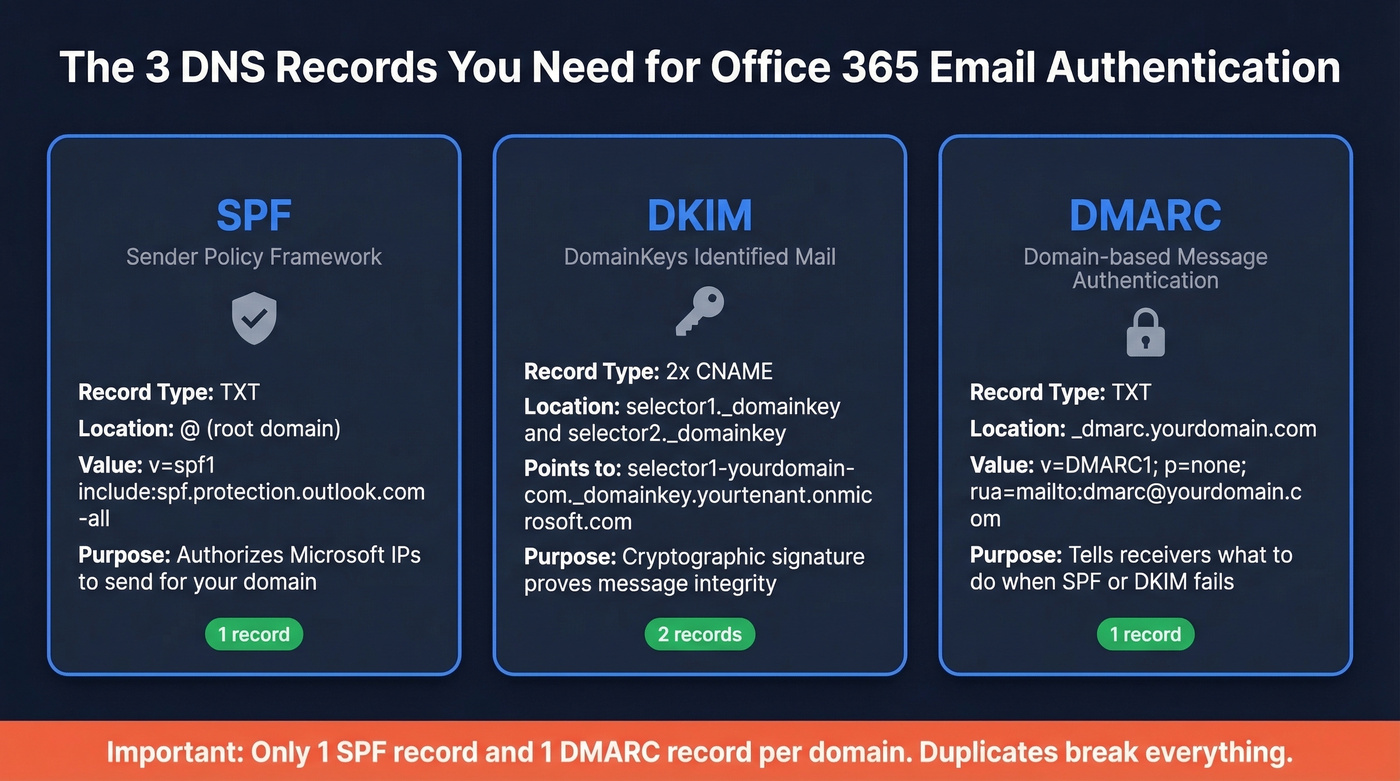
Here are the three records you'll create:
- SPF - one TXT record:
v=spf1 [include:spf.protection.outlook.com](https://learn.microsoft.com/en-us/defender-office-365/email-authentication-spf-configure) -all - DKIM - two CNAME records pointing selectors to your
.onmicrosoft.comtenant - DMARC - one TXT record:
v=DMARC1; p=none; rua=mailto:dmarc@yourdomain.com
That's the skeleton. The details - and the places where things break - are below.
Set Up SPF for Microsoft 365
SPF tells receiving mail servers which IPs are authorized to send on behalf of your domain. For Microsoft 365, the core record is straightforward.
Add a TXT record at your domain's root:
v=spf1 include:spf.protection.outlook.com -all
If you also send through other services, consolidate everything into that single record. A multi-sender SPF record looks like this:
v=spf1 include:spf.protection.outlook.com include:_spf.google.com include:servers.mcsv.net include:sendgrid.net -all
You can only have one SPF TXT record per domain. Publishing two separate SPF records causes a PermError, which means SPF fails entirely. Every third-party sender's include goes into the same record.
Before publishing, validate your record using spf.access.nu - its pre-publish mode checks the record before it goes live in DNS, catching lookup-limit issues and syntax errors before they affect real mail.
Use -all (hard fail) once you're confident you've included every legitimate sender. If you're still discovering senders, start with ~all briefly, then move to -all after your DMARC reports confirm nothing legitimate is being missed.
The 10-Lookup Limit
SPF evaluation is capped at 10 DNS lookups per RFC 7208. Mechanisms that count: include, a, mx, redirect, exists, and ptr. Mechanisms that don't: ip4, ip6, and all.
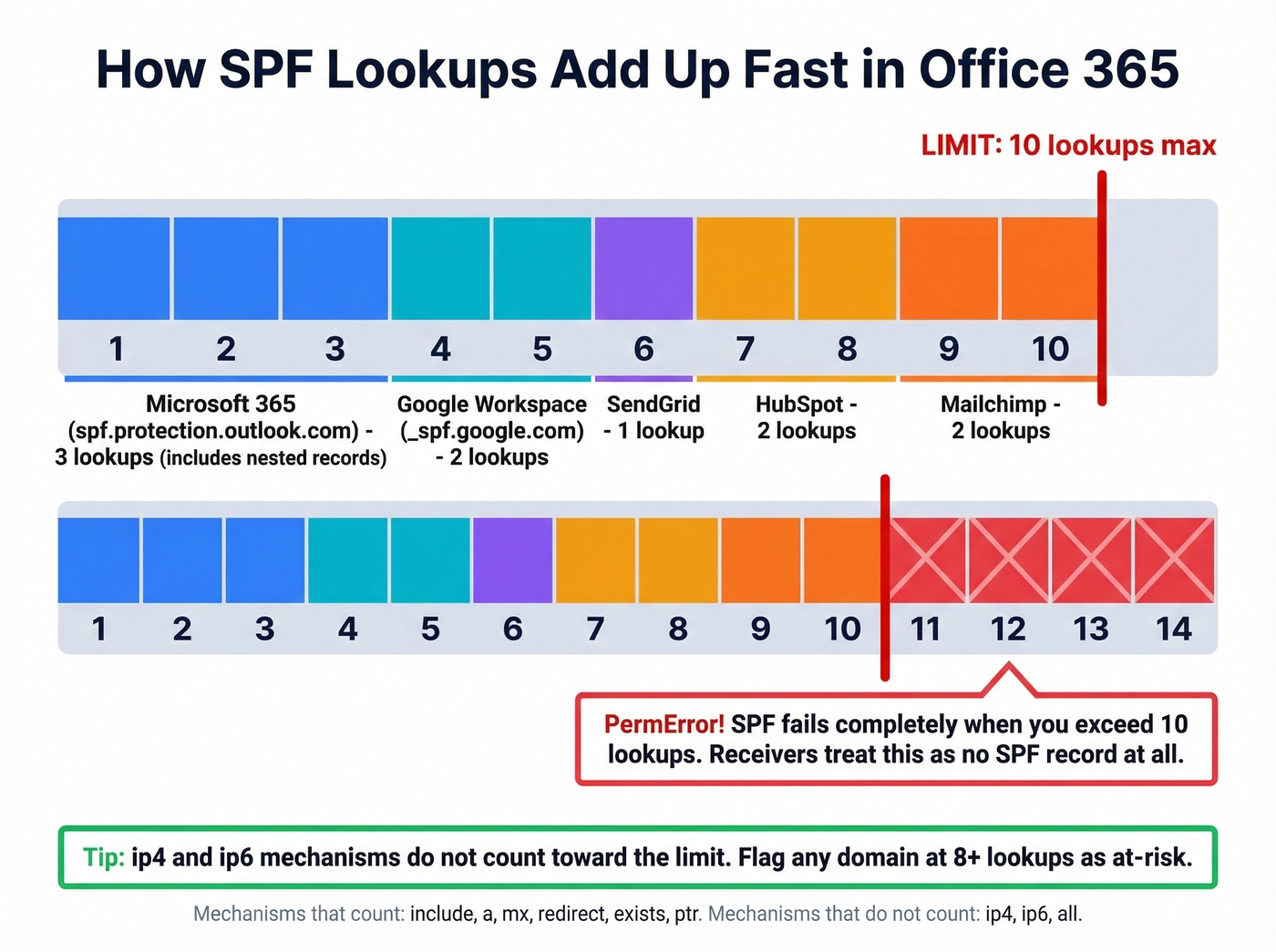
The trap is nested includes. include:spf.protection.outlook.com itself triggers additional lookups for Microsoft's nested records. Add Salesforce, HubSpot, SendGrid, and Mailchimp includes, and you blow past 10 without realizing it. We've seen organizations hit 14 lookups and not understand why their SPF was failing intermittently - flag any domain at 8+ lookups as at-risk.
SPF flattening (replacing includes with hardcoded IP addresses) is a common workaround, but providers rotate IPs and your flattened record goes stale silently. If you flatten, schedule quarterly audits or use a dynamic SPF service.
Enable DKIM in Office 365
DKIM adds a cryptographic signature to outbound messages, proving they haven't been tampered with in transit. Microsoft 365 doesn't enable DKIM signing for custom domains by default.
Go directly to the Defender portal DKIM page. Select your custom domain and click Enable. Microsoft will prompt you to create two CNAME records in your DNS:
Host: selector1._domainkey.yourdomain.com

Points to: selector1-yourdomain-com._domainkey.yourtenant.onmicrosoft.com

Host: selector2._domainkey.yourdomain.com

Points to: selector2-yourdomain-com._domainkey.yourtenant.onmicrosoft.com
Replace yourdomain.com and yourtenant with your actual values - the Defender portal shows the exact records to create.
After publishing the CNAMEs, allow a few hours up to 48 hours for DNS propagation before enabling DKIM signing in the portal. Don't panic if it doesn't activate immediately. Each subdomain you send from (e.g., marketing.yourdomain.com) needs its own DKIM configuration.
Rotate DKIM keys every 6-12 months. Microsoft's two-selector system makes this straightforward - one selector stays active while the other rotates.
Create Your DMARC Record
DMARC ties SPF and DKIM together by telling receivers what to do when authentication fails. Add a TXT record at _dmarc.yourdomain.com:
v=DMARC1; p=none; adkim=r; aspf=r; rua=mailto:dmarc@yourdomain.com
Quick breakdown of each tag: p=none means "don't take action on failures yet - just send me reports." adkim=r and aspf=r set relaxed alignment, meaning subdomains can align with the parent domain. Start relaxed and tighten later once you understand all your mail flows.
The rua=mailto: tag is where aggregate reports get sent. Use a dedicated mailbox - these reports arrive as XML files and they'll clutter a personal inbox fast.
Same rule as SPF: one DMARC record per domain. Publishing two invalidates both.
Subdomain inheritance works in your favor - a DMARC record at the parent domain covers all subdomains unless a subdomain publishes its own. But each subdomain still needs its own SPF and DKIM to actually pass DMARC checks. Microsoft recommends using a subdomain (for example, marketing.yourdomain.com) for bulk or third-party sending to protect your main domain's reputation. Use the sp= tag for explicit subdomain policy (e.g., sp=reject to block unauthenticated subdomain mail even while the parent is at p=none).
Verify Everything Works
Don't assume DNS records are correct just because you published them. Verify.
For SPF, open a terminal and run:
nslookup -type=txt yourdomain.com
You should see your SPF record in the output. For DKIM:
nslookup -type=cname selector1._domainkey.yourdomain.com
This should return the Microsoft CNAME target. If it returns nothing, DNS hasn't propagated yet.
The real test: send an email to an external Gmail address and inspect the message headers. Look for the Authentication-Results header - a passing result shows spf=pass, dkim=pass, and dmarc=pass. Any fail or none result means something's misconfigured.
MXToolbox and spf.access.nu are solid for quick checks - spf.access.nu also lets you validate SPF changes before publishing them to DNS. We run both on every domain we configure; they catch different edge cases.

You just spent hours configuring SPF, DKIM, and DMARC to protect your domain reputation. Don't waste that effort by sending to bad email addresses. Prospeo's 5-step verification delivers 98% email accuracy - teams using it cut bounce rates from 35% to under 4%.
Your authentication is airtight. Make your contact data match.
Moving from p=none to p=reject
Most organizations sit at p=none for months and call it "done." That's like installing a security camera but never turning on the monitor. p=none gives you visibility but blocks nothing. Spoofed emails still land in inboxes. You need to get to p=reject.
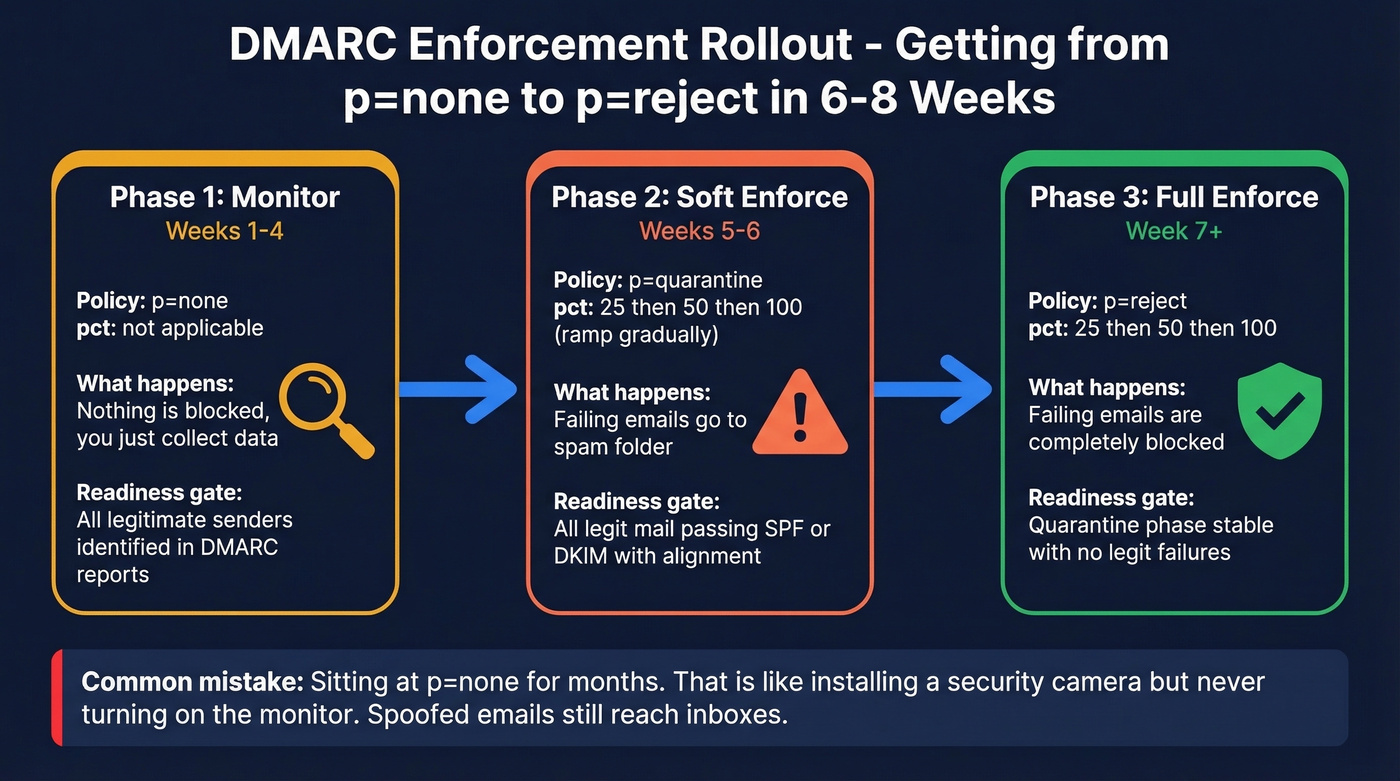
| Phase | DMARC Policy | Duration | pct Value | Readiness Gate |
|---|---|---|---|---|
| Monitor | p=none | Weeks 1-4 | N/A | All senders identified |
| Soft enforce | p=quarantine | Weeks 5-6 | 25 -> 50 -> 100 | Legit mail passing |
| Full enforce | p=reject | Week 7+ | 25 -> 50 -> 100 | Quarantine stable |
The pct tag controls what percentage of failing messages get the policy applied. At pct=25 with p=quarantine, only 25% of failing messages get quarantined - the rest are treated as p=none. This lets you ramp gradually.
Before each phase transition, check your DMARC reports. Every legitimate sender should show SPF or DKIM passing with alignment. If you see failures from services you recognize, fix their authentication before moving forward.
A typical rollout runs 6-8 weeks from p=none to p=reject. Rushing it risks blocking legitimate mail. Dragging it out for months means your domain stays spoofable. Neither is acceptable.
DMARC Reporting and Monitoring
DMARC aggregate reports arrive as XML files within 24-48 hours of your record going live. The key fields: source_ip (who's sending as your domain), policy_evaluated (what happened), and spf/dkim pass/fail indicators.
Raw DMARC XML is borderline hostile to read. You need a tool to parse it.
Free Monitoring Tools
| Tool | Cost | Volume Limit | M365 Native | Watch Out For |
|---|---|---|---|---|
| Valimail Monitor | Free | Unlimited | Yes | - |
| EasyDMARC | Free tier | 1,000/mo | No | 14-day retention |
| Postmark | Free | Reasonable | No | Duplicate record risk |
| Cloudflare | Free | Varies | No | Requires Cloudflare DNS |
| Dmarcian | Free trial | Limited | No | Paid after trial |
For Microsoft 365 users, Valimail Monitor is the clear winner - free with no volume limits, native M365 integration, and it handles the XML parsing so you don't have to.
One warning about Postmark's free monitor: it can prompt you to add a new DMARC record without detecting your existing one. Two DMARC records invalidate both. Always check before adding.
Fixing Common DMARC Failures
You've set p=none and half your legitimate mail is failing. This is the #1 question on r/sysadmin DMARC threads, and the failures fall into three categories.
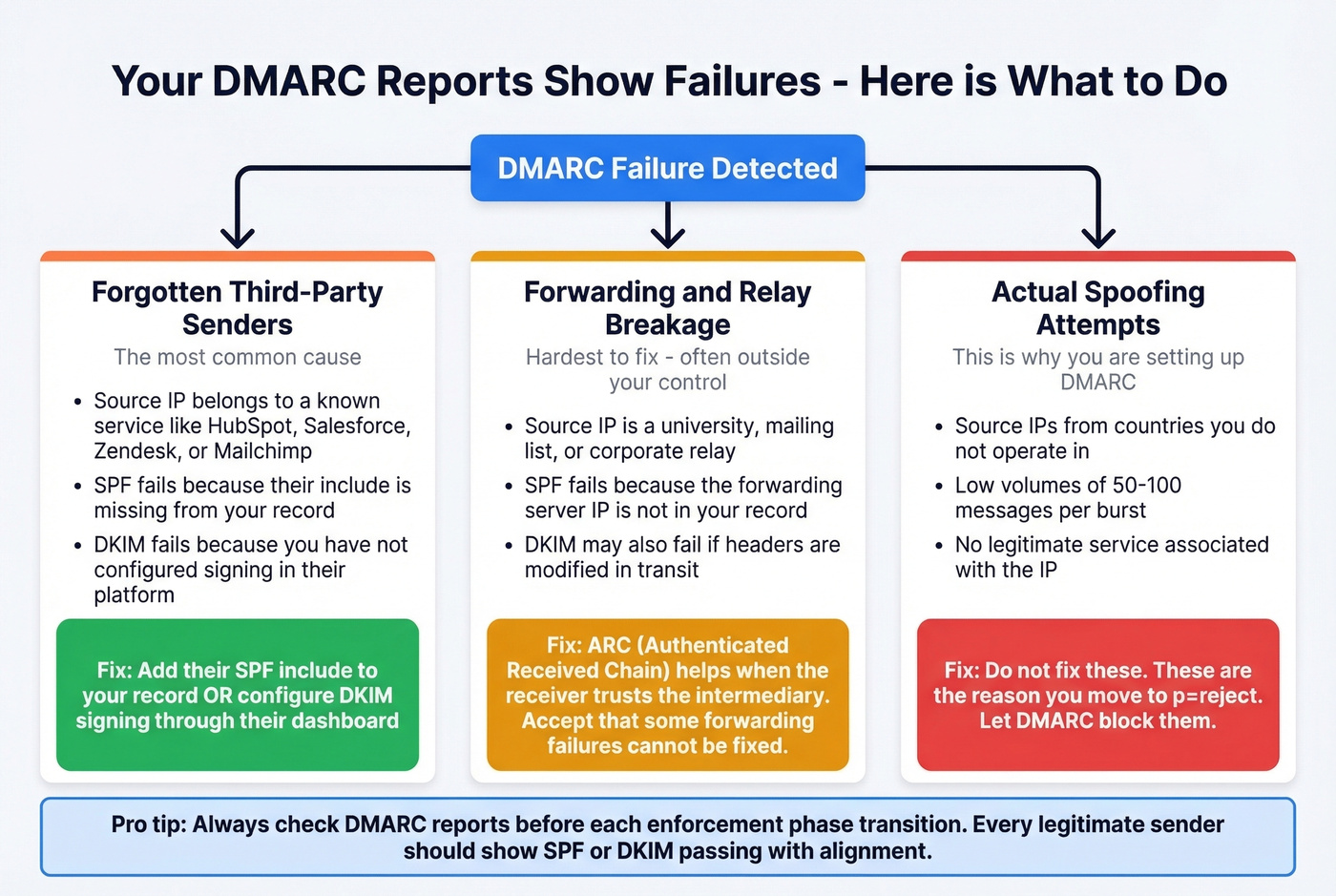
Third-party senders you forgot to authorize. The most common culprit. Marketing platforms, ticketing systems, transactional email services - anything sending as your domain needs to be in your SPF record or signing with your DKIM key. Add their SPF include or configure DKIM signing through their platform.
Forwarding and relaying services breaking authentication. Universities, mailing lists, and corporate mail relays frequently mangle headers or change the sending IP, which breaks SPF and sometimes DKIM. ARC (Authenticated Received Chain) helps when the receiver trusts the intermediary's ARC seal, but you can't force every forwarder to implement it. Accept that some forwarding failures are outside your control.
Actual spoofing attempts. You'll see source IPs from countries you don't operate in, sending volumes of 50-100 messages - classic spoofing pattern. Don't try to "fix" these. They're the reason you're moving to p=reject.
Hybrid Exchange Scenarios
If you're running Exchange on-premises alongside Exchange Online, configure DKIM on whichever system sends outbound mail to the internet. Don't enable it in both places during coexistence.
Per Microsoft's own guidance, an on-prem DKIM signer won't interfere with hybrid - but only switch to M365 DKIM signing when outbound mail actually routes through Exchange Online. The most common hybrid failure we see: migrated cloud users fail SPF and DMARC because the sending IP changed but the SPF record still only authorizes on-prem IPs. Make sure include:spf.protection.outlook.com is in your SPF record before you migrate any mailboxes.
Troubleshooting Authentication in Office 365
Multiple SPF records = PermError. The #1 mistake. Consolidate everything into one TXT record. Period.
SPF passes checkers but fails at Microsoft. Exchange Online Protection can time out DNS lookups around ~500ms per lookup. Slow third-party DNS causes intermittent TempErrors that online checkers never see. Reduce includes and use ip4/ip6 for stable senders.
DKIM "not enabled" after publishing CNAMEs. DNS propagation can take up to 48 hours. Wait, then retry in the Defender portal.
Alignment mismatches. DMARC checks that the domain in the From header matches the SPF MAIL FROM domain or the DKIM d= domain. If your transactional service sends with a different envelope sender, SPF passes but doesn't align - and if DKIM isn't configured for that service either, DMARC fails.
Stop treating this as a one-time setup task. Providers change IPs, you add new SaaS tools, team members spin up marketing platforms without telling IT. Schedule quarterly SPF audits and monitor DMARC reports continuously.
Protect Sender Reputation Beyond Authentication
Authentication handles one half of deliverability - preventing spoofing. Clean contact data handles the other - preventing bounces. High bounce rates tank the same sender reputation you just worked to protect.
If you're running outbound campaigns, verify your contact data before you send. Prospeo's email finder runs a 5-step verification process with catch-all handling and spam-trap removal, delivering 98% email accuracy on a 7-day data refresh cycle. Don't undo your authentication work by sending to dead addresses.

Deliverability isn't just DNS records - it's data quality. One bad list can torch the sender reputation you just built with DMARC enforcement. Prospeo refreshes 300M+ profiles every 7 days with spam-trap removal and catch-all handling, so your outbound hits real inboxes.
Stop protecting a domain you're burning with bad data.
FAQ
How long do SPF, DKIM, and DMARC take to start working?
SPF and DMARC TXT records typically propagate within 1-4 hours; DKIM CNAME records can take up to 48 hours. DMARC aggregate reports start arriving within 24-48 hours after the record is live, depending on the receiving provider's reporting cycle.
Can I set up DMARC without DKIM?
Technically yes - DMARC passes if either SPF or DKIM passes with alignment. But relying on SPF alone is fragile because forwarding breaks SPF, and you lose your safety net. Always enable both before moving toward enforcement.
What happens if I go straight to p=reject?
You'll block all unauthenticated mail immediately, including legitimate messages from third-party senders you haven't authorized. Start with p=none, monitor reports for 2-4 weeks, then ramp through quarantine to reject using the pct tag.
Do subdomains need their own DMARC records?
No - a DMARC record at the parent domain covers subdomains by default. Each subdomain still needs its own SPF and DKIM configuration to actually pass authentication checks, though. Use the sp= tag in your parent record for explicit subdomain policy.
Does email authentication alone guarantee deliverability?
No. Authentication prevents spoofing but doesn't prevent reputation damage from high bounce rates. You need both - proper SPF, DKIM, and DMARC configuration alongside clean, verified contact data to keep bounce rates low and your domain reputation intact.