

Lead Conversion in Salesforce: The 2026 Guide
You converted 200 leads last quarter. Clean work - until you opened the pipeline report and found 40% of those conversions created duplicate Opportunities, half the resulting Contacts had no email address, and three BDRs each created separate Accounts for the same company. Lead conversion in Salesforce is easy to click and hard to get right.
This isn't the "what is lead conversion" overview you've read five times. We're covering field mapping, validation rules, duplicate prevention, and automation patterns that separate a functional Salesforce instance from a messy one.
Quick Version
If you're short on time:
- Define conversion criteria with validation rules. Don't let reps convert leads that haven't been qualified. Use
ISCHANGED(IsConverted)formulas to enforce this at the platform level. - Audit field mappings quarterly. Unmapped custom fields don't throw errors - they silently lose data during conversion.
- Set up cross-object duplicate rules. Lead-to-Contact email matching catches the duplicates that standard conversion misses.
- Measure conversion rates by source. If your overall Lead-to-MQL rate is below 10% in B2B SaaS, that's a lead quality problem, not a sales process issue.
- Fix data quality before conversion. Verify and enrich lead data upstream so the Contact and Account records you create are actually complete.
- Automate carefully. Flow alone can't trigger
Database.LeadConvert. You'll need Invocable Apex.
What Conversion Actually Does
When you convert a lead, Salesforce uses lead information to create records on other objects. The Lead record itself doesn't disappear - it's marked IsConverted = true and becomes read-only.
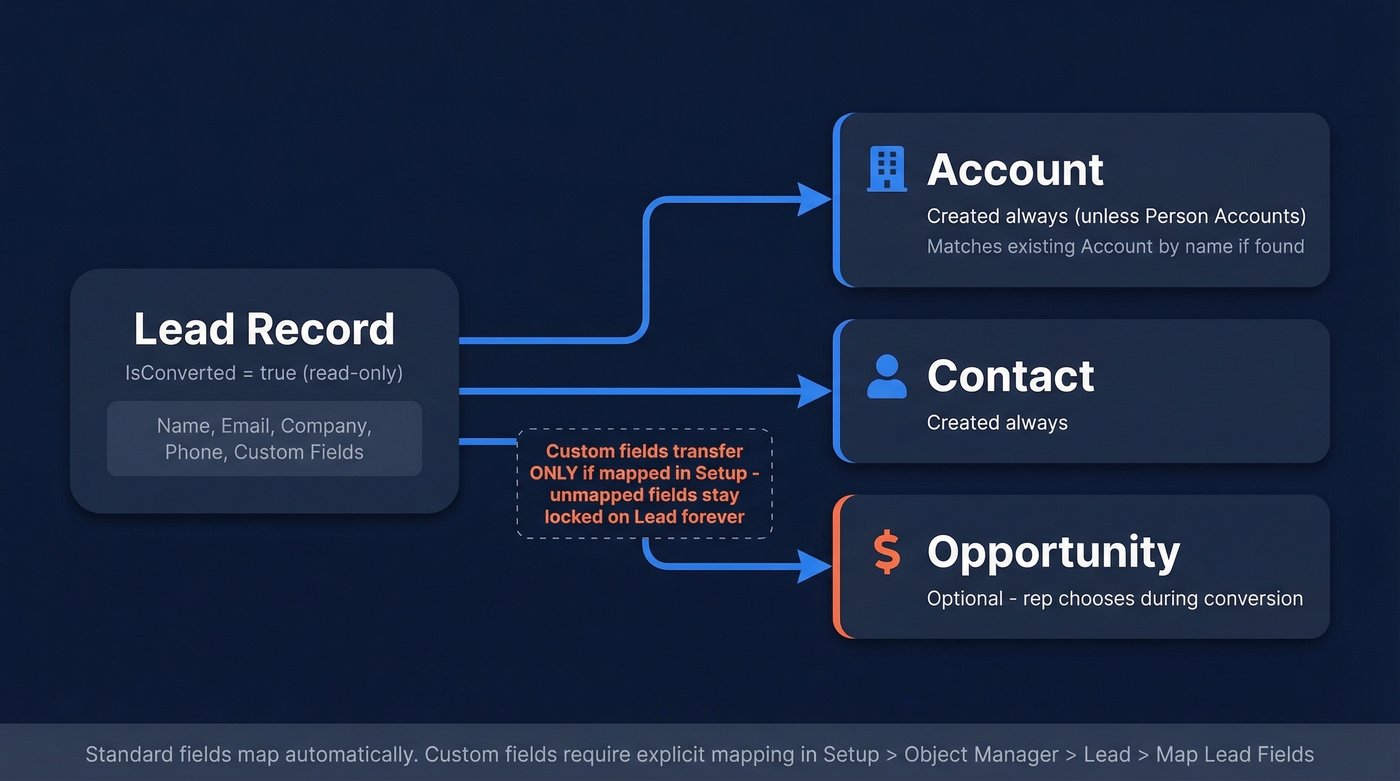
In a standard B2B setup, conversion can create up to three records:
| Action | Object Created | Always? |
|---|---|---|
| Convert Lead | Account (Business Account) | Yes (unless Person Accounts apply) |
| Convert Lead | Contact | Yes |
| Convert Lead | Opportunity | Optional |
If Person Accounts are enabled and the Lead has no Company name, the Lead converts into a Person Account (and an Opportunity if you choose to create one).
When an Account already exists with a similar match (name-based matching), Salesforce presents the option to attach the new Contact to that existing Account rather than creating a new one. The rep must actively select the existing Account during conversion. This is where duplicate problems start - and where most teams first realize their conversion process needs guardrails.
Custom field data transfers based on your Map Lead Fields configuration in Setup. Standard fields transfer automatically. Custom fields only transfer if you've explicitly mapped them. Miss one, and that data stays locked on the converted Lead record forever.
When to Convert Leads
Converting too early is worse than converting too late. An early conversion floods your pipeline with unqualified Opportunities that sales reps ignore, inflates stage-one metrics, and makes forecasting unreliable. A late conversion skews your funnel reporting, but at least your pipeline stays honest.
Map your qualification methodology directly to Salesforce custom fields:
- BANT: Budget (picklist), Authority (lookup or checkbox), Need (text), Timing (date or picklist)
- MEDDIC: Metrics, Economic Buyer, Decision Criteria, Decision Process, Identified Pain, Champion - each as a custom field on the Lead object
Then enforce it with a validation rule that prevents conversion unless criteria are met:
AND(
  ISCHANGED(IsConverted),
  IsConverted = TRUE,
  OR(
    ISBLANK(Budget__c),
    ISBLANK(Authority__c),
    ISBLANK(Need__c)
  )
)
Add a ConvertedOpportunityId check if you only want to enforce this when an Opportunity is being created during conversion.

The Persistent Leads Alternative
Use this if: You're running complex B2B sales with 6+ month cycles, multi-touch engagement across buying committees, and you need full-funnel attribution from first touch to closed-won. Some teams on r/salesforce keep Leads "persistent" - never converting them - and instead log interactions on a custom Engagement object linked to both the Lead and the Opportunity.
Skip this if: You're a small team with a straightforward sales motion. The custom Engagement object model adds real complexity to your data model, reporting, and automation. For most teams under 20 reps, standard conversion with good validation rules gets the job done.
Conversion Benchmarks by Industry
Before you panic about your numbers, here's what "normal" looks like. First Page Sage's funnel benchmark report - the most recent available, covering data gathered between 2017 and 2025 across a roughly 65% B2B client mix - provides stage-by-stage averages:
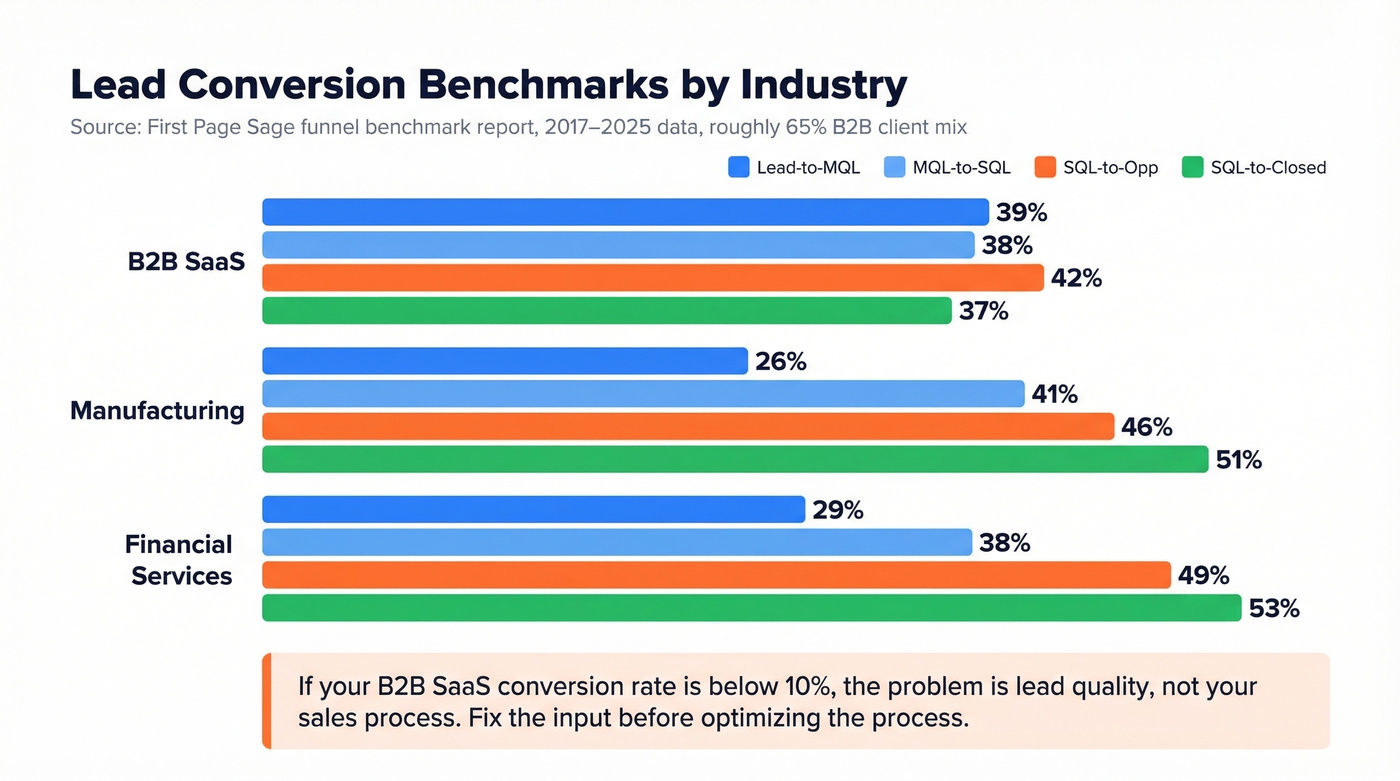
| Industry | Lead-to-MQL | MQL-to-SQL | SQL-to-Opp | SQL-to-Closed |
|---|---|---|---|---|
| B2B SaaS | 39% | 38% | 42% | 37% |
| Manufacturing | 26% | 41% | 46% | 51% |
| Financial Svcs | 29% | 38% | 49% | 53% |
The formula: (Converted Leads / Total Leads) x 100. Generate 500 leads, convert 195, and that's a 39% Lead-to-MQL rate - right at the B2B SaaS average.
Here's the thing: if your overall conversion rate is sitting below 10% in B2B SaaS, the problem almost certainly isn't your sales process. It's lead quality. You're either capturing the wrong people at the top of the funnel or your qualification criteria are so loose that unqualified records flood the pipeline. Fix the input before you optimize the process.
Manufacturing and Financial Services teams see higher SQL-to-Closed rates because their sales cycles are longer and more heavily qualified before a lead ever reaches SQL status. Don't benchmark your SaaS motion against those numbers.
Field Mapping Deep Dive
This is where silent data loss happens.
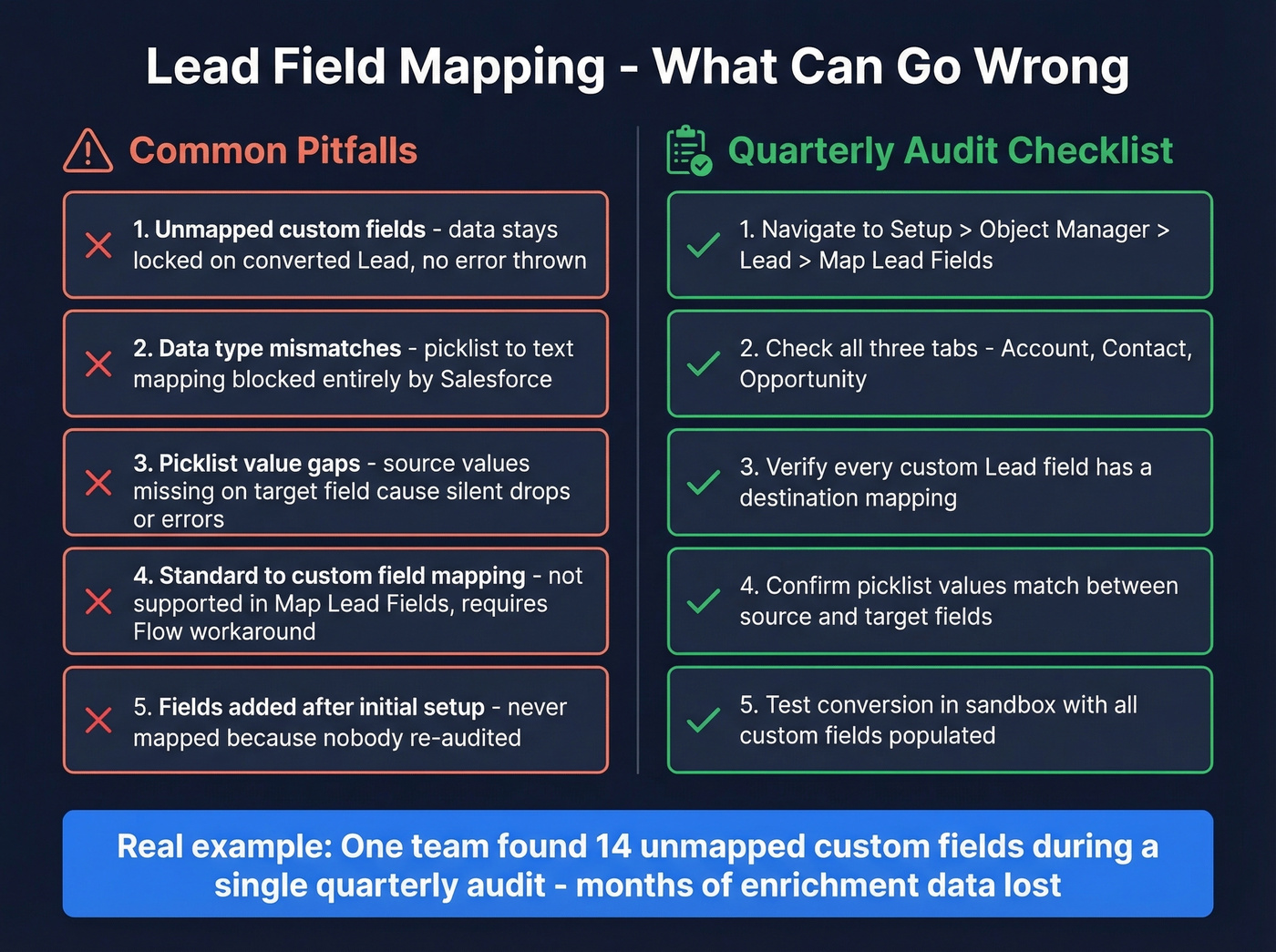
Navigate to Setup -> Object Manager -> Lead -> Fields & Relationships -> Map Lead Fields. You'll see three tabs - one each for Account, Contact, and Opportunity. Standard fields transfer automatically. Custom fields need manual mapping.
A few things will save you grief. You can map one Lead field to multiple destination objects - an "Industry" field can map to both Account and Opportunity when both objects need the context. Data type mismatches prevent mapping entirely: a picklist field on Lead can't map to a text field on Contact, and Salesforce won't let you save the mapping.
Unmapped custom fields don't throw errors. They just stay on the converted Lead record. You built a custom "Buying Timeline" field, populated it carefully during qualification, and it never made it to the Opportunity because nobody mapped it. We've seen teams discover 14 unmapped custom fields during a quarterly audit - months of enrichment data that never reached their Opportunity records. That's not a hypothetical; it's a Tuesday.
You also can't map custom fields to standard fields or standard fields to custom fields using Map Lead Fields. If you need a Lead's standard field value on a custom Contact field (or vice versa), use Flow triggered on conversion to grab the new Contact ID and update the field. Watch for picklist value gaps between source and target fields too, which can either drop values or trigger conversion errors depending on whether the target picklist is restricted.
Audit your mappings quarterly. Fields get added, renamed, and deprecated constantly.

Half your converted Contacts have no email because the data was never there to begin with. Prospeo's CRM enrichment fills in verified emails, direct dials, and 50+ data points on your Salesforce leads - before conversion. 98% email accuracy. 92% match rate. No more hollow Contact records.
Fix lead data quality upstream so every conversion creates a complete Contact.
Configuration That Prevents Problems
Most conversion headaches come from settings that admins either don't know exist or set once and forget.
Enable "Require Validation for Converted Leads" in Setup -> Lead Settings. Without this toggle, your carefully crafted validation rules won't fire during conversion. This catches more teams than you'd expect - it's the single most common "why isn't my validation rule working?" question on the Salesforce Stack Exchange.
In Lightning App Builder, set component visibility so the Convert button only appears when key fields are populated - Email, Phone, or whatever your minimum qualification bar is. This is gentler than a validation rule error and guides reps toward completing records before converting.
During conversion, reps get the option to create an Opportunity or skip it. For teams whose process requires Opportunities to have specific fields populated, consider defaulting to "Do not create an Opportunity" and having reps create Opportunities separately with proper validation.
Watch for picklist value drift. Lead and Contact/Account picklists evolve independently over time. A Lead Status value that existed when you set up mapping might not exist on the Contact's corresponding field six months later. This causes conversion errors with vague messages that are maddening to debug.
Preventing Duplicates
The consensus on r/salesforce is clear: duplicates are the number-one operational complaint about lead conversion. And the standard conversion process does almost nothing to prevent them.
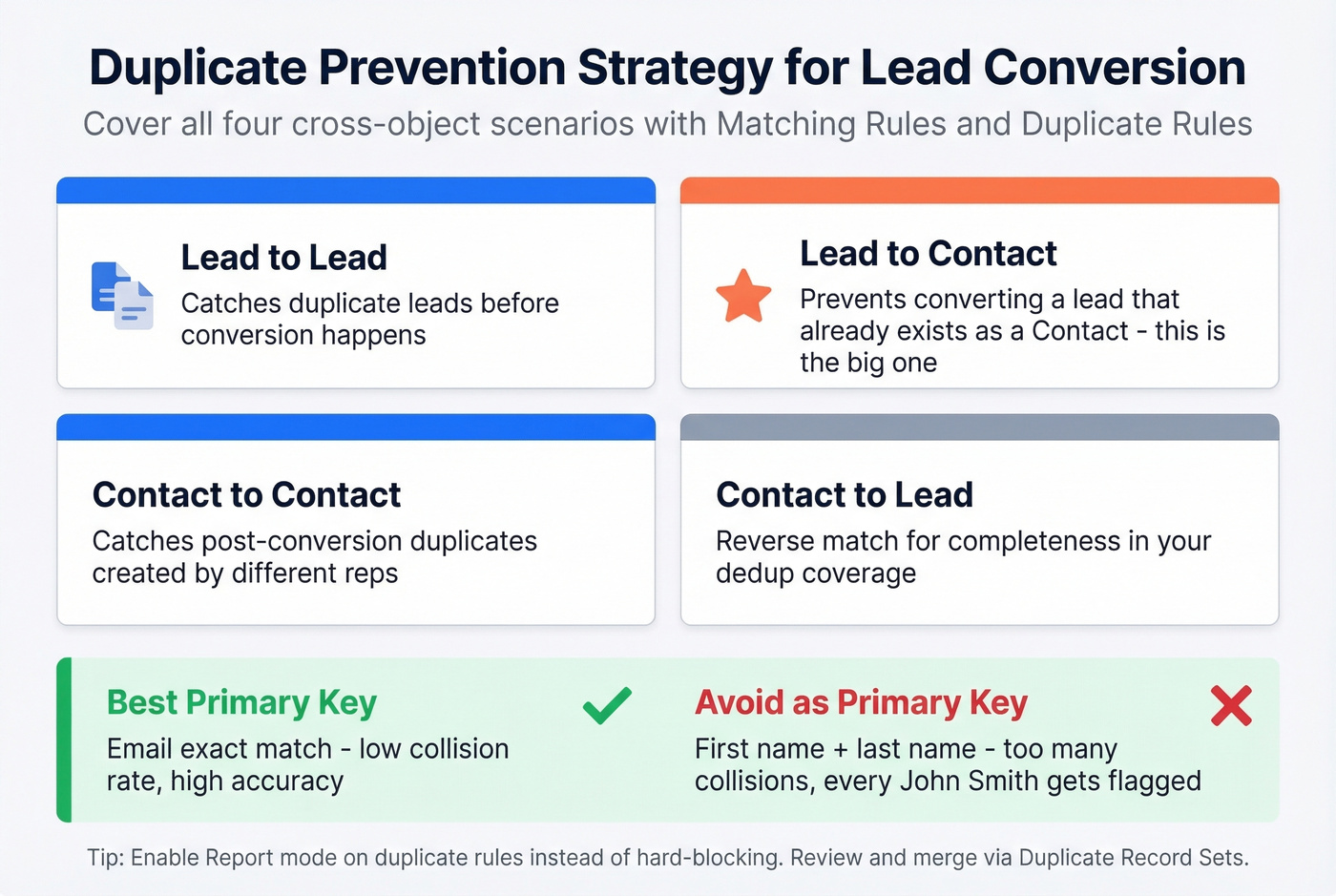
You need Matching Rules that define how duplicates are identified and Duplicate Rules that define what happens when a match is found - block, alert, or report. Cover all four cross-object scenarios:
| Scenario | Why It Matters |
|---|---|
| Lead to Lead | Catches duplicate leads before conversion |
| Lead to Contact | Prevents converting a lead that already exists as a Contact |
| Contact to Contact | Catches post-conversion duplicates |
| Contact to Lead | Reverse match for completeness |
Use email exact match as your primary dedup key. First name + last name matching is too collision-prone - you'll flag every "John Smith" in your database.
Enable the Report option on your duplicate rules. This generates Duplicate Record Sets you can review and merge, rather than hard-blocking reps during conversion (which creates friction and workarounds). One caveat: Duplicate Jobs - the batch process for finding existing duplicates - are limited to Performance and Unlimited editions.
Automating the Process
Here's a frustration every Salesforce admin hits eventually: Flow alone can't convert leads. The Database.LeadConvert method requires Apex. This should be a standard automation action by now, but it isn't.
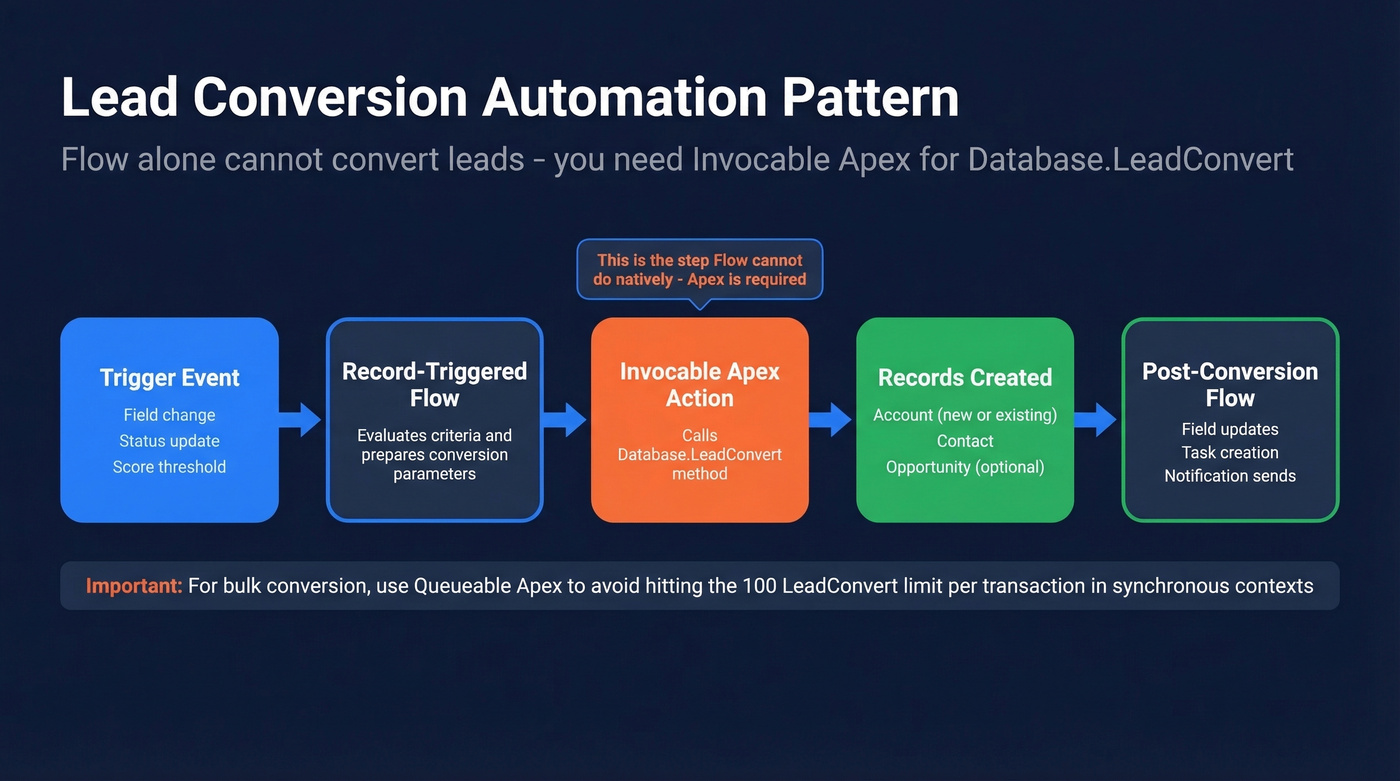
The standard pattern is Flow -> Invocable Apex -> Database.LeadConvert. Your Flow handles the trigger logic - a field change, a status update, a score threshold - then calls an Invocable Apex action that executes the actual conversion.
For bulk conversion, the proven pattern uses a Screen Flow launched from a custom list view button. Reps select leads from a list view, the Flow captures the selected Lead IDs, enforces a 30-lead maximum to stay within governor limits, and passes them to Invocable Apex that triggers Batch Apex for the actual conversions. The button URL pattern:
/flow/Convert_leads?retURL=lightning/o/Lead/list?filterName=AllOpenLeads
Not elegant, but it works and saves hours of one-by-one clicking for teams processing high lead volumes.
Mistakes That Break Your Pipeline
Three BDRs each convert a lead from the same company. Each creates an Opportunity. Now you've got three deals in your pipeline for what's actually one buying conversation - your forecast is inflated, your AEs are confused about ownership, and your Account record looks like a mess.
The fix is Contact Roles plus deal-level qualification criteria. In buying-group motions, a strong pattern is: convert the person, attach them to the real deal via Contact Roles, and only create a new Opportunity when there's evidence of a separate buying motion.
The other pipeline killer is upstream data quality. We've all seen it: 30% of converted Contacts have no email, no phone, and Lead Source set to "Other." That isn't a conversion problem - it's a data problem that conversion makes permanent. Enriching lead records with verified emails and direct dials before you hit Convert means the resulting Contact and Account records are actually complete. Prospeo's Salesforce integration handles this with 98% email accuracy and 50+ data points per record on a 7-day refresh cycle, so records stay current through long sales cycles instead of going stale between qualification and close.
Your validation rules enforce qualification criteria, but they can't enforce data completeness. Prospeo enriches leads with verified emails, phone numbers, company size, tech stack, and buying intent - giving reps the context they need to convert with confidence. Data refreshed every 7 days, not 6 weeks.
Complete lead records convert into pipeline. Incomplete ones convert into cleanup work.
Measuring Conversion Performance
The report type you want is "Leads with Converted Lead Information" - this gives you access to both the original Lead fields and the converted Account/Contact/Opportunity data in one view.
Let's be honest: most teams obsess over conversion rate when they should obsess over conversion quality. A 50% conversion rate means nothing if half those Opportunities stall at Stage 1 because the leads were barely qualified. Track stage progression velocity alongside conversion rate, and you'll get a much more honest picture of your funnel health.
Your dashboard should include five core components:
- Funnel chart showing Lead -> MQL -> SQL -> Opportunity -> Closed-Won with stage-to-stage drop-off visible
- Conversion rate by source - which channels produce leads that actually convert? This kills the "we need more leads" argument when the real problem is source quality.
- Conversion rate by rep to identify coaching opportunities and process compliance gaps
- Time-to-convert trend - leads sitting in MQL status for weeks signals either a capacity problem or a qualification problem
- Leaking funnel report showing where leads drop out and what they have in common
Keep your Lead Source picklist to 5-10 options. More than that and reps start picking randomly, which makes your source-level reporting useless. Also consider Salesforce's Lead Intelligence View as a triage tool - it surfaces aggregate activity signals that help reps prioritize which leads to convert first.
At minimum, track leads generated and leads converted per month, broken out by source. Establish a Sales/Marketing SLA around lead contribution volume and review it monthly.
Troubleshooting Conversion Errors
When conversion fails, work through these checks in order - the first two catch about 70% of errors:
- Validation rules or required fields on target objects. A required field on the Account, Contact, or Opportunity object that isn't populated during conversion blocks the whole process. Check all three objects.
- Restricted picklist mismatches. If a mapped Lead picklist value doesn't exist in the target field's restricted value set, conversion fails. Compare the value lists on both sides.
- Multi-currency conflicts. Converting a lead into an existing Opportunity with products fails if the Lead's currency doesn't match. The error message rarely says "currency mismatch."
- Queue ownership. Leads owned by a queue can't convert cleanly in automation because Accounts, Contacts, and Opportunities can't be queue-owned. Set a valid user as owner before calling
Database.LeadConvert. - Person Account vs Business Account confusion. The Company field determines which Account type gets created when Person Accounts are enabled. No red error when this goes wrong - you just end up with the wrong Account type, and nobody notices until reporting breaks.
FAQ
What's a good lead conversion rate in Salesforce?
B2B SaaS averages 39% Lead-to-MQL and 38% MQL-to-SQL based on First Page Sage benchmarks. Below 10% overall typically signals a lead quality problem, not a sales process issue. Manufacturing and Financial Services run higher SQL-to-Closed rates (51-53%) due to longer, more heavily qualified cycles.
Can you automate lead conversion with Flow?
Not directly - Database.LeadConvert requires Apex. The standard pattern is a Record-Triggered or Screen Flow that calls an Invocable Apex action. For bulk conversion, combine a Screen Flow launcher with Batch Apex and a 30-lead selection cap to stay within governor limits.
What happens to the Lead record after conversion?
It persists as read-only with IsConverted = true. Salesforce creates a Contact and Account (or Person Account) from mapped field data, plus an optional Opportunity. Unmapped custom field values remain locked on the original Lead - which is why quarterly field mapping audits matter.
How do you prevent duplicates during conversion?
Configure cross-object duplicate rules using email exact match for Lead-to-Contact scenarios. Cover all four combinations: Lead-to-Lead, Lead-to-Contact, Contact-to-Contact, and Contact-to-Lead. Use the Report action instead of hard-blocking so reps aren't forced into workarounds.
How do you improve lead data quality before converting?
Enrich records upstream with verified contact data. Tools like Prospeo add verified emails at 98% accuracy, direct dials, and 50+ data points per record on a 7-day refresh cycle, so Contacts and Accounts are complete from the moment they're created.