

Mailbox Warmup: The 2026 Practitioner Guide
A poster on r/coldemail described a pattern we've all seen: warmup dashboards showing green across the board, then real outreach landing in spam. That gap between mailbox warmup metrics and real-world inbox placement is the single biggest misunderstanding in cold email right now - and it's costing teams months of wasted effort.
Short on time? Get authentication right (SPF, DKIM, DMARC) before sending a single warmup email. Verify every contact address so bounces don't destroy the reputation you're building. Ramp gradually over 3-4 weeks. If you're already on Instantly, warmup is bundled - you don't need a standalone tool.
Why Warmup Matters More in 2026
The inbox is getting harder to reach. GlockApps Q1 2025 testing showed Gmail inbox placement at just 53.70%, down from 58.72% the prior year. Outlook dropped to a brutal 26.77%. Office 365 fell from 77.43% to 50.70%. The global average inbox placement rate sits at 83.5% - roughly one in six legitimate emails never gets seen.
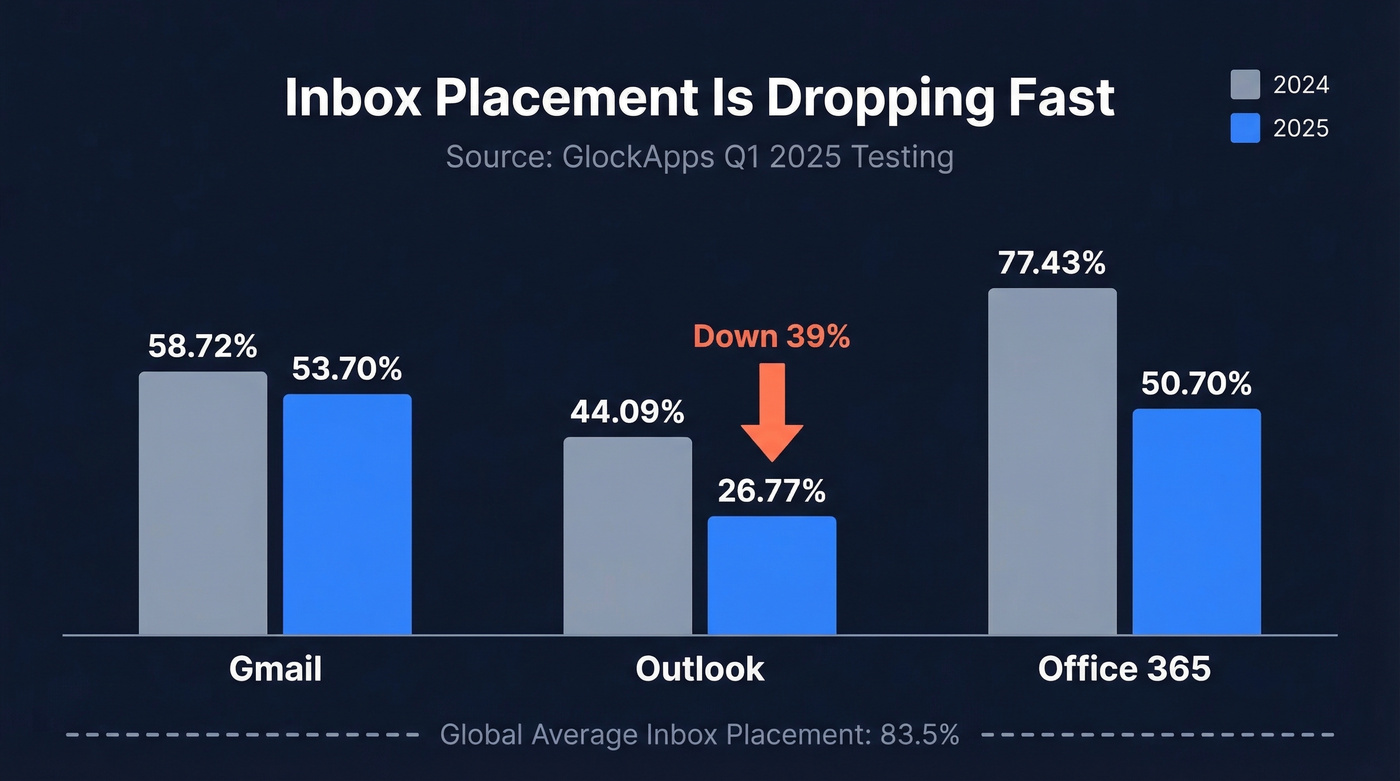
Gmail tightened enforcement in November 2025, moving from spam-foldering non-compliant messages to outright SMTP rejection with 4xx/5xx errors. Your emails don't quietly disappear anymore. They bounce hard, and those bounces actively damage your sender reputation. Microsoft followed suit with its own SPF/DKIM/DMARC mandate effective May 5, 2025 for Outlook.com, Hotmail, and Live.com.
Here's the thing: most teams spending $200+/month on warmup tools would get better results spending that money on data verification and authentication setup. Warming up inboxes is necessary, but it's the third most important lever - behind authentication and data quality.
What Mailbox Warmup Actually Is
Most guides blur two different things.
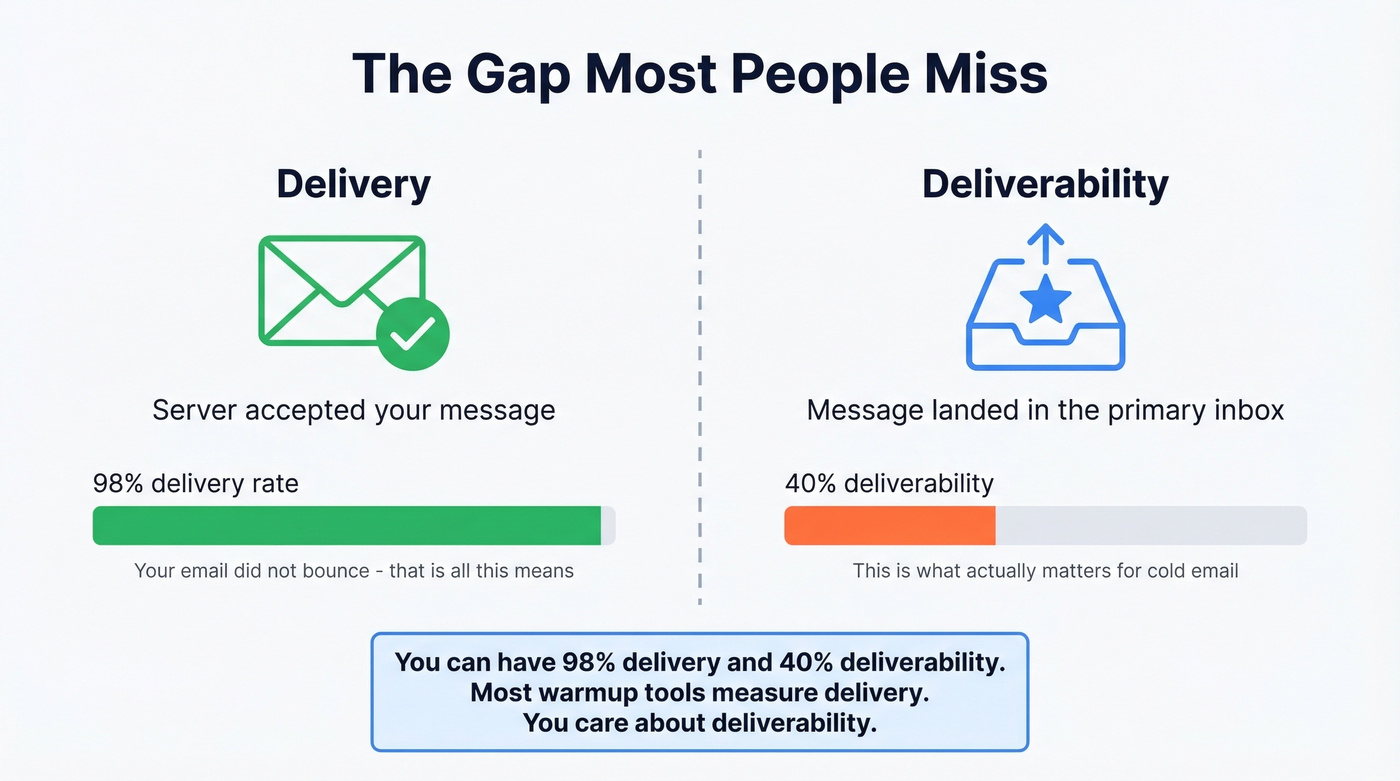
Delivery means the receiving server accepted your message - it didn't bounce. Deliverability means your message landed in the primary inbox, not spam, not promotions, not a black hole. You can have 98% delivery and 40% deliverability. That distinction matters enormously because warmup tools often measure the first while you care about the second.
Warmup is the process of gradually increasing email volume from a new or dormant mailbox while generating positive engagement signals - opens, replies, mark-as-important actions - that tell inbox providers this sender is legitimate.
Here's what most people miss: if you're on Google Workspace or Microsoft 365, you're already on shared IP pools that are "warm." IP warmup is mostly irrelevant for you. What matters is domain reputation - your domain's sending history, engagement patterns, and complaint rates are what Gmail and Outlook use to decide where your emails land. Subdomains carry their own reputation too. Warming up sales.company.com doesn't automatically warm up outreach.company.com. Plan your domain architecture before you start.
Does Warmup Actually Work?
The cold email community splits into two camps, and both have evidence.
The Case For
Practitioners on r/coldemail argue that warmup should run continuously, not just during a two-week setup period. Gmail weights engagement quality - time-to-read, reply depth, conversation threading - and warmup pools generate those signals at scale. Apollo's own warmup parameters reflect this: min 10/day, max 40/day, 30% reply rate target. The volume isn't the point. The engagement ratio is.
The Case Against
A growing number of practitioners argue warmup tools are increasingly detectable. Gmail and Microsoft can identify automated openers running on cloud infrastructure like AWS and Heroku, and repetitive warmup templates look nothing like real human correspondence. One analysis tested nearly all major warmup tools and reported no meaningful improvements in deliverability or reputation. The ToS angle is real too - warmup pools that auto-reply to each other operate in a gray area, and Google has warned providers directly. One Reddit poster reported Gmail deliverability at roughly 12% during active warmup in January 2026, with most messages hitting spam.
Our Verdict
Warmup dashboards are often measuring seed-list performance against controlled inboxes, not your actual campaign deliverability. The gap between "warmup says 95%" and "real campaign hits 40%" is well-documented. Your warmup tool is grading its own homework.
Gradual volume ramping with real engagement signals works. Automated warmup pools carry increasing risk and diminishing returns. Use warmup as one layer in a stack that includes proper authentication, clean data, and disciplined sending patterns. Don't treat it as a magic fix.
Prerequisites Before You Warm Up
Skip these and no warmup tool will save you.
Authentication Setup
Use a dedicated outreach domain - never warm up your primary domain. Configure MX records, set up SPF with fewer than 10 DNS lookups, enable DKIM with 2048-bit keys, and set DMARC to p=none initially with a reporting address. Optional trust layers include MTA-STS, TLS-RPT, and BIMI.
For bulk senders hitting 5,000+ emails/day: keep spam complaint rate below 0.3% and include one-click unsubscribe headers (RFC 8058). This aligns with Google's bulk sender requirements and Microsoft's May 2025 mandate.
Identity and Tracking Hygiene
Avoid role-based addresses like info@ or sales@. Complete your profile with a real name, photo, and simple text signature. During warmup, skip open pixels and link redirects entirely. If you need tracking later, use a branded tracking domain with proper CNAME and SSL.
Clean Data Is the Upstream Fix
This is where most warmup guides fail you. They talk about authentication and volume ramps but ignore the single fastest way to destroy sender reputation: bounces from bad email addresses.
A 5% bounce rate from unverified emails will undo weeks of warmup progress in a single send. Spam traps and honeypots are even worse - hitting one can tank your domain reputation overnight. We've seen teams run flawless warmup for a month, then nuke their reputation on day one of real outreach because they pulled contacts from a stale database. Verify every address before it enters your sequence. Prospeo's 5-step verification catches catch-all domains, spam traps, and honeypots before they reach your outbox - at 98% email accuracy, it's the most reliable pre-send check we've found. Stack Optimize built their agency to $1M ARR using this approach: client deliverability hit 94%+, bounce stayed under 3%, and they saw zero domain flags across all clients.
Step-by-Step Warmup Schedule
Treat these as guidelines, not gospel - your specific ramp depends on domain age, provider, and engagement rates.
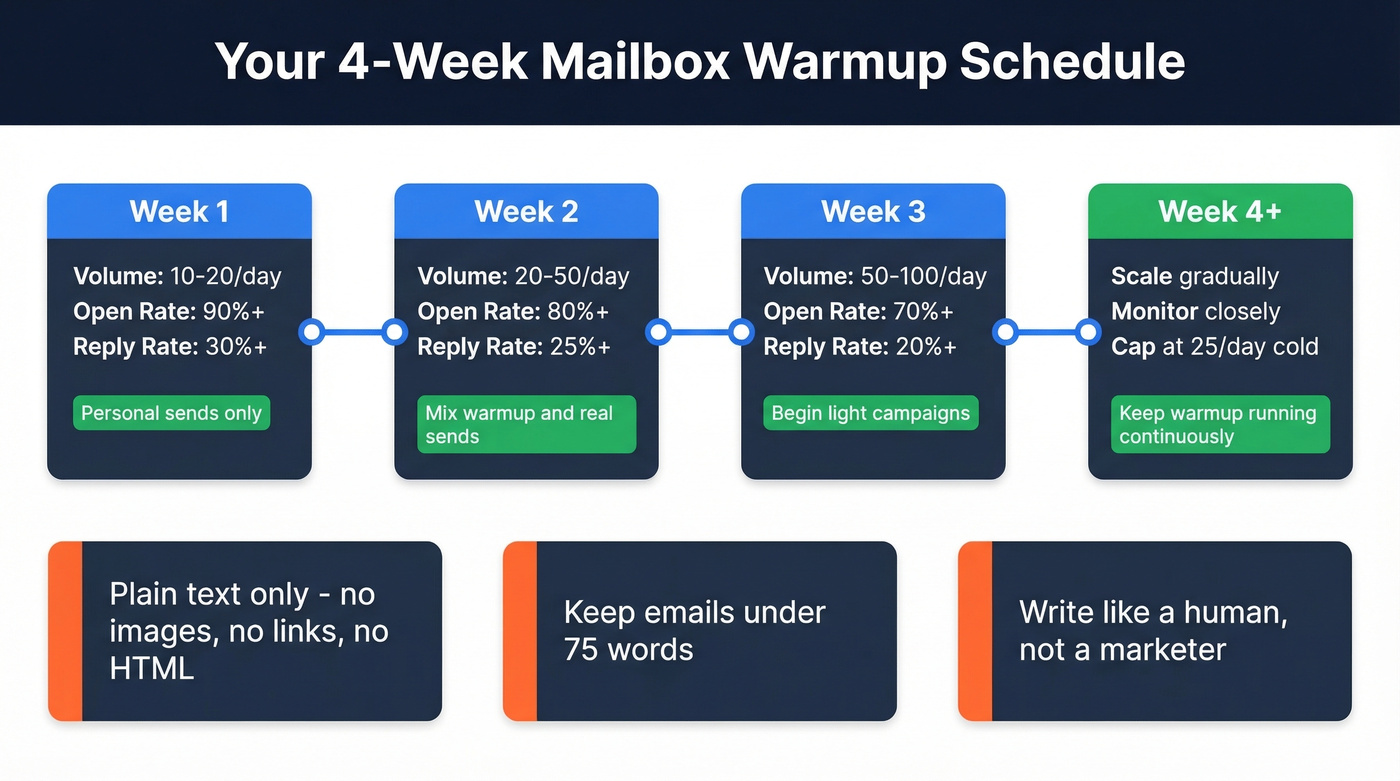
| Week | Daily Volume | Target Open Rate | Target Reply Rate | Notes |
|---|---|---|---|---|
| 1 | 10-20 | 90%+ | 30%+ | Personal sends only |
| 2 | 20-50 | 80%+ | 25%+ | Mix warmup + real |
| 3 | 50-100 | 70%+ | 20%+ | Begin light campaigns |
| 4+ | Scale gradually | Monitor closely | Monitor closely | Cap at 25/day cold |
Apollo's recommended parameters are a useful reference: minimum 10 emails per day, maximum 40 per day with a hard cap at 50, reply rate target of 30% with a 45% ceiling. The total ramp takes 3-6 weeks depending on your target volume.
Keep emails plain text during warmup - no images, no links, no HTML formatting. Stay under 75 words. Write like a human having a conversation, not a marketer running a sequence. The practitioners who get the best results treat warmup as continuous, not a one-time setup. Keep it running alongside live campaigns to maintain the engagement signals that protect your reputation.

Bad data destroys sender reputation faster than any warmup tool can rebuild it. Prospeo's 5-step verification catches catch-all domains, spam traps, and honeypots at 98% accuracy - so your warmup actually sticks when real outreach begins.
Stop warming up mailboxes just to burn them on bad data.
Mistakes That Kill Your Warmup
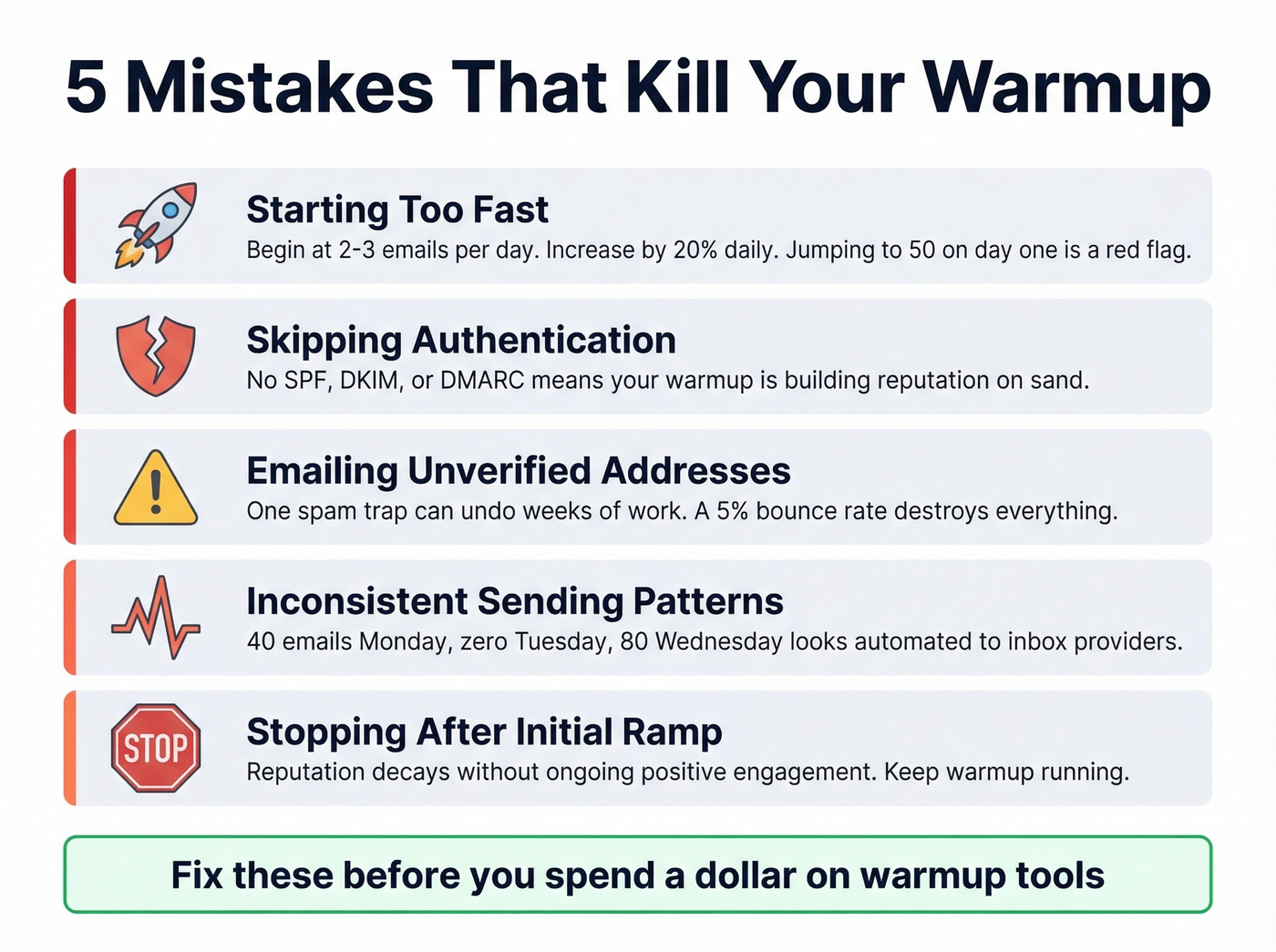
- Starting too fast. Begin at 2-3 emails per day and increase by roughly 20% daily. Jumping to 50 on day one is a red flag to inbox providers.
- Skipping authentication. No SPF/DKIM/DMARC means your warmup is building reputation on sand. Gmail will reject you outright.
- Emailing unverified addresses. One spam trap can undo weeks of work. Verify every contact before anything enters your sequence.
- Inconsistent sending patterns. Sending 40 emails Monday, zero Tuesday, and 80 Wednesday looks automated. Maintain steady, predictable volume.
- Stopping after the initial ramp. Reputation decays without ongoing positive engagement. Keep warmup running.
How to Measure Warmup Success
Google retired Postmaster Tools v1 on Sept 30, 2025, and the legacy experience went dark after Oct 31, 2025. The domain reputation and IP reputation dashboards everyone relied on are gone. Postmaster Tools v2 focuses on Compliance Status - pass/fail checks for SPF, DKIM, DMARC alignment, PTR records, TLS, and one-click unsubscribe - plus Spam Rate.
The blind spot most people miss: Google's spam rate only counts manual user reports, not emails automatically filtered to spam or promotions. You can show a 0.1% spam rate while 60% of your emails are being auto-filtered. That's a massive gap.
Use these deliverability benchmarks as your real measuring stick:
- Excellent: 95%+ inbox placement
- Good: 85-94%
- Average: 83-85% (roughly the global average)
- Poor: Below 80%
The only way to get accurate inbox placement data is through seed-list testing with tools like GlockApps - not your warmup tool's dashboard.
Best Warmup Tools Compared
| Tool | Price/Mo | Model | Best For |
|---|---|---|---|
| Instantly | ~$37 | Per plan | All-in-one cold email |
| Smartlead | ~$39 | Per plan | Agency scaling |
| Lemwarm | $24-49 | Per mailbox | Lemlist users |
| Warmup Inbox | $19-99 | Per inbox | Dedicated warmup |
| MailReach | $20 | Per mailbox | Inbox testing |
| TrulyInbox | $29 | Per plan | Budget teams |
| Mailwarm | $69 | Per mailbox | High-volume warmup |
| Warmy.io | $41+ | Per mailbox | AI-driven warmup |
Saleshandy tested 13 warmup tools over 3 weeks and reported deliverability rates ranging from 88% to 98% - but those are seed-list results from controlled conditions. Treat them as directional, not definitive.
Bundled Warmup (Best Value)
Instantly is the recommendation for most cold emailers. Warmup is included with outreach starting at ~$37/mo, and you can start for free with no credit card required. Paying separately for warmup doesn't make sense when Instantly bundles it. In our experience, bundled tools win because they reduce the number of moving parts - fewer integrations, fewer things to break.
Smartlead is a strong pick for agencies managing multiple client accounts. Its multi-client architecture handles inbox rotation well, and warmup is bundled around $39/mo.
Lemwarm at $24-49/mo per mailbox only makes sense if you're already deep in the Lemlist ecosystem. Skip it otherwise - the per-mailbox pricing adds up fast at 10+ inboxes.
Standalone Warmup
For teams already running outreach on a platform without built-in warmup, Warmup Inbox is a popular standalone option. Basic plan runs $19/inbox/mo, Pro at $59, Max at $99. Annual pricing drops to $15 / $49 / $79 per inbox per month, and there's a 7-day free trial. Warmup Inbox uses a network of 20,000+ real inboxes. But here's the math problem: at 10 inboxes, you're paying $190-990/mo just for warmup.
MailReach starts at $20/mo per mailbox billed annually and stands out for combining warmup with inbox placement testing - a strong two-in-one if you want independent deliverability measurement alongside warmup.
TrulyInbox is the budget play at $29/mo, with a free-forever plan offering 1 account and 10 warmups/day. For teams scaling inboxes on a tight budget, start here.
Let's be honest about the economics. Per-inbox pricing is a scaling trap. At 20 inboxes - a modest outbound operation - standalone warmup at $19-25/inbox runs $380-500/mo. That's more than your entire cold email platform. This is why bundled tools dominate the conversation on r/coldemail.
After Warmup: Sending and Maintenance
Post-warmup, cap cold outreach at 20-25 emails per inbox per day. Not 50. Not 100. Twenty-five. Scale by adding inboxes and domains, not by pushing a single mailbox harder. Keep warmup running alongside live campaigns - your reputation isn't a permanent achievement, it's a daily score.
Your first real campaign emails should be plain text, under 75 words, with no links or images. The consensus on Reddit is clear: setup matters more than copy. Authentication, clean data, proper warmup, and disciplined volume will outperform brilliant copywriting sent from a burned domain every single time.
Prospeo integrates natively with Instantly, Lemlist, and Smartlead, so verified contacts feed directly into warmed-up inboxes without manual CSV exports. With a 7-day data refresh cycle - versus the 6-week industry average - you're not warming up an inbox only to blast stale addresses that bounce.
Stack Optimize hit 94%+ deliverability, under 3% bounce, and zero domain flags across every client - not because of a warmup tool, but because every email was verified before sending. At $0.01 per email, Prospeo costs less than one day of a wasted warmup cycle.
Protect the reputation you spent weeks building for a penny per contact.
Mailbox Warmup FAQ
How long does warmup take?
Two to four weeks minimum before sending any real campaign volume. Most practitioners recommend 3-4 weeks of dedicated ramp, then keeping warmup running continuously alongside live campaigns to maintain engagement signals.
Is email warmup against Gmail's terms of service?
Automated warmup pools that fabricate replies operate in a gray area - Google has warned providers directly about artificial engagement manipulation. Gradual volume ramping with genuine engagement is legitimate; synthetic engagement networks risk account suspension or blacklisting.
Can I warm up a mailbox for free?
Yes. Send real emails to colleagues and contacts who reply - manual warmup works for low-volume senders. TrulyInbox offers a free plan with 1 account and 10 warmups per day.
Does warmup work for Outlook and Microsoft 365?
Yes, but Office 365-hosted warmup sometimes requires SMTP AUTH enabled for the mailbox. Outlook has been more stable than Gmail for many teams during early-2026 ramps, making it a more predictable platform to start on.
What matters more - warmup tools or clean data?
Clean data, and it's not close. A 5% bounce rate from unverified emails will destroy sender reputation faster than any warmup tool can build it. Verify first, then warm up second.