


Odoo Pricing, Reviews, Pros and Cons: What the Pricing Page Doesn't Show You
Your ops manager just demoed Odoo and wants to replace five tools with one platform. The pitch is compelling - modular ERP, open-source roots, one subscription for everything. Before you sign anything, let's break down what Odoo actually costs, what users love and hate about it, and who should walk away. Because license fees are about 30% of the real cost once you factor in implementation, training, maintenance, and ops overhead.
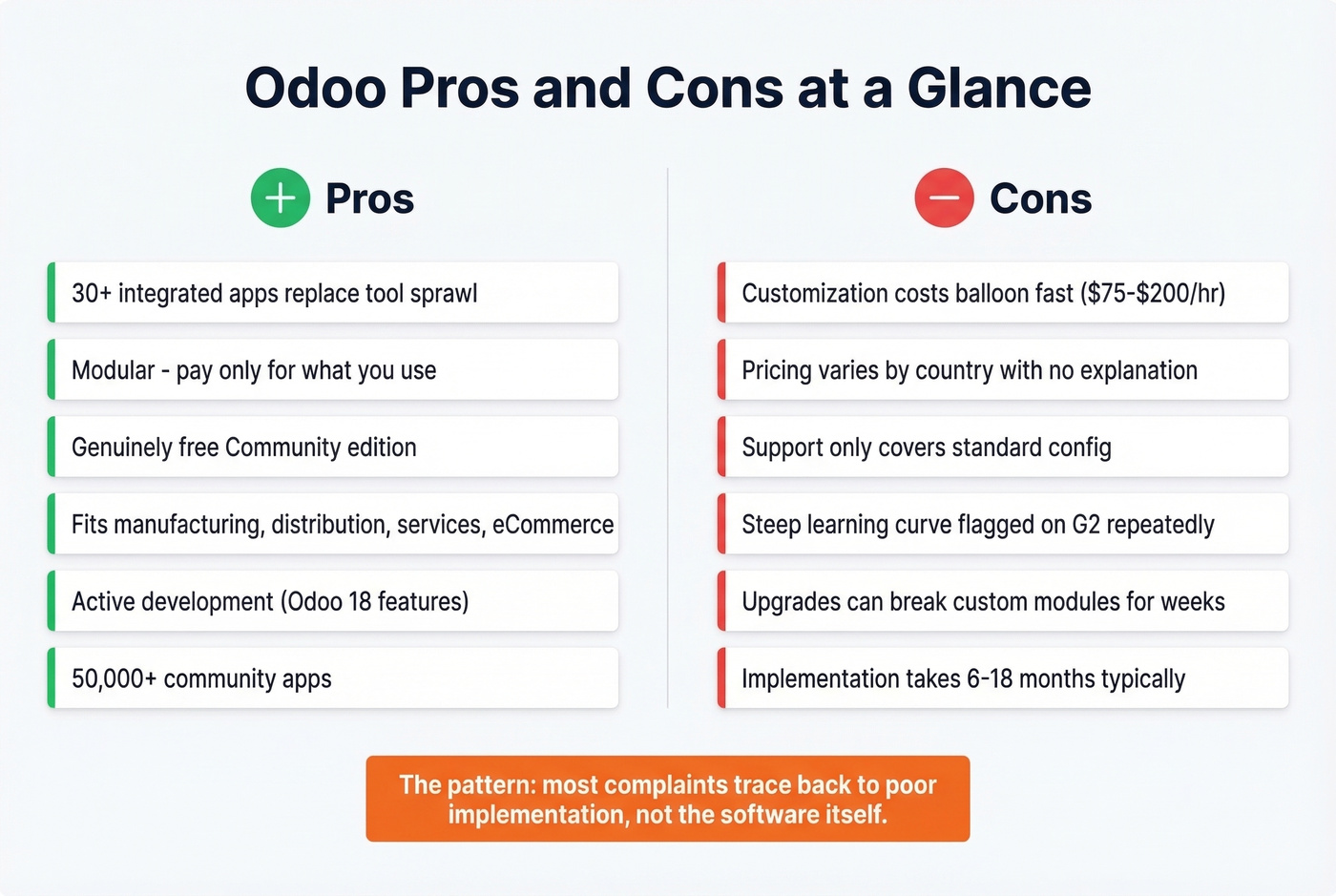
30-Second Verdict
What Is Odoo?
Odoo is a modular ERP suite with 30+ integrated apps covering CRM, accounting, inventory, eCommerce, manufacturing, HR, and project management. The Community edition is LGPLv3 and genuinely free - not "free trial" free. The platform's ecosystem includes over 50,000 community-contributed apps, and you can deploy on Odoo Online, Odoo.sh, or your own self-hosted infrastructure.
What You'll Actually Pay in 2026
License Tiers
Here's what Odoo's pricing page shows. Watch the promo-to-renewal gap, because it catches people off guard.
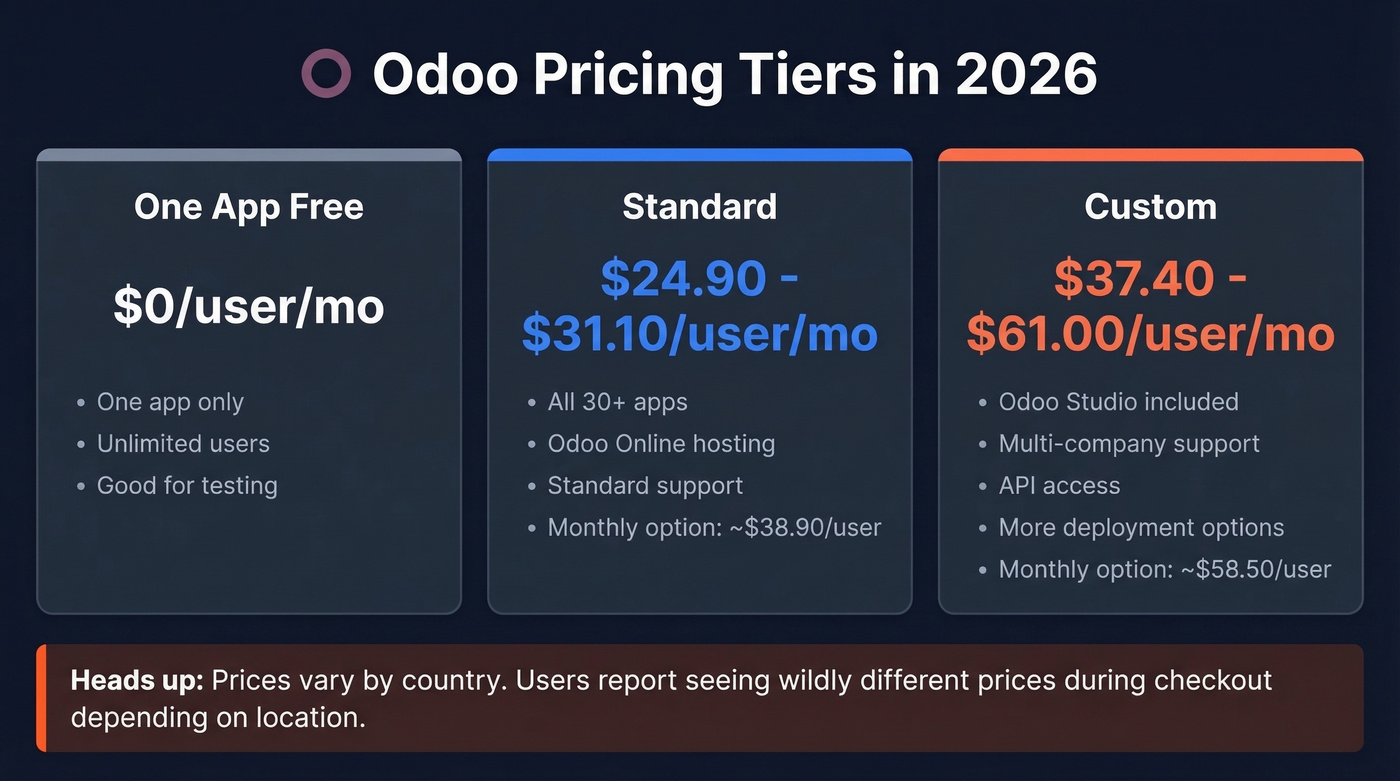
| Plan | Annual (standard) | Monthly | Notes |
|---|---|---|---|
| One App Free | $0 | $0 | One app, unlimited users |
| Standard | ~$24.90-$31.10/user/mo | ~$38.90/user/mo | All apps, Odoo Online |
| Custom | ~$37.40-$61.00/user/mo | ~$58.50/user/mo | Adds Studio, multi-company, API, more deployment options |
Pricing varies by country - significantly. One Reddit user reported seeing 17EUR, then 24EUR, then 44EUR, then 28EUR depending on their location during checkout. Support couldn't explain the discrepancy. Not a great look for a platform asking you to commit your entire business stack.
What's Not on the Pricing Page
Standard and Custom plans cover hosting, maintenance, upgrades, and support for standard configuration. Everything else costs extra: implementation services, Odoo.sh hosting, SMS/email marketing credits, contact enrichment credits, AI credits for scanning vendor bills and expenses, custom code maintenance, and marketplace app fees.
Odoo sells Success Packs - bundled onboarding hours in blocks ranging from 4 to 200 hours. In practice, teams spend around $3k-$15k on a Success Pack depending on scope, and that's separate from partner implementation fees.
The Real Total Cost of Ownership
We've watched teams budget for the license and then scramble when implementation bills arrive. For a 25-person company on Standard, the license runs roughly $7,470/year at the common annual entry price.
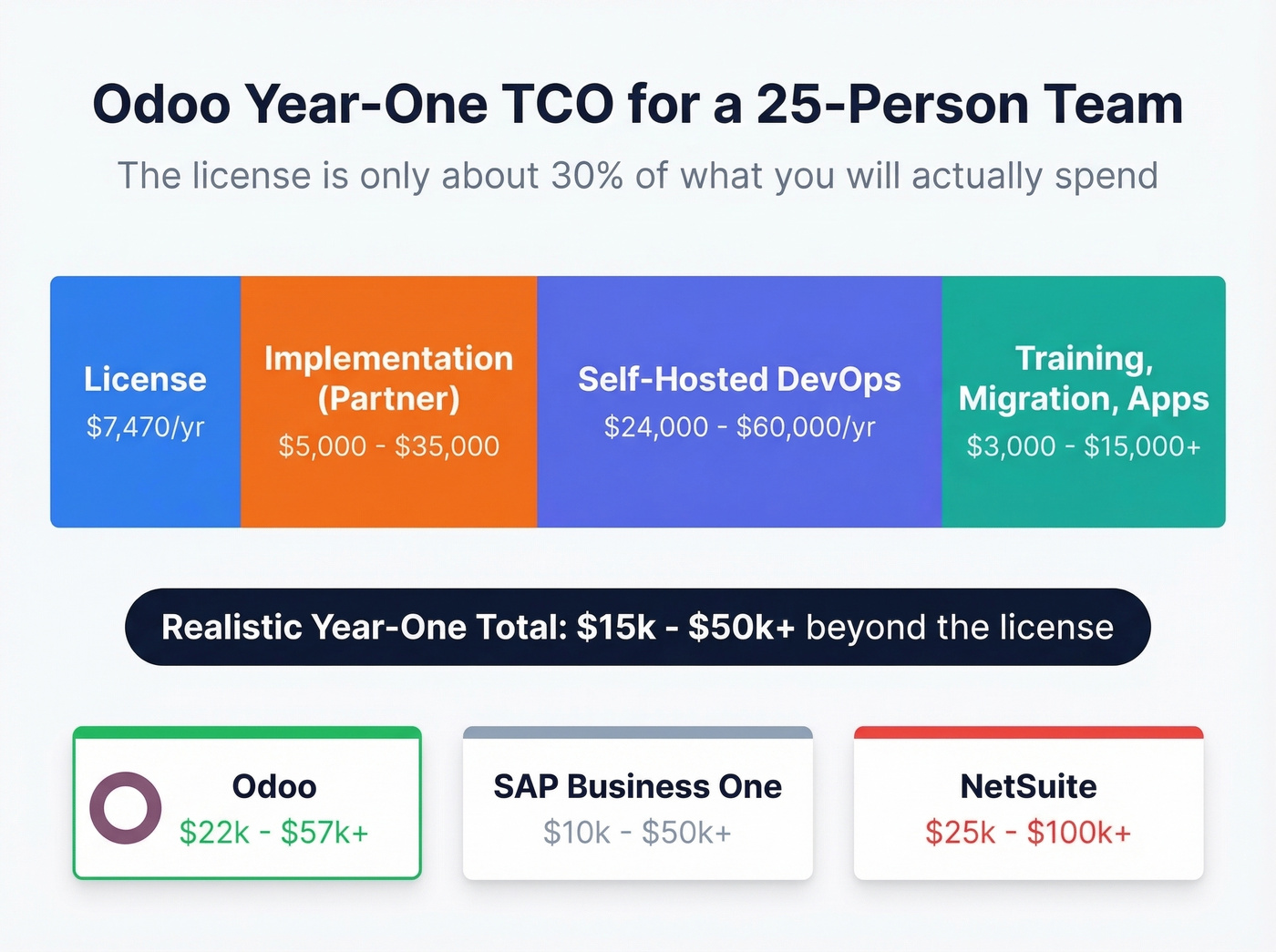
Implementation with a partner adds $5,000-$35,000 at rates of $75-$200/hr. Self-hosted DevOps overhead can hit $2,000-$5,000/month. Training, data migration, and marketplace apps pile on from there. For that 25-person team, expect $15k-$50k in year-one costs beyond the license. Complex multi-module deployments push to $75k+.
For context, NetSuite runs $25k-$100k+/year all-in, and SAP Business One $10k-$50k+. Odoo is cheaper than the enterprise alternatives, but it's not the budget option people assume from the pricing page.

Odoo's CRM module costs $25-$60/user/month before implementation - and it ships with zero contact data. Prospeo fills any CRM with 98% accurate emails and 125M+ verified mobile numbers at $0.01/lead, refreshed every 7 days. No six-month rollout required.
Skip the ERP rabbit hole. Start filling your pipeline today.
Community vs. Enterprise
Use Community if you have in-house developers, want $0 licensing, can self-host, and don't need official support or Enterprise-only features like mobile apps.
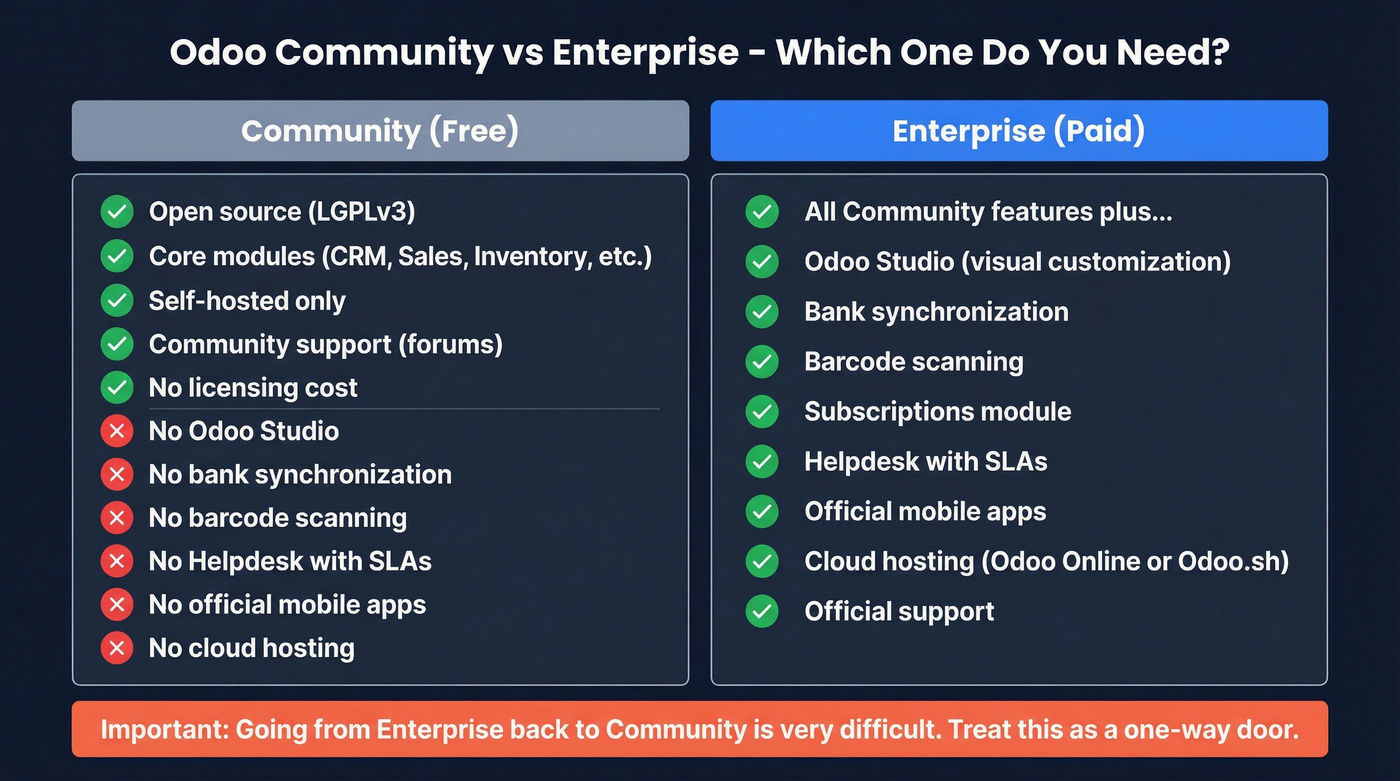
Use Enterprise if you need bank synchronization, barcode scanning, Subscriptions, Helpdesk with SLAs, Odoo Studio, or cloud hosting. Most businesses land here. The Community-to-Enterprise upgrade path is straightforward - add the Enterprise code and upgrade your database. Going the other direction is significant effort, so treat this as a one-way door. If you don't have in-house Odoo expertise, Enterprise is the only realistic option, and even then, budget for a partner.
Pros and Cons
Pros
- True all-in-one. 30+ integrated apps replace tool sprawl across CRM, accounting, inventory, HR, and more.
- Modular design. Start with one app and expand. Pay only for what you use.
- Open-source foundation. Community edition is genuinely free under LGPLv3.
- Industry-flexible. Fits manufacturing, distribution, services, and eCommerce workflows without forcing you into one vertical.
- Active development. Odoo 18 added dedicated PWA apps for Barcode, POS, Attendances, Kiosk, Sign, and Shop Floor, plus abnormal invoice alerts and OCR for bank statements.
- Massive ecosystem. 50,000+ community apps extend core functionality in directions the core team never planned for.
Cons
- Customization cost trap. Every modification means partner hours at $75-$200/hr, and "simple tweaks" routinely balloon into multi-week projects.
- Pricing opacity. Country-based price swings and promo rates that expire without warning.
- Support ceiling. Standard config only - custom code and complex troubleshooting require a paid partner.
- Steep learning curve. G2 reviewers flag this consistently, and "customization" appears as both a top pro and a top con.
- Upgrade risk. One Reddit user reported their site was down for a month after an upgrade broke custom modules, directly impacting sales.
- Resource-intensive implementation. ERP switches commonly take 6-18 months when you include planning, migration, configuration, training, and stabilization.
Here's the thing: most "Odoo doesn't work" complaints trace back to poor implementation, not the software itself. That's both reassuring and frustrating - the tool is capable, but it demands serious upfront investment to prove it.
What Real Users Say
Odoo holds a 4.3/5 on G2 across 329 reviews (66% five-star, 4% one-star) and a 4.2/5 on Capterra across 1,290 reviews. The G2 base skews heavily SMB over mid-market and enterprise.
r/Odoo tells a different story than the review sites. Users who expected plug-and-play SaaS describe it as an "awful experience," while teams with dedicated implementation partners generally succeed. The pattern is unmistakable: Odoo rewards investment in setup and punishes shortcuts. If you're the kind of team that reads documentation and plans rollouts in phases, you'll probably love it. If you want something that works out of the box on day one, you won't.
Who Should Use Odoo
Use Odoo if you're a manufacturing, distribution, or multi-department SMB with 10-100 employees, budget for proper implementation, and either in-house Odoo expertise or a trusted partner.
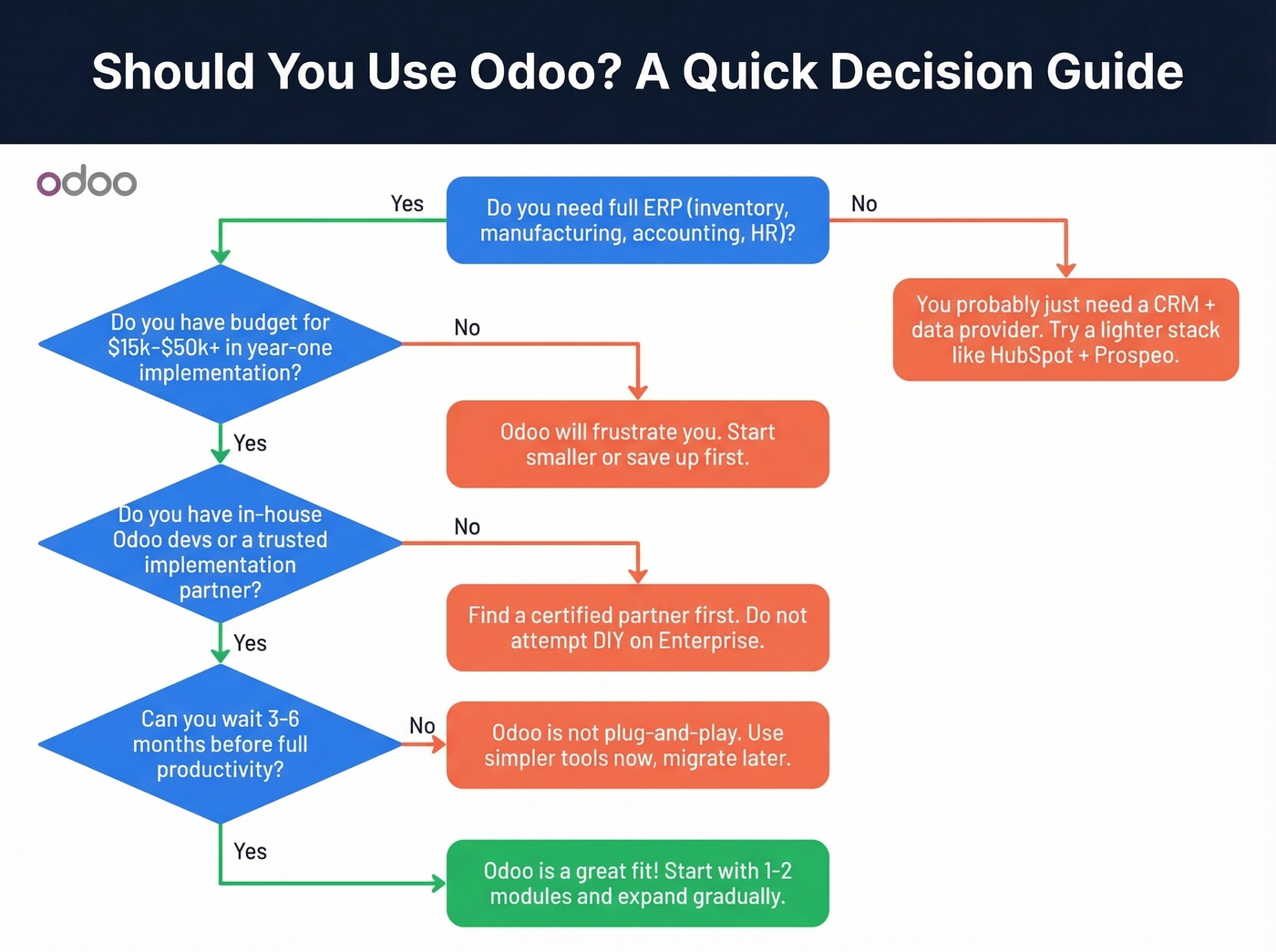
Skip Odoo if you're a solo founder, a non-technical team expecting SaaS simplicity, an eCommerce-only business where Shopify is simpler, or anyone who needs to be productive next week rather than next quarter. We've seen too many small sales teams burn three months configuring Odoo CRM when their actual bottleneck was contact data, not workflow automation.
Let's be honest about what most sales teams actually need. If your real problem is finding verified emails and direct dials for decision-makers, a lighter CRM paired with Prospeo gets you running in an afternoon - 98% email accuracy, 125M+ verified mobile numbers, and data refreshed every 7 days. That combination beats a misconfigured Odoo CRM every time.

Most sales teams don't need a 30-module ERP. They need verified decision-maker data that doesn't bounce. Prospeo delivers 300M+ profiles with 30+ search filters - buyer intent, technographics, funding, headcount growth - and integrates natively with HubSpot and Salesforce in minutes, not months.
Be productive this afternoon instead of next quarter.
FAQ
Is Odoo really free?
Community edition is genuinely free under LGPLv3, and One App Free gives you one app at $0. Most businesses need Enterprise, where pricing starts around $24.90-$31.10/user/month on Standard and goes higher for Custom. Implementation costs often dwarf the license itself.
How much does Odoo implementation cost?
Expect $5,000-$75,000+ depending on complexity, at partner rates of $75-$200/hour. Simple single-module setups land at the low end. Multi-module deployments with custom workflows hit the high end and frequently exceed it.
What's a good Odoo alternative for sales teams?
If your primary need is CRM and outbound prospecting rather than full ERP, Zoho CRM or HubSpot's free CRM paired with a strong data provider will get you running in an afternoon instead of months. Prospeo's 300M+ profile database and 98% email accuracy make it a strong fit for teams whose real bottleneck is contact data - you can start with 75 free emails per month and scale from there without contracts.