

One-Click Unsubscribe: Complete Guide for 2026
Email marketing is projected to hit $18.9B by 2028, and Gmail and Yahoo have made the rules harder. If you're sending bulk email without proper one-click unsubscribe headers, you're going to get blocked. Not "might." Will.
Here's the thing most senders still get wrong: this isn't about the link in your email footer. It's a pair of email headers that let inbox providers render an "Unsubscribe" button directly in their UI and process the opt-out with a single POST request. No confirmation page, no extra clicks. The RFC 8058 standard defines exactly how this works, and compliance isn't a suggestion anymore.
The Minimum Viable Checklist
Before we get into the weeds, here's what you need:
- Two email headers:
List-Unsubscribe(containing an HTTPS URI) andList-Unsubscribe-Post(containing exactlyList-Unsubscribe=One-Click). Both must be present. - DKIM must cover both headers. If your DKIM signature doesn't include
List-UnsubscribeandList-Unsubscribe-Postin its signed header fields, Gmail treats you as non-compliant. - Non-compliant bulk email gets rejected. Enforcement has been progressive since 2024, and stricter blocking continues as providers tighten the gate. Many ESPs like SendGrid handle this automatically. If you're on Amazon SES or custom SMTP, you'll need the copy-paste headers below.
What One-Click Unsubscribe Actually Means
There's a persistent confusion - especially on Reddit - between the HTML unsubscribe link in your email footer and the header-based mechanism. As one sender on r/Emailmarketing put it: "Google's one-click requirement was poorly explained - half the industry thought it meant the footer link."
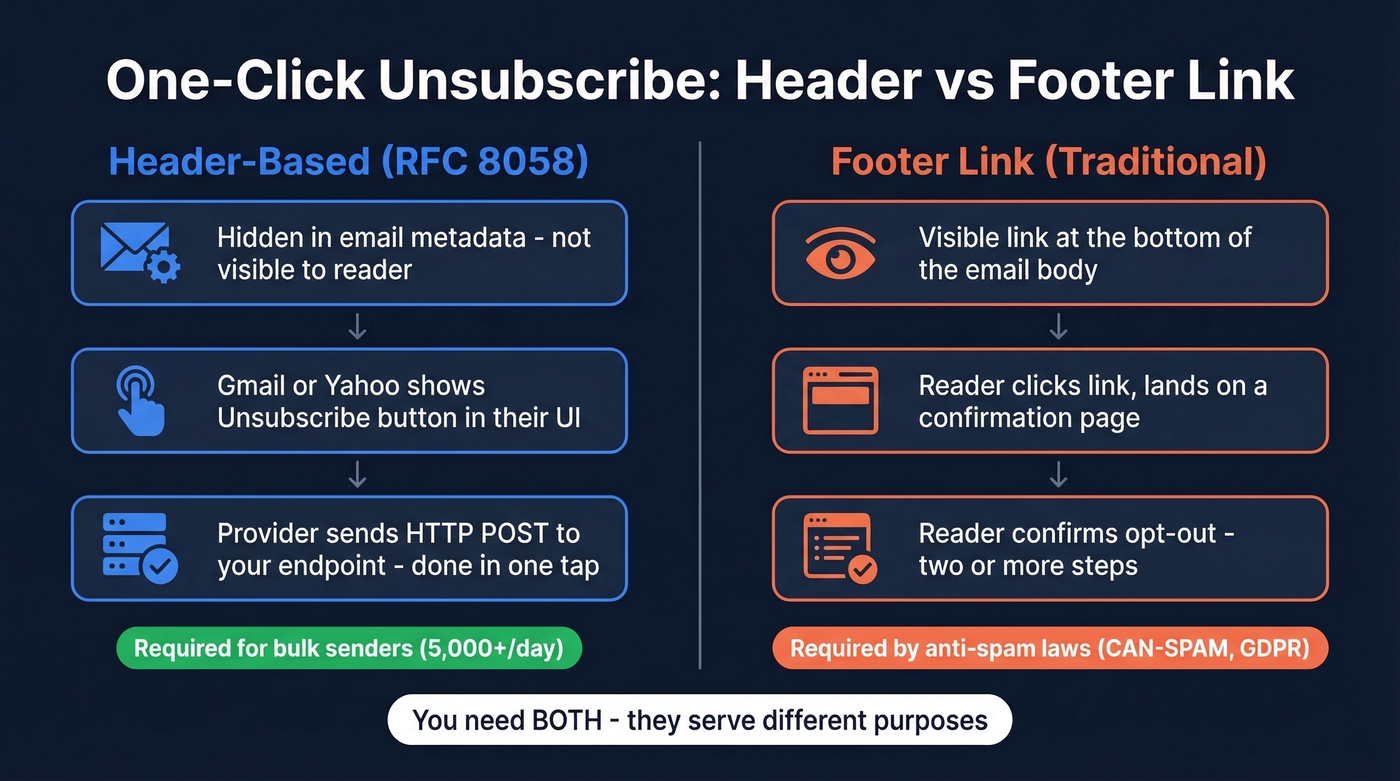
They're completely different things.
The footer link is visible in the email body. The reader clicks it, lands on a page, maybe confirms. That's a two-step unsubscribe flow, and it's been standard practice for years. The header-based mechanism is invisible to the reader - it lives in the email's metadata. When Gmail, Yahoo, or other inbox providers detect the right headers, they render an "Unsubscribe" button at the top of the message. One tap, the provider fires an HTTP POST to your endpoint, and the recipient is unsubscribed. No landing page. No confirmation.
You need both. Unsubscribe links in marketing emails are required by anti-spam laws, and the header-based mechanism satisfies Gmail and Yahoo's bulk sender requirements under RFC 8058.
Enforcement Timeline: 2024-2026
| Date | Event | Consequence |
|---|---|---|
| Feb 2024 | Google/Yahoo requirements go live | Temp errors on small % of traffic |
| Jun 2024 | Header-based unsubscribe deadline | Gmail progressively rejects non-compliant mail |
| May 2025 | Outlook enforces for 5,000+/day | Rejection: 550; 5.7.515 |
| Nov 2025+ | Gmail enforcement phase | SMTP-level rejection, not just spam folder |
| Ongoing | Postmaster Tools: Pass/Fail | Binary compliance status for key requirements |
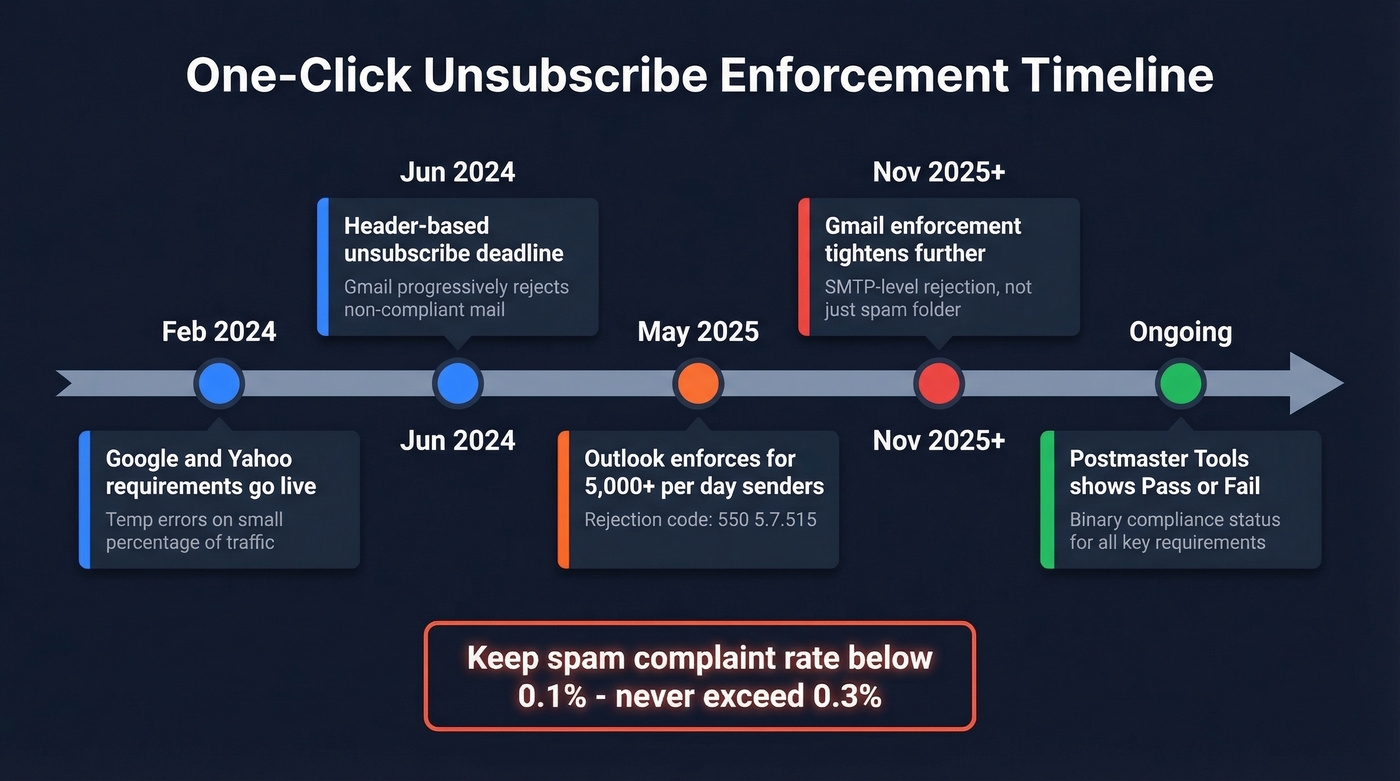
The complaint-rate thresholds haven't changed: keep your spam complaint rate below 0.1%, and never exceed 0.3%. Cross that line and you're in trouble regardless of header compliance.
We've watched the enforcement posture shift dramatically over the past 18 months. Non-compliant bulk email increasingly gets bounced, and Google Postmaster Tools now surfaces a binary Pass/Fail compliance status.
Our take: If you're sending fewer than 5,000 emails a day, you probably won't feel the enforcement hammer yet. But you will. Every major inbox provider is converging on the same standard. Set this up now while it's a calm afternoon project, not a fire drill.
How RFC 8058 Works
The technical requirements are straightforward. Your email needs two headers:
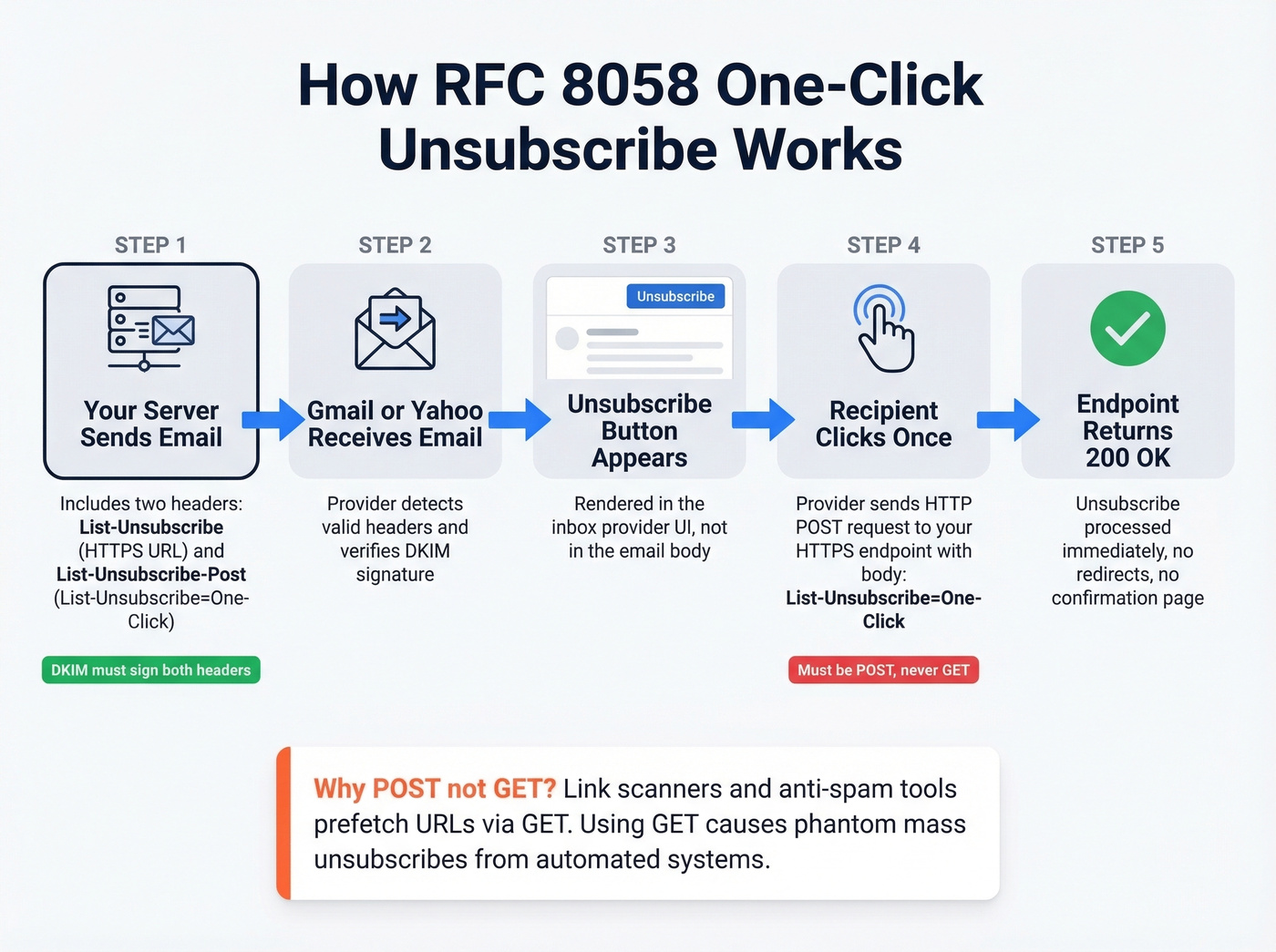
List-Unsubscribe: <https://yourdomain.com/unsubscribe/abc123>

List-Unsubscribe-Post: List-Unsubscribe=One-Click
When a recipient clicks "Unsubscribe" in Gmail or Yahoo's UI, the provider sends an HTTP POST to your endpoint:
POST /unsubscribe/abc123 HTTP/1.1

Content-Type: application/x-www-form-urlencoded

List-Unsubscribe=One-Click
RFC 8058 requires an HTTPS URI - plain HTTP doesn't cut it. The spec mandates POST instead of GET for a critical reason: anti-spam software and link scanners routinely prefetch URLs via GET requests. If your endpoint unsubscribes on GET, you'll get phantom mass unsubscribes from automated systems that never involved a human. POST ensures only deliberate inbox-provider actions trigger the opt-out.
Your DKIM signature must cover both headers. If middleware rewrites headers after signing, compliance breaks silently.

One-click unsubscribe compliance protects your domain - but bad data destroys it faster than missing headers ever will. Prospeo's 98% email accuracy and 5-step verification mean bounce rates under 4%, fewer spam complaints, and sender reputation that stays clean.
Fix the data before you fix the headers.
Implementation: Copy-Paste Headers + ESP Setup
Raw Headers + Endpoint Rules
Here's the minimum viable implementation for custom SMTP:
List-Unsubscribe: <https://yourdomain.com/unsubscribe/TOKEN>, <mailto:unsub@yourdomain.com?subject=unsubscribe>

List-Unsubscribe-Post: List-Unsubscribe=One-Click
Your endpoint must be idempotent - hitting it twice doesn't double-unsubscribe. Respond with 200 OK quickly and avoid redirects. No preference center, no "Are you sure?" page. Process the unsubscribe immediately and return a clean 200.
SendGrid
If you've got SendGrid's subscription tracking enabled, both headers are inserted automatically. You don't need to touch anything. For manual setup via the API, add custom headers to your JSON payload:
{
  "headers": {
    "List-Unsubscribe": "<mailto:unsub@yourdomain.com>, <https://yourdomain.com/unsub/TOKEN>",
    "List-Unsubscribe-Post": "List-Unsubscribe=One-Click"
  }
}
One caveat: even with correct headers, you won't always see the unsubscribe button in Gmail during testing. The UI appearance depends on sender reputation and provider heuristics, not just header presence.
Amazon SES
SES doesn't auto-insert these headers. You need to add them manually, and AWS recommends placing List-Unsubscribe before List-Unsubscribe-Post:
List-Unsubscribe: <https://nutrition.co/?address=user@example.com&topic=weekly>, <mailto:unsubscribe@nutrition.co?subject=TopicUnsubscribe>

List-Unsubscribe-Post: List-Unsubscribe=One-Click
This is where we've seen the most implementation mistakes in our experience. SES gives you full control, which also means full responsibility.
Postmark
Postmark supports List-Unsubscribe headers for marketing-style sends. Enable them on broadcast/promotional streams while keeping transactional streams separate. Transactional emails are exempt from the requirement, so skip this for order confirmations and password resets.
Five Mistakes That Break Compliance
1. Non-HTTPS URL. Plain HTTP endpoints don't satisfy RFC 8058 requirements. Gmail ignores them entirely.
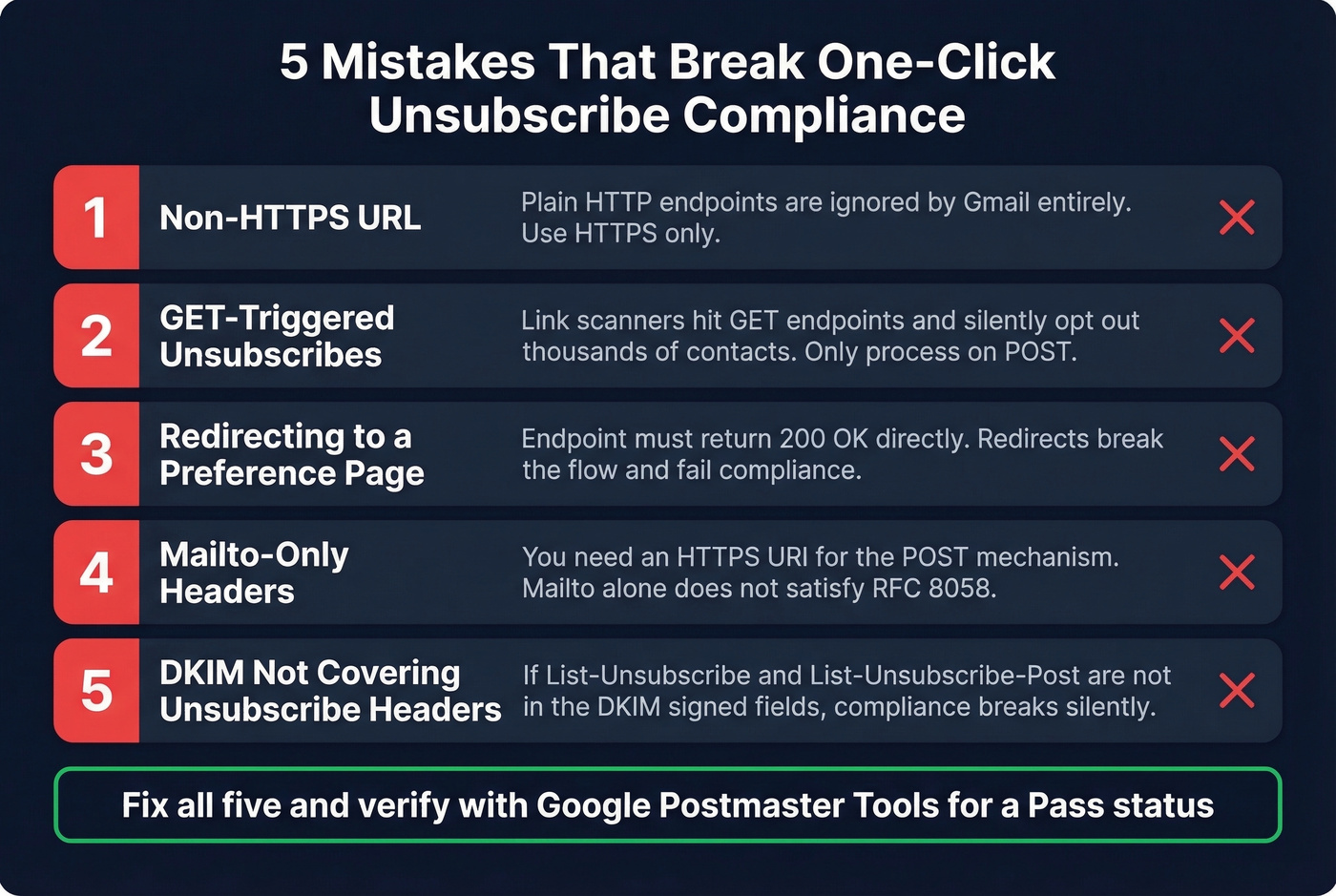
2. GET-triggered unsubscribes. This is the big one. A Reddit thread documented mass unsubscribes from Microsoft recipients - link scanners were hitting GET endpoints and silently opting out thousands of contacts. Only process unsubscribes on POST. Seriously.
3. Redirecting to a preference page. The endpoint must process the opt-out and return 200 OK. Redirecting to a confirmation or preference center page breaks the flow and causes inbox providers to treat you as non-compliant.
4. Mailto-only headers. Including only a mailto: URI without an HTTPS URI doesn't satisfy the requirement. You need the HTTPS endpoint for the POST mechanism. Include both for maximum client compatibility.
5. DKIM not covering unsubscribe headers. If your signing configuration excludes List-Unsubscribe and List-Unsubscribe-Post, or if middleware rewrites these headers after DKIM signing, your compliance signals break. We've seen this happen with email relay services that modify headers in transit - the fix is ensuring DKIM alignment happens after all header modifications are complete.
How to Verify Your Setup
Send a test email to your own Gmail account. Open the message, click the three-dot menu, and select "Show original." Search for List-Unsubscribe and List-Unsubscribe-Post in the raw headers - both must be present with correct syntax.
Then check the DKIM section. Confirm both unsubscribe headers are listed in the signed header fields (h= tag). Use an email testing tool like Mail Tester or GlockApps for a second opinion: send to a generated address and review the deliverability report for header presence and DKIM alignment.
Finally, monitor Google Postmaster Tools for your domain's compliance status. The Pass/Fail system makes it obvious whether you're meeting requirements.
Don't panic if you don't see the native unsubscribe UI immediately. Providers show or hide it based on heuristics like sender reputation and engagement, not just header presence.
Behavior Across Email Clients
Here's the practical reality of how different providers handle the List-Unsubscribe headers:
Gmail and Yahoo support RFC 8058-style opt-out via POST when the headers are correct. Many other clients rely more heavily on the mailto: option or their own unsubscribe UX. And then there's Outlook.
Outlook webmail's "Unsubscribe" quick action can internally block the sender for that user without actually hitting your List-Unsubscribe endpoint. The sender never gets the signal, keeps sending, and racks up complaints. This is genuinely frustrating - you're doing everything right on the technical side and still getting burned because Outlook decided to handle things its own way.
Mitigation: always include both mailto: and HTTPS URIs in your List-Unsubscribe header, and keep a prominent in-body unsubscribe link as a fallback. Belt, suspenders, and a backup belt.
Compliance Starts Before the Header
Let's be honest: meeting the one-click unsubscribe requirement is the easy part. Two headers, a POST endpoint, proper DKIM - a competent engineer ships this in an afternoon. The hard part is reaching the inbox in the first place.
Maintaining a preference center reduces full opt-outs by giving subscribers control over frequency and topics. Analyzing unsubscribe patterns reveals content problems before they become deliverability problems. And keeping a visible footer link acts as a safety net that catches the people who miss the inbox-provider button.
But none of that matters if your list is full of dead addresses.
Bad data creates a vicious cycle: you send to unverified addresses, bounces spike, sender reputation tanks, Gmail hides your unsubscribe button or rejects your email entirely, and compliance becomes irrelevant because nobody's seeing your messages. The upstream fix isn't better headers. It's cleaner data. Prospeo's real-time email verification catches these problems before they hit your sender reputation - 98% email accuracy, a 5-step verification process that handles catch-all domains, removes spam traps and honeypots, and refreshes every 7 days. Upload a CSV, verify in bulk, and push clean contacts to your sequencer.

You're building compliant unsubscribe flows to stay under 0.3% complaint rates. Smart. But every bounced email from stale data pushes you closer to that line. Prospeo refreshes 300M+ profiles every 7 days - not every 6 weeks like the rest of the industry.
Stop sending to dead addresses that spike your complaint rate.
FAQ
Are transactional emails exempt from the one-click unsubscribe requirement?
Yes. Only commercial and promotional messages need the List-Unsubscribe and List-Unsubscribe-Post headers. Order confirmations, password resets, shipping notifications, and account alerts are exempt. If you use separate sending streams (as you should), your transactional stream doesn't need these headers.
Does the 5,000 emails/day threshold apply to all senders?
Google and Yahoo's strictest requirements target senders exceeding 5,000 messages per day to their domains. Outlook's May 2025 enforcement uses the same threshold. Below 5,000, you still need SPF, DKIM, and DMARC alignment, but the header-based opt-out requirement is less aggressively enforced.
How quickly must I process an unsubscribe request?
Within two days. Google's guidelines specify that senders must honor requests within two days of receipt. Your endpoint should process them immediately - the two-day window is the outer limit, not the target. If your system takes more than a few seconds to process the POST, something's architecturally wrong.
How do I prevent bad data from hurting deliverability?
Verify every address before sending. Tools like Prospeo, NeverBounce, and ZeroBounce offer bulk verification, though refresh cycles vary - Prospeo refreshes every 7 days compared to weeks or months at other providers. Keeping bounce rates under 4% is the floor for maintaining the sender reputation that makes your compliance headers actually visible to recipients.