

Professional Email Address Examples: Ranked From Best to "Please Change That"
You're updating your resume, polishing your portfolio, or about to send a cold pitch to a dream client - and then you glance at the top of the page. xXdragonslayer99Xx@yahoo.com. That address made sense in 2009. It doesn't anymore.
Roughly 75% of U.S. email users have a Gmail account, which means every "firstname.lastname" combination for common names was claimed years ago. If you've tried 47 variations and they're all taken, that's not a personal failing - it's a namespace problem affecting millions of people. Below: ranked formats, what to avoid, what to do when your name is taken, and whether a custom domain is worth the money.
Quick Version
Three paths, depending on who you are:
- Job seeker:
firstname.lastname@gmail.com- free, universally accepted, done in two minutes. If it's taken, keep reading. - Freelancer:
firstname@yourname.com- a custom domain costs less than Netflix and instantly signals credibility. - Business owner:
name@company.comvia Google Workspace or Zoho Mail. This isn't optional. It's table stakes.
If your name is taken on Gmail, skip to the "When Your Name Is Taken" section before you start adding random numbers. There are better moves.
Best Email Address Formats, Ranked
Not all formats are equal. Here's a tiered ranking based on readability, professionalism, and how well they hold up over time.
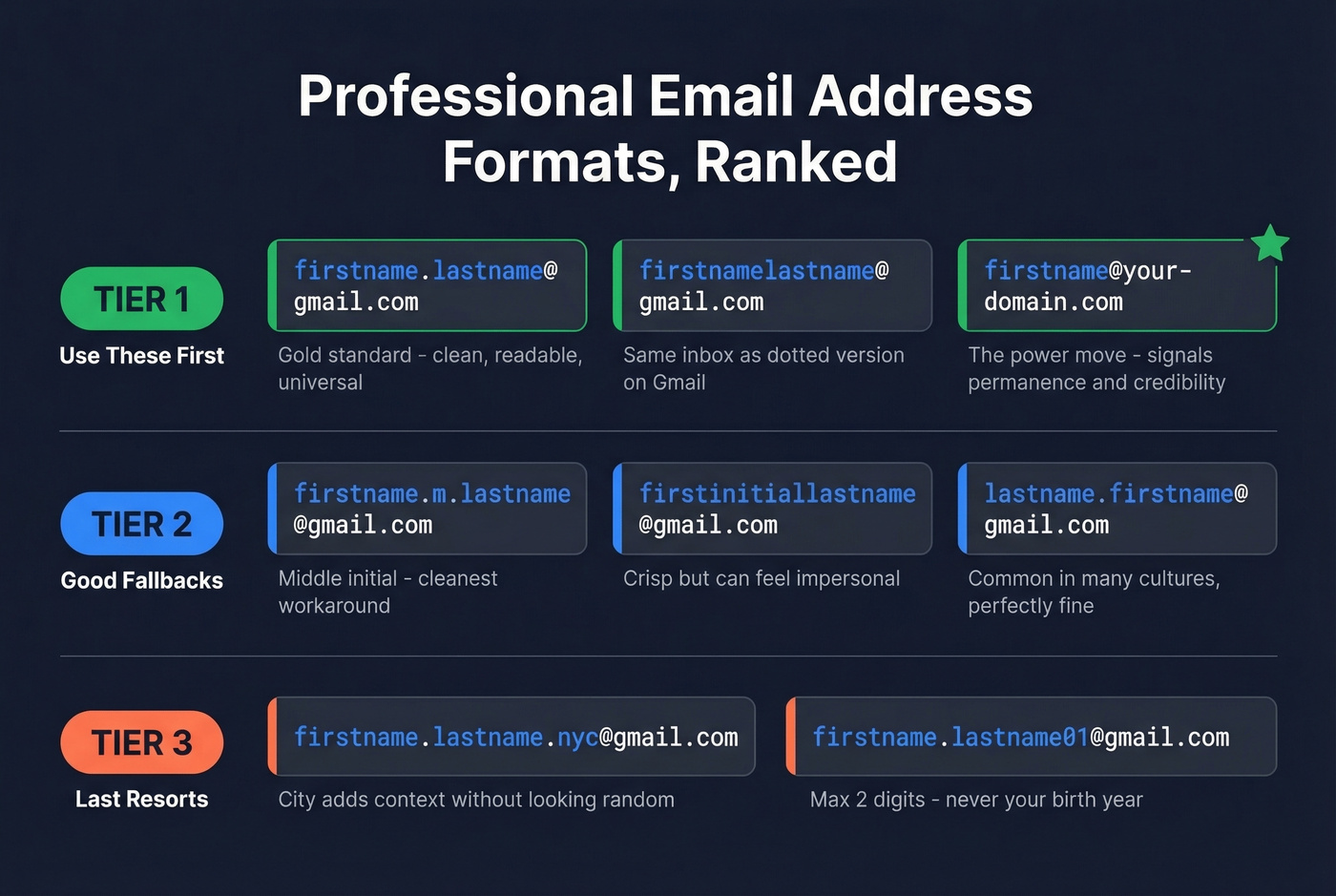
Tier 1: Use These First
firstname.lastname@gmail.com remains the gold standard. sarah.chen@gmail.com and marcus.williams@gmail.com both read clean, are easy to dictate over the phone, and no recruiter will blink at them. If this is available for your name, grab it and stop reading.
firstnamelastname@gmail.com drops the dot and works just as well. Gmail actually ignores dots in the local part for delivery purposes, so sarahchen and sarah.chen route to the same inbox - this is really about what you print on your resume.
firstname@yourdomain.com is the power move. sarah@sarahchen.com or marcus@williamsdesign.com tells anyone who sees it that you've invested in your professional identity. We've seen freelancers get noticeably better response rates on cold outreach just by switching from Gmail to a custom domain. It signals permanence.
Tier 2: Good Fallbacks
The middle initial trick is the single cleanest workaround when the obvious options are taken. sarah.m.chen@gmail.com or marcus.j.williams@gmail.com - professional, readable, and almost always available.
Shorter options like firstinitiallastname work for internal-facing roles. schen@gmail.com feels crisp, though it can read as impersonal for client-facing work. An underrated benefit of initials-based formats: they reduce gender and ethnicity signals, which can help counteract unconscious bias in hiring. That's a practical advantage, not just a namespace workaround.
Reversing the order - chen.sarah@gmail.com - is common in many cultures and perfectly fine. Just know that some people will assume the first word is your first name. Your full middle name is the longest acceptable option; sarah.marie.chen@gmail.com runs 16 characters before the @, but clarity beats brevity every time.
Tier 3: Last Resorts
A city abbreviation adds context without looking random. sarah.chen.nyc@gmail.com works if the cleaner versions are all claimed.
One or two digits - and only one or two - are tolerable. sarah.chen01 is fine. sarah.chen1987 is not. We'll get into why below.
One principle runs through all of these: the person reading your email address should be able to figure out your name from it. If they can't, you've gone too far.
What to Avoid
Recruiters spend 6-7 seconds on an initial resume scan. Your email address is one of the first things they see. Here's what makes them wince.
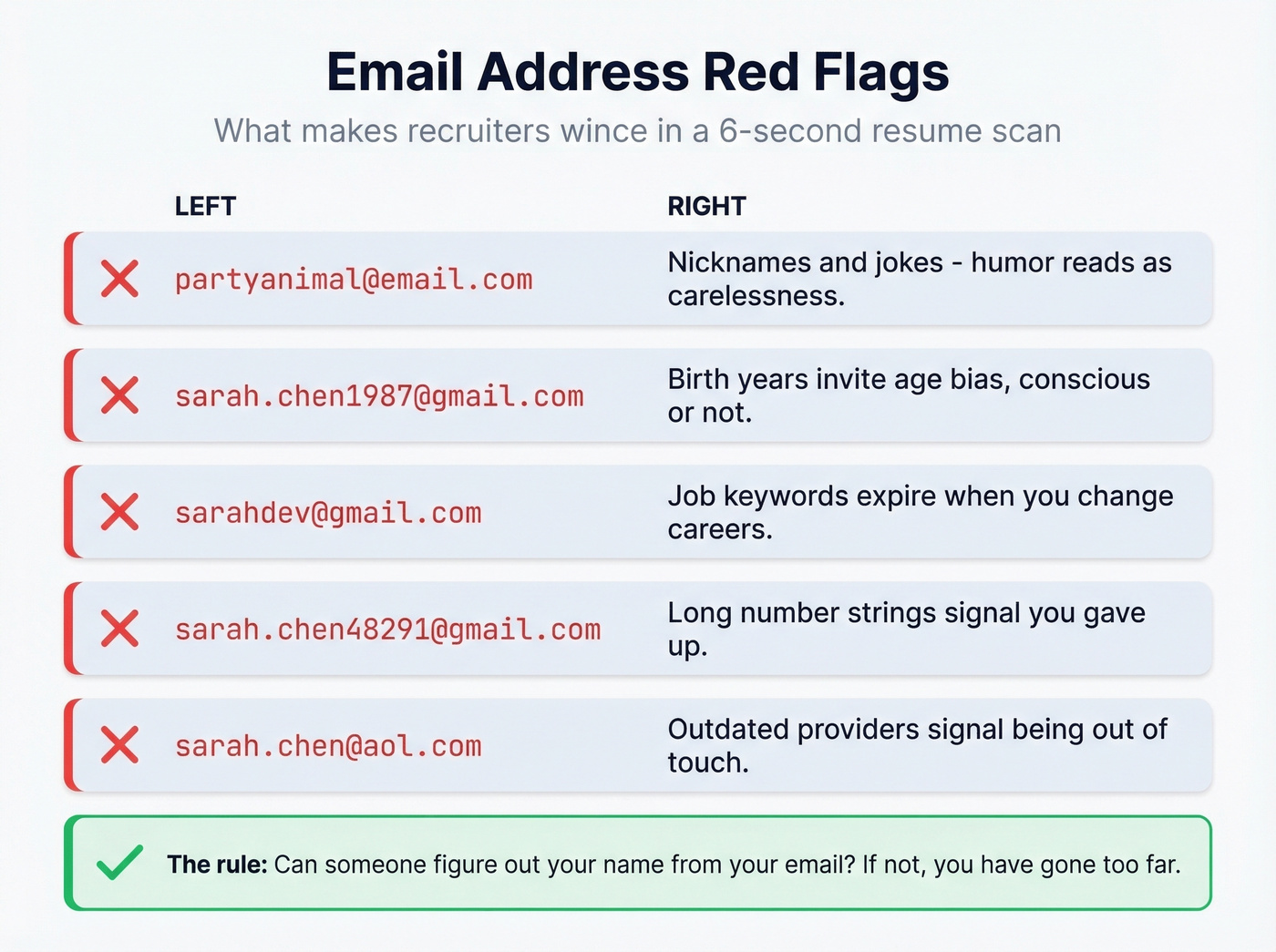
Nicknames and jokes. partyanimal@email.com and beerlover85@email.com are real examples from a staffing firm's list of resume red flags. Even mild humor reads as carelessness in a professional context.
Birth years and graduation years. sarah.chen1987@gmail.com invites age bias - conscious or not. A professional resume writer on Reddit put it bluntly: your email address can "immediately age you." Graduation years have the same problem, plus they scream "I made this in college and never updated it."
Job keywords. sarahdev@gmail.com works until you pivot from development to product management. Career-specific handles have a shelf life.
Long number strings. sarah.chen48291@gmail.com signals "I gave up and mashed the keyboard." One or two digits is the absolute maximum.
Outdated providers. Look - an AOL address in 2026 can signal you're out of touch. Yahoo and Hotmail carry similar baggage. It's not fair, but it's real.

A polished email address gets your foot in the door. But what about finding the right email addresses for the people you need to reach? Prospeo's Email Finder locates verified professional emails from 300M+ profiles at 98% accuracy - so your outreach lands in real inboxes, not bounce logs.
Stop guessing email formats. Find verified addresses for $0.01 each.
When Your Name Is Taken
Gmail namespace saturation is a genuine problem. People on r/careerguidance describe trying every reasonable variant of their name and still hitting "username taken." Here's the escalation path:
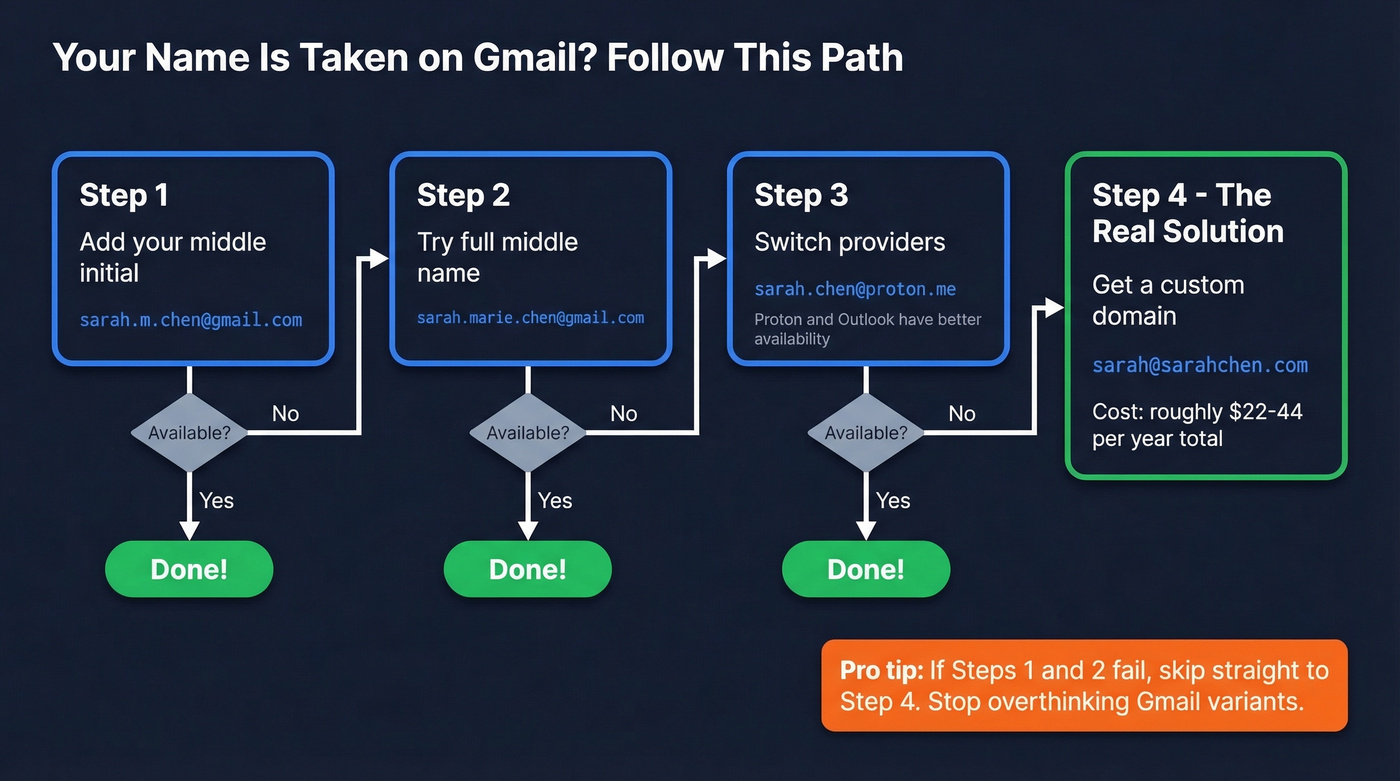
- Add your middle initial.
firstname.m.lastname@gmail.comis the cleanest workaround. Usually available. - Try your full middle name.
firstname.marie.lastname@gmail.comis longer but unambiguous. - Switch providers. Proton Mail and Outlook often have better availability for common name formats.
firstname.lastname@proton.meis frequently open when the Gmail equivalent isn't. Proton also carries a slight "tech-savvy" signal that doesn't hurt. - Get a custom domain. This is the real solution. For $10-20/year for the domain and $1-6/user/month for hosting, you own your name permanently.
Here's the thing: if your first two attempts fail, skip straight to step four. Stop overthinking Gmail variants and invest the $6-8/month. It solves the problem permanently, and it's the only option that actually gets better over time as you build reputation on that domain.
Long, Hyphenated, or Non-English Names
This topic is massively underserved in most guides, so let's address it directly.
If your full name is something like "Andrew Sungmin Joo" - a real example from r/namenerds - the concatenated version (andrewsungminjoo@gmail.com) is 16 characters before the @. That's fine. Long-but-clear always beats short-but-confusing. A recruiter or client can read that and know exactly who you are.
If you go by a shortened version of your name in daily life, use it. andy.joo@gmail.com isn't "too casual" - it's practical. The test is whether the people who interact with you professionally would recognize the name.
The one thing to avoid: truncating your name in a way that accidentally creates a different word or an ambiguous abbreviation. Spell it out if there's any doubt. Nobody's going to reject your email for being 20 characters long.
Does Your Email Affect Hiring?
There's no single survey with a clean "X% of recruiters reject candidates based on email format." But the practitioner evidence is consistent.
A professional resume writer on Reddit says they've "seen people get passed over" because their email signaled being out of touch. A staffing firm's published guidance explicitly flags inappropriate email addresses as a resume red flag. In a 6-7 second scan, your email is doing real work - either reinforcing that you're a serious candidate or planting a seed of doubt.
For business owners, the stakes are different but equally real. Brian Minick, COO at ZeroBounce, put it this way: "It doesn't look professional if you are a real business with a Gmail, AOL, or Yahoo account." If you're sending proposals from yourname@gmail.com, you're leaving credibility on the table.
Your email won't get you hired. But the wrong one can get you filtered out before anyone reads your resume.
Free vs. Custom Domain Email
If you're a job seeker, Gmail is fine. Full stop. If you're freelancing, running a business, or doing any kind of outbound outreach, a custom domain is worth the small investment.
Hosting Pricing Compared
| Provider | Starting Price | Best For |
|---|---|---|
| Gmail (free) | Free | Job seekers - just works |
| Outlook.com | Free | When your Gmail name is taken |
| Proton Mail (free) | Free | Privacy-focused professionals |
| Zoho (Mail Lite) | $1/user/mo | Best bang for buck with custom domain |
| Bluehost | $1.67/mo | Already need web hosting |
| Google Workspace | $6/user/mo | Google-native teams |
| Microsoft 365 | $6/user/mo | Office-native teams |
| Proton Mail (biz) | $8/user/mo | Privacy-first organizations |
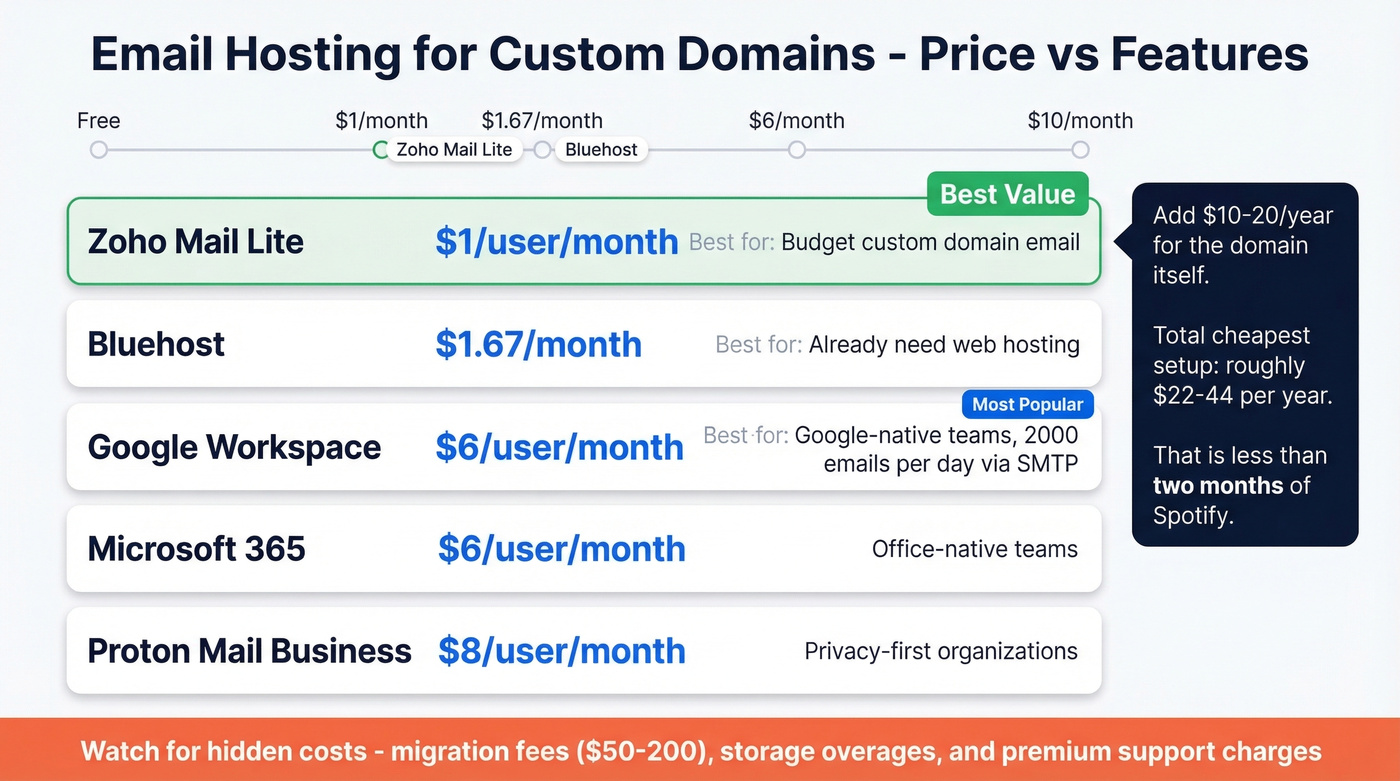
Add $10-20/year for the domain itself. Total cost for the cheapest custom domain setup with Zoho and a .com: roughly $22-44/year. That's less than two months of Spotify.
For most freelancers and small businesses, Zoho Mail at $1/month is the best value. If you're already deep in the Google ecosystem, Google Workspace at $6/month is worth the premium. One thing free Gmail can't match: Google Workspace allows 2,000 outbound emails per day via SMTP, compared to Gmail's 100-email cap. For teams doing outbound at any scale, that limit matters fast.
Watch for hidden costs that providers don't advertise upfront - migration fees ($50-200), storage overages, and premium support charges can quietly inflate your bill.
A custom domain also means portability. You can switch from Zoho to Google Workspace without changing your email address. That alone makes it worth the investment.

Setup in 5 Steps
- Register your domain at Namecheap or Cloudflare ($10-20/year for a .com).
- Choose an email host from the table above. Zoho at $1/month is the budget pick; Google Workspace at $6/month is the "just works" pick.
- Update your DNS records. MX records tell the internet where to deliver your mail. SPF proves you're authorized to send from that domain. DKIM adds a digital signature so recipients know the email wasn't tampered with. Your host will give you the exact values to paste in - it takes about 10 minutes.
- Create your email addresses.
you@yourdomain.com,hello@yourdomain.com, whatever you need. - Test everything. Send emails to a Gmail and Outlook account. Check that they land in the inbox, not spam. If you plan to run automated outbound campaigns on this domain, budget at least 12 weeks of warm-up before scaling volume.
Once your domain is set up and authenticated, the emails you send to matter just as much as the ones you receive. Sending to unverified addresses tanks the domain reputation you just built. For any kind of outbound - sales, partnerships, recruiting - tools like Prospeo verify recipient emails before you hit send, protecting a new domain from bounces on day one.
You've perfected your own professional email format. Now scale that precision to your outbound. Prospeo verifies every email through a 5-step process with spam-trap removal and catch-all handling - delivering 98% accuracy and bounce rates under 4%.
Find any prospect's professional email address in one click.
FAQ
What's the best professional email address example for a resume?
firstname.lastname@gmail.com is universally accepted by recruiters and hiring managers. Gmail carries no negative stigma the way AOL or Yahoo does. Only upgrade to a custom domain if you're freelancing, running a business, or doing outbound outreach where domain reputation matters.
Should I add numbers to my email address?
Avoid it if possible. Numbers signal "my name was taken and I gave up." If you absolutely must, stick to one or two digits - 01 or 02, not 1987. Never use your birth year; it invites age bias and dates the address permanently. Try a middle initial or Proton Mail before resorting to numbers.
How much does a custom domain email cost?
A domain runs $10-20/year. Email hosting starts at $1/user/month with Zoho and goes up to $6-8 with Google Workspace or Proton Mail Business. Total annual cost: roughly $22-116 depending on the provider. That's less than a single streaming subscription for most setups.
Does "Send mail as" in Gmail affect deliverability?
It can. What matters most is authentication and alignment: set up SPF and DKIM for your domain, add DMARC if you can, then send through an authenticated SMTP path that matches your domain. If you're doing outbound at scale, verify recipient emails before you send - bounces on a fresh domain will damage your sender reputation from day one.
What's the best free tool to verify emails before sending?
Prospeo's free tier includes 75 email credits per month with 98% verification accuracy - enough for freelancers and small teams testing outbound. Other options include NeverBounce and ZeroBounce, but neither offers a comparable free plan with full verification included.