

How to Run a Quarterly Business Review That Actually Produces Decisions
It's 3 p.m. on a Thursday. You're 47 slides into a quarterly business review, and the VP of Sales is checking email on her phone. The CFO left at slide 22. Nobody's made a single decision.
72% of senior executives believe QBRs are a waste of time - and when they look like this, they're right. The problem isn't the concept. It's the execution. The consensus on r/sales and r/CustomerSuccess mirrors what we hear constantly: QBRs become "all-day meetings going over numbers that are easily visible" in dashboards everyone already has access to. Let's fix that.
The Quick Version
If you had to standardize your QBR process tomorrow, here's the entire system in three pieces:
- An 8-slide decision deck. Not a data dump. Every slide earns its spot by driving toward a decision. Appendix slides are unlimited - the core deck isn't.
- A 5-7 metric scorecard. One table. RAG status. Scannable in five seconds. If you're tracking 15 metrics, you're tracking none.
- A 24-hour recap with owners and dates. Not a "thanks for attending" email. A document with names, deadlines, and dependencies that people can be held to.
The rest of this piece breaks down each component slide by slide, with a bad-news playbook and prep system that eliminates the last-minute scramble.
What Is a QBR?
A quarterly business review is a structured meeting - held once per quarter - where stakeholders review performance, extract insights, and commit to decisions for the next 90 days. That last part is what separates it from everything else on your calendar.
Here's the thing: a QBR isn't a status meeting. Status meetings report what happened. A QBR diagnoses why it happened and decides what changes. It's also not an executive business review, which typically runs annually or semi-annually at the C-suite level with a broader strategic lens.
The litmus test is simple. If your QBR ends without at least one concrete decision - a budget reallocation, a strategy pivot, a resource commitment - it was a status meeting with better catering. Companies that regularly analyze performance and adjust strategies are 1.5x more likely to exceed revenue targets, and B2B customers with strong executive engagement are 2.5x more likely to renew. That engagement happens in well-run QBRs, but only when the meeting is built to produce outcomes.
Internal QBR vs Customer QBR
These two meetings share a name and almost nothing else. Conflating them is one of the most common mistakes teams make.
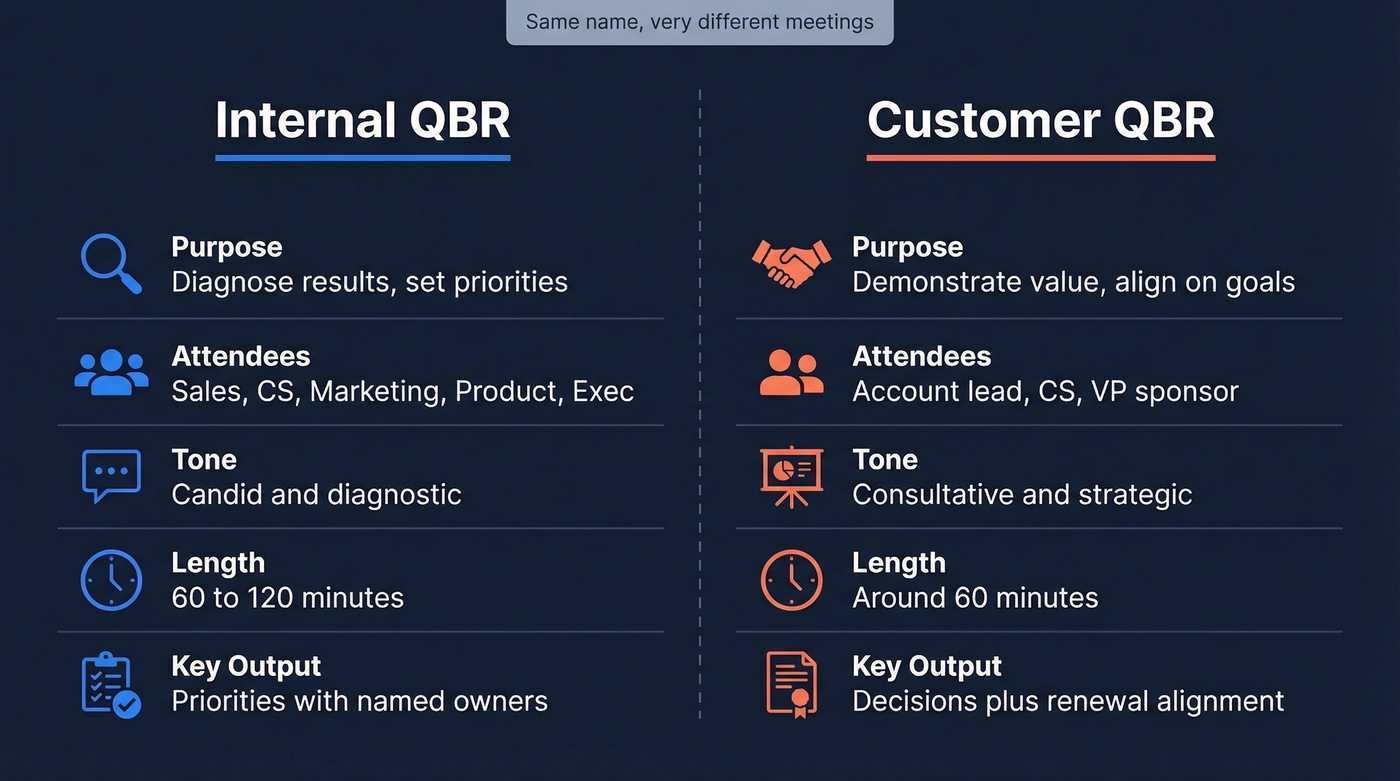
An internal QBR is a diagnostic session. Sales, CS, marketing, product, and leadership sit in a room and get honest about what drove results - good and bad. It's not where you put your best face forward. It's where you figure out why enterprise deals are taking 40% longer to close and who owns the fix. Pure operational accountability.
A customer QBR is consultative. You're demonstrating value, aligning on next-quarter priorities, and building the case for renewal or expansion. A well-run customer QBR also arms your internal champion with the data and narrative they need to justify renewal to their own leadership - which means the real audience isn't always the person in the room. The tone shifts from candid to strategic, and the attendee list matters enormously. Get only your day-to-day champion? You'll have a tactical conversation. Get the VP or economic buyer in the room, and now you're having a strategic one.
Tailor Depth by Account Tier
Not every account deserves the same QBR. Strategic accounts get the full 8-slide treatment with executive sponsors on both sides. Growth accounts can run a lighter version - 30 minutes with a condensed scorecard. For SMB and at-risk accounts, consider a digital-first approach: send an async scorecard with a 15-minute video walkthrough, and reserve live meetings for accounts where churn risk demands face time. Matching investment to account value keeps your team from burning 6 hours prepping for a $12K ARR account.
| Dimension | Internal QBR | Customer QBR |
|---|---|---|
| Purpose | Diagnose results, set priorities | Demonstrate value, align |
| Attendees | Sales, CS, Mktg, Product, Exec | Account lead, CS + VP sponsor |
| Tone | Candid, diagnostic | Consultative, strategic |
| Length | 60-120 minutes | Around an hour |
| Key Output | Priorities with owners | Decisions + renewal alignment |
The 8-Slide QBR Deck
Most QBR decks fail because they're built to display data, not drive decisions. The WinningPresentations framework flips this: start with insight, end with a decision. Here's the slide-by-slide breakdown.
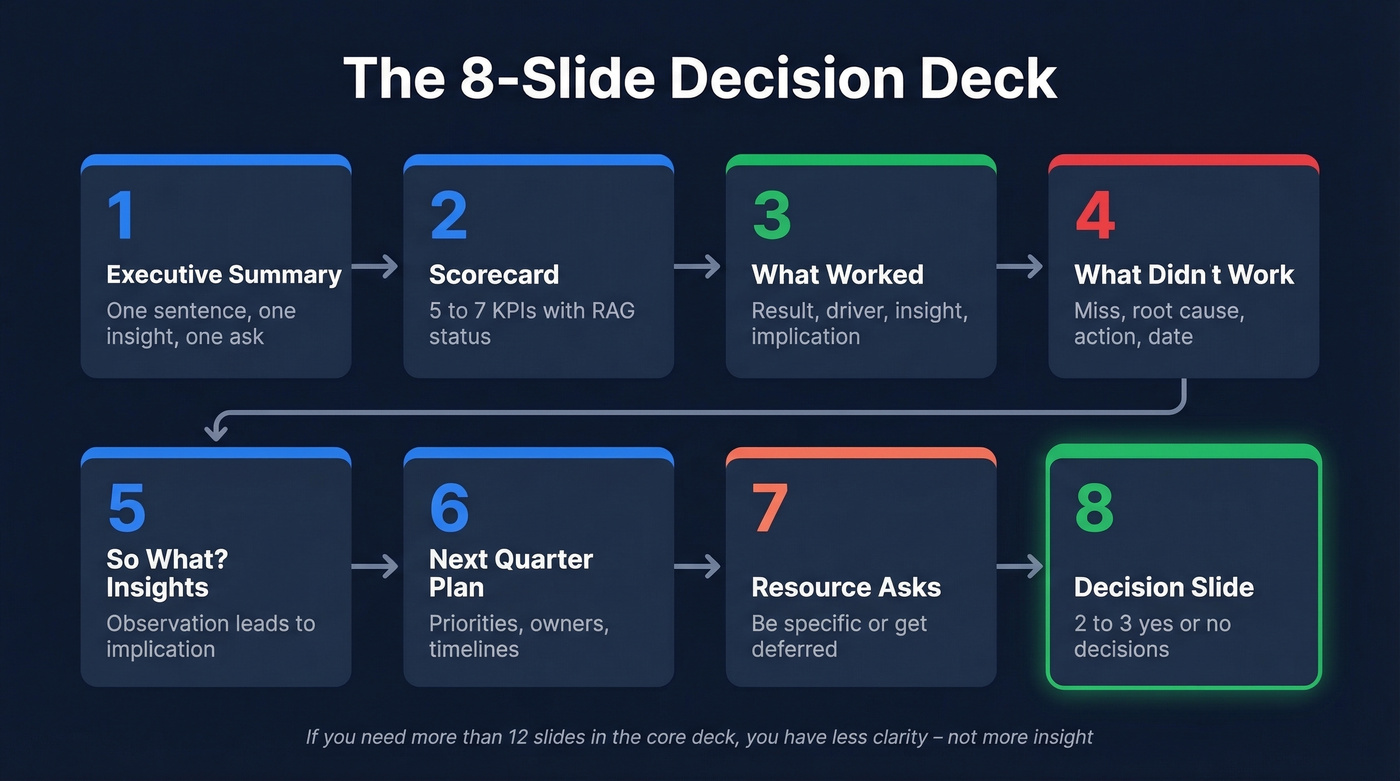
Slide 1: Executive Summary
One slide. Quarter performance in a single sentence, the most important insight, your recommendation, and what you need from leadership.
"Q4 exceeded target by 12% (£2.4M vs £2.1M). Our mid-market segment drove 80% of the overperformance. We recommend shifting £50K of enterprise budget to mid-market demand gen. Need approval by January 15."
That's the entire slide. If an executive has to leave after five minutes, they've gotten the core message.
Slide 2: Scorecard
Five to seven metrics in a table: Metric | Target | Actual | Variance | Status (red/yellow/green). Scannable in five seconds. Don't explain variances here - that's what the next slides are for. The scorecard just tells the room where you stand. For a project-based services QBR, this slide becomes a milestone tracker instead of a revenue scorecard - same format, different inputs.
Slides 3-4: What Worked / What Didn't
Each follows the same structure. For wins: result, driver, insight, implication. For misses: miss, root cause, action, expected improvement date. This consistency matters because it trains your audience to process information the same way every quarter, which means less time explaining format and more time on substance.
Slide 5: "So What?" Insights
This is where most decks fall apart. You've shown the data - now tell the room what it means. Format each insight as observation followed by implication. "Enterprise deals are taking 40% longer to close" leads to "we need to revisit the enterprise sales process before committing to next quarter's pipeline targets."
Slides 6-7: Next-Quarter Plan and Resource Asks
Priorities, owners, timelines, and dependencies. If you need budget, headcount, or cross-functional support, this is where you make the case. Be specific about what you're asking for and what happens if you don't get it.
"We need two additional SDRs by March 1 to cover the mid-market pipeline increase. Without them, we'll cap at 60% of the new segment target and leave roughly £400K on the table."
That kind of specificity is what gets approvals. Vague asks get deferred.
Slide 8: Decision Slide
List the 2-3 decisions you need from the room. Not recommendations - decisions. "Approve mid-market budget shift: yes/no." "Commit engineering resources to integration project: yes/no." This slide is why the meeting exists.
If you need more than 12 slides in the core deck, you don't have more insight - you have less clarity. Move supporting data to an appendix. The paid template from WinningPresentations runs £39 as a one-time download if you want a pre-built version.

Your next QBR's pipeline numbers depend on the data feeding them. Prospeo gives your team 300M+ verified profiles with 98% email accuracy - so when you present next quarter's plan, the pipeline behind it is real.
Walk into your next QBR with pipeline numbers you can defend.
Pick the Right KPIs
The scorecard on Slide 2 only works if you've chosen the right metrics. DemandFarm breaks these into five categories that cover most B2B scenarios:
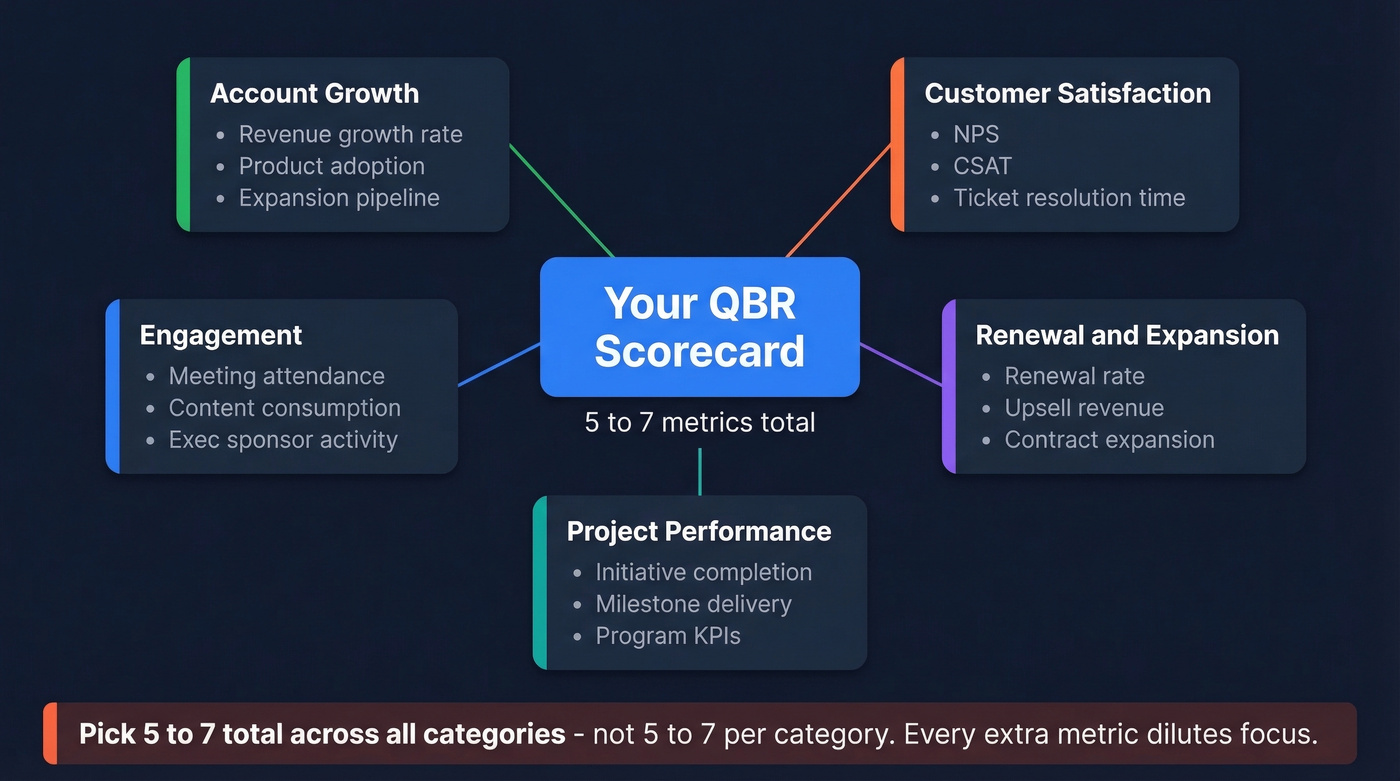
- Account growth: Revenue growth rate, product adoption, expansion pipeline
- Customer satisfaction: NPS, CSAT, ticket resolution time
- Engagement: Meeting attendance, content consumption, executive sponsor activity
- Renewal and expansion: Renewal rate, upsell/cross-sell revenue, contract expansion
- Project performance: Initiative completion rate, milestone delivery, program KPIs
Pick 5-7 total. Not 5-7 per category - 5-7 across all of them. The temptation is always to add more, and it always makes the scorecard worse. Every additional metric dilutes attention from the ones that actually drive decisions.
Your scorecard format stays consistent quarter over quarter: Metric | Target | Actual | Variance | Status. The status column uses RAG so the room can see health at a glance before anyone starts talking.
The Bad-News Playbook
You're 10 minutes into a customer QBR and the economic buyer asks, "So what do you recommend?" - and your deck has no answer.
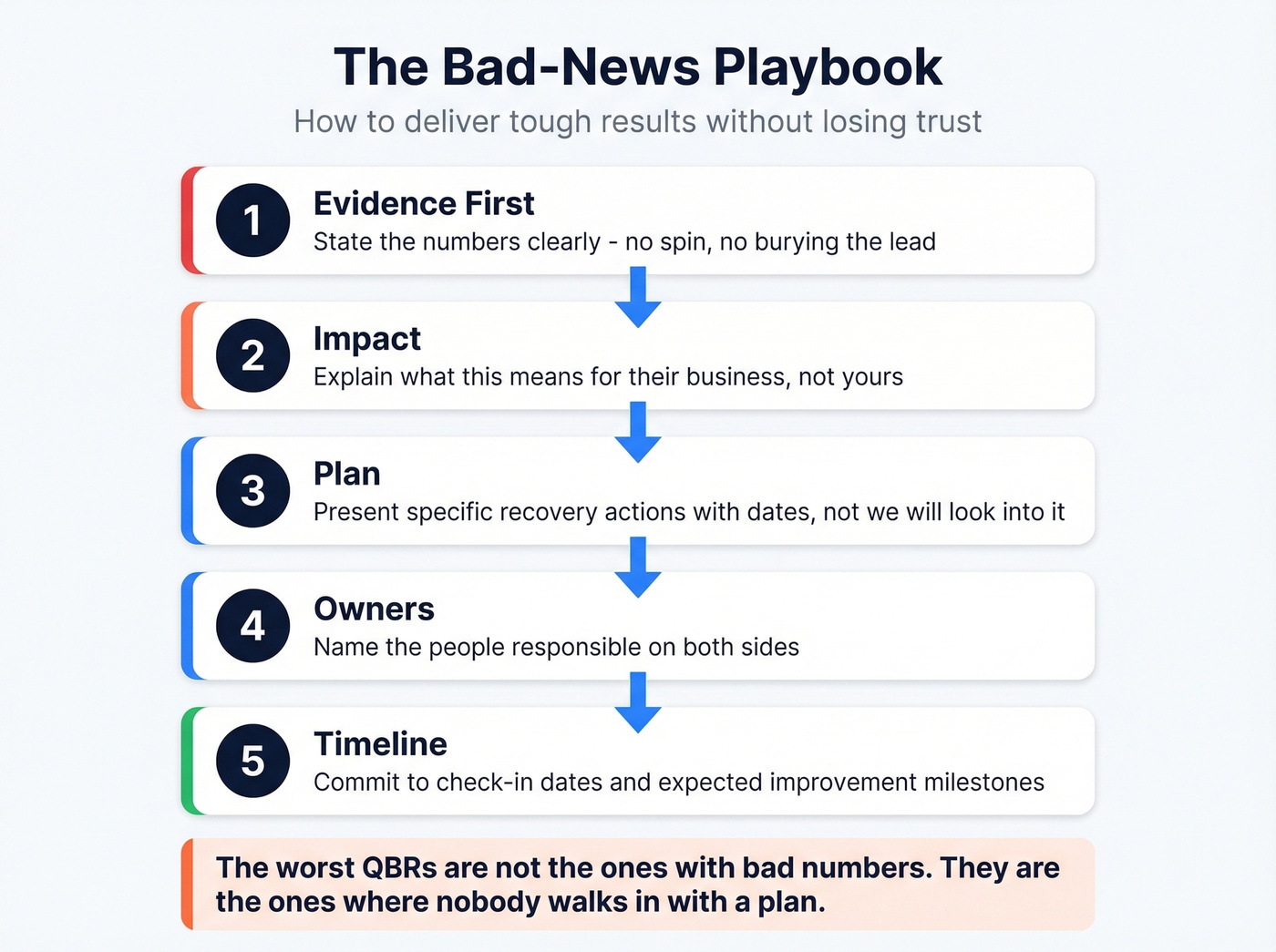
This is the moment that separates good account teams from mediocre ones. Sugar-coating bad results doesn't protect the relationship. It erodes trust. The MyClientShare framework gives you a clean talk track for at-risk accounts:
- Evidence first. State the numbers clearly. No spin, no burying the lead.
- Impact. Explain what this means for the customer's business, not yours.
- Plan. Present a concrete recovery plan - not "we'll look into it," but specific actions with dates.
- Owners. Name the people responsible on both sides.
- Timeline. Commit to check-in dates and expected improvement milestones.
Look, the worst QBRs aren't the ones with bad numbers. They're the ones where nobody walks in with a plan. Executives can handle underperformance. They can't handle a team that doesn't know what to do about it.
Benefits of Running QBRs Well
When quarterly business reviews follow the decision-driven framework above, the benefits compound quarter over quarter:
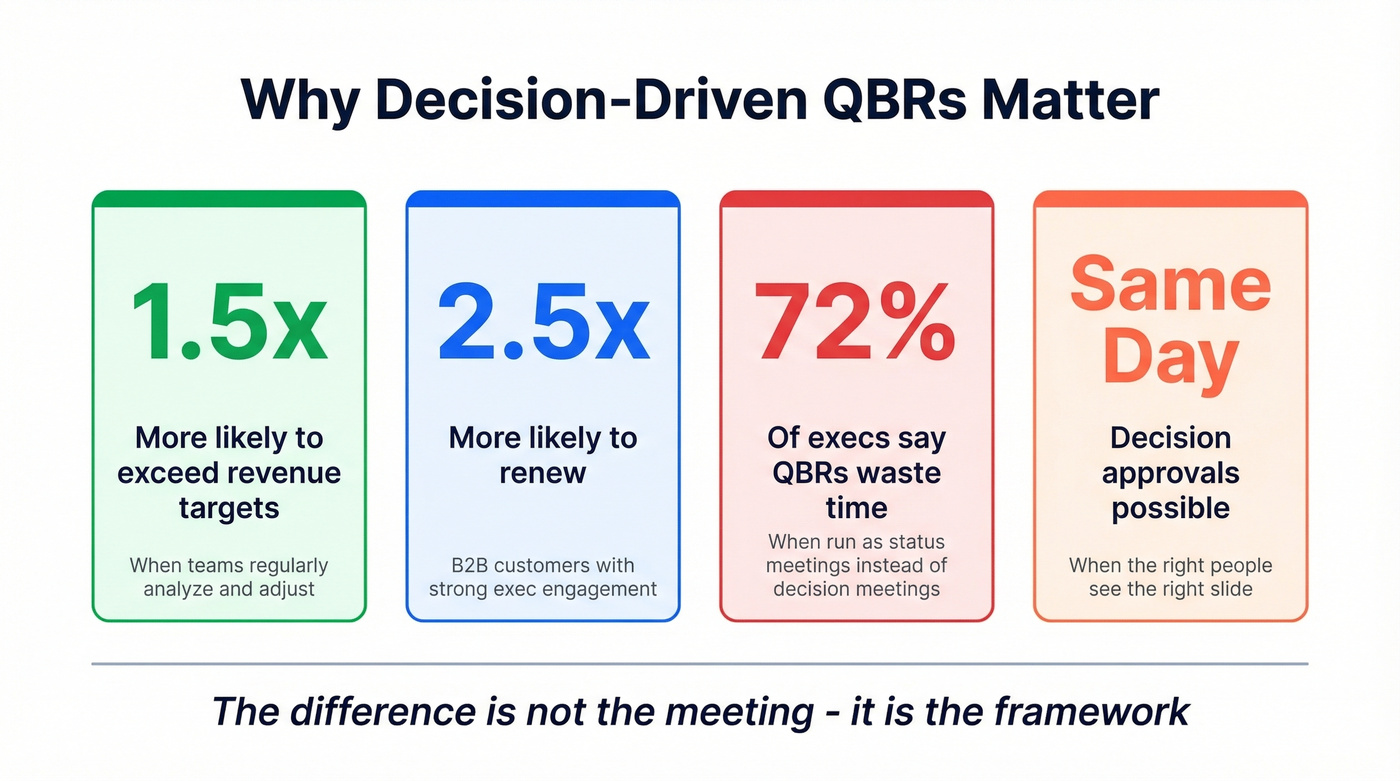
Faster decision cycles. Decisions that used to stall in email threads get resolved in the room with the right people present. We've seen teams cut approval timelines from weeks to same-day just by putting the decision slide in front of the right attendees.
Stronger account retention. Customer QBRs that demonstrate measurable value give your champion the ammunition to defend the renewal internally. That 2.5x renewal lift from executive engagement isn't magic - it's what happens when the economic buyer sees ROI data they can forward to their CFO.
Cross-functional alignment. Internal QBRs force sales, CS, marketing, and product to reconcile competing narratives about what's actually happening. No more "marketing says pipeline is fine but sales says it's garbage" standoffs.
Accountability culture. Named owners and public deadlines create a rhythm of follow-through that status meetings never achieve.
Prep System and Follow-Up
The biggest time sink in QBR prep is entirely avoidable. Reddit threads are full of practitioners describing the same cycle: manual screenshots piped into Excel, rebuilt into charts, reformatted into slides - a multi-hour grind every quarter. The fix is structural, not heroic.
Before the QBR
Run weekly check-ins against OKRs. If you're reviewing key results weekly, synthesis at quarter-end becomes a summarization exercise, not a discovery project. You're connecting dots you already know, not finding them for the first time under deadline pressure.
Standardize your template. Rebuilding from scratch every quarter is one of the biggest time wasters CSMs report. Pick a template, lock the structure, and only update the data. Send the pre-read 48 hours before. If attendees walk in cold, you'll spend 20 minutes on context that should've been absorbed beforehand. The pre-read is the deck minus the discussion - just the scorecard and key findings.
After the QBR
Send the recap within 24 hours. Owners, dates, dependencies. Not a summary of what was discussed - a commitment document. If someone's name is next to an action item, they should see it in writing before the weekend.
Schedule the next QBR date before everyone leaves. Sounds obvious. Almost nobody does it.
The Systemic Problem Nobody Talks About
Here's the hot take most QBR guides won't give you: the meeting itself is rarely the problem. McKinsey identifies five structural reasons QBRs fail that have nothing to do with slide count or agenda design - unclear ownership of the QBR process, poor cross-functional dependency alignment, budgeting cycles that conflict with quarterly cadence, KPI/OKR misalignment across teams, and disconnect from IT release planning. If your organization has these systemic issues, no amount of deck optimization will save your review. Fix the operating rhythm first, then worry about the slides.
65% of B2B sales organizations have shifted to data-driven decision-making over intuition. The quarterly business review is where that shift either compounds or stalls.
Free Templates Worth Downloading
If you need a deck by Friday, don't start from scratch.
Smartsheet's QBR template library has the broadest free collection - a customer QBR prep checklist, supplier QBR template in Excel, executive QBR PowerPoint, and sales QBR PowerPoint. The supplier template works well for vendor management reviews where you're on the receiving end. The sales QBR PowerPoint is closest to the 8-slide framework above and needs the least customization. They're not flashy, but they're structured and immediately usable.
For something more opinionated, the WinningPresentations Executive Slide System (£39, one-time) follows the 8-slide framework outlined above. It's the only paid template on this list, and it's the one we'd recommend if you want a deck that's built to drive decisions rather than just organize data.
Skip the templates that give you 20+ slides and call it "thorough." Start with whichever matches your timeline, and keep the discipline of ending every meeting with a decision slide.
QBR slide 3 keeps showing the same miss: not enough qualified conversations. Teams using Prospeo book 35% more meetings than Apollo users - with 125M+ verified mobiles and a 30% pickup rate, your reps actually reach decision-makers.
Turn 'What Didn't Work' into 'What Worked' by next quarter.
FAQ
What's the difference between a QBR and an EBR?
A QBR runs quarterly and focuses on performance review plus next-quarter decisions. An EBR (Executive Business Review) is typically annual or semi-annual, aimed at C-suite strategic alignment rather than operational cadence. Think of the QBR as the engine check and the EBR as the route planning session.
How long should a QBR last?
Customer QBRs should run around 60 minutes. Internal cross-functional reviews can go 60-120 minutes depending on org complexity. If you're consistently running over two hours, your deck has too many slides or your meeting lacks a clear decision objective.
Who should attend a customer QBR?
Your side: account lead, CS manager, and a subject-matter expert relevant to the quarter's key topics. Their side: the economic buyer or VP-level sponsor - not just your day-to-day champion. Wrong attendees turn a strategic meeting into a tactical one.
How do I make QBR follow-up actually happen?
Send a recap within 24 hours with owners, dates, and dependencies. For outreach to new stakeholders identified during the review, use Prospeo's email finder to get verified contact data so follow-ups don't bounce. The recap isn't a meeting summary - it's a commitment document.
What if my QBR results are bad?
Lead with evidence, state the business impact, then present a concrete recovery plan with named owners and timelines. Sugar-coating erodes trust faster than bad numbers do. Executives respect teams that show up with a plan, not teams that hide behind optimistic framing.