

QuickEmailVerification vs SalesQL: You're Comparing Two Different Things
QuickEmailVerification vs SalesQL is a common comparison, but it's basically putting a spell-checker next to a search engine and asking which one is "better." They don't do the same thing. QuickEmailVerification is a pure email verifier - you feed it a list, it tells you which addresses are real. SalesQL is a contact finder - you point it at professional profiles, it pulls emails and phone numbers. The overlap is minimal, and picking between them depends entirely on which problem you're actually solving.
If you need both finding and verification - and most outbound teams do - duct-taping these two together is the worst way to spend your budget.
30-Second Verdict
- Need to clean an existing list before sending? QuickEmailVerification. Built for exactly this.
- Need to find emails for prospects you've identified? SalesQL. That's its whole job.
How We're Judging
We evaluated both tools on four criteria: deliverability risk, credit economics, workflow friction, and compliance. We also factored in community sentiment from G2, Capterra, and Reddit threads where real users share unfiltered opinions.
QuickEmailVerification vs SalesQL: Key Differences
Here's the fastest way to see why these aren't substitutes.
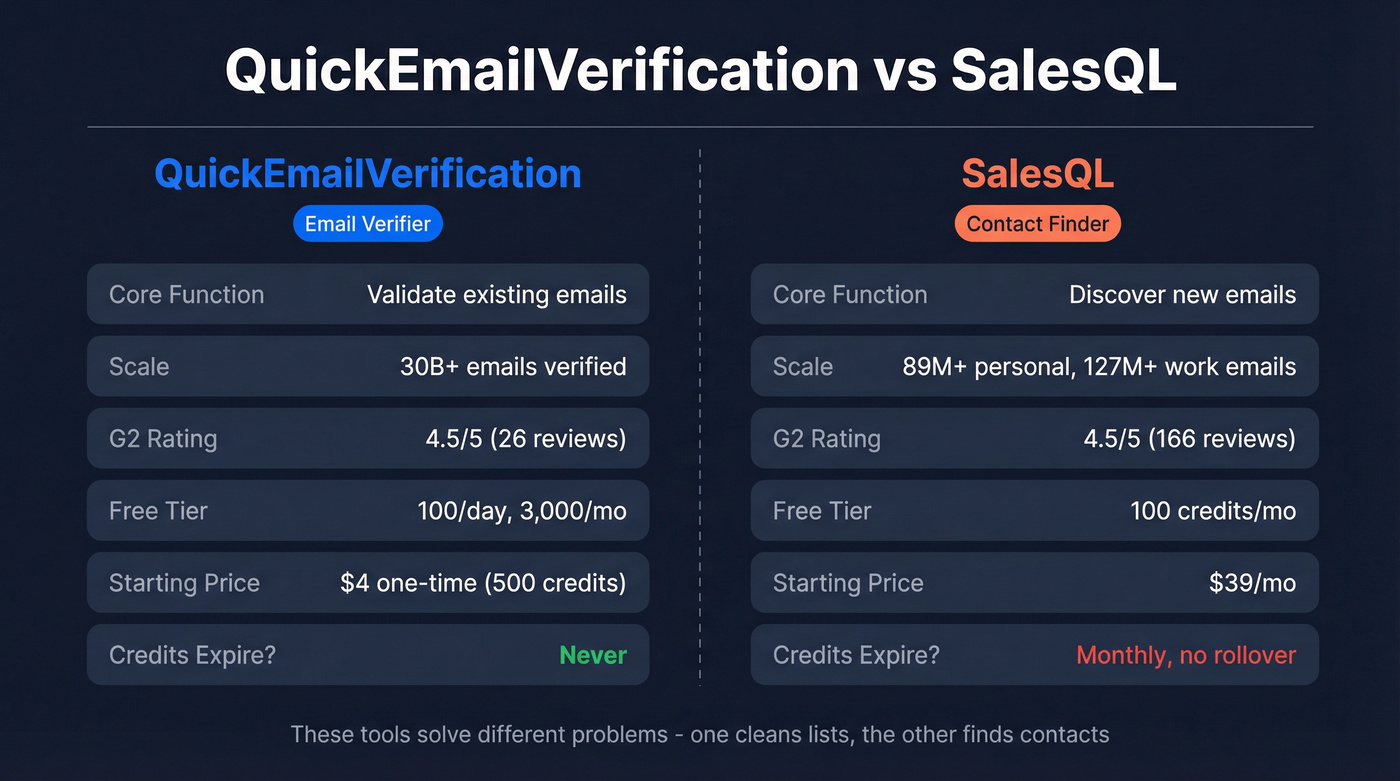
| QuickEmailVerification | SalesQL | |
|---|---|---|
| Category | Email verifier | Contact finder |
| Core function | Validate existing emails | Discover new emails |
| Scale metric | 30B+ emails verified (lifetime) | 89M+ personal emails, 127M+ work emails |
| G2 rating | 4.5/5 (26 reviews) | 4.5/5 (166 reviews) |
| Capterra | N/A | 3.8/5 (46 reviews) |
| Free tier | 100/day (3,000/mo) | 100 credits/mo |
| Credits expire? | Never | Monthly, no rollover |
| Starting price | $4 one-time (500 credits) | $39/mo |
| Best for | List hygiene | Prospecting from profiles |

You shouldn't need two tools and two budgets to build a clean prospect list. Prospeo finds emails, verifies them at 98% accuracy, and returns 50+ data points per contact - all in one platform with a 7-day data refresh cycle. No catch-all credit waste. No duct tape.
Find, verify, and enrich contacts in a single workflow for $0.01 per email.
What Each Tool Actually Does
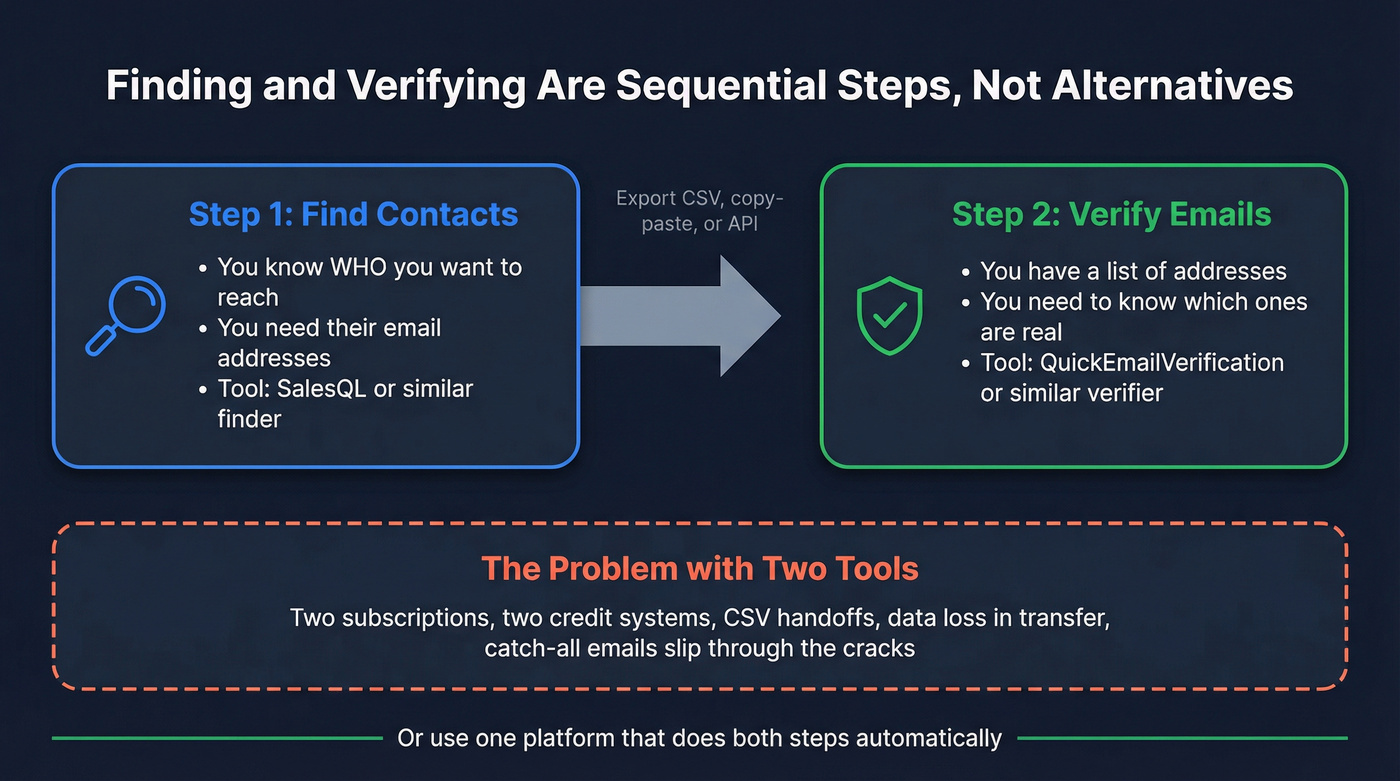
Understanding the difference between email finding and email verification is essential here. One builds your list; the other cleans it. They're sequential steps, not alternatives.
QuickEmailVerification
Use this if you've got a list - purchased, scraped, collected from webinars, whatever - and you need to know which addresses will actually land in an inbox before you hit send.
QuickEmailVerification runs syntax checks, domain validation, inbox testing, and disposable/spam-trap detection. The platform advertises 99% deliverability on verified addresses, and 191,000+ businesses use it. Their benchmark for large lists is roughly 100,000 emails in about an hour, though in our experience the UI queues and file handling can feel sluggish on very large batches compared to competitors like ZeroBounce. The API is clean and well-documented - one G2 reviewer (Rob B.) specifically called out how easy it was to integrate. ISO 27001 certified and GDPR compliant, which matters if you're operating in the EU.

Skip this if you need to find emails in the first place (it can't do that), you're sending 6,000+ emails a month on a budget where pricing gets steep at volume - Reddit users have flagged this - or disposable email detection is critical to your workflow. An independent test on r/SaaS scored QEV at roughly 8/16 on disposable detection. Middle of the pack at best.
SalesQL
SalesQL is a Chrome extension that extracts contact data from professional profiles - 89M+ personal emails, 127M+ work emails, and 30M+ phone numbers. Over 200,000 companies use it. No technical experience required.
One credit gets you work email, personal email, and phone number for a single profile - that's strong credit efficiency. Duplicates don't burn credits, and credits only charge on successful finds. For teams doing targeted outreach from profile pages, the workflow is dead simple: install, click, export.
Here's the thing, though. Capterra reviewers rate SalesQL's customer service at 3.3/5, and roughly 24% of Capterra reviews are negative. Chase Leigh P. on G2 put it bluntly: "Data Coverage Can Be Inconsistent and the credit based pricing" is frustrating. Catch-all emails still burn credits despite being essentially unverified - we've seen teams waste 20-30% of their finder credits on catch-alls when targeting mid-market companies with catch-all domains.
Who should avoid it: Anyone uncomfortable with platform risk. Browser-based prospecting extensions can trigger account warnings if usage looks automated, so keep volumes conservative and don't run multiple automation tools at once. Apollo.io offers a broader database with 275M+ contacts and less platform risk if that concerns you.

Pricing and Credit Math
QuickEmailVerification Pricing
| Plan | Price | Credits | Notes |
|---|---|---|---|
| Free (Daily) | $0/mo | 100/day | No expiration |
| One-Time Starter | $4 | 500 | Never expire |
| Daily 1K | ~$45/mo (est.) | 1,000/day | Estimated from slider tiers |
| Daily 10K | ~$250/mo (est.) | 10,000/day | Estimated from slider tiers |
QEV's daily plan prices above are approximate - the site uses a slider, and exact pricing shifts by volume tier. The one-time plans are confirmed.
SalesQL Pricing
| Plan | Monthly Price | Annual Price | Finder Credits | Verifier Credits | Seats |
|---|---|---|---|---|---|
| Free | $0 | $0 | 100/mo | 200/mo | 1 |
| Basic | $39/mo | $29/mo | 2,000/mo (24,000 on annual) | 5,000/mo | 1 |
| Pro | $79/mo | $59/mo | 5,000/mo (60,000 on annual) | 10,000/mo | 3 |
| Org | $119/mo | $89/mo | 12,000/mo (144,000 on annual) | 20,000/mo | 15 |
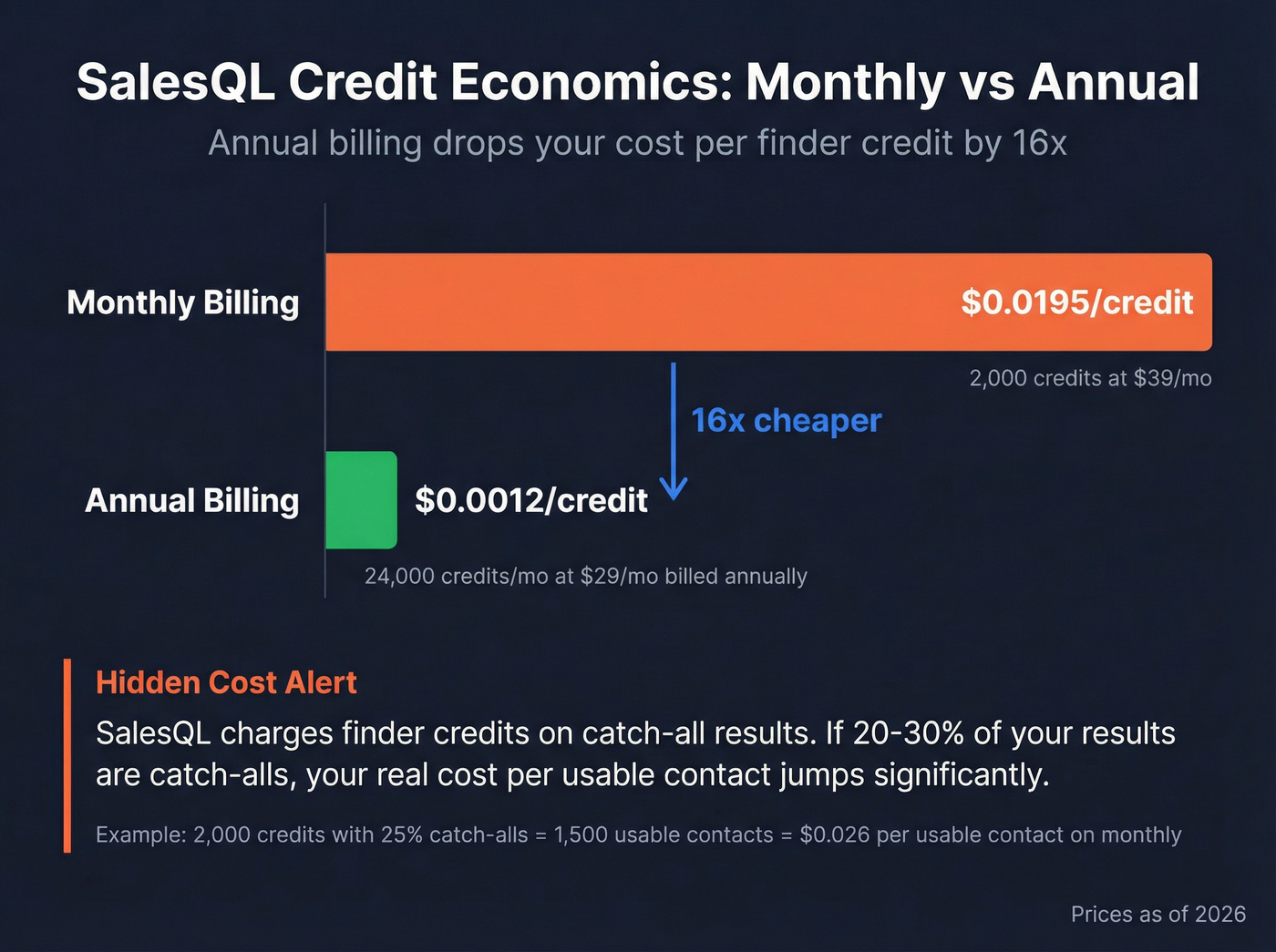
Let's be honest: credit expiry is the #1 hidden cost with tools like SalesQL. Credits vanish at the end of every billing cycle - no rollover. Compare that to QEV's one-time credits that sit in your account indefinitely. If you verify in unpredictable bursts rather than steady monthly volumes, QEV's model saves real money.
The annual plan math on SalesQL is wild. Basic monthly gives you 2,000 finder credits at ~$0.0195/credit. Basic annual gives you 24,000 finder credits/mo at ~$0.0012/credit - a 16x improvement. If you're committing to SalesQL, annual is the only plan that makes financial sense. SalesQL still charges finder credits on catch-all results, so budget for "unknowns" eating into your allocation.
Which One Do You Need?
Most people end up comparing these after someone tells them "just verify your list" - without explaining that finding and verifying are different jobs.
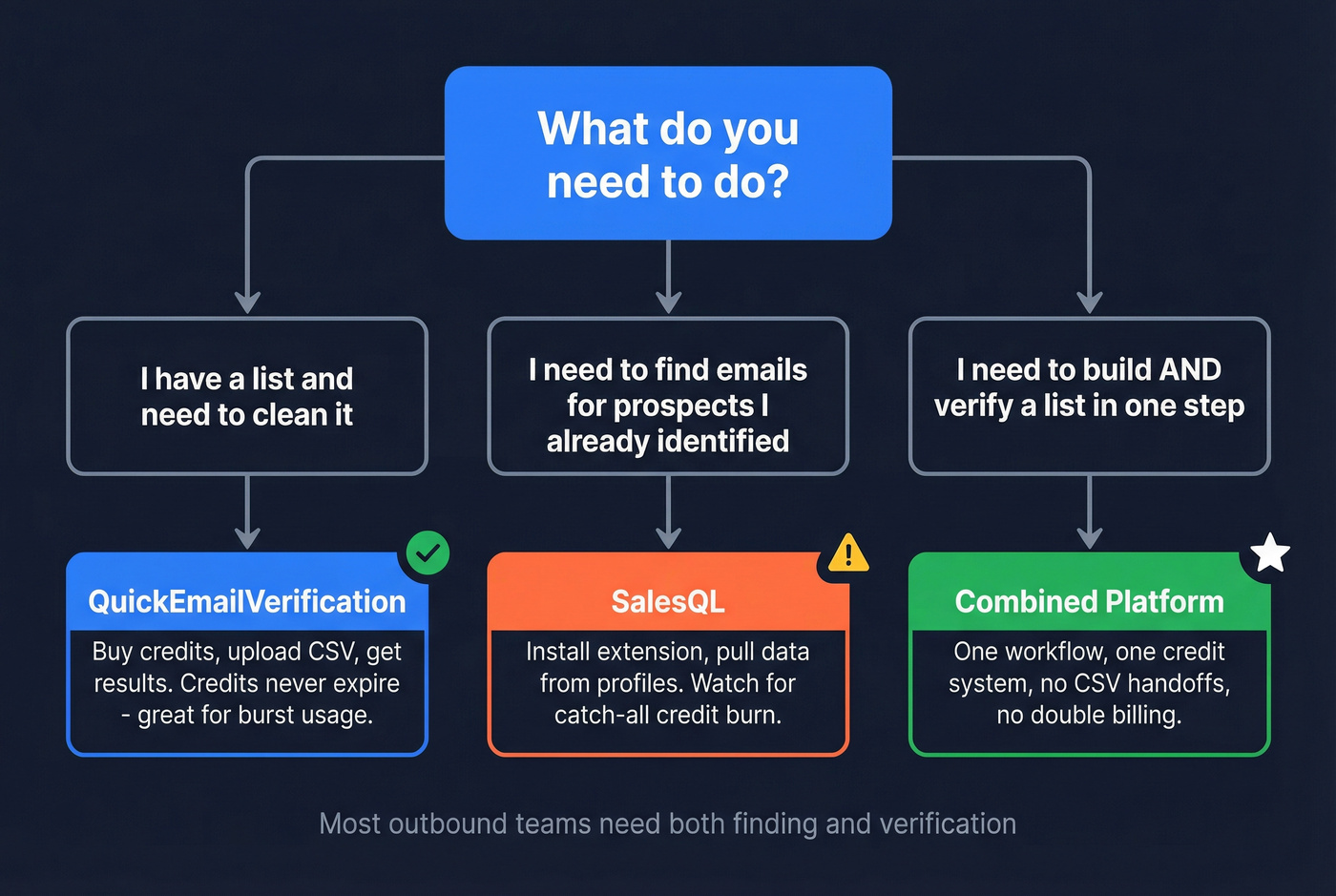
You have a list and need to clean it. Old CRM data, webinar signups, purchased contacts. QuickEmailVerification. Buy credits, upload a CSV, get results.
You need to find emails for prospects you've identified. You know who you want to reach but don't have their contact info. SalesQL. Install the extension, start pulling data.
You need to build AND verify a list in one step. You don't want to duct-tape a finder to a verifier and pray the data matches up. Keep reading.
When You Need Finding + Verification
Instead of pulling contacts with a browser extension and then cleaning them in a separate verifier - paying twice and losing data in the handoff - Prospeo handles both in a single workflow. You search across 300M+ profiles using 30+ filters like job role, technographics, headcount growth, funding, and revenue, and you get verified emails back immediately. No CSV export, no second tool, no reconciliation headaches.
The numbers that matter: 143M+ verified emails at 98% accuracy, 125M+ verified mobile numbers with a 30% pickup rate, and a 7-day data refresh cycle where the industry average sits at six weeks. CRM enrichment returns 50+ data points per contact with an 83% match rate, and the API hits a 92% match rate for automated workflows.
Over 15,000 companies use it, and the Chrome extension has 40,000+ users. The free tier gives you 75 emails plus 100 extension credits monthly - self-serve, cancel anytime, no sales call required. Unlike pure "profile scraping" workflows, Prospeo runs inside its own platform and extension on websites and CRMs, which reduces the risk of triggering account restrictions from automated profile visits.

SalesQL charges credits on catch-all emails. QEV can't find contacts at all. Prospeo's proprietary 5-step verification handles catch-all domains, spam traps, and honeypots - so you only pay for emails that actually land. 143M+ verified emails, 125M+ mobile numbers, 98% accuracy.
Stop burning credits on unverifiable addresses. Get data that connects.
FAQ
Can SalesQL replace an email verifier?
No. SalesQL is mainly for discovery, and catch-all results still consume credits without giving you inbox-level confidence. If you're cleaning a CSV before a campaign, use a purpose-built verifier or a platform that verifies at the moment it finds the address to keep bounces under 3-5%.
Do QuickEmailVerification credits expire?
They don't. QEV's one-time credits persist indefinitely, which is a real advantage if you verify in bursts - say, a 20k list once a quarter. With monthly tools, unused credits vanish at the end of the billing cycle, quietly inflating your effective cost per verified email.
Is there a tool that finds and verifies emails in one workflow?
Yes. Prospeo combines contact discovery with real-time verification, so you don't have to export and import CSVs between tools. You get 98% verified email accuracy, a 7-day refresh cycle, and a free tier that includes 75 emails plus 100 extension credits per month.
What's the real cost per credit for SalesQL?
On monthly billing, Basic runs ~$0.0195 per finder credit (2,000 credits for $39). On annual billing, it drops to ~$0.0012 per credit (24,000 credits/month at $29/month billed annually). If 20-30% of results are catch-alls in your niche, your cost per usable contact rises accordingly.
The Bottom Line
QuickEmailVerification vs SalesQL isn't a true head-to-head - one is list hygiene, the other is contact discovery. If you only need verification, QEV's non-expiring credits are hard to beat. If you only need profile-based prospecting, SalesQL can work, but watch the catch-all burn and keep volumes conservative. If you need both steps, stop paying for two tools and check pricing on a combined platform to simplify your stack.